EHS data falls into three groups: master data that describes the company's places and hazards (locations, chemicals, agents, hazards, controls, jobs), rules (compliance requirements and regulatory content) and transactional business objects (incidents, risk assessments, compliance scenarios, change requests). In S/4HANA they are BOPF business objects with GUID keys, not the classic specification tables. Product compliance has its own model of compliance views. This page names the objects, their tables and how to read them; the processes that use them are on page 03, the APIs and extension options on page 05.
Part 1 – Master data overview
Object | What it describes | Used by | Fiori app (examples) |
|---|---|---|---|
Location | Place in the company: site, building, work area, equipment, emission source | Every EHS object | Manage Locations |
Person | Employee (HR) or business partner (contractor, visitor) | Incidents, tasks, assessment teams | Business partner apps |
Chemical | A substance or mixture used at a location, with SDS data and approvals | Chemical approval, chemical risk assessment, inventory | Manage Chemicals, Request Chemical Approval |
Agent | Physical, airborne or chemical agent a worker can be exposed to (noise, dust, solvent) | Exposure assessment, sampling | Manage Agents |
Hazard / hazard category | What can cause harm (fall from height, chemical agent …) | Risks, risk assessments | Configured in the hazard and control register |
Control | Measure that reduces a risk (guard rail, ventilation, PPE) | Risk mitigation, control inspections | Manage Controls |
Job | A job or task done by workers; split into steps for job hazard analysis | Risk assessment, exposure groups | Risk assessment apps |
Occupational exposure limit (OEL) | Legal or internal limit per agent | Exposure assessment, sampling results | – |
Compliance requirement | Regulation, permit or internal policy with limits and equations | Environment management (and product compliance) | Manage Compliance Requirements |
- Business partner is the leading object for natural persons; EHS reads HR master data (PA, OM) for employees and creates BPs for external persons.
Part 2 – Locations and the location hierarchy
The location is the anchor of all EHS data (page 01 Part 4). It is time-dependent: a root record holds the stable ID, and revisions hold the data valid from a date (type, status, address, org assignments). Status flow: new → active ↔ inactive → historic; records can be assigned to a location in any status (historic locations are read-only).
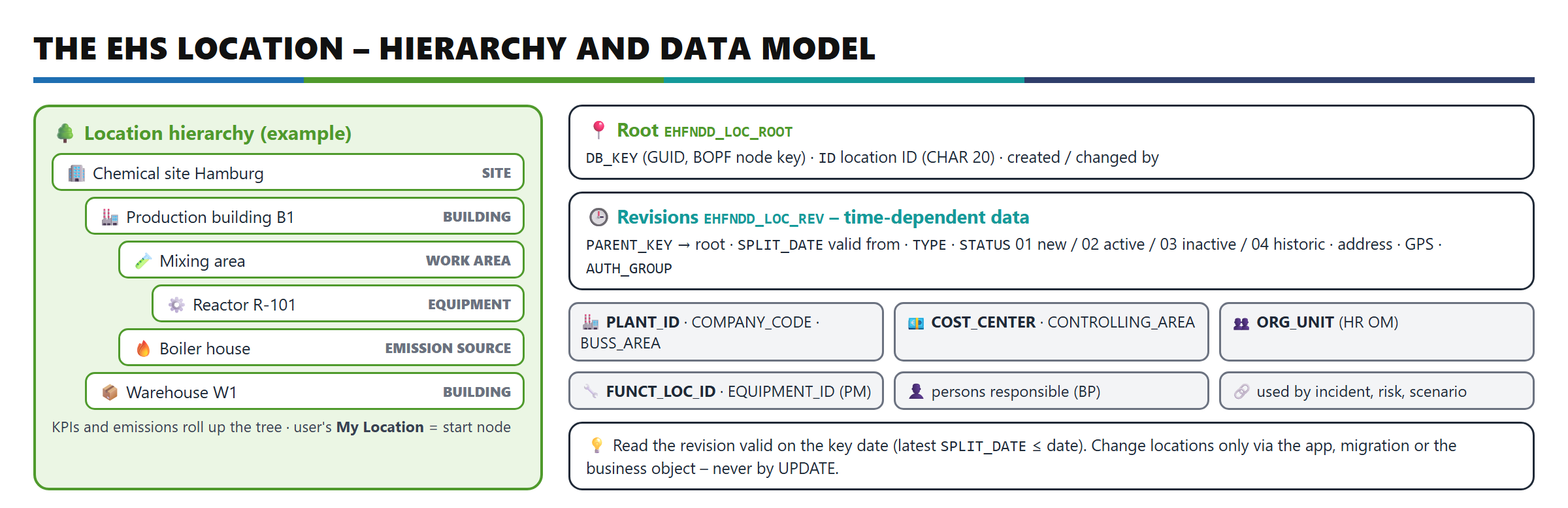
Table | Content | Key fields / important fields |
|---|---|---|
EHFNDD_LOC_ROOT | Location – root | DB_KEY (node GUID), ID (location ID, CHAR 20), created / changed by |
EHFNDD_LOC_REV | Location – revisions | PARENT_KEY → root, SPLIT_DATE (valid from), TYPE, STATUS (01 new, 02 active, 03 inactive, 04 historic), PLANT_ID, COMPANY_CODE, BUSS_AREA, COST_CENTER, CONTROLLING_AREA, ORG_UNIT, FUNCT_LOC_ID, EQUIPMENT_ID, AUTH_GROUP, address, LATITUDE |
- Hierarchy: parent-child relations between locations; two views – location structure and organizational structure. Users set My Location as their start node.
- Creation: in Manage Locations, by import from PM technical objects (functional locations, equipment) or by mass load with the migration cockpit (Part 8).
- Location types are customizing (customer types start with Z or Y); the authorization group on the revision restricts access.
Example – current revision of a location
|
Part 3 – Chemicals, agents, hazards, controls and jobs
3.1 Chemicals and chemical approval
- A chemical (root table EHFNDD_CHM_ROOT: ID, status 03 released / 04 historic, external source = substance ID) holds composition, hazard classification and SDS data of a substance or mixture used in the company.
- A chemical approval (root EHFNDD_CHA_ROOT) approves a chemical for a location and method of use: an employee requests it (Request Chemical Approval), the hazardous substance manager approves it, an industrial hygienist reviews it. Approved data flows into the chemical risk assessment.
- SDS data comes from an SDS clerk, from a content provider integration, from the classic specification database or from product compliance in the same system. Transfer reports in the foundation:
R_EHFND_FILL_CHM_BY_EHS_SUBST(chemicals),R_EHFND_FILL_REGL_BY_EHS_SUBST(regulatory lists),R_EHFND_PHRASE_TRANSFER(phrases). - Chemical inventory (amounts per plant / storage) feeds regulatory reports such as the US SARA 311 / 312 reports.
3.2 Agents, hazards, controls, jobs
Object | Details |
|---|---|
Agent | Physical (noise, radiation), airborne (dust, fumes) or chemical agent; has OELs; sampled in industrial hygiene campaigns (Manage Agents) |
Hazard category / hazard | Catalogue of hazards; a hazard category can have the agent type Chemical Agent so chemical risks are identified per chemical |
Control | Predefined control catalogue (technical, organizational, PPE …); controls have inspection questions from which the system calculates control effectiveness |
Job | Work performed at a location; job steps are the basis of a job hazard analysis |
Risk assessment profile | Per location: which agents, hazards, controls and jobs may be used during risk identification there |
Part 4 – Compliance requirements and regulatory content
A compliance requirement models a regulation, an operating permit or a company-internal policy in a structured way, so the system can calculate and check against it.
Element | Meaning |
|---|---|
Paragraph hierarchy | The requirement is a tree of paragraphs, mirroring the legal text |
Environmental limit | Upper, lower or range limit with a limit value and a warning value (e.g. NOx ≤ 100 mg/m³) |
Regulatory list | Tabular data such as emission factors per fuel |
Equation | Formula defined in the requirement and used in compliance scenarios (e.g. CO₂ = fuel quantity × emission factor) |
- Requirements are created manually, copied, imported from a spreadsheet (Import Compliance Requirement) or retrieved from a regulatory content provider (built-in integration with RegScan).
- Compliance requirements are linked to locations through compliance scenarios (Part 5, page 03).
- In product compliance, compliance requirements and compliance purposes (e.g. sales, production) define what a product is assessed against; legally listed substances, dangerous goods lists and SDS rules per country come as embedded regulatory content from a content partner.
Part 5 – Transactional objects: incident, risk assessment, risk
5.1 Incident
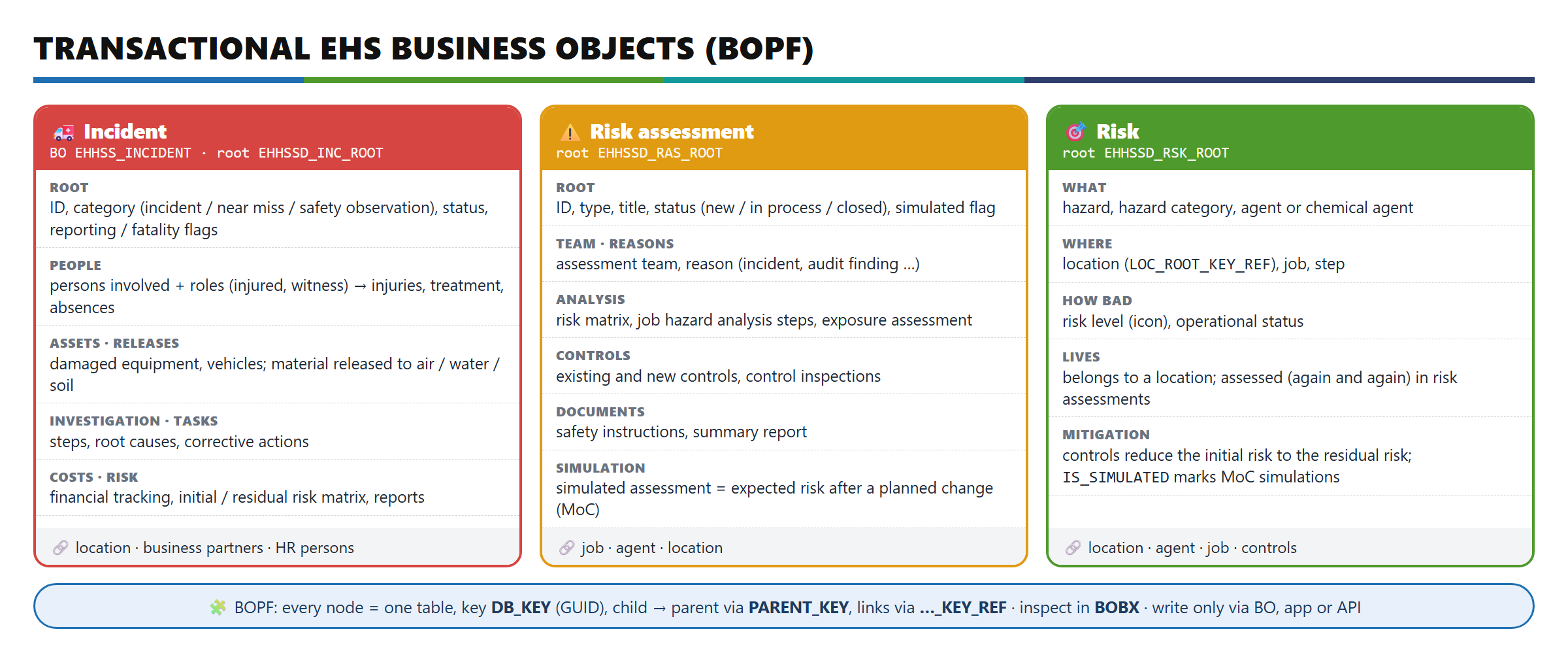
BOPF business object EHHSS_INCIDENT, root table EHHSSD_INC_ROOT (ID CHAR 20, CATEGORY, STATUS, flags such as reporting required and fatality, archiving status). Child nodes hold:
- Persons involved and their roles (injured person, witness, reporter …); roles unlock injuries, treatment, absences and work restrictions.
- Assets (damaged equipment, vehicles, property), releases (material released to air, water or soil, quantity, clean-up), notices of violation.
- Financial tracking (expenses, fines, reimbursements, production losses), risk matrix (initial / residual), investigation steps and root causes, tasks (corrective and preventive actions), attachments and generated reports.
- Related objects: injury/illness log entry (first aid, minor injuries), hours worked (for incident rates) and summary reports (e.g. OSHA 300 log).
5.2 Risk assessment and risk
Table | Content | Important fields |
|---|---|---|
EHHSSD_RAS_ROOT | Risk assessment – root | ID, TYPE (risk assessment type), TITLE, STATUS (00 void, 01 new, 02 in process, 03 closed), JOB_ROOT_KEY_REF, AGENT_KEY_REF, IS_SIMULATED |
EHHSSD_RSK_ROOT | Risk – root | ID, HAZARD, HAZ_CAT, LOC_ROOT_KEY_REF (location), AGENT_KEY_REF, CMA_KEY_REF (chemical agent), JOB_KEY_REF, STEP_ID, RISK_LEVEL, RAS_TYPE, OPERATION_STATUS, IS_SIMULATED |
- A risk exists at a location (hazard + agent / job); a risk assessment is the project that analyses one or more risks, records controls and produces safety instructions.
- Simulated risk assessments support management of change: the expected risk after a planned change.
5.3 Other transactional objects
Object | Purpose |
|---|---|
Compliance scenario | Environmental activities at a location: data collection, sampling, calculations, aggregation, tasks – linked to compliance requirements |
Deviation | Violation of an environmental requirement: limit exceeded, missing data, data quality problem; can be created automatically |
Task (definition / instance) | Work item attached to a host object (incident, investigation step, risk assessment, control implementation, compliance scenario) |
Change request | Management of change object with activities and approvals |
Sampling campaign / sample | Industrial hygiene measurements compared with OELs |
Part 6 – Persistence: BOPF tables and how to read them
Rule | Detail |
|---|---|
One node = one table | Root and child nodes each have a database table; naming pattern |
GUID keys | DB_KEY (RAW 16) is the technical key; PARENT_KEY links a child to its parent (deeper nodes usually also carry ROOT_KEY); the readable ID (CHAR 20) is a normal field |
Cross-object references | Fields ending in |
Prefixes | EHFND… = Foundation for EHS (location, chemical, agent); EHHSS… = health and safety (incident, risk assessment, risk) |
Find the model | Transaction BOBX (or /BOBF/CONF_UI): pick the BO, double-click a node to see its table, actions, determinations and validations |
Extension fields | Dummy fields like EEW_INC_ROOT_D show the extension include used by custom fields (page 05) |
Writes | Never INSERT / UPDATE these tables: determinations, validations, status, workflow and change documents run only in the BO. Use the BO service manager, the Fiori app or an API |
Example – risks of a location (read-only report)
|
Classic EHS tables (legacy)
- Specification database: ESTRH specification header (RECN, SUBID, SUBCAT …), ESTRI identifiers (names, CAS numbers), value assignments; maintained in CG02. Industrial hygiene and safety: incident/accident log CCIHT_IAL, customizing tables
CCIHC_…. Know them for migrations only.
Part 7 – Product compliance master data
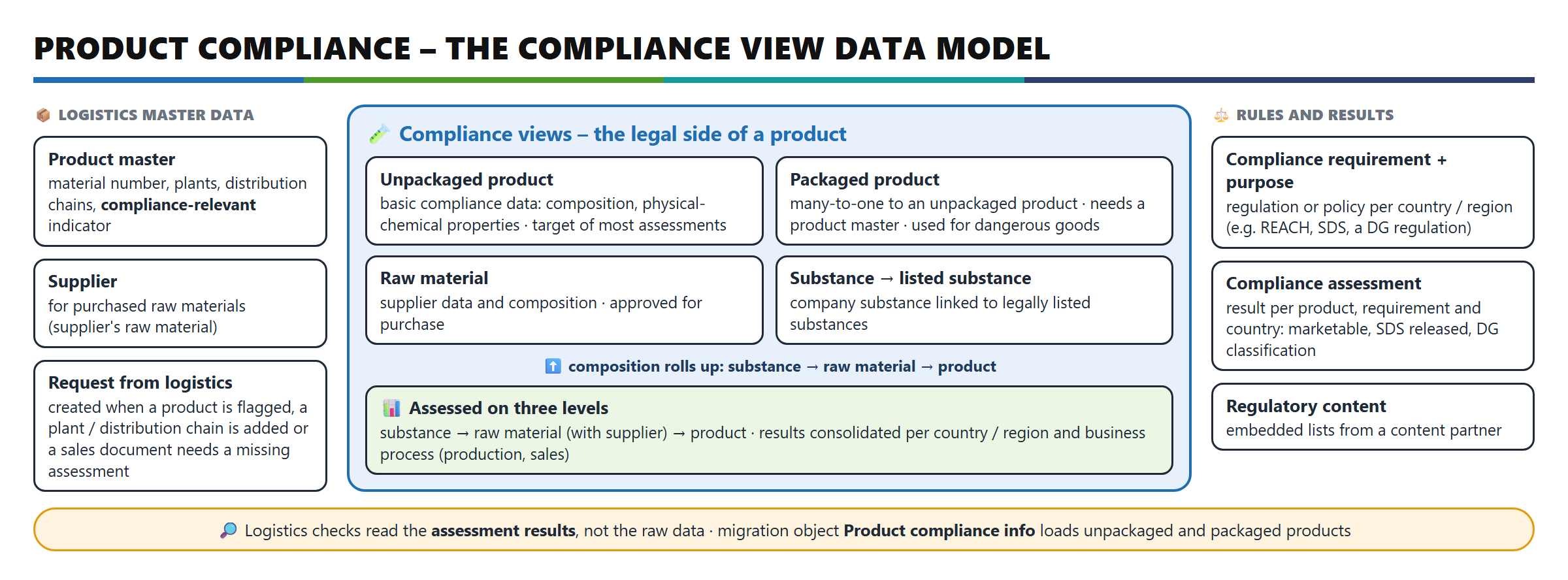
Product compliance does not extend the material master with legal fields. It puts the legal data into compliance views linked to the product master – the commercial product stays clean, the legal product is assessed separately.
Object | Meaning |
|---|---|
Compliance-relevant indicator | Field in the product master; setting it to Yes creates a request from logistics for the product stewardship team |
Unpackaged product (compliance view) | The chemical product itself: basic compliance data – composition, physical-chemical properties. Most assessments (marketability, SDS) are made here |
Packaged product (compliance view) | A packed variant; many packaged → one unpackaged; must have a product master; needed for the packaged dangerous goods classification |
Raw material | Purchased material with supplier-specific composition; approved for purchase |
Substance / listed substance | Company substance linked to substances on legal lists (embedded content) |
Compliance assessment | Result per object, requirement and country / region: marketable or not, SDS released, DG classification (UN number, packing group) |
- Apps (examples): Manage Basic Compliance Data – Unpackaged Products, My Unpackaged Dangerous Goods, My Packaged Dangerous Goods, Compliance Information – For Products, Analyze SDS Availability.
- Subsequent requests are created when a new plant or distribution chain is added in the product master or the procurement type changes.
Part 8 – Released CDS views, APIs and migration objects
Need | Object | Note |
|---|---|---|
Create / read incidents from outside | OData API_EHS_REPORT_INCIDENT_SRV (Environment, Health and Safety Incident – Create, Read); entities include A_Incident and A_Location | Communication arrangement (cloud) or Gateway service activation (on-premise); details page 05 |
Incident reporting | Standard incident CDS views in package EHHSS_CNS_INC_RECORDING, e.g. C_IncidentCaseQuery | Not released for ABAP Cloud – on-premise / private cloud only |
Load locations | Migration cockpit object for EHS locations | Mass import of the location hierarchy |
Load product compliance data | Migration object Product compliance info | Unpackaged and packaged products; prerequisites must be loaded first |
- Rule for clean core: use a released CDS view or API (ADT → Properties → API State, or the Business Accelerator Hub). The BOPF tables are not released – direct SELECTs are acceptable only on-premise / private cloud for read-only reports. Released EHS objects: page 05 Part 8.
Part 9 – Interview questions
Q1. What is the central master data object in EHS and why?
The location. Incidents, risks, risk assessments, chemical approvals and compliance scenarios all refer to it, it carries the org assignments (plant, company code, cost center, org unit) and responsible persons, and data is aggregated along the location hierarchy.
Q2. How is a location stored?
Root EHFNDD_LOC_ROOT with DB_KEY and ID, and time-dependent revisions EHFNDD_LOC_REV (PARENT_KEY, SPLIT_DATE, type, status, address, plant, company code, cost center, functional location). The valid revision is the one with the latest split date not after the key date.
Q3. How do you find the tables of an EHS business object?
In BOBX: open the BO (e.g. EHHSS_INCIDENT) and double-click a node to see its table. Root nodes follow the pattern …D_<object>_ROOT, e.g. EHHSSD_INC_ROOT, EHHSSD_RAS_ROOT.
Q4. What is the difference between a risk and a risk assessment?
A risk is a hazard (with agent, job, step) at a location with a risk level. A risk assessment is the project that analyses risks with a method (matrix, job hazard analysis, exposure), records controls and creates safety instructions.
Q5. What does an incident record contain?
Category, status, location, date; persons involved with roles, injuries and absences; damaged assets; environmental releases; financial data; risk matrix; investigation with root causes; tasks; reports.
Q6. What is a compliance requirement in environment management?
A structured regulation, permit or policy: a paragraph tree with environmental limits (limit and warning values), regulatory lists such as emission factors and equations, used by compliance scenarios.
Q7. What is an agent?
A physical, airborne or chemical factor workers are exposed to (noise, dust, solvent). Agents have occupational exposure limits and are measured in sampling campaigns and evaluated in exposure assessments.
Q8. Why must you not update EHS tables directly?
They are BOPF node tables: status handling, determinations, validations, workflow and change documents run only inside the business object. Changes go through the BO service manager, the app or an API.
Q9. What is a compliance view in product compliance?
The legal counterpart of a product: unpackaged product (composition, properties), packaged product (for dangerous goods), raw material, substance. It is linked to the product master and assessed per requirement and country.
Q10. Unpackaged vs packaged product?
The unpackaged product carries the composition and is the target of most assessments. Packaged products (many-to-one) need a product master and are used for the packaged dangerous goods classification.
Q11. Which API creates incidents from an external app?
API_EHS_REPORT_INCIDENT_SRV (Environment, Health and Safety Incident – Create, Read), an OData V2 service with A_Incident and its persons and attachments; activated through a communication arrangement in the cloud or /IWFND/MAINT_SERVICE on-premise.
Q12. What were the classic EHS tables?
The specification database ESTRH (header), ESTRI (identifiers) and value assignment tables maintained in CG02, and CCIHT_IAL for the incident/accident log. They matter only for migration to the new model.
🏠 Start Here · ◀ 01 · Overview & Org · 03 · Processes & Config ▶ · Sections: CORE ABAP | OOPS ABAP | ABAP on HANA | Clean Core | RAP | ABAP Points | SAP Fiori | SAPUI5 | Mobile Development (MDK) | BTP Foundations | BTP Development | CAP | SAP Build | ABAP on BTP | Integration Suite | SAP Business AI | SAP BASIS | Security | SAP SDLC
Functional: FICO ABAP | TRM ABAP | VIM | SAP BIS | SD ABAP | MM ABAP | PP ABAP | QM ABAP | PM ABAP | PS ABAP | EWM | TM ABAP | GTM ABAP | EHS ABAP | HR ABAP | BW | SAP Datasphere | SAP Business Data Cloud | SAP MDG | SAP Analytics Cloud | SAP Ariba | SAP CX | SAP IBP