The main EHS and product compliance processes end to end: who does what, in which app, and what is configured behind each step. S/4HANA EHS is run almost entirely from Fiori apps and My Inbox; SAP GUI is used mainly for customizing (SPRO) and technical tools (BOBX, workflow). Objects and tables used here: page 02; integration and authority reporting interfaces: page 04; BAdIs and workflow extensions: page 05.
Part 1 – Incident management
Goal: capture every safety event quickly, investigate it, fix the cause, meet legal reporting duties and measure safety performance. Three incident categories exist: incident (injury or damage happened), near miss (could have happened) and safety observation (unsafe act or condition).
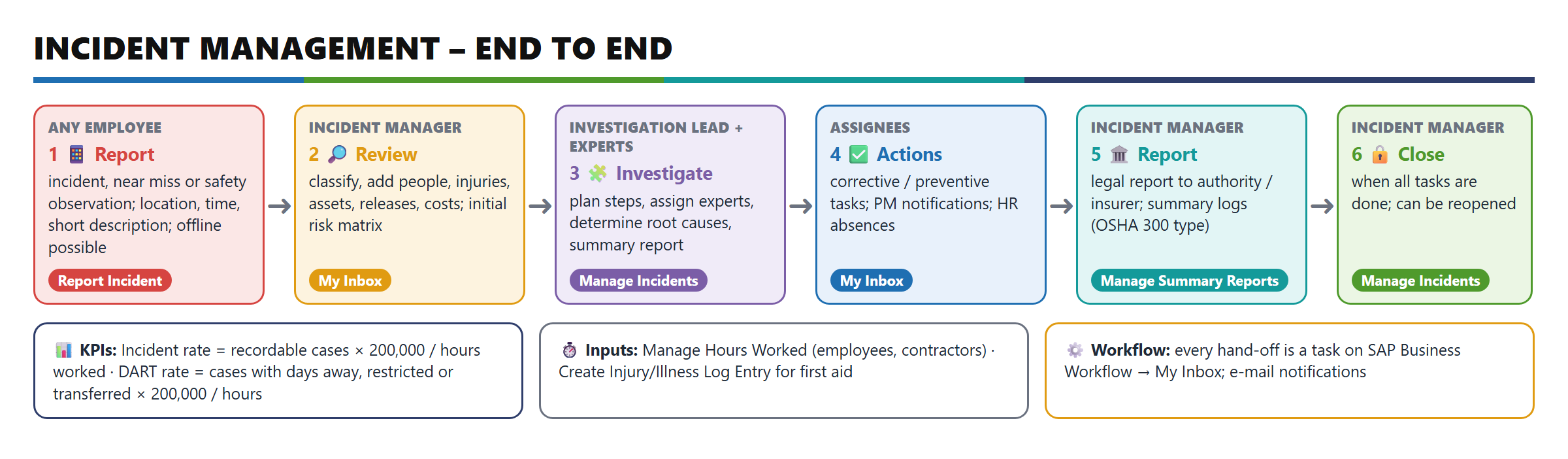
Step | What happens | Role / app |
|---|---|---|
1 Report | Initial entry with location, date / time, description, persons; fields depend on the category. Also from the mobile app (offline), an Adobe interactive form or the injury/illness log (first aid → incident) | Any employee · Report Incident |
2 Review and complete | Classify (incident group), add persons involved with roles, injuries, absences, damaged assets, environmental releases, notices of violation, financial data; initial risk matrix; send inquiries to witnesses | Incident manager · My Inbox, Manage Incidents |
3 Investigate | Investigation lead plans steps, assigns them to experts, records root causes from a configurable root-cause hierarchy, links tasks to causes, creates a summary report | Investigation lead · Manage Incidents |
4 Actions | Corrective and preventive tasks to assignees; follow-on documents: PM maintenance notification, HR absence, internal order for costs, change request (MoC) | Assignees · My Inbox |
5 Report | Legal reports per incident to authorities or insurers (e.g. OSHA 301 type form); summary reports over many incidents (e.g. OSHA 300 log) as PDF or CSV | Incident manager · Manage Summary Reports |
6 Close | After all tasks are complete; closed records are read-only but can be reopened | Incident manager |
Safety KPIs (US OSHA formulas, used in the standard analytical apps)
- Incident rate = number of recordable cases × 200,000 / hours worked.
- DART rate = cases with days away, restricted work or job transfer × 200,000 / hours worked.
- Hours worked for employees and contractors are entered in Manage Hours Worked; 200,000 = 100 full-time employees × 2,000 hours a year.
Part 2 – Health and safety management: risk assessment
Goal: know every hazard at every location, rate the risk, reduce it with controls and prove the controls work. This is the operational risk assessment (not the GRC enterprise risk management).
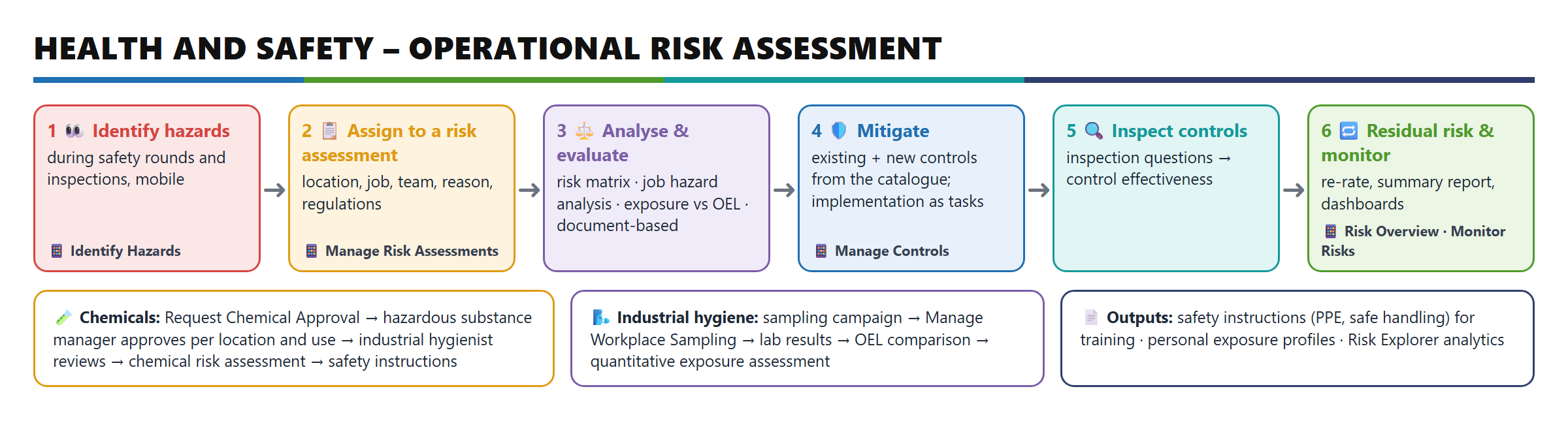
Step | What happens | App |
|---|---|---|
1 Identify hazards | During safety rounds and inspections, on a mobile device; existing controls are noted | Identify Hazards |
2 Assign to a risk assessment | Risk assessment with location, job, team, reasons (incident, audit finding), linked regulations; the risk assessment type controls the steps | Manage Risk Assessments |
3 Analyse and evaluate | Methods: risk matrix (likelihood × severity, optional exposure frequency), job hazard analysis (risks per job step), exposure assessment against OELs, document-based analysis (Word / Excel) | Manage Risk Assessments |
4 Mitigate | Assign new controls from the control catalogue; implementation runs as tasks | Manage Controls |
5 Inspect controls | Inspection questions per control; the answers give a control effectiveness that flows back into the assessment | Control inspection |
6 Residual risk and monitor | Re-rate the risk with controls in place, summary report, dashboards | Risk Overview, Monitor Risks, Risk Explorer |
- Safety instructions summarise hazards, required PPE and safe handling of a chemical at a location; they are created from the risk assessment and used for training (newer releases add AI-assisted generation).
Part 3 – Chemical approval and industrial hygiene
3.1 Chemical approval
- 1. An employee requests a chemical for a location and method of use (Request Chemical Approval).
- 2. The SDS clerk enters vendor SDS data (or it comes from a content integration or product compliance).
- 3. The hazardous substance manager defines the approval team and approves; an industrial hygienist reviews (My Inbox).
- 4. The approved chemical flows into the chemical risk assessment; it appears in Manage Chemicals and in chemical inventory reporting (e.g. SARA 311 / 312 in the US).
3.2 Industrial hygiene sampling
- The industrial hygienist defines a sampling campaign (agents, number of samples, methods, jobs, locations, period) and releases it.
- The sampling technician plans and performs samples (Manage Workplace Sampling), records sampled persons, sends samples to an internal or external lab and imports the results.
- Results are validated (blank samples), compared with OELs and used in the quantitative exposure assessment of the risk assessment; personal exposure profiles document each person's history.
Part 4 – Permit to work and maintenance integration
Dangerous maintenance work (hot work, confined space, electrical isolation) needs a work permit. In S/4HANA this is part of Asset Management, built on Work Clearance Management (WCM), and integrated with EHS.
Topic | Detail |
|---|---|
Where | Permits are requested from the maintenance order (button for operation work permits in the order, or the Fiori apps); permit lifecycle: create → submit for approval → issue → (extend) → close |
Apps | Manage Work Permits (F6579) and related apps for permit requests and templates; public cloud scope item 7Z4 Permit to Work |
Permit types | Configured in WCM (e.g. hot / cold work, high / low risk) with different data and validity |
EHS integration | Activated in the EHS IMG (Health and Safety › Integration › PM Integration) and for the PM worker-safety planning plants: EHS data such as risks and safety information appears on maintenance orders and task lists |
Incident → maintenance | Incident Management creates PM notifications; report |
Release dependency | There is no hard-wired rule that the order can be released only with an issued permit – it depends on configuration and the company's permit policy |
Part 5 – Environment management
Goal: stay within permits and regulations, calculate emissions correctly and report them on time.
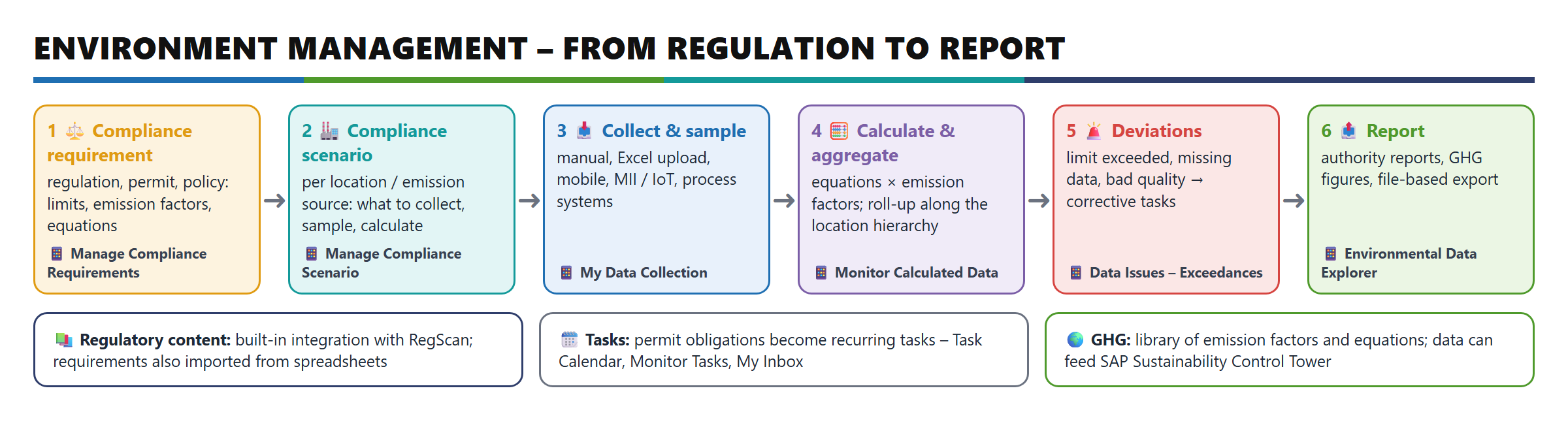
Step | What happens |
|---|---|
1 Compliance requirement | Regulation, permit or policy with limits, emission factors and equations (page 02 Part 4); imported or from a content provider |
2 Compliance scenario | Per location (emission source): which requirements apply, what data is collected and sampled (analytes, methods), which calculations and aggregations run, which tasks recur |
3 Collect and sample | Responsible persons and schedules; entry in My Data Collection, Excel mass upload, mobile, or automatic from process systems / SAP MII / IoT |
4 Calculate and aggregate | Equations with emission factors (e.g. fuel burnt → CO₂); results aggregated along the location hierarchy |
5 Deviations | Limit exceedances, missing data, data quality problems – created automatically for exceedances; corrective actions and notifications attached; data must be approved before it is used in calculations |
6 Report | Authority reports, GHG figures, file-based export; Environmental Data Explorer, Emission Forecast |
- Newer releases extend environment management with waste management (generation to disposal, manifests) and AI-assisted permit management (extracting obligations from permit documents).
Part 6 – Product compliance processes
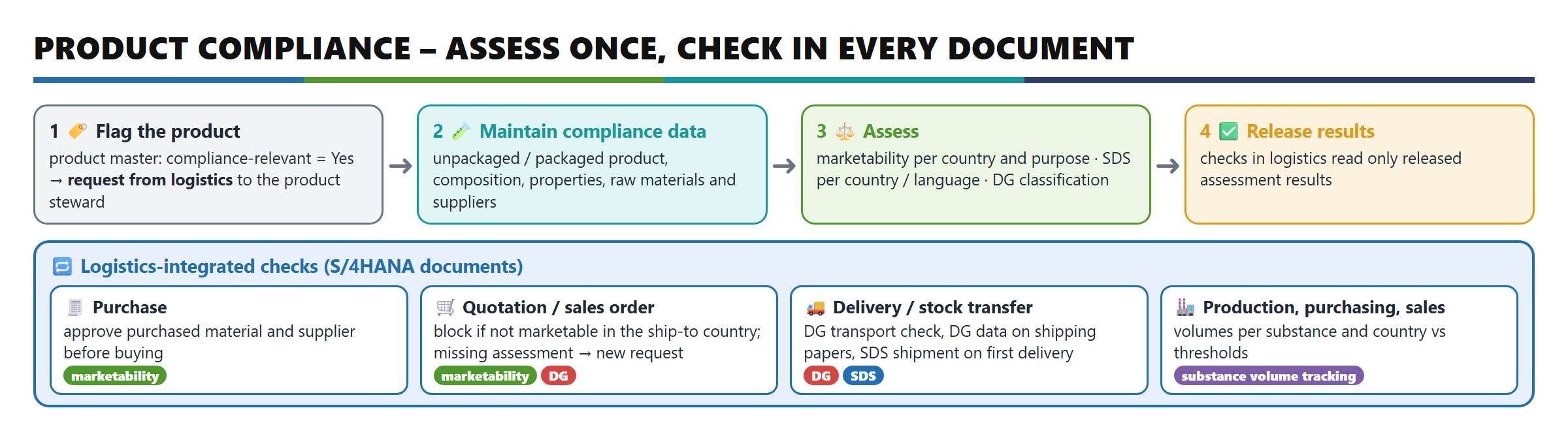
Process | Steps | Scope items |
|---|---|---|
Product marketability | Request from logistics → maintain basic compliance data → assess product, raw materials and substances per country / purpose → release → checks in sales order and outbound delivery; approval of purchased materials and suppliers | 31H, 31J, 31G, 5OJ (5OJ: on-premise / cloud up to 2602, not listed for 2608) |
Safety data sheets | Maintain regulatory data → author or upload SDS per country and language → release → check SDS availability in sales → automatic SDS shipment with the first delivery; labels via label management | 3VR, 3VQ, 6MT, 6AV |
Dangerous goods | Classify the unpackaged product (UN number, packing group) → classify packaged products → DG checks in quotations, orders, deliveries and stock transfers → DG data on shipping documents | 3FC, 3G8 |
Substance volume tracking | Volumes imported, produced or sold per substance and country are calculated from logistics documents and compared with thresholds; each figure can be traced to its document | 4OL |
- Apps (examples): Analyze SDS Availability, Monitor Shipments – Safety Data Sheets, My Unpackaged Dangerous Goods, My Packaged Dangerous Goods, Substance List – Impact on Sales / Suppliers / Production.
- The SD / MM side of these checks (which documents, how blocking appears to the user) is on page 04.
Part 7 – Management of change
MoC makes sure that changes to plants, processes, chemicals or organization are assessed and approved before they are made.
- 1. Initiation: anyone authorized creates a change request with description, attachments and impacted objects (Create Change Request).
- 2. Initial evaluation: a gatekeeper checks completeness.
- 3. Assessment: subject matter experts review it, e.g. activity Perform Risk Assessment (questionnaires; simulated risk assessments).
- 4. Approval: operations / area manager approves or rejects.
- 5. Implementation: responsible persons carry out the change; customers are informed if needed.
- 6. Close-out: verify implementation, evaluate effectiveness, close (Manage Change Requests, Manage Change Activities).
Part 8 – Key customizing
On-premise / private cloud: SPRO → Environment, Health and Safety with sub-nodes for the foundation, each application and product compliance. Public cloud: scoping in Central Business Configuration and fine-tuning through configuration activities (SSCUI) in Manage Your Solution. Order: foundation first, then the applications.
Area | What you configure | Why it matters |
|---|---|---|
Foundation for EHS | Location types, location structure settings, authorization groups, number ranges of the business objects, person / BP settings, task types, forms | Base for every application |
Workflow / processes | Check the workflow system (Foundation → Checks and Tools → Check Configuration of Workflow System); process configuration in the Process Foundation (extend and adapt processes) | All tasks and notifications run on SAP Business Workflow |
Incident management | Incident groups, person roles, injury / illness types, root-cause hierarchy, investigation steps, regulations and report forms per country, incident group and category, field control | Decides fields, flow and legal reports |
Health and safety | Risk assessment types, risk matrix (likelihood, severity, risk levels), hazard and control register (hazard categories, control catalogue), analysis methods, OEL sources | Decides how risks are rated |
Environment management | Compliance requirement settings, data collection and sampling settings, calculation and aggregation settings, deviation handling | Decides what is collected and calculated |
Management of change | Change request types, activities, questionnaires, roles | MoC process |
Product compliance | Compliance requirements and purposes, assessment processes, logistics check settings (which documents and when), SDS shipping, DG checks | Decides when SD / MM are blocked |
Asset management | Health and Safety › Integration › PM Integration (risk-level mapping, location types for PM plants); PM worker-safety planning plants; WCM permit types | Permit to work |
- Custom entries (e.g. injury types, location types) normally start with Z or Y so they survive upgrades of SAP-delivered values.
Part 9 – Key Fiori apps by role
Role | Apps |
|---|---|
Employee / incident reporter | Report Incident (also mobile), Create Injury/Illness Log Entry, Identify Hazards, Request Chemical Approval |
Incident manager | My Inbox, Manage Incidents, Manage Summary Reports, Manage Hours Worked, Incident Rate, DART Rate, Incidents – Detailed Analysis |
Safety manager / industrial hygienist | Manage Risk Assessments, Manage Controls, Risk Overview, Monitor Risks, Risk Explorer, Chemical Risks, Manage Workplace Sampling, Health and Safety Overview |
Hazardous substance manager | Manage Chemical Approvals, Manage Chemicals, Chemical Inventory Reporting |
Environmental manager | Manage Compliance Requirements, Import Compliance Requirement, Manage Compliance Scenario, My Data Collection, Monitor Data, Monitor Calculated Data, Data Issues – Exceedances and Warnings, Environmental Data Explorer, Task Calendar, Monitor Tasks |
Master data | Manage Locations, Manage Agents |
MoC coordinator | Create Change Request, Manage Change Requests, Manage Change Activities |
Product steward | Manage Basic Compliance Data – Unpackaged Products, Compliance Information – For Products, My Unpackaged / Packaged Dangerous Goods, Analyze SDS Availability |
- Find the exact app ID, OData service and required roles in the Fiori apps reference library; the set differs between releases and editions.
Part 10 – Interview questions
Q1. Describe the incident management process in S/4HANA.
Report (Report Incident, mobile, form, injury/illness log) → incident manager reviews and completes in My Inbox / Manage Incidents → investigation with steps and root causes → corrective and preventive tasks, PM notifications, HR absences → legal and summary reports → close (reopen possible).
Q2. How are the incident rate and DART rate calculated?
Incident rate = recordable cases × 200,000 / hours worked; DART rate = cases with days away, restricted work or transfer × 200,000 / hours worked. Hours come from Manage Hours Worked.
Q3. What is the difference between an incident report and a summary report?
A legal report covers one incident (e.g. OSHA 301 type form to an authority or insurer); a summary report lists many incidents of a location and period (e.g. the OSHA 300 log), created in Manage Summary Reports.
Q4. Walk through a risk assessment.
Identify hazards → assign them to a risk assessment (location, job, team) → analyse with risk matrix, job hazard analysis or exposure assessment → mitigate with controls → inspect controls → rate the residual risk and monitor.
Q5. What is a job hazard analysis?
A risk assessment method that splits a job into steps and identifies hazards, risks and controls per step.
Q6. How does chemical approval work?
An employee requests a chemical for a location and use; SDS data is entered; the hazardous substance manager approves and an industrial hygienist reviews; the approved chemical feeds the chemical risk assessment and safety instructions.
Q7. How is permit to work handled?
In Asset Management on WCM: permits are requested from the maintenance order, approved, issued and closed (Manage Work Permits). EHS integration is activated in the EHS IMG (Activate and Configure PM Integration) and for the PM worker-safety planning plants, so EHS data appears on orders and task lists.
Q8. Explain the environment management process.
Compliance requirements (limits, factors, equations) → compliance scenario per location → data collection and sampling → calculations and aggregation → deviations with corrective tasks → reports and GHG figures.
Q9. When is a deviation created?
When environmental data violates a requirement: a limit is exceeded (automatically), data is missing or its quality is bad. Corrective actions and notifications are attached.
Q10. How do product compliance checks reach the sales order?
The product master marks the product compliance-relevant; the product steward assesses it. Sales orders and deliveries read the released assessment results: not marketable or no DG classification blocks the document, missing assessments create requests, SDS are shipped with the first delivery.
Q11. What does management of change do?
It routes a change request through initial evaluation, assessment (incl. risk assessment), approval, implementation and close-out with effectiveness check, so changes are assessed before they happen.
Q12. What must be configured first in EHS?
The Foundation for EHS (locations, number ranges, authorization groups, persons, tasks) and a working workflow system – all tasks run on SAP Business Workflow. Then the application settings such as incident groups, risk assessment types and the risk matrix.
🏠 Start Here · ◀ 02 · Master Data · 04 · Integration & Reporting ▶ · Sections: CORE ABAP | OOPS ABAP | ABAP on HANA | Clean Core | RAP | ABAP Points | SAP Fiori | SAPUI5 | Mobile Development (MDK) | BTP Foundations | BTP Development | CAP | SAP Build | ABAP on BTP | Integration Suite | SAP Business AI | SAP BASIS | Security | SAP SDLC
Functional: FICO ABAP | TRM ABAP | VIM | SAP BIS | SD ABAP | MM ABAP | PP ABAP | QM ABAP | PM ABAP | PS ABAP | EWM | TM ABAP | GTM ABAP | EHS ABAP | HR ABAP | BW | SAP Datasphere | SAP Business Data Cloud | SAP MDG | SAP Analytics Cloud | SAP Ariba | SAP CX | SAP IBP