EHS is embedded in S/4HANA, so most integration is not an interface at all: Incident Management creates a maintenance notification, an HR absence or reads an internal order in the same database, and product compliance blocks a sales order or delivery directly. This page shows each integration with the objects it creates or reads, the external interfaces (sensors, authorities, regulatory content, third-party apps) and the reporting and analytics layers. The integration map overview is on page 01 Part 5, the business processes on page 03, APIs and BAdIs in depth on page 05.
Part 1 – Integration overview
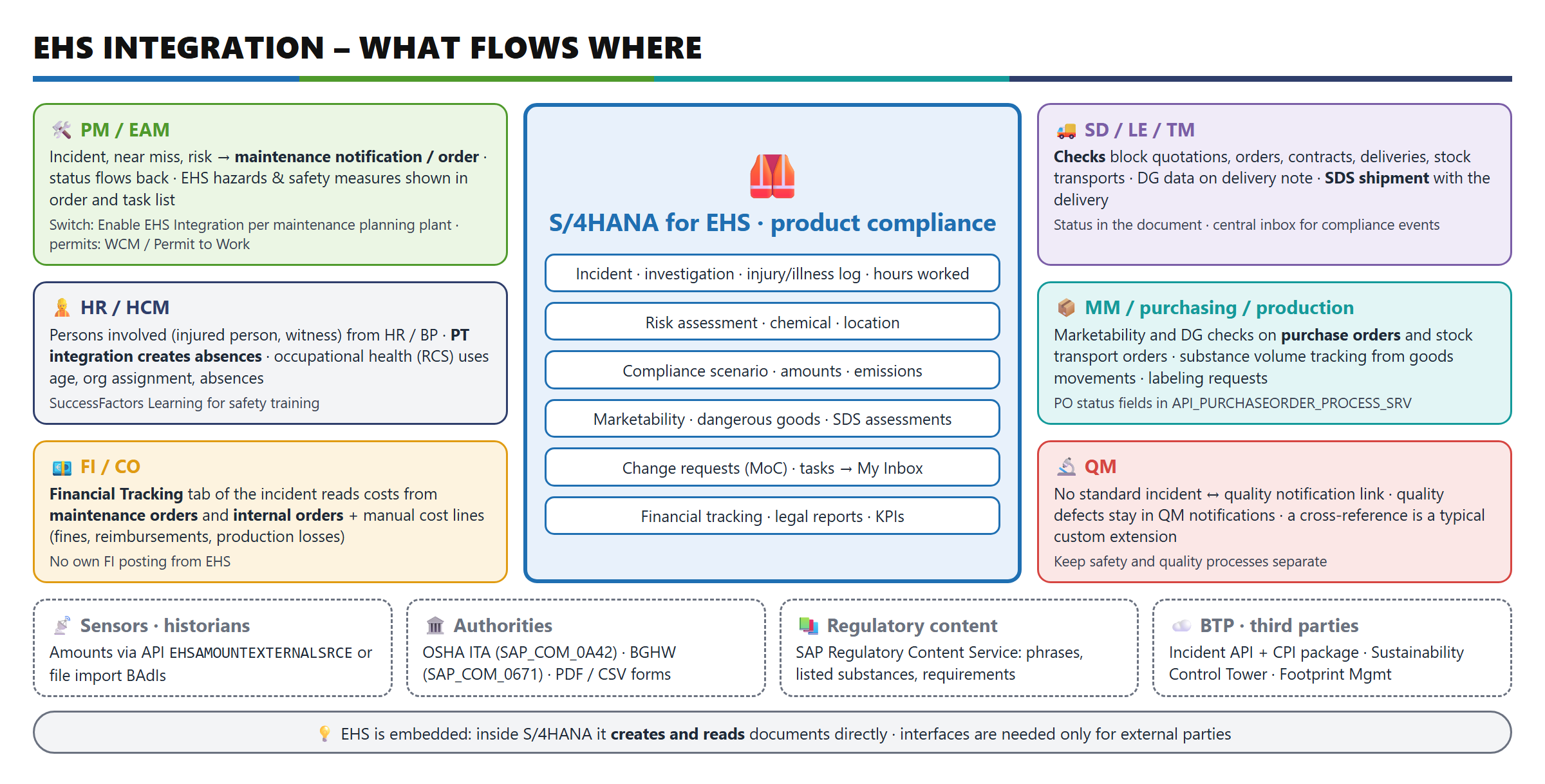
Partner | Mechanism | Objects created or read | Part |
|---|---|---|---|
PM / EAM | Embedded call | Maintenance notification / order; EHS data in order and task list | 2 |
HR / HCM, BP | Embedded (PA, PT, BP integration) | Persons involved, HR absences, business partners | 3 |
FI / CO | Embedded read | Actual costs of maintenance orders and internal orders | 4 |
SD, MM, LE, TM | Checks inside the logistics documents | Compliance status, blocks, DG data, SDS shipment | 5 |
Sensors, historians, MII | OData API, file import BAdIs | Environmental data amounts | 7 |
Authorities | Adobe forms, web services (communication arrangements) | Legal reports, electronic submissions | 8 |
Content provider | SAP Regulatory Content Service | Phrases, listed substances, compliance requirement versions | 9 |
Third-party apps, BTP | Released APIs, SAP Cloud Integration package | Incidents, product compliance data, ESG figures | 7, page 05 |
- Architect rule of thumb: inside one S/4HANA system there is nothing to interface – the work is configuration (switches, number ranges, roles). Interfaces appear only towards external parties or a second system (e.g. HR in SuccessFactors, a separate EHS product, a central ESG platform).
Part 2 – Plant maintenance (EAM) and permits
The integration is closed-loop: an incident, near miss, unsafe condition or risk triggers maintenance work, and the completion of that work is reflected back in EHS.
Topic | How it works |
|---|---|
Activation | EHS IMG activity Activate and Configure PM Integration (Health and Safety › Integration › PM Integration); in PM the worker-safety planning plants |
Incident → notification | A corrective action (task) of the incident creates a maintenance notification; the maintenance planner turns it into an order as usual. The status of the PM object flows back to the EHS task (process details: page 03 Part 4) |
Task definitions | EHS task definitions can carry maintenance notification data (subnode). Released BAdI BADI_EHFND_TSK_MNTF_FLD_CTR controls those fields; BADI_EHFND_TASK_DEF_FLD_CTRL and BADI_EHFND_TASK_DEF_FLD_VALID control and validate custom fields of the task definition |
EHS data in maintenance | Safety-relevant EHS data (hazards, safety information from risk assessments) becomes visible in the maintenance order and maintenance task list |
Locations | Functional locations and equipment can be imported as EHS locations (page 02 Part 2) |
Costs | A maintenance order assigned to the incident feeds the Financial Tracking tab (Part 4) |
Permits | Permit to work belongs to Asset Management on the Work Clearance Management (WCM) foundation: IMG Plant Maintenance and Customer Service → Work Clearance Management → Permit to Work; public cloud scope item 7Z4. Process: page 03 Part 4; PM side: PM ABAP |
- WCM licence: the WCM-based apps (e.g. the permit to work dashboard) are part of the SAP S/4HANA WCM licence – clarify it with the customer before permits are put into project scope.
- Typical custom requirement: block the release of a maintenance order until a permit is issued. There is no hard standard dependency between order release and permit status – it is a PM enhancement (see PM ABAP › 05 Development & Extensibility).
Part 3 – HR / HCM, business partner and occupational health
Scenario | What happens | Prerequisite |
|---|---|---|
Persons involved | Incident manager adds people or organizations on the People tab and assigns roles (injured person, witness …); employee data is read from HR, others are business partners | HR master data or BP |
Absences for injured persons | Incident Management creates an HR absence for the injured person (lost workdays) | PT integration (time management) active |
Creating persons | Unknown persons (contractors, visitors) are created or changed as business partners from the incident | SAP BP integration |
Working time / hours | Employee master data and working time feed incident records; hours worked per location (Manage Hours Worked) feed the incident rates | Hours entered or uploaded |
Occupational health (EHS-SUS-OH) | Protocols assigned from personal data (age, gender) and org assignment (exposure group, position, job); planning cockpit sees absences (illness, vacation); health centres, labs and physicians are business partners | SAP Time Management for absences |
Injury → medical follow-up | A first-aid case is logged as an injury/illness log entry; a doctor can create a medical service from it | Occupational health |
Training | Safety training through SAP SuccessFactors Learning | Integration scenario |
- Hybrid HR: when HR runs in SAP SuccessFactors, employees reach S/4HANA as business partners through the standard workforce replication; S/4HANA functions that need on-premise HR time data (such as PT absences) must then be re-evaluated – an architect question (page 06).
- Data privacy: incident and health data are sensitive personal data. Occupational health offers read access logging, change logs, blocking during retention and deletion of personal data – plan the authorization concept (authorization groups on locations) together with HR.
Part 4 – FI / CO: incident costs
EHS does not post to FI. It collects the financial impact of an incident on the Financial Tracking tab and reads actual costs from controlling objects.
Cost collector type | Source | Example |
|---|---|---|
Maintenance order | PM integration | Repair of damaged equipment after the incident |
Internal order | Accounting integration | Investment measure for a structural improvement, paid through a service purchase order |
Manual entry | Typed in | Fines, reimbursements, benefits, production losses |
- Cost categories tracked: direct costs, reimbursements, fines, benefits and production losses. Configuration prerequisite: maintained exchange rates, because costs arrive in several currencies.
- Settlement of the maintenance or internal order stays in CO (see PM ABAP › 04 and FICO ABAP › 04 Controlling) – EHS only shows the figures, so financial reporting remains in one place.
Part 5 – Product compliance in SD, MM, LE and TM
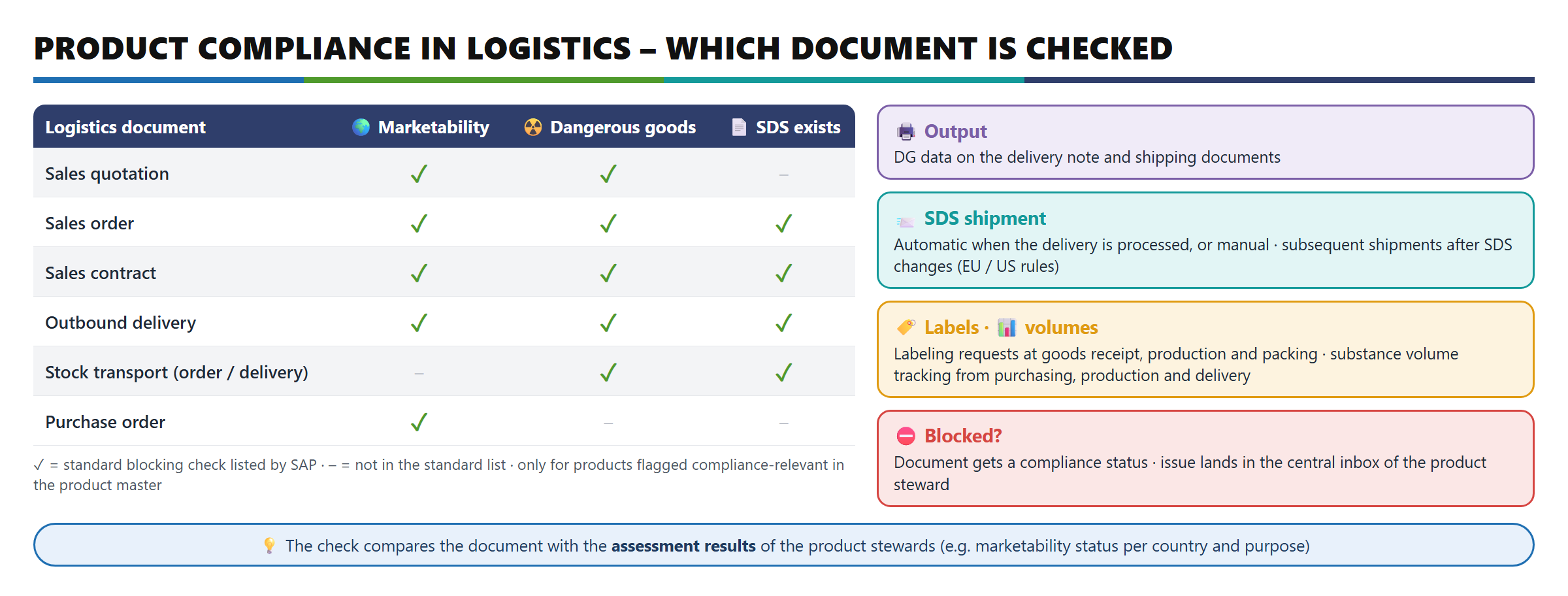
For products whose product master is flagged compliance-relevant, the logistics documents check the released assessment results (marketability, dangerous goods classification, SDS) and can block the document. The assessment process itself is on page 03 Part 6.
Area | Integration | Developer touchpoint |
|---|---|---|
Sales (SD) | Marketability, DG and SDS checks in quotations, orders, contracts; self-service Compliance Information app for sales and customer support | Compliance status in the document; see SD ABAP for order enhancements |
Delivery (LE) | Checks in outbound deliveries; DG data on the delivery note and shipping documents; automatic SDS shipment when the delivery is processed, subsequent shipments after SDS changes (EU / US rules) | Released BAdIs BADI_EHSDS_OR_OUTPUT_REQUIRED and BADI_EHSDS_OR_SDS_FILTER (SDS output decisions) |
Purchasing (MM) | Marketability checks on purchase orders; approval of purchased materials and suppliers; DG and SDS checks for stock transport orders | PO status fields in API_PURCHASEORDER_PROCESS_SRV; released CDS views I_PurgProductMarketabilitySts, I_PurgSafetyDataSheetStatus, I_PurgTotDangerousGoodsStSt |
Transportation (TM) | DG checks and DG status on freight documents | Released CDS view I_TranspOrdDngrsGdsStatus |
Warehouse / production | Labeling requests for received and produced goods; substance volume tracking from goods movements | Substance Volumes – Read API (page 05) |
Logistics document data | DG descriptions, EU ADR data and mixed-loading checks for a logistics document | RAP BO I_PRODCMPLNCLOGSDOCUMENTTP / API Product Compliance Logistics Document |
- When a check fails, the issue lands in the central inbox of the product steward; the logistics user sees the compliance status in the document. Do not code your own marketability checks in MV45AFZZ – configure the standard check and, if needed, react to its status.
- The checks are the reason product compliance must be in the same S/4HANA system as SD and MM: a separate compliance system would need synchronous calls in every order.
Part 6 – QM: what is (not) integrated
- There is no standard link between an EHS incident and a QM quality notification: product defects stay in QM notifications (see QM ABAP), safety events in EHS incidents.
- When a quality issue also has a safety impact (e.g. a defective part caused an injury), the usual design is a cross-reference: an attachment or custom field on the incident holding the notification number, or a custom action that creates the QM notification.
- Maintenance notifications (PM) are the standard follow-on object of EHS – do not misuse QM notifications for safety actions.
Part 7 – Environmental data from external systems
Environment management needs measured values (fuel consumption, flow, concentrations) from process systems, data historians and meters. Manual entry and Excel upload are on page 03 Part 5; automated channels are:
Channel | Object | Use |
|---|---|---|
OData API | EHSAMOUNTEXTERNALSRCE_0001 – Environment, Health, and Safety External Source – Read, Collect Amounts | External systems read the external source IDs and send amounts (automatic data collection) |
File import | Released BAdIs BADI_EHENV_ADC_IMPORT, BADI_EHENV_ADC_IMPORT_XLSX, BADI_EHENV_ADC_XLSX_PARSER | Custom file formats and parsing for automated data collection |
Checks | Released BAdI BADI_EHFND_AMOUNTS_CHECK | Own plausibility checks on collected amounts (in addition to limits and thresholds) |
Middleware | SAP Cloud Integration, SAP MII / IoT | Map historian or IoT data to the API |
Outbound – ESG | SAP Sustainability Control Tower (Manage ESG Data apps), SAP Sustainability Footprint Management (Import Emission Data) | Group-wide ESG and emission reporting |
- Compliance requirements can also be imported: released BAdIs BADI_EHFND_REQ_IMPORT and BADI_EHFND_REQ_PARSING (import and parse requirement content), BADI_EHFND_REQ_ENV_LIMIT_EXEC (environmental limit execution).
- Design point: decide which system is the system of record for each measured value. Raw high-frequency data belongs in the historian; EHS receives aggregated amounts per collection period.
Part 8 – Authority reporting
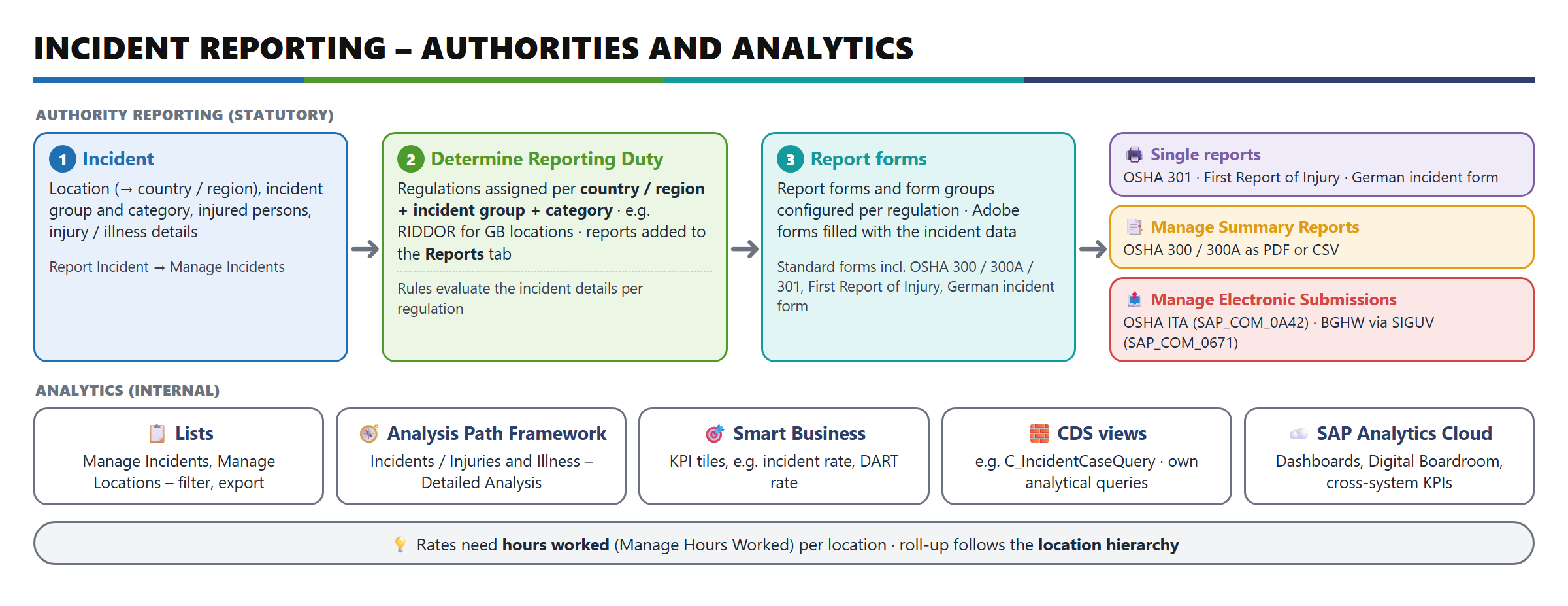
Determine Reporting Duty works per report: it evaluates the incident data against the regulation assigned to the report and sets Reporting Required. Reports are Adobe forms filled with incident data.
Output | Examples | Channel |
|---|---|---|
Single incident reports | OSHA 301, First Report of Injury, German incident form, Investigation Summary, Job Safety Analysis, Exposure Communication Letter | PDF (Adobe Interactive Forms) |
Summary reports | OSHA 300 log, OSHA 300A summary – location incl. sublocations | Manage Summary Reports: PDF (print version) or CSV |
Electronic submission – US | Workplace injury and illness data to OSHA's Injury Tracking Application (ITA) | Manage Electronic Submissions (F8152), scenario SAP_COM_0A42 OSHA Reporting Integration |
Electronic submission – Germany | Accident reports through the SIGUV interface to the workers' compensation associations (e.g. BGHW) | Scenario SAP_COM_0671 BGHW Integration |
Setting up the OSHA connection (public cloud)
- 1. Prerequisites: an OSHA ITA account, the establishment created there, the OSHA regulation assigned to the incident.
- 2. Communication system (Communication Systems, F1762) with host osha.gov and an outbound user.
- 3. Communication arrangement (F1763) for SAP_COM_0A42 with the ITA API key; activate the outbound service.
- 4. Master data: enter the establishment ID and name exactly as in ITA on the location's Identification tab.
- BGHW works the same way: communication system with host extranet-api.bghw.de, arrangement SAP_COM_0671 and the root certificate in Maintain Certificate Trust List (F2275).
Environmental authority reports are produced from calculated and aggregated data (page 03 Part 5); file-based exports can be adapted with the released BAdIs BADI_EHFND_EXP_FILE_GEN_CLOUD and BADI_EHFND_EXP_VAL_TEMPL_FILE (page 05).
Part 9 – Regulatory content
Product compliance depends on legal lists that change constantly. SAP delivers them through the SAP Regulatory Content Service, which can be connected to a productive S/4HANA system.
Content | How it arrives | Who acts |
|---|---|---|
Phrases with translations, graphics (e.g. pictograms) | Updated automatically with each release and through the service | No action |
Listed substances (inventory of substances on legal lists) | Updated automatically | Product stewards link company substances |
Compliance requirement versions | Delivered, some updated automatically | Activated in the Activate Compliance Requirements apps; automatically only with continuous content delivery |
- Supporting elements that are not content (data structures, calculation logic, supply-chain integration logic, document templates) come with the software release. Technical details: SAP Note 3055767.
- Architect choice: SAP's content service, partner content or own lists – it decides update effort, country coverage and who is accountable for activating new versions (page 06).
- Environment management works with its own compliance requirements (regulations, permits, policies), created manually, imported or retrieved from a content provider (page 02 Part 4); SAP's direction adds AI-assisted extraction of obligations from permit documents.
Part 10 – Reporting and embedded analytics
Layer | Tool | EHS examples |
|---|---|---|
Operational lists | Fiori list reports, export to Excel | Manage Incidents, Manage Locations, Monitor Data (environment), Analyze SDS Availability |
Guided analysis | Analysis Path Framework (APF) – path of filter steps + charts, saved and shared | Incidents – Detailed Analysis, Injuries and Illness – Detailed Analysis |
KPI tiles | Smart Business – real-time KPIs with the same role-based authorizations | Incident Rate, DART Rate (formulas: page 03 Part 1) |
Data model | CDS views (analytical cubes and queries) | Incident views in package EHHSS_CNS_INC_RECORDING, e.g. C_IncidentCaseQuery (incidents per location, plant, country) |
Enterprise / cross-system | SAP Analytics Cloud, Digital Boardroom, Sustainability Control Tower | Incident trends, locations with most injuries, root causes, lost workdays, GHG emissions vs targets, risk overview by location |
- Roll-up and drill-down use central hierarchies: plant, functional location, cost center and the EHS location hierarchy; incident rates need hours worked per location.
- Legacy BW extraction: the classic DataSource 0EH_INCIDNT_ATTR has CDS-based successors in S/4HANA (SAP KBA 3602843 maps them). New BW / Datasphere models should extract released CDS views.
- Custom analytics: on-premise you may build a custom analytical query on standard EHS views; in ABAP Cloud and public cloud only released views can be used, and SAP's released list contains no incident CDS views (page 05 Part 8).
- C_ views ending in Query are analytical queries for the analytic engine (Fiori analytical apps, SAC, Analysis for Office) – consume them there, not with ABAP SQL; for own ABAP reports read the underlying interface views or the BOPF tables read-only (page 02 Part 6).
- Prefer the analytical app or an SAC story over a custom ALV: the CDS query already applies the EHS authorization checks (DCL) and location filters.
Part 11 – Interview questions
Q1. How does EHS integrate with plant maintenance?
Closed loop: an incident or risk creates a maintenance notification (activated with the EHS IMG activity Activate and Configure PM Integration), the planner creates the order, and the completion status flows back to the EHS action. EHS hazards and safety information appear in the maintenance order and task list; maintenance order costs flow into the incident's Financial Tracking tab.
Q2. Where does permit to work live in S/4HANA?
In Asset Management on the Work Clearance Management foundation (IMG Plant Maintenance and Customer Service → Work Clearance Management → Permit to Work; public cloud scope item 7Z4). EHS supplies hazard and safety data; the WCM-based apps need the WCM licence.
Q3. What does Incident Management write to HR?
With PT integration active it creates HR absences for injured persons. With BP integration it creates or changes business partners for people who are not employees. Employee data and working time are read from HR.
Q4. Does EHS post incident costs to FI?
No. The Financial Tracking tab reads actual costs from maintenance orders and internal orders and allows manual entries (fines, reimbursements, production losses). Postings and settlement stay in PM / CO.
Q5. Which logistics documents are blocked by product compliance?
Marketability checks: sales quotations, orders, contracts, outbound deliveries and purchase orders. Dangerous goods checks: quotations, orders, contracts, outbound deliveries, stock transports. SDS existence: sales orders, contracts, outbound deliveries and stock transport orders – only for products flagged compliance-relevant.
Q6. How is a safety data sheet sent to the customer?
Automatically when the outbound delivery is processed (or manually), with subsequent shipments when the SDS changes under EU / US rules. Released BAdIs BADI_EHSDS_OR_OUTPUT_REQUIRED and BADI_EHSDS_OR_SDS_FILTER let you influence the output decision.
Q7. How do sensor or historian values reach environment management?
Through the OData API EHSAMOUNTEXTERNALSRCE_0001 (read external sources, send amounts), file imports adapted with the released BAdIs BADI_EHENV_ADC_IMPORT / _XLSX / _XLSX_PARSER, or middleware such as SAP Cloud Integration or MII. Usually aggregated amounts per period, not raw readings.
Q8. How does S/4HANA know which authority report an incident needs?
Determine Reporting Duty works per report: it evaluates the incident data against the regulation assigned to the report and sets Reporting Required. Forms are Adobe forms; summary reports (OSHA 300 / 300A) come from Manage Summary Reports.
Q9. Which electronic submissions are standard?
OSHA ITA in the US via Manage Electronic Submissions and communication scenario SAP_COM_0A42, and German workers' compensation associations (e.g. BGHW) via SIGUV with SAP_COM_0671. Both need a communication system, arrangement and, for BGHW, a trusted certificate.
Q10. What is the SAP Regulatory Content Service?
SAP's service for product compliance content: phrases with translations, graphics, listed substances and compliance requirement versions. Most content updates automatically; new requirement versions are activated in the Activate Compliance Requirements apps (automatically only with continuous content delivery).
Q11. Which analytics options does EHS offer?
Fiori lists, Analysis Path Framework (detailed incident and injury analysis), Smart Business KPI tiles (incident rate, DART rate), CDS views such as C_IncidentCaseQuery for own queries, and SAP Analytics Cloud / Sustainability Control Tower for cross-system dashboards and ESG.
Q12. Is there a standard link between EHS incidents and QM notifications?
No. Quality defects stay in QM notifications and safety events in incidents; the standard follow-on object of EHS is the PM maintenance notification. A cross-reference is a custom extension (custom field or action).
🏠 Start Here · ◀ 03 · Processes & Config · 05 · Development ▶ · Sections: CORE ABAP | OOPS ABAP | ABAP on HANA | Clean Core | RAP | ABAP Points | SAP Fiori | SAPUI5 | Mobile Development (MDK) | BTP Foundations | BTP Development | CAP | SAP Build | ABAP on BTP | Integration Suite | SAP Business AI | SAP BASIS | Security | SAP SDLC
Functional: FICO ABAP | TRM ABAP | VIM | SAP BIS | SD ABAP | MM ABAP | PP ABAP | QM ABAP | PM ABAP | PS ABAP | EWM | TM ABAP | GTM ABAP | EHS ABAP | HR ABAP | BW | SAP Datasphere | SAP Business Data Cloud | SAP MDG | SAP Analytics Cloud | SAP Ariba | SAP CX | SAP IBP