What an ABAP developer builds in EHS: extensions of the BOPF business objects behind incidents, risk assessments and locations, BAdIs (classic IMG BAdIs on-premise, released BAdIs for clean core), workflows and tasks, Adobe forms for legal reports and safety data sheets, API integrations and analytics on CDS views. EHS differs from SD or MM: there are almost no user exits or BAPIs – the S/4HANA EHS objects come from the SAP EHS Management add-on and are BOPF-based, while the newer product compliance objects use RAP. Tables and BOPF persistence: page 02 Part 6; general techniques: CORE ABAP › 10 Enhancements, 11 Forms, 12 Workflow; ABAP on HANA › 05 CDS Views; the RAP section.
Part 1 – Where to extend EHS: choosing the technique
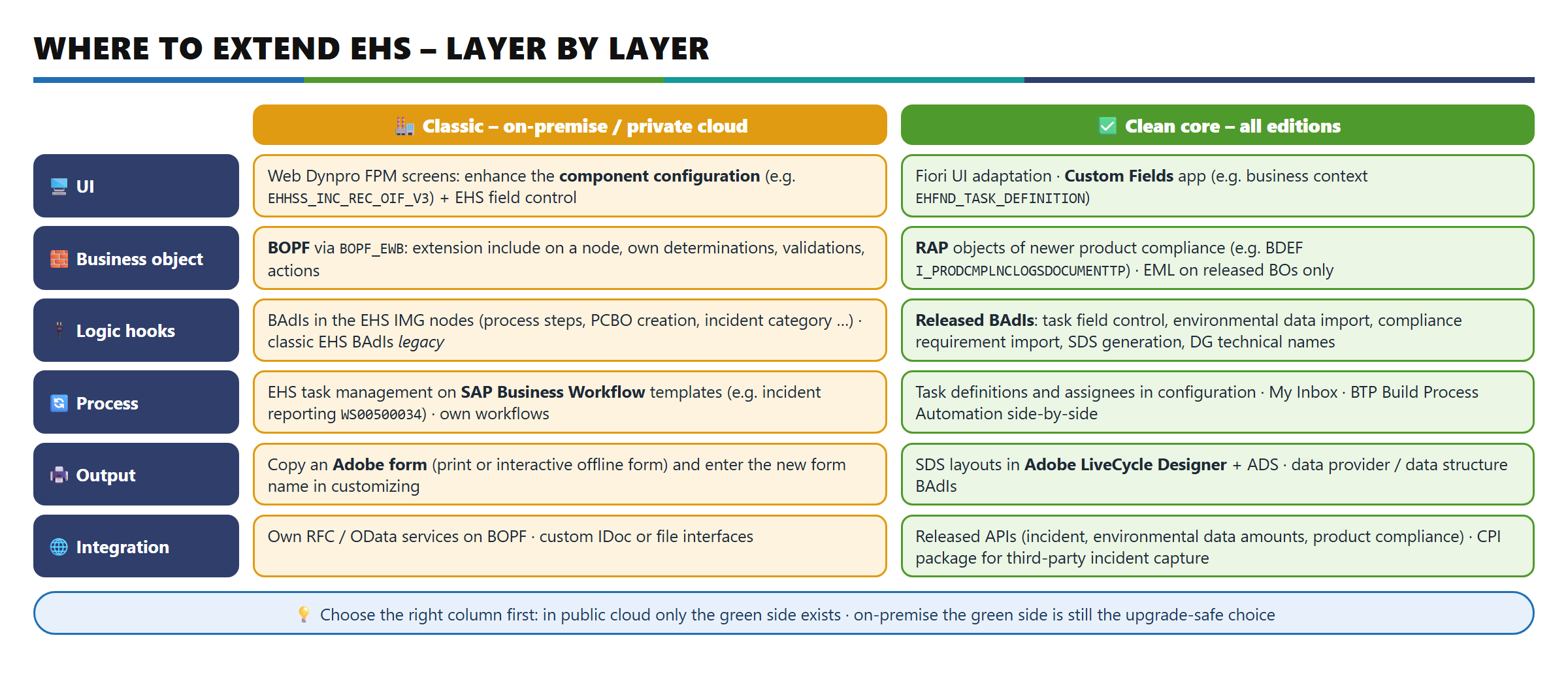
Requirement | Technique | Where |
|---|---|---|
New field on the incident (on-premise) | BOPF extension include via BOPF_EWB + FPM component configuration + EHS field control | Part 3, 9 |
New field on a task definition (all editions) | Custom Fields (business context EHFND_TASK_DEFINITION) + released field-control BAdIs | Part 4, 9 |
Own check before an incident or risk assessment is saved or closed | BOPF validation in an enhancement (on-premise) | Part 3 |
Change standard behaviour at a defined point | BAdI from the EHS IMG node (on-premise) or a released BAdI | Part 4 |
Approval step or own process | EHS process foundation / SAP Business Workflow; side-by-side on BTP | Part 5 |
Own legal report or SDS layout | Copy the Adobe form; SDS with Adobe LiveCycle Designer + data provider BAdIs | Part 6 |
Incidents from a third-party app, data from sensors | Released OData APIs, SAP Cloud Integration package | Part 7 |
Custom KPI report | CDS views, analytical query, SAC | Part 8, page 04 |
- There are no user exits in the S/4HANA EHS objects and almost no BAPIs; classic EHS (CG02, CBIH82 …) had function modules, BAPIs and classic BAdIs – those are legacy.
Part 2 – Technical foundation: packages, components, tools
Prefix | Area | Examples of objects |
|---|---|---|
EHFND | Foundation for EHS: locations, chemicals, compliance requirements, tasks, data providers, forms | Tables |
EHHSS | Health and safety: incident, investigation, risk assessment | BO EHHSS_INCIDENT, table EHHSSD_INC_ROOT, incident CDS package EHHSS_CNS_INC_RECORDING |
EHENV | Environment management: data collection, calculations | BAdIs |
EHSDS | Safety data sheets (product compliance) | BAdIs |
EHDGM | Dangerous goods management | BAdI BADI_EHDGM_DGDSCR_TECH_NAM, CL_EHDGM_API_EXT_FACTORY |
EHLBL | Label management | IF_EHLBL_FIELD_CALCULATOR |
EHEWA | Waste management (environment) | BAdI BADI_EHEWA_WTR_STATUS_VAL |
- Application components: in SAP Notes and KBAs you see the EHS Management names (EHS-MGM-FND, EHS-MGM-INC-REC …); SAP's released-object list uses EHS-SUS-… (e.g. EHS-SUS-IM incident management, EHS-SUS-HS health and safety, EHS-SUS-EM environment, EHS-SUS-FND-PC product compliance foundation, EHS-SUS-SDS, EHS-SUS-DG, EHS-SUS-CI compliance requirements).
- Message classes follow the same prefixes, e.g. CM_EHHSS_INC_COMMON (incident), CM_EHFND_FW_WFF (workflow foundation) – the fastest way to find the code behind an error message.
Tool | Use in EHS |
|---|---|
BOBX / /BOBF/CONF_UI | Display the BOPF model: nodes, tables, actions, determinations, validations |
BOBT | BOPF test UI: read and change instances, run actions, test your validation |
BOPF_EWB | BOPF Enhancement Workbench: enhance standard BOs (SAP Note 1457235) |
SE18 / SE19, SPRO Business Add-Ins nodes | Find and implement BAdIs |
FPM configuration editor | Enhance Web Dynpro FPM component configurations (e.g. EHHSS_INC_REC_OIF_V3 incident screens) |
SFP | Adobe form interfaces and layouts |
SWDD / SWI1 | Workflow templates and work item analysis |
ADT | Released objects (API state), RAP BOs, CDS views, released BAdI implementations |
- Unit tests: the released class CL_EHFND_ABAP_TESTDOUBLE_MNGR and test-double injectors (TD_… classes) support isolating EHS dependencies in ABAP Unit.
Part 3 – BOPF business objects: reading and enhancing
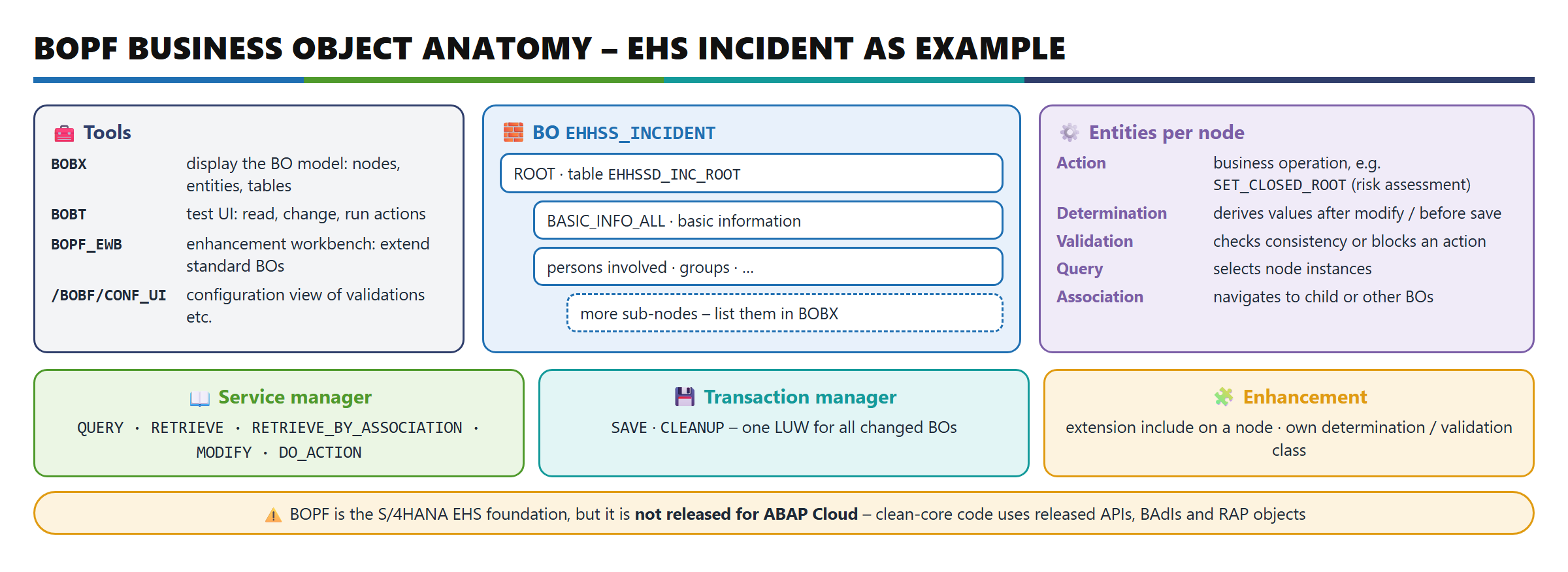
Each EHS object (incident, risk assessment, location, chemical …) is a BOPF business object with nodes; every node has a table (page 02 Part 6). Examples: EHHSS_INCIDENT (root table EHHSSD_INC_ROOT, node BASIC_INFO_ALL for basic information) and EHHSS_RISK_ASSESSMENT (action SET_CLOSED_ROOT closes it, implemented in CL_EHHSS_RAS_ROOT_A_STATUS). The full node list is in BOBX.
3.1 Reading BO data
- Read-only reports on-premise: SELECT on the node tables is fine (example on page 02).
- Programs that need BO logic (derived fields, authorization-relevant reads, changes): use the service manager (
/BOBF/CL_TRA_SERV_MGR_FACTORY=>GET_SERVICE_MANAGER) and, for changes, the transaction manager (/BOBF/CL_TRA_TRANS_MGR_FACTORY=>GET_TRANSACTION_MANAGER, method SAVE). - The BO and node keys are constants of the BO's constants interface (shown in BOBX for the BO). This generic reader works for any EHS BO:
|
3.2 Enhancing a standard BO (on-premise / private cloud)
- 1. BOPF_EWB → create an enhancement for the BO (SAP Note 1457235).
- 2. New fields: add them to the node's extension include (the dummy fields such as EEW_… mark where), then place them on the UI: enhance the FPM component configuration and maintain EHS field control.
- 3. New logic: add a determination (derive values after modify / before save) or a validation (consistency check, action check) with your own class in the enhancement.
- 4. Test in BOBT, then in the Fiori / FPM app. Never INSERT or UPDATE the node tables directly – determinations, status, workflow and change documents would be skipped.
- Some checks are not BOPF validations but application logic: e.g. the incident close check runs in the FPM application controller class, so a BOPF validation is not always the right hook – debug first.
- Clean core: BOPF objects of EHS are not released for ABAP Cloud. In public cloud you cannot enhance them; on-premise such enhancements are classic extensions to document and retest at upgrades. Newer product compliance objects are RAP BOs (e.g. BDEF I_PRODCMPLNCLOGSDOCUMENTTP, I_PRODCMPLNCLABELFLDGROUPTP_2, both released) – access them with EML (RAP › 08 · EML).
Part 4 – BAdIs: classic and released
4.1 On-premise BAdIs in the EHS IMG
Every EHS customizing area (SPRO → Environment, Health and Safety → Foundation, Incident Management, Health and Safety, Environment Management, Product Compliance …) has Business Add-Ins nodes. Examples:
- Foundation, process configuration: BAdI: Create and Initialize PCBOs (process control business objects), under Process Foundation › Processes – used when you extend or add EHS processes.
- Incident management: a BAdI to change the incident category (message CM_EHHSS_INC_COMMON 273 points to it when the implementation is not active).
- Finding BAdIs: SE18 with the prefixes EHFND / EHHSS / EHENV, the IMG nodes, or a breakpoint on the
GET BADI/CALL BADIstatements while running the app. - Legacy (classic EHS): e.g. EHSI_IA_BAPI (enhancements in the incident/accident log BAPIs), EHSS_SPEC_CHECKS (extended checks for specifications), EHSS_HITLIST (hit lists) – relevant only for ECC systems and migrations.
4.2 Released BAdIs (clean core, all editions)
Area | Released BAdI | Purpose |
|---|---|---|
Tasks (foundation) | BADI_EHFND_TASK_DEF_FLD_CTRL, BADI_EHFND_TASK_DEF_FLD_VALID | Field control and validation of custom fields on task definitions |
Tasks (foundation) | BADI_EHFND_TSK_MNTF_FLD_CTR, BADI_EHFND_TASK_PLAN_MODIFY | Fields of the maintenance notification subnode; modify the task plan |
Environment | BADI_EHENV_ADC_IMPORT, _IMPORT_XLSX, BADI_EHENV_ADC_XLSX_PARSER | Import of collected data, own file formats |
Environment data | BADI_EHFND_AMOUNTS_CHECK | Own checks on amounts |
Exports | BADI_EHFND_EXP_FILE_GEN_CLOUD, BADI_EHFND_EXP_VAL_TEMPL_FILE | Export file generation, validation of template files |
Compliance requirements | BADI_EHFND_REQ_IMPORT, BADI_EHFND_REQ_PARSING, BADI_EHFND_REQ_ENV_LIMIT_EXEC | Import / parse requirements, environmental limit execution |
Product compliance data | BADI_EHFND_DATA_PRVDR_ADAPTION | Adapt data delivered to product compliance documents |
Safety data sheets | BADI_EHSDS_GEN_DATA_STRUCTURE, BADI_EHSDS_GEN_HIGHLIGHT_CHNG, BADI_EHSDS_FINAL_SDS_GEN | SDS data structure for the form, highlighting of changes, final SDS generation |
SDS output | BADI_EHSDS_OR_OUTPUT_REQUIRED, BADI_EHSDS_OR_SDS_FILTER | Is SDS output needed, which SDSs to send |
Dangerous goods | BADI_EHDGM_DGDSCR_TECH_NAM | Technical names in the DG description |
Waste | BADI_EHEWA_WTR_STATUS_VAL | Status validation in waste processing |
- Implement released BAdIs in ADT (developer extensibility) – or, where offered, in the Custom Logic app (key user). Each has a released interface (IF_BADI_… / IF_EHSDS_…) you program against.
- Most released BAdIs serve product compliance and environment; incident management has very few released hooks, so incident extensions in public cloud are mostly APIs + side-by-side apps.
Part 5 – Workflow, tasks and rules
Element | How it works | Developer view |
|---|---|---|
Tasks | Task definition on a host object (incident, investigation step, risk assessment, control, compliance scenario) → task instances in the assignee's My Inbox | Task types in foundation customizing; released field-control BAdIs (Part 4) |
Process foundation | EHS processes (e.g. incident reporting, investigation) are configured process steps controlled by process control business objects (PCBOs) | BAdI for PCBO creation (Create and Initialize PCBOs) |
SAP Business Workflow | Runs under the tasks and processes; e.g. the incident reporting workflow template WS00500034 contains the incident approval | SWDD, SWI1, work item analysis; check workflow configuration in the EHS foundation (page 03 Part 8) |
Notifications | E-mails on events (e.g. environment calculation errors) | Event IDs such as EHENV_CALCULATION_ERROR in notification configuration |
- Approval at incident creation is not part of the standard reporting flow (approval sits later in WS00500034) – a typical custom requirement, solved with a custom process step or workflow.
- BRF+: EHS does not use BRF+ as its central rules engine. Reporting duty, risk matrix, calculations and check settings are EHS customizing; SDS generation has its own rule engine (released classes CL_EHSDS_RULE_ENG_FACTORY, CL_EHSDS_RUL_ENG_JAVASCRIPT …). BRF+ appears where S/4HANA output management determines output for the logistics documents (see SD ABAP, CORE ABAP › 13 BRF+).
- Side-by-side processes (e.g. a contractor safety induction) belong in SAP Build Process Automation on BTP, calling the EHS APIs.
Part 6 – Forms: legal reports and safety data sheets
Form type | Technology | How to customize |
|---|---|---|
Legal and summary reports (OSHA 300 / 300A / 301, First Report of Injury, German incident form, Investigation Summary, Job Safety Analysis, Exposure Communication Letter) | Adobe forms (SAP Interactive Forms by Adobe) | Copy the form in SFP, change the layout, enter the new form name in the report / form customizing |
Offline recording of incidents, near misses, safety observations | Interactive Adobe form stored on an intranet or device; Send returns the data to Incident Management | Copy the initial incident record form; inbound data is persisted by an EHS handler class (e.g. CL_EHHSS_AIF_GEN_INB_HANDLER) |
Safety data sheets (product compliance) | Adobe LiveCycle Designer layouts rendered by Adobe Document Services – the only supported services for SDS documents | Data via the form data provider; BAdIs BADI_EHSDS_GEN_DATA_STRUCTURE, BADI_EHFND_DATA_PRVDR_ADAPTION |
Classic SDS / reports (legacy) | WWI (Word-based report templates) on the specification database | Only classic capabilities; not in the new product compliance |
- Transport trap: a custom field used in the form context must exist in every target system – if it reaches QAS later than the form, the print program dumps.
- The final SDS is generated automatically during SDS shipment once the SDS assessment that contains the base SDS is released.
- Forms in general (interfaces, context, ADS): CORE ABAP › 11 Forms.
Part 7 – APIs and integration
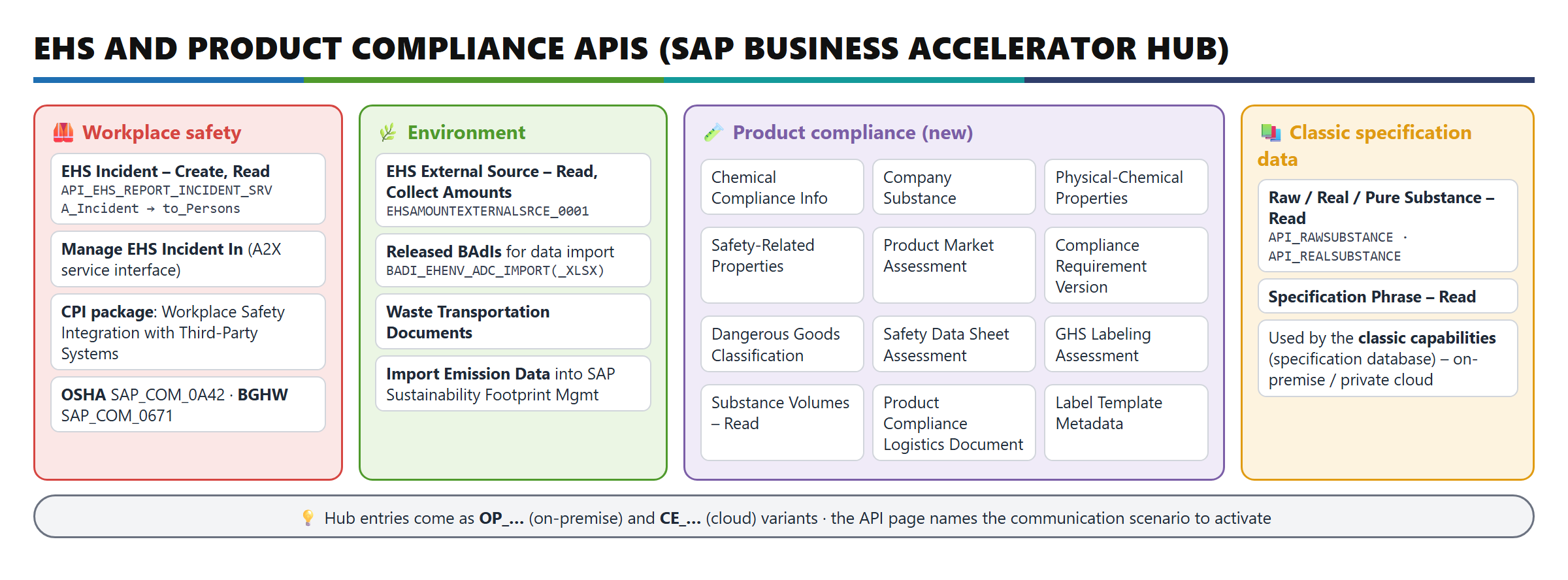
API (Business Accelerator Hub) | Technical name | Use |
|---|---|---|
Environment, Health and Safety Incident – Create, Read | API_EHS_REPORT_INCIDENT_SRV (OData V2; entity A_Incident with navigation to_Persons, attachments) | Report incidents from portals, mobile or third-party apps |
Manage EHS Incident In | A2X service interface | Incident data capture by third-party applications |
Environment, Health, and Safety External Source – Read, Collect Amounts | EHSAMOUNTEXTERNALSRCE_0001 | Automatic environmental data collection |
Chemical Compliance Info, Company Substance, Physical-Chemical / Safety-Related Properties | OP_… / CE_… variants | Basic compliance data of products and substances |
Product Market Assessment, Dangerous Goods Classification, Safety Data Sheet Assessment, GHS Labeling Assessment | OP_… / CE_… variants | Assessment results |
Compliance Requirement Version – Read, Substance Volumes – Read, Product Compliance Logistics Document | OP_… / CE_… variants | Requirements, volume tracking, DG data of logistics documents |
Raw / Real / Pure Substance – Read, Specification Phrase – Read | API_RAWSUBSTANCE, API_REALSUBSTANCE … | Classic specification data (classic capabilities) |
7.1 Third-party incident capture with SAP Cloud Integration
- 1. Set up Incident Management, create a business user with the EHS roles, activate the incident API.
- 2. In Cloud Integration copy the package SAP S/4HANA for EHS Workplace Safety Integration with Third-Party Systems; deploy the S/4HANA user as User Credentials security material.
- 3. Configure the iFlow Report Incidents to SAP S4HANA: HTTPS sender endpoint (e.g. /ReportIncident, role ESBMessaging.send); OData receiver on API_EHS_REPORT_INCIDENT_SRV via Cloud Connector for on-premise; separate calls fetch the CSRF token and post persons and attachments.
- 4. Deploy; the third party posts one JSON message, the iFlow creates the incident, its persons and attachments.
|
- Activation: a communication arrangement for the API's communication scenario (public cloud; the scenario is named on the API page in the Business Accelerator Hub) or the Gateway service in /IWFND/MAINT_SERVICE (on-premise). OData and CPI basics: CORE ABAP › 08 OData, Integration Suite › 02 SAP Cloud Integration.
Part 8 – CDS views and released objects
Area | Released CDS / RAP objects (examples) | Note |
|---|---|---|
Product compliance logistics | I_PRODCMPLNCLOGSDOCUMENTTP, I_PRODCMPLNCLOGSDOCUMENTITEMTP, I_PRODCMPLNCLOGSDOCEUADRTP | RAP BO with DG and EU ADR data per logistics document |
Compliance requirements | I_ACTIVECOMPLIANCERQMTVERSION | Active requirement versions |
Chemical compliance | I_CHMLCMPLNCIDFR, I_PRODCMPLNCUSETP | Identifiers, product compliance uses |
Dangerous goods | I_COUNTRYTRANSPORTSTATUS, I_TRANSPORTCHECKRULETEXT | Transport status per country, check rules |
Labels | I_PRODCMPLNCLABELFLDGROUPTP_2 and versions | Label field groups |
Purchasing / TM status | I_PurgProductMarketabilitySts, I_PurgSafetyDataSheetStatus, I_TranspOrdDngrsGdsStatus | Compliance status in other modules |
Incidents | Views in package EHHSS_CNS_INC_RECORDING (e.g. C_IncidentCaseQuery) | Not in the released list – on-premise use only, or use the incident API |
- The release state of each object is shown in ADT (Properties → API State) and in SAP's released-object list (GitHub repository SAP/abap-atc-cr-cv-s4hc, also used by ATC); the list grows with every release. Most released EHS objects belong to product compliance (SDS, DG, foundation) – only a handful to incident and health and safety, and no incident CDS views.
- On-premise you may build Z CDS views on non-released EHS views or BOPF tables (classic extensibility, read-only); in ABAP Cloud only released objects compile. CDS basics: ABAP on HANA › 05 CDS Views.
Part 9 – Key-user extensibility and custom fields
Option | Edition | EHS example |
|---|---|---|
Custom Fields app | All | Business context EHFND_TASK_DEFINITION for task definitions; field control with the released task BAdIs |
Custom Logic app | All (where a BAdI is offered for key users) | Released BAdIs of Part 4 |
UI adaptation | All | Hide, move, rename fields in Fiori apps |
BOPF extension include + FPM | On-premise / private | Incident fields on BASIC_INFO_ALL or other nodes, shown in the FPM incident screens |
OData extension | On-premise / private | The mobile Report Incident service has an extension include on its incident entity – needed so custom fields reach the mobile app |
- The business contexts offered in the Custom Fields app grow with each release; filtering them by EHS shows which objects accept custom fields in your system.
Part 10 – Typical RICEFW objects in EHS
Type | Example | Technique |
|---|---|---|
Report | Safety KPI dashboard per site, open corrective actions, chemical inventory by location | CDS analytical query / SAC; BOPF tables read-only on-premise |
Interface | Incidents from a contractor portal or mobile app; HR / time data; sensor and historian amounts; ESG figures to a group platform | API_EHS_REPORT_INCIDENT_SRV + CPI package; EHSAMOUNTEXTERNALSRCE_0001; import BAdIs |
Conversion | Locations and hierarchy, tasks, product compliance data from the specification database | Migration cockpit objects EHS – Location, EHS – Location hierarchy, EHS – Task; 11 product compliance objects (page 06) |
Enhancement | Mandatory contractor field, own close check, custom field on task definitions, SDS output filter | BOPF_EWB (on-premise), released BAdIs, Custom Fields |
Form | Company incident report, country-specific authority form, branded SDS layout | Adobe forms (SFP), LiveCycle Designer + ADS for SDS |
Workflow | Approval at incident creation, escalation of overdue actions | Process steps / SAP Business Workflow; BTP Build Process Automation |
Part 11 – Interview questions
Q1. Which framework implements the S/4HANA EHS business objects and how do you inspect them?
BOPF. BOBX (or /BOBF/CONF_UI) shows the nodes, tables, actions, determinations and validations, e.g. EHHSS_INCIDENT with root table EHHSSD_INC_ROOT; BOBT tests them; BOPF_EWB enhances them. Newer product compliance objects are RAP BOs.
Q2. How do you add a custom field to the incident on-premise?
Enhance the BO in BOPF_EWB and add the field to the node's extension include, enhance the FPM component configuration of the incident screen, maintain EHS field control; for the mobile app also extend the OData service. In the cloud use the Custom Fields app where a business context exists (e.g. task definitions).
Q3. Why must you not update EHS tables with SQL?
Determinations, validations, status management, workflow triggers and change documents run only in the business object. Changes go through the BOPF service and transaction manager, the app or an API.
Q4. Name some released EHS BAdIs.
BADI_EHFND_TASK_DEF_FLD_CTRL / _FLD_VALID (task definition custom fields), BADI_EHENV_ADC_IMPORT (environmental data import), BADI_EHFND_REQ_IMPORT (compliance requirements), BADI_EHSDS_GEN_DATA_STRUCTURE and BADI_EHSDS_FINAL_SDS_GEN (SDS generation), BADI_EHSDS_OR_SDS_FILTER (SDS output), BADI_EHDGM_DGDSCR_TECH_NAM (dangerous goods).
Q5. Where are the on-premise EHS BAdIs?
In the Business Add-Ins nodes of each EHS IMG area (Foundation, Incident Management, Health and Safety, Environment Management, Product Compliance), e.g. BAdI: Create and Initialize PCBOs; also via SE18 with the EHFND / EHHSS / EHENV prefixes.
Q6. How do EHS workflows work?
Task definitions on host objects create task instances in My Inbox; EHS processes are configured in the process foundation with process control business objects; SAP Business Workflow runs underneath (e.g. incident reporting WS00500034 with the approval).
Q7. Is BRF+ used in EHS?
Not as the central rules engine: reporting duty, risk matrix and calculations are EHS customizing, SDS generation has its own rule engine. BRF+ appears in S/4HANA output management for logistics documents.
Q8. How are safety data sheets rendered in the new product compliance?
With Adobe LiveCycle Designer layouts and Adobe Document Services (the only supported services); data comes from a form data provider, adaptable with BADI_EHSDS_GEN_DATA_STRUCTURE and BADI_EHFND_DATA_PRVDR_ADAPTION. Classic SDS used WWI templates on the specification database.
Q9. A contractor portal must create incidents in S/4HANA. Your design?
Use the released OData API API_EHS_REPORT_INCIDENT_SRV (A_Incident, to_Persons, attachments) through the SAP Cloud Integration package for third-party systems: HTTPS endpoint for the portal, business user credentials, CSRF handling, Cloud Connector for on-premise. No custom RFC.
Q10. Which incident CDS views exist and can you use them in ABAP Cloud?
Incident views live in package EHHSS_CNS_INC_RECORDING (e.g. C_IncidentCaseQuery), but they are not in the released list – usable on-premise; in ABAP Cloud use released objects or the incident API.
Q11. Which migration objects exist for EHS?
EHS – Location, EHS – Location hierarchy and EHS – Task in the migration cockpit, plus product compliance objects such as product compliance info, substance, DG assessments and SDS assessments and shipment history.
Q12. How do you extend incident management in a clean-core way?
Custom Fields and released BAdIs where offered, released APIs for integration, side-by-side BTP apps and processes for new functionality; BOPF and FPM enhancements only on-premise when no released option exists, documented as classic extensions.
🏠 Start Here · ◀ 04 · Integration & Reporting · 06 · S/4HANA & Architect ▶ · Sections: CORE ABAP | OOPS ABAP | ABAP on HANA | Clean Core | RAP | ABAP Points | SAP Fiori | SAPUI5 | Mobile Development (MDK) | BTP Foundations | BTP Development | CAP | SAP Build | ABAP on BTP | Integration Suite | SAP Business AI | SAP BASIS | Security | SAP SDLC
Functional: FICO ABAP | TRM ABAP | VIM | SAP BIS | SD ABAP | MM ABAP | PP ABAP | QM ABAP | PM ABAP | PS ABAP | EWM | TM ABAP | GTM ABAP | EHS ABAP | HR ABAP | BW | SAP Datasphere | SAP Business Data Cloud | SAP MDG | SAP Analytics Cloud | SAP Ariba | SAP CX | SAP IBP