How goods flow through an EWM warehouse: the inbound process from ASN to stock in the bin, the outbound process from outbound delivery to goods issue, the internal processes (replenishment, ad-hoc moves, posting changes, physical inventory, slotting), and the configuration that drives them – warehouse process types, search sequences, putaway and stock removal rules, storage control, warehouse order creation rules and PPF actions. Each step lists its SAP GUI transaction and Fiori app. Structure and master data: pages 01 – 02; postings and interfaces: page 04; BAdIs for these steps: page 05.
Part 1 – The engine behind every process: warehouse process type
Every warehouse task has a warehouse process type (4 characters, e.g. putaway, stock removal, internal move; Customizing table /SCWM/T333). It is the EWM counterpart of the LE-WM movement type and decides how the task behaves. The process type is determined for each delivery item and then drives the search for storage types, bins and the warehouse order.
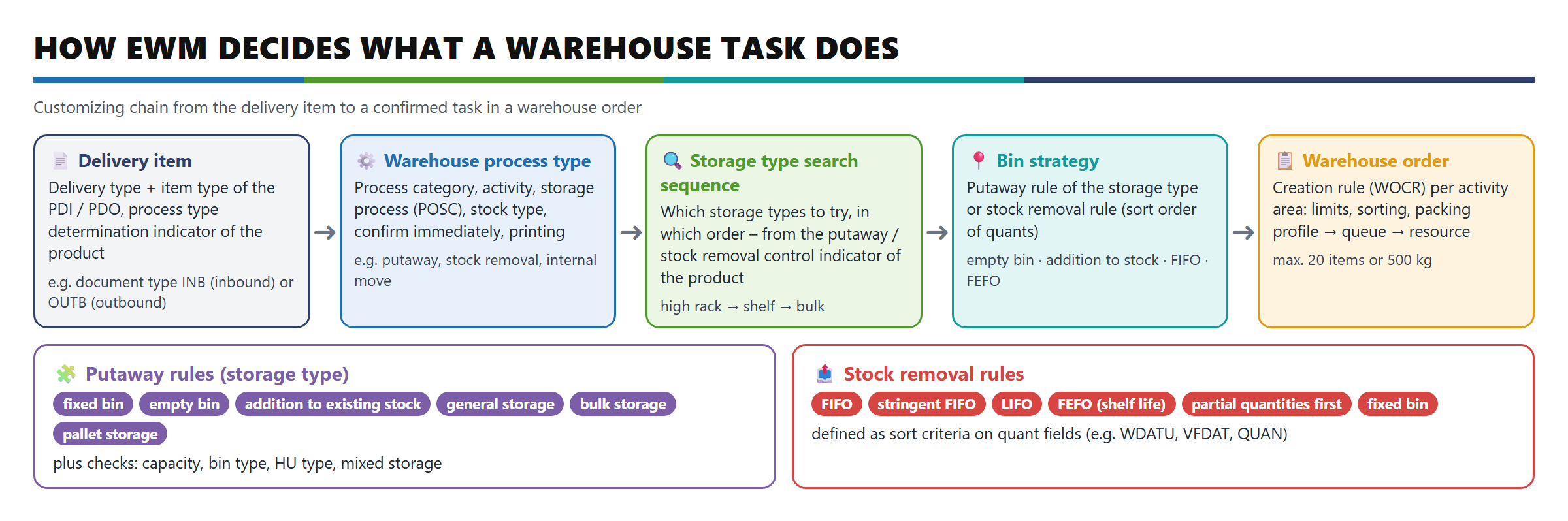
Setting of the warehouse process type | What it controls |
|---|---|
Process category | Putaway, stock removal, internal movement, posting change, physical inventory |
Activity | Which activity area (sort sequence) is used for warehouse order creation |
Storage process | Process-oriented storage control: list of steps (Part 4) |
Confirm immediately | The task is confirmed at creation – for system moves without a person |
Priority, printing, RF behaviour | Queue determination, task printing via PPF, exception codes |
Stock type / availability group | Stock type that a receipt gets (e.g. F1 in the goods receipt zone) |
- Determination (IMG: Cross-Process Settings → Warehouse Task → Determine Warehouse Process Type): warehouse number + EWM document type + item type + delivery priority + process type determination indicator of the product → warehouse process type.
- Ad-hoc tasks (/SCWM/ADHU, /SCWM/ADPROD) and internal processes take the process type from the transaction or replenishment settings.
Part 2 – Inbound process
# | Step | What happens | T-code / app |
|---|---|---|---|
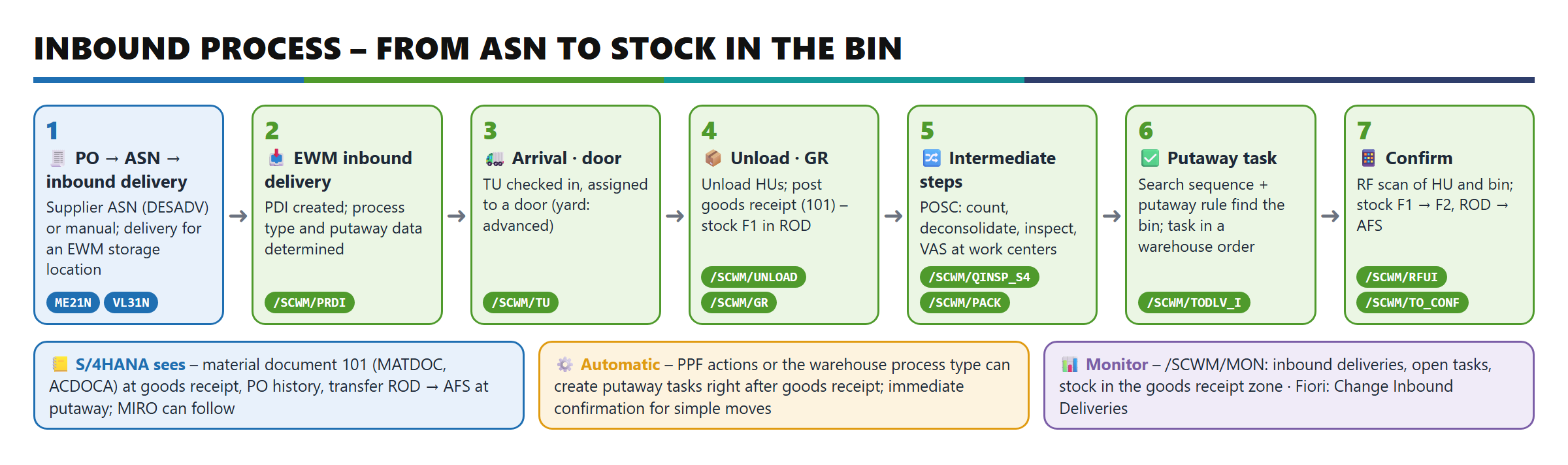
1 | ASN / inbound delivery | Supplier sends an ASN (IDoc DESADV) or the buyer creates the inbound delivery for the PO; storage location is EWM-managed | ME21N, VL31N; IDoc |
2 | EWM inbound delivery (PDI) | Created from the S/4HANA delivery; warehouse process type, packspec and storage process determined; HUs can come from the ASN | /SCWM/PRDI; Fiori Change Inbound Deliveries |
3 | Arrival | Truck arrives, TU checked in and assigned to a door (yard management: advanced) | /SCWM/TU |
4 | Unloading | HUs moved from the truck to the goods receipt staging area | /SCWM/UNLOAD, RF |
5 | Goods receipt | GR posted in EWM → material document 101 in S/4HANA; stock F1 in availability group 001 (ROD) | /SCWM/PRDI (post GR), /SCWM/GR |
6 | Intermediate steps | Counting, quality inspection, deconsolidation, VAS – only with POSC (Part 4); QM integration: page 04 Part 5 | /SCWM/QINSP_S4 (embedded) or /SCWM/QINSP (decentralized), /SCWM/PACK, RF |
7 | Putaway task | Created automatically or manually; search sequence + putaway rule find the destination bin; task grouped into a warehouse order | /SCWM/TODLV_I |
8 | Confirmation | RF user scans source HU and destination bin; stock becomes F2 (AFS); differences via exception codes | /SCWM/RFUI, /SCWM/TO_CONF |
- Early or late GR: GR can be posted at unloading (stock visible in S/4HANA immediately, typical) or only after putaway, depending on the process design.
- Receipt from production and customer returns use the same inbound delivery with other document types; returns often go through a quality step first.
- Expected goods receipts let a warehouse plan and receive goods for purchase or production orders before an inbound delivery exists.
Part 3 – Putaway: search sequences and putaway rules
Finding the destination bin is a two-step decision: which storage type (search sequence) and which bin inside it (putaway rule of the storage type).
Setting | Meaning |
|---|---|
Putaway control indicator | Field of the warehouse product (/SCWM/MAT1, values in /SCWM/T305Q). Points to the storage type search sequence. |
Storage type search sequence | Ordered list of storage types, e.g. high rack → shelf → bulk. Determined from the putaway control indicator, warehouse process type, stock type, HU type, quantity classification and other parameters. |
Putaway rule (storage type control /SCWM/T331) | How a bin is chosen inside the storage type: fixed bin (/SCWM/BINMAT), empty bin, addition to existing stock, general storage (unlimited bin), plus storage behaviour bulk storage or pallet storage. |
Capacity and type checks | Bin type vs HU type, weight / volume / capacity, mixed storage of products or batches, HU requirement. |
Storage section search | Optional: prefer fast-mover sections for A-products. |
- If no bin is found in the first storage type, EWM tries the next one in the search sequence; if none fits, the task stays without destination (exception) and the monitor shows it.
- Developers can influence storage type and bin determination with BAdIs in the putaway enhancement spots (page 05).
Part 4 – Storage control: POSC and LOSC
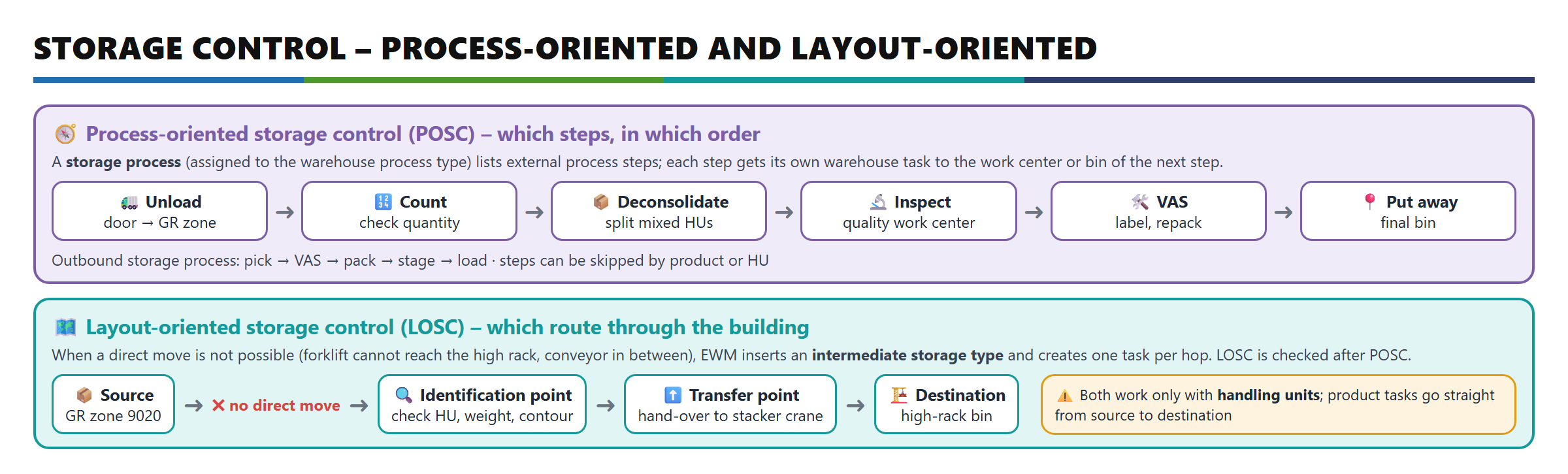
Process-oriented storage control (POSC) | Layout-oriented storage control (LOSC) | |
|---|---|---|
Question | Which process steps happen between source and final destination? | Which route through the building is physically possible? |
Defined as | A storage process (list of external steps such as unloading, counting, deconsolidation, QI, VAS, packing, staging, loading), assigned to the warehouse process type | Rules per source / destination storage type: intermediate storage type (identification point, pick point, transfer point) |
Result | One HU warehouse task per step, to the work center or bin of that step | Additional HU tasks via the intermediate storage type |
Order | Evaluated first | Applied after POSC to make each step physically possible |
Typical use | Receiving with counting and QI, outbound with pack, stage and load | High-rack with stacker cranes, conveyors, mezzanines |
- Both work only with handling units – product tasks go straight from source to destination.
- Task fields PRCES (storage process) and PROCS (external step) show where an HU stands in the storage process; the monitor shows the same.
Part 5 – Outbound process
# | Step | What happens | T-code / app |
|---|---|---|---|
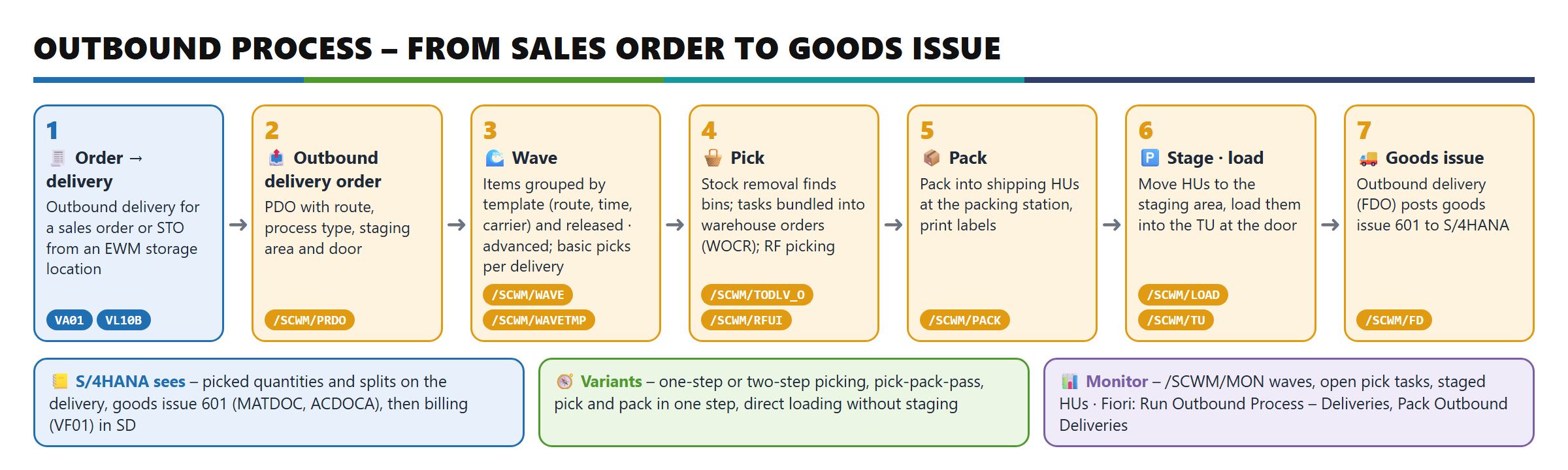
1 | Outbound delivery (S/4HANA) | Created for sales orders or STOs from the EWM storage location; ATP and route determination in SD | VA01, VL01N, VL10B |
2 | Outbound delivery order (PDO) | Created in EWM; process type, route, staging area and door determined | /SCWM/PRDO |
3 | Wave (advanced) | Items grouped by wave template (route, carrier, cut-off time) and released manually or automatically | /SCWM/WAVE, /SCWM/WAVETMP |
4 | Pick tasks and warehouse orders | Stock removal strategy finds quants; WOCR bundles tasks per activity area; queues assign them to resources | /SCWM/TODLV_O; Fiori Run Outbound Process – Deliveries |
5 | Picking | RF user picks into a pick HU, confirms quantities; differences with exception codes | /SCWM/RFUI |
6 | Packing | Pack into shipping HUs at the packing work center, print HU labels via PPF | /SCWM/PACK; Fiori Pack Outbound Deliveries |
7 | Staging and loading | HUs moved to the staging area of the door, then loaded into the TU | /SCWM/LOAD, /SCWM/TU |
8 | Goods issue | Outbound delivery (FDO) posts goods issue → 601 in S/4HANA; billing follows in SD | /SCWM/FD (or from the TU) |
- Variants: one-step picking (straight to staging) or two-step picking (pick consolidated quantities for many deliveries, then distribute), pick-pack-pass across zones, pick and pack in one step into the shipping carton, direct loading without staging.
- Delivery split: if not all items fit on the truck, EWM creates several FDOs and reports the split to the S/4HANA delivery.
Part 6 – Waves, stock removal and warehouse order creation
6.1 Waves (advanced)
- A wave groups delivery items that should be picked together (same route, same cut-off time). Wave templates define time slots, capacity and release method (manual, automatic, immediate).
- Wave release creates the warehouse tasks for all items at once – the basis for two-step picking and for balancing workload. Tables /SCWM/WAVEHDR and /SCWM/WAVEITM (page 02).
6.2 Stock removal
- Stock removal control indicator (warehouse product) → storage type search sequence for stock removal → stock removal rule, i.e. the sort order of the quants found.
- Typical rules: FIFO (oldest goods receipt date WDATU), stringent FIFO across storage types, LIFO, FEFO by shelf-life expiration date (VFDAT), partial quantities first (empty broken pallets first), fixed bin for picking faces.
- Batch selection criteria from the delivery or customer are respected during quant selection.
6.3 Warehouse order creation rules (WOCR)
After tasks are created, EWM bundles them into warehouse orders – the work package for one resource. IMG: Cross-Process Settings → Warehouse Order → Define Creation Rule for Warehouse Orders.
WOCR element | Meaning |
|---|---|
Determination | By activity area (and optionally queue); several rules can be checked in sequence |
Filters | Which tasks qualify (e.g. only full-pallet tasks) |
Limits | Max. number of items, weight, volume, processing time, number of HUs per warehouse order |
Sort rules | Order of tasks in the WO (bin sort sequence from /SCWM/LAGPS = walking path) |
Packing profile / consolidation group | Which tasks may end in the same pick HU (same ship-to, same route) |
- Warehouse orders are assigned to queues; RF users of a resource working in that queue pull the next order. Table /SCWM/WHO stores the WCR used.
Part 7 – Internal processes
Process | What it does | T-code |
|---|---|---|
Replenishment | Refills picking bins from reserve storage. Types: planned (min / max from storage type data, run in background), order-related (for open demand), automatic (triggered by a task confirmation), direct (triggered by the picker on RF when the bin is empty) | /SCWM/REPL |
Ad-hoc movement | Move an HU or a product quantity from one bin to another without a document | /SCWM/ADHU (HU), /SCWM/ADPROD (product) |
Posting change | Change stock attributes in place or with a move: stock type (Q2 → F2), batch, owner, sales order stock | /SCWM/POST, /SCWM/IM_PC |
Physical inventory | Annual, ad-hoc, cycle counting (cycle counting indicator in the warehouse product), low-stock check, putaway inventory; difference analyzer, then posting to S/4HANA | /SCWM/PI_CREATE, /SCWM/PI_COUNT, /SCWM/PI_PROCESS, /SCWM/DIFF_ANALYZER, /SCWM/WM_ADJUST |
Slotting and rearrangement (advanced) | Calculates the best storage type, section and bin type per product from demand and dimensions; rearrangement moves products to the optimal bins | /SCWM/SLOT |
Stock data transfer | Initial stock upload at go-live | /SCWM/ISU |
Part 8 – RF framework, Fiori apps and the warehouse monitor
8.1 RF framework
- /SCWM/RFUI is the entry for all mobile (radio frequency) transactions: log on with warehouse number, resource and presentation device, then a menu of logical transactions (receiving, putaway, picking, packing, counting, ad-hoc moves).
- Screens are small dynpros designed for handhelds and run in a browser via ITSmobile or on terminal devices; the RF framework Customizing defines menus, steps, function codes, validation and verification fields per presentation profile.
- Developers copy and extend RF transactions (own steps, screens and function modules) through the RF framework Customizing – page 05.
8.2 Fiori apps (selection)
App | Use |
|---|---|
Change Inbound Deliveries | Inbound delivery maintenance, items, locks, QM inspection lots after GR |
Run Outbound Process – Deliveries | Assign carriers, create pick tasks, print loading instructions, monitor outbound progress |
Pack Outbound Deliveries | Pack picked goods into shipping HUs at the packing station |
Warehouse KPIs | Open tasks, open warehouse orders, outbound delivery order KPIs with drill-down |
The full list: Fiori apps reference library, filter by warehouse roles. Public cloud uses Fiori apps throughout.
8.3 Warehouse management monitor /SCWM/MON
- The central cockpit: a node tree for documents (inbound deliveries, outbound delivery orders, waves, warehouse tasks, warehouse orders), stock and bins, resource management (queues, resources), physical inventory and alerts.
- Each node has methods: confirm or cancel a task, release a wave, print, unassign a resource, change the queue.
- Own monitors and custom nodes can be added in Customizing (page 05) – the classic place for a warehouse-specific report without writing a new transaction.
Part 9 – Key customizing and PPF actions
All EWM settings are in SPRO → SCM Extended Warehouse Management → Extended Warehouse Management. The most important activities:
IMG area | Activity | What it controls |
|---|---|---|
Master Data | Define warehouse number, storage types, sections, bin types, activity areas, doors, staging areas, work centers | Warehouse structure (page 01) |
Cross-Process Settings → Delivery Processing | Document and item types, status profiles, actions (PPF), number ranges | EWM delivery documents and what happens automatically |
Cross-Process Settings → Warehouse Task | Define / determine warehouse process type | Behaviour of every task (Part 1) |
Goods Receipt Process → Strategies | Putaway control indicator, storage type search sequence, storage section search, putaway rules | Destination bin (Part 3) |
Goods Issue Process → Strategies | Stock removal control indicator, search sequence, stock removal rules | Source quant (Part 6) |
Cross-Process Settings → Warehouse Order | Creation rules (WOCR), filters, limits | Work packages (Part 6) |
Cross-Process Settings → Storage Control | Process-oriented storage processes and layout-oriented rules | Routing (Part 4) |
Goods Issue Process → Wave Management | Wave templates, wave categories | Waves (advanced) |
Internal Warehouse Processes → Physical Inventory | PI procedures, tolerance groups, reasons | Counting and posting differences |
Mobile Data Entry | RF framework: menus, logical transactions, steps | RF screens (Part 8) |
Monitoring | Monitor nodes and methods | /SCWM/MON |
9.1 PPF actions in EWM
The Post Processing Framework (PPF) runs follow-up actions when conditions are met – for EWM deliveries, HUs, warehouse orders and TUs.
- Examples: create warehouse tasks automatically after goods receipt, create the outbound delivery (FDO), print HU labels, delivery notes or warehouse order lists, send the ASN or other messages.
- Structure: action profile (assigned to the document type) → action definitions → schedule conditions / start conditions → processing (method or Smart Form / Adobe form).
- Administration: SPPFCADM (PPF administration, action profiles and definitions), SPPFP (process actions that were scheduled but not yet run); HU printing condition records /SCWM/PRHU6.
- Developers implement own action methods or conditions as BAdIs of the PPF – page 05.
Part 10 – T-codes per process step
Area | T-code | Purpose |
|---|---|---|
Inbound | /SCWM/PRDI | Maintain inbound delivery (post GR, create tasks) |
Inbound | /SCWM/UNLOAD, /SCWM/GR | Unloading, physical goods receipt |
Inbound | /SCWM/TODLV_I | Create warehouse tasks for inbound delivery |
Inbound | /SCWM/QINSP_S4, /SCWM/QINSP | Quality workload overview (embedded); quality inspection and count (decentralized) |
Outbound | /SCWM/PRDO | Maintain outbound delivery order |
Outbound | /SCWM/WAVE, /SCWM/WAVETMP | Maintain waves, wave templates (advanced) |
Outbound | /SCWM/TODLV_O | Create warehouse tasks for outbound delivery order |
Outbound | /SCWM/PACK | Packing – general (work center) |
Outbound | /SCWM/LOAD, /SCWM/TU | Loading, transportation units |
Outbound | /SCWM/FD | Maintain outbound delivery, goods issue |
Execution | /SCWM/RFUI | Log on to RF environment |
Execution | /SCWM/TO_CONF | Confirm warehouse task (desktop) |
Internal | /SCWM/ADHU, /SCWM/ADPROD | Ad-hoc warehouse task for HU / product |
Internal | /SCWM/REPL | Replenishment |
Internal | /SCWM/POST, /SCWM/IM_PC | Posting change |
Internal | /SCWM/PI_CREATE, /SCWM/PI_COUNT, /SCWM/PI_PROCESS | Physical inventory: create, count, process |
Internal | /SCWM/DIFF_ANALYZER, /SCWM/WM_ADJUST | Difference analyzer; post differences to S/4HANA inventory management |
Internal | /SCWM/SLOT | Slotting (advanced) |
Master data | /SCWM/MAT1, /SCWM/BINMAT, /SCWM/PACKSPEC | Warehouse product, fixed bins, packaging specifications |
Master data | /SCWM/LS01, /SCWM/LS10, /SCWM/SBST | Create bin, mass-create bins, sort bins |
Master data | /SCWM/RSRC, /SCMB/SCUMAIN, /SCWM/PSA | Resources, supply chain units, production supply areas |
Monitoring | /SCWM/MON | Warehouse management monitor |
Go-live | /SCWM/ISU, /SCWM/SBUP, /SCWM/IPU | Upload stock, bins, packaging specifications |
PPF | SPPFCADM, SPPFP | PPF administration, process actions |
Part 11 – Interview questions
Q1. What is a warehouse process type and how is it determined?
The key setting of every warehouse task (/SCWM/T333): process category, activity, storage process, immediate confirmation, printing. It is determined from the EWM document type, item type, priority and the process type determination indicator of the product – the EWM counterpart of the WM movement type.
Q2. Walk me through the inbound process in EWM.
ASN or inbound delivery in S/4HANA → EWM inbound delivery (/SCWM/PRDI) → truck arrival and door → unloading and goods receipt (101, stock F1 in ROD) → optional counting / QI / deconsolidation via POSC → putaway task with search sequence and putaway rule → RF confirmation, stock F2 in AFS.
Q3. How does EWM find the destination bin?
The putaway control indicator of the warehouse product determines a storage type search sequence; each storage type is tried in turn, and its putaway rule (fixed bin, empty bin, addition to stock, general, bulk) plus capacity, bin type and HU type checks choose the bin.
Q4. What is the difference between POSC and LOSC?
POSC defines the process steps (unload, count, deconsolidate, QI, VAS, pack, stage, load) as a storage process assigned to the process type. LOSC defines the physical route via intermediate storage types when a direct move is impossible. POSC is evaluated first; both work only with HUs.
Q5. Walk me through the outbound process.
Outbound delivery in S/4HANA → outbound delivery order (/SCWM/PRDO) → wave (advanced) → pick tasks via stock removal strategy, bundled into warehouse orders by WOCR → RF picking → packing (/SCWM/PACK) → staging and loading into the TU → outbound delivery (/SCWM/FD) posts goods issue 601.
Q6. What is a wave and is it available in basic warehouse management?
A group of delivery items picked together (route, cut-off time), defined by wave templates and released manually or automatically. Wave management is part of advanced warehouse management; basic warehouses create pick tasks per delivery.
Q7. What does a warehouse order creation rule do?
It bundles warehouse tasks of an activity area into warehouse orders using filters, limits (items, weight, volume, time), sort rules (bin sequence) and packing profiles, so each resource gets a sensible work package from its queue.
Q8. Name the stock removal rules you know.
FIFO by goods receipt date, stringent FIFO across storage types, LIFO, FEFO by shelf-life expiration date, partial quantities first and fixed bin picking – defined as sort criteria on quant fields.
Q9. Which replenishment types exist in EWM?
Planned (min / max from storage type data, background job /SCWM/REPL), order-related (for open demand), automatic (triggered by task confirmation) and direct (triggered by the picker on RF when a bin is empty).
Q10. What is the RF framework?
The EWM framework for mobile devices, started with /SCWM/RFUI. Logical transactions (receiving, putaway, picking, counting) are built from steps, screens and function codes in Customizing, run in a browser via ITSmobile, and can be copied and extended by developers.
Q11. What can you do in /SCWM/MON?
Monitor and act on documents (deliveries, waves, tasks, orders), stock and bins, resources and queues, PI and alerts – confirm or cancel tasks, release waves, print, reassign. Custom nodes and methods can be added in Customizing.
Q12. What is the PPF used for in EWM?
The Post Processing Framework runs actions on deliveries, HUs, warehouse orders and TUs: automatic task creation, creating the outbound delivery, printing labels and lists, sending messages. Action profiles are assigned to document types; SPPFCADM administers them and SPPFP processes pending actions.
🏠 Start Here · ◀ 02 · Master Data · 04 · Integration & Reporting ▶ · Sections: CORE ABAP | OOPS ABAP | ABAP on HANA | Clean Core | RAP | ABAP Points | SAP Fiori | SAPUI5 | Mobile Development (MDK) | BTP Foundations | BTP Development | CAP | SAP Build | ABAP on BTP | Integration Suite | SAP Business AI | SAP BASIS | Security | SAP SDLC
Functional: FICO ABAP | TRM ABAP | VIM | SAP BIS | SD ABAP | MM ABAP | PP ABAP | QM ABAP | PM ABAP | PS ABAP | EWM | TM ABAP | EHS ABAP | HR ABAP | BW | SAP MDG | SAP Analytics Cloud | SAP Ariba | SAP CX | SAP IBP