EWM executes the warehouse, but the business documents live in the rest of S/4HANA: the purchase order and the goods receipt in MM, the sales order and the goods issue in SD, the production order in PP, the inspection lot in QM, the freight order in TM. This page shows the technical integration layer (qRFC, ALE, business systems), each module integration with the documents it creates, the physical world around the warehouse (yard, MFS, external subsystems, mobile devices) and how warehouses are monitored and measured. The overview map is on page 01 Part 7; the process steps inside EWM are on page 03; BAdIs and APIs are on page 05.
Part 1 – The integration layer: embedded vs decentralized
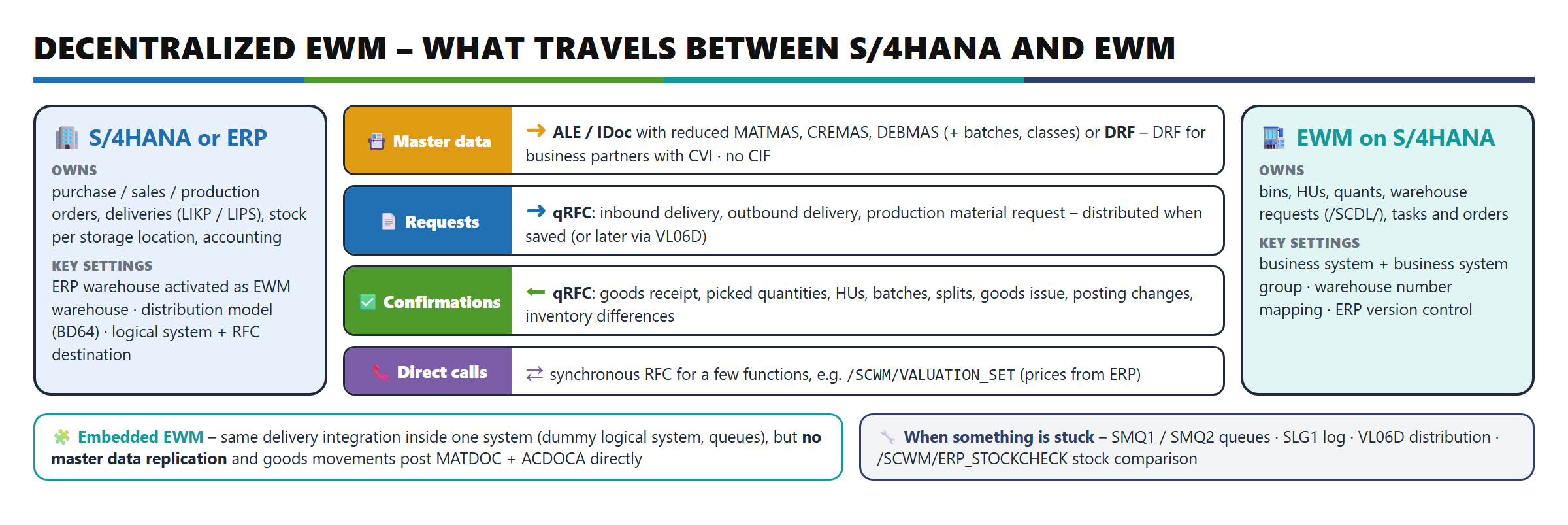
The delivery is the contract between S/4HANA and EWM. S/4HANA owns the business document (inbound or outbound delivery, LIKP / LIPS); EWM creates its own warehouse request (/SCDL/ tables) from it and reports quantities, HUs and goods movements back. Both deployment options use the same delivery integration – the difference is where the messages travel.
Integration object | Embedded EWM | Decentralized EWM on S/4HANA |
|---|---|---|
Master data (material, BP, batch, classification) | Shared – nothing to replicate; the warehouse product is created in the background | ALE / IDoc with reduced message types (MATMAS, CREMAS, DEBMAS; batches and classes too) or DRF – DRF is required for business partners with CVI. CIF is not available (only for the old SCM-based EWM) |
Deliveries and production material requests | Passed between the two parts of the same system; still configured like a distribution (dummy logical system, qRFC) | qRFC queues from S/4HANA to EWM (distribution model in BD64) |
Confirmations and goods movements | Posted directly – material document (MATDOC) and accounting document (ACDOCA) in the same LUW or queue | qRFC back to the ERP, which posts the material document (S/4HANA: MATDOC · ECC: MKPF / MSEG); stock must be reconciled |
Direct calls (method-call RFC) | Same system | Some EWM functions call S/4HANA synchronously, e.g. /SCWM/VALUATION_SET (determine prices from ERP) |
1.1 Settings an integration consultant must know
Setting | Where | What it does |
|---|---|---|
Logical systems and RFC destinations | BD54, SCC4, SM59 (destination named like the logical system) | Address of the partner system; embedded EWM uses a dummy logical system |
Business system and business system group (BSG) | EWM Customizing (Interfaces → ERP Integration) | Maps the logical system on the delivery to a business system; the BSG keeps same-numbered materials of different ERP systems apart |
ERP warehouse activated as EWM warehouse | S/4HANA Customizing for the warehouse number (communication via queued asynchronous RFC) | Creates the distribution model and sets the flags below |
Flags on the ERP warehouse | Same activity | Distribution mode (immediate or stop, later via VL06D), unchecked deliveries, serial numbers in decentralized WM, batch determination, GR from EWM only for production orders, delivery change while EWM processes it (S/4HANA only) |
Distribution model | BD64 | Objects inbound delivery, outbound delivery, production material request (or all) from the ERP warehouse to the EWM logical system |
Map warehouse numbers | EWM Customizing (Interfaces → ERP Integration) | ERP warehouse (T320 / T340D) → EWM warehouse number; needed in embedded and decentralized |
Control parameters for ERP version | EWM Customizing | Decentralized only – which ERP release is connected; embedded uses settings in the delivery process profile instead |
- Queue monitoring is daily work: SMQ1 / SMQ2 (outbound / inbound queues), SMQR / SMQS (queue registration), SLG1 (application log). A stuck delivery is almost always a failed queue entry.
- Decentralized master data setup: report /SCWM/R_DEC_EWM_ALE_SETUP creates the ALE settings for the reduced message types; vendors and customers can come as CREMAS / DEBMAS, but overlapping business partner numbers need DRF.
- Decentralized EWM on S/4HANA can be connected to SAP ERP 6.0 (EhP3 or higher) or to S/4HANA, and one EWM can serve several ERP systems (business system group).
Part 2 – Procurement and inventory management (MM)
Step | Where | Document / posting |
|---|---|---|
1. Purchase order or stock transport order | S/4HANA MM (ME21N) | Purchasing document (MM ABAP › 02) |
2. Inbound delivery | S/4HANA – from the supplier ASN (IDoc DESADV), from confirmation control, manually (VL31N) or by report | LIKP / LIPS with the EWM-managed storage location |
3. Distribution | Embedded: direct; decentralized: qRFC | EWM inbound delivery (/SCDL/ tables; in decentralized first the inbound delivery notification) |
4. Unloading, goods receipt | EWM (RF, Fiori, /SCWM/PRDI) | GR posting in EWM → material document 101 in S/4HANA, PO history and GR/IR updated |
5. Putaway | EWM warehouse tasks | No posting in MM – the stock stays in the same plant / storage location, only the bin changes |
6. Posting changes, scrapping, differences | EWM (posting change, difference analyzer) | Material documents in S/4HANA (e.g. unrestricted ↔ blocked, physical inventory differences) |
- Stock in two places: S/4HANA inventory management knows plant / storage location / stock type; EWM knows bin, HU and quant. EWM is the leading system for warehouse stock – /SCWM/ERP_STOCKCHECK compares both and adjusts the S/4HANA side to EWM. Stock in the difference analyzer counts as EWM stock.
- Storage location mapping: one EWM warehouse number covers one or more plant / storage location combinations. Stock types (e.g. received-on-dock vs available) map to storage locations through availability groups (page 01 Part 6).
- Returns to supplier are outbound deliveries (Part 3); customer returns are inbound deliveries with their own document type and usually a quality inspection (Part 5).
- Movement types, stock types and the material document tables: MM ABAP › 03 Inventory Management.
Part 3 – Sales and outbound deliveries (SD / LE)
Step | Where | Document / posting |
|---|---|---|
1. Sales order or STO | S/4HANA SD (VA01) / MM | Schedule lines with material availability date |
2. Outbound delivery | S/4HANA (VL10 due lists, VL01N) | LIKP / LIPS for the EWM-managed storage location – SD ABAP › 02 |
3. Distribution | Embedded: direct; decentralized: qRFC | EWM outbound delivery order (PDO), later the final outbound delivery |
4. Waves, picking, packing, staging, loading | EWM (page 03 Part 5 – 6) | Warehouse tasks and orders; HUs with packaging material |
5. Goods issue | EWM (or S/4HANA if allowed) | Picked quantities, HUs and batches go back to the delivery; goods issue 601 posts the material document and the cost of goods sold |
6. Billing | S/4HANA SD (VF01 / VF04) | Billing document – delivery-related billing uses the quantities EWM reported |
- Quantity changes travel back: pick denials, delivery splits and batch splits in EWM update the S/4HANA delivery, so the invoice matches what was shipped.
- Changes from S/4HANA after distribution are only allowed in specific cases (delivery change flag, status checks); otherwise the delivery is locked for changes once EWM works on it.
- Shipping output (delivery note, shipping label, ASN to the customer) can come from S/4HANA output management on the delivery or from PPF actions in EWM (page 05 Part 2).
Part 4 – Production supply and receipt from production (PP)
Components must reach the production supply area (PSA) before the order starts, and finished goods must be put away afterwards. EWM offers two integration styles.
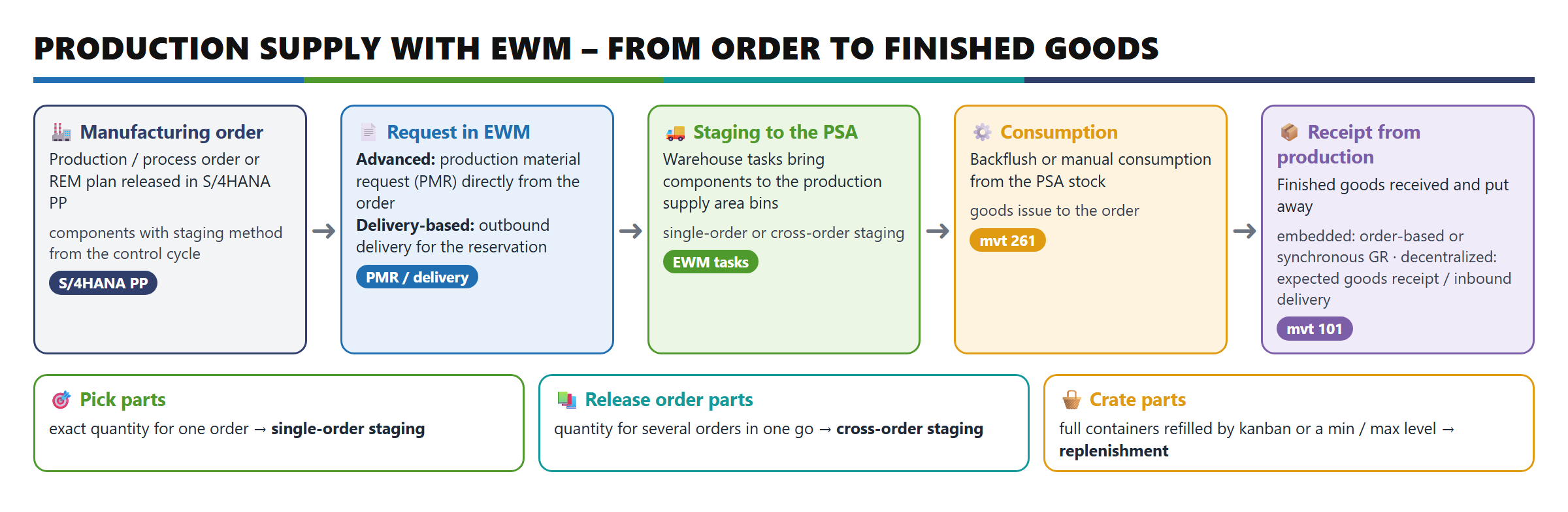
Topic | Delivery-based production supply | Advanced production integration |
|---|---|---|
Request document | Outbound delivery in S/4HANA for the reservation, distributed to EWM | Production material request (PMR) created in EWM directly from the manufacturing order – no ERP delivery |
Order types | Production orders | Production orders, process orders, repetitive manufacturing, kanban (embedded) |
Staging | Pick parts by delivery | Single-order staging (like pick parts) or cross-order staging (like release order parts); crate parts by kanban / replenishment |
Consumption | Goods issue of the delivery | Consumption posting from the PSA (backflush or manual) – material document 261 in S/4HANA |
Receipt from production | Inbound delivery for the order | Decentralized: expected goods receipt in EWM; embedded: EWM works on the manufacturing order directly, optionally synchronous goods receipt without a delivery |
- Staging methods (S/4HANA control cycle / material master): pick parts – exact quantity per order; release order parts – quantity for several orders; crate parts – full containers replenished by kanban or a min / max level.
- The PSA is replicated from S/4HANA and assigned to bins in EWM; the flag GR from EWM only on the ERP warehouse forces production receipts to start in EWM (Part 1.1).
- Production planning, orders and backflush in detail: PP ABAP; BAdIs for PSA names and consumption stock: page 05 Part 3.
Part 5 – Quality inspection (QM and QIE)
Topic | Embedded EWM | Decentralized EWM |
|---|---|---|
Engine | Without inspection rules no QIE inspection documents – EWM and QM exchange messages directly; QM creates the inspection lot in the same system | QIE (Quality Inspection Engine) in the EWM system creates inspection documents; with QM integration it triggers an inspection lot in the ERP QM |
Inspection rule | Optional since S/4HANA 1909 – without rules the inspection setup in the material master (QM view) decides | Required: what is inspected, sample or 100 % |
Inspection lot origin | Without inspection rules the standard inspection types 01 (GR for purchase order), 04 (GR from production), 08 (stock transfer), 09 (recurring batch inspection); with inspection rules origin 17 (QIE inspection documents) | Origin 17 (Extended Warehouse inspection – QIE inspection documents) |
Inspection object types (IOT) | Still activated per warehouse in Customizing; Q-inspection product / batch inbound delivery, returns delivery, warehouse-internal – no counting or HU preliminary inspection | All IOTs incl. counting inbound delivery and preliminary inspection HU |
Desktop transaction | /SCWM/QINSP_S4 (quality workload overview) | /SCWM/QINSP (quality inspection and count) |
Result | QM inspection lot and usage decision; EWM moves the stock | Inspection lot in ERP QM; the usage decision goes back to the QIE and EWM |
- Typical flow: GR posts into quality stock (stock type Q) → EWM moves the HU to a quality work center or keeps it in the bin → usage decision in QM → EWM posts the posting change to unrestricted or blocked stock and triggers follow-up actions (putaway, scrap, return delivery).
- QM side of this flow (inspection types, movement types, usage decision codes): QM ABAP › 04 Part 7.
Part 6 – Transportation (TM) and yard management
6.1 TM integration: two models
TU-based (shipping and receiving) | Advanced Shipping and Receiving (ASR) | |
|---|---|---|
Central object | EWM transportation unit (TU) and vehicle, linked to the TM freight order | TM freight order used by both TM and EWM – no TU, no EWM vehicle |
Flow | TM plans the freight order; at 'cargo ready for loading' TM sends a loading instruction; EWM loads the TU and reports back | Delivery → freight unit in TM and outbound delivery order in EWM; load planning on the freight order triggers warehouse execution |
Availability | Embedded and decentralized | Since S/4HANA 2020 FPS01, designed for embedded TM and EWM in one system |
Why choose | Existing processes, decentralized EWM | Fewer interfaces, no duplicate objects, simpler status handling – SAP's direction for new projects |
- Freight orders, freight units and TM planning in depth: TM ABAP.
6.2 Yard management (advanced)
- The yard is modelled as storage types and bins inside the warehouse number: checkpoints, parking spaces, doors.
- Check-in / check-out at the checkpoint: /SCWM/CICO – the TU becomes active, the delivery transit status changes to registered; yard moves (parking → door) are warehouse tasks: /SCWM/YMOVE.
- Without yard management EWM only records arrival and departure at the checkpoint or door.
- Dock appointment scheduling plans time slots at the loading points; large yards with their own processes use the separate product SAP Yard Logistics.
Part 7 – Automation, external subsystems and mobile devices
7.1 Material flow system (MFS)
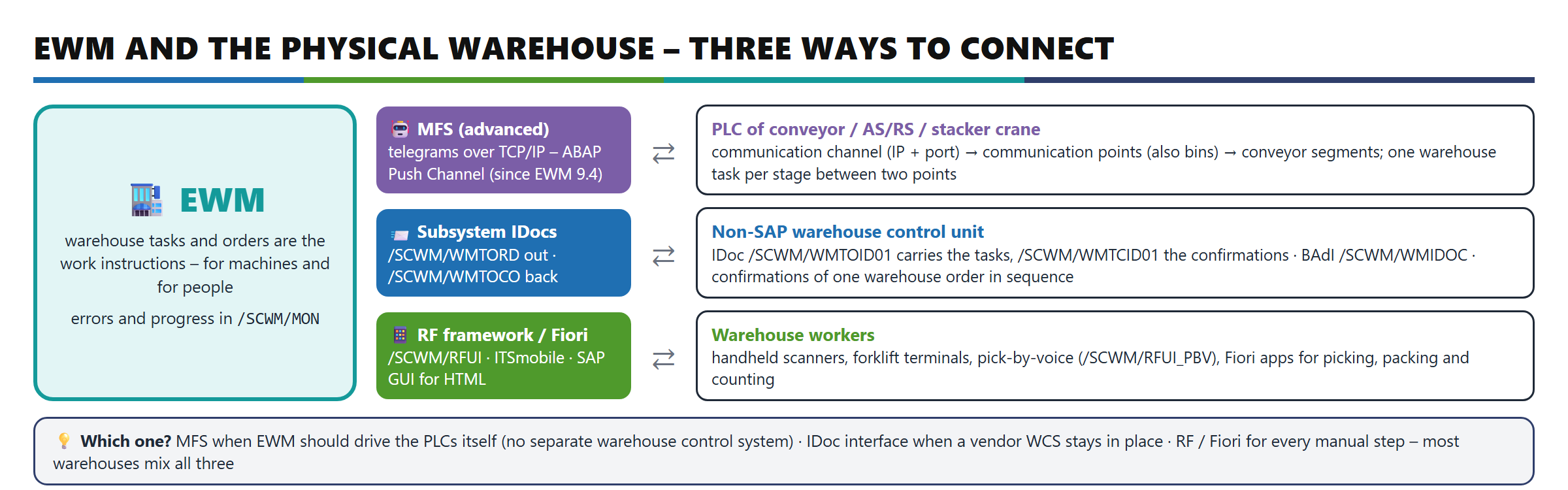
MFS lets EWM control automated equipment – conveyors, automated storage and retrieval systems (AS/RS), stacker cranes – directly, without a separate warehouse control system. EWM talks to the programmable logic controllers (PLC) with fixed-format messages called telegrams.
MFS object | Meaning |
|---|---|
PLC | Controller of a conveyor area or crane; only the head controllers are defined in EWM |
Communication channel | IP address and port, telegram length, confirmations; messages on one channel are sequential |
Communication point | Station where the PLC reports an HU and waits for the next destination; also a storage bin – each stage between two points is one warehouse task |
Conveyor segment | Connection between communication points with optional capacity; modelled in layout-oriented storage control |
Resource | Stacker crane or shuttle that moves HUs (conveyor lines are not resources) |
Telegram | Structured message EWM ↔ PLC: destination request, move order, confirmation, error |
- Connection: since EWM 9.4 the ABAP Push Channel (TCP socket) of the ABAP platform talks to the PLC directly; earlier releases needed an RFC adapter such as SAP Plant Connectivity (PCo).
- MFS is an advanced function; monitoring and error handling run in /SCWM/MON.
7.2 Non-SAP subsystems via IDoc
- A non-SAP warehouse control unit (WCU) or 'black-box' system receives warehouse tasks as IDoc /SCWM/WMTOID01 (message type /SCWM/WMTORD) and confirms them with /SCWM/WMTOCO (IDoc /SCWM/WMTCID01); it can also create tasks in EWM with an inbound /SCWM/WMTORD.
- Setup: Customizing → Interfaces → Non-SAP Systems → Connect Subsystem; BAdI /SCWM/WMIDOC adjusts inbound processing. IDoc basics: CORE ABAP › 07 Interfaces.
- Confirmations for tasks of the same warehouse order cannot be processed in parallel – the WCU must send them in sequence.
7.3 RF and mobile
Device type | Technology |
|---|---|
GUI devices (touch, keyboard) | SAP GUI on the device, transaction /SCWM/RFUI |
Browser handhelds | ITSmobile (HTML templates generated per screen) or SAP GUI for HTML with SAP Screen Personas – the mobile option in the public cloud |
Character terminals | SAPConsole (legacy) |
Voice | Pick-by-voice: /SCWM/RFUI_PBV on the RF framework |
Fiori | Fiori apps for picking, packing, counting and monitoring (page 03 Part 8) |
How RF transactions are built and changed: page 05 Part 4.
Part 8 – Monitoring, labour management, KPIs and analytics
8.1 Warehouse management monitor /SCWM/MON
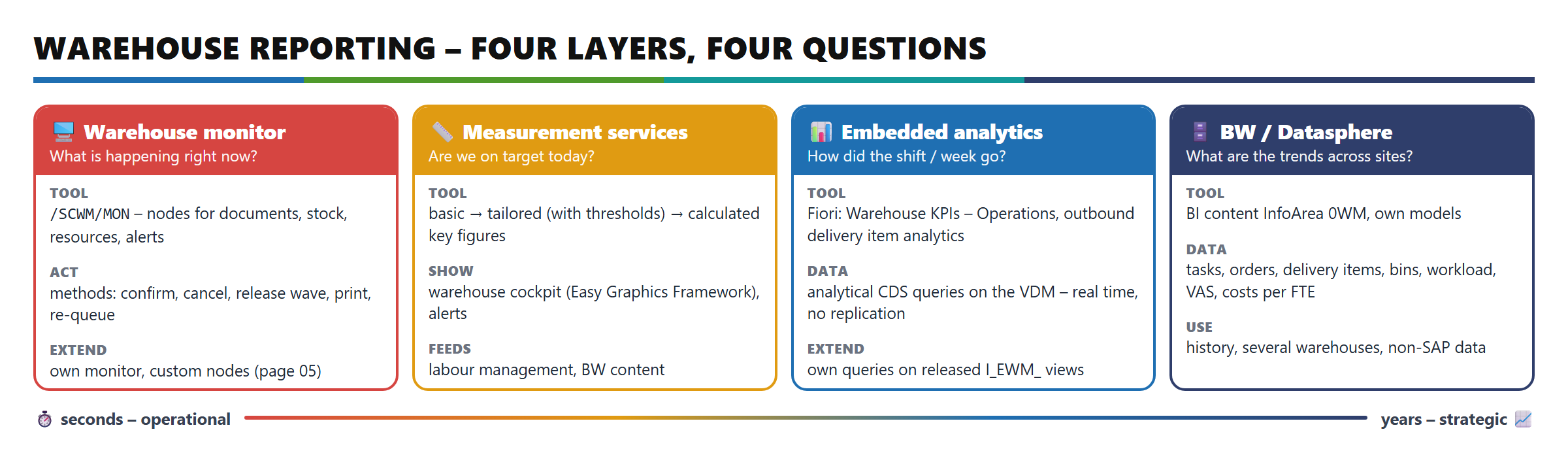
- Node classes: documents (warehouse requests, waves, warehouse orders, tasks, PI documents), stock and bin, resource management (queues, resources, users), alerts (e.g. overdue waves, deliveries without goods receipt or goods issue).
- Monitor SAP is the standard; own monitors are defined in Customizing and can reuse standard nodes and add custom nodes (page 05 Part 6). Users create node variants and hide branches.
- User parameters (SU3) can preset the default warehouse number and monitor.
8.2 Measurement services and the warehouse cockpit
Type | What it is |
|---|---|
Basic measurement service | Predefined key figure, e.g. number of open warehouse tasks |
Tailored measurement service | Basic service + selection variant + optional thresholds that raise alerts |
Calculated measurement service | Formula over tailored services, e.g. completed warehouse orders per processor |
- Results: transaction /SCWM/MS_RESULT (report /SCWM/R_MS_RESULT_READ writes table /SCWM/MS_RESULT); graphical display in the warehouse cockpit (Easy Graphics Framework, /SCWM/EGF_COCKPIT).
- Measurement services feed labour management planning and the BW content.
8.3 Labour management (advanced)
- Warehouse employees are business partners (processors); EWM records executed workload per task and compares it with engineered labour standards (planned times calculated from distance, weight, number of items).
- Indirect labour tasks (cleaning, meetings) and performance documents give a complete picture per employee or team; results can feed an HR incentive scheme.
8.4 Embedded analytics, Fiori and BW
Tool | Use |
|---|---|
Warehouse KPIs – Operations (Fiori) | KPI cards for the day: open warehouse tasks, warehouse orders, outbound delivery orders, with drill-down |
Outbound delivery analytics (Fiori) | Number, overdue items, weight or volume of outbound delivery items per shift, by carrier, door or ship-to party |
Analytical CDS queries (C_EWM_…Q) | Basis of the Fiori analytics; own queries on released I_EWM_ views (page 02 Part 10) – no replication, real time |
SAP BW / SAP Datasphere | Historical and cross-warehouse reporting; BI content InfoArea 0WM (tasks, orders, delivery items, bins, workload, VAS) |
8.5 Warehouse KPIs an architect is asked about
KPI | Definition | EWM data source |
|---|---|---|
Dock-to-stock time | Truck arrival or GR → putaway confirmed | TU / delivery timestamps, putaway task confirmation |
Order cycle time | Delivery created → goods issue | PDO status and goods issue date |
Picking productivity | Lines or tasks per hour per processor | Confirmed tasks (ORDIM_C), labour management executed workload |
Picking accuracy | Lines without exception / all lines | Exception codes on confirmed tasks |
Inventory accuracy | Bins without difference / counted bins | Physical inventory documents, difference analyzer |
On-time shipping | Shipped by planned date / all shipments | Planned vs actual goods issue |
Bin utilisation | Occupied bins / all bins per storage type | Bin status (empty indicator) |
Part 9 – Interview questions
Q1. How does an inbound delivery get from S/4HANA to a decentralized EWM?
The ERP warehouse is activated as an EWM warehouse, which creates a distribution model (BD64). Saving the delivery distributes it through a qRFC queue to the EWM logical system; EWM maps the logical system to its business system and the ERP warehouse to the EWM warehouse number and creates the EWM inbound delivery.
Q2. Which master data does decentralized EWM on S/4HANA need and how does it get there?
Material, business partners (suppliers, customers, carriers), batches and classification – by ALE IDoc with reduced message types (MATMAS, CREMAS, DEBMAS) or by DRF; DRF is required for business partners with CVI. CIF is only used by the old SCM-based EWM. Plants / supply chain units are set up in EWM.
Q3. Does embedded EWM still use qRFC?
Yes, the delivery integration is technically the same: a dummy logical system, a distribution model and queues inside the one system. What disappears is master data replication and the separate ERP posting – goods movements write MATDOC and ACDOCA directly.
Q4. A delivery does not appear in EWM. Where do you look?
Distribution status of the delivery (VL06D or the delivery monitor), SMQ1 / SMQ2 for stuck queue entries and their error text, SLG1 application log, the warehouse number mapping and the distribution model. After fixing the cause, restart the queue.
Q5. How do S/4HANA and EWM stock stay consistent?
Every EWM goods movement posts a material document in S/4HANA, so the storage location stock follows. Differences from counting go through the difference analyzer. /SCWM/ERP_STOCKCHECK compares both and adjusts the S/4HANA side to EWM, which is the leading system for warehouse stock.
Q6. What is the advanced production integration?
EWM creates a production material request directly from the manufacturing order – no ERP delivery. Staging (single-order or cross-order), consumption and receipt from production are controlled in EWM. In embedded EWM a synchronous goods receipt without a delivery is possible.
Q7. What is the QIE and does embedded EWM use it?
The Quality Inspection Engine is a framework that creates inspection documents for EWM objects using inspection object types and rules. Decentralized EWM uses it; with QM integration the QIE triggers an inspection lot (origin 17) in ERP QM and receives the usage decision. Embedded EWM can also work without it – EWM and QM then exchange messages directly. Since 1909 inspection rules are optional there: without them the material's QM inspection setup creates lots with the standard types 01, 04, 08 or 09.
Q8. TU-based integration or Advanced Shipping and Receiving?
ASR (since S/4HANA 2020 FPS01) uses the TM freight order as the one shared object and drops the EWM TU and vehicle – fewer interfaces, simpler statuses; it is designed for embedded TM and EWM. The TU-based model fits decentralized EWM and existing processes.
Q9. How does EWM control a conveyor system?
With the material flow system: PLCs, communication channels (IP / port), communication points and conveyor segments are defined in EWM. EWM exchanges telegrams with the PLC over TCP/IP via the ABAP Push Channel; each stage between two communication points is a warehouse task.
Q10. A customer already has a warehouse control system from a vendor. How do you integrate it?
Through the subsystem IDoc interface: EWM sends warehouse tasks as /SCWM/WMTORD (IDoc /SCWM/WMTOID01) and receives confirmations as /SCWM/WMTOCO; BAdI /SCWM/WMIDOC for adjustments. MFS replaces the WCS when EWM should drive the PLCs directly.
Q11. Where do you see warehouse KPIs?
Operationally in /SCWM/MON and in measurement services with the warehouse cockpit; in Fiori with Warehouse KPIs – Operations and outbound delivery analytics on analytical CDS queries; historical and cross-warehouse KPIs in BW (content 0WM) or Datasphere.
Q12. Which KPIs would you propose for a distribution centre?
Dock-to-stock time, order cycle time, picking productivity (lines per hour), picking accuracy, inventory accuracy, on-time shipping and bin utilisation – each mapped to EWM timestamps, confirmed tasks, exception codes and physical inventory results.
🏠 Start Here · ◀ 03 · Processes & Config · 05 · Development ▶ · Sections: CORE ABAP | OOPS ABAP | ABAP on HANA | Clean Core | RAP | ABAP Points | SAP Fiori | SAPUI5 | Mobile Development (MDK) | BTP Foundations | BTP Development | CAP | SAP Build | ABAP on BTP | Integration Suite | SAP Business AI | SAP BASIS | Security | SAP SDLC
Functional: FICO ABAP | TRM ABAP | VIM | SAP BIS | SD ABAP | MM ABAP | PP ABAP | QM ABAP | PM ABAP | PS ABAP | EWM | TM ABAP | GTM ABAP | EHS ABAP | HR ABAP | BW | SAP Datasphere | SAP Business Data Cloud | SAP MDG | SAP Analytics Cloud | SAP Ariba | SAP CX | SAP IBP