What an ABAP developer builds in EWM: PPF actions (labels, lists, messages, follow-up documents), BAdI implementations in the warehouse strategies, custom RF transactions, programs that create or confirm warehouse tasks, interfaces through IDocs, OData APIs and MFS, and custom monitor nodes and reports. The general techniques are taught in CORE ABAP › 10 Enhancements, 07 Interfaces and 11 Forms; RAP in the RAP section, clean core in Clean Core › 01. EWM objects and tables: page 02; processes: page 03; interfaces from the business side: page 04.
Part 1 – Where to extend EWM: choosing the technique
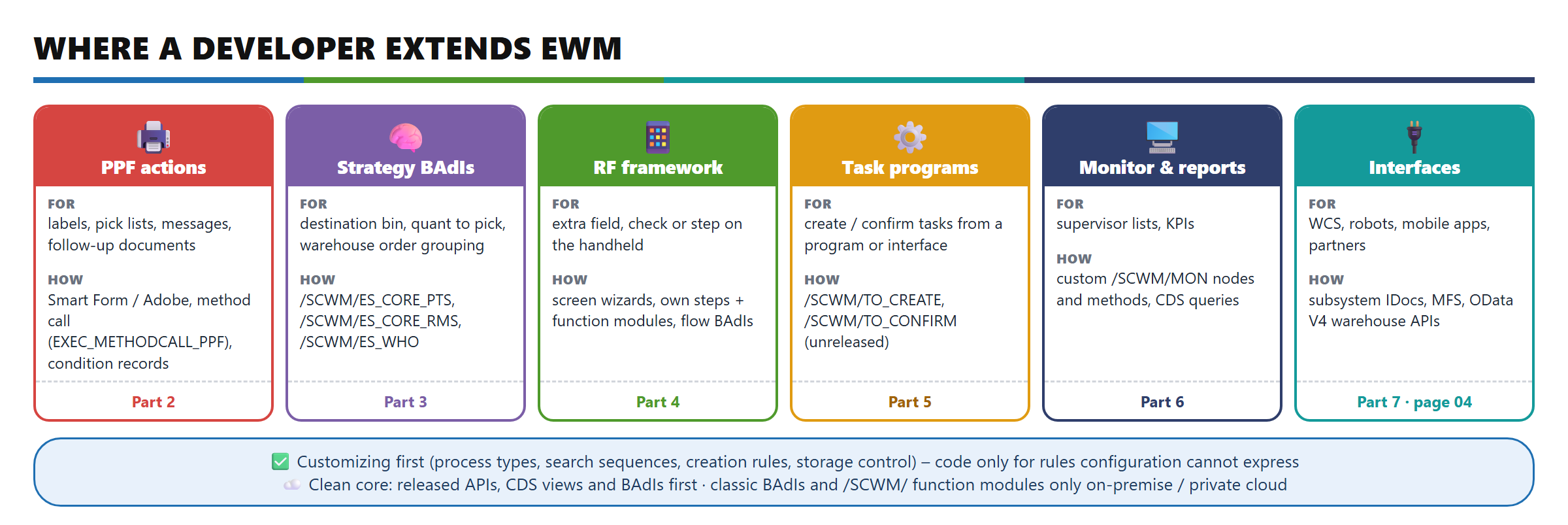
Requirement | Technique | Where |
|---|---|---|
Print an HU label or pick list, send a message when a status is reached | PPF action (Smart Form, Adobe form or method call) | Part 2 |
Own rule for the destination bin or the quant to pick | BAdIs in /SCWM/ES_CORE_PTS / /SCWM/ES_CORE_RMS | Part 3 |
Different grouping of tasks into warehouse orders | BAdIs in /SCWM/ES_WHO | Part 3 |
Extra field or step on a handheld screen | RF framework Customizing + own function group | Part 4 |
Create or confirm tasks from a program | /SCWM/TO_CREATE, /SCWM/TO_CONFIRM (on-premise) or the warehouse order / task API | Part 5, 7 |
Warehouse-specific list for supervisors | Custom monitor node in /SCWM/MON or a Fiori app on released CDS views | Part 6 |
Exchange tasks with a non-SAP control system | Subsystem IDocs /SCWM/WMTORD / WMTOCO, BAdI /SCWM/WMIDOC | Part 8, page 04 |
Mobile app or partner system reads and confirms tasks | OData API API_WAREHOUSE_ORDER_TASK_2 | Part 7 |
- First check Customizing: most warehouse behaviour (process types, search sequences, creation rules, storage control) is configurable – code only when configuration cannot express the rule.
- Namespaces: EWM application code is /SCWM/, delivery processing /SCDL/, stock /LIME/, master data partly /SAPAPO/ and /SCMB/. Product numbers are stored as GUIDs (MATID).
Part 2 – Post Processing Framework (PPF)
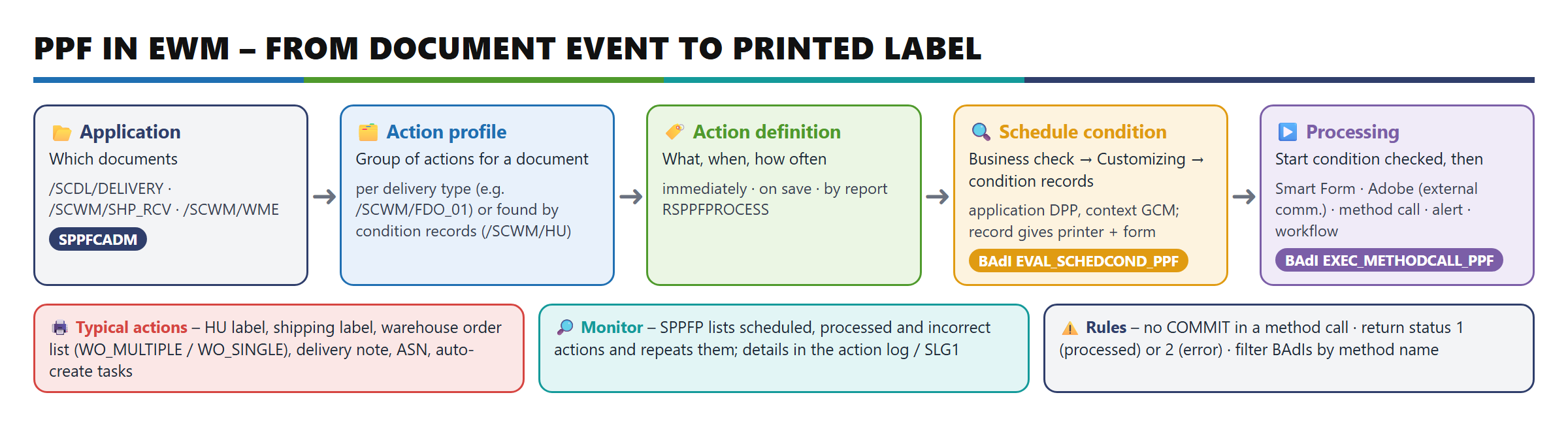
The PPF is the ABAP platform framework for condition-dependent actions – the successor of message control (NAST) in newer applications. EWM uses it for printing, messages and follow-up processing. The basic structure is on page 03 Part 9.1; here is what a developer needs.
PPF application | Objects | How the action profile is found |
|---|---|---|
/SCDL/DELIVERY | Inbound and outbound delivery documents | Action profile assigned to the delivery document type (e.g. /SCWM/FDO_01 for OUTB) |
/SCWM/SHP_RCV | Transportation units, vehicles, doors | Profiles per means of transport, TU, vehicle, door; hard-coded scheduling, no condition records |
/SCWM/WME | Warehouse orders, HUs, physical inventory documents, VAS orders | No profile on the object – condition records decide (e.g. profile /SCWM/HU for HU printing, WO_MULTIPLE / WO_SINGLE for warehouse order lists) |
2.1 Processing types and BAdIs
Processing type | Use in EWM |
|---|---|
Smart Forms print / fax / mail | Warehouse order lists (form /SCWM/WO_MULTIPLE), HU labels, delivery notes |
External communication | Adobe PDF forms |
Method call – BAdI EXEC_METHODCALL_PPF | Any ABAP logic: send a message, create a follow-up document, call an API. The BAdI filter value is the method name entered in the action definition |
Alert, workflow | Notify a user, start a workflow |
- Scheduling: EWM evaluates schedule conditions in three steps – business check (does the action make sense, is the data there), Customizing, condition records. Own schedule logic: BAdI EVAL_SCHEDCOND_PPF. Start conditions are checked again right before execution (e.g. TU not locked).
- Condition technique for EWM actions: application DPP, maintenance context GCM, condition tables / access sequences / condition types / determination procedures like in pricing; records for delivery actions in /SCWM/DLVPPFC. The records also give printer, form and spool parameters.
- Processing time: immediately, when saving, or by selection report RSPPFPROCESS (background job).
- Transactions: SPPFCADM – PPF Customizing (applications, action profiles, definitions); SPPFP – monitor and repeat actions; logs in SLG1 and in the action details.
2.2 Example: method-call action
A method-call action that sends warehouse order data to a partner system. The action definition uses processing type Method Call with method ZSEND_WO; the BAdI implementation has filter value ZSEND_WO.
|
- Interface parameters of EXECUTE: FLT_VAL, IO_APPL_OBJECT (application object with the document), IO_PARTNER, IP_APPLICATION_LOG (processing log), IP_PREVIEW, II_CONTAINER, IP_ACTION, RP_STATUS.
- Never COMMIT inside a PPF method – the application controls the LUW; for long-running work schedule a background action or a qRFC.
Part 3 – BAdIs in EWM
EWM is built with new BAdIs grouped in enhancement spots under /SCWM/ES_…; the IMG lists them under SCM Extended Warehouse Management → Extended Warehouse Management → Business Add-Ins (BAdIs) for Extended Warehouse Management, sorted by process area, each with documentation.
Enhancement spot / BAdI | Area | Typical use |
|---|---|---|
/SCWM/ES_CORE_PTS (e.g. /SCWM/EX_CORE_PTS_TYPSQ, /SCWM/EX_CORE_PTS_NBIN_BLK, /SCWM/EX_CORE_PTS_MIX) | Putaway strategy | Change the storage type search sequence, section / bin type determination, the bin search for bulk storage, mixed-storage checks |
/SCWM/ES_CORE_RMS | Stock removal strategy | Change or sort the list of quants found by the standard rule (e.g. opened HUs first) |
/SCWM/ES_WHO (e.g. /SCWM/EX_WHO_CREATE, /SCWM/EX_WHO_FLT_IL, /SCWM/EX_WHO_HDR_PROCTY) | Warehouse order creation | Own grouping logic, extra item filters, header processing after creation |
/SCWM/EX_PSA_GENERATE_NAME, /SCWM/EX_CORE_PROD_STOCK | Production supply | Name of replicated PSAs; which PSA stock is consumed and in which order |
/SCWM/EX_RF_LOGGING and the flow processing BAdIs of spot /SCWM/ES_RF_FLOW (before / after a defined flow step) | RF framework | Own RF log entries; change data or the flow around a step without copying the transaction |
/SCWM/WMIDOC (methods WMTORD_INBOUND, WMTOCO_INBOUND …) | Subsystem IDocs | Map or check inbound task and confirmation IDocs |
EXEC_METHODCALL_PPF, EVAL_SCHEDCOND_PPF | PPF | Method-call actions, own schedule conditions (Part 2) |
- Finding the right BAdI: IMG documentation per process area, SE18 on the enhancement spot, or a breakpoint on the
GET BADI/CALL BADIstatements while running the process; the spot name usually matches the package (CORE_PTS = putaway, CORE_RMS = removal). - Implement in SE19 (or ADT) with a filter on warehouse number where offered, so the logic only runs in the warehouse that needs it. Most EWM BAdIs allow several implementations.
- Strategy BAdIs run very often (every task creation, every RF scan) – no SELECT in loops, buffer master data, never send messages to the screen from them.
Part 4 – RF framework: custom steps and screens
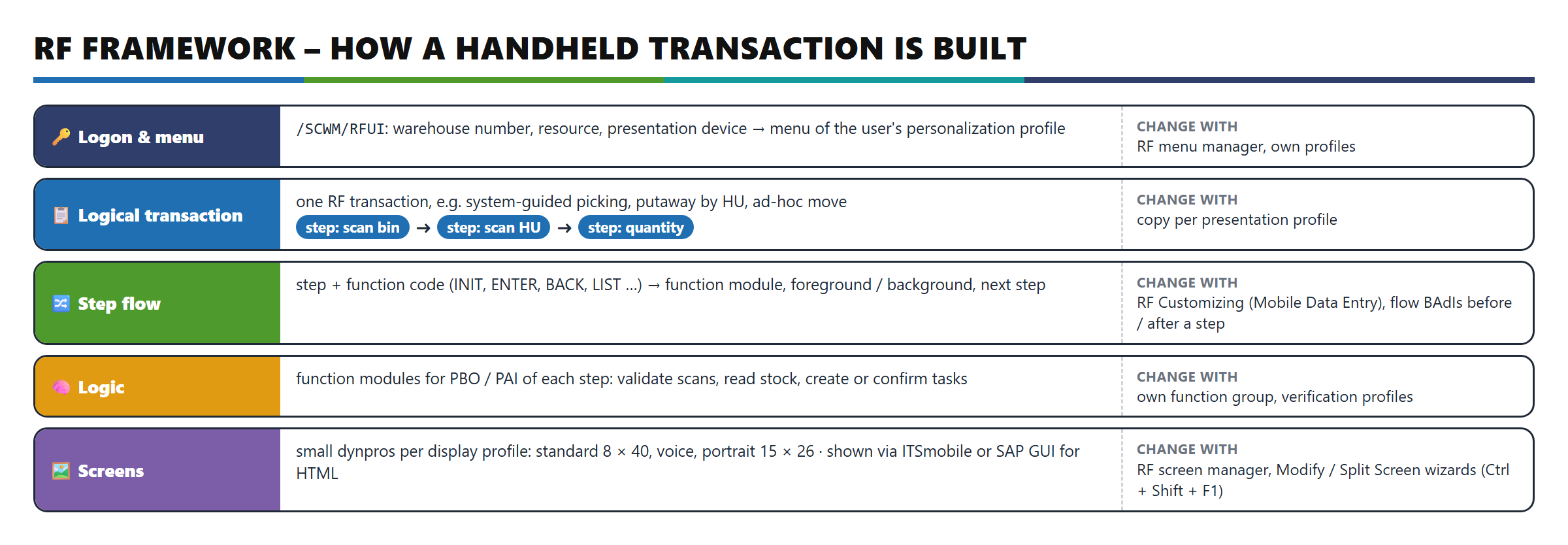
The RF framework separates business logic (function modules per step) from presentation (small dynpros per display profile). Transaction /SCWM/RFUI runs every RF transaction.
Object | Meaning |
|---|---|
Logical transaction | One RF transaction, e.g. system-guided picking or putaway by HU, entered from the RF menu |
Step | One screen state inside the logical transaction (e.g. scan source bin, enter quantity) |
Function code | User action or system event in a step (ENTER, BACK, LIST …); INIT is always the first one, triggered by the framework |
Step flow | Table logic: step + function code → function module to call, processing mode (foreground / background), next step |
Display profile | Screen size and template: standard 8 × 40, a voice profile, a portrait profile 15 × 26 (since S/4HANA 2020); own profiles possible |
Presentation profile / personalization profile | Warehouse-specific variant of the RF transactions / user-specific menus and screens |
Verification profile | Which fields must be verified by scan (bin, HU, product, quantity) |
4.1 How a custom RF change is built
- Small screen changes (hide, add a standard field, split a screen): the Modify Screen and Split Screen wizards (Ctrl + Shift + F1 inside the running transaction) generate a copy of the screen in an own function group and assign it to a personalization profile – no change to SAP objects.
- New step or own logic: copy the logical transaction for your presentation profile, create your own function group with the screens (one per display profile) and function modules for PBO / PAI logic, and register steps, function codes and step flow in RF framework Customizing (Mobile Data Entry).
- Change standard behaviour only: the flow processing BAdIs run before and after every step – often enough for an extra check or default without copying the transaction.
- Menus are maintained with the RF menu manager, screens with the RF screen manager; SAP's default menu and default profiles are locked in customer systems – work in your own profiles.
- Test with /SCWM/RFUI in SAP GUI first, then on the device (ITSmobile / SAP GUI for HTML); performance options such as asynchronous pick confirmation change the timing your code sees.
Part 5 – Function modules for warehouse tasks
Function module | Purpose |
|---|---|
/SCWM/TO_CREATE | Create one or more warehouse tasks (product or HU) and post them |
/SCWM/TO_CREATE_INT + /SCWM/TO_POST | Create tasks one by one in a loop, post once at the end (cleanup and posting are then your job) |
/SCWM/TO_CREATE_MOVE_HU | Move complete HUs |
/SCWM/TO_CREATE_WHR | Create tasks for a warehouse request (delivery) – fails when the delivery is assigned to a wave |
/SCWM/TO_CONFIRM | Confirm warehouse tasks (with exceptions such as differences) |
- These modules are not released – widely used in on-premise projects, but SAP may change their signatures in any release; SAP's own calls (where-used list) show how each is filled. In ABAP Cloud and the public cloud use the warehouse order / task API instead (Part 7).
- /SCWM/TO_CREATE takes the warehouse number and a create table; it returns the task number (EV_TANUM), the created tasks (ET_LTAP_VB) and messages (ET_BAPIRET). SAP also recommends passing the warehouse task code (
IV_WTCODE) that matches the calling process.
|
- The create structure (/SCWM/S_TO_CREATE_INT) has many more fields – source / destination HU, storage type, special stock, owner and entitled roles.
- For confirmation, fill the confirmation table with warehouse task number and actual data and call /SCWM/TO_CONFIRM; differences need an exception code.
Part 6 – Monitor extensions and custom reports
- Custom monitor: define an own monitor in Customizing (Monitoring → Warehouse Management Monitor), copy the standard nodes you need and add custom nodes. A node profile names the function module that selects the data and the structure shown in the ALV; methods (own buttons) call your own function modules for the selected lines.
- Copy a similar standard node profile as a template – its selection function module shows the expected interface. The result looks and behaves like a standard node (variants, layouts, hotspots).
- Classic report on /SCWM/ tables (ORDIM_O / ORDIM_C, WHO, AQUA, LAGP) – example on page 02 Part 7. Restrict every SELECT by LGNUM; convert MATID to the product number through the product master or use released views.
- Fiori / clean core: an analytical CDS query or a RAP list report on released I_EWM_ views (page 02 Part 10) – runs in private and public cloud alike.
- Measurement services (page 04 Part 8) cover many KPI needs without code; custom basic measurement services are possible for own key figures.
Part 7 – APIs, released CDS views and clean core
API (SAP Business Accelerator Hub) | Protocol | Use |
|---|---|---|
API_WAREHOUSE_ORDER_TASK_2 (Warehouse Order and Warehouse Task) | OData V4 | Read warehouse orders and tasks, assign resources, confirm tasks – e.g. for own mobile apps or robots |
API_WAREHOUSE_RESOURCE_2 | OData V4 | Warehouse resources (log on / off, assignment) |
API_WHSE_PHYSINVTRYITEM_2 | OData V4 | Physical inventory items (counting from external devices) |
API_WHSE_STORAGE_BIN_2 | OData V4 | Storage bins |
API_WHSE_PHYSSTOCKPROD | OData | Physical stock per product (page 02 Part 10) |
Warehouse order / task send to external system (A2A) | Async | Public cloud (from 2602): push work to an external system |
- Availability differs between public cloud and on-premise releases – an older on-premise release may not have API_WAREHOUSE_ORDER_TASK_2. The Accelerator Hub lists the APIs per edition; on-premise the V4 service group is activated in /IWFND/V4_ADMIN.
- Released CDS views (I_EWM_WarehouseTask_2, I_EWM_PhysStockProd, I_EWM_StorageBin_2 (public cloud only), I_EWM_WhseDocumentItem for the link material document ↔ task ↔ HU): page 02 Part 10. Not every EWM object has a released view yet; ADT shows the release state of each view.
- Clean-core rule for EWM: released APIs and views and released BAdIs first (level A); /SCWM/ BAdIs not released for ABAP Cloud, /SCWM/ function modules and RF framework copies are classic extensions (on-premise / private cloud only); never modify /SCWM/ code. Clean Core › 01 Clean Core; architect view: page 06 Part 6.
- Side-by-side: high-volume device integration or robotics often runs on SAP BTP (Cloud Integration, Event Mesh, own apps) calling the warehouse APIs – Integration Suite › 02 SAP Cloud Integration.
Part 8 – Typical RICEFW objects in EWM projects
Type | Typical EWM objects | Technique |
|---|---|---|
R Reports | Open tasks per queue and resource, overdue waves, bin occupancy, productivity per processor | Custom monitor node, ALV on /SCWM/ tables, analytical CDS query |
I Interfaces | Warehouse control system or automation vendor, carrier labels and tracking, 3PL partner, mobile or robot apps | Subsystem IDocs, MFS telegrams, OData APIs, CPI |
C Conversions | Warehouse products, storage bins, fixed bins, stock with HUs | /SCWM/MIG_… tools, Migration Cockpit objects (page 06 Part 5) |
E Enhancements | Own putaway or picking rule, warehouse order grouping, extra RF step or check, PPF condition | BAdIs (Part 3), RF framework (Part 4), PPF (Part 2) |
F Forms | HU and shipping labels (often ZPL for label printers), pick lists, delivery note, packing list | PPF with Smart Forms / Adobe forms – CORE ABAP › 11 Forms |
W Workflow | Approval of large inventory differences, alerts to supervisors | PPF workflow / alert processing, flexible workflow |
- Label printing is the most common EWM development: HU label at packing, pallet label at goods receipt – PPF action on /SCWM/WME (HU) with condition records per work center and printer.
- Performance matters more than in most modules: RF users wait for every scan; measure with SAT / ST12 and keep BAdI logic lean.
Part 9 – Interview questions
Q1. What is the PPF and how does EWM use it?
The Post Processing Framework schedules condition-dependent actions (print, message, method call, workflow) for application documents. EWM uses it in /SCDL/DELIVERY (deliveries), /SCWM/SHP_RCV (TUs, vehicles, doors) and /SCWM/WME (warehouse orders, HUs, PI documents); SPPFCADM for Customizing, SPPFP to monitor.
Q2. How do you implement custom logic in a PPF action?
Action definition with processing type Method Call and a method name; implement BAdI EXEC_METHODCALL_PPF with that name as filter value. EXECUTE gets the application object, preview flag and log handle and returns RP_STATUS (1 processed, 2 error). No COMMIT inside.
Q3. How is it decided whether an EWM print action is scheduled?
Three steps: business check, Customizing, condition records (condition technique with application DPP, context GCM). The condition record also gives printer, form and spool data. Own logic: BAdI EVAL_SCHEDCOND_PPF.
Q4. The customer wants opened HUs picked first. How?
First check the stock removal rules in Customizing. If no rule fits, implement a BAdI of enhancement spot /SCWM/ES_CORE_RMS that sorts the quant list found by the standard strategy, filtered by warehouse number.
Q5. Which enhancement spot is used for putaway?
/SCWM/ES_CORE_PTS – e.g. /SCWM/EX_CORE_PTS_TYPSQ for the storage type search sequence or /SCWM/EX_CORE_PTS_NBIN_BLK for bin determination in bulk storage.
Q6. How do you add a field to an RF screen?
For a standard field use the Modify Screen wizard (Ctrl + Shift + F1): it copies the screen into an own function group for a personalization profile. For new logic copy the logical transaction, add steps, function codes, step flow and function modules in RF Customizing, or use the flow BAdIs.
Q7. Explain logical transaction, step and function code.
The logical transaction is the RF transaction; a step is one screen state; a function code is the user or system action in a step. The step flow maps step + function code to a function module and the next step; INIT starts every transaction.
Q8. How do you create a warehouse task from a program?
On-premise with /SCWM/TO_CREATE (warehouse number, create table with process type, product GUID, quantities and bins; returns task number and BAPIRET messages) – not released, so wrap the call. In ABAP Cloud or from outside, the Warehouse Order and Warehouse Task API.
Q9. Why are products in EWM tables GUIDs?
EWM stores the product as MATID (GUID) from its SCM heritage – the same product master can serve several systems through business system groups. Reports convert MATID to the product number or use released views such as I_EWM_PhysStockProd.
Q10. How would you build a supervisor report of overdue tasks?
Best in /SCWM/MON as a custom node in an own monitor (copy a node profile, own selection function module), so supervisors keep the methods; or a Fiori list report on released I_EWM_ views for clean core.
Q11. What is the clean-core approach for EWM extensions?
Released APIs (API_WAREHOUSE_ORDER_TASK_2 …), released CDS views and released BAdIs first; side-by-side on BTP for device or robot integration; unreleased /SCWM/ BAdIs, /SCWM/ function modules and RF copies only on premise or in private cloud; never modifications.
Q12. Name typical RICEFW objects in an EWM project.
HU and shipping labels (PPF forms), interface to a warehouse control system (IDocs or MFS), carrier integration, custom RF steps, putaway / picking BAdIs, custom monitor nodes, migration of bins, products and stock with /SCWM/MIG_… tools.
🏠 Start Here · ◀ 04 · Integration & Reporting · 06 · S/4HANA & Architect ▶ · Sections: CORE ABAP | OOPS ABAP | ABAP on HANA | Clean Core | RAP | ABAP Points | SAP Fiori | SAPUI5 | Mobile Development (MDK) | BTP Foundations | BTP Development | CAP | SAP Build | ABAP on BTP | Integration Suite | SAP Business AI | SAP BASIS | Security | SAP SDLC
Functional: FICO ABAP | TRM ABAP | VIM | SAP BIS | SD ABAP | MM ABAP | PP ABAP | QM ABAP | PM ABAP | PS ABAP | EWM | TM ABAP | GTM ABAP | EHS ABAP | HR ABAP | BW | SAP Datasphere | SAP Business Data Cloud | SAP MDG | SAP Analytics Cloud | SAP Ariba | SAP CX | SAP IBP