The General Ledger (FI-GL) is the heart of finance: every business transaction ends as a balanced journal entry on G/L accounts, and the balance sheet and P&L are read from it. In S/4HANA the line items of the General Ledger, Controlling, Asset Accounting and the material ledger live in one table – the Universal Journal ACDOCA. This page explains the document principle, document types and posting keys, the G/L account master, open items, ACDOCA and what it replaced, ledgers and parallel accounting, document splitting, and the t-codes, Fiori apps, tables and released CDS views a developer uses. Org units and currencies: page 01; subledgers (AP, AR, assets): page 03; period-end close and financial statements: page 05.
Part 1 – The document principle
No posting without a document. Every posting creates an accounting document (journal entry) with a header and at least two line items, and debits must equal credits – otherwise it cannot be saved. A posted document is never deleted: errors are corrected by a reversal document. This audit trail is what makes the books legally valid.
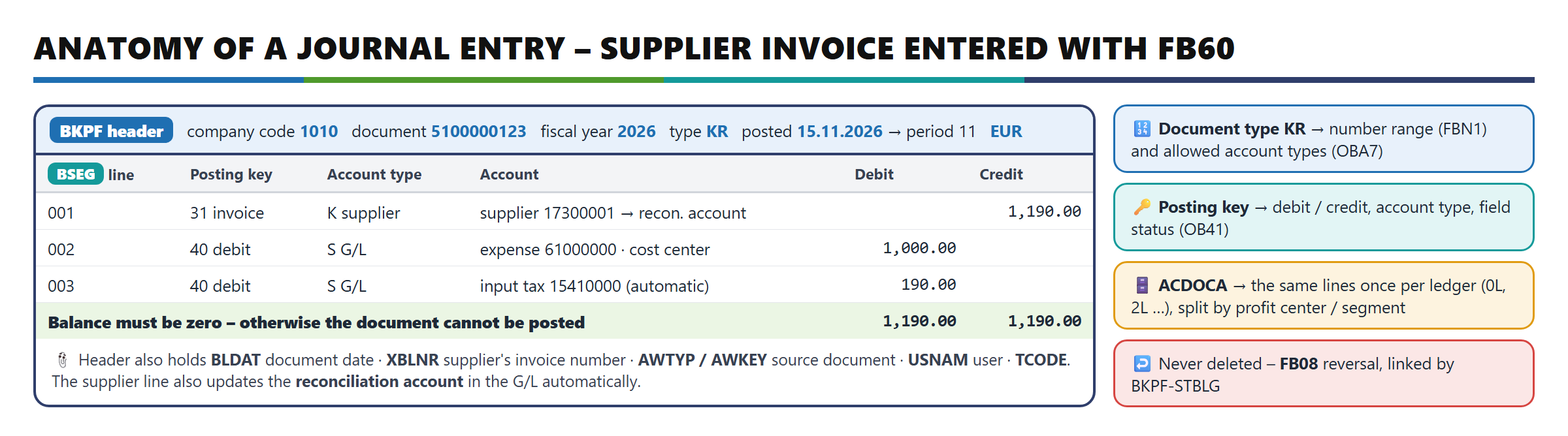
Part | Table | Key fields | Important fields |
|---|---|---|---|
Header | BKPF | BUKRS, BELNR, GJAHR | BLART document type, BLDAT document date, BUDAT posting date, MONAT period, WAERS currency, XBLNR reference, BKTXT text, USNAM, TCODE, AWTYP / AWKEY source document, STBLG reversal document, BSTAT status |
Line items (entry view) | BSEG | BUKRS, BELNR, GJAHR, BUZEI | BSCHL posting key, KOART account type, SHKZG debit S / credit H, HKONT G/L account, KUNNR, LIFNR, ANLN1, DMBTR local amount, WRBTR document amount, MWSKZ tax code, KOSTL, AUFNR, PRCTR, ZUONR assignment, SGTXT text, AUGBL / AUGDT clearing |
Line items (ledger view) | ACDOCA | RCLNT, RLDNR, RBUKRS, GJAHR, BELNR, DOCLN | One line per ledger, after document splitting – Part 5 (ECC new G/L: ledger view in FAGLFLEXA) |
Rules every document follows
- The document number is unique per company code + fiscal year; it comes from the number range of the document type (FBN1, object RF_BELEG).
- Posting date decides the period and fiscal year; document date is the date on the original paper; both are mandatory.
- Change: only fields allowed by the document change rules (OB32), e.g. text, assignment, payment block – never amounts or accounts. Change with FB02; every change is logged (BKPF/BSEG change documents).
- Reversal: FB08 (mass reversal F.80) posts a mirror document with a reversal reason; BKPF-STBLG links both. With negative posting (allowed per company code and reversal reason) the reversal reduces the original debit and credit totals instead of adding to both sides.
- Parking: a parked document (FV50 G/L, FV60 / FV70 subledgers) is saved without updating balances and without checks for completeness; it is posted later with FBV0 – often after approval in a workflow. Parked documents live in VBKPF and VBSEGS / VBSEGK / VBSEGD / VBSEGA.
- Recurring entries (FBD1 + run F.14) post the same document monthly, e.g. rent.
Part 2 – Document types, posting keys and account types
2.1 Document types
The document type (2 characters, table T003, maintained in OBA7) classifies the business transaction. It controls the number range, the account types allowed, whether a reference or a document header text is required, and – with document splitting – the business transaction variant (Part 7).
Document type | Business transaction | Created by |
|---|---|---|
SA | G/L account document | FB50, FB01, F-02 |
AB | Accounting document (general, often reversals and clearing) | FB08, clearing |
KR / KG / KZ | Supplier invoice / supplier credit memo / supplier payment | FB60, FB65, F-53, F110 |
DR / DG / DZ | Customer invoice / customer credit memo / customer payment | FB70, FB75, F-28 |
AA / AF | Asset posting / depreciation run | ABZON, AFAB |
WE / WA / WL | Goods receipt / goods issue / goods issue for delivery | MIGO, VL02N |
RE | Invoice receipt in logistics invoice verification | MIRO |
RV | Billing document transferred to accounting | VF01, VF02 |
ZP | Payment posting of the payment run | F110 |
2.2 Posting keys and account types
The posting key (2 digits, table TBSL, maintained in OB41) is entered per line item in the classic transactions (FB01, F-02). It decides debit or credit, the account type and the field status of the line. Enjoy transactions such as FB50 / FB60 choose the posting key automatically.
Account type (KOART) | Debit key | Credit key | Examples |
|---|---|---|---|
S – G/L account | 40 | 50 | Expense, revenue, bank, clearing accounts |
D – Customer | 01 invoice, 09 special G/L | 11 credit memo, 15 incoming payment, 19 special G/L | Customer open items |
K – Supplier (vendor) | 21 credit memo, 25 outgoing payment, 29 special G/L | 31 invoice, 39 special G/L | Supplier open items |
A – Asset | 70 | 75 | Acquisition, retirement |
M – Material | 89 | 99 | Inventory postings (normally automatic from MM) |
- Special G/L transactions (keys 09 / 19 / 29 / 39 + special G/L indicator, e.g. A down payment, F down payment request, W bill of exchange) post to an alternative reconciliation account so that down payments are shown separately from normal payables and receivables (page 03).
- Reconciliation accounts: customer, supplier and asset lines are posted to the subledger account; the G/L side is updated automatically on the reconciliation account (SKB1-MITKZ = D, K or A). Reconciliation accounts cannot be posted to directly.
Part 3 – The G/L account master
A G/L account has two segments. The chart of accounts segment (number, name, type) is maintained once for all company codes using the chart; the company code segment holds the settings that may differ per company code. In S/4HANA the account master also holds the controlling data (cost element category), because cost elements are G/L accounts.
Segment | Table | Key | Important fields |
|---|---|---|---|
Chart of accounts | SKA1 (texts SKAT) | KTOPL, SAKNR | GLACCOUNT_TYPE (S/4HANA), XBILK balance sheet indicator, GVTYP P&L statement account type (→ retained earnings account), KTOKS account group, BILKT group account |
Company code | SKB1 | BUKRS, SAKNR | WAERS account currency, XSALH balances in local currency only, MWSKZ tax category, MITKZ reconciliation account type, XOPVW open item management, XKRES line item display, ZUAWA sort key, FSTAG field status group, XINTB post automatically only, ALTKT alternative account, BEGRU authorization group |
Controlling area | CSKA / CSKB (written by FS00) | KOKRS, account | Cost element category (CSKB-KATYP) for accounts of type P and S, record quantity flag |
3.1 G/L account types (S/4HANA)
Type | Meaning | CO relevance |
|---|---|---|
X Balance sheet account | Assets, liabilities, equity; balance carried forward to the same account | None (fixed asset and material accounts can have cost element category 90 for statistics) |
N Nonoperating expense or income | P&L account that is not relevant for CO (e.g. extraordinary items, some taxes) | No cost element |
P Primary costs or revenue | P&L account that is also a primary cost element – costs and revenues from outside CO (FI, MM, SD, HR) | Cost element category e.g. 1 primary costs, 11 revenues, 12 sales deductions, 22 external settlement |
S Secondary costs | Exists only in CO – secondary cost element for internal allocations; no FI posting from outside | Category e.g. 21 internal settlement, 41 overhead rates, 42 assessment, 43 internal activity allocation |
C Cash account | Since S/4HANA 2020: balance sheet account for bank and cash, with subtypes bank reconciliation account, bank subaccount and petty cash | None |
- ECC → S/4HANA: cost elements were separate master data in CO (KA01 primary, KA06 secondary, tables CSKA / CSKB). In S/4HANA you create them in FS00 (G/L account type P or S + cost element category on the Control Data tab); KA01 / KA06 / KA02 lead to FS00. Cost element groups (KAH1) still exist.
- The account group (KTOKS, OBD4) controls the number interval and which master data fields are shown; retained earnings accounts are assigned to the P&L statement account type in OB53.
- Maintenance: FS00 (central, all segments), FSP0 (chart of accounts segment), FSS0 (company code segment), mass change OB_GLACC11 – 13; Fiori Manage G/L Account Master Data. For programs: G/L account APIs, never INSERT into SKA1 / SKB1.
Part 4 – Open item management and line item display
Some G/L accounts are clearing accounts: a posting on them waits for its counterpart, e.g. GR/IR (goods receipt ↔ invoice), bank clearing (payment ↔ bank statement), salary clearing. With open item management (SKB1-XOPVW) every line stays open until it is cleared against matching lines; the cleared items get a clearing document (BSEG-AUGBL) and date (AUGDT). Balance-sheet accounts such as bank or GR/IR use it; P&L accounts and reconciliation accounts never do.
Function | T-code / app | Note |
|---|---|---|
Manual clearing of G/L open items | F-03 (Fiori Clear G/L Accounts) | Select open items whose sum is zero (or post the difference) |
Automatic clearing | F.13 (G/L accounts, customers, suppliers) | Rules (OB74): match open items by fields such as assignment ZUONR or reference |
Post with clearing | F-04 | New posting + clearing in one step |
Reset cleared items | FBRA | Undo a clearing (e.g. before reversing a payment) |
Switch on open item management later | FAGL_ACTIVATE_OP | Converts existing items of an account with balance |
- Sort key (SKB1-ZUAWA) fills the assignment field ZUONR automatically (e.g. 001 posting date, or the purchase order number on the GR/IR account) – the key for automatic clearing.
- Line item display (SKB1-XKRES): in ECC needed to list line items per account; in S/4HANA every line is stored in ACDOCA anyway, so line items can always be reported.
- Index tables: ECC stored open and cleared items redundantly in BSIS / BSAS (G/L), BSID / BSAD (customers) and BSIK / BSAK (suppliers). In S/4HANA these are compatibility views – SELECTs still work, but nothing is written to them.
Part 5 – The Universal Journal ACDOCA
The Universal Journal (introduced with SAP Simple Finance, standard in every S/4HANA) is one line item table, ACDOCA, for all actual postings of FI-GL, CO, FI-AA, the material ledger and margin analysis. Every line holds the G/L account and all CO objects, logistics references and up to 10 currency amounts. Totals tables are gone – SAP HANA aggregates line items on the fly.
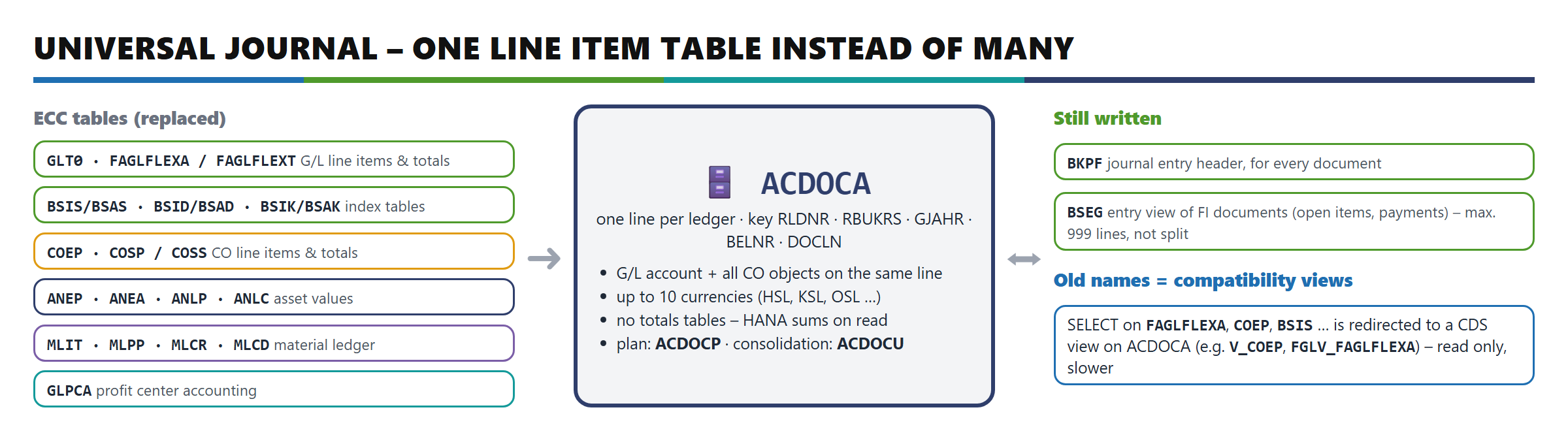
Field group | Example fields in ACDOCA |
|---|---|
Key | RCLNT, RLDNR ledger, RBUKRS company code, GJAHR fiscal year, BELNR document, DOCLN line (6 digits) |
Header and period | BUDAT, BLDAT, BLART, POPER period, FISCYEARPER, AWTYP / AWREF source document, BSTAT |
Account | RACCT G/L account, KTOPL, DRCRK debit/credit, KOART account type, LIFNR, KUNNR, ANLN1 |
FI dimensions | PRCTR profit center, SEGMENT, RFAREA functional area, RBUSA business area, RASSC trading partner |
CO objects | KOKRS, RCNTR cost center, AUFNR order, PS_POSID WBS element, OBJNR, CO_BELNR CO document |
Logistics / assets | MATNR, WERKS, EBELN, KDAUF sales order, ANLN1 / ANLN2 asset, AFABE depreciation area |
Amounts | WSL transaction currency, HSL company code currency, KSL global currency, OSL … GSL freely defined currencies, MSL quantity |
Margin analysis | Market segment characteristics such as customer, product, customer group, sales org – plus customer-defined characteristics |
5.1 What ACDOCA replaced
ECC table(s) | Content | S/4HANA |
|---|---|---|
GLT0 | Classic G/L totals | Compatibility view on ACDOCA |
FAGLFLEXA / FAGLFLEXT | New G/L line items / totals | Compatibility views (e.g. FGLV_FAGLFLEXA) |
BSIS / BSAS, BSID / BSAD, BSIK / BSAK | Index tables of open and cleared items | Compatibility views |
COEP / COSP / COSS | CO line items / totals of primary and secondary costs | Actuals in ACDOCA; COEP read through view V_COEP (plan data: ACDOCP) |
ANEP / ANEA / ANLP / ANLC | Asset line items, values, periodic values, totals | Actuals in ACDOCA, old names as compatibility views (page 03) |
MLIT / MLPP / MLCR / MLCD, CKMI1 | Material ledger documents and totals | Values in ACDOCA, ML documents in MLDOC / MLDOCCCS (page 04) |
GLPCA | Classic profit center accounting (EC-PCA) | Profit center field in ACDOCA |
BKPF / BSEG | Document header / entry view | Still written – BKPF for every journal entry, BSEG for the entry view of FI documents |
- Compatibility views: old DDIC tables stay as names; a SELECT on them is redirected to a CDS view that calculates the result from ACDOCA (proxy object, SE11 shows it). Old reports keep working, but they are slower than a direct read of ACDOCA and writing to them is impossible.
- Entry view vs ledger view: BSEG shows the document as entered (max. 999 lines, one set for all ledgers); ACDOCA holds the ledger view – one line set per ledger, including document splitting and ledger-specific postings (DOCLN has 6 digits, so far more lines are possible).
- CO-internal postings (assessment, activity allocation, settlement) create ACDOCA lines with secondary cost elements but no BSEG lines.
- BSEG was a cluster table (RFBLG) in ECC; in S/4HANA it is a normal transparent table.
- Sister tables: ACDOCP plan data, ACDOCU consolidation (Group Reporting). Custom fields are added to ACDOCA and BSEG together through the coding block or the Custom Fields app (page 06).
|
Part 6 – Ledgers, accounting principles and parallel accounting
Multinational companies must report under more than one set of rules: the group under IFRS, each subsidiary under its local GAAP, sometimes a tax view. Parallel accounting keeps these valuations side by side. In S/4HANA a ledger is a set of ACDOCA lines (field RLDNR); ledgers are defined in FINSC_LEDGER.
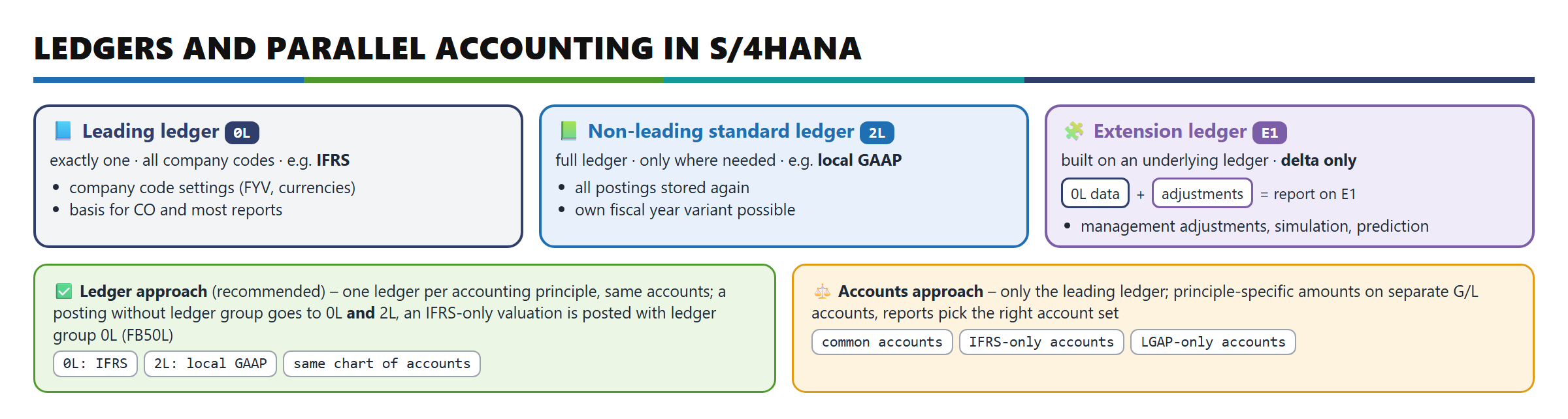
Ledger | What it is | Typical use |
|---|---|---|
Leading ledger 0L | Exactly one; assigned to all company codes; uses the company code settings (fiscal year variant, currencies). Controlling and most reports are based on it. | Group accounting principle, often IFRS |
Non-leading standard ledger | A complete ledger with all postings; assigned only to the company codes that need it; can have its own fiscal year variant. | Local GAAP (e.g. 2L), tax ledger |
Extension ledger | Built on an underlying ledger and stores only adjustment (delta) postings; reports show underlying + delta. Successor of the appendix ledger of Simple Finance. | Management adjustments, simulations, predictive accounting |
- Accounting principle (e.g. IFRS, LGAP) is assigned to ledger and company code; FI-AA depreciation areas and valuation postings refer to it.
- Ledger group: a set of ledgers posted together. A document without ledger group goes to all ledgers; a valuation adjustment for one principle is posted with a ledger group, e.g. FB50L / FB01L. The representative ledger of the group decides the posting period check.
6.1 Ledger approach or accounts approach
Ledger approach | Accounts approach | |
|---|---|---|
Idea | One ledger per accounting principle; same chart of accounts | Only the leading ledger; principle-specific postings go to separate G/L accounts (e.g. IFRS-only and LGAP-only accounts) |
Reporting | Each ledger gives a clean balance sheet and P&L | Report sums the common accounts + the accounts of one principle; needs separate financial statement versions |
Pros | Clear separation, own fiscal year variant possible, recommended by SAP in S/4HANA | Fewer ledgers, simpler for few differences |
Cons | More data volume, period close per ledger | Chart of accounts grows, error-prone postings, no different fiscal year |
- Changing the approach after go-live is a migration project – one of the first architect decisions (page 07).
Part 7 – Document splitting
IFRS 8 segment reporting needs a complete balance sheet per segment or profit center – also for payables, receivables, tax and cash. But a supplier invoice only knows the profit center on its expense lines. Document splitting splits the other lines (supplier, tax, later the payment) in the ledger view in proportion to the lines that carry the characteristic, so that every document is balanced per profit center and segment.
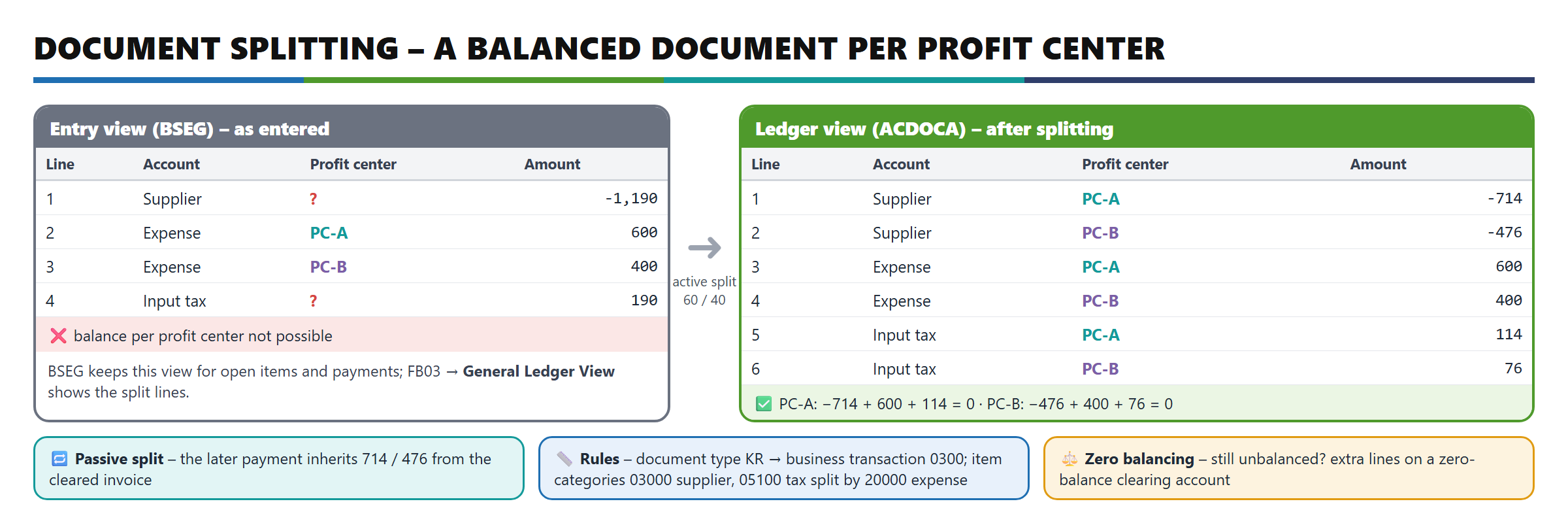
Step | What happens |
|---|---|
Passive split | Clearing documents (payment of the invoice) inherit the split of the cleared items – the bank line of the payment is split like the invoice. |
Active split | Rules decide which item categories are split by which base items, e.g. supplier (03000) and tax (05100) lines by expense lines (20000). |
Zero balancing | If a document is still not balanced per characteristic, the system adds lines on a zero-balance clearing account, e.g. for a transfer between two profit centers. |
Inheritance / default | Lines without a rule inherit the characteristic from other lines of the document, or get a default profit center. |
Configuration (Financial Accounting → General Ledger → Business Transactions → Document Splitting)
- Define document splitting characteristics – e.g. profit center, segment, business area; flag zero balance and mandatory field.
- Classify G/L accounts for document splitting – each account gets an item category (01000 balance sheet, 02000 customer, 03000 supplier, 05100 tax, 20000 expense, 30000 revenue …).
- Classify document types – each document type gets a business transaction and variant (e.g. 0300 supplier invoice for KR).
- Splitting method (SAP-delivered 0000000012) holds the rules; activate document splitting per client and deactivate it for company codes that do not need it.
- Where to see it: FB03 → General Ledger View, or ACDOCA (split lines) vs BSEG (entry view, not split). In S/4HANA Cloud Public Edition document splitting is preconfigured. Activating it in a productive system later is a separate migration project, so decide it before go-live.
Part 8 – T-codes, Fiori apps, tables and CDS views
8.1 SAP GUI transactions
Area | T-codes |
|---|---|
Post | FB50 G/L document (Enjoy), FB50L with ledger group, FB01 general posting, F-02 general posting with posting keys, FBR2 post with reference, F-04 post with clearing |
Park / recurring | FV50 park G/L document, FBV0 post parked document, FBD1 recurring entry, F.14 run recurring entries |
Display / change / reverse | FB03 display, FB02 change, FB08 reverse, F.80 mass reversal |
Line items | FBL3N (classic) / FBL3H line item browser; FAGLL03 / FAGLL03H G/L view with ledger selection |
Balances | FAGLB03 G/L account balances (new G/L, per ledger), FS10N classic balance display |
Clearing | F-03 manual, F.13 automatic, FBRA reset clearing |
Master data | FS00 G/L account, FSP0 / FSS0 segments, OBD4 account groups |
Customizing | OBA7 document types, FBN1 number ranges, OB41 posting keys, OB32 change rules, OB53 retained earnings, FINSC_LEDGER ledgers and currencies |
8.2 Fiori apps (role General Ledger Accountant)
App | Replaces / purpose |
|---|---|
Post General Journal Entries (F0718) | FB50 / FB01 – enter and post, also with ledger group |
Manage Journal Entries (F0717) | FB03 / FB02 / FB08 – search, display, change, reverse, copy as similar entry |
Display Line Items in General Ledger (F2217) | FBL3N / FAGLL03 – line items with any ACDOCA dimension, drill-down to the journal entry |
Display G/L Account Balances, Trial Balance | FAGLB03, S_ALR_87012277 – balances per period and ledger |
Upload General Journal Entries | Mass posting from a spreadsheet file |
Manage G/L Account Master Data | FS00 |
Clear G/L Accounts | F-03 |
8.3 Tables and released CDS views
Object | Table(s) | Released CDS view |
|---|---|---|
Journal entry header | BKPF | I_JournalEntry |
Journal entry item (ledger view) | ACDOCA | I_JournalEntryItem; for G/L line item reporting I_GLAccountLineItem |
Entry view item | BSEG | I_OperationalAcctgDocItem |
G/L account | SKA1, SKAT, SKB1 | I_GLAccountInChartOfAccounts, I_GLAccountInCompanyCode, I_GLAccount |
Chart of accounts | T004 | I_ChartOfAccounts |
Ledger | FINSC_LEDGER | I_Ledger |
Document type / posting key | T003 / TBSL | – |
Check the release state of a view in ADT (Properties → API State) for your release – released views are the only ones allowed in ABAP Cloud and the stable choice on-premise (ABAP on HANA › 05 CDS Views).
|
- Read balances from line items – there are no totals tables to read in S/4HANA, and HANA aggregates fast.
- Always filter the ledger: without it every amount is counted once per ledger.
- Post from programs with the Journal Entry APIs or BAPI_ACC_DOCUMENT_POST, never by INSERT into BKPF / BSEG / ACDOCA – page 06.
Part 9 – Interview questions
Q1. What is the document principle?
Every posting creates a document with a header and at least two balanced line items (debit = credit). Posted documents cannot be deleted, only reversed (FB08), which gives a complete audit trail.
Q2. What do the document type and the posting key control?
The document type (T003, OBA7) controls the number range, the allowed account types and header checks, e.g. SA, KR, DR. The posting key (TBSL, OB41) controls debit/credit, account type and the field status of a line, e.g. 40 / 50 G/L, 01 / 15 customer, 31 / 25 supplier.
Q3. What are the segments of a G/L account and their tables?
Chart of accounts segment SKA1 (texts SKAT) with number, type and account group; company code segment SKB1 with currency, tax category, open item management, line item display, sort key, field status group and reconciliation account type. In S/4HANA FS00 also holds the cost element category.
Q4. What are the G/L account types in S/4HANA?
X balance sheet, N nonoperating expense or income, P primary costs or revenue, S secondary costs; since S/4HANA 2020 also C cash account. P and S accounts are cost elements, so KA01 / KA06 are replaced by FS00.
Q5. What is the Universal Journal and which tables did it replace?
ACDOCA, one line item table for FI, CO, Asset Accounting, the material ledger and margin analysis. It replaces GLT0, FAGLFLEXA / FAGLFLEXT, the index tables BSIS … BSAK, COEP / COSP / COSS actuals, ANEP / ANLC values, the ML tables and GLPCA; the old names are compatibility views. BKPF and BSEG are still written.
Q6. Will a SELECT on FAGLFLEXT or BSIS still work in S/4HANA?
Yes – the SELECT is redirected to a compatibility view that reads ACDOCA, but it is slower and cannot be written. New code should read ACDOCA or the released views I_JournalEntryItem / I_GLAccountLineItem.
Q7. What is the difference between the entry view and the ledger view?
The entry view (BSEG) is the document as posted, the same for all ledgers. The ledger view (ACDOCA) has one line set per ledger including document splitting and ledger-specific postings.
Q8. Leading, non-leading and extension ledger – what is the difference?
The leading ledger 0L is mandatory and used by CO. A non-leading standard ledger is a full parallel ledger for another accounting principle. An extension ledger stores only delta postings on top of an underlying ledger, e.g. for management adjustments or simulations.
Q9. Ledger approach or accounts approach for parallel accounting?
Ledger approach: one ledger per principle, same accounts, clean reports – SAP's recommendation. Accounts approach: one ledger, separate accounts for principle-specific postings – fewer ledgers but a larger chart of accounts and more complex reports.
Q10. What is document splitting and why is it needed?
It splits lines without a profit center or segment (supplier, customer, tax, bank) in proportion to the lines that have one, and adds zero-balance lines if needed, so that a complete balance sheet per segment or profit center is possible (IFRS 8). Passive split for clearings, active split by rules, zero balancing.
Q11. What is open item management?
An account setting (SKB1-XOPVW) for clearing accounts such as GR/IR or bank clearing: items stay open until cleared against matching items (F-03, automatic F.13), which sets the clearing document and date.
Q12. How would you report G/L balances per profit center in custom code?
SELECT with SUM and GROUP BY from I_JournalEntryItem (or I_GLAccountLineItem), always filtered by ledger and company code – no totals tables. In analytics, build a CDS cube on top and consume it in a Fiori app or SAP Analytics Cloud.
🏠 Start Here · ◀ 01 · Overview & Org · 03 · AP, AR & Assets ▶ · Sections: CORE ABAP | OOPS ABAP | ABAP on HANA | Clean Core | RAP | ABAP Points | SAP Fiori | SAPUI5 | Mobile Development (MDK) | BTP Foundations | BTP Development | CAP | SAP Build | ABAP on BTP | Integration Suite | SAP Business AI | SAP BASIS | Security | SAP SDLC
Functional: FICO ABAP | TRM ABAP | VIM | SAP BIS | SD ABAP | MM ABAP | PP ABAP | QM ABAP | PM ABAP | PS ABAP | EWM | TM ABAP | GTM ABAP | EHS ABAP | HR ABAP | BW | SAP Datasphere | SAP Business Data Cloud | SAP MDG | SAP Analytics Cloud | SAP Ariba | SAP CX | SAP IBP