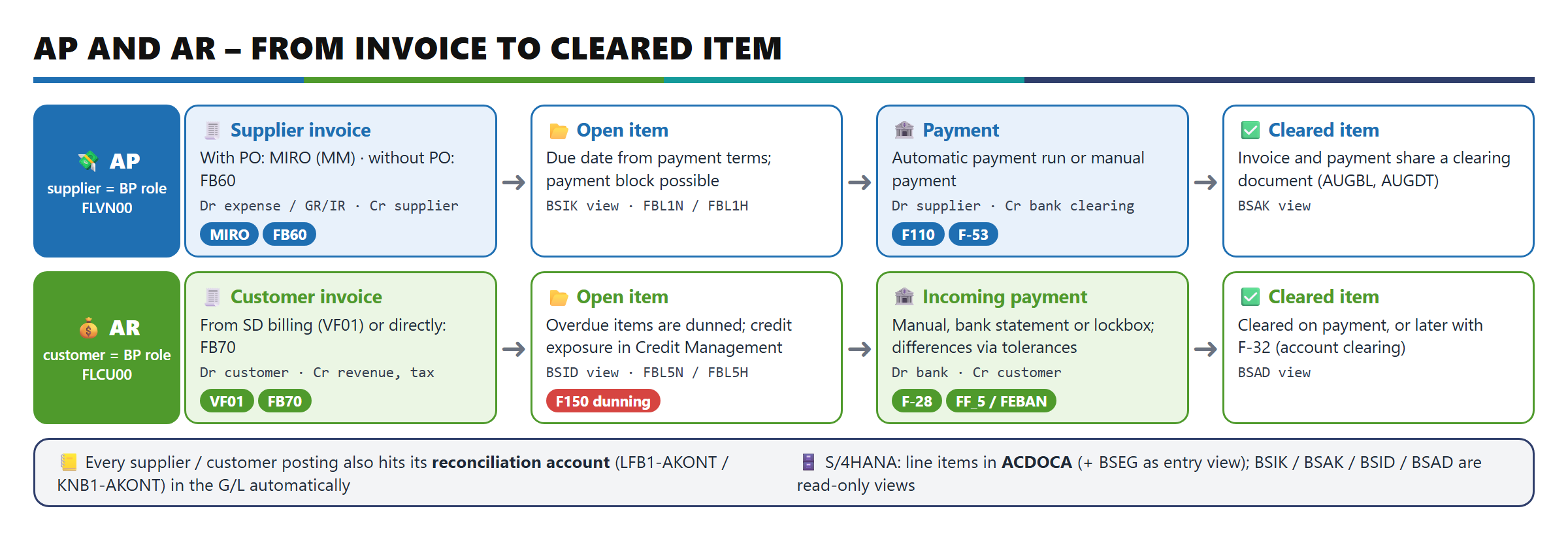
The three classic subledgers of FI: Accounts Payable (AP) – what we owe suppliers, Accounts Receivable (AR) – what customers owe us, and Asset Accounting (FI-AA) – fixed assets and their depreciation. Each keeps its own accounts with line items and open items, and every posting updates a reconciliation account in the General Ledger automatically. This page covers the master data, the end-to-end processes (invoice → payment → clearing, dunning, down payments, bank statements, asset life cycle), the key tables, t-codes, Fiori apps and released CDS views. Universal Journal and G/L: page 02; period-end close and reporting: page 05; BAdIs, BAPIs, payment formats (DMEE): page 06; migration and architecture: page 07.
Part 1 – Subledgers, business partners and reconciliation accounts
A subledger keeps one account per supplier, customer or asset. Users post to the subledger account; the system posts the same amount to the reconciliation account in the G/L. A reconciliation account cannot be posted directly, so the subledger and the G/L always agree – no separate reconciliation run is needed.
1.1 Supplier and customer as business partner
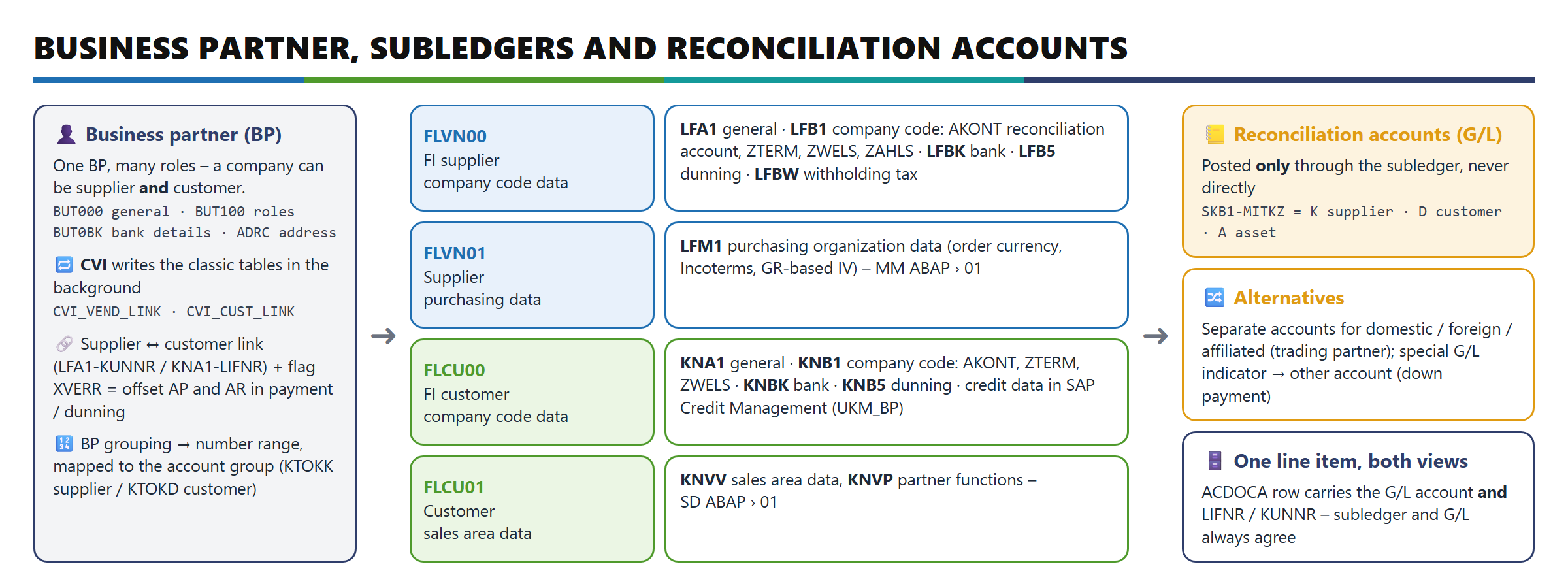
In S/4HANA suppliers and customers are business partners maintained only in transaction BP (XK01, FK01, XD01, FD01 redirect to BP). CVI (Customer/Vendor Integration) keeps the classic tables filled, so all existing reads of LFA1, LFB1, KNA1, KNB1 keep working.
BP role | Data level | Tables written by CVI | Key |
|---|---|---|---|
000000 Business partner (general) | Name, address, bank, tax numbers | BUT000, BUT0BK, ADRC; LFA1 / KNA1, bank details LFBK / KNBK | PARTNER; LIFNR / KUNNR |
FLVN00 FI supplier | Company code: reconciliation account, payment terms, payment methods, dunning, withholding tax | LFB1, LFB5, LFBW | LIFNR + BUKRS |
FLVN01 Supplier | Purchasing organization data (MM ABAP › 01) | LFM1 | LIFNR + EKORG |
FLCU00 FI customer | Company code: reconciliation account, payment terms, dunning | KNB1, KNB5 | KUNNR + BUKRS |
FLCU01 Customer | Sales area data (SD ABAP › 01) | KNVV, KNVP | KUNNR + sales area |
- Link tables CVI_VEND_LINK and CVI_CUST_LINK map the BP GUID to the supplier / customer number. The BP grouping decides the number range and is mapped to the account group (LFA1-KTOKK, KNA1-KTOKD).
- If one company is both supplier and customer, LFA1-KUNNR / KNA1-LIFNR link the two accounts; with the flag XVERR (clearing with customer / supplier) in LFB1 / KNB1, payment program and dunning offset payables against receivables.
- Important company code fields: AKONT reconciliation account, ZTERM payment terms, ZWELS allowed payment methods, ZAHLS payment block, HBKID house bank, REPRF double invoice check (LFB1).
1.2 Reconciliation accounts and account types
Account type (KOART) | Subledger | Reconciliation account flag | Example |
|---|---|---|---|
K | Supplier (AP) | SKB1-MITKZ = K | Payables domestic, payables foreign, payables affiliated |
D | Customer (AR) | SKB1-MITKZ = D | Receivables domestic, receivables affiliated |
A | Asset (FI-AA) | SKB1-MITKZ = A | Acquisition and production costs (APC), accumulated depreciation |
S | G/L account | – | Bank, revenue, expense |
M | Material (MM) | – (inventory accounts via OBYC) | Stock account BSX |
- The account type is stored per line item (BSEG-KOART, ACDOCA-KOART). Each ACDOCA line carries the G/L account and the subledger key (LIFNR, KUNNR, ANLN1), so the G/L and subledger views are the same data (page 02).
- Posting keys decide account type and debit / credit in classic entry screens – e.g. 01 customer invoice, 15 incoming payment, 31 supplier invoice, 25 outgoing payment; full table on page 02 Part 2.2.
Part 2 – Accounts payable: supplier invoices and open items
A supplier invoice creates an open item on the supplier account (credit). Two ways in:
Invoice | T-code / Fiori | Posting | Document type |
|---|---|---|---|
With purchase order – logistics invoice verification, three-way match (MM ABAP › 03) | MIRO; Fiori Create Supplier Invoice | Dr GR/IR clearing (WRX), Cr supplier | RE |
Without purchase order – rent, services, utilities | FB60 (Enjoy), F-43 (classic) | Dr expense + input tax, Cr supplier | KR |
Supplier credit memo | MIRO (credit memo), FB65 | Dr supplier, Cr expense / GR/IR | KG |
Park and post later | FV60 park, FBV0 post parked document | No ACDOCA posting while parked | – |
2.1 What controls the open item
- Payment terms (ZTERM, customizing OBB8, table T052): baseline date, cash discount periods and rates (e.g. 2 % within 14 days, net 30). The system derives the net due date that the payment program and the due date analysis use.
- Payment block on the item (BSEG-ZLSPR) or on the supplier (LFB1-ZAHLS): R is set by invoice verification for variances and released with MRBR; free / manual blocks (e.g. A) are set by AP users.
- Duplicate invoice check: with LFB1-REPRF the system warns when supplier, reference (XBLNR), document date, amount and company code match an existing invoice.
- Withholding tax (extended withholding tax, supplier master LFBW): tax deducted at invoice or payment, typical in India, Latin America and for US 1099 reporting.
- Recurring entries (FBD1 define, F.14 post) for fixed monthly invoices such as rent.
2.2 Displaying and clearing
- Line items: FBL1N (classic ALV) or FBL1H (S/4HANA line item browser, faster, optional); balances FK10N; Fiori Manage Supplier Line Items, Display Supplier Balances.
- Manual outgoing payment F-53, payment with printed form F-58, account clearing F-44 (e.g. invoice against credit memo). Reverse a document FB08, reset a clearing FBRA.
Part 3 – The payment program F110
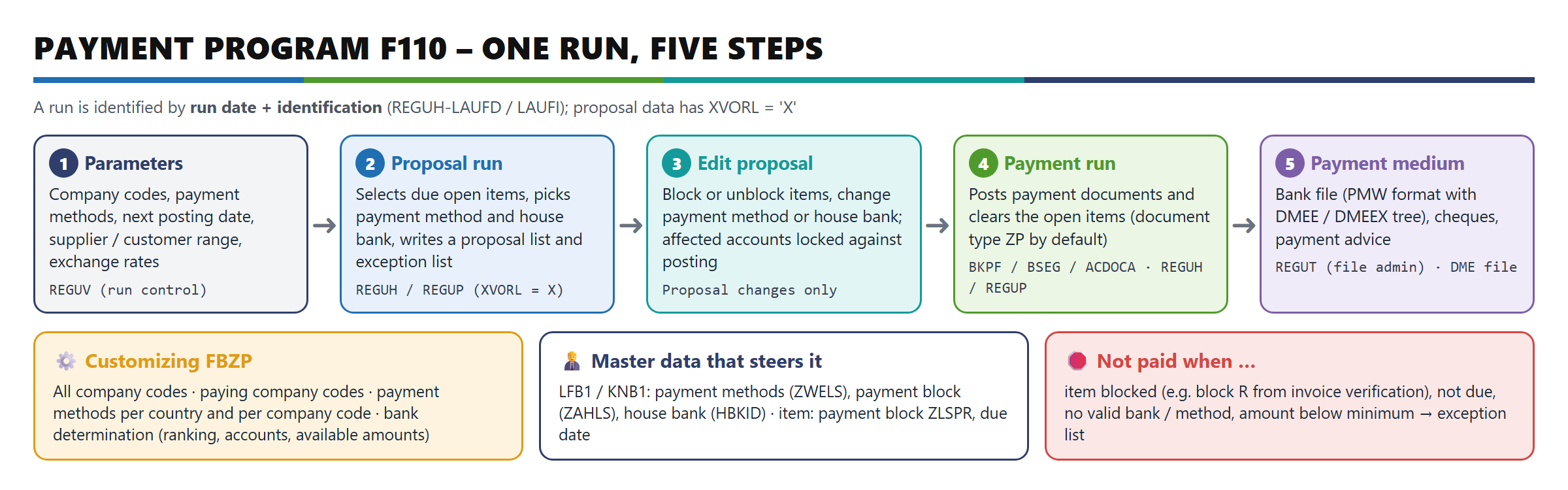
The automatic payment program selects all due open items of the chosen suppliers (and customers with refunds or direct debits), decides payment method and house bank, posts the payment documents, clears the items and creates the payment medium. S/4HANA uses the same program; the Fiori app Manage Automatic Payments wraps it with a monitor and exception handling.
Step | What happens | Result |
|---|---|---|
1 Parameters | Run date + identification, posting date, document entry date, next payment date, company codes, payment methods, accounts, exchange rate type | Parameter set (REGUV) |
2 Proposal | Program selects due items, checks blocks, groups items per payee, picks payment method and bank | Proposal list + exception list (REGUH / REGUP with XVORL = 'X') |
3 Edit proposal | AP clerk blocks / releases items, changes payment method or house bank | Corrected proposal; accounts are locked until the run is done |
4 Payment run | Posts one payment document per payee and clears the paid items | Payment documents (FI), REGUH / REGUP (XVORL = space) |
5 Print / payment medium | Payment Medium Workbench creates the bank file (e.g. SEPA, ISO 20022 pain.001), cheques, payment advice notes | DME file administration (REGUT), cheque register |
3.1 Customizing (FBZP)
Area | Controls |
|---|---|
All company codes | Sending and paying company code, tolerance days, special G/L transactions to be paid (e.g. down payment requests) |
Paying company codes | Minimum amounts, forms for payment advice, bill of exchange settings |
Payment methods in country | Outgoing / incoming, type (transfer, cheque, direct debit), required master data (bank details, address), document types, payment medium (PMW format) |
Payment methods in company code | Minimum / maximum amounts, foreign currency and foreign payee allowed, grouping, form or PMW format |
Bank determination | Ranking order of house banks per payment method and currency, bank accounts, available amounts, value date, charges |
- House bank (HBKID, 5 characters) + account ID (HKTID): classic tables T012 / T012K. In S/4HANA house banks are maintained with FI12_HBANK (or the Fiori app Manage Banks) and the bank accounts themselves in Bank Account Management (Fiori app Manage Bank Accounts); FI12 only displays bank accounts (Part 8).
- Payment medium: the classic
RFFO*print programs are legacy; current formats run in the Payment Medium Workbench (PMW) – format defined in OBPM1, mapped with a DMEE tree (S/4HANA: DMEEX, extended DMEE). Building and enhancing formats: page 06. - Bank connectivity: files go to the bank through SAP Bank Communication Management (batching, payment approval, e.g. Fiori Approve Bank Payments) and, if used, SAP Multi-Bank Connectivity on BTP.
3.2 Payment run tables
Table | Content | Key fields |
|---|---|---|
REGUV | Control record per run: status of proposal and payment run | LAUFD, LAUFI |
REGUH | One record per payment (payee, payment method, house bank, amount, payment document VBLNR) | LAUFD, LAUFI, XVORL, ZBUKR, LIFNR, KUNNR, EMPFG, VBLNR |
REGUP | Paid items: one record per invoice / credit memo in a payment | REGUH key + BUKRS, BELNR, GJAHR, BUZEI |
REGUT | Administration of generated DME files (TemSe) | Run, file number |
|
Part 4 – Accounts receivable: invoices, incoming payments and clearing
Most customer invoices come from SD billing: releasing the billing document (VF01 / VF04) posts Dr customer, Cr revenue and output tax (SD ABAP › 02 – 03; revenue account determination VKOA). Invoices without SD – rent, recharges, sale of scrap – are posted in FI.
Step | T-code | Fiori app | Note |
|---|---|---|---|
Customer invoice / credit memo | FB70 / FB75 (F-22 classic) | Manage Customer Line Items (display) | Document type DR / DG; SD billing uses RV |
Incoming payment | F-28 | Post Incoming Payments | Select open items, clear fully or partially |
Clear open items on an account | F-32 (customer), F-44 (supplier) | Clear Incoming Payments | Invoice against payment on account or credit memo |
Post with clearing | F-30 | – | Any posting that clears items, e.g. transfer between accounts |
Line items / balances | FBL5N, FBL5H; FD10N | Manage Customer Line Items, Display Customer Balances | FBL5H = S/4HANA line item browser |
Bank statement / lockbox | FF_5, FEBAN, FLB2 (US lockbox) | Manage Bank Statements | Automatic cash application (Part 8) |
Correspondence, statements, interest | F.27 account statement, FINT interest on arrears | – | Customer statements and interest calculation |
4.1 Partial payments, residual items and differences
- Partial payment: the invoice stays open and the payment is posted as a separate open item linked to it (invoice reference) – both cleared later.
- Residual item: the invoice is cleared and a new open item for the remaining amount is created.
- Payment differences within the tolerance groups (customer / supplier tolerances OBA3, employee tolerances OBA4) are written off automatically (cash discount adjustment or a difference account); reason codes (OBBE) decide how a difference is treated and posted.
- Clearing writes AUGBL (clearing document) and AUGDT (clearing date) into the cleared lines – an item is open when AUGBL is initial.
Part 5 – Dunning and credit management
5.1 Dunning (F150)
The dunning program reminds customers of overdue items with letters of increasing severity. The dunning procedure (customizing FBMP) defines dunning levels, the dunning interval in days, minimum amounts and days in arrears, dunning charges, interest and the form per level.
Step in F150 | What happens |
|---|---|
Parameters | Run date + identification, dunning date, documents posted up to, company codes and accounts |
Dunning proposal | Selects overdue items, determines the new dunning level per item and account; can be edited (block item or account) |
Creates dunning letters and updates the dunning data in the customer master and the items |
- Master data: dunning procedure, last dunning date and dunning level per customer and company code in KNB5 (MAHNA, MADAT, MAHNS); on the item: dunning block (MANSP), dunning key and level (MANST).
- Dunning run tables: MHNK (dunning data per account) and MHND (dunning data per item). Forms are SAPscript, Smart Forms or PDF-based (CORE ABAP › 11 Forms); output can be by print, fax or e-mail.
- Supplier dunning exists as well (for debit balances, e.g. after credit memos) – data in LFB5.
5.2 Credit management
- S/4HANA: classic FI-AR credit management (credit control area, KNKK, FD32, F.28) is legacy. SAP Credit Management (FIN-FSCM-CR) is used instead: credit segments, score and risk class, credit limit and exposure per business partner, maintained in BP with role UKM000 (transaction UKM_BP).
- The credit check in sales orders and deliveries, the credit block (ECC VKM1 · S/4HANA UKM_MY_DCDS) and the related tables: SD ABAP › 03.
- Related FSCM components for receivables: Collections Management (worklists for collectors) and Dispute Management (dispute cases for short payments).
Part 6 – Open items in S/4HANA: BSIK, BSAK, BSID, BSAD
ECC kept secondary index tables for fast open item access, written in parallel to BSEG. S/4HANA no longer writes them: tables with the same names are now read-only compatibility views that select from the line item tables and present the old structure.
Name | ECC | S/4HANA |
|---|---|---|
BSIK / BSAK | Supplier open / cleared items (index tables) | Compatibility views – read works, write is impossible |
BSID / BSAD | Customer open / cleared items | Compatibility views |
BSIS / BSAS | G/L open / cleared items (open item managed accounts) and line item index | Compatibility views |
BSEG | Line items of the FI document (cluster table in ECC) | Transparent table, still written as the entry view of FI documents; ACDOCA is the single source for amounts |
ACDOCA | – | Universal Journal: all FI, CO, AA, ML line items (page 02) |
- Existing
SELECTs on BSIK etc. still work – but each view hides a join over the line items. On large volumes, SE16 queries on these views can run long; in new code select only the fields you need or use a released CDS view. - Clean core: read open items with I_OperationalAcctgDocItem (operational accounting document item with account type, supplier, customer, net due date and clearing fields) and journal entries with I_JournalEntry / I_JournalEntryItem (ABAP on HANA › 05 CDS Views).
- Noted items such as down payment requests are written only to BSEG, not to ACDOCA (they have no amount effect) – I_OperationalAcctgDocItem shows them, a pure ACDOCA read does not.
|
Part 7 – Down payments and special G/L transactions
Special G/L transactions are supplier or customer postings that must not land on the normal reconciliation account. A special G/L indicator (BSEG-UMSKZ, e.g. A, F, W) switches the posting to an alternative reconciliation account, so down payments and bills of exchange appear separately in the balance sheet. Configuration per indicator and reconciliation account: FBKP.
Type | Effect | Example |
|---|---|---|
Noted item | No G/L posting, only a one-sided reminder item (BSEG only); can be paid by F110 | Down payment request (indicator F) |
Statistical posting | Posted with a fixed offsetting account, shown as a contingent item | Guarantees given / received |
Free offsetting entry | Real posting with a normal offsetting account | Down payment (indicator A), bill of exchange (W) |
Step | Supplier (AP) | Customer (AR) |
|---|---|---|
Down payment request (noted item) | F-47 | F-37 |
Down payment posted (paid / received) | F-48 (or F110 paying the request) | F-29 |
Clear the down payment against the final invoice | F-54 | F-39 |
- Example AP: down payment 1,000 → Dr supplier (A, special reconciliation account 'down payments made'), Cr bank. Final invoice 5,000 → Cr supplier. F-54 transfers the down payment to the normal account so 4,000 remain to pay.
- In logistics, down payments can be agreed in the purchase order and requested with reference to it; in SD, billing plans create down payment requests (SD ABAP › 02).
Part 8 – Bank accounting
Object | Purpose | T-code / app | Table |
|---|---|---|---|
Bank master (bank directory) | All banks with bank key, SWIFT / BIC | FI01 – FI03 | BNKA |
House bank | Our bank (5-character ID) used by payment program and bank statement | S/4HANA: FI12_HBANK, Manage Banks (ECC: FI12) | T012 |
House bank account | Account ID + G/L account; S/4HANA: master data in Bank Account Management with signatories and approval | Manage Bank Accounts (FI12 display) | T012K + BAM tables |
Electronic bank statement | Import MT940, CAMT.053, BAI2 files; post and clear automatically | FF_5, FEBAN post-processing; Manage Bank Statements | FEBKO header, FEBEP items, FEBRE note to payee |
Manual bank statement | Enter statement lines by hand | FF67 | FEBKO / FEBEP |
Cash journal | Petty cash book per company code | FBCJ |
|
8.1 Bank statement and cash application
- The bank's external transaction code (e.g. incoming SEPA credit) is mapped to a posting rule (customizing OT83 – electronic bank statement settings). Posting area 1 posts to the G/L (Dr bank, Cr bank clearing), posting area 2 clears the subledger (Dr bank clearing, Cr customer).
- Interpretation algorithms search the note to payee for document numbers or references to find the open items to clear; unmatched lines go to post-processing (FEBAN or the Fiori app Reprocess Bank Statement Items).
- Bank clearing accounts (incoming / outgoing) bridge the time between the payment posting (F110, F-28) and the bank statement – their balance shows payments not yet seen on the statement.
- SAP Cash Application adds machine learning matching of incoming payments to open items for lines the rules cannot match. Cash position and liquidity forecast belong to SAP S/4HANA Cash Management (page 07).
Part 9 – Asset Accounting: structure and master data
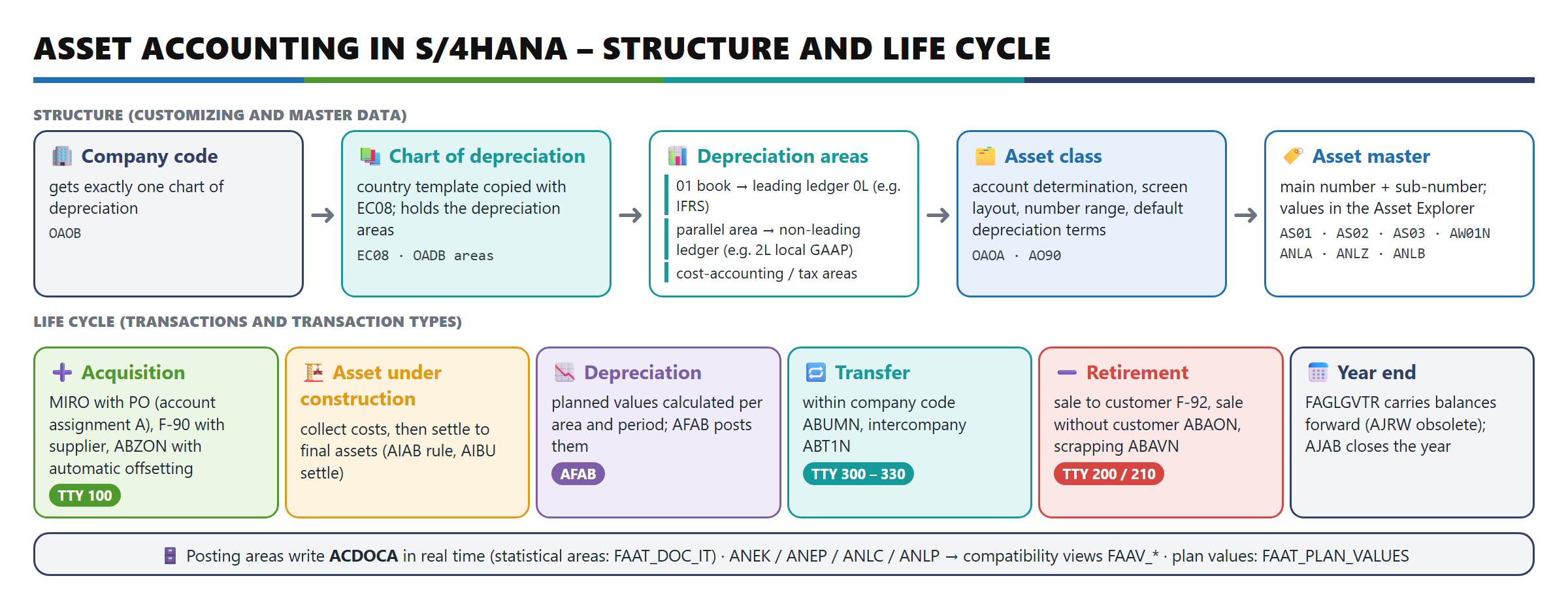
S/4HANA: new Asset Accounting is the only option – classic Asset Accounting is not available. Every depreciation area that posts to the G/L posts in real time together with the G/L (no periodic APC posting, no delta areas), each valuation into its own ledger, and every asset posting is a line in ACDOCA. There is no separate reconciliation of AA against the G/L any more.
9.1 Organizational objects and customizing
Object | Meaning | Customizing |
|---|---|---|
Chart of depreciation | Country-specific list of depreciation areas; copied from a SAP template and assigned to the company code (one per company code) | EC08 copy, OAOB assign |
Depreciation area | One valuation of the asset (book, IFRS, tax, cost accounting); posting indicator says whether and how it posts to the G/L | OADB |
Accounting principle → ledger group → area | Links each area to the ledger it posts to (e.g. group principle IFRS in the leading ledger 0L, local GAAP in a non-leading ledger such as 2L) | Ledger approach (page 02 / 07) |
Asset class | Groups assets (buildings, machines, IT, AuC, low-value assets); gives account determination, screen layout, number range and default depreciation terms | OAOA |
Account determination | Balance sheet accounts (APC, accumulated depreciation), depreciation expense, gain / loss on retirement per area | AO90 |
Depreciation key | Method (straight line, declining balance, units of production), base value, period control | AFAMA |
- Typical areas (numbers follow the country template): 01 book depreciation (posts to the leading ledger), parallel areas for the other accounting principles, tax areas and 20 cost-accounting depreciation (costs to CO only).
- Integrated asset acquisition with a supplier uses a technical clearing account so that each ledger can value the acquisition separately.
9.2 Asset master and tables
- Create AS01, change AS02, display AS03, sub-number AS11; Fiori Manage Fixed Assets. An asset has a main number (ANLN1) and a sub-number (ANLN2) for later additions or components.
Table | Content | S/4HANA |
|---|---|---|
ANLA | Asset general data: class (ANLKL), description, capitalization date (AKTIV), deactivation date (DEAKT) | Unchanged |
ANLZ | Time-dependent assignments: cost center, plant, location | Unchanged |
ANLB | Depreciation terms per area: depreciation key (AFASL), useful life (NDJAR / NDPER) | Unchanged |
ANLH | Main asset number data | Unchanged |
ANEK / ANEP | Asset document header / line items | Actuals in ACDOCA; read via compatibility views FAAV_ANEK / FAAV_ANEP |
ANLC | Asset values per fiscal year and area | No longer written – values from ACDOCA, view FAAV_ANLC |
ANLP | Posted depreciation per period | ACDOCA; view FAAV_ANLP |
FAAT_PLAN_VALUES | – | S/4HANA: planned depreciation per area and period |
FAAT_DOC_IT | – | S/4HANA: statistical line items (areas that do not post to the G/L) |
- Selects on ANEP / ANLC are redirected to the
FAAV_*views; data from before the conversion is inFAAV_*_ORI. New code: ACDOCA (fields ANLN1, ANLN2, AFABE depreciation area, ANBWA transaction type) or the released CDS view I_FixedAsset for the master data.
Part 10 – Asset transactions, depreciation and year-end
Each asset posting has an asset transaction type (ANBWA) that controls the value fields and the accounts – e.g. 100 external acquisition, 200 retirement without revenue, 210 retirement with revenue, 300 – 330 transfers.
Business event | T-code | Posting |
|---|---|---|
Acquisition with purchase order | MIGO / MIRO with account assignment A (MM) | Dr asset APC, Cr GR/IR → supplier |
Acquisition with supplier invoice (no PO) | F-90 | Dr asset APC, Cr supplier |
Acquisition with automatic offsetting entry | ABZON | Dr asset APC, Cr clearing account (e.g. in-house production) |
Asset under construction (AuC) settlement | AIAB distribution rule, AIBU settle | Cr AuC, Dr final asset(s) |
Transfer within company code / intercompany | ABUMN / ABT1N | Retire on sender, acquire on receiver |
Retirement with revenue – sale to customer | F-92 | Dr customer, Cr revenue; asset APC and depreciation retired, gain / loss |
Retirement with revenue – no customer | ABAON | Revenue against a clearing account |
Retirement by scrapping | ABAVN | Net book value → loss on scrapping |
Unplanned depreciation / write-up / post-capitalization | ABAA / ABZU / ABNAN | Extra value adjustments |
Reverse an asset document | AB08 | Reversal |
10.1 Depreciation run (AFAB)
- Planned depreciation is calculated when the asset or its values change and stored per area and period (S/4HANA: FAAT_PLAN_VALUES; ECC: planned values in ANLP / ANLC). The depreciation run AFAB only posts these values for a period: Dr depreciation expense (with cost center from ANLZ), Cr accumulated depreciation.
- S/4HANA: program FAA_DEPRECIATION_POST replaces RAPOST2000; the old options (planned posting run, repeat, restart, unplanned posting run) are gone – a run can simply be started again and posts what is missing. Since S/4HANA 1809 the depreciation run no longer writes BSEG, only ACDOCA.
- Fiori: Schedule Asset Accounting Jobs (depreciation run and other jobs as application jobs). Recalculate depreciation after customizing changes: AFAR.
10.2 Year-end and reporting
- Fiscal year change: in S/4HANA the asset balances are carried forward with the G/L balance carry forward FAGLGVTR (Fiori Carry Forward Balances) – the separate AA fiscal year change AJRW is legacy.
- Year-end closing AJAB closes the fiscal year for Asset Accounting (checks that depreciation is fully posted and no errors remain; the year is then locked for postings). Settings for legacy data transfer and closing: FAA_CMP.
- Reports: AW01N Asset Explorer (values, planned and posted depreciation per area), asset history sheet S_ALR_87011990, asset balances; Fiori Asset Balances, Asset History Sheet, Asset Transactions.
- Legacy assets at go-live: S/4HANA Migration Cockpit object for fixed assets (master data with values) – page 07.
|
Part 11 – T-codes, Fiori apps and released CDS views
Area | SAP GUI t-codes | Fiori apps (examples) |
|---|---|---|
Business partner | BP (XK01 / XD01 / FK01 / FD01 redirect) | Manage Business Partner Master Data, Manage Supplier Master Data, Manage Customer Master Data |
AP | FB60, FB65, MIRO, FV60, F-53, F-58, F-44, FBL1N, FBL1H, FK10N | Create Supplier Invoice, Manage Supplier Line Items, Display Supplier Balances |
Payments | F110, FBZP, FI12_HBANK (ECC: FI12), OBPM1, DMEEX (ECC: DMEE) | Manage Automatic Payments, Manage Bank Accounts, Approve Bank Payments |
AR | FB70, FB75, F-28, F-32, F-30, FBL5N, FBL5H, FD10N, F150, FBMP | Post Incoming Payments, Clear Incoming Payments, Manage Customer Line Items, Process Receivables |
Special G/L | F-47, F-48, F-54, F-37, F-29, F-39, FBKP (configuration) | – |
Bank | FF_5, FEBAN, FF67, OT83, FBCJ | Manage Bank Statements, Reprocess Bank Statement Items |
Asset Accounting | AS01 – AS03, AW01N, F-90, ABZON, ABUMN, F-92, ABAON, ABAVN, AFAB, AJAB, FAGLGVTR | Manage Fixed Assets, Asset Balances, Asset History Sheet, Schedule Asset Accounting Jobs |
Released CDS view | Content | Replaces reads on |
|---|---|---|
I_Supplier / I_SupplierCompany | Supplier general / company code data | LFA1 / LFB1 |
I_Customer / I_CustomerCompany | Customer general / company code data | KNA1 / KNB1 |
I_OperationalAcctgDocItem | FI document items incl. open item and clearing information | BSEG, BSIK / BSAK / BSID / BSAD |
I_JournalEntry / I_JournalEntryItem | Journal entry header / Universal Journal items | BKPF / ACDOCA |
I_FixedAsset | Fixed asset master data | ANLA / ANLZ |
- OData APIs for these objects (e.g. business partner, supplier invoice, journal entry, fixed asset), BAPIs such as BAPI_ACC_DOCUMENT_POST and the BAdIs of FI: page 06.
Part 12 – Interview questions
Q1. What is a reconciliation account and why can't you post to it directly?
A G/L account flagged for a subledger type (SKB1-MITKZ K, D or A) and assigned in the supplier, customer or asset class. Every subledger posting updates it automatically, so G/L and subledger always agree. Direct postings would break that, so the system blocks them.
Q2. How are suppliers and customers maintained in S/4HANA and where is the data stored?
As business partners in transaction BP: FLVN00 / FLVN01 for suppliers, FLCU00 / FLCU01 for customers. CVI fills LFA1 / LFB1 / LFM1 and KNA1 / KNB1 / KNVV; CVI_VEND_LINK and CVI_CUST_LINK link BP and account numbers.
Q3. Explain the steps of the payment program F110.
Maintain parameters, run the proposal (due items, payment method, house bank; exception list), edit the proposal, run the payment (post payment documents, clear items), create the payment medium with PMW / DMEE and payment advices. Data in REGUV, REGUH, REGUP (XVORL separates proposal from run) and REGUT.
Q4. Why was an invoice not paid by F110?
Typical reasons in the exception list: payment block (item ZLSPR, e.g. R from invoice verification, or supplier ZAHLS), not yet due, payment method not allowed for the supplier, missing bank details, amount below the minimum, no house bank with enough available amount, or the account was locked by another proposal.
Q5. What happened to BSIK, BSAK, BSID and BSAD in S/4HANA?
They are no longer written; tables of the same name are read-only compatibility views over the line items. Old SELECTs work, writes are impossible. New code should use I_OperationalAcctgDocItem or read BSEG / ACDOCA directly with only the needed fields.
Q6. How do you find open items of a customer in code?
Line items with account type D, the customer number and an empty clearing document (AUGBL / ClearingAccountingDocument). In S/4HANA preferably via I_OperationalAcctgDocItem; BSID still works as a view.
Q7. What is a special G/L transaction? Give examples.
A supplier / customer posting with a special G/L indicator that moves it to an alternative reconciliation account: down payments (A), down payment requests (F, a noted item without G/L effect), bills of exchange (W), guarantees (statistical). Down payment requests are stored only in BSEG, not ACDOCA.
Q8. How does dunning work and where is the dunning data stored?
The dunning procedure (FBMP) defines levels, intervals, minimum amounts, charges and forms. F150 selects overdue items, proposes the new level, prints letters and updates KNB5 (last dunning date, level) and the items; run data is in MHNK / MHND.
Q9. How is an electronic bank statement processed?
FF_5 imports the file (MT940, CAMT.053, BAI2) into FEBKO / FEBEP. External transaction codes map to posting rules (OT83): area 1 posts bank against bank clearing, area 2 clears the customer or supplier items found by interpretation algorithms. Unmatched lines are post-processed in FEBAN or the Fiori app.
Q10. What changed in Asset Accounting with S/4HANA?
ECC: classic Asset Accounting was possible (periodic APC posting run RAPERB2000, delta depreciation areas, values in ANEP / ANLC). S/4HANA: new Asset Accounting is mandatory: all posting depreciation areas post in real time to their ledgers, actuals are in ACDOCA (ANEP, ANLC, ANLP, ANEK via FAAV_* views), plan values in FAAT_PLAN_VALUES, AFAB uses FAA_DEPRECIATION_POST, AJRW is replaced by FAGLGVTR, and acquisitions use a technical clearing account.
Q11. What is a depreciation area and how does it relate to ledgers?
One valuation of the asset (book, IFRS, tax, cost accounting) in the chart of depreciation. Through the accounting principle and ledger group each posting area is linked to a ledger – e.g. area 01 to the leading ledger 0L, the area of another principle (local GAAP or tax) to a non-leading ledger – and posts its values there.
Q12. Architect view: when do you use automatic vs manual payments, and what do you check before go-live?
Automatic payments (F110 / Manage Automatic Payments) for all regular supplier payments: one controlled, auditable run with approval in Bank Communication Management and bank files from PMW / DMEEX; manual payments only for exceptions. Before go-live: FBZP for every company code and payment method, house banks and bank accounts in BAM, DME formats tested with the bank, payment blocks and tolerances, authorization split between proposal editing and payment run.
🏠 Start Here · ◀ 02 · GL & Universal Journal · 04 · Controlling ▶ · Sections: CORE ABAP | OOPS ABAP | ABAP on HANA | Clean Core | RAP | ABAP Points | SAP Fiori | SAPUI5 | Mobile Development (MDK) | BTP Foundations | BTP Development | CAP | SAP Build | ABAP on BTP | Integration Suite | SAP Business AI | SAP BASIS | Security | SAP SDLC
Functional: FICO ABAP | TRM ABAP | VIM | SAP BIS | SD ABAP | MM ABAP | PP ABAP | QM ABAP | PM ABAP | PS ABAP | EWM | TM ABAP | GTM ABAP | EHS ABAP | HR ABAP | BW | SAP Datasphere | SAP Business Data Cloud | SAP MDG | SAP Analytics Cloud | SAP Ariba | SAP CX | SAP IBP