FI/CO is where every other module ends up: goods movements, invoices, billing documents, payroll runs, settlements and asset postings all become journal entries in the Universal Journal. This page shows how those postings are created (the accounting interface and the account determination of each module), how a company closes its books every month and year, how intercompany figures are reconciled and consolidated in group reporting, how finance data is reported, and how FI talks to banks and other systems. G/L and Universal Journal basics: page 02; AP, AR and assets: page 03; Controlling: page 04; enhancements and APIs: page 06.
Part 1 – The accounting interface: how logistics becomes accounting
Logistics applications never write FI tables themselves. They hand their data to the accounting interface (function group RWCL, e.g. AC_DOCUMENT_CREATE / AC_DOCUMENT_POST), which builds one accounting document in the interface structures ACCHD (header), ACCIT (items) and ACCCR (currency amounts), runs substitution, validation and the BAdI AC_DOCUMENT (page 06) and posts it to all components at once – in S/4HANA as one entry in ACDOCA.
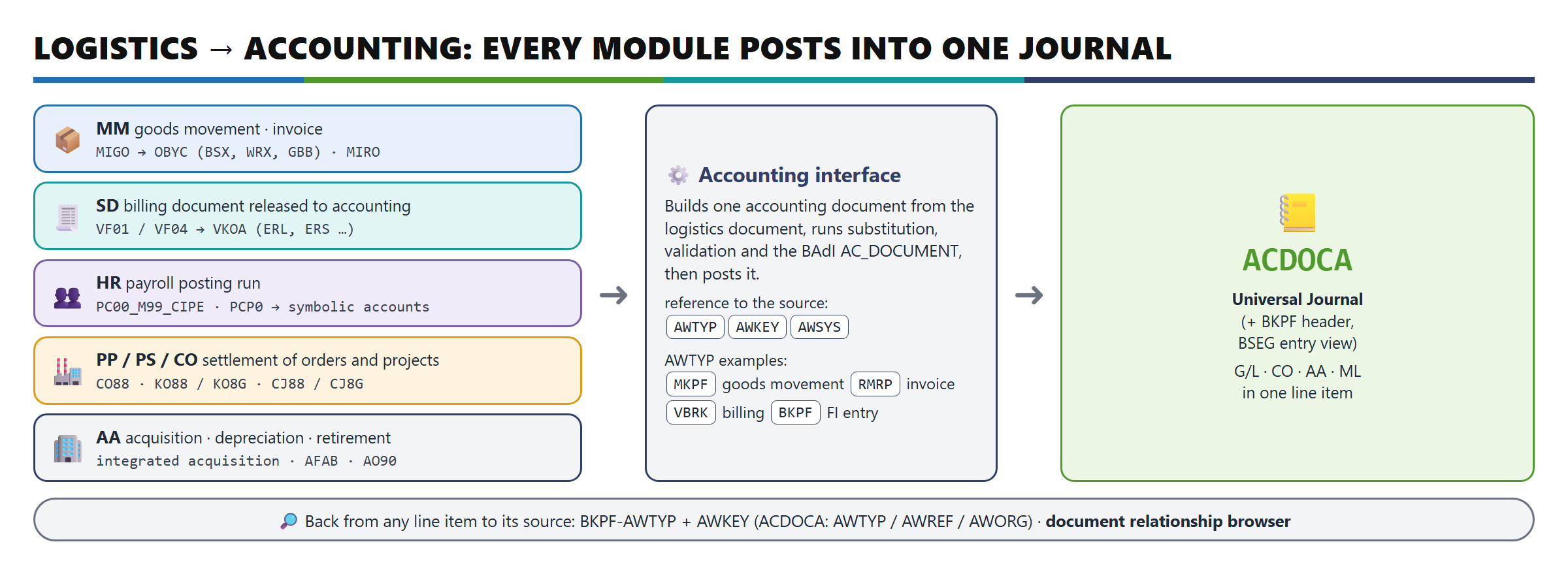
Field | Table | Meaning |
|---|---|---|
AWTYP | BKPF, ACDOCA | Reference transaction: which application created the document |
AWKEY | BKPF | Reference key = number of the source document (+ year or organisational unit) |
AWREF / AWORG | ACDOCA | AWKEY split into document number and organisational part |
AWSYS | BKPF, ACDOCA | Logical system of the source document (ALE, Central Finance) |
AWTYP | Source document | Created by |
|---|---|---|
MKPF | Material document (goods movement) | MIGO, PGI in SD (VL02N), backflush |
RMRP | Logistics invoice | MIRO |
VBRK | Billing document | VF01 / VF04 (release to accounting) |
BKPF | FI document entered in FI | FB50, FB60, FB70, F-02 |
BKPFF | FI document posted through the accounting BAPI or an interface | BAPI_ACC_DOCUMENT_POST |
1.1 Linking a logistics document to its FI document in code
The link is stored only on the FI side: BKPF-AWTYP says which application posted, BKPF-AWKEY holds the source document number. The layout of AWKEY depends on AWTYP:
AWTYP | AWKEY layout | Example |
|---|---|---|
VBRK | Billing document number (VBELN, 10) | 0090000123 |
MKPF | Material document (MBLNR, 10) + material document year (MJAHR, 4) | 49000004712026 |
RMRP | Invoice document (BELNR, 10) + fiscal year (GJAHR, 4) | 51056000012026 |
BKPF | FI document number + company code + fiscal year | – |
|
- Always filter on AWTYP and AWKEY together – the same number can exist for different reference transactions. One source document can create several journal entries (e.g. a goods movement across two company codes), so select into a table.
- In the GUI: "Accounting documents" in the source transaction, "Environment → Document environment" in FB03, or the document relationship browser for the whole chain.
- Errors from the interface come with message class RW (e.g. "error in document" followed by the real FI / CO message) – a billing document that is not released to accounting is the classic symptom. Check the long text: the cause is almost always account determination, a closed period or a validation.
- S/4HANA: the separate FI, CO, profit center, asset and material ledger documents of ECC became one journal entry: one BKPF header, BSEG for the entry view, ACDOCA for every ledger (page 02).
Part 2 – MM and SD integration
Both integrations are explained in depth in their own sections; here is what FI receives and where the accounts come from.
2.1 MM → FI: automatic account determination (OBYC)
MM event | FI posting (simplified) | Transaction keys |
|---|---|---|
Goods receipt for PO (101) | Debit stock · credit GR/IR clearing | BSX / WRX (PRD for S-price differences) |
Invoice receipt (MIRO) | Debit GR/IR · debit input tax · credit supplier (reconciliation account) | WRX (tax via tax code, key VST); supplier from LFB1-AKONT |
Goods issue to cost center (201) | Debit consumption (with cost center) · credit stock | GBB-VBR / BSX |
Post goods issue for delivery (601) | Debit cost of goods sold · credit stock | GBB-VAX or VAY / BSX |
Physical inventory difference (701/702) | Stock against inventory difference account | GBB-INV / BSX |
- Movement type → value string → transaction key + account modifier → OBYC rule by chart of accounts, valuation grouping code and valuation class (MBEW-BKLAS). Full explanation with diagram: MM ABAP › 03 Inventory Management, Part 7; GR/IR: same page, Part 9.
- Each valuated movement creates a material document (S/4HANA: MATDOC; ECC: MKPF / MSEG) and a journal entry with AWTYP MKPF; the invoice creates a journal entry with AWTYP RMRP.
2.2 SD → FI: revenue account determination (VKOA)
SD event | FI posting (simplified) | Account source |
|---|---|---|
Billing document released | Debit customer (receivable) · credit revenue · credit output tax | Customer: KNB1-AKONT; revenue: VKOA (key ERL); tax: tax code (FTXP) |
Discounts, freight, rebates | Sales deductions / freight revenue / accruals | VKOA keys ERS, ERF, ERB / ERU |
Incoming payment | Debit bank · credit customer (clears the invoice) | FI (F-28, bank statement) |
- VKOA uses the condition technique (account determination type KOFI): chart of accounts, sales organization, customer and material account assignment groups, account key. Full explanation: SD ABAP › 03 Pricing, Output, Credit & Other SD Functions, Part 3.
- Billing creates the journal entry with AWTYP VBRK and AWKEY = billing document number. Profit center, segment and margin analysis characteristics are derived and written to the same ACDOCA line.
- S/4HANA: with account-based margin analysis the cost of goods sold can be split into cost components, and revenue and COGS land on the same characteristics without a separate CO-PA document.
Part 3 – HR, PP / PS settlement and Asset Accounting integration
3.1 HR payroll posting
- After each payroll run a posting run turns wage types into FI/CO documents: wage type → symbolic account → G/L account (customizing of "Reporting for Posting Payroll Results to Accounting").
- PC00_M99_CIPE creates the posting run (simulation first), PCP0 checks, releases and posts it; the posting goes through the accounting interface like any logistics document. Costs carry the cost center of the employee's organisational assignment (infotype 0001 / 0027).
- Payroll structures and clusters: HR ABAP › 05 Payroll & Time Data – Clusters.
3.2 Production and project settlement
Object | During the period | At period end |
|---|---|---|
Production order | Goods issue debits the order, goods receipt credits it | WIP KKAX / KKAO, variances KKS2 / KKS1, settlement KO88 / CO88 – variances to price difference accounts, WIP to the balance sheet |
Internal order | Costs collected on the order | Settlement KO88 (single) / KO8G (collective) to cost center, asset, G/L or margin analysis |
WBS element / project | Costs, revenues, commitments on the WBS | Results analysis, settlement CJ88 / CJ8G (e.g. to an asset under construction or margin analysis) |
- The settlement rule (receiver and percentage) is stored with the object; settlement posts with settlement cost elements (cost element category 21 internal, 22 external) – concepts on page 04.
- S/4HANA: event-based revenue recognition posts revenue recognition for projects and service orders with every cost or revenue posting instead of a period-end results analysis run.
3.3 Asset Accounting integration
Event | How it is posted | Account source |
|---|---|---|
Acquisition from a supplier | Integrated acquisition (asset + supplier in one document) or PO with account assignment A (MIGO / MIRO post to the asset) | Asset class → account determination (AO90) |
Asset under construction | Costs collected on an AuC or a WBS element, then settled / distributed | AIAB / AIBU or CJ88 |
Depreciation | Depreciation run AFAB posts the planned values per depreciation area / ledger | AO90 (expense with cost center, accumulated depreciation) |
Retirement | Sale with customer or without revenue, scrapping | Gain / loss accounts in AO90 |
- S/4HANA: new Asset Accounting is mandatory; every depreciation area writes its values to the ledger of its accounting principle in ACDOCA in real time, and the planned depreciation is calculated with each posting – the depreciation run only posts it. Details: page 03.
Part 4 – Month-end close
The close turns a month of postings into correct financial statements. The order matters: subledgers first (assets, materials, accruals), then G/L valuations, then Controlling allocations and settlements, then reconciliation and reporting.
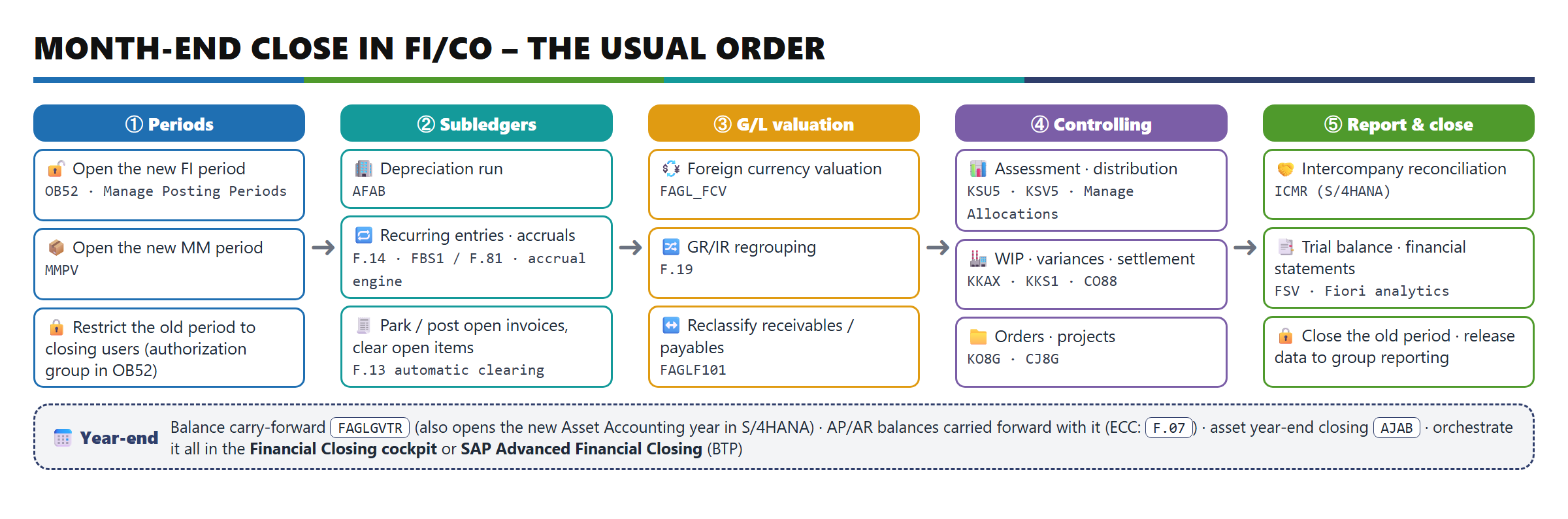
Step | Purpose | SAP GUI / Fiori |
|---|---|---|
Open / close posting periods | Posting period variant per company code; separate intervals per account type (+ all, A assets, D customers, K suppliers, M materials, S G/L); authorization group for the closing team | OB52 · Manage Posting Periods |
MM period | Opens the next material period | MMPV |
Depreciation run | Posts planned depreciation | AFAB (S/4HANA program FAA_DEPRECIATION_POST) |
Recurring entries | Rent, leasing, standard accruals | FBD1 create · F.14 execute |
Accruals / deferrals | Accrual document with automatic reversal next period; S/4HANA accrual engine e.g. for purchase order accruals | FBS1 · F.81 reverse |
Automatic clearing | Clears matching open items (G/L, customers, suppliers) | F.13 |
Foreign currency valuation | Revalues open items and balances in foreign currency per valuation area (accounting principle); accounts in OBA1 | FAGL_FCV (ECC: F.05, FAGL_FC_VAL) |
GR/IR regrouping | Splits the GR/IR account into goods received not invoiced / invoiced not received for the balance sheet | F.19 (program RFWERE00) |
Reclassification | Customers with credit balance → payables, sorting by remaining term | FAGLF101 |
CO allocations | Assessment (secondary cost element), distribution (primary costs), activity price calculation | KSU5, KSV5, KSII · Manage Allocations |
WIP, variances, settlement | Production orders, internal orders, projects | KKAX, KKS1, CO88, KO8G, CJ8G |
Actual costing (material ledger) | Periodic actual prices, revaluation of consumption | CKMLCP |
Close period | No more postings to the old month (except closing users) | OB52 |
- Concepts behind the CO steps (assessment vs distribution, settlement rules, activity prices): page 04.
- Developer relevance: closing jobs run as background jobs (often hundreds of them) – custom closing programs must be restartable, write an application log and be schedulable in the closing tools (Part 5).
Part 5 – Year-end close and closing orchestration
Step | What happens | T-code |
|---|---|---|
Balance carry-forward | P&L accounts → retained earnings account (OB53); balance sheet accounts carried forward per ledger. In S/4HANA it also opens the new Asset Accounting year (no separate AJRW). | FAGLGVTR |
AP / AR carry-forward | Customer and supplier balances to the new year with F.07 (balance carryforward for customers and vendors, SAPF010) – not part of FAGLGVTR | F.07 |
Asset year-end closing | Locks the old fiscal year in Asset Accounting | AJAB |
Special periods | Periods 13 – 16 of the fiscal year variant for audit adjustments | OB52 intervals |
Fiscal year in CO | Copy plan data, lock periods, carry forward commitments | Page 04 |
- The balance carry-forward must run per ledger; the Asset Accounting year can only be opened after the G/L carry-forward for all its ledgers succeeded.
5.1 Closing tools
Tool | Where | What it does |
|---|---|---|
Schedule Manager (SCMA) – legacy | ECC / on-premise | Task lists and job chains for the close |
SAP Financial Closing cockpit | Add-on in ECC; integrated into S/4HANA since 1709 | Templates and task lists with dependencies, jobs and manual steps, status monitor per company code |
SAP Advanced Financial Closing (formerly SAP S/4HANA Cloud for advanced financial closing) | SaaS on SAP BTP | Closing templates, cross-system orchestration of jobs in several S/4HANA systems (S/4HANA Cloud and S/4HANA 2020 or later), approvals, audit trail |
Part 6 – Intercompany reconciliation and group reporting
6.1 Intercompany postings
- Cross-company-code posting: one entry posts in two company codes; the system adds clearing lines on the intercompany accounts defined in OBYA.
- Intercompany sales: SD intercompany billing (billing type IV) and supplier invoice in the receiving company code – the two must match at period end.
6.2 Intercompany Matching and Reconciliation (ICMR)
S/4HANA (available since 1909): ICMR reads the intercompany documents of both partners from ACDOCA, matches them with matching methods (rules on reference, amount, date), groups accounts into reconciliation cases (e.g. receivables against payables), assigns reason codes to differences and can post corrections with posting rules. The reconciliation close status can be a prerequisite for consolidation. Configuration in Fiori, e.g. Define Reconciliation Cases.
6.3 Consolidation: SAP S/4HANA Finance for group reporting
Solution | Status | Notes |
|---|---|---|
SAP S/4HANA Finance for group reporting | Current, S/4HANA (on-premise, private and public cloud) | Reads company data directly from ACDOCA; consolidation journal ACDOCU; currency translation, intercompany elimination, consolidation of investments, group reports |
Real-time consolidation (RTC) | Legacy | Predecessor based on BPC – replaced by group reporting |
EC-CS (ERP consolidation) | Legacy | In S/4HANA only in the time-limited compatibility scope; migrate to group reporting |
SEM-BCS (on BW), BPC for consolidation | Legacy | Separate systems with data upload – replaced by group reporting |
- Group reporting data flow: company code data in ACDOCA → release or direct read into the consolidation unit → validation → currency translation → intercompany elimination (fed by ICMR) → consolidation of investments → group financial statements (Fiori, SAP Analytics Cloud).
- Architect question: the group chart of accounts / financial statement items must be mapped from the operational accounts – a decision made in the chart-of-accounts design (page 07).
Part 7 – Financial reporting and embedded analytics
7.1 Standard reports
Need | SAP GUI | Fiori app (S/4HANA) |
|---|---|---|
G/L account balances | FS10N (S/4HANA: FAGLB03) | Display G/L Account Balances |
G/L line items | FBL3N (S/4HANA: FAGLL03H) | Display Line Items in General Ledger |
Supplier / customer line items | FBL1N / FBL5N | Manage Supplier Line Items / Manage Customer Line Items |
Trial balance | S_ALR_87012277 (G/L account balances) | Trial Balance |
Balance sheet / P&L | S_ALR_87012284 with a financial statement version | Display Financial Statement |
Journal entries | FB03 | Manage Journal Entries, Journal Entry Analyzer |
Cost centers actual / plan | S_ALR_87013611 | Cost Centers – Actuals, Cost Centers – Plan/Actual |
7.2 Financial statement versions and legacy report tools
- A financial statement version (FSV, OB58) is the hierarchy of balance sheet and P&L items to which G/L accounts are assigned; reports and Fiori apps aggregate along it. In S/4HANA it can also be maintained as a global hierarchy in Fiori.
- Report Painter (GRR1 create / GRR2 change / GRR3 display) and Report Writer (sets in GS01, libraries) built most classic FI/CO reports – legacy: still running on-premise, but new reports are built on CDS views.
7.3 Embedded analytics on CDS
S/4HANA reports read ACDOCA live through the virtual data model (VDM): interface views (I_…), analytical cubes and consumption queries (C_…). No BW extraction and no totals tables are needed – every Fiori analytical app drills down to the journal entry line.
Object | Use |
|---|---|
I_JournalEntryItem / I_JournalEntry | Released views on ACDOCA line items / BKPF header |
I_JournalEntryItemCube | Analytical cube over journal entry items for G/L analytics (key-user queries; not in the ABAP Cloud release list) |
I_OperationalAcctgDocItem | Released view on BSEG-based open items (customers, suppliers) – replaces reads of the old index tables |
I_GLAccountInChartOfAccounts, I_CostCenter, I_ProfitCenter | Master data views for joins and texts |
Custom Analytical Queries app | Key users build own queries on released cubes without ABAP |
How to build CDS views and analytical queries: ABAP on HANA › 05 CDS Views; a finance CDS example: page 06 Part 8. SAP Analytics Cloud and BW/4HANA (or SAP Datasphere / Business Data Cloud) remain the choice for cross-system, planning and historical reporting.
Part 8 – External integration: banks, IDocs and Central Finance
8.1 Bank integration
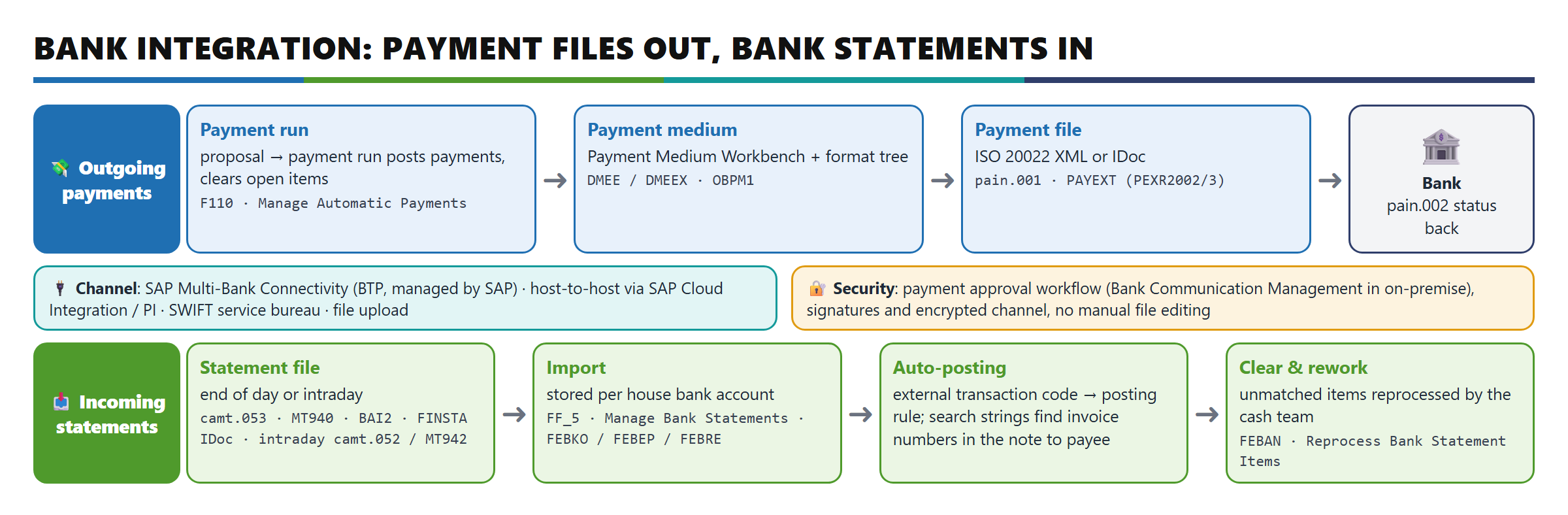
- Outgoing: the payment run (F110, Fiori Manage Automatic Payments) selects due items, posts the payments and calls the Payment Medium Workbench, which builds the file from a DMEE / DMEEX format tree (page 06) – typically ISO 20022 pain.001; the bank answers with pain.002 status messages. Payment run configuration is page 03.
- Incoming: bank statements in camt.053, MT940 or BAI2 (intraday camt.052 / MT942) are imported with FF_5 or the Fiori app Manage Bank Statements into FEBKO (header), FEBEP (items) and FEBRE (note to payee). The external transaction code maps to a posting rule; search strings find invoice or document numbers in the note to payee so that open items are cleared automatically. Rework: FEBAN / Reprocess Bank Statement Items.
- SAP Multi-Bank Connectivity (MBC) is SAP's managed connectivity service on SAP BTP between S/4HANA and banks (payment files, status messages, statements); on-premise the connector is part of S/4HANA since 1909. Alternatives: host-to-host via SAP Cloud Integration / PI, SWIFT service bureau.
- S/4HANA: house bank accounts are maintained in Bank Account Management (Fiori Manage Bank Accounts) instead of FI12; cash position and liquidity forecast come from SAP S/4HANA Cash Management (page 07).
8.2 Finance IDocs
Message type | Basic type | Direction | Use |
|---|---|---|---|
ACC_DOCUMENT | ACC_DOCUMENT0x | Inbound / outbound | ALE interface of BAPI_ACC_DOCUMENT_POST – post journal entries from another system |
FIDCC1 / FIDCC2 | FIDCCP02 | Outbound / inbound | Distribute complete FI documents between SAP systems (e.g. to a central or local system) |
FINSTA | FINSTA01 | Inbound | Bank statement (process code FINS, FM IDOC_INPUT_FINSTA) |
PAYEXT | PEXR2002 / PEXR2003 | Outbound | Payment order to the bank (EDI payment program RFFOEDI1) |
REMADV | PEXR2002 | Outbound / inbound | Payment advice |
GLMAST, COSMAS | – | Outbound / inbound | G/L account and cost center master data (ALE) |
CREMAS / DEBMAS | – | Outbound / inbound | Supplier / customer master (in S/4HANA the business partner is distributed with BP replication services) |
IDoc mechanics (partner profiles, ports, WE19, BD87): CORE ABAP › 07 Interfaces. In S/4HANA new integrations prefer the SOAP and OData APIs (page 06) through SAP Cloud Integration (SAP BTP Integration Suite › 01).
8.3 SAP Central Finance
Central Finance (S/4HANA) is a central finance system that runs alongside existing ERP systems: FI/CO postings of the source systems (SAP ECC, other S/4HANA or non-SAP systems) are replicated into one central Universal Journal. An initial load brings the history, then SLT (SAP Landscape Transformation Replication Server) replicates postings in real time; master data and codes are mapped to central values (MDG mapping), and the Application Interface Framework (AIF) monitors and reprocesses documents that fail. The logistics processes stay in the source systems. Architect view (Central Finance vs conversion): page 07.
Part 9 – Interview questions
Q1. How does a goods receipt or a billing document become an accounting document?
The application passes its data to the accounting interface (structures ACCHD / ACCIT / ACCCR), which determines the accounts (OBYC for MM, VKOA for SD), runs substitution, validation and BAdI AC_DOCUMENT and posts one journal entry to BKPF / BSEG / ACDOCA with AWTYP and AWKEY pointing to the source document.
Q2. A billing document is not released to accounting. How do you analyse it?
Open it in VF02 and release it to see the RW message and its long text. Typical causes: missing VKOA entry (account determination analysis in the billing document), closed posting period in OB52, a validation error, a missing profit center or tax code. Fix the cause, then release again (VFX3 lists blocked billing documents).
Q3. How do you find the source document of a journal entry in code?
Read BKPF-AWTYP and AWKEY (or ACDOCA-AWTYP / AWREF / AWORG). AWTYP MKPF means material document, RMRP invoice, VBRK billing document; AWKEY holds the document number plus year or organisational unit.
Q4. Which postings happen at goods receipt and invoice receipt for a stock material?
GR: debit stock (BSX), credit GR/IR clearing (WRX), price differences to PRD for standard-price materials. IR: debit GR/IR, debit input tax, credit the supplier's reconciliation account. Open GR/IR balances are regrouped at period end with F.19.
Q5. Name the main month-end closing steps in order.
Open the new period (OB52, MMPV); subledger closing: depreciation run AFAB, recurring entries F.14, accruals FBS1; G/L valuation: FAGL_FCV, GR/IR regrouping F.19, reclassification FAGLF101; Controlling: assessments KSU5 / distributions KSV5, WIP and variances, settlement CO88 / KO8G / CJ8G; then intercompany reconciliation, reports and closing the old period.
Q6. What does FAGLGVTR do and what changed in S/4HANA?
It carries forward balance sheet balances and moves the P&L result to the retained earnings account per ledger. In S/4HANA it also opens the new fiscal year in Asset Accounting, so AJRW is no longer run.
Q7. What is the difference between assessment and distribution?
Both allocate costs between cost centers at period end. Distribution (KSV5) keeps the original primary cost element; assessment (KSU5) groups costs under a secondary assessment cost element (category 42) – less detail on the receiver, but fewer line items.
Q8. How does consolidation work in S/4HANA?
With SAP S/4HANA Finance for group reporting: it reads company data directly from ACDOCA, writes consolidation entries to ACDOCU and runs currency translation, intercompany elimination (fed by ICMR) and consolidation of investments. EC-CS, SEM-BCS and BPC consolidation are legacy.
Q9. How are bank statements processed?
The file (camt.053, MT940, BAI2 or FINSTA IDoc) is imported with FF_5 or Manage Bank Statements into FEBKO / FEBEP / FEBRE. External transaction codes map to posting rules, search strings find invoice numbers in the note to payee, the system posts and clears; the rest is reworked in FEBAN or Reprocess Bank Statement Items.
Q10. Which IDocs are used in FI?
ACC_DOCUMENT (journal entries via BAPI_ACC_DOCUMENT_POST), FIDCC1 / FIDCC2 with FIDCCP02 (distribute FI documents), FINSTA (bank statement), PAYEXT with PEXR2002 / PEXR2003 (payment orders), REMADV (payment advice), GLMAST and COSMAS (master data).
Q11. What is Central Finance and how is data replicated?
A central S/4HANA finance system that receives the FI/CO postings of several source ERPs: initial load, then real-time replication with SLT, mapping of codes via MDG and error handling in AIF. Logistics stays in the sources; finance reporting, payments and close can be centralised.
Q12. How do reports work without totals tables in S/4HANA?
Fiori analytical apps and CDS-based queries aggregate ACDOCA line items at read time through the VDM (I_JournalEntryItem, I_JournalEntryItemCube, C_ queries). Financial statements are aggregated along the financial statement version; Report Painter reports still run on-premise but are legacy.
🏠 Start Here · ◀ 04 · Controlling · 06 · Development ▶ · Sections: CORE ABAP | OOPS ABAP | ABAP on HANA | Clean Core | RAP | ABAP Points | SAP Fiori | SAPUI5 | Mobile Development (MDK) | BTP Foundations | BTP Development | CAP | SAP Build | ABAP on BTP | Integration Suite | SAP Business AI | SAP BASIS | Security | SAP SDLC
Functional: FICO ABAP | TRM ABAP | VIM | SAP BIS | SD ABAP | MM ABAP | PP ABAP | QM ABAP | PM ABAP | PS ABAP | EWM | TM ABAP | GTM ABAP | EHS ABAP | HR ABAP | BW | SAP Datasphere | SAP Business Data Cloud | SAP MDG | SAP Analytics Cloud | SAP Ariba | SAP CX | SAP IBP