GTM owns the deal, but almost every document of the deal belongs to another module: the sales order, delivery and billing to SD, the purchase order, goods receipt and supplier invoice to MM, every posting to FI/CO, expense documents to settlement management. Around the contract sit credit management, Trade Finance (letters of credit), Commodity Management (commodity pricing, revaluation, risk reporting) and International Trade / GTS. This page shows what each integration creates and how it is switched on, how GTM talks to external systems, and which reports and analytics exist. Integration overview: page 01 Part 6; process steps and customizing: page 03; BAPIs, BAdIs and code: page 05.
Part 1 – The document chain across modules
GTM is a layer on top of SD, MM and FI in the same system – there is no interface between GTM and SD/MM, the contract creates the standard documents directly. That is why SD and MM customizing must be complete before GTM works, and why all standard SD/MM/FI reports also see the GTM deals.
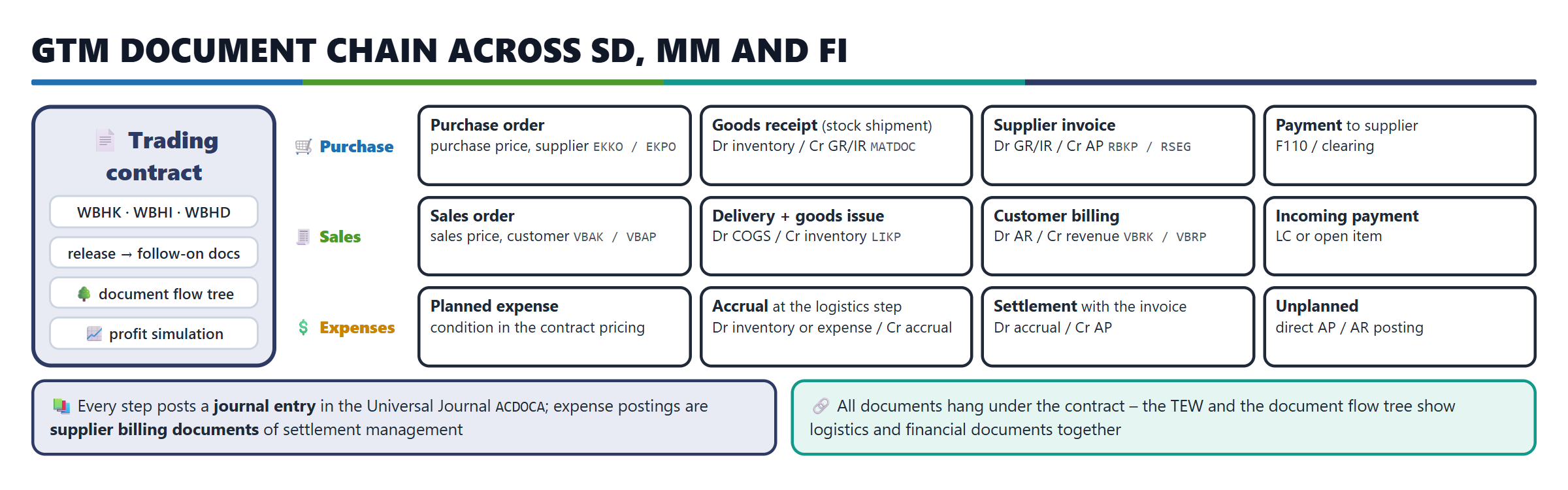
Step | Document | Module | Created by |
|---|---|---|---|
1 | Trading contract (WBHK / WBHI / WBHD) | GTM | WB21, BAPI, or automatically as shadow contract |
2 | Sales order (VBAK) and purchase order(s) (EKKO) | SD / MM | Release of the contract (background) |
3 | Goods receipt (stock shipment), outbound delivery, goods issue (MATDOC, LIKP) | MM-IM / LE | TEW steps |
4 | Supplier invoice (RBKP) and customer billing document (VBRK) | MM / SD | TEW steps |
5 | Supplier billing documents for expenses (accrual, settlement, direct) | Settlement management | Contract, TEW or Expense Workbench |
6 | Journal entries (ACDOCA) | FI / CO | Each posting step |
7 | Payments, LC drawings | FI / TRM | Payment run, Trade Finance |
Part 2 – SD: sales orders, deliveries and billing
- Sales order on release – the sales document type comes from the sales-side grouping of the contract type, the SD item category from the contract item category (page 02). Partners, Incoterms, payment terms, texts and prices are copied from the contract.
- Pricing – the contract prices both sides with the condition technique; whether the sales order copies the contract price or redetermines it is set on the grouping (pricing type). Planned expenses must exist in the sales pricing procedure. Automatic document adjustment pushes changed condition records into contracts and follow-on documents (page 03).
- Leading document – changes go into the contract and are passed to the sales order by re-release; documents created by the TEW must be changed in the TEW.
- Delivery, goods issue, billing – standard LE and SD documents, created from the TEW (drop shipment or stock shipment group), with standard copy control, output and account determination (SD ABAP › 02–04).
- Order confirmation and other output can be triggered centrally from the contract (header output for the customer, several outputs for the suppliers) instead of from each follow-on document.
- Not integrated in standard GTM (plan in the project): returns, lead and quotation management – these run in SD without a trading contract.
Part 3 – MM: purchase orders, goods receipt and invoice verification
- Purchase order on release – one or several POs per contract (several suppliers or split quantities); document type from the purchasing grouping; the delivery address can be the plant or the customer (drop shipment) – Customizing of the purchasing group.
- Stock transport order – contract with an STO order type: supplying plant instead of supplier, intra- or cross-company-code (page 03 Part 7).
- Goods receipt in the stock-shipment case, invoice verification for the supplier invoice – both as TEW steps; planned expenses with settlement can be accrued at the goods receipt (Part 4).
- Supplier evaluation of MM helps to choose the supplier in the contract; purchase prices can be proposed from the purchasing info record (page 02).
- MM background: MM ABAP › 02 (purchasing), 04 (inventory), 05 (invoice verification).
Part 4 – FI/CO: postings, expense accounting and profitability
Business step | Typical posting | Account determination |
|---|---|---|
Goods receipt (stock shipment) | Dr inventory / Cr GR/IR clearing | MM automatic account determination (OBYC: BSX, WRX) |
Goods issue to the customer | Dr cost of goods sold / Cr inventory | OBYC (GBB) |
Supplier invoice | Dr GR/IR / Cr supplier (AP) | Invoice verification |
Customer billing | Dr customer (AR) / Cr revenue | SD revenue account determination (VKOA) |
Expense accrual (provisional) | Dr inventory or expense / Cr accrual | Supplier billing document type and expense account keys |
Expense settlement | Dr accrual / Cr AP (differences allocated) | Same |
Unplanned expense | Dr expense / Cr AP – or AR for a sales-side expense charged on | Same |
- Expense documents are supplier billing documents of settlement management. The posting category of the expense decides the settlement document type and the posting type – payables, receivables, provisional for payables / receivables, or statistical (no FI document).
- Account keys for expenses – SAP Community describes the GTM expense keys G01 (expense), G02 (provision) and G04 (expense, receivables side), maintained in OBYC and used in the definition of the supplier billing document types. Check them in the system before relying on them.
- Profitability per deal – the profit simulation shows prices, planned expenses and margin before release; after all documents are posted, the trading contract number is the key to check the actual profit. Because expenses are linked to the contract, revenue and every cost element can be assigned to the deal.
- Period-end valuation (with Commodity Management) – CMM_PEV_CALC (worklist of last month's goods receipts and deliveries), CMM_PEV_WL (accrual documents for selected contracts), CMM_PEV_AD (approve / reject and post), CMM_PEV_CC (completeness check). Supported for commodity price positions, not for GTM expenses.
- Prepayments (with Commodity Management) – prepayment requests can be maintained on trading contract, sales order and PO items and posted by report PPMGCO_REP_PAYMENT_REQ_POST (Customizing under Cross-Application Components › Prepayment).
- FI postings in S/4HANA all land in the Universal Journal ACDOCA; account determination details: FICO ABAP.
Part 5 – Credit, letters of credit and currencies
5.1 SAP Credit Management (FIN-FSCM-CR)
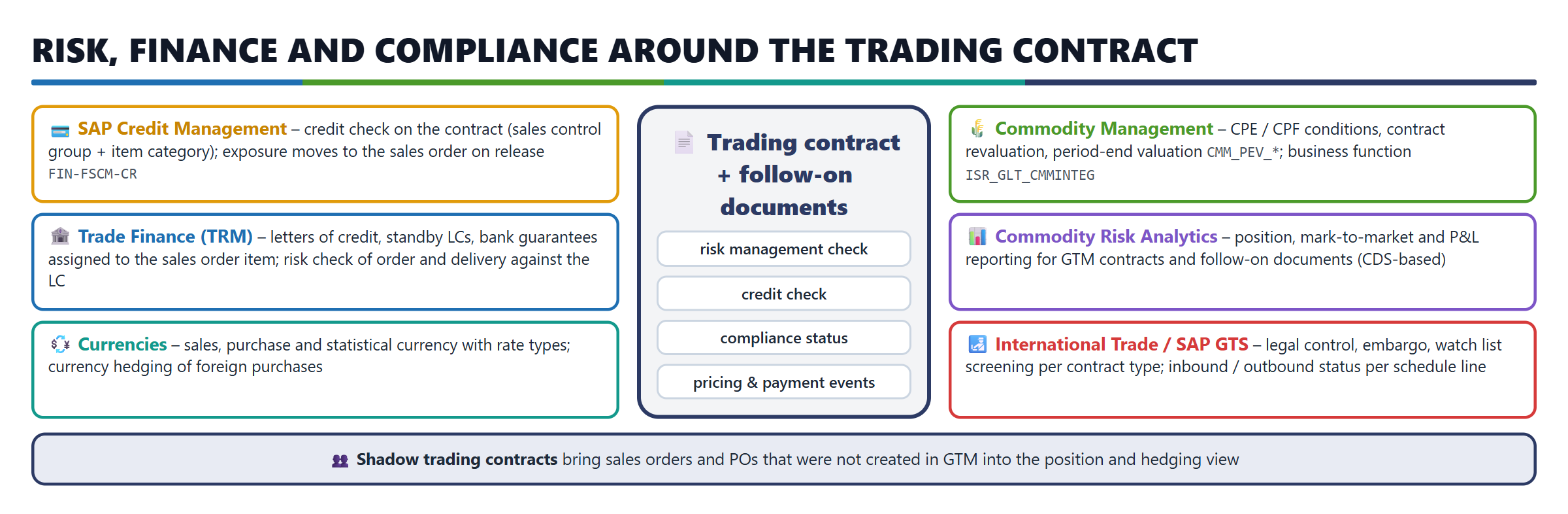
- Credit checks for the partners already in the trading contract. ECC: classic credit management FI-AR-CR (FD32, follow-on sales orders released with VKM3 / VKM4) or the SAP Credit Management link set on the trading contract type · S/4HANA: only SAP Credit Management – FI-AR-CR is not available (Note 2270544). Activation: Credit Management customizing in Financial Supply Chain Management, plus Global Trade Management › Trading Contract › Define Control Groups Sales (per control group) and Define Item Categories (per item category).
- Credit exposure – the contract carries exposure until sales orders or sales contracts are created; then the risk crosses over to the follow-on documents and the contract exposure is reduced. Later changes are recalculated from the values of the follow-on documents.
- BAdIs can adapt the data sent to Credit Management and the exposure update (page 05). Rule: check credit at the level of the trading contract, not also on the precontract, to avoid double updates.
5.2 Letters of credit and Trade Finance
- On the contract, the risk management check reads the customer's LC balance when a payment guarantee procedure is assigned; a failed check blocks automatic sales order creation.
- The LC itself is a Trade Finance transaction (Treasury and Risk Management › Transaction Manager): letters of credit, standby letters of credit and bank guarantees, with back office and automatic posting to FI.
- Integration of Trade Finance with Sales (same system only): activate per company code, product type and transaction type – Financial Supply Chain Management › Treasury and Risk Management › Transaction Manager › Trade Finance › Transaction Management › Activate Integration with S/4HANA Sales. Trade finance transactions are then assigned to sales order items.
- Risk check on save of the sales order (and, if configured in SD › Basic Functions › Credit Management/Risk Management › Receivables Risk Management › Maintain Trade Finance Risk Control, also for deliveries and goods issue): order value (credit price) against the available LC amount and other LC terms; discrepancies block the order or delivery.
- Legacy: ECC documentary payments in SD Foreign Trade (financial documents) – in S/4HANA use Trade Finance.
5.3 Currencies and FX risk
- Each deal can have a sales currency, a purchasing currency and a statistical currency, with exchange rate and rate type per contract – e.g. sale in USD, purchases in GBP and CHF.
- Currency hedging of foreign-currency purchases is part of the GTM scope described by SAP Learning; for agricultural commodity businesses, Foreign Exchange Risk Management for Commodity Businesses calculates FX exposures from ACM trading contracts and hands them to Treasury (SAP S/4HANA Cloud Private Edition from 2025 FPS01 only).
Part 6 – Commodity Management and commodity price risk
For metals, agricultural and energy deals, prices float with market quotations. SAP Commodity Management (separate licence) adds commodity pricing and risk reporting to GTM documents. Business function ISR_GLT_CMMINTEG (Integration of Commodity Management with GTM, application component LO-GT-CMM, available since S/4HANA 1809) switches it on.
Function | What it does in GTM |
|---|---|
Commodity pricing (CPE / CPF) | Commodity Pricing Engine and Configurable Parameters and Formulas conditions in trading contracts and follow-on documents; quantity adjustment conditions (e.g. copper concentrate with copper, silver, gold) |
Pricing and payment events (PPE) | Event dates on contract items (planned / actual) used by CPE reference date routines for the pricing period; events 302 / 303 set the payment date of provisional and final invoices (switch BC set CMM_CPEV_REFDATEROUT_1809_00_GTM, package WB2B_SWITCH) |
Free characteristics | Extra characteristics on GTM contracts and follow-on documents (Free Characteristics tab) |
Contract revaluation / lean revaluation | Updates floating prices from explicit (or, lean, implicit) price fixations – also in deliveries, goods receipts and invoices |
Period-end valuation | CMM_PEV_* transactions (Part 4) |
Commodity Risk Analytics | Commodity position reporting, mark-to-market and profit-and-loss reporting for GTM contracts and their follow-on documents |
- Price risk view – risk reports show priced / unpriced and hedged / unhedged quantities from physical contracts, stock and paper trades; position reports come as current, end-of-day (snapshot) and day-over-day versions and are CDS-based, so they can be consumed in tools such as Analysis for Microsoft Office.
- Product change: the CDS-based Commodity Risk Analytics reports are offered only to customers who licensed them before SAP S/4HANA 2025 FPS01; newer risk reporting comes with SAP Advanced Commodity Risk Analytics (page 06).
- Hedging – shadow trading contracts make sales orders / POs from internal demand visible to the hedging solution (page 03 Part 7). Treasury's commodity hedge management offers APIs such as Commodity Plan Exposure and Commodity Hedge Specification on SAP Business Accelerator Hub. In ERP, trading contracts could update raw exposures in Treasury through the logistics–TRM integration – check the current release before designing on it.
Part 7 – Compliance, transportation and logistics execution
- SAP S/4HANA for international trade – activate trade compliance per contract type (Define Trading Contract Types) and configure Governance, Risk and Compliance › International Trade. Checks: legal control (licences), embargo, SAP Watch List Screening. Results: header status view (Legal Control log), item status (Trade Compliance Check per inbound / outbound scenario), schedule line (legal control status inbound = purchase data, outbound = sales data).
- SAP Global Trade Services – separate compliance and customs product that S/4HANA integrates with for more advanced international supply-chain processes (GTM vs GTS: page 01).
- Transportation – SAP Learning lists transportation management among the areas not fully integrated with GTM: shipping and transport are coordinated outside the contract, and any TM integration runs through the standard sales orders, purchase orders and deliveries (see TM ABAP).
- Logistics execution – deliveries and goods movements are standard LE / MM-IM documents created from the TEW, so warehouse processing and goods movement postings work as usual.
Part 8 – External systems: output, BAPIs and services
Channel | What it is used for | Details |
|---|---|---|
Output – message determination (NAST, application WT) | Contract printouts and messages to customer, supplier and employee (print, fax, e-mail, EDI); central output for SO / PO from the contract | Smart Forms, schemas per sales group, purchasing group and contract type (page 05) |
S/4HANA output control | Customer and supplier output of the contract | Application object types TRADING_CONTRACT_CUSTOMER / TRADING_CONTRACT_SUPPLIER; output control indicator on the contract type |
BAPIs | Create, change, release contracts from a front-office or trading platform, e.g. BAPI_TRADINGCONTRACT_CREATE, BAPI_TRADINGCONTRACT_RELEASE | Page 05 |
IDocs / EDI of follow-on documents | Orders to suppliers, order confirmations, invoices | Standard SD / MM output and IDocs (CORE ABAP › 07) |
Enterprise services | Single settlement documents for energy contracts (no SO / PO follow-on documents for energy contracts) | Commodity / energy scenarios |
Commodity and treasury APIs | Hedge management, nominations (ACM) | SAP Business Accelerator Hub |
- No public trading contract API – the SAP Business Accelerator Hub catalog (checked November 2026) lists no released OData or SOAP API for trading contracts. Integrations use BAPIs (wrapped as RFC or custom services, for example via SAP Integration Suite) – an architect point for clean core (page 06).
- Background processing – follow-on document jobs (Schedule Follow-On Document Processing), shadow contracts by queued RFC (Trading Contract Synchronizer).
Part 9 – Reporting and analytics
Report / app | Content | Where |
|---|---|---|
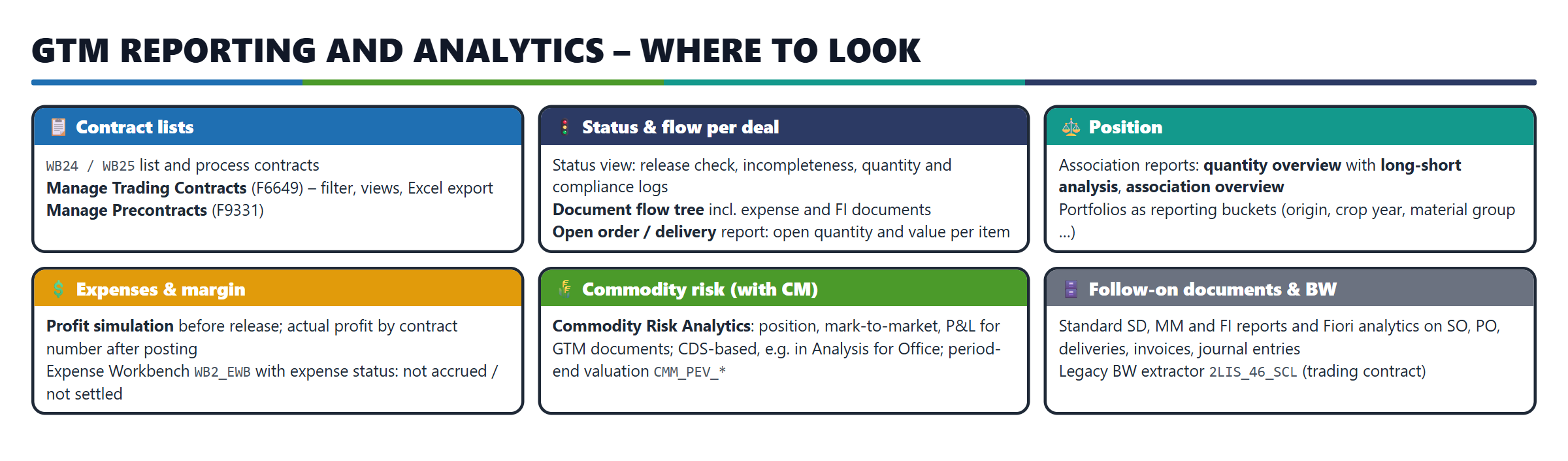
WB24 / WB25 | List trading contracts and process them further (ECC: WB24, report RWB2B001 · S/4HANA: WB24 not available – WBRR / WB24N, WB25) | SAP GUI |
Manage Trading Contracts (F6649) | Search, filter, saved views, export to spreadsheet, navigation to create / change / display | Fiori |
Manage Precontracts (F9331) | Same for precontracts | Fiori |
Status view of the contract | Release check, incompleteness log, quantity matching, legal control, credit | WB22 / WB23 |
Document flow tree | Follow-on and follow-up documents incl. supplier billing documents and FI documents | Contract and TEW |
Open order / open delivery | Open quantity and value per item across follow-on documents (sales and purchasing); calculation by a function module that can be copied and adapted | Contract |
Association reports | Quantity overview with long-short analysis; association overview | Association Management › Reports |
Expense Workbench | Contracts by expense status (not accrued / not settled) | WB2_EWB |
Profit simulation | Planned margin from prices and expenses | Contract |
Commodity Risk Analytics | Position, mark-to-market, P&L for GTM documents | With Commodity Management |
BW extractor 2LIS_46_SCL | Trading contract movement data with delta (contract, item, schedule line, application status, item category, contract type) | Legacy BW content |
- Embedded analytics – no released analytical CDS content for trading contracts is documented (page 02 Part 8); the follow-on documents are covered by the standard Fiori analytics of sales, purchasing, inventory and finance. Custom deal reports join WBHK / WBHI / WBHD with the follow-on tables or the document flow – data model on page 02, code example on page 05.
- The Fiori list apps can be adapted by key users – the product assistance documents App Extensibility: Manage Trading Contracts (Key User) and the same for Manage Precontracts.
- Typical custom report: deal profitability per contract – contract prices and planned expenses vs actual revenue, cost of goods and posted expenses from the journal entries.
Part 10 – Interview questions
Q1. How is GTM integrated with SD and MM?
Not by interface: GTM runs in the same system and the contract release creates standard sales orders and purchase orders directly, with document types from the contract type groupings and item categories. Deliveries, goods movements and invoices are standard documents created through the TEW.
Q2. Which postings does a stock-shipment deal create?
Goods receipt Dr inventory / Cr GR/IR, supplier invoice Dr GR/IR / Cr AP, goods issue Dr COGS / Cr inventory, billing Dr AR / Cr revenue – plus expense supplier billing documents (accrual against inventory or expense, then settlement against AP).
Q3. How are trading expenses posted to FI?
As supplier billing documents of settlement management. The posting category picks the settlement document type and posting type (payables, receivables, provisional, statistical); G/L accounts come from the expense account keys in account determination.
Q4. How do you see the profit of a deal?
Before release with the profit simulation (prices, planned expenses, margin); afterwards by trading contract number, because revenue, purchase cost and all expense documents are linked to the contract. A custom deal-profitability report is a common requirement.
Q5. How does credit management work with trading contracts?
In S/4HANA only SAP Credit Management exists (ECC also classic FI-AR-CR with VKM3 / VKM4 – Note 2270544); it is activated per sales control group and item category. The contract carries the credit exposure until the sales order exists; then the exposure crosses over to the sales order. BAdIs adapt the data and the exposure update.
Q6. How are letters of credit handled in S/4HANA?
As Trade Finance transactions in TRM, integrated with Sales: the LC is assigned to the sales order item and a risk check compares order and optionally delivery data with the LC terms. The contract's own risk management check reads the LC balance; SD Foreign Trade financial documents are legacy.
Q7. What does Commodity Management add to GTM?
CPE / CPF commodity pricing with pricing and payment events, quantity adjustments, free characteristics, contract and lean revaluation, period-end valuation (CMM_PEV_*) and Commodity Risk Analytics (position, MtM, P&L). Switched on by business function ISR_GLT_CMMINTEG; separate licence.
Q8. How do compliance checks work for a trading contract?
Trade compliance is activated per contract type; International Trade runs legal control, embargo and watch list checks, with status on header, item and schedule line (inbound for purchase, outbound for sales). SAP GTS can be integrated instead for advanced compliance and customs.
Q9. Is TM integrated with GTM?
Not as a GTM feature – SAP lists transportation management among the areas not fully integrated. Transport is planned on the standard sales orders, purchase orders and deliveries that GTM creates, so TM integration is a project design topic.
Q10. A front-office trading system must create contracts in S/4HANA – how?
There is no released trading contract OData / SOAP API on the Business Accelerator Hub, so use the trading contract BAPIs (create, change, release) behind an RFC or custom service, typically through SAP Integration Suite, with error handling and idempotency; document it as a clean-core exception.
Q11. Which standard reports show the trading position?
Association reports – quantity overview with long-short analysis and association overview – for physical long and short positions; with Commodity Management, Commodity Risk Analytics position, MtM and P&L reports (current, end-of-day, day-over-day).
Q12. How would you list contracts with open quantities and their follow-on documents?
WB25 / WB24N (ECC: WB24) or Manage Trading Contracts for the list, the open order / delivery report per contract, and for a custom report a selection on WBHK / WBHI joined with the document flow to the sales orders, purchase orders and deliveries (page 02, page 05).
🏠 Start Here · ◀ 03 · Processes & Config · 05 · Development ▶ · Sections: CORE ABAP | OOPS ABAP | ABAP on HANA | Clean Core | RAP | ABAP Points | SAP Fiori | SAPUI5 | Mobile Development (MDK) | BTP Foundations | BTP Development | CAP | SAP Build | ABAP on BTP | Integration Suite | SAP Business AI | SAP BASIS | Security | SAP SDLC
Functional: FICO ABAP | TRM ABAP | VIM | SAP BIS | SD ABAP | MM ABAP | PP ABAP | QM ABAP | PM ABAP | PS ABAP | EWM | TM ABAP | GTM ABAP | EHS ABAP | HR ABAP | BW | SAP Datasphere | SAP Business Data Cloud | SAP MDG | SAP Analytics Cloud | SAP Ariba | SAP CX | SAP IBP