GTM is classic ERP application code: dialog transactions, function groups and transparent tables in the WB2B packages of the Global Trade enterprise extension (EA-GLTRADE). There is no BOPF or RAP business object behind the trading contract, no released OData API and no RAP interface. You extend GTM with customizing, the GTM BAdIs under Logistics – General › Global Trade Management, the trading contract BAPIs with their extension parameters, message determination and Smart Forms, and – because the follow-on documents are ordinary sales orders, purchase orders, deliveries and billing documents – with the normal SD and MM exits. This page shows each technique with names that can be checked in SAP documentation, one complete read example and the typical RICEFW objects. General techniques: CORE ABAP › 10 Enhancements, 07 Interfaces, 11 Forms, 12 Workflow; SD and MM exits: SD ABAP and MM ABAP page 05.
Part 1 – How GTM is built technically
A trading contract is a document of its own (number TKONN) with a purchase side and a sales side. When it is released, GTM creates or updates the follow-on purchase orders and sales orders with the standard SD and MM functions; deliveries, goods movements, billing and invoice verification are then processed from the Trading Execution Workbench. For a developer this means two worlds: the GTM objects themselves (contract, workbench, expenses) and the standard SD / MM documents created from them.
Area | Technical objects | Note |
|---|---|---|
Software / components | Software component: ECC EA-GLTRADE · S/4HANA core; application components LO-GT-TC trading contract, LO-GT-TEW Trading Execution Workbench, LO-GT-TE trading expenses, LO-GT-PM (ERP Fiori app Approve Trading Contracts (F0587, Business Suite only – not in S/4HANA): LO-GT-FIO) | Use the component when you search SAP Notes and KBAs |
Trading contract | WB21 create, WB22 change, WB23 display; WB24N status and release; WBRR release trading contracts | WBRR and WB24N replace the ERP reports behind WB24 / WB25_COMP in S/4HANA (page 06) |
Execution and expenses | WTEW Trading Execution Workbench, WB2_EWB Expense Workbench | Steps such as goods receipt, delivery, billing, invoice verification |
Tables | WBHK header, WBHI items, WBHD commercial data, WBHE schedule lines, WBHP partners, WBHF document flow, WBGT generic document information; contract types in TB2BE | Data model in detail: page 02 |
Messages | Message classes WB2B and WB2B_EXPENSE (e.g. WB2B282, WB2B_EXPENSE038) | A message number in a dump or log leads straight to the KBA |
Customizing | IMG › Logistics – General › Global Trade Management › Trading Contract (types, status, output, Enhancements Using Business Add-Ins) | Key settings: page 03 |
- Because the follow-on documents are created with the standard SD and MM logic, every SD user exit and MM BAdI you know (for example
MV45AFZZ,ME_PROCESS_PO_CUST) also runs for documents that come from a trading contract. Check in such exits whether the document belongs to a contract before you change GTM-controlled fields. - Never change follow-on documents of a trading contract in a way GTM does not expect: SAP reports errors (for example WB2B166) when standard MM or SD transactions process trading contract follow-on documents outside the intended flow.
Part 2 – Reading trading contract data
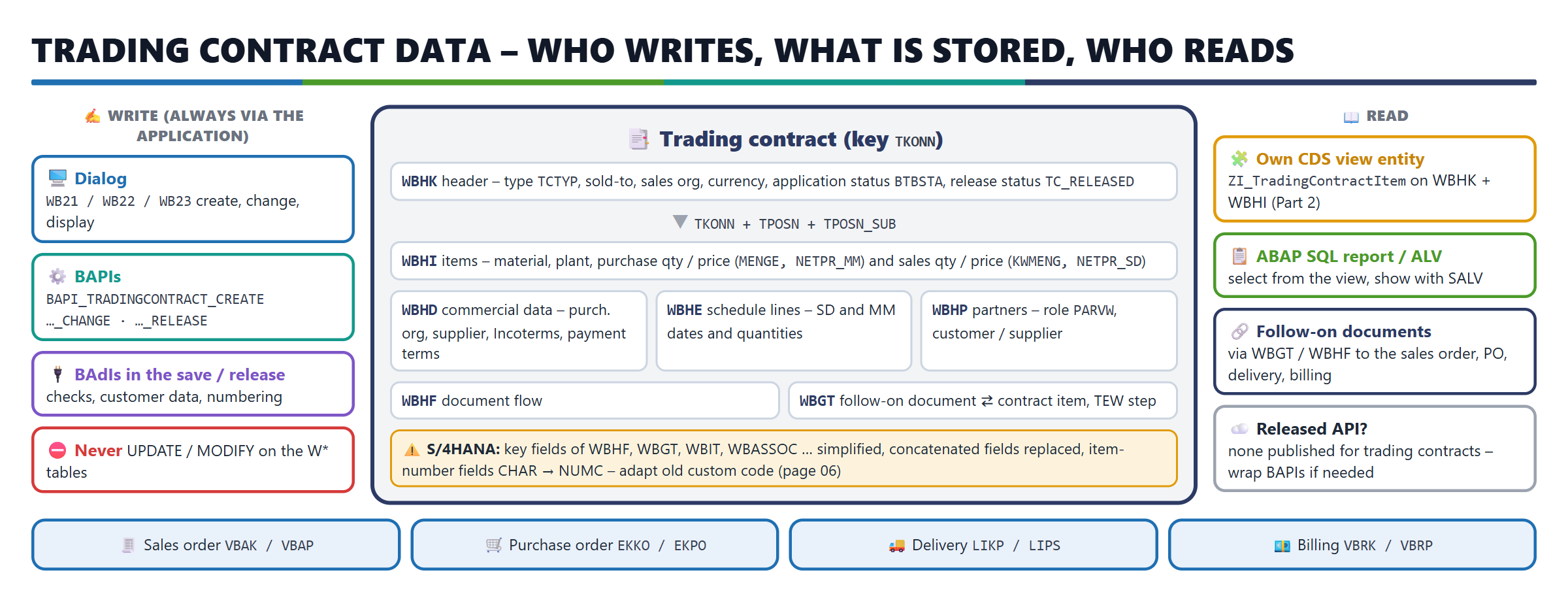
No released CDS view for trading contracts is documented on the SAP Business Accelerator Hub, so on-premise and in the Private Edition you build your own read model on the GTM tables. The key is TKONN at header level and TKONN + TPOSN + TPOSN_SUB at item level. The view below combines the purchase side and the sales side of each item – the basis of most GTM reports.
|
|
- Purchasing organization, supplier, Incoterms and payment terms are in WBHD (fields such as EKORG, ELIFN, INCO1_SD, ZTERM) and the partner roles in WBHP. Check in SE16 at which item level your contract types store them before you join – a wrong join silently drops items.
- Follow-on documents: WBGT links a document (DOC_TYPE, VBELN, POSNR) to the contract item and the TEW step; WBHF holds the document flow. From there you reach VBAK / EKKO / LIKP / VBRK.
- Authorizations: the demo view has no access control. A production view gets a DCL role, for example on the sales organization, and the report an authority check.
- These tables are not released for ABAP Cloud – the code is classic ABAP for on-premise / Private Edition. Custom code that used the ERP key layout of WBHF, WBGT and related tables must be adapted after a conversion (page 06 Part 3).
Part 3 – BAdIs and other enhancement points
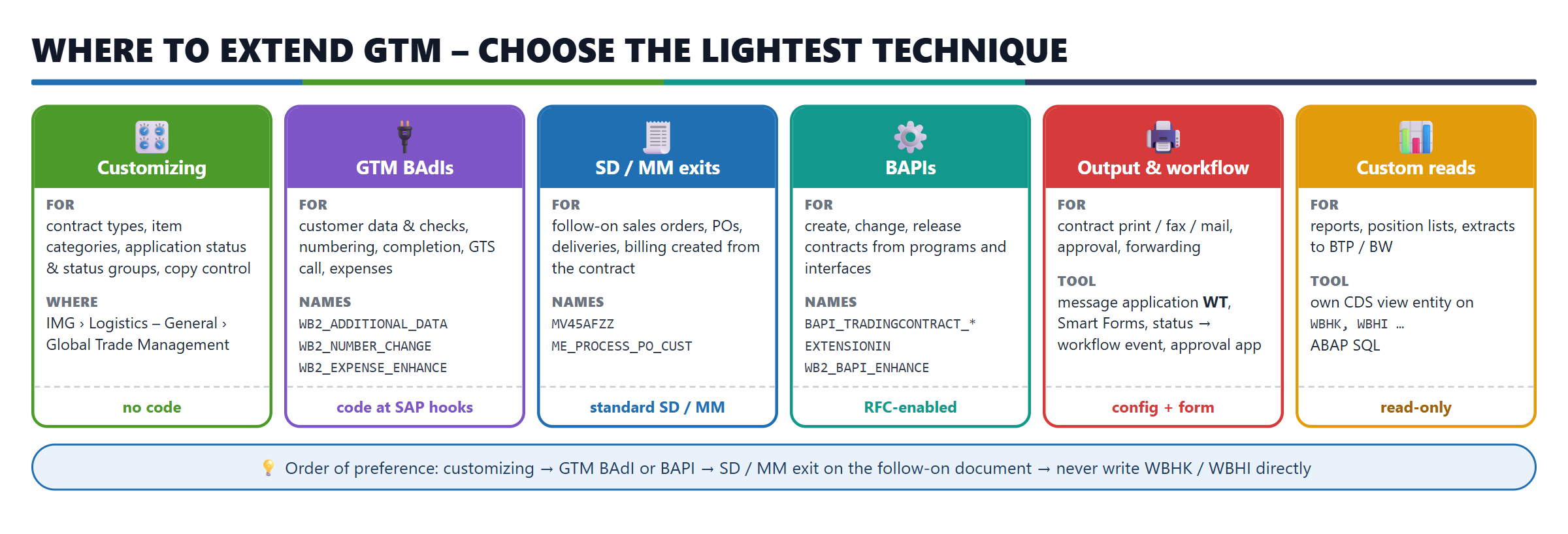
GTM's BAdIs are listed in the IMG under Logistics – General › Global Trade Management › Trading Contract › Enhancements Using Business Add-Ins (expenses and the workbench have their own nodes). Most are classic BAdIs: implement them in SE19 (definition in SE18, interface IF_EX_<BAdI>). Names you can quote:
BAdI | Area | Use |
|---|---|---|
WB2_ADDITIONAL_DATA | Customer data in GTM | Maintain and check customer-specific fields; document-type-specific, not multiple-use (one active implementation) |
WB2_BAPI_ENHANCE_EX | Trading contract BAPIs | Move custom fields between the BAPI extension parameters and the contract (new-style BAdI, interface IF_WB2_BAPI_ENHANCE) – Part 4 |
WB2_CHECK_TC_COMP | Completed documents | Control when the accounting document of a follow-on document counts as complete (inactive in the standard) |
WB2_GTS_ENHANCE | Customs server call (GTS) | Own checks and data before trading contract data is passed to SAP GTS |
WB2_NUMBER_CHANGE | Number assignment | IMG activity 'BAdI: Global Trade Management Number Assignment' – own logic for contract numbers |
WB2_EXPENSE_ENHANCE, WB2_EXPENSE_ENHANCE2, WB2_ENHANCE_EXPENSE | Trading expenses | Defaults when expenses are copied from a preceding document, changes before release to FI, filters in recovery cases, logic at update time – Part 7 |
TCAPPROVAL_BADI_FIELD_EXTEND, TCAPPROVAL_BADI_FUNC_CHECK | Fiori app Approve Trading Contracts (F0587, Business Suite only – not in S/4HANA) | Extra fields in the app's OData service; extra checks on approve / reject – Part 6 |
- Further IMG activities in the same node (names as shown in the IMG): copying of contracts and items, data changes in PAI, change and enhance data during release, mass changes in the online contract, master conditions in the trading contract, replacement material, profit-calculation items. Read the IMG documentation of each activity for the BAdI name and the call point in your release.
- Retail pricing BAdIs from ERP are irrelevant in S/4HANA – retail pricing is no longer supported in GTM (KBA 2607509).
- Finding the right hook: IMG documentation first, then SE18 / SE84 search in the WB2* packages, then a breakpoint on
CALL BADI/cl_exithandler=>get_instancewhile you run WB22 or the release. For follow-on documents use the SD / MM exits instead (Part 1).
Part 4 – Custom fields end to end
A custom field on the trading contract touches four layers. Plan all four before you start – a field that exists in the table but not in the BAPI cannot be filled by the interface.
Layer | What to do | Objects |
|---|---|---|
1 Database | Append the field to the header or item table (append structure; WBHK also has an include for new fields) | WBHK, WBHI, WBHD, WBHE, WBHP |
2 Dialog and checks | Maintain and check the field in WB21 / WB22 | BAdI WB2_ADDITIONAL_DATA |
3 BAPI | Pass the value in | BAdI WB2_BAPI_ENHANCE_EX; KBA 2173024 |
4 Follow-on documents | Copy the value into the sales order / PO if the business needs it there | SD user exits, MM BAdIs (Part 1) |
- KBA 2173024 also covers standard fields that the BAPI structures do not contain (for example posting date and exchange rate on the header, business area and profit center on the item) – they are filled the same way, through the extension parameters.
- The Approve Trading Contracts app (Business Suite only, not in S/4HANA) has its own extension include structures –
WB2_S_TCHEADER_ENH,WB2_S_TCITEMGENERAL_ENH,WB2_S_TCITEMDETAIL_ENH,WB2_S_WORKITEM_ENH,WB2_S_COND_SALES_ENH,WB2_S_COND_PURCH_ENH,WB2_S_FORWARDING_AGENT_ENH– plus the BAdI TCAPPROVAL_BADI_FIELD_EXTEND and UI extension points such asextMoreTCItemListColumns. - Key-user extensibility exists for the Fiori apps: SAP Help documents "App Extensibility: Manage Trading Contracts (Key User)" and the same for Manage Precontracts – key users adapt these apps without code. Which business contexts the Custom Fields app offers for the trading contract itself depends on the release – check it before promising custom fields on the document.
Part 5 – BAPIs and interfaces
BAPI | Use | Known limits (SAP KBAs) |
|---|---|---|
BAPI_TRADINGCONTRACT_CREATE | Create a contract (header, items, business data, partners, conditions) | No 'create with reference' to another contract (KBA 3262446); tolerance fields UNTTO / UEBTO for MM and SD not in the interface (KBA 3602126) |
BAPI_TRADINGCONTRACT_CHANGE | Change a contract | Partner functions on header / item cannot be changed (KBA 3765665); custom and some standard fields only via extension (KBA 2173024) |
BAPI_TRADINGCONTRACT_RELEASE | Release – creates / updates the follow-on PO and sales order | Follow-on output and ATP run in the same step (Part 6 tip) |
BAPI_TRADINGCONTRACT_GET_LIST | Select contracts by criteria | For lists; detail reads are simpler with your own CDS view (Part 2) |
- BAPIs do not commit: call
BAPI_TRANSACTION_COMMITafter a successful call andBAPI_TRANSACTION_ROLLBACKwhen RETURN contains an error – also when you chain create and release. - Inbound from a trading platform or CTRM: the external system sends deals; SAP Integration Suite (CPI) maps them and calls the BAPIs via RFC, or you expose an own OData / RAP service that wraps the BAPIs (on-premise / Private Edition). Store the external deal number in the external contract number (TKONN_EX) for idempotency.
- Outbound: contract data to a broker, bank or customs system – read via your CDS view, send via CPI; customs checks are better done by SAP GTS (BAdI WB2_GTS_ENHANCE, page 04).
- TC@NET – the old internet scenario for trading contracts had BAdIs for IDoc creation and for changing data before the BAPI call; its user-creation report is obsolete in S/4HANA. Treat it as legacy.
- There is no released OData API for trading contracts on the SAP Business Accelerator Hub (Part 8).
Part 6 – Output, workflow and the approval app
6.1 Output (message determination)
Trading contract output uses the classic condition technique with message application WT (ECC: NAST only · S/4HANA: NAST or S/4HANA output control with application object types TRADING_CONTRACT_CUSTOMER / _SUPPLIER, chosen by the output control indicator on the contract type – page 04). Output is determined per target group – customer, supplier, employee – each with a header and an item procedure.
Element | Trading contract specifics |
|---|---|
Target group customer / supplier | Partner-dependent output types; procedure assigned to the sales group (customer) or purchasing group (supplier); recipients from partner functions |
Target group employee | Partner-independent; procedure assigned to the contract type; address of the 'person responsible' from the user master |
Condition tables / access sequences | Standard condition table 170 (purchasing organization + supplier); own tables and access sequences allowed |
Forms and programs | Smart Forms for layout, a processing program per output type; form texts by purchasing organization, sales organization and company code |
Own procedures | Copy the standard; customer keys start with Y or Z |
- Follow-on output tip: releasing a both-side contract can create the sales order output twice when the sales order is updated again (ATP) and the output type allows multiple issuing – SAP KBA 2680304. Check the output type settings before you look for a coding error.
6.2 Workflow and approval
- Application status and status groups (IMG › Trading Contract › Define Application Status and Status Groups) can raise a workflow event when a status is saved – the usual trigger for an approval workflow before release.
- The Workflow Workbench: Trading Contract forwards contracts to employees for display, change or release (for example contracts that arrived from outside).
- Fiori app Approve Trading Contracts (F0587, Business Suite only – not in S/4HANA) (delivered with SAP Fiori for SAP ERP, EHP7; component LO-GT-FIO): worklist of approvable contracts grouped by purchase, sales and back-to-back, reserve, approve, reject, forward. Field changeability during approval: business function ISR_GLT_COMMODITY_4 and the customizing for frozen header / item fields. Check the Fiori apps reference library for its availability in your S/4HANA release.
Part 7 – Trading expenses and the execution workbench
- Trading expenses (freight, insurance, commissions …) are planned in the contract and posted and settled from the Expense Workbench WB2_EWB or from the Trading Execution Workbench WTEW; expense documents are displayed as vendor billing documents (agency business, WLF3). Process: page 03.
- Expense BAdIs (Part 3): default values and messages during expense maintenance, adjustments when expenses are copied from a preceding document, changes before release to accounting, filtering in recovery cases and logic at update time.
- Typical support case: planned expenses with settlement cannot be posted because a required condition type is missing (message WB2B_EXPENSE038, KBA 2467434) – a customizing gap, not a program error.
- The TEW has its own IMG activities, for example a BAdI to change the ALV data shown for a trading contract – use it for extra columns instead of copying the workbench.
Part 8 – APIs, CDS views and clean core: what exists in S/4HANA
Technique | Status for GTM | Consequence |
|---|---|---|
Released OData / SOAP API | None for trading contracts on the SAP Business Accelerator Hub (checked 11/2026); APIs exist for neighbours such as commodity hedging | Wrap the BAPIs in an own service; plan CPI mappings |
Released CDS views | S/4HANA ships CDS views on WBHK / WBHI, mostly for Agricultural Contract Management apps; none is documented as a released trading contract interface | Check the release state in ADT; otherwise build own views (Part 2) |
RAP business object / events | Not available for the trading contract | No EML, no business events – poll or use change pointers / own events |
Key-user extensibility | Documented for the Manage Trading Contracts and Manage Precontracts apps | Custom Fields contexts depend on the release; otherwise developer extensions (Part 4) |
Classic extensions | BAdIs, BAPIs, message determination, own CDS views | The normal toolset on-premise and in the Private Edition |
- Clean core for GTM therefore means: configuration first; then BAdIs and BAPIs (stable SAP interfaces); read-only own CDS views; no direct table updates, no modifications of WB2* includes; side-by-side apps on SAP BTP only through your own released service. Run ATC with the S/4HANA readiness checks on GTM custom code. Clean core in general: ABAP on HANA › 08 Clean Core.
Part 9 – Typical GTM developments (RICEFW)
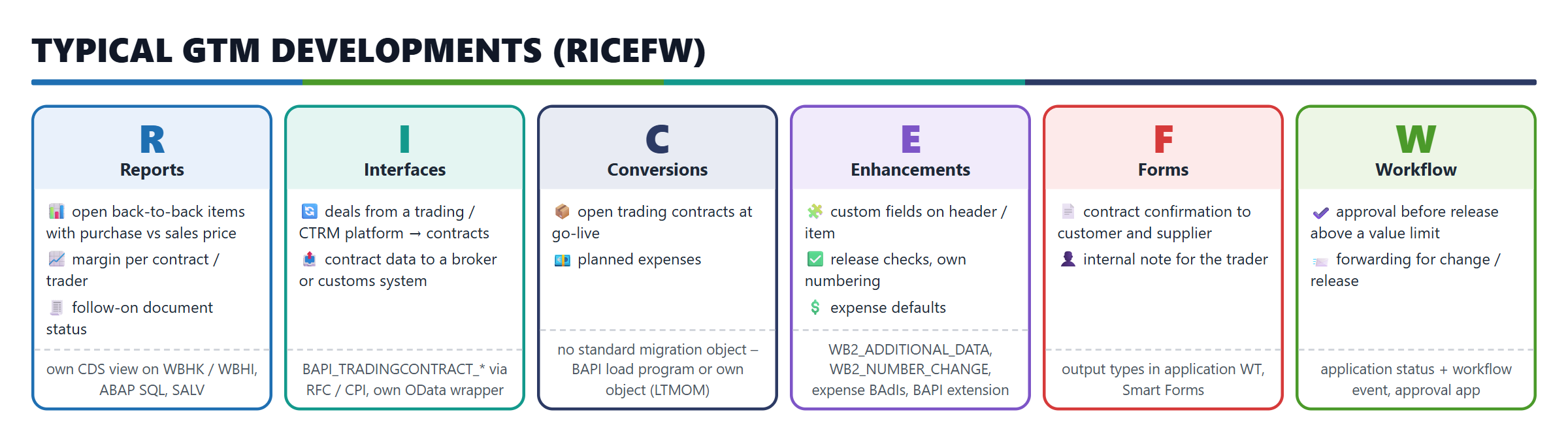
Type | Example | Technique |
|---|---|---|
Report | Open back-to-back items with purchase vs sales price; margin per contract or trader; follow-on document status | Own CDS view entity, ABAP SQL, SALV or Fiori elements list |
Interface | Deals from a trading platform / CTRM into trading contracts; contract data to banks, brokers, customs | BAPI_TRADINGCONTRACT_* via RFC from CPI, own OData wrapper, GTS integration |
Conversion | Open trading contracts and planned expenses at go-live | No standard migration object found – BAPI load program or own object in the Migration Object Modeler (page 06) |
Enhancement | Custom fields; release checks; credit management data / exposure; shadow TC copy relevance; copying custom data to the follow-on documents | WB2_ADDITIONAL_DATA, WB2_BAPI_ENHANCE_EX, WB2_NUMBER_CHANGE, expense BAdIs, SD / MM exits |
Form | Contract confirmation to customer and supplier; internal note for the trader | Output types in application WT, Smart Forms |
Workflow | Approval before release above a value or risk limit | Application status with workflow event, approval app (Business Suite only), flexible / classic workflow |
Part 10 – Interview questions
Q1. How is GTM built technically, and how does that affect enhancements?
It is classic ERP code in the WB2B packages of EA-GLTRADE with transparent tables (WBHK, WBHI …), dialog transactions WB21 – WB23 and BAPIs – no BOPF or RAP object. You extend it with customizing, the GTM BAdIs, the BAPI extension parameters, message determination and the SD / MM exits of the follow-on documents.
Q2. Which tables hold a trading contract?
WBHK header, WBHI items, WBHD commercial data, WBHE schedule lines, WBHP partners, WBHF document flow and WBGT for the link between follow-on documents and contract items; contract types are in TB2BE. The key is TKONN, items add TPOSN and TPOSN_SUB.
Q3. How would you build a margin report per trading contract item?
An own CDS view entity on WBHI joined to WBHK with purchase price NETPR_MM / WAERS_MM and sales price NETPR_SD with the SD currency, currency and unit annotations, a DCL role on the sales organization, and an ABAP SQL report or Fiori list on top. Handle different currencies and price units explicitly.
Q4. How do you add a custom field to the trading contract?
Append it to the table, maintain and check it with BAdI WB2_ADDITIONAL_DATA, support the BAPIs with EXTENSIONIN / EXTENSIONOUT (structures BAPI_TE_WBHK, BAPI_TE_WBHI …) and BAdI WB2_BAPI_ENHANCE_EX, and copy it to sales order or PO with the SD / MM exits if needed.
Q5. Which BAPIs exist for trading contracts, and what are their limits?
BAPI_TRADINGCONTRACT_CREATE, _CHANGE, _RELEASE and _GET_LIST. Create cannot copy from a reference contract, the tolerance fields are missing, CHANGE cannot change partner functions, and custom or some standard fields need the extension parameters. Commit explicitly with BAPI_TRANSACTION_COMMIT.
Q6. A customer wants to integrate a CTRM platform. What do you design?
CPI receives the deals, maps them and calls BAPI_TRADINGCONTRACT_CREATE / _RELEASE via RFC (or an own OData service that wraps them), with the external deal number in TKONN_EX for idempotency, error handling via the RETURN table and monitoring in CPI. There is no released trading contract API.
Q7. Where do you put logic for documents created from a trading contract?
In the normal SD and MM exits – sales orders, POs, deliveries and billing documents are standard documents. Check in the exit whether the document comes from a contract and leave GTM-controlled fields alone, otherwise GTM reports inconsistencies.
Q8. How is trading contract output configured?
Message determination with application WT, per target group customer, supplier and employee, with header and item procedures assigned to sales group, purchasing group or contract type, condition table 170 among the standard tables, and Smart Forms for the layout. That is the ECC way (NAST only); S/4HANA also offers S/4HANA output control (TRADING_CONTRACT_CUSTOMER / _SUPPLIER, output control indicator on the contract type).
Q9. After release the customer gets the order confirmation twice. Where do you look?
At the output type of the sales order: if multiple issuing is allowed, the release of a both-side contract followed by the ATP update of the sales order can create the output twice (KBA 2680304). It is a customizing issue.
Q10. How do you implement an approval before a contract may be released?
Define application statuses in a status group assigned to the contract type, raise a workflow event when the 'to approve' status is saved, approve in My Inbox (Business Suite: also the Approve Trading Contracts app), and allow release only from the approved status. The approval app BAdIs exist only in the Business Suite; in S/4HANA approval runs via the workflow (WBWF).
Q11. Is GTM ready for ABAP Cloud and clean core?
Only partly: there is no released trading contract API or RAP object; key-user extensibility is documented for the Manage Trading Contracts and Manage Precontracts apps. Clean core means configuration first, then key-user adaptations, BAdIs and BAPIs, read-only own CDS views, no table updates or modifications, and side-by-side apps only via an own service.
Q12. Name a typical GTM RICEFW list.
Margin and open-position reports on own CDS views, CTRM and bank interfaces via BAPIs and CPI, a BAPI load of open contracts at go-live, custom fields and release checks via the GTM BAdIs, contract confirmations as WT output with Smart Forms, and a status-based approval workflow.
🏠 Start Here · ◀ 04 · Integration & Reporting · 06 · S/4HANA & Architect ▶ · Sections: CORE ABAP | OOPS ABAP | ABAP on HANA | Clean Core | RAP | ABAP Points | SAP Fiori | SAPUI5 | Mobile Development (MDK) | BTP Foundations | BTP Development | CAP | SAP Build | ABAP on BTP | Integration Suite | SAP Business AI | SAP BASIS | Security | SAP SDLC
Functional: FICO ABAP | TRM ABAP | VIM | SAP BIS | SD ABAP | MM ABAP | PP ABAP | QM ABAP | PM ABAP | PS ABAP | EWM | TM ABAP | GTM ABAP | EHS ABAP | HR ABAP | BW | SAP Datasphere | SAP Business Data Cloud | SAP MDG | SAP Analytics Cloud | SAP Ariba | SAP CX | SAP IBP