How an ABAP developer reads HR data. HR data is different from most SAP data: almost every record is time-dependent (BEGDA / ENDDA), it is protected by strict HR authorizations, and it is spread over many infotype tables. That is why classic HR reports use logical databases (LDBs), the event GET PERNR, special macros and PROVIDE … ENDPROVIDE instead of plain SELECTs. Payroll and time results live in clusters and are read with IMPORT or function modules (see page 05 Payroll & Time Data). Infotype basics (Pnnnn, PAnnnn, time constraints) are on page 02 Infotypes & Personnel Administration.
Part 1 – Three ways to read HR data
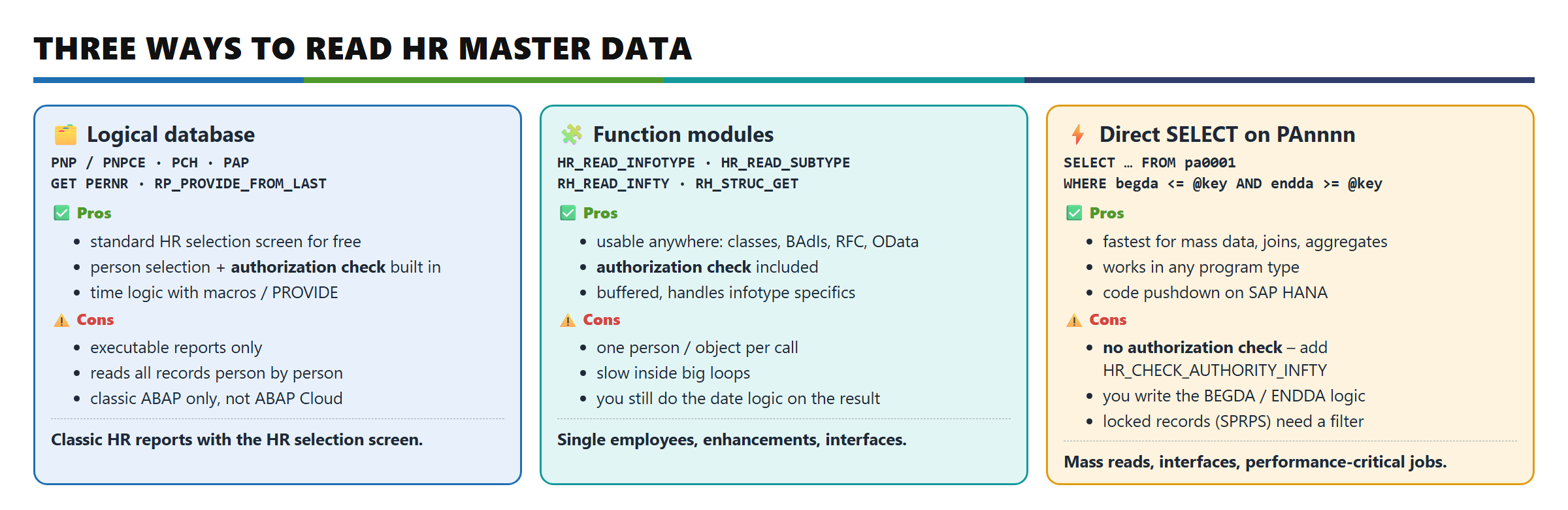
Way | Typical statements | Use it for |
|---|---|---|
Logical database (PNP / PNPCE / PCH / PAP) |
| Classic executable HR reports with the standard HR selection screen |
Function modules |
| One employee or one OM object inside classes, BAdIs, user exits, RFC / OData services |
Direct SELECT / CDS | SELECT … FROM pa0001 WHERE begda <= … AND endda >= … | Mass reads and interfaces where performance matters – you add the authorization check yourself |
Rule of thumb: an HR report with a selection screen → LDB; a single employee in other code → FM; large volumes or joins → SELECT plus an explicit authorization check (Part 10).
Part 2 – Logical databases in HR: PNP, PNPCE, PCH, PAP
A logical database is a special ABAP program (maintained in SE36) that reads related tables in a fixed hierarchy, offers a ready-made selection screen, checks authorizations and hands the data to your report one node at a time through GET events. You attach it in the program attributes of an executable program (type 1). You write no SELECT for the master data – the LDB does it.
LDB | Used for | Main node / event | Notes |
|---|---|---|---|
PNP | HR master data: Personnel Administration, Time Management, Payroll |
| The classic HR LDB; best suited to selecting persons |
PNPCE | Same as PNP, plus concurrent employment (one person, several assignments) |
| SAP recommends PNPCE for new reports, even without concurrent employment |
PCH | Personnel Planning: Organizational Management, Personnel Development, Training and Event Management |
| Can technically read all HR infotypes, but use it only for personnel planning data (objects O, S, C …) |
PAP | Recruitment (applicants) | applicant node | Applicant infotypes are stored in tables PBnnnn |
- PNP vs PCH for employees: PCH can reach employee data through evaluation paths, but PNP is faster and simpler because it is built for selecting persons.
- The same four LDBs are the data sources of HR InfoSets for SAP Query (SQ01 / SQ02) and the Ad Hoc Query – the reporting tools for key users.
- LDBs are classic ABAP only. They are not available in ABAP Cloud, and modern ABAP documentation treats them as obsolete for new non-HR development – but HR reports still use them everywhere, so you must know them.
Part 3 – A PNP report: TABLES pernr, INFOTYPES, GET PERNR
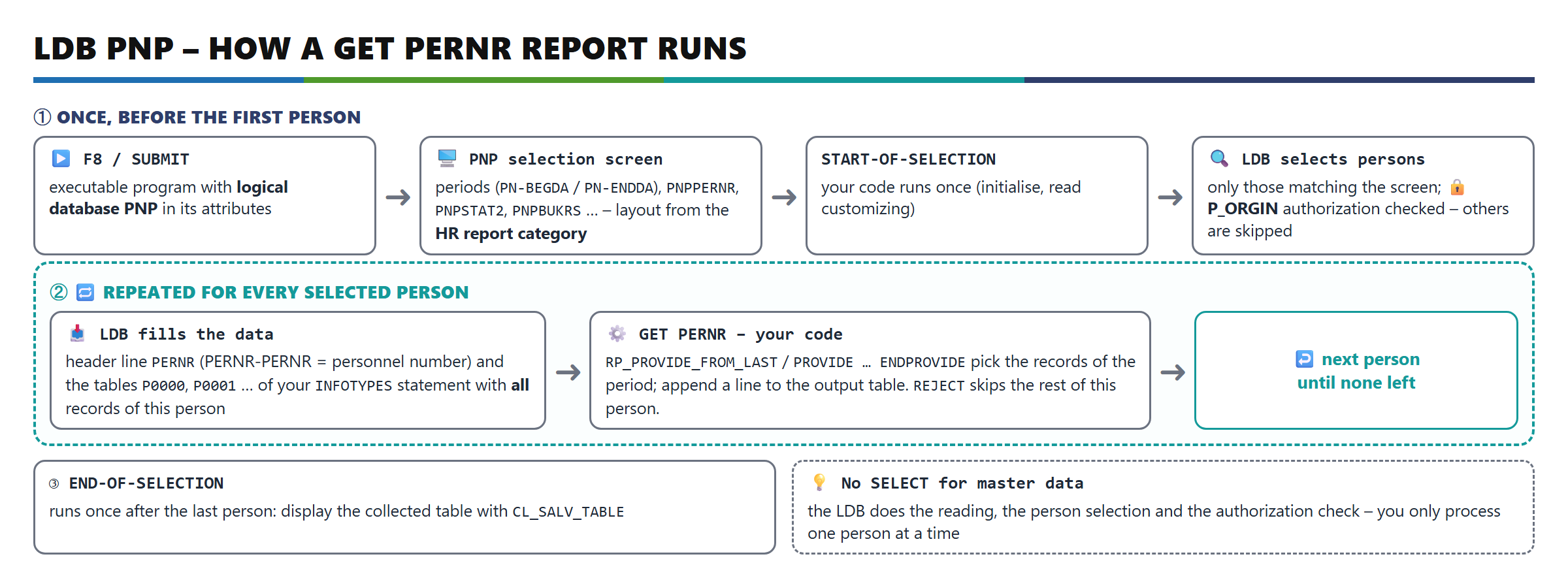
3.1 The building blocks
Statement | What it does |
|---|---|
Program attributes → Logical database = PNP | Gives the report the PNP selection screen and the GET events |
TABLES pernr. | Declares the LDB node PERNR (structure with PERNR-PERNR = personnel number). |
INFOTYPES: 0000, 0001, 0002. | Creates an internal table with header line P0000, P0001, P0002 (structure Pnnnn) for each infotype; the LDB fills them at GET PERNR |
START-OF-SELECTION. | Runs once before the first person |
GET pernr. | Runs once per selected person; the infotype tables now hold all records of that person (every period) |
REJECT. | Inside GET PERNR: stop processing this person and continue with the next one |
END-OF-SELECTION. | Runs once after the last person – output (ALV) |
- Infotype numbers are always four digits:
INFOTYPES: 0000, 0001, 0006. - Useful additions:
INFOTYPES 0008 MODE N.– the LDB does not read this infotype (saves time); you read it yourself only when needed, e.g. with the TRMAC macroRP-READ-INFOTYPEor HR_READ_INFOTYPE. - Because the tables contain the person's whole history, you must pick the records of the reporting period yourself – with the macros (Part 5) or PROVIDE (Part 6).
3.2 Minimal example
|
Part 4 – The selection screen and HR report categories
4.1 Standard PNP selection fields
The LDB generates the selection screen. Its fields are select-options with fixed names that you can use in your code (for example to fill a default in INITIALIZATION).
Field | Meaning |
|---|---|
PNPPERNR | Personnel number |
PNPSTAT2 | Employment status (0 withdrawn, 1 inactive, 2 retiree, 3 active) |
PNPBUKRS | Company code |
| Personnel area / personnel subarea |
| Employee group / employee subgroup |
PNPABKRS | Payroll area |
PNPKOSTL | Cost center |
| Organizational unit / position |
| Data selection period – used by the macros and PROVIDE |
| Person selection period – which persons are selected |
| Payroll year / payroll period (payroll-type report categories) |
The period block (Today, Current month, Current year, Other period …) fills PN-BEGDA / PN-ENDDA. Further fields are hidden behind the Further selections button; Search helps and Sort order are also provided by the LDB.
4.2 HR report category
The HR report category decides which fields and period types the PNP selection screen shows. You choose it in the program attributes (button HR report category, visible when the LDB is PNP or PNPCE). Example: a payroll report uses a category that shows payroll area and payroll period instead of a free date range.
- SAP delivers many report categories; you can also create your own in Customizing (IMG → Personnel Management → Human Resources Information System → Reporting → Adjusting the Standard Selection Screen).
- PNP and PNPCE have separate report categories.
- Your own fields: add normal
PARAMETERS/SELECT-OPTIONS(or aSELECTION-SCREEN BEGIN OF BLOCK) – they appear below the LDB fields.
Part 5 – Macros RP_PROVIDE_FROM_LAST / FRST and PNP-SW-FOUND
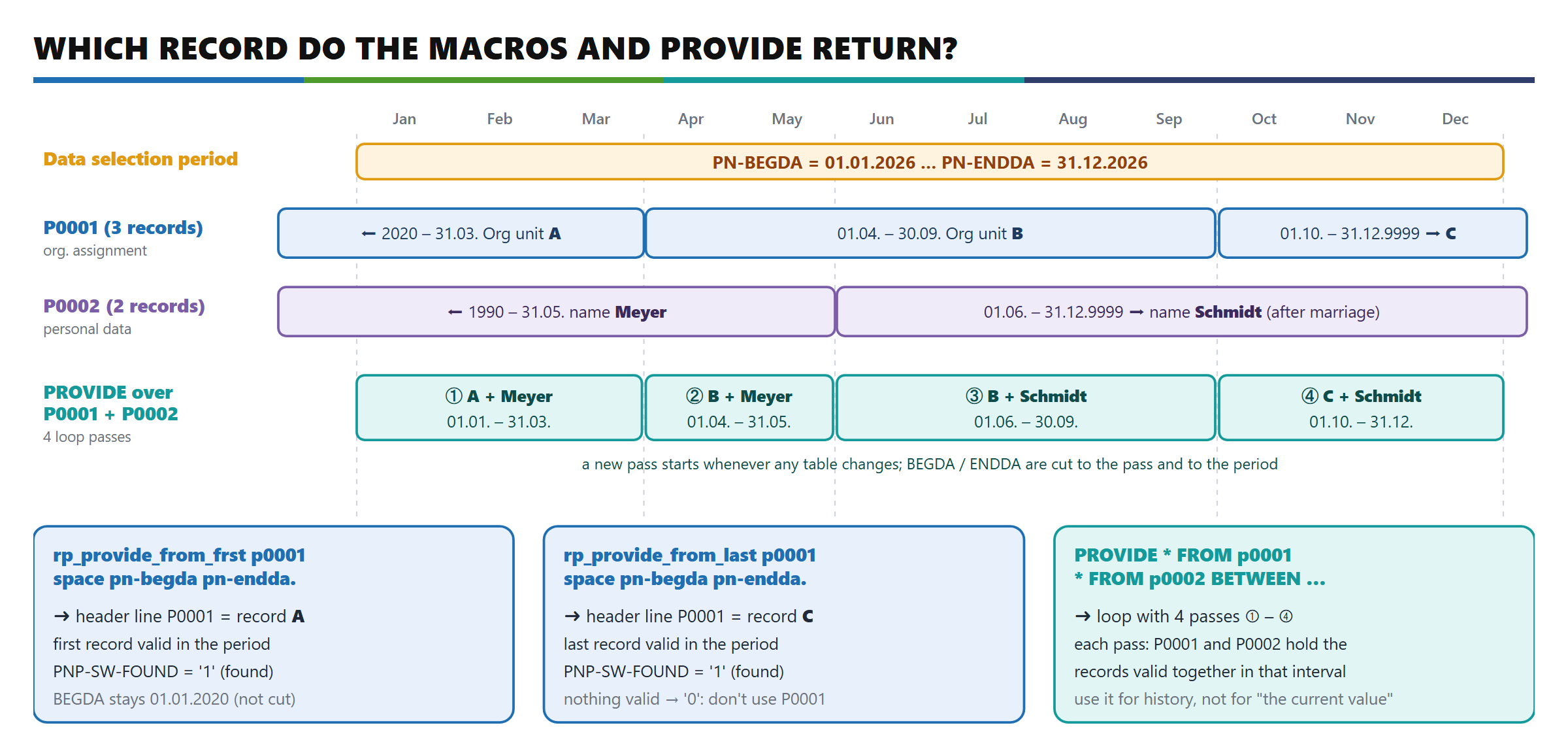
A macro is a named piece of ABAP code that the compiler copies in where you use it. HR macros are stored centrally in table TRMAC ('Macros in ABAP/4 programs', view it in SE16 / SE11), so programs can use them without any INCLUDE. The two you need every day:
Macro | Puts into the header line … |
|---|---|
rp_provide_from_last pnnnn subty begda endda. | the last (latest) record of table Pnnnn that is valid at least one day between begda and endda |
rp_provide_from_frst pnnnn subty begda endda. | the first (earliest) such record |
- subty = subtype, or
spaceif the infotype has no subtypes or you want any subtype. - After the call PNP-SW-FOUND tells you the result:
'1'= a record was found,'0'= no record valid in the period. Always check it before you use the header line. - The record is copied as it is – BEGDA / ENDDA are not cut to the period (PROVIDE does cut them).
- Two spellings exist: TRMAC holds the hyphen form (
RP-PROVIDE-FROM-LAST); PNP / PNPCE reports usually use the underscore form (RP_PROVIDE_FROM_LAST) that the logical database provides. Both work the same.
|
Key-date reading: pass the same date twice, e.g. rp_provide_from_last p0001 space sy-datum sy-datum. – gives the record valid today.
Part 6 – PROVIDE … ENDPROVIDE
PROVIDE is a loop made for time-dependent tables. It walks through a period and, for every sub-interval in which the data of all listed tables stays the same, fills the work areas and runs the loop body once. Use it when you need the history within a period (e.g. every org unit an employee had this year); use the macros when you need just one record.
Short form (classic HR syntax, works with the Pnnnn header lines)
|
Long form (modern syntax, explicit work areas)
|
- The records of one table must not overlap (the long form raises an exception if they do), so PROVIDE suits time constraint 1 and 2 infotypes, not time constraint 3.
- Add
INCLUDING GAPSto the long form to get a pass also for intervals where a table has no record. - The short form is obsolete in modern ABAP but is everywhere in HR code; know both.
Part 7 – Repetitive structures with DO … VARYING
Repetitive structures such as LGA01 … LGA40 / BET01 … BET40 in IT0008 and DAR01 … DAR12 / DAT01 … DAT12 in IT0041 are explained on page 02 Part 6. To loop over them, use DO … VARYING: each pass moves the variable to the next field of the group.
|
|
DO … VARYINGis obsolete in modern ABAP but is the standard idiom in HR code. Modern alternative: build the field name and useASSIGN COMPONENT |LGA{ lv_i WIDTH = 2 ALIGN = RIGHT PAD = '0' }| OF STRUCTURE p0008 TO <lv_lgart>.- Wage type codes are 4 characters and defined per customer and country in table T512W (texts in T512T) – see page 05.
Part 8 – PNPCE (GET PERAS) and PCH (GET OBJEC)
8.1 PNPCE – concurrent employment
With concurrent employment one real person (central person, object type CP) can have several personnel assignments – several PERNRs, e.g. two part-time contracts. PNPCE knows this hierarchy (person → group of assignments → assignment). The event for one assignment is GET PERAS; it replaces GET PERNR. Everything else (INFOTYPES, macros, PROVIDE) works as with PNP.
|
8.2 PCH – organizational objects
PCH reads Personnel Planning objects (O organizational unit, S position, C job, P person …). The selection screen asks for plan version, object type, object ID and optionally an evaluation path; PCH then follows the path and triggers GET OBJEC for every object found. The PD infotype tables (P1000 Object, P1001 Relationships …) are filled like Pnnnn in PNP.
|
OM objects, relationships and evaluation paths are explained on page 01 HCM Overview & Organizational Management; outside a PCH report use RH_STRUC_GET (Part 9).
Part 9 – Function modules: HR_READ_INFOTYPE, HR_READ_SUBTYPE, RH_READ_INFTY, RH_STRUC_GET
Function module | Reads | Notes |
|---|---|---|
HR_READ_INFOTYPE | PA infotype records (PAnnnn) of one employee for a period | Checks HR authorizations; result table of type Pnnnn |
HR_READ_SUBTYPE | Same, restricted to one subtype | e.g. IT0006 subtype 1, IT0105 subtype 0001 |
RH_READ_INFTY | PD infotype records (HRPnnnn) of OM objects | e.g. HRP1000 names, HRP1001 relationships |
RH_STRUC_GET | All objects reached along an evaluation path from a start object | e.g. path O-S-P: org unit → positions → persons |
HR_INFOTYPE_OPERATION | – (writes) | Create / change / delete infotype records – see page 04 Infotype Development, Enhancements & Authorizations |
HR_READ_INFOTYPE
|
HR_READ_SUBTYPE
|
RH_READ_INFTY – name of an org unit
|
RH_STRUC_GET – all employees of an org unit
|
- RH_STRUC_GET also returns
RESULT_OBJEC(object names) andRESULT_STRUC(the tree with levels). Evaluation paths are maintained in OOAW (table T778A). - HR_READ_INFOTYPE returns the records sorted by date; the last line is the latest record. The FM reads the HR buffer, so repeated calls for the same person are cheap.
Part 10 – Reading without an LDB: direct SELECT on PAnnnn
Infotype tables are normal transparent tables (PA0001, PA0002 …), so you can SELECT from them – in any program type, with joins, and pushed down to SAP HANA. The price: you must write the date logic, skip locked records and check authorizations.
|
Finding the personnel number of the current SAP user (IT0105 subtype 0001) works the same way – example on page 02 Part 4.
LDB / FM | Direct SELECT | |
|---|---|---|
Authorization check | Built in (P_ORGIN …) | Missing – call HR_CHECK_AUTHORITY_INFTY (page 04) for every person / infotype you output |
Date logic | Macros, PROVIDE, FM parameters | Own WHERE condition on BEGDA / ENDDA |
Performance | Person by person | Set-based, joins, HANA pushdown – fastest for mass data |
Where usable | LDB: executable reports only; FM: anywhere | Anywhere |
Infotype logic | Handles subtypes, buffer, special infotypes | Only what the table contains |
Never output HR data read with SELECT without an authorization check – this is a typical audit finding.
Part 11 – Complete sample report: PNP + IT0001/0002 + ALV
An employee list: for each selected person the latest organizational assignment and personal data in the period, shown in an ALV grid with CL_SALV_TABLE (ALV in depth: CORE ABAP › 03 Report Programming & ALV and OOPS ABAP › 04 ALV Reporting).
|
- The LDB already checked P_ORGIN for every person, so no extra authorization code is needed.
- Test it: enter a period (e.g. Current month) and a few personnel numbers or an org unit on the selection screen, press F8.
Part 12 – Interview questions
Q1. Why do HR reports use logical databases instead of SELECT?
PNP gives the standard HR selection screen, selects the persons, checks HR authorizations (P_ORGIN) and fills all infotype tables per person. The report only processes one person at a time in GET PERNR. A direct SELECT is possible but you must then do the date logic and the authorization check yourself.
Q2. Which HR logical databases do you know, and when do you use each?
PNP for HR master data (PA, time, payroll); PNPCE for the same with concurrent employment – recommended for new reports; PCH for personnel planning objects (OM, PD, training and events); PAP for recruitment.
Q3. What does the INFOTYPES statement do?
INFOTYPES: 0001. creates an internal table P0001 with header line and structure P0001. With an LDB it is filled at GET PERNR with all records of the person. MODE N stops the LDB from reading it.
Q4. What is the difference between RP_PROVIDE_FROM_LAST and RP_PROVIDE_FROM_FRST?
Both copy one record of a Pnnnn table into its header line: LAST the latest, FRST the earliest record valid in the given period (optionally for one subtype). PNP-SW-FOUND = '1' if a record was found, '0' if not.
Q5. Where are the HR macros defined?
Centrally in table TRMAC (hyphen form, e.g. RP-PROVIDE-FROM-LAST, RP-READ-INFOTYPE), so programs can use them without an INCLUDE; display them in SE16. PNP reports also get the underscore form RP_PROVIDE_FROM_LAST from the logical database.
Q6. When do you use PROVIDE instead of the macros?
When you need every change within a period, not just one record. PROVIDE loops over the sub-intervals in which the data of all listed infotype tables is constant and cuts BEGDA / ENDDA to each interval.
Q7. How do you read a repetitive structure such as the wage types of IT0008?
With DO 40 TIMES VARYING lv_lgart FROM p0008-lga01 NEXT p0008-lga02 VARYING lv_betrg FROM p0008-bet01 NEXT p0008-bet02, exiting when the wage type is initial. Modern alternative: ASSIGN COMPONENT with a generated field name.
Q8. What is an HR report category?
A setting in the program attributes of a PNP / PNPCE report that decides which selection fields and period types the standard selection screen shows. SAP delivers many; you can create your own in Customizing.
Q9. What is the difference between PNP and PNPCE?
PNPCE supports concurrent employment (one person with several personnel assignments). It uses NODES peras and GET peras instead of TABLES pernr and GET pernr, and has its own report categories.
Q10. How do you get all employees of an organizational unit?
Call RH_STRUC_GET with object type O, the org unit ID and evaluation path O-S-P, then keep the result lines with OTYPE = 'P'. In a PCH report the evaluation path on the selection screen does the same.
Q11. What must you take care of when you SELECT directly from PA0001?
Date logic (begda <= end AND endda >= start), locked records (SPRPS), and the missing authorization check – call HR_CHECK_AUTHORITY_INFTY before you output the data.
Q12. Which FMs read HR data and which one writes it?
Read: HR_READ_INFOTYPE, HR_READ_SUBTYPE (PA), RH_READ_INFTY (PD / OM), RH_STRUC_GET (structures). Write: HR_INFOTYPE_OPERATION, with the employee locked by BAPI_EMPLOYEE_ENQUEUE (page 04).
🏠 Start Here · ◀ 02 · Infotypes & PA · 04 · Infotype Development ▶ · Sections: CORE ABAP | OOPS ABAP | ABAP on HANA | Clean Core | RAP | ABAP Points | SAP Fiori | SAPUI5 | Mobile Development (MDK) | BTP Foundations | BTP Development | CAP | SAP Build | ABAP on BTP | Integration Suite | SAP Business AI | SAP BASIS | Security | SAP SDLC
Functional: FICO ABAP | TRM ABAP | VIM | SAP BIS | SD ABAP | MM ABAP | PP ABAP | QM ABAP | PM ABAP | PS ABAP | EWM | TM ABAP | EHS ABAP | HR ABAP | BW | SAP MDG | SAP Analytics Cloud | SAP Ariba | SAP CX | SAP IBP