How an HR ABAP developer changes infotypes: building a custom infotype (9nnn) in PM01, adding fields to a standard infotype with a customer include, putting defaults and checks into the infotype dialog with PBAS0001 and BAdI HRPAD00INFTY, writing infotype data from a program with HR_INFOTYPE_OPERATION, and respecting HR authorizations. Running example: custom infotype 9001 Laptop Assignment (asset ID, model, issue date). Infotype basics (structures, time constraints) are on page 02 Infotypes & Personnel Administration; reading infotypes in reports is on page 03 HR Reporting.
Part 1 – Custom infotype or enhancement? Choosing the technique
SAP delivers hundreds of infotypes. When the business needs more, there are two ways: create a custom infotype (number range 9000–9999) or enhance a standard infotype with extra fields. Both are done in transaction PM01 and both are supported enhancement techniques – no modification of SAP code.
Requirement | Technique | Where |
|---|---|---|
A new group of fields with its own validity period (laptop, union membership, visa) | Custom infotype 9nnn | PM01 – Part 2 |
A few extra fields on an existing infotype (e.g. a badge number on IT0001) | Customer include CI_Pnnnn | PM01 → Enhance infotypes – Part 3 |
Hide a field, make it mandatory or read-only on a standard screen | Screen control (table T588M) – Customizing, no code | IMG – Personnel Administration |
Default values or extra checks when a record is entered | PBAS0001 exits / BAdI HRPAD00INFTY | Part 4 |
Automatic follow-up when an infotype changes (e.g. create IT0019 after a hire) | Dynamic actions (T588Z) or BAdI method IN_UPDATE | Page 02 / Part 4 |
Write infotype records from a program, interface or upload | HR_INFOTYPE_OPERATION | Part 5 |
New fields for Organizational Management objects (O, S, C …) | Custom PD infotype – transaction PPCI, tables HRP9nnn (and HRT9nnn for a table part) | Page 01 for OM objects |
- Never change SAP's infotype module pools (MP000100, MP000200 …) – that is a modification.
- Never write PA tables with
INSERT/UPDATE/MODIFY: you bypass checks, time constraints, the infotype log and authorizations. Use HR_INFOTYPE_OPERATION (Part 5).
Part 2 – Creating a custom infotype in PM01
You only define the fields; PM01 generates everything else – structures, the database table, the dialog module pool with its screens – and the Customizing entries that make PA30 know the infotype.
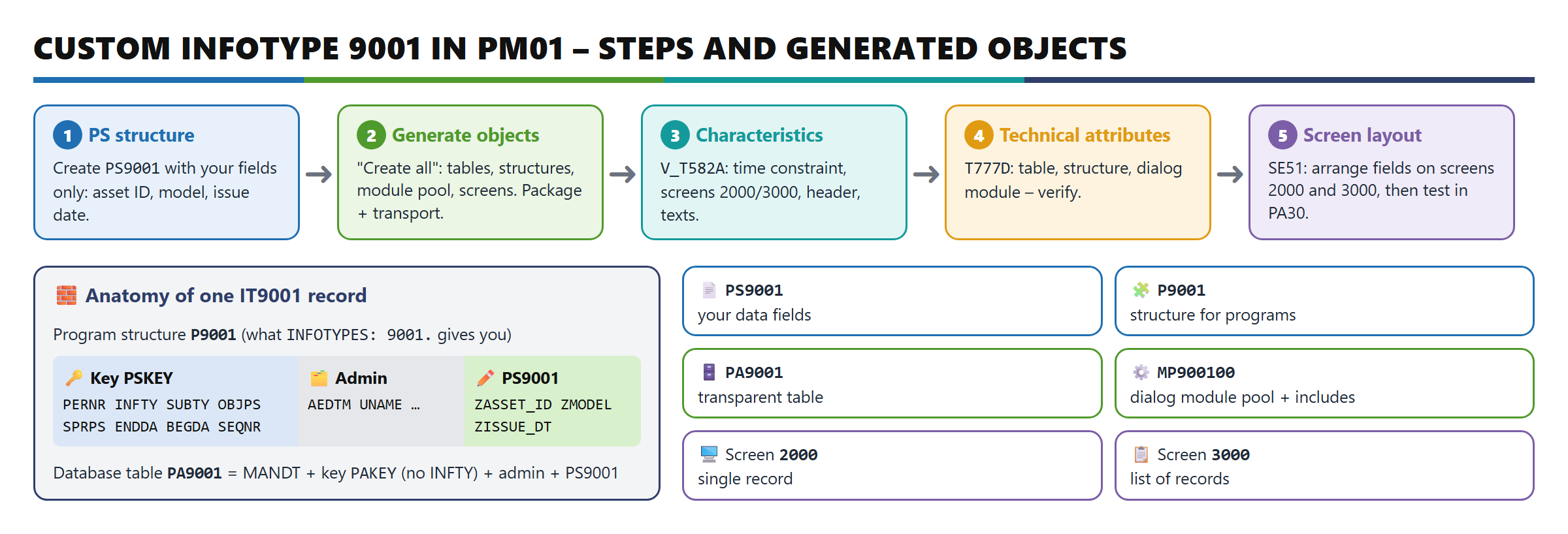
2.1 The five steps
Step | What you do | Result |
|---|---|---|
1. Create the PS structure | PM01 → enter infotype number 9001, type 'Employee infotype' → select PS structure → Create. Add your fields (asset ID, model, issue date) with data elements; activate. | Structure PS9001 – only your fields, no key fields |
2. Generate the objects | Choose Generate objects (Create all). PM01 lists what it will create; confirm, give a package and a transport request. | P9001, PA9001, module pool MP900100 with screens 2000 and 3000 |
3. Infotype characteristics | Maintain the infotype attributes (view V_T582A): time constraint, single screen 2000, list screen 3000, screen header, retroactive accounting relevance, infotype text (T582S). | PA30 accepts the infotype |
4. Technical attributes | Check the technical entry (table T777D): database table PA9001, structure P9001, dialog module MP900100. Normally generated correctly – just verify. | Runtime knows which table and program to use |
5. Screen layout | Screen Painter (SE51) for MP900100: arrange fields and labels on screen 2000 and the columns of list screen 3000. Screen fields reference P9001-…. | Usable screens |
- Then add the infotype to an infotype menu (IMG: Personnel Administration → Customizing User Interfaces) so it shows in PA30, and test create, change, delimit and list display.
- Choose the time constraint carefully (page 02): for a laptop, 3 if an employee may hold several at once, 2 if only one at a time.
2.2 Generated objects
Object | Name for IT9001 | Content / purpose |
|---|---|---|
PS structure | PS9001 | Your data fields (you create it in step 1) |
Infotype structure | P9001 | Key |
Database table | PA9001 | MANDT + key |
Module pool | MP900100 | Dialog program of the infotype with generated includes for global data, PBO modules, PAI modules and subroutines |
Single screen | 2000 | Detail screen – one record |
List screen | 3000 | All records of a period in a table control |
Customizing | V_T582A, T777D, T582S | Attributes, technical attributes, texts |
2.3 Your own checks in the custom infotype
A custom infotype owns its module pool, so field checks go directly into it: add a FIELD … MODULE line to the PAI flow logic of screen 2000 and write the module in the PAI include.
|
- Custom infotypes are transported like any repository object; the Customizing entries (V_T582A etc.) travel with them in the same request when PM01 asks for it.
- Custom PD infotypes for OM objects are created the same way with transaction PPCI (tables HRP9nnn).
Part 3 – Enhancing a standard infotype (customer include CI_Pnnnn)
Most standard PS structures contain an empty customer include CI_Pnnnn (e.g. PS0002 contains CI_P0002). Fields you put into it automatically become part of Pnnnn and PAnnnn – no append, no modification.
Steps (example: badge number on IT0001)
- PM01 → tab Enhance infotypes → infotype 0001.
- Select Cust. include → Create → structure CI_P0001; add field
ZZBADGE(customer fields start with ZZ to avoid clashes with future SAP fields). Activate – PA0001 is adjusted automatically. - Choose Create all: PM01 generates a customer module pool ZP000100 with a subscreen for the new fields and links it to the standard screen of IT0001.
- Arrange the field on the subscreen in SE51; PBO/PAI logic for the new fields goes into ZP000100's modules.
- Test in PA30: the new fields appear in the customer area of the standard screen.
Custom infotype 9nnn | Customer include CI_Pnnnn | |
|---|---|---|
Use when | New, independent data with its own validity | A few extra fields that share the validity of the standard record |
Own table | Yes – PA9nnn | No – fields added to PAnnnn |
Time constraint | You choose | Inherits the standard infotype's |
Screens | Own module pool MP9nnn00 (2000/3000) | Subscreen in ZPnnnn00 inside the standard screen |
Read in ABAP |
| Same as the standard infotype – the fields are simply there ( |
Part 4 – Defaults and validations: PBAS0001 and BAdI HRPAD00INFTY
For standard infotypes you cannot touch the module pool, so SAP offers two hooks that run inside the infotype dialog for every infotype (check innnn-infty to react only to yours). The classic CMOD/SMOD and BAdI mechanics are explained in CORE ABAP › 10 Enhancements.
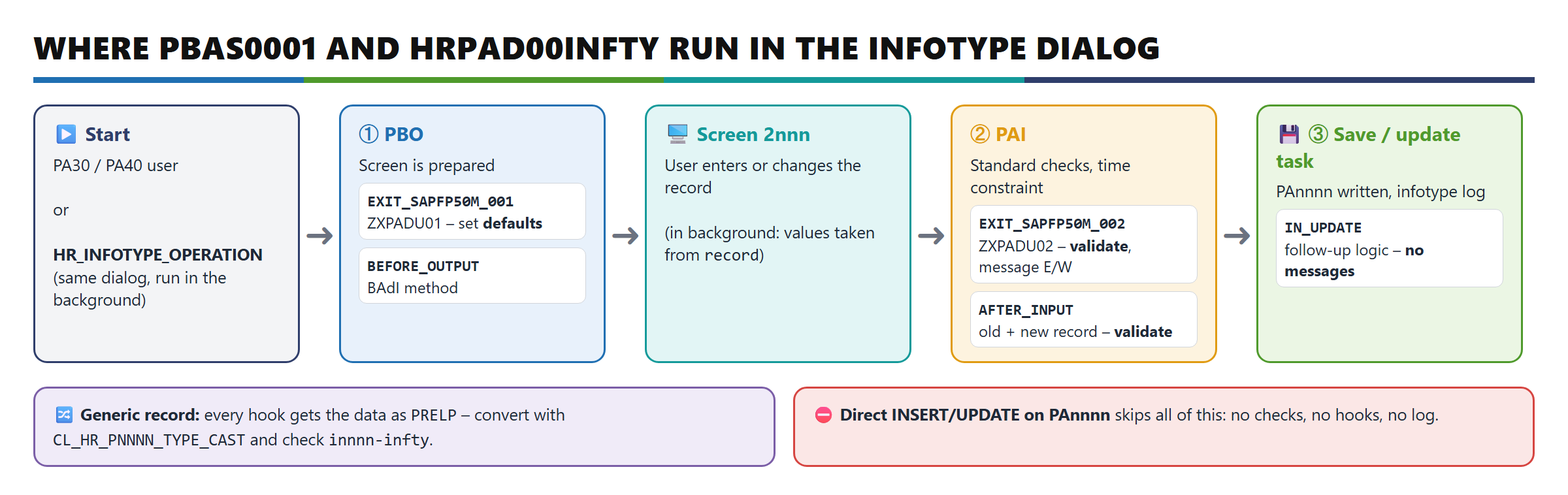
Hook | Runs | Typical use | Note |
|---|---|---|---|
EXIT_SAPFP50M_001 (include ZXPADU01) | PBO – before the screen is shown | Default values | Changed |
EXIT_SAPFP50M_002 (include ZXPADU02) | PAI – after user input | Validations | Check only – raise an error/warning message |
HRPAD00INFTY~BEFORE_OUTPUT | Before output | Prepare the screen | BAdI, multiple use |
HRPAD00INFTY~AFTER_INPUT | After input ( | Validations that compare old and new values | Raise messages as in the exit |
HRPAD00INFTY~IN_UPDATE | In the update task when the record is saved | Follow-up actions (write a Z table, flag for an interface) | No messages, no dialogs, no COMMIT |
Both hooks receive the record as the generic structure PRELP (fields of any infotype in one character container). Convert it with CL_HR_PNNNN_TYPE_CAST to the typed structure and back.
4.1 Validation in PBAS0001 (include ZXPADU02)
|
4.2 Default value in PBAS0001 (include ZXPADU01)
|
- Activate the CMOD project that contains PBAS0001, otherwise the includes never run.
- PBO runs every time the screen is displayed – set a default only if the field is still empty.
4.3 Validation in BAdI HRPAD00INFTY
Implement the BAdI in SE19 (classic BAdI, multiple use – several implementations may run, in no fixed order). AFTER_INPUT sees both the old and the new record, which the exit does not.
|
4.4 Exit or BAdI?
- Both run in PA30/PA40 and when HR_INFOTYPE_OPERATION processes the infotype in the background (Part 5).
- Prefer the BAdI for new work: object-oriented, several independent implementations, old and new values, and IN_UPDATE for follow-up logic. The exit has one shared include for the whole system.
- Newer HR applications (HCM Processes and Forms, Web Dynpro ESS) use the decoupled infotype framework (business logic classes, e.g. via
CL_HRPA_MASTERDATA_FACTORY). Check there that your logic also runs; the framework has its own BAdIs for business logic. - Screen-only changes (hide, mandatory, read-only) need no code: T588M screen control.
Part 5 – Updating infotypes from ABAP: HR_INFOTYPE_OPERATION
HR_INFOTYPE_OPERATION creates, changes, delimits or deletes one infotype record. It runs the infotype's own dialog module in the background, so the same checks as PA30 apply: time constraints, standard validations, your PBAS0001 / HRPAD00INFTY logic and the infotype log.
5.1 Rules
- Lock the employee first with
BAPI_EMPLOYEE_ENQUEUE, unlock withBAPI_EMPLOYEE_DEQUEUEat the end – the FM refuses to work on an unlocked personnel number. - Pass a complete record (
record) with the key: PERNR, INFTY, SUBTY, BEGDA, ENDDA. For MOD, DEL and LIS9 read the existing record first (HR_READ_INFOTYPE) so the key matches exactly. - Check
return-type: E or A means the record was not saved;return-messagetells why. - It commits by itself. Pass
nocommit = 'X'to group several calls and doCOMMIT WORKyourself. dialog_mode: '0' background (default), '1' show screens only on errors, '2' show all screens.tclas: 'A' employee data (default), 'B' applicant data.
Operation | Meaning |
|---|---|
INS | Create a record (an existing one is delimited according to the time constraint) |
MOD | Change an existing record (same key) |
DEL | Delete a record |
LIS9 | Delimit – end the record at a date |
COP | Copy – create a new record based on an existing one |
5.2 Example – create a permanent address (IT0006, subtype 1)
|
5.3 Alternatives
Tool | Use |
|---|---|
HR_MAINTAIN_MASTERDATA | Runs a personnel action (several infotypes, e.g. a hire) in one call |
Infotype BAPIs (e.g. | Released, stable interfaces for single infotypes – good for external callers via RFC |
Decoupled framework ( | Class-based read/write used by newer HR apps |
LSMW / batch input on PA30 | One-off data migration (see CORE ABAP › 06 Data Migration) |
Direct INSERT into PAnnnn | Never – no checks, no time constraint, no log |
Part 6 – HR authorizations
HR data is the most sensitive data in SAP, so HR has its own authorization objects on top of the normal transaction checks. Two dimensions are combined:
- General authorizations – what a user may do: which infotypes and subtypes, read or write, for which personnel areas, employee groups and organizational keys (object P_ORGIN).
- Structural authorizations – who the user may see: the part of the org structure reachable from a root object through an evaluation path (e.g. a manager sees only the employees below their org unit).
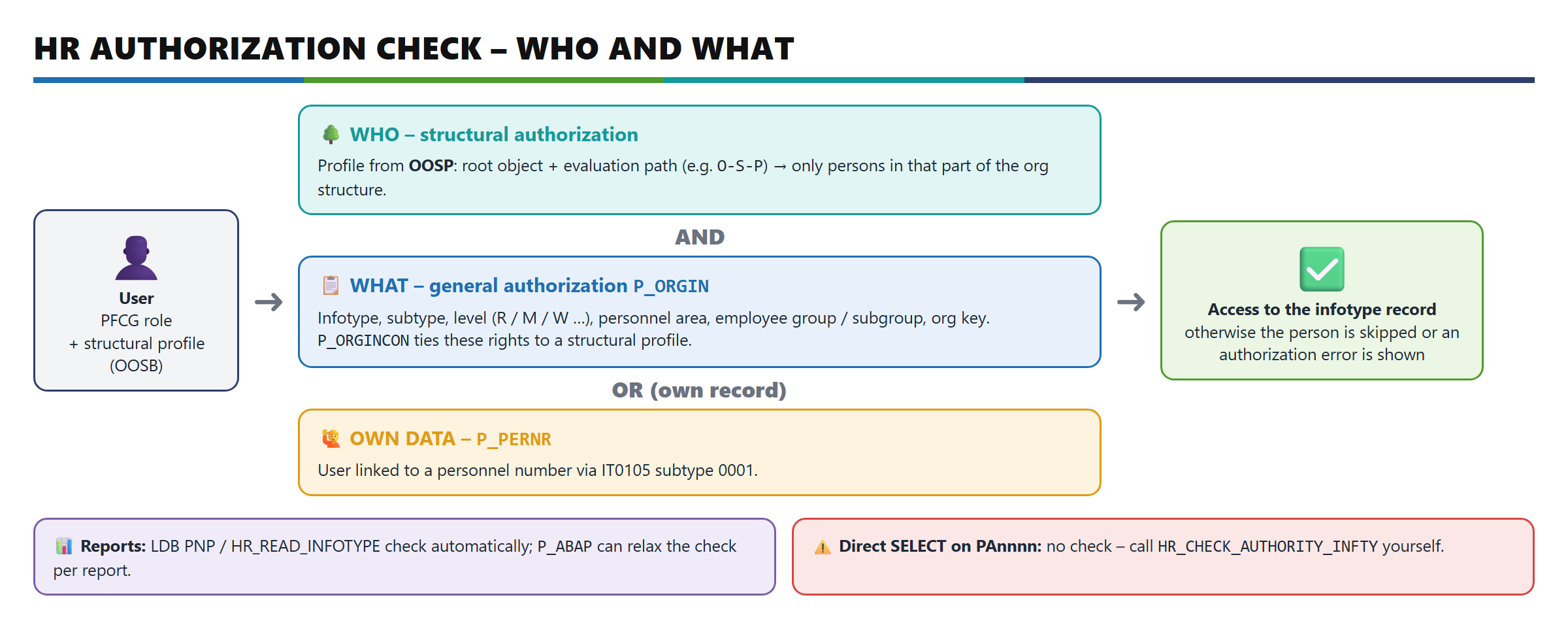
6.1 Authorization objects
Object | Purpose | Main fields |
|---|---|---|
P_ORGIN | HR master data – the main PA check | INFTY, SUBTY, AUTHC (level), PERSA (personnel area), PERSG, PERSK (employee group/subgroup), VDSK1 (organizational key) |
P_ORGINCON | Same as P_ORGIN plus a structural profile – context-sensitive: the rights apply only to the persons of that profile | P_ORGIN fields + PROFL |
P_ORGXX | Extended check by administrator (from IT0001) | SACHA, SACHP, SACHZ, SBMOD |
P_PERNR | Rights for the user's own personnel number (user linked via IT0105 subtype 0001) | INFTY, SUBTY, AUTHC, PSIGN (I = include / E = exclude these levels for the user's own personnel number, IT0105 subtype 0001) |
P_ABAP | HR reports using LDB PNP/PNPCE: simplify or switch off the LDB's check for a report | REPID, COARS (1 = simplified check, 2 = no check by the LDB) |
PLOG | Personnel planning (OM) data | PLVAR, OTYPE, INFOTYP, SUBTYP, ISTAT, PPFCODE |
P_PCLX | Direct access to HR clusters PCL1–PCL4 (payroll, time results – page 05) | RELID, AUTHC |
6.2 Authorization level (AUTHC)
Level | Meaning |
|---|---|
R | Read |
M | Matchcode – search help only (find the person, not see the data) |
W | Write |
E, D, S | Working with locked records (double-verification principle: one user enters a locked record, a second one unlocks it) |
* | All levels |
Which checks are active is controlled by switches in table T77S0, group AUTSW (e.g. ORGIN, INCON, ORGXX, PERNR).
6.3 Structural authorizations
- OOSP – define a structural profile: plan version, object type, root object (or a function module that finds it dynamically, e.g. the manager's own org unit) and evaluation path (e.g. O-S-P).
- OOSB – assign profiles to users (table T77UA). Report RHPROFL0 can assign them automatically from the org structure.
- Check object type and depth carefully: a large evaluation path for many users costs performance.
6.4 Authorizations in your programs
How you read | Authorization check |
|---|---|
LDB PNP / PNPCE ( | Automatic – persons without authorization are skipped and reported at the end (P_ABAP can relax it) |
HR_READ_INFOTYPE | Automatic – unauthorized records are not returned |
PA30 / HR_INFOTYPE_OPERATION | Automatic |
Direct SELECT on PAnnnn | None – call |
|
- Analyse a missing authorization with SU53 (last failed check) or the authorization trace STAUTHTRACE / ST01.
- Roles are built in PFCG; HR authorization values are often derived from the org structure.
Part 7 – Workflow and events from infotype changes
A typical requirement: "when an employee's address or bank details change, start an approval or send a notification". HR raises workflow events from infotype operations through its own customizing:
Step | Where | What you do |
|---|---|---|
1. Infotype → object type | SWEHR1 | Declare which infotypes create events and the object type they belong to (e.g. the employee object type BUS1065) |
2. Operation → event | SWEHR2 | Define which operation (create, change, delete) of which infotype raises which event |
3. Event → workflow | SWE2 | Link the event to the workflow template (event linkage), optionally with a check function |
4. Test | SWELS / SWEL, SWUE | Switch the event trace on and display it; create a test event |
- Alternatives: a dynamic action (T588Z, page 02) can send a mail or start a follow-up infotype; the BAdI HRPAD00INFTY (Part 4) method
IN_UPDATEcan call your own logic, e.g.SAP_WAPI_CREATE_EVENT. - Workflow basics (containers, binding, agents) are on CORE ABAP › 12 Workflow; leave approval with Fiori is on page 06.
Part 8 – Interview questions
Q1. How do you create a custom infotype? Which objects are generated?
In PM01: create the PS structure PS9nnn with the fields, generate the objects, maintain the infotype characteristics (V_T582A, time constraint, screens), check the technical attributes (T777D) and arrange the screen layout. Generated: P9nnn, PA9nnn, module pool MP9nnn00 with single screen 2000 and list screen 3000.
Q2. What is the difference between PS9nnn, P9nnn and PA9nnn?
PS9nnn holds only the data fields. P9nnn is the program structure: key PSKEY (incl. INFTY), administration fields and PS9nnn. PA9nnn is the database table: MANDT, key PAKEY, administration fields and PS9nnn.
Q3. How do you add fields to a standard infotype?
PM01 → Enhance infotypes → create the customer include CI_Pnnnn with ZZ fields, then Create all to generate module pool ZPnnnn00 with a subscreen in the standard screen. PAnnnn and Pnnnn get the fields automatically.
Q4. Custom infotype or customer include – how do you decide?
Independent data with its own validity or several records at a time → custom infotype. A few fields that belong to the standard record and share its validity → customer include.
Q5. Where do you put a validation for a standard infotype?
In EXIT_SAPFP50M_002 (include ZXPADU02, enhancement PBAS0001) or in BAdI HRPAD00INFTY method AFTER_INPUT. Defaults go into EXIT_SAPFP50M_001 (ZXPADU01). Convert PRELP with CL_HR_PNNNN_TYPE_CAST.
Q6. What are the methods of HRPAD00INFTY and when do they run?
BEFORE_OUTPUT before the screen is shown, AFTER_INPUT after the user's input (with old and new record), IN_UPDATE in the update task when the record is saved – no messages there.
Q7. How do you update infotype data from a program?
BAPI_EMPLOYEE_ENQUEUE, then HR_INFOTYPE_OPERATION with the record and an operation (INS, MOD, DEL, LIS9, COP), check RETURN for E/A, then BAPI_EMPLOYEE_DEQUEUE. Never a direct INSERT into PAnnnn.
Q8. Why not update PA tables directly?
A direct update skips time-constraint handling, validations, exits/BAdIs, the infotype log, dynamic follow-ups and authorization checks – data becomes inconsistent and changes are not traceable.
Q9. Which HR authorization objects do you know?
P_ORGIN (infotype, subtype, level, personnel area, employee group/subgroup, org key), P_ORGINCON (with structural profile), P_ORGXX (administrator), P_PERNR (own data via IT0105), P_ABAP (report checks), PLOG (OM data), P_PCLX (clusters).
Q10. What are structural authorizations?
They restrict which objects/persons a user sees: a profile in OOSP defines a root object and an evaluation path, OOSB assigns it to the user. Combined with P_ORGIN (what) they give the final access.
Q11. Your report selects from PA0008 directly. What must you add?
An authorization check per employee and infotype with HR_CHECK_AUTHORITY_INFTY (or read with the LDB / HR_READ_INFOTYPE, which check automatically) – otherwise users see salaries they are not allowed to see.
Q12. What is P_ABAP used for?
For a specific report using LDB PNP it can simplify (COARS = 1) or switch off (COARS = 2) the LDB's authorization check, e.g. for statistics that show no personal data.
Q13. How do you start a workflow when an infotype record changes?
Declare the infotype and its object type in SWEHR1, assign the event to the infotype operation in SWEHR2, and link the event to the workflow in SWE2. Test with the event trace (SWELS / SWEL). Alternatives: a dynamic action, or raising the event yourself in BAdI HRPAD00INFTY.
🏠 Start Here · ◀ 03 · HR Reporting · 05 · Payroll & Time Clusters ▶ · Sections: CORE ABAP | OOPS ABAP | ABAP on HANA | Clean Core | RAP | ABAP Points | SAP Fiori | SAPUI5 | Mobile Development (MDK) | BTP Foundations | BTP Development | CAP | SAP Build | ABAP on BTP | Integration Suite | SAP Business AI | SAP BASIS | Security | SAP SDLC
Functional: FICO ABAP | TRM ABAP | VIM | SAP BIS | SD ABAP | MM ABAP | PP ABAP | QM ABAP | PM ABAP | PS ABAP | EWM | TM ABAP | GTM ABAP | EHS ABAP | HR ABAP | BW | SAP Datasphere | SAP Business Data Cloud | SAP MDG | SAP Analytics Cloud | SAP Ariba | SAP CX | SAP IBP