What happens after the purchase order: goods are received, moved and issued (inventory management), every movement changes the stock value (valuation) and posts to the right G/L accounts (automatic account determination), and finally the supplier invoice is checked against PO and goods receipt (logistics invoice verification) and handed to FI for payment. Purchasing documents: page 02; material master and valuation views: page 01; every t-code and table: page 05; enhancements and BAPIs: page 04.
Part 1 – Goods movements with MIGO and movement types
Every physical change of stock is a goods movement: goods receipt (GR), goods issue (GI), transfer posting or stock transfer. The single Enjoy transaction MIGO handles all of them – you choose the action (goods receipt, goods issue, transfer posting, display, cancel), the reference (purchase order, order, reservation, material document, other) and the movement type.
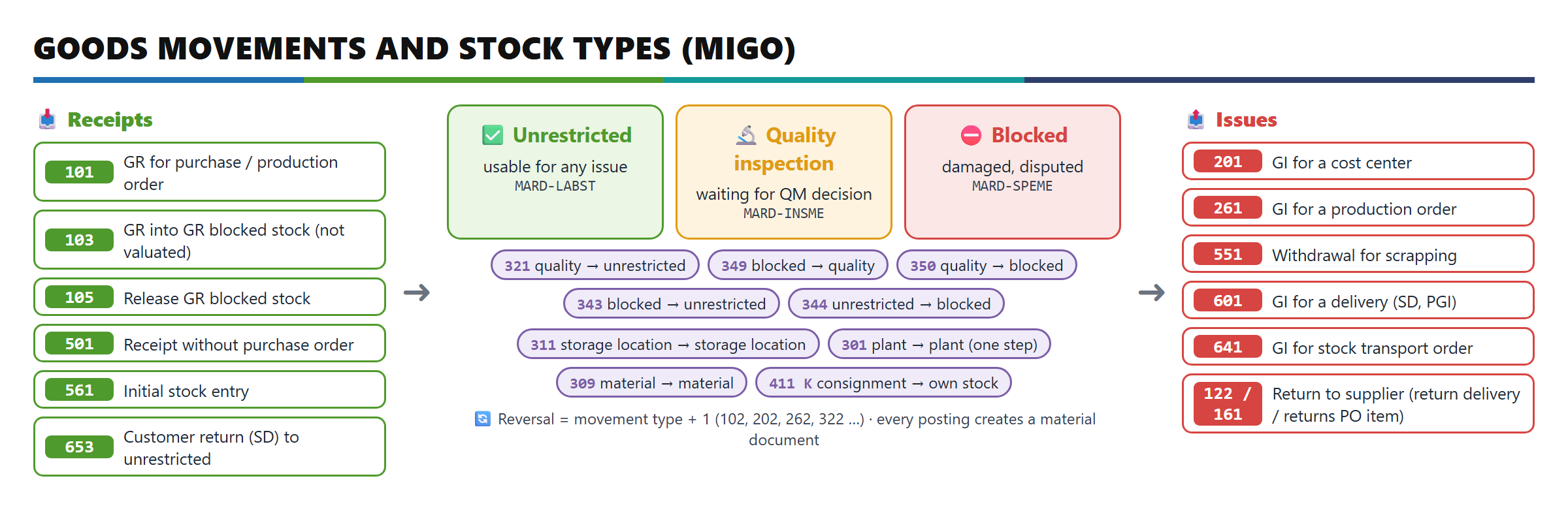
The movement type (3 digits, table T156, texts T156T, help texts T157H) controls everything: which quantity and value fields are updated, which stock type is affected, which screen fields are required and which G/L accounts are posted (Part 7). The reversal of a movement type is normally the next number (101 → 102).
Movement type | Meaning | Typical t-code / reference |
|---|---|---|
101 / 102 | Goods receipt for purchase order or production order / reversal | MIGO with PO or order |
103 / 105 | GR into GR blocked stock (not valuated) / release from GR blocked stock | MIGO – when the goods must be checked before acceptance |
122 | Return delivery to the supplier (refers to the GR material document) | MIGO, MBRL (ECC) |
161 | Goods receipt for a returns item in a PO – stock goes down | MIGO with returns PO |
201 | Goods issue for a cost center | MIGO goods issue, reservation |
221 | Goods issue for a project (WBS element) | MIGO goods issue |
261 | Goods issue for a production / maintenance order | MIGO, backflush |
301 | Transfer posting plant → plant in one step | MIGO transfer posting |
303 / 305 | Plant → plant in two steps: removal / placement in storage | MIGO |
309 | Transfer posting material → material | MIGO |
311 | Storage location → storage location in one step (313 / 315 two steps) | MIGO |
321 | Quality inspection stock → unrestricted (usually from the QM usage decision) | MIGO, QA11 |
343 / 344 | Blocked → unrestricted / unrestricted → blocked | MIGO |
349 / 350 | Blocked → quality inspection / quality inspection → blocked | MIGO |
411 K | Supplier consignment stock → own stock (creates a payable, settled with MRKO) | MIGO |
501 | Goods receipt without purchase order | MIGO, other goods receipt |
541 | Transfer to stock provided to a subcontractor (special stock O) | MIGO, ME2O |
551 | Withdrawal for scrapping | MIGO goods issue |
561 | Initial entry of stock balances (go-live, data migration) | MIGO, migration cockpit |
601 | Goods issue for an outbound delivery (post goods issue in SD) | VL02N, VL06G |
641 | Goods issue for a stock transport order into stock in transit (receipt 101) | VL02N |
653 | Customer return to unrestricted stock (651 to blocked returns stock) | VL02N returns |
701 / 702 | Physical inventory difference: more / less stock than in the system | MI07 |
- Customer-defined movement types start with 9, X, Y or Z (copy a standard one in OMJJ).
- The movement indicator in MSEG (KZBEW) says what the movement refers to: B = purchase order, F = production order, L = delivery, blank = other.
- S/4HANA: MIGO is the only transaction for entering and displaying goods movements. MB01, MB02, MB03, MB04, MB05, MB0A, MB11, MB1A, MB1B, MB1C, MB31, MBNL, MBRL, MBSF, MBSL and MBST are not available any more (SAP Note 2210569); programs use BAPI_GOODSMVT_CREATE / BAPI_GOODSMVT_CANCEL (page 04). Fiori: Post Goods Movement, Post Goods Receipt for Purchasing Document.
Part 2 – Material documents: MKPF / MSEG and MATDOC
Every goods movement creates a material document (number + year). When the movement is valuated, it also creates an accounting document in FI. Display: MIGO → Display (ECC also MB03); list: MB51.
Table | Content | S/4HANA |
|---|---|---|
MKPF | Material document header: MBLNR, MJAHR, BUDAT (posting date), BLDAT, USNAM, XBLNR | Data in MATDOC; MKPF is read through a compatibility view |
MSEG | Material document item: ZEILE, BWART, MATNR, WERKS, LGORT, CHARG, MENGE, MEINS, DMBTR, SHKZG (S debit / H credit), EBELN / EBELP, AUFNR, KOSTL, KZBEW, SOBKZ | Data in MATDOC; MSEG read through a compatibility view |
EKBE | PO history per PO item: every GR (VGABE 1) and invoice (VGABE 2) with quantity and amount | Unchanged |
EKBZ | PO history of delivery costs (freight, customs) | Unchanged |
MVER | Material consumption per plant and period – updated by goods issues, used by forecasting, consumption-based MRP and ABC analysis | Still exists |
T156 / T156T / T157H | Movement types, their texts, help texts | Unchanged |
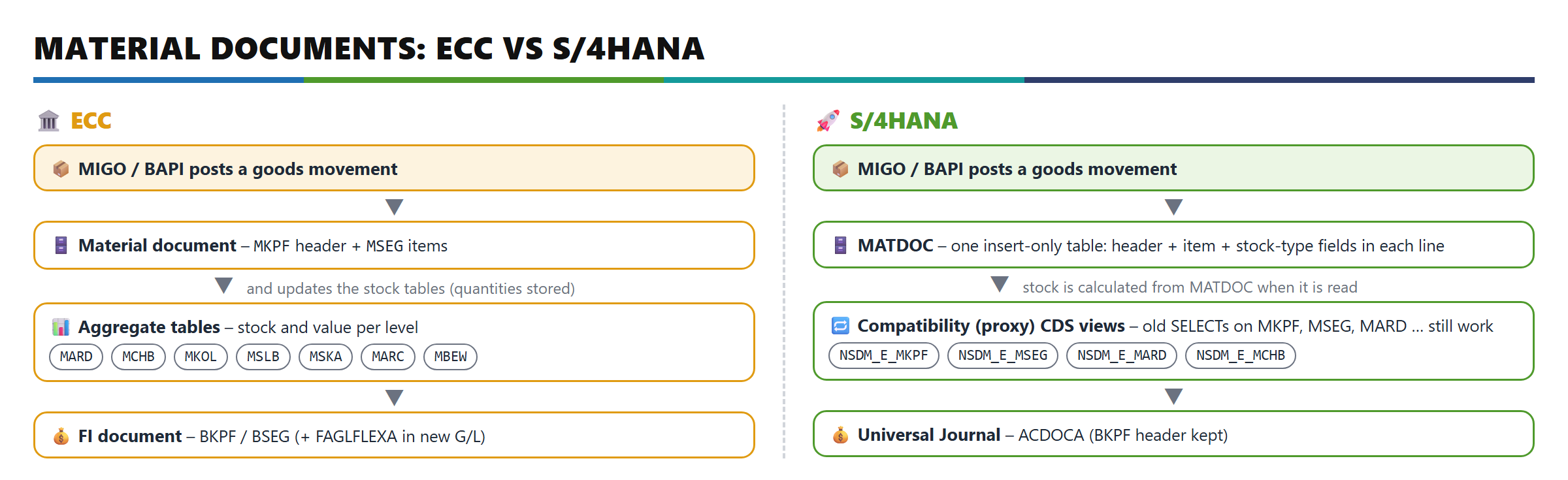
2.1 MATDOC in S/4HANA
- MATDOC is one wide, insert-only table: header, item and the stock attributes in every line. No updates of aggregate stock tables during posting → fewer locks and much faster mass postings.
- The old tables MKPF, MSEG and the stock tables (MARD, MCHB, MKOL, MSLB, MSKA, MSPR, MSKU …) still exist as DDIC definitions, but
SELECTs on them are redirected to CDS compatibility views (NSDM_E_MKPF, NSDM_E_MSEG, NSDM_E_MARD …) that read MATDOC. Old code keeps working; master data fields of MARD / MARC (not quantities) are still stored in the tables. - Stock quantities are calculated from MATDOC when they are read (with the help of an aggregate table MATDOC_EXTRACT for speed). Writing to the stock tables yourself is not allowed.
- New code: read MATDOC directly or, better, the released CDS views I_MaterialDocumentHeader_2 / I_MaterialDocumentItem_2 and I_MaterialStock_2 (page 04).
|
Part 3 – Stock types and special stocks
Stock type | Meaning | Field (stock per storage location, MARD) |
|---|---|---|
Unrestricted use | Free for any goods issue | LABST |
Quality inspection | Waiting for a QM usage decision; can be consumed only after release (321) | INSME |
Blocked | Damaged or disputed goods; no consumption | SPEME |
Restricted use | Batches with status restricted (batch management) | EINME |
Returns (blocked returns stock) | Customer returns not yet checked | RETME |
GR blocked stock | Received with 103, not yet accepted – not part of valuated stock | PO history only (EKBE) |
Stock in transit | Plant-to-plant transfer between GI (641 / 303) and GR | MARC level |
Special stocks belong to someone else or are reserved for a special purpose. The special stock indicator (MSEG-SOBKZ) tells which one:
Indicator | Special stock | Table |
|---|---|---|
K | Supplier consignment – goods at our site, owned by the supplier until withdrawn | MKOL |
O | Material provided to a subcontractor (our goods at the supplier) | MSLB |
E | Sales order stock (make-to-order) | MSKA |
Q | Project stock (WBS element) | MSPR |
W / V | Customer consignment / returnable packaging at the customer | MSKU |
- Batches: MCHA (batch per plant), MCH1 (cross-plant batch), MCHB (batch stock per storage location). In S/4HANA the stock quantities of all these tables come from MATDOC as well.
- Reports: MMBE stock overview, MB52 warehouse stock per material / storage location, MB5B stock on a posting date, MB51 material document list. Fiori: Stock – Single Material, Stock – Multiple Materials.
Part 4 – Reservations
A reservation asks the warehouse to keep material ready for a later goods issue (for a cost center, order, project or a stock transfer). It is a planning document: it reduces available stock for MRP and ATP but does not change the stock itself. The goods issue in MIGO refers to the reservation.
Item | Detail |
|---|---|
Tables | RKPF reservation header, RESB reservation / dependent requirement items (also component requirements of production and maintenance orders) |
Manual reservations | MB21 create, MB22 change, MB23 display, MB24 by material, MB25 by account assignment (page 05) |
Automatic reservations | Created by production orders, maintenance orders, networks |
Movement | Reservation for 201 → goods issue with reference to the reservation; RESB-ENMNG holds the quantity already withdrawn, RESB-KZEAR the final issue flag |
Part 5 – Physical inventory and cycle counting
Physical inventory compares the counted stock with the book stock and corrects the difference. Legal requirement at least once a year.
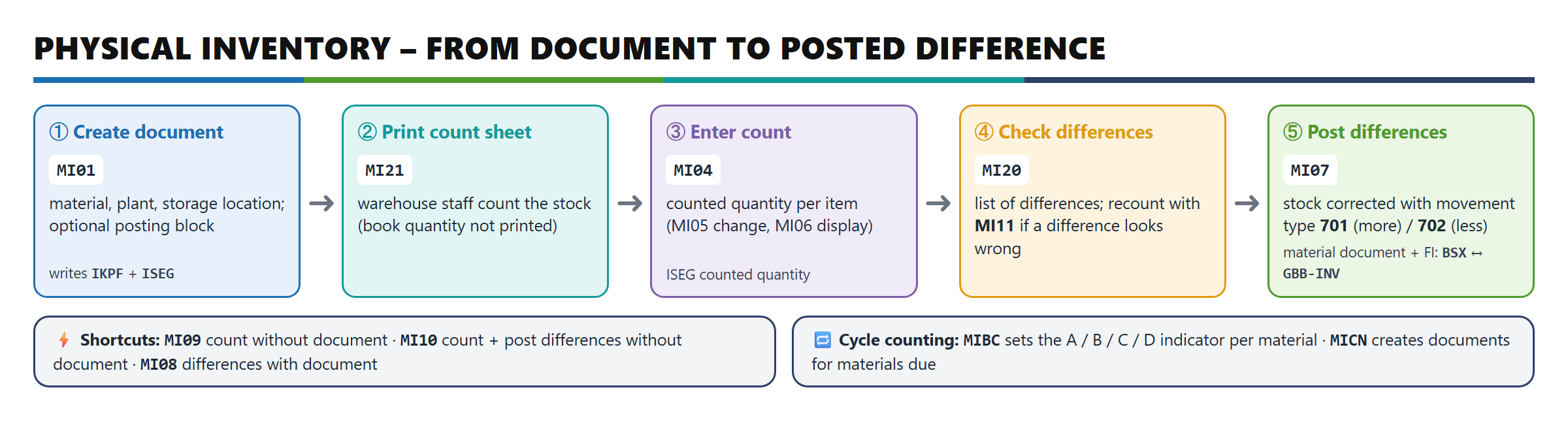
Step | T-code | Result |
|---|---|---|
Create physical inventory document (optionally block postings) | MI01 (MI02 change, MI03 display) | IKPF header, ISEG items (book quantity frozen if required) |
Print the count list | MI21 | Count sheet without book quantities |
Enter the count | MI04 (MI05 change, MI06 display) | Counted quantity in ISEG |
Check / recount | MI20 list of differences, MI11 recount | New document for a recount |
Post differences | MI07 | Material document 701 / 702 and FI posting (BSX ↔ GBB-INV) |
Shortcuts | MI09 count without document, MI10 count and difference without document, MI08 list of differences with document | Fewer steps for small counts |
- Methods: periodic (annual, key date), continuous (spread over the year), cycle counting (fast-moving materials counted more often) and sampling.
- Cycle counting: MIBC runs an ABC analysis and sets the cycle counting indicator (A, B, C, D) in the material master (MARC-ABCIN); MICN creates the physical inventory documents for the materials that are due.
- Batch input variants (MI31 – MI40, MICN, MIK1, MIQ1) create documents, enter counts and post differences for mass data – listed on page 05.
Part 6 – Material valuation
Valuated stock has a value as well as a quantity. Valuation happens per valuation area – normally the plant (or the company code). The accounting views of the material master are stored in MBEW (page 01).
Price control | How the price behaves | Goods receipt at a different PO price |
|---|---|---|
S – standard price | Fixed price (MBEW-STPRS), changed only by a price change or cost estimate; typical for own products (FERT, HALB) | Stock at standard price; difference posted to PRD (price differences) |
V – moving average price | Price (MBEW-VERPR) = total value ÷ total quantity, recalculated with every receipt; typical for purchased materials (ROH, HAWA) | Stock at the PO price; the average price changes |
Example (V): 100 pcs in stock at 10.00 = 1,000. Goods receipt 50 pcs at 12.00 = 600. New stock 150 pcs, value 1,600 → new moving average price 10.67.
MBEW field | Meaning |
|---|---|
VPRSV | Price control S / V |
STPRS / VERPR / PEINH | Standard price / moving average price / price unit |
LBKUM / SALK3 | Total valuated stock quantity / total value |
BKLAS | Valuation class – links the material to the G/L accounts (Part 7) |
BWTAR | Valuation type, key part for split valuation (e.g. own production / purchased, or per batch); the valuation category is in MARC |
- Material ledger: optional in ECC (activated per valuation area with OMX1), mandatory in S/4HANA for valuation (actual costing remains optional). It keeps the inventory value in up to three currencies / valuations; the values are posted in ACDOCA. MBEW still exists, but reads of the quantity and value fields are served from the material ledger / Universal Journal.
- Price change: MR21 (standard price change, also for V); revaluation postings use transaction key UMB.
Part 7 – Automatic account determination (OBYC)
Users never enter G/L accounts in MIGO or MIRO – the system determines them. Configuration is in transaction OBYC (table T030).
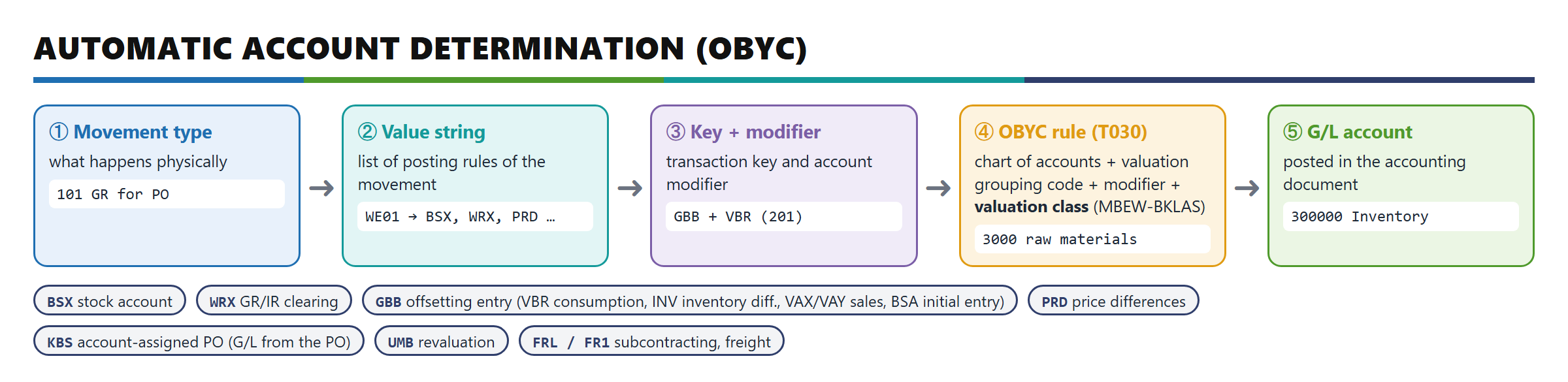
Transaction key | Used for | Example |
|---|---|---|
BSX | Inventory (stock) account | Debit at GR 101, credit at GI 201 |
WRX | GR/IR clearing account | Credit at GR for PO, debit at invoice |
GBB | Offsetting entry for inventory postings; the account modifier separates the cases: VBR consumption (201, 261), INV inventory differences (701), VAX / VAY goods issue for sales, BSA initial entry (561), VNG scrapping (551), ZOB GR without PO (501), AUF GR for an order | GI 201: debit GBB-VBR (consumption), credit BSX |
PRD | Price differences | S-material GR or invoice at another price |
KBS | Account-assigned purchase order (cost center, asset …) – the account comes from the PO account assignment | GR for a PO item with category K |
UMB | Revaluation gain / loss | Price change with stock |
FRL / FR1 | External service for subcontracting / freight clearing | Subcontracting PO, delivery costs |
- Valuation grouping code (OMWD) lets plants with the same chart of accounts share account assignments; valuation class (MBEW-BKLAS, e.g. 3000 raw materials, 7920 finished goods) separates material groups; the link material type → allowed valuation classes is the account category reference (OMSK).
- The movement type points to a value string (e.g. WE01 for 101) – the list of transaction keys it posts to.
- Simulate account determination in OBYC / OMWB before testing – the most common reason for a failing goods movement in a new plant is a missing OBYC entry (error M8147 'Account determination … not possible').
Part 8 – Logistics invoice verification
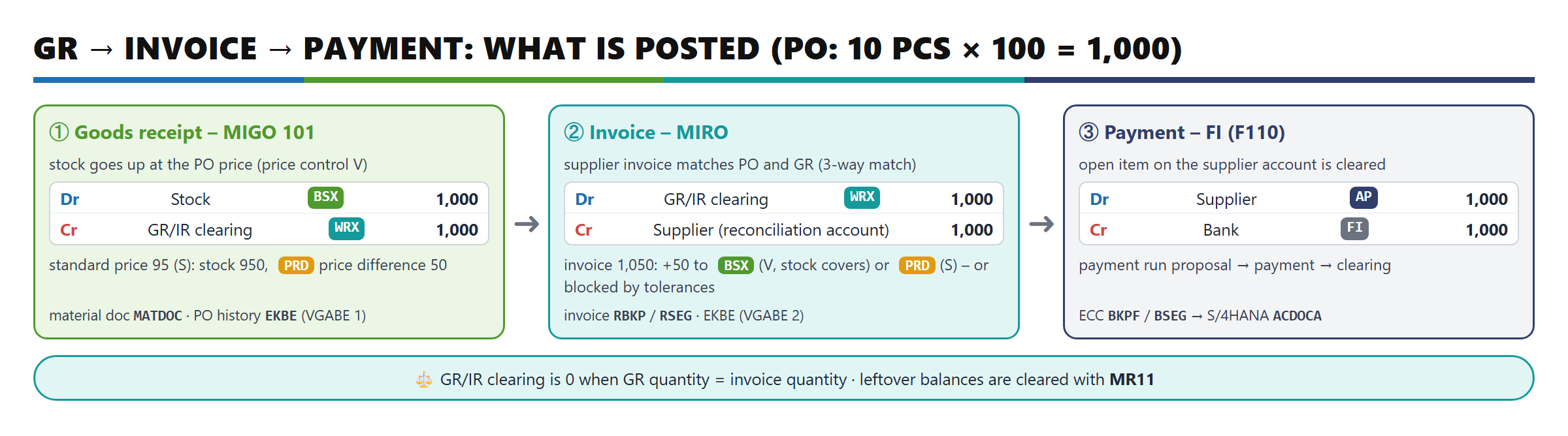
Logistics invoice verification (LIV, MM-IV) checks the supplier invoice against the purchase order (price, terms) and the goods receipt (quantity) – the three-way match – and posts it. The posted invoice creates an open item in the supplier account in FI.
T-code | Purpose |
|---|---|
MIRO | Enter and post an incoming invoice or credit memo with PO reference |
MIR7 | Park an invoice (saved, not posted – no FI document yet; complete and post later) |
MIR4 / MIR6 | Call MIRO – change status / invoice overview |
MR8M | Cancel (reverse) an invoice document |
MRBR | Release blocked invoices |
MRRL | Evaluated receipt settlement (ERS) – the invoice is created from the GR, no paper invoice |
MRKO | Settle consignment and pipeline withdrawals |
MR11 | GR/IR clearing account maintenance (Part 9) |
Table | Content |
|---|---|
RBKP | Invoice header: BELNR, GJAHR, BUKRS, LIFNR, BLDAT, BUDAT, XBLNR (supplier reference), RMWWR (gross amount), WAERS, RBSTAT (status, e.g. parked / posted), ZLSPR (payment block) |
RSEG | Invoice items with PO reference: EBELN, EBELP, LFBNR / LFGJA / LFPOS (reference GR document), MENGE, WRBTR |
RBCO | Account assignment of invoice items (for account-assigned POs) |
RBKP_BLOCKED | Invoices blocked for payment (read by MRBR) |
EKBE | Every posted invoice also writes PO history with VGABE 2 |
8.1 Checks, tolerances and blocking
- GR-based invoice verification (PO item flag EKPO-WEBRE): each invoice line refers to a specific goods receipt; without GR no invoice.
- Tolerance keys (customizing OMR6, per company code) decide when a difference blocks the invoice: PP price variance, DQ quantity variance (invoice quantity > GR quantity), DW quantity variance when no GR yet, ST date variance, BD small differences posted automatically, VP moving average price variance.
- Outside tolerance: MIRO posts the invoice but sets payment block R (blocked for invoice verification); FI's payment run skips it until MRBR releases it (manually or automatically once the GR arrives).
- Unplanned delivery costs can be entered in MIRO and distributed to the items or posted to a separate G/L account.
- S/4HANA: MIRO is unchanged; Fiori apps Create Supplier Invoice, Manage Supplier Invoices, Supplier Invoices List; incoming paper invoices can be digitised automatically (document information extraction).
Part 9 – GR/IR clearing and the hand-off to FI
The GR/IR clearing account (WRX) bridges the time between goods receipt and invoice: GR credits it, the invoice debits it. When GR quantity = invoice quantity the balance per PO item is zero.
- Differences that will never be settled (supplier invoices less than delivered, or vice versa) are cleared with MR11 (GR/IR account maintenance); MR11SHOW displays and reverses those postings. MB5S lists GR/IR balances per PO.
- At period end FI regroups the open GR/IR balances into 'goods received not invoiced' and 'invoiced not received' for the balance sheet. S/4HANA Fiori: Monitor GR/IR Account Balances.
9.1 From invoice to payment
Step | Where | Tables |
|---|---|---|
Invoice posted (MIRO) | MM-LIV document + FI document (document type RE) | RBKP / RSEG; ECC BKPF / BSEG; S/4HANA BKPF + ACDOCA (BSEG is still written) |
Open item on the supplier | Supplier account (reconciliation account from LFB1-AKONT) | ECC BSIK; S/4HANA BSIK as a compatibility view |
Payment run | FI, F110 (manual payment F-53) | REGUH / REGUP, payment document |
Cleared item | Open item cleared by the payment | ECC BSAK; S/4HANA view on ACDOCA / BSEG |
- ECC new G/L: line items also in FAGLFLEXA (totals FAGLFLEXT). S/4HANA: the Universal Journal ACDOCA replaces FAGLFLEXA, COEP, the index tables BSIK / BSAK / BSIS / BSAS as the single source of line items.
- The FI document points back to its source: BKPF-AWTYP (
RMRPinvoice,MKPFgoods movement) and BKPF-AWKEY (document number + fiscal year).
|
Part 10 – Interview questions
Q1. What is a movement type? Name the ones you know.
A 3-digit key (T156) that controls how a goods movement updates quantities, stock types and G/L accounts. 101 GR for PO, 102 reversal, 122 return to supplier, 201 GI cost center, 261 GI order, 301 plant to plant, 311 storage location to storage location, 321 quality to unrestricted, 551 scrapping, 561 initial stock, 601 GI delivery, 701 / 702 inventory differences.
Q2. Which tables store a material document in ECC and in S/4HANA?
ECC: MKPF (header) and MSEG (items) plus updates of the stock tables. S/4HANA: one table MATDOC; MKPF, MSEG, MARD, MCHB … are read through CDS compatibility views (NSDM_E_*), stock is calculated on read.
Q3. Will my old SELECT on MSEG still work in S/4HANA?
Yes – the SELECT is redirected to the compatibility view on MATDOC. For performance and new code read MATDOC directly or use released CDS views such as I_MaterialDocumentItem_2. Direct writes to the stock tables are not possible any more.
Q4. What is the difference between quality inspection, blocked and GR blocked stock?
Quality inspection and blocked stock are valuated stock types (MARD-INSME, SPEME) that cannot be consumed until released (321, 343). GR blocked stock (103) is not valuated – the goods are received but not yet accepted; 105 releases them into valuated stock.
Q5. Which tables hold reservations and physical inventory documents?
Reservations: RKPF (header), RESB (items). Physical inventory: IKPF (header), ISEG (items). Differences are posted with MI07 using movement types 701 / 702.
Q6. Standard price or moving average price – what is the difference?
S keeps the price fixed and posts differences to PRD; V recalculates the price with every receipt so the stock is valued at actual purchase prices. Purchased materials usually use V, own products S. Both are in MBEW (VPRSV, STPRS, VERPR).
Q7. How does the system find the G/L account for a goods receipt?
Movement type → value string → transaction keys (BSX, WRX, PRD) → OBYC rules (T030) by chart of accounts, valuation grouping code, account modifier and valuation class from MBEW-BKLAS → G/L account.
Q8. What is posted at goods receipt and at invoice receipt?
GR: debit stock (BSX), credit GR/IR clearing (WRX), price differences to PRD for S-materials. Invoice: debit GR/IR, credit supplier; invoice differences go to stock (V with stock) or PRD.
Q9. Difference between MIRO and MIR7?
MIRO posts the invoice (FI document created, supplier open item). MIR7 parks it: the invoice is saved without an FI document and can be completed, checked and posted later.
Q10. Why is an invoice blocked for payment and how is it released?
A price, quantity or date variance exceeds the tolerance keys (OMR6: PP, DQ, ST …), so MIRO sets payment block R. MRBR releases it manually or automatically when the reason is gone (e.g. the GR arrives).
Q11. What is the GR/IR account and what does MR11 do?
A clearing account between goods receipt (credit) and invoice (debit). MR11 clears balances that will not be settled by further GRs or invoices, posting the difference to an expense / income account.
Q12. Where are accounting documents in S/4HANA and how do you find the FI document of an invoice?
In the Universal Journal ACDOCA (BKPF still holds the header; FAGLFLEXA is ECC only). The FI document has BKPF-AWTYP = 'RMRP' and AWKEY = invoice number + fiscal year.
🏠 Start Here · ◀ 02 · Procure-to-Pay · 04 · MM for Developers ▶ · Sections: CORE ABAP | OOPS ABAP | ABAP on HANA | Clean Core | RAP | ABAP Points | SAP Fiori | SAPUI5 | Mobile Development (MDK) | BTP Foundations | BTP Development | CAP | SAP Build | ABAP on BTP | Integration Suite | SAP Business AI | SAP BASIS | Security | SAP SDLC
Functional: FICO ABAP | TRM ABAP | VIM | SAP BIS | SD ABAP | MM ABAP | PP ABAP | QM ABAP | PM ABAP | PS ABAP | EWM | TM ABAP | GTM ABAP | EHS ABAP | HR ABAP | BW | SAP Datasphere | SAP Business Data Cloud | SAP MDG | SAP Analytics Cloud | SAP Ariba | SAP CX | SAP IBP