How an MDK app does things. Actions are declarative building blocks (navigate, show a message, create or update OData entities, group changes in a change set, close a page); rules are JavaScript functions that use the ClientAPI (context.read, evaluateTargetPath, getPageProxy, executeAction ...) for logic, validation and formatting; events tie both to the user's taps and the app's lifecycle; navigation patterns connect the pages. Everything is shown on the Sales Order Approval app: list → detail → approve / reject. Pages, controls and bindings are on 02 · MDK Fundamentals; offline sync actions on 04 · Offline OData & Synchronisation.
Part 1 – Actions: the building blocks
Why actions: most behaviour in a business app is standard – open a page, save an entity, show a toast. MDK makes each of these a small JSON file instead of code. Actions are reusable, can be edited in a form editor, behave the same on iOS, Android and web, and are executed by the client with built-in error handling and activity indicators.
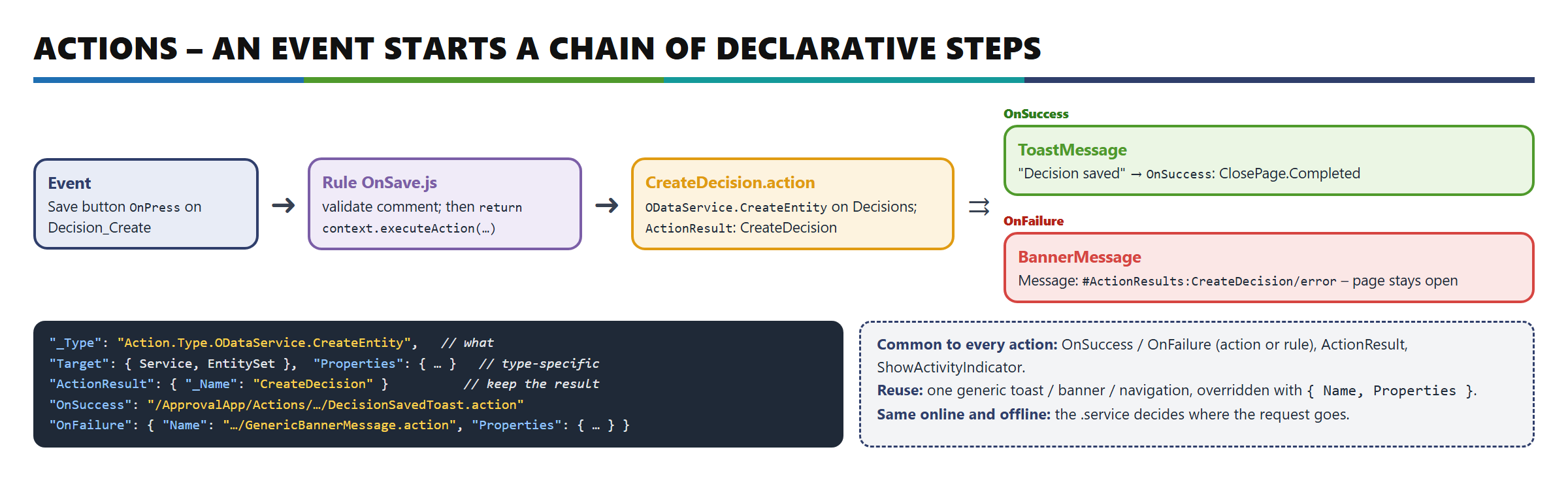
An action is a .action file with a _Type, its type-specific properties and the common properties of every action, above all OnSuccess and OnFailure (the next action or rule), ActionResult (a name under which the result is kept), ShowActivityIndicator and ActivityIndicatorText.
|
- Chaining with
OnSuccess/OnFailurebuilds simple flows without code: save → toast → close page. - Overriding properties:
OnSuccess/OnFailure(andexecuteActionin rules) accept an object withNameandProperties, so one generic action (a banner, a toast, a navigation) is reused with different texts. SAP's sample apps use this pattern everywhere (GenericToastMessage.action,GenericBannerMessage.action). - Action results: ActionResult names the result of an action; later actions and rules read its failure via #ActionResults:<name>/error, e.g. the error text of a failed create.
Interview tip: describe actions as "declarative commands" and rules as "the JavaScript glue". Good MDK apps keep rules small and let actions do the work, because actions are visible in the editor and reusable.
Part 2 – The action catalogue
The metadata reference groups the action types as below. You do not need them all by heart; know the groups and the common ones.
Group | Action types ( | Typical use |
|---|---|---|
Navigation |
| Open a page (normal or modal), close it, open another app |
Messages |
| Dialog with OK / Cancel, short toast, banner for errors or progress |
OData |
| CRUD on the service, function / action calls, grouped changes |
OData service lifecycle |
| Open the service (online or offline store); draft-enabled V4 services |
Offline OData |
| Sync and store management (→ 04 · Offline OData & Synchronisation) |
Others |
| Required-field check, menus, filter pages, app update, logout, theme, logging |
Push, REST, devices |
| Push registration, REST calls through Mobile Services, scanning |
Exact property lists change between client versions; the MDK metadata reference on SAP Help is the authority, and the editor's action wizard only offers valid properties.
Part 3 – Navigation, messages and closing pages
Navigation
|
Property | Meaning |
|---|---|
PageToOpen | Metadata path of the page (or a rule returning it) |
| Open as a modal page – the pattern for create / edit forms; modal pages are always full screen on phones |
NavigationType |
|
| Reset the back stack (e.g. after onboarding), hide the page from back navigation, animation |
The binding travels with the navigation: when a tapped object cell starts the action, the tapped entity becomes the new page's binding. In a rule you can set it explicitly with pageProxy.setActionBinding(entity) before executing the navigation action, as SAP's demo app does.
Closing pages
|
Action.Type.ClosePage.Completedcloses after the pending actions run;Canceledstops the action queue and closes. A plain{ "_Type": "Action.Type.ClosePage" }closes a normal page (back).
Messages
|
Type | Use for | Blocks the user? |
|---|---|---|
Message | Confirmations and errors the user must read ("Reject order 4711?") | Yes, until a button |
ToastMessage | Short success feedback ("Decision saved") | No, disappears |
BannerMessage | Non-blocking errors or hints under the action bar | No |
ProgressBanner | Long-running work such as sync, with completion text | No |
Common mistake: a Message dialog for every success. Users learn to tap OK blindly; use toasts for success and dialogs only for decisions and real errors.
Part 4 – OData CRUD actions and change sets
OData actions work the same online and offline: the .service file decides whether they go to the back end directly or into the offline store's request queue (→ 04 · Offline OData & Synchronisation). The action itself does not change.
Action | Key properties | Approval app |
|---|---|---|
CreateEntity |
| Create a |
UpdateEntity |
| Edit the comment of a not yet uploaded decision |
DeleteEntity |
| Discard a draft decision |
CreateRelatedEntity |
| Create a note under an order |
Read |
| Read data into an action result |
CallFunction | Function / action import with parameters | Business operations on the service; offline, non-GET calls are queued until upload and return an empty result, GET functions need online |
ChangeSet |
| Decision plus note saved together |
Update with the read link
|
A change set: all or nothing
|
- Inside a change set, a newly created entity gets a temporary read link
pending_1,pending_2... in creation order; later actions of the same change set use it inCreateLinksto point to the new entity (pattern from the metadata reference). - Online, a change set becomes one OData
$batchchange set; offline, the requests are queued together and uploaded as one unit (offline details on page 04).
Design note for offline approvals: model approve / reject as a plain create of a Decision entity that the CAP or RAP service processes on arrival, not as a bound OData action call. Creates queue cleanly offline; the back end still re-checks status and authorisation.
Part 5 – Rules in JavaScript and the ClientAPI
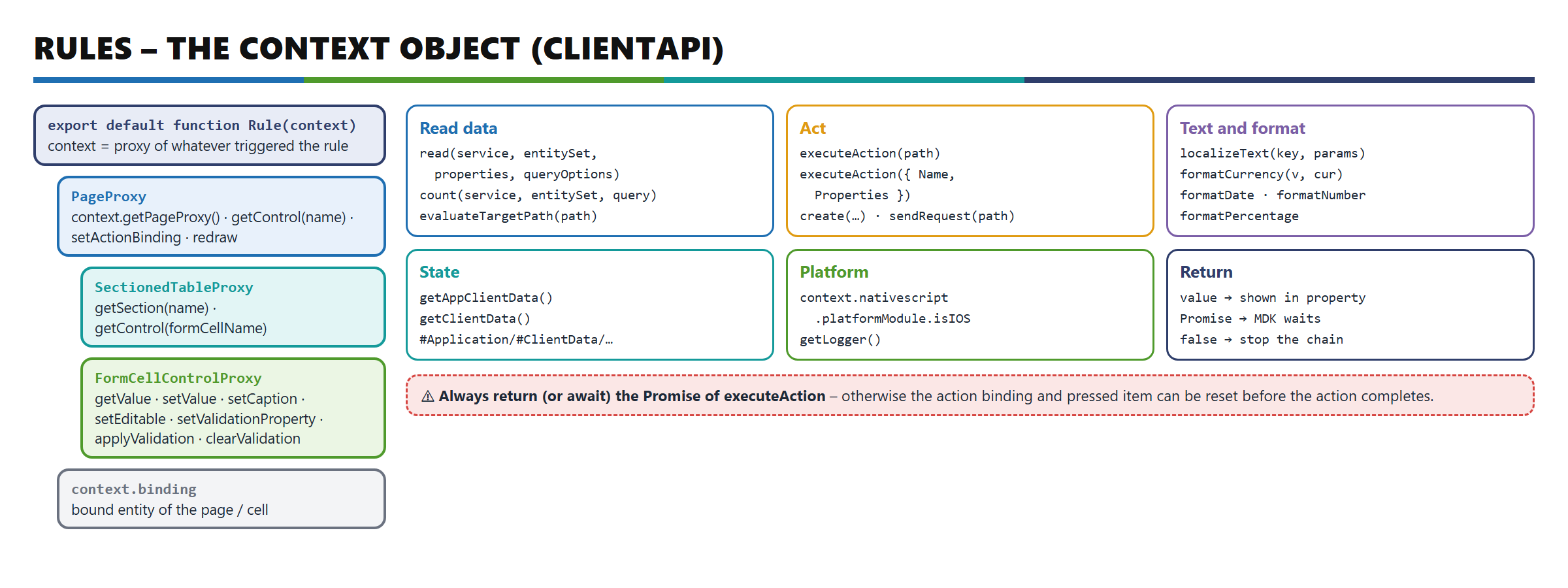
A rule is a JavaScript module in Rules/ whose default export is a function. MDK calls it with a context – a ClientAPI proxy for the element that triggered it (the page, a control, a section, the app). The function returns a value (used as a property value), or a Promise (MDK waits for it).
ClientAPI member | What it does |
|---|---|
context.binding | The entity bound to the current page or cell (properties as plain fields) |
context.getPageProxy() | The page proxy – find controls with |
context.evaluateTargetPath(path) | Evaluate a target path synchronously, e.g. |
context.read(service, entitySet, properties, queryOptions) | Query an entity set; returns a Promise of the result collection |
context.count(service, entitySet, queryOptions) | Count entities; Promise of a number |
context.create(...) | Create an entity directly from a rule (actions are preferred) |
context.executeAction(pathOrObject) | Run an action, optionally with |
| i18n texts and locale-aware formatting |
| App-level or element-level JavaScript object for state |
context.sendRequest(path, params) | HTTP request to the app's SAP Mobile Services, e.g. user info |
| Client logging; NativeScript modules (platform, app settings) on mobile |
Reading data and running an action from a rule
|
- Always return the Promise of
executeAction(or await it in an async rule). Otherwise the action binding and pressed item can be reset before the action completes – the ClientAPI reference warns about exactly this. - Prefer target paths and actions for simple cases; use rules when you need conditions, loops, calculations or several reads.
Common mistake: putting secrets or back-end URLs in rules. Rules ship to every device; calls go through Mobile Services destinations, never directly with credentials.
Part 6 – Validation and formatting
Required fields without code
|
Business validation in a rule
Rule: a rejection needs a comment of at least 10 characters. The rule shows the message directly at the form cell (validation view) instead of a dialog, and only then runs the create action.
|
getControl(name)on the sectioned table finds a form cell by its_Name;setValidationProperty+applyValidationshow the message under the cell,clearValidationremoves it. Valid keys (ValidationProperties):ValidationMessage,ValidationMessageColor,ValidationViewIsHidden,ValidationViewBackgroundColor,SeparatorIsHidden,SeparatorBackgroundColor.- Client validation is for usability only. The CAP / RAP service must repeat every check, because offline creates are validated only on upload and any client can be manipulated.
Formatting rules
Any property can point to a rule; its return value is displayed. Use this when a formatter $(C,…) is not enough.
|
Part 7 – Events and navigation patterns
Where actions and rules are attached
Level | Events (examples) | Approval app |
|---|---|---|
Application (Application.app) |
| Initialise the offline store; ask before applying a new version; open an order from a deep link |
Page | OnLoaded, OnReturning, OnResume, OnUnloaded; PullDown › OnPulledDown; action bar OnBackButtonPressed | Refresh the list when returning from the decision form; pull to sync |
Control / cell |
| Navigate on tap; show the comment field as required when "Reject" is selected |
Action |
| Toast and close after save; banner on error |
|
getValue, setValue, setCaption, setEditable, setVisible and the validation methods are available on every form cell proxy (e.g. SegmentedFormCellProxy, NoteFormCellProxy).
Navigation patterns
Pattern | How in MDK | Example |
|---|---|---|
List → detail | Object cell | Pending orders → order detail |
Detail → modal form → back | Navigation with | Detail → Decision → detail |
Refresh on return | Page | The decided order disappears from the list |
Menu | Action bar item → | Sync, log upload, logout |
Tabs / side drawer / flexible column layout | Container controls (BottomNavigation, Tabs, SideDrawer, FlexibleColumnLayout) with | Tablet: list and detail side by side |
Deep link / push | Application | Tap on "Order 4711 waits" opens that order |
Common mistake: navigating from a rule without returning the Promise, or opening the form as a normal page. The back button then leaves a half-saved form on the stack; data-entry pages should be modal and always end with a ClosePage action.
Part 8 – The approve / reject flow end to end
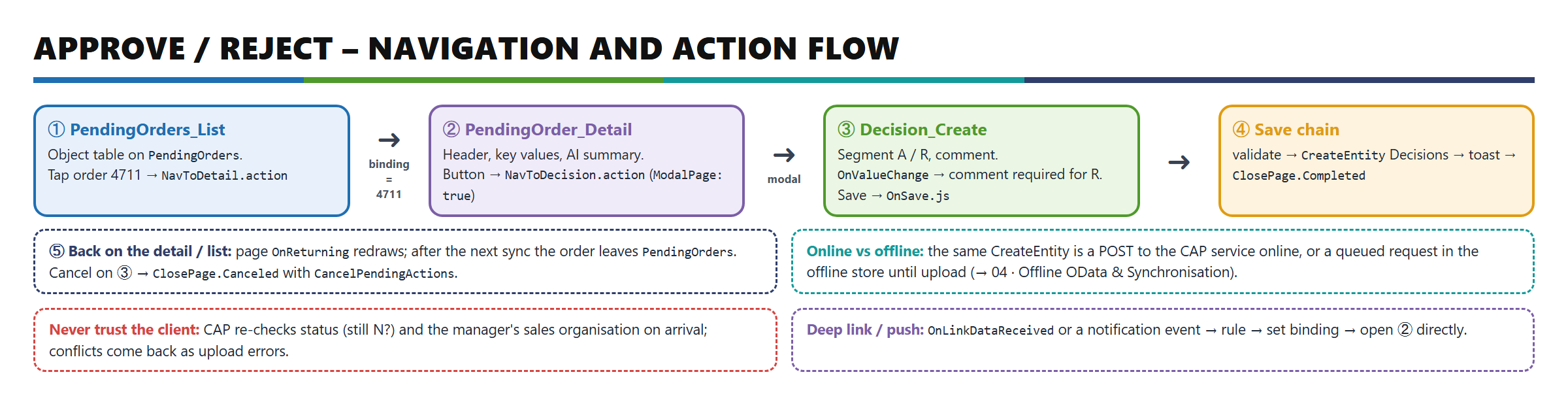
Putting the pieces together for one manager decision, as you would explain it in an interview.
Step | Element | Metadata |
|---|---|---|
1 | Manager taps order 4711 in the list | Object cell |
2 | Detail page shows header, key values and AI summary |
|
3 | Taps "Approve / Reject" | Button table |
4 | Selects Reject, types a comment |
|
5 | Taps Save |
|
6 | Decision stored | Online: POST to CAP; offline: queued in the request queue |
7 | Feedback and close |
|
8 | List updates |
|
9 | Back end processes | CAP re-checks and approves in S/4HANA; errors return at upload (→ 04) |
Next steps for this app: offline store, defining requests and the ErrorArchive → 04 · Offline OData & Synchronisation; deploying versions and the branded client → 05 · Build, Deploy & App Lifecycle; security and the complete project → 07 · Security, Device Management & the Order Approval Mobile App.
Part 9 – Interview questions
Q1. What is the difference between an action and a rule in MDK?
An action is a declarative JSON definition of one operation (navigate, message, OData create, sync ...) executed by the client. A rule is a JavaScript function that receives the ClientAPI context for logic that metadata cannot express; it can read data, evaluate target paths and run actions.
Q2. How do you chain actions?
With OnSuccess and OnFailure, which point to the next action or rule, optionally as { Name, Properties } to override properties of a generic action. Failures of earlier actions (named by ActionResult) are available via #ActionResults:<name>/error.
Q3. Which OData actions does MDK provide?
CreateEntity, UpdateEntity, DeleteEntity, CreateRelatedEntity, Read, CallFunction, ChangeSet, media and stream actions, Initialize for opening the service, draft actions for draft-enabled services, and the OfflineOData actions for upload, download and store management.
Q4. What does a ChangeSet do and how do later actions refer to a new entity?
It executes several OData actions serially as one unit; if one fails, the whole change set fails. Entities created inside it get temporary read links pending_1, pending_2 ... which later actions use in CreateLinks.
Q5. Name important ClientAPI methods.
binding, getPageProxy, evaluateTargetPath, read, count, create, executeAction, localizeText, formatCurrency / formatDate, getAppClientData, sendRequest, getLogger; on page and form cell proxies getControl, getValue, setValidationProperty, applyValidation.
Q6. How do you open a form as a modal page and close it correctly?
Navigation action with ModalPage: true. Save runs the create / update chain and ends with ClosePage and DismissModal: Action.Type.ClosePage.Completed; Cancel uses ClosePage.Canceled with CancelPendingActions: true.
Q7. How do you validate input in MDK?
CheckRequiredFields for mandatory fields; rules for business checks that show the message on the form cell with setValidationProperty and applyValidation; and always the same checks again in the back end, because offline data is validated by the server only at upload.
Q8. Why must a rule return the Promise of executeAction?
So that MDK waits for the action. Otherwise the rule ends immediately, the action binding and pressed item can be reset, and later steps run in the wrong order.
Q9. Which events exist at application, page and control level?
Application: OnLaunch, OnWillUpdate, OnDidUpdate, OnLinkDataReceived and lifecycle / push events. Page: OnLoaded, OnReturning, OnResume, OnUnloaded, pull-down (PullDown › OnPulledDown); action bar: OnBackButtonPressed. Control: OnPress, OnValueChange. Action: OnSuccess, OnFailure.
Q10. Scenario: managers want approve / reject offline. How do you model the write?
As a CreateEntity on a Decisions entity set (order ID, decision, comment) triggered from a modal form after validation, not as a bound action call. It queues offline; on upload the CAP / RAP service re-checks status and authorisation and approves in S/4HANA. Conflicts surface as upload errors (→ 04 · Offline OData & Synchronisation).
Q11. Scenario: after Save the form closes but the list still shows the decided order.
The list is not refreshed on return. Redraw the section in the list page's OnReturning (or filter out orders with a local decision), and remember that the status changes on the server only after the next sync; showing a "decision pending upload" state avoids confusion.
🏠 Start Here · ◀ 02 · MDK Fundamentals · 04 · Offline OData ▶ · Sections: CORE ABAP | OOPS ABAP | ABAP on HANA | Clean Core | RAP | ABAP Points | SAP Fiori | SAPUI5 | Mobile Development (MDK) | BTP Foundations | BTP Development | CAP | SAP Build | ABAP on BTP | Integration Suite | SAP Business AI | SAP BASIS | Security | SAP SDLC
Functional: FICO ABAP | TRM ABAP | VIM | SAP BIS | SD ABAP | MM ABAP | PP ABAP | QM ABAP | PM ABAP | PS ABAP | EWM | TM ABAP | GTM ABAP | EHS ABAP | HR ABAP | BW | SAP Datasphere | SAP Business Data Cloud | SAP MDG | SAP Analytics Cloud | SAP Ariba | SAP CX | SAP IBP