How an MDK app gets from SAP Business Application Studio to users' phones and browsers and stays healthy there: deploying the metadata bundle to SAP Mobile Services, app update and versioning, the SAP Mobile Services client versus a branded client (built with Cloud Build or the MDK SDK), distribution, web deployment of MDK apps, CI/CD with the mdk command-line tools, and monitoring and usage analytics. The running example is the Sales Order Approval app for managers. MDK project structure and the Mobile Services features are introduced on Mobile Development (MDK) › 01 · Mobile Options & SAP Mobile Services and 02 · MDK Fundamentals – Metadata, Pages & Controls.
Part 1 – Two things to ship: metadata and the client
Why it matters: an MDK app is not one binary. It is metadata (pages, actions, rules, styles – your project) that runs inside a native client (the MDK runtime). The two have different release paths, and that split is MDK's biggest operational advantage: most changes reach users without an app store release.
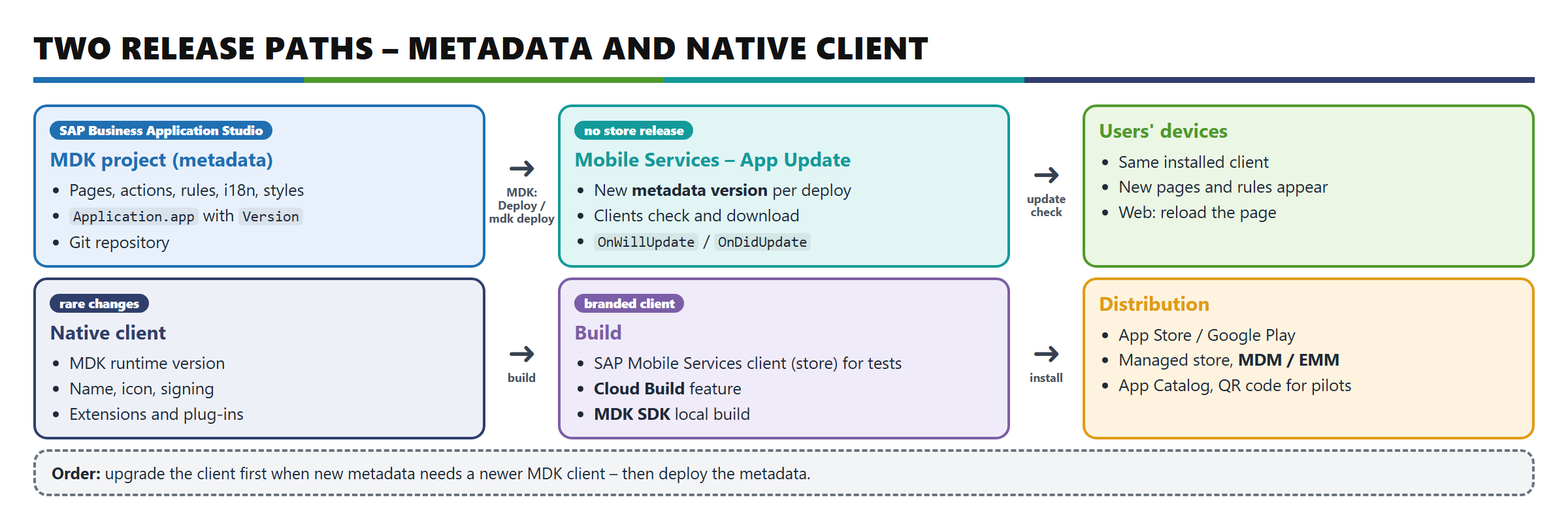
Metadata bundle | Native client | |
|---|---|---|
Contains | Pages, actions, rules, i18n, styles, | MDK runtime, app name and icon, signing, native extensions and plug-ins, branded settings |
Built by | MDK editor / | SAP (store client), Cloud Build or the MDK SDK |
Delivered via | Mobile Services App Update feature (mobile) or HTML5 repository (web) | App Store / Google Play, enterprise distribution, MDM, App Catalog |
Typical change | New field, new rule, changed layout, new defining request | New MDK client version, new native control, new icon, certificate renewal |
Users get it | Automatically at the next update check | By installing a new app version |
Interview tip: say "metadata through App Update, client through the store" – and add that the client must be new enough for the metadata (Part 3).
Part 2 – Deploying metadata to SAP Mobile Services
In SAP Business Application Studio (dev space type SAP Mobile Application, also reached from SAP Build Code), the deploy step bundles the project and uploads it as a new version of the app's App Update feature.
Steps in the editor
- Right-click
Application.app→ MDK: Deploy; choose the target: Mobile Services (native clients), Cloud Foundry (web, Part 5) or your Dev Space for a quick web test. - The first deploy asks for the app (Mobile Services app ID) or name and version; later deploys reuse that configuration stored in
.project.json. MDK: Redeploy repeats the last deployment. - After a Mobile Services deploy the editor can show the onboarding QR code; testers scan it with the client (Part 4).
- For Cloud Foundry targets you need the Space Developer role in the space.
The same with the command line (mdk-tools)
The npm package @sap/mdk-tools provides the mdk CLI used by the editor. It is the basis for automation (Part 6).
|
Commands and flags as in the mdk-tools README (version 1.17.x): mdk build writes its output to the project's .build folder (--target zip → uploadBundle.zip); without --zip, mdk deploy builds itself. Both deploy targets use the Cloud Foundry login – run cf login first (Space Developer role); --showqr prints the onboarding QR code, --create creates a missing Mobile Services app, and mdk validate --show-warnings lets warnings fail the run too.
Part 3 – App update and versioning
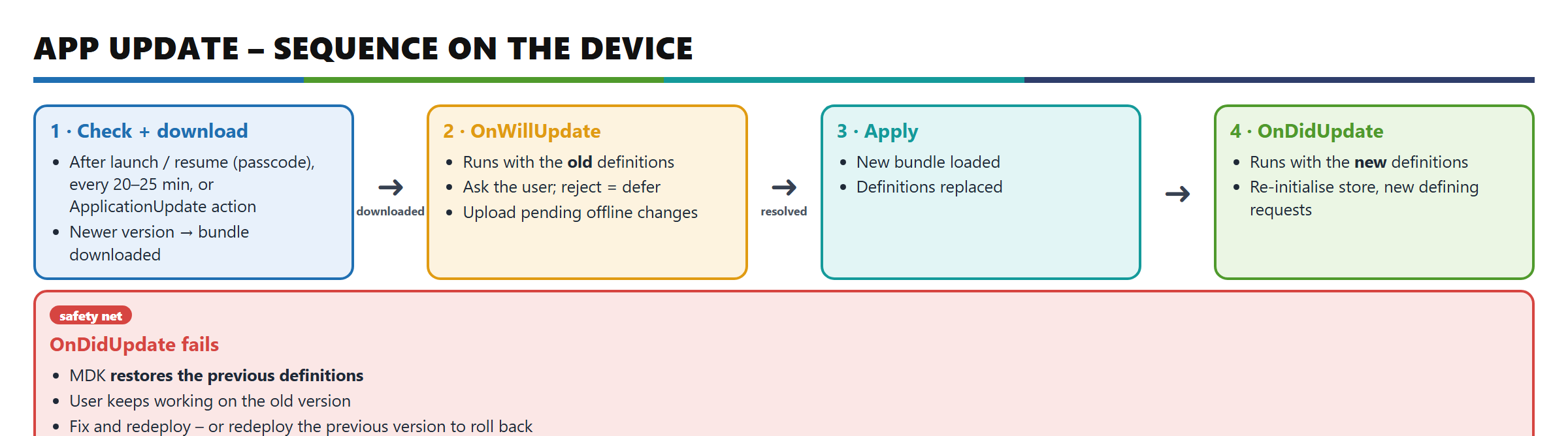
Every metadata deploy creates a new version in the App Update feature. Clients check for a newer version and download it; the app logic can control when it is applied.
The update events in Application.app
Event | Runs | Typical use |
|---|---|---|
OnWillUpdate | With the existing definitions, before the update | Ask the user ("Update now?"); reject the promise to defer; make sure pending offline changes are uploaded first |
OnDidUpdate | With the new definitions, after the update | Re-initialise the offline store, add new defining requests. If it fails, the previous definitions are restored |
Version | Property of | Metadata version (string, |
| Start / back to foreground | The client runs its update check here anyway; good moments to sync |
|
To check on demand (e.g. a "Check for updates" menu item), run an action of type Action.Type.ApplicationUpdate. Its success result is the new version or a text such as "Current version is already up to date"; when a new version is found, OnWillUpdate fires. The action is not supported in the web runtime.
Versioning rules that avoid incidents
- Metadata vs client compatibility: metadata written for a newer MDK release may use properties an older client does not know. Upgrade the branded client first, then deploy metadata that needs it. Check the MDK compatibility information for the supported client/metadata combinations.
- Offline schema changes: a new entity set or a new defining request needs a step in
OnDidUpdate(e.g. a Download with the new defining requests); removing one needs server permission (→ 04 · Offline OData & Synchronisation). - Never break pending changes: upload before the update is applied, or keep entity sets and properties compatible for one version.
- Roll back by redeploying the previous metadata version – keep releases tagged in Git.
- Web apps update by reloading the page – no update events needed.
mdk migratehelps to move older projects to a newer metadata schema version.
Part 4 – SAP Mobile Services client versus a branded client
The metadata needs a native client to run in. There are two kinds:
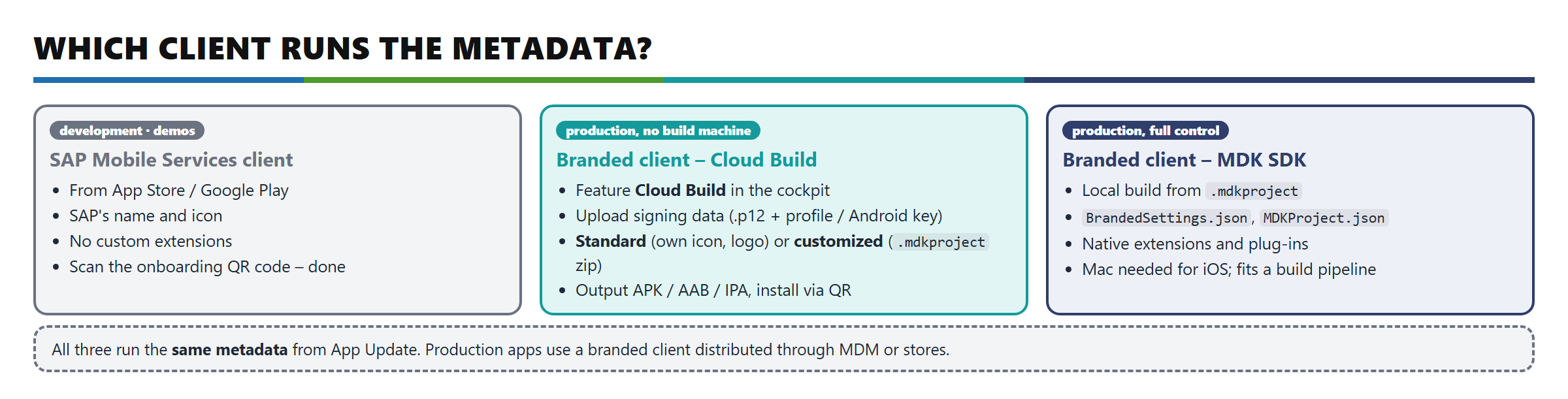
SAP Mobile Services client | Branded client – Cloud Build | Branded client – MDK SDK | |
|---|---|---|---|
What | SAP's generic MDK client from the App Store / Google Play | Built in the cloud by the Mobile Services Cloud Build feature | Built locally from the MDK SDK ( |
Name, icon, signing | SAP's | Yours (standard client with own icon and logo) | Yours, fully configurable ( |
Custom extensions / plug-ins | No | Yes, with a customized client: upload a zipped | Yes |
Needs a local build machine | No | No – signing profiles are uploaded instead | Yes (a Mac for iOS) |
Output | – | APK or AAB (Android), IPA (iOS); install via QR code or download | APK / AAB / IPA from your local build |
Use for | Development, tests, demos | Production without native build know-how | Production with native extensions or a full build pipeline |
Cloud Build in short
- Add the Cloud Build feature to the MDK app in the mobile service cockpit.
- Upload signing data: for iOS a
.p12certificate with passphrase and a.mobileprovisionprofile; for Android generate or upload a signing profile. - Enter the bundle ID (iOS) / package name (Android) – for iOS it must match the registered App ID – and a URL scheme; add
google-services.jsononly if Android push is used. - Choose standard or customized client, start the build and install from the build history. An AAB is for Google Play; install it locally only through Google's
bundletool. - iOS push needs a paid Apple Developer account (the APNs key or certificate).
Distribution of the branded client
Channel | When |
|---|---|
Public stores (App Store, Google Play) | Apps for external users (customers, partners) |
Private / managed store (e.g. Apple Business Manager custom apps, managed Google Play) | Internal apps for employees |
MDM / EMM | Company devices: push the app, its managed configuration (e.g. onboarding URL) and remove it when the device leaves (→ 07 · Security, Device Management & the Order Approval Mobile App) |
Mobile Services App Catalog / QR code | Pilots and test groups |
Common mistake: going live on the SAP Mobile Services client "because it works". Users then see SAP's app name and icon, you cannot add extensions, and you depend on SAP's client release cycle.
Part 5 – Web deployment of MDK apps
The same MDK project can also run in the browser through the MDK web runtime – useful for desk users of the same process (e.g. back-office approvers) without building a second UI.
- Deploy with MDK: Deploy → target Cloud Foundry, or
mdk deploy --target cf. The app goes to the HTML5 Application Repository; the CLI needs the MTA Build Tool, the MultiApps CF CLI plugin and the HTML5 Applications Repository CF CLI plugin. - The app then appears like other HTML5 apps in the subaccount and can be added to SAP Build Work Zone as content (→ SAP Fiori › 02 · SAP Fiori Launchpad & Security).
- Data sources: OData destinations used by the web app need the properties
HTML5.DynamicDestination,WebIDEEnabledandWebIDEUsage=odata_gen. A Mobile Services data source needs the Cross Context SSO setting in the app's security configuration. - Offline is a mobile-client feature – the web runtime works online. Design pages so that web users get online reads. The "Web Runtime Limitations" page lists what the browser lacks, for example the Offline OData and BarcodeScanner actions, the camera, SideDrawer, SignatureCapture, analytic and KPI controls and all extensions;
ApplicationUpdateand the passcode actions are listed as not supported on the web. - Updates: redeploy; users get the new version on page reload.
Part 6 – CI/CD for MDK projects
Treat MDK metadata like any other code: Git, reviews, automated checks and repeatable deploys to separate Mobile Services apps per stage (e.g. ...salesapproval.dev, .test, .prod, each with its own destinations).
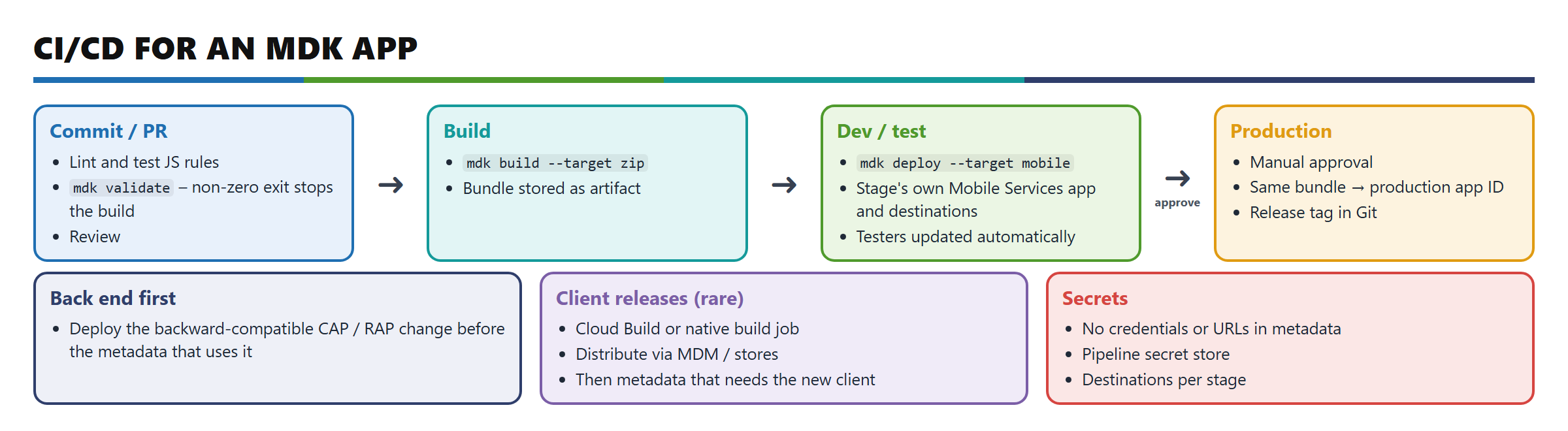
Stage | What runs | Tool |
|---|---|---|
Commit / pull request | Lint the JavaScript rules, | Any CI runner with Node.js |
Build | mdk build --target zip | mdk-tools |
Deploy to dev / test |
| mdk-tools + technical access to the subaccount |
Approve and deploy to production | Same bundle, production app ID; tag the release | Manual approval gate |
Client release (rare) | New branded client via Cloud Build or a native build job; distribute through MDM / stores | Cloud Build or Xcode / Gradle |
- Keep destinations, app IDs and credentials out of the metadata; they belong to the Mobile Services app of each stage and to the pipeline's secret store.
- There is no MDK-specific template assumed here; general CI/CD on BTP (SAP Continuous Integration and Delivery, project "Piper", GitHub Actions) is covered in the BTP Development section; an MDK job there is simply a Node.js step that runs the
mdkcommands above aftercf login. - Back end and app ship together: deploy the CAP / RAP change that adds a field before the metadata that shows it.
Part 7 – Monitoring, support and usage analytics
After go-live you need to know: who uses the app, which version, what fails, and why a single user has a problem. Mobile Services collects this centrally for MDK and SDK apps.
Need | Mobile Services feature / tool |
|---|---|
Who is registered, which device, OS, app version | User registrations of the app (also where admins lock, wipe or delete registrations) |
Client errors for one user | Client Log Upload – log policy (level, upload) set centrally; users or rules upload logs |
HTTP calls of a device | Network Trace |
Sessions, screens, versions in use, adoption | Client Usage (usage analytics, opt-in by consent screen) |
What users think | User Feedback |
Offline data problems | Upload the offline store ( |
Back-end side | CAP / RAP logs, SAP Cloud Logging or the ABAP application log; Mobile Services server logs for the destination calls |
- Consent: usage collection requires the user's consent screen during onboarding (data protection); default it to off where works councils or local law require it.
- Support runbook: ask for the metadata
Versionand client version first, then check the ErrorArchive, the uploaded logs and the destination test in the cockpit.
Common mistake: debugging a production issue with debug-level logging permanently enabled. Raise the log level for one user through the log policy, collect, then reset.
Part 8 – Interview questions
Q1. Why can MDK apps be updated without an app store release?
The app logic is metadata interpreted by the native client. A deploy stores a new metadata version in the Mobile Services App Update feature; clients download and apply it. Only native changes (client version, extensions, icon, signing) need a new binary.
Q2. What do OnWillUpdate and OnDidUpdate do?
OnWillUpdate runs with the old definitions before the update – ask the user, defer, or upload pending changes. OnDidUpdate runs with the new definitions afterwards – e.g. re-initialise the offline store; if it fails, MDK restores the previous definitions.
Q3. SAP Mobile Services client or branded client?
The store client runs any MDK app and is fine for development and demos. Production uses a branded client: own name, icon and signing, custom extensions, controlled client upgrades, distribution through MDM or stores. Build it with the Cloud Build feature or locally with the MDK SDK.
Q4. What does Cloud Build need from you?
Signing data (iOS .p12 + provisioning profile, Android signing profile), bundle ID / package name, URL scheme, optional google-services.json for Android push, and for a customized client the zipped .mdkproject. It produces APK / AAB and IPA files.
Q5. How do you deploy an MDK app to the web?
MDK: Deploy with target Cloud Foundry (or mdk deploy --target cf). It lands in the HTML5 Application Repository and can be added to SAP Build Work Zone. Destinations need the dynamic-destination properties; the web runtime is online only.
Q6. What would a CI/CD pipeline for MDK look like?
Git with pull requests; mdk validate and rule lint/tests as gates; mdk build --target zip; mdk deploy --target mobile to the dev and test apps; manual approval; same bundle to the production app; client builds separately and rarely.
Q7. Why must the client be upgraded before the metadata?
New metadata may use features only newer MDK clients understand. If the metadata arrives first, older clients fail to load it. Read the release notes, roll out the client via MDM / stores, then deploy the metadata.
Q8. Which tools help support a single user's problem?
User registrations (device, versions), Client Log Upload with a temporarily raised log level, Network Trace, the ErrorArchive in the app, offline store upload, and back-end logs.
Q9. Scenario: you add a field to the approval page that comes from a new CAP property. What is the release order?
Deploy the CAP service with the new property (backward compatible) first; then deploy the metadata. If the field must be available offline, the store must pick up the new metadata – handle it in OnDidUpdate (e.g. re-download) and test with pending changes in the queue.
Q10. Scenario: after a metadata update some users' app shows an error at start. What do you check?
Client versions of those users against the metadata's required version; whether OnDidUpdate failed (MDK restores the previous definitions); offline schema changes without re-initialisation; client logs for the failing rule; and roll back by redeploying the previous version if many users are affected.
🏠 Start Here · ◀ 04 · Offline OData · 06 · Native SDKs ▶ · Sections: CORE ABAP | OOPS ABAP | ABAP on HANA | Clean Core | RAP | ABAP Points | SAP Fiori | SAPUI5 | Mobile Development (MDK) | BTP Foundations | BTP Development | CAP | SAP Build | ABAP on BTP | Integration Suite | SAP Business AI | SAP BASIS | Security | SAP SDLC
Functional: FICO ABAP | TRM ABAP | VIM | SAP BIS | SD ABAP | MM ABAP | PP ABAP | QM ABAP | PM ABAP | PS ABAP | EWM | TM ABAP | EHS ABAP | HR ABAP | BW | SAP MDG | SAP Analytics Cloud | SAP Ariba | SAP CX | SAP IBP