PM master data describes the assets and the standard work done on them: functional locations (the places), equipment (the individual objects installed there), serial numbers, PM BOMs (spare parts), task lists (standard work), maintenance plans (when the work is due) and measuring points (readings and counters). Notifications and orders are the transactional documents. For every object this page gives the transaction, the tables and the key fields an ABAP developer reads – ECC and S/4HANA use the same PM tables – plus the released CDS views for clean-core code. Organization units and ILOA: page 01; processes: page 03; BAPIs and APIs: page 05.
Part 1 – The data model at a glance
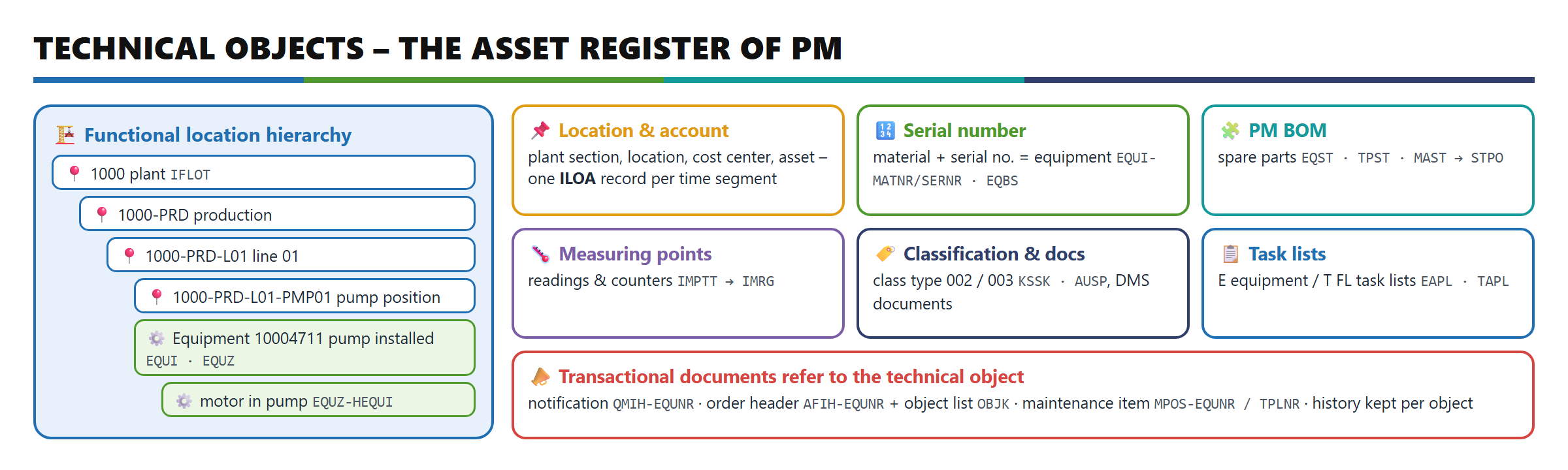
Functional locations form a hierarchy; equipment is installed at a functional location (or in superior equipment). Both are technical objects: they carry BOMs, measuring points, classification and documents, and they are the reference object of notifications, orders, task lists and maintenance plan items.
Object | Create / change / display | Main tables |
|---|---|---|
Functional location | IL01 / IL02 / IL03 | IFLOT, IFLOTX, ILOA (view IFLO) |
Equipment | IE01 / IE02 / IE03 | EQUI, EQUZ, EQKT, ILOA |
Serial number | IQ01 / IQ02 / IQ03 | EQUI (MATNR + SERNR), EQBS, OBJK |
PM BOM | IB01 equipment, IB11 functional location, CS01 material (assembly) | EQST, TPST, MAST → STKO, STPO |
Task list | IA05 general, IA01 equipment, IA11 functional location | PLKO, PLPO, PLAS, PLMZ, EAPL, TAPL |
Maintenance strategy | IP11 | T351, T351P |
Maintenance plan / item | IP41, IP42, IP43, IP01 / IP04 | MPLA, MPOS, MMPT, MHIS, MHIO |
Measuring point / document | IK01 / IK11 | IMPTT, IMRG |
Notification | IW21 / IW22 / IW23 | QMEL, QMIH, QMFE, QMUR, QMMA, QMSM |
Maintenance order | IW31 / IW32 / IW33 | AUFK, AFIH, AFKO, AFVC, AFVV, RESB, AFRU |
Part 2 – Functional locations
A functional location (FL) is a place in a technical system where an object can be installed: a plant area, a production line, a pump station. It is where maintenance happens and it keeps its history even when the installed equipment is replaced. FLs are arranged in a hierarchy, e.g. 1000-PRD-L01-PMP01 = plant 1000 → production → line 01 → pump position 01.
Concept | Meaning |
|---|---|
Structure indicator | Customizing that defines the edit mask (characters and separators of the FL label) and the hierarchy levels – which part of the label belongs to which level. The system derives the superior FL automatically from the label. |
FL category | Controls screen layout, partner determination and status profile (e.g. M = technical system, standard) |
Superior FL | IFLOT-TPLMA; the hierarchy is stored as a parent pointer, not as a separate table |
Reference functional location | A template FL that is not a real place; real FLs inherit its data (for many identical stations) |
Alternative labeling | Several labels for the same FL (e.g. a customer numbering system); the internal key stays the same |
Data transfer / inheritance | Location and account assignment fields flow down the hierarchy and to installed equipment, unless overwritten |
Table | Content | Key / important fields |
|---|---|---|
IFLOT | Functional location master | TPLNR (internal key), FLTYP category, TPLMA superior FL, TPLKZ structure indicator, IWERK planning plant, INGRP planner group, ILOAN, OBJNR, EQART object type |
IFLOTX | Short texts per language | TPLNR, SPRAS, PLTXT |
ILOA | Location and account assignment (page 01 Part 4) | ILOAN, SWERK, STORT, BEBER, KOSTL, BUKRS, ANLNR |
IFLO (view) | FL with texts and location data in one view – convenient for reads | TPLNR, PLTXT, SWERK, KOSTL … |
- The FL key is stored in an internal format; always use the conversion exit (TPLNR) or a released CDS view when you compare with user input.
Part 3 – Equipment
A piece of equipment is an individual physical object that is maintained on its own: a specific pump, motor, vehicle or measuring instrument. It can be installed at a functional location, dismantled, sent to repair and installed elsewhere – the equipment keeps its own history, the FL keeps the history of the place.
Table | Content | Important fields |
|---|---|---|
EQUI | Equipment master (time-independent) | EQUNR, EQTYP equipment category, EQART object type, HERST manufacturer, TYPBZ model, SERGE manufacturer serial no., BAUJJ construction year, MATNR + SERNR (serialised material), OBJNR |
EQUZ | Time segments – one row per validity period | EQUNR, DATBI valid-to (99991231 = current), IWERK, INGRP, GEWRK main work center, HEQUI superior equipment, ILOAN, TIDNR technical ID |
EQKT | Short texts | EQUNR, SPRAS, EQKTX |
ILOA | Location / account assignment of each time segment, incl. TPLNR = FL where installed | ILOAN, TPLNR, SWERK, KOSTL |
- Equipment category (EQTYP) controls number range, screens, history and whether the equipment can be installed; standard examples: M machines, Q test / measuring equipment.
- Time segments: every change of an EQUZ / ILOA field with history (installation, cost center, planning plant) closes the current time segment and opens a new one. So "where is this equipment today" = the EQUZ row with DATBI = 99991231 joined to ILOA.
- Installation / dismantling: IE02 (Structure tab) or IE4N (install / dismantle with goods movement for serialised spare parts); the installation history is in the time segments.
- Equipment hierarchy: equipment in equipment (motor in a pump) via EQUZ-HEQUI; structure display IH01 (functional location structure) shows FLs and installed equipment as a tree.
Example – current location data of equipment installed at a functional location
|
Part 4 – Serial numbers
A serial number identifies one unit of a material (material + serial number). In PM it bridges inventory and maintenance: a serialised spare part in the warehouse becomes, when installed, a piece of equipment with its own history.
- Created with IQ01 (change IQ02, display IQ03) or automatically at goods receipt / delivery, controlled by the serial number profile in the material master (plant data).
- A serial number is an equipment record: EQUI holds MATNR + SERNR and the equipment number. With the profile setting for equipment creation, every serial number also gets full equipment data ("serial number with equipment view").
- EQBS: stock information of the serial number (plant, storage location, batch, special stock). OBJK (with SER01 – SER05 headers per document type): which serial numbers are in which delivery, material document or order.
Part 5 – PM bills of material
A PM BOM lists the spare parts and assemblies of a technical object. It makes component planning in orders easy (choose from the structure list) and documents the object's structure.
BOM type | Transaction | Link table → BOM | Use |
|---|---|---|---|
Equipment BOM | IB01 / IB02 / IB03 | EQST (EQUNR, WERKS, STLAN → STLNR) | Spare parts of one specific equipment |
Functional location BOM | IB11 / IB12 / IB13 | TPST (TPLNR … → STLNR) | Spare parts of a place |
Material BOM (maintenance assembly) | CS01 / CS02 / CS03 | MAST (MATNR, WERKS, STLAN → STLNR) | Reusable assembly, e.g. a pump type; material type IBAU, assigned in the object as construction type |
- Header and items are the common BOM tables STKO / STPO (item category L stock item, N non-stock, plus text items). BOM usage 4 = plant maintenance.
- Spare parts are often material type ERSA; the order component (RESB) refers to them – page 03.
Part 6 – Task lists
A task list is standard work: a sequence of operations with work center, duration, number of people, control key, spare parts and tools. Orders and maintenance plan items copy it so planners do not re-plan recurring jobs.
Type (PLNTY) | Name | Transactions | Assigned to |
|---|---|---|---|
A | General maintenance task list | IA05 / IA06 / IA07 | No object – reusable for many objects |
E | Equipment task list | IA01 / IA02 / IA03 | One equipment (EAPL) |
T | Functional location task list | IA11 / IA12 / IA13 | One functional location (TAPL) |
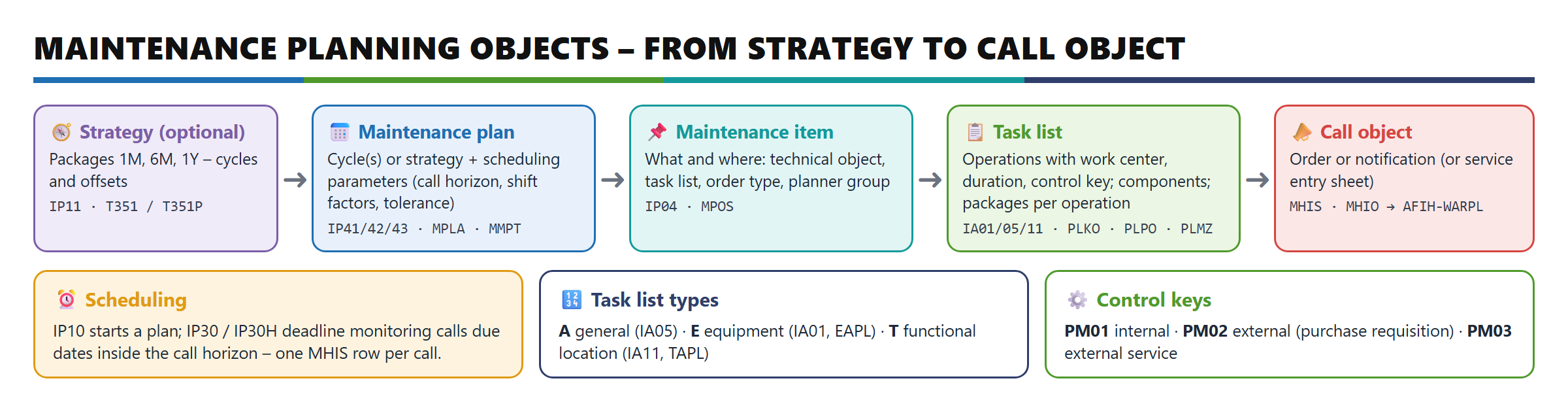
Table | Content | Key / important fields |
|---|---|---|
PLKO | Task list header | PLNTY, PLNNR group, PLNAL group counter, KTEXT, WERKS, STRAT strategy, VERWE usage |
PLAS | Selection of operations per group counter | PLNTY, PLNNR, PLNAL, PLNKN |
PLPO | Operations | PLNKN node, VORNR, ARBID work center, STEUS control key, LTXA1 text, ARBEI work, DAUNO duration, ANZZL number of people |
PLMZ | Component allocation to operations | STLNR / STLKN BOM item, PLNKN |
EAPL / TAPL | Allocation of task lists to equipment / to functional locations | EQUNR or TPLNR, PLNTY, PLNNR, PLNAL |
MAPL | Allocation to materials (task lists for an assembly) | MATNR, WERKS, PLNNR |
- Control key (STEUS) decides how an operation is processed: standard PM01 internal processing, PM02 external processing (purchase requisition), PM03 external service (service entry sheet).
- In strategy task lists every operation gets one or more maintenance packages (e.g. 1M, 6M, 1Y); the plan only copies operations whose package is due.
Part 7 – Maintenance strategies, plans and items
Plan type | Transaction | Cycle |
|---|---|---|
Single cycle plan | IP41 | One time or counter cycle, e.g. every 30 days |
Strategy plan | IP42 (strategy from IP11) | Several packages of one strategy, e.g. monthly lubrication, half-yearly inspection, yearly overhaul; time- or performance-based |
Multiple counter plan | IP43 | Several cycles with AND / OR link, e.g. every 12 months or 10,000 km, whichever comes first |
General create / change / display | IP01 / IP02 / IP03 | Any plan type |
Maintenance item | IP04 / IP05 / IP06 | One object + task list + order type, assigned to a plan |
Table | Content | Important fields |
|---|---|---|
MPLA | Maintenance plan header with scheduling parameters | WARPL, WPTXT, STRAT, plan category (order, notification, service entry sheet), shift factors, tolerances, call horizon, scheduling period |
MPOS | Maintenance item | WAPOS, WARPL, EQUNR / TPLNR, PLNTY / PLNNR / PLNAL task list, AUART order type, IWERK, ILART |
MMPT | Cycles of the plan (single cycle / multiple counter) | WARPL, ZYKL1 cycle, ZEIEH unit, POINT measuring point (counter-based) |
MHIS | Scheduling history – one row per call | WARPL, ABNUM call number, NPLDA planned date, call / fixed / skipped dates |
MHIO | Call objects created by a call | WARPL, ABNUM, AUFNR order or QMNUM notification |
T351 / T351P | Strategies / their packages | STRAT, PAKET, ZYKL1, ZEIEH |
- The created order points back to the plan: AFIH-WARPL / AFIH-ABNUM. The scheduling run itself (IP10, IP30) is a process – page 03 Part 3.
Part 8 – Measuring points and measurement documents
A measuring point describes where and what is measured on a technical object (temperature of bearing 2, oil pressure). A counter is a special measuring point whose reading only increases (operating hours, kilometres) – the basis of performance-based maintenance. Every reading is saved as a measurement document.
Object | Transactions | Table and important fields |
|---|---|---|
Measuring point / counter | IK01 / IK02 / IK03; list IK07 | IMPTT: POINT, MPOBJ (object number of equipment / FL), PSORT position, MPTYP category, ATINN characteristic (unit), INDCT counter indicator, target value and limits, annual estimate (counter) |
Measurement document | IK11 create, IK12 change, IK13 display, IK17 list, IK22 collective entry | IMRG: MDOCM, POINT, IDATE / ITIME, READG reading, CNTRR counter reading, VLCOD valuation code |
- The characteristic (from classification, CT04) gives the unit; readings are stored internally in the SI unit as floating point – convert with the characteristic's unit for display.
- Counter readings update the scheduling of performance-based plans; readings with a valuation code or outside limits can lead to notifications (condition-based maintenance, page 03 Part 4).
Part 9 – Notification tables and catalogs
PM notifications share the notification framework with QM and Customer Service: the same header table, distinguished by the notification type and its origin. PM-specific data sits in QMIH.
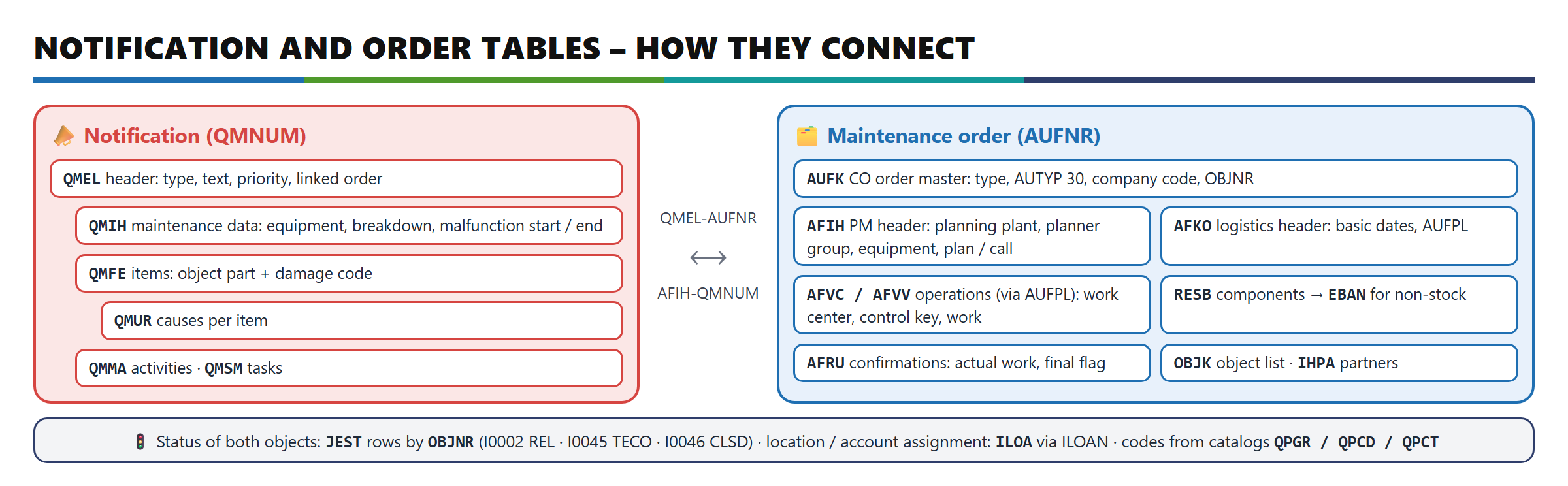
Table | Content | Important fields |
|---|---|---|
QMEL | Notification header (all notification categories) | QMNUM, QMART type, QMTXT text, PRIOK priority, QMDAT date, AUFNR linked order, OBJNR |
QMIH | Maintenance data of the notification | QMNUM, EQUNR, ILOAN, IWERK, INGRP, MSAUS breakdown indicator, AUSVN / AUSBS malfunction start / end, AUSZT breakdown duration |
QMFE | Items: object part and damage | FENUM, OTGRP / OTEIL object part, FEGRP / FECOD damage |
QMUR | Causes per item | URNUM, URGRP / URCOD |
QMMA | Activities (work done) | MANUM, MNGRP / MNCOD |
QMSM | Tasks (to-dos with responsible and status) | MANUM, MNGRP / MNCOD, planned dates |
IHPA | Partners of PM objects (notification, order, equipment) | OBJNR, PARVW, PARNR |
Catalogs
Damage, cause and activity are entered as codes from catalogs so they can be analysed. A catalog profile (assigned to the notification type or the technical object) limits the code groups offered.
Catalog type | Used for | Tables |
|---|---|---|
B | Object parts | QPGR code groups, QPCD codes, QPCT code texts |
C | Overview of damage (damage codes) | same |
5 | Causes | same |
A | Activities | same |
2 | Tasks | same |
D | Coding (notification header) | same |
Part 10 – Order tables, status and number ranges
A maintenance order is a CO order (AUFK, order category AUTYP = 30) with the PM extension AFIH and the logistics structure it shares with production orders (AFKO header, AFVC operations).
Table | Content | Important fields |
|---|---|---|
AUFK | Order master (all CO order categories) | AUFNR, AUART order type, AUTYP 30, KTEXT, BUKRS, KOSTV responsible cost center, OBJNR, PSPEL WBS |
AFIH | Maintenance order header data | AUFNR, ILART activity type, IWERK, INGPR planner group, EQUNR, ILOAN, PRIOK, QMNUM notification, WARPL / ABNUM plan and call, GEWRK |
AFKO | Order header logistics data | AUFNR, AUFPL routing number of operations, GSTRP / GLTRP basic start / finish |
AFVC / AFVV | Operations / their quantities and dates | AUFPL, APLZL, VORNR, ARBID, STEUS, LTXA1, LARNT activity type; AFVV: ARBEI work, DAUNO duration |
RESB | Components (reservations) | RSNUM, RSPOS, AUFNR, MATNR, BDMNG required, ENMNG withdrawn, POSTP item category (L stock, N non-stock) |
AFRU | Confirmations | RUECK, RMZHL, AUFNR, VORNR, ISMNW actual work, PERNR, AUERU final confirmation |
OBJK | Object list (several technical objects in one order) | OBKNR (object list number: INT4 in ECC, INT8 in S/4HANA), EQUNR, TPLNR, IHNUM notification |
JEST / TJ02T | Status of every object by OBJNR / status texts | OBJNR, STAT, INACT |
System status in code
Order and notification status is not a field in the header – it is a set of rows in JEST (object number OBJNR, status STAT, INACT flag). Internal codes: I0001 CRTD created, I0002 REL released, I0010 PCNF partially confirmed, I0009 CNF confirmed, I0045 TECO technically completed, I0046 CLSD closed, I0076 DLFL deletion flag. Classic reads use function module STATUS_READ (STATUS_TEXT_EDIT for the status line as text); mass reads join JEST with INACT = space. A complete work-list query (released, not TECO / CLSD) is on page 05 Part 7.1.
Number range | Controlled by |
|---|---|
Equipment | Equipment category |
Functional location | Label (no number range – the label is the key) |
Notification | Notification type → number range group |
Maintenance order | Order type → number range group (shared object for CO orders) |
Maintenance plan / item | Plan category / internal number range |
Measuring point / document | Internal number ranges |
Part 11 – Classification and released CDS views
11.1 Classification and documents
- Technical objects are classified with the standard classification system: class type 002 equipment, 003 functional location. Values in AUSP, class assignment in KSSK (CL20N assigns, CL30N finds objects by characteristic value).
- Characteristics describe technical data (power, voltage, pressure rating) and are also the units of measuring points.
- Documents (drawings, manuals) are linked through DMS document info records (CV01N); object links connect technical objects in networks (pipelines, power grids). Linear assets (roads, rail, pipelines) use Linear Asset Management (start / end point, offsets).
11.2 Released CDS views
For new code – and always in public cloud – read PM data through released CDS views or APIs (page 05), not the tables. Confirmed examples (check the release contract in ADT or the View Browser app for your release):
Object | CDS views | Note |
|---|---|---|
Equipment | I_Equipment, I_EquipmentText | |
Functional location | I_FunctionalLocation, I_FunctionalLocationText, I_TechnicalObject | |
Maintenance order | I_MaintenanceOrderDEX (maintenance order data); RAP BO I_MaintenanceOrderTP | Base for custom CDS views |
Order operations / components | I_MaintOrderOperation_DEX, I_MaintOrderComponentDEX | I_MaintOrderOperationData is deprecated |
Notification | I_MaintenanceNotification | Items, causes, activities, tasks |
Planning | I_MaintenancePlanBasic, I_MaintenanceItem, I_MaintenanceTaskList, I_MaintenanceStrategy | |
Measuring | I_MeasuringPoint, I_MeasurementDocument | |
Org / texts | I_MaintenancePlannerGroup, I_MaintenanceActivityType, I_TechnicalObjectTypeText |
- How to build a custom CDS view entity on top of these: ABAP on HANA › 05 CDS Views; extending them with custom fields: page 05.
Part 12 – Interview questions
Q1. What is the difference between a functional location and an equipment?
A functional location is a place in the technical structure where an object can be installed; it keeps the history of the place. Equipment is an individual physical object with its own history that can be installed, dismantled and moved. Tables: IFLOT / IFLOTX vs EQUI / EQUZ / EQKT.
Q2. What is a structure indicator?
Customizing for functional locations that defines the edit mask of the label and its hierarchy levels, so the system derives the superior functional location (IFLOT-TPLMA) from the label.
Q3. Why does EQUZ exist next to EQUI?
EQUZ stores time segments: every change of history-relevant data (installation location, planning plant, cost center) closes the current row and creates a new one. The current data is the row with DATBI = 99991231, joined to ILOA for location and account assignment.
Q4. How are serial numbers and equipment related?
A serial number is material + serial number stored in EQUI with an equipment number; with the right serial number profile it gets full equipment data. EQBS holds its stock information, OBJK / SER0x link it to documents.
Q5. Which PM BOMs exist and how are they linked?
Equipment BOM (IB01, link table EQST), functional location BOM (IB11, TPST) and material BOM used as maintenance assembly (CS01, MAST). All use STKO / STPO; BOM usage 4 is plant maintenance.
Q6. What are the task list types?
A general maintenance task list (IA05), E equipment task list (IA01), T functional location task list (IA11). Header PLKO, operations PLPO, components PLMZ, allocations EAPL / TAPL / MAPL.
Q7. Which tables hold a maintenance plan and its calls?
MPLA header with scheduling parameters, MPOS items, MMPT cycles, MHIS scheduling history per call, MHIO call objects. The order points back via AFIH-WARPL and AFIH-ABNUM.
Q8. What is the difference between a measuring point and a counter?
A measuring point records any value (temperature, pressure) with optional limits; a counter is a measuring point whose reading only increases (hours, km) and drives performance-based scheduling. Both are in IMPTT; readings are measurement documents in IMRG.
Q9. Name the notification tables.
QMEL header, QMIH maintenance data (equipment, breakdown, malfunction times), QMFE items with object part and damage, QMUR causes, QMMA activities, QMSM tasks; codes from catalogs in QPGR / QPCD / QPCT.
Q10. Which tables make up a maintenance order and how do you read its status?
AUFK (AUTYP 30), AFIH, AFKO, AFVC / AFVV operations, RESB components, AFRU confirmations, OBJK object list. Status is in JEST by OBJNR (I0002 REL, I0045 TECO, I0046 CLSD …), read with STATUS_READ or a join on JEST with INACT = space.
Q11. What should new S/4HANA code use instead of the PM tables?
Released CDS views such as I_Equipment, I_FunctionalLocation, I_MaintenanceOrderDEX (RAP BO I_MaintenanceOrderTP) and the maintenance notification / plan / measuring point views, and the released OData APIs for writes. Check the release contract (C1) before using a view.
Q12. As an architect, how do you decide between functional locations and equipment only?
Use functional locations when places have their own life (positions in a plant or network where units are swapped) and costs or history are reported per place; use equipment alone for loose, mobile assets such as vehicles or tools. Most plants use both: FL hierarchy + installed equipment.
🏠 Start Here · ◀ 01 · Overview & Org · 03 · Processes & Config ▶ · Sections: CORE ABAP | OOPS ABAP | ABAP on HANA | Clean Core | RAP | ABAP Points | SAP Fiori | SAPUI5 | Mobile Development (MDK) | BTP Foundations | BTP Development | CAP | SAP Build | ABAP on BTP | Integration Suite | SAP Business AI | SAP BASIS | Security | SAP SDLC
Functional: FICO ABAP | TRM ABAP | VIM | SAP BIS | SD ABAP | MM ABAP | PP ABAP | QM ABAP | PM ABAP | PS ABAP | EWM | TM ABAP | GTM ABAP | EHS ABAP | HR ABAP | BW | SAP Datasphere | SAP Business Data Cloud | SAP MDG | SAP Analytics Cloud | SAP Ariba | SAP CX | SAP IBP