PP runs on five master data objects – material master (MRP and work scheduling views), bill of material, work center / resource, routing / master recipe and production version – plus the demand in planned independent requirements. From them MRP creates planned orders, which become production or process orders with operations, component reservations and confirmations. This page gives every object with its key tables, the important fields, the ECC → S/4HANA changes and the released CDS views. Processes and customizing: page 03; enhancements, BAPIs and APIs: page 05; the general CDS and table techniques: ABAP on HANA › 05 CDS Views and ABAP Points › Tables.
Part 1 – Master data overview and the data model
Master data must exist in this order before the first MRP run: material → BOM and work centers → routing (it refers to work centers and BOM components) → production version (it combines a BOM alternative and a routing) → PIRs.
Object | Create / change / display | Main tables | Key |
|---|---|---|---|
Material (MRP, work scheduling views) | MM01 / MM02 / MM03 | MARA, MARC, MDMA, MBEW | MATNR + WERKS |
BOM | CS01 / CS02 / CS03 | MAST, STKO, STPO, STAS, STZU | STLTY + STLNR + STLAL |
Work center | CR01 / CR02 / CR03 | CRHD, CRCO, CRCA, KAKO, CRTX | OBJTY + OBJID (ARBPL per plant) |
Resource (PP-PI) | CRC1 / CRC2 / CRC3 | Same tables as work center | OBJTY + OBJID |
Routing | CA01 / CA02 / CA03 | MAPL, PLKO, PLAS, PLPO, PLMZ | PLNTY + PLNNR + PLNAL |
Master recipe (PP-PI) | C201 / C202 / C203 | Same task list tables, PLNTY = 2 | PLNTY + PLNNR + PLNAL |
Production version | C223 (also MM02, work scheduling view) | MKAL | MATNR + WERKS + VERID |
PIR | MD61 / MD62 / MD63 | PBIM, PBED | BDZEI (pointer) |
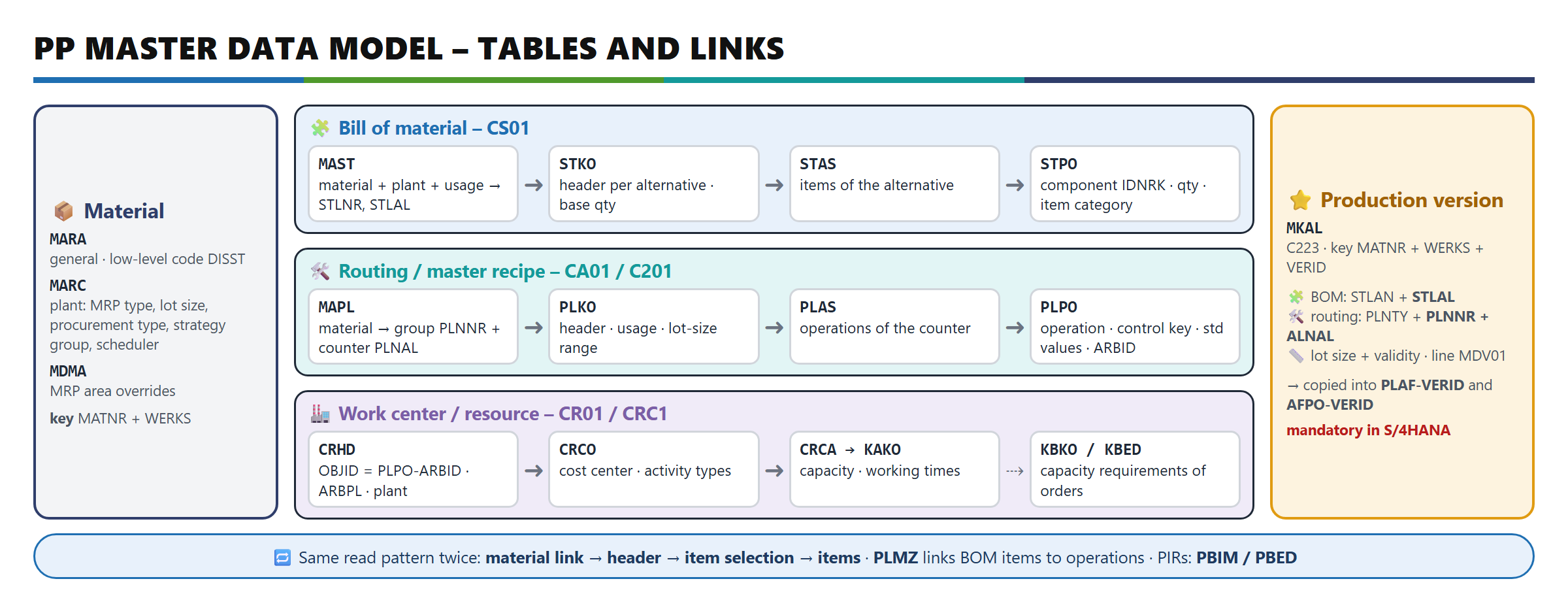
Part 2 – Material master: MRP and work scheduling views
PP data of the material is plant-specific and lives in MARC (MRP-area-specific overrides in MDMA). It is maintained in the views MRP 1 – MRP 4 and Work scheduling of MM01 / MM02. General material data (MARA, MAKT, MARM) and valuation (MBEW): MM ABAP page 01.
View | What it controls |
|---|---|
MRP 1 | MRP type, MRP controller, reorder point, lot size and its limits, MRP group |
MRP 2 | Procurement type, special procurement, storage locations, in-house production time, planned delivery time, GR processing time, scheduling margin key, safety stock, backflush |
MRP 3 | Strategy group, consumption mode and periods, availability check group, planning material / forecast settings |
MRP 4 | BOM selection method, individual / collective requirements, REM profile and repetitive manufacturing flag, discontinuation |
Work scheduling | Production scheduler, production scheduling profile, under / overdelivery tolerance, production versions |
2.1 Important MARC fields
Field | Meaning | Typical values |
|---|---|---|
DISMM | MRP type – which planning procedure | PD MRP, VB manual reorder point, VM automatic reorder point, VV forecast-based, M0 – M4 MPS, ND no planning |
DISPO | MRP controller | Key from T024D |
DISLS | Lot-sizing procedure | EX lot-for-lot, FX fixed, HB replenish to maximum, TB / WB / MB daily / weekly / monthly lots |
BSTMI / BSTMA / BSTFE / BSTRF | Minimum / maximum / fixed lot size, rounding value | Quantities |
BESKZ | Procurement type | E in-house, F external, X both |
SOBSL | Special procurement key (plant-specific customizing) | e.g. subcontracting, stock transfer from another plant, phantom assembly, direct production, production in another plant |
STRGR | Strategy group → planning strategies | 10, 11, 20, 40, 50 … |
DZEIT / PLIFZ / WEBAZ | In-house production time / planned delivery time / GR processing time (days) | Used in basic date scheduling |
FHORI | Scheduling margin key: floats before / after production, opening period | Key |
EISBE / MINBE | Safety stock / reorder point | Quantities |
LGPRO / LGFSB | Issue storage location for production / default location for external procurement | Storage location |
RGEKZ | Backflush indicator | 1 always, 2 work center decides |
SBDKZ | Individual / collective requirements | blank individual and collective, 1 individual only, 2 collective only |
ALTSL | Selection method for BOM alternatives | ECC: by lot size, validity date or production version · S/4HANA: production version only |
MTVFP | Availability check group (ATP) | e.g. 02 individual requirements |
VRMOD / VINT1 / VINT2 | Consumption mode, backward / forward consumption period (days) | Used when sales orders consume PIRs |
FEVOR / SFCPF | Production scheduler / production scheduling profile | Keys |
SAUFT / SFEPR | Repetitive manufacturing allowed / REM profile | Flag / key |
FXHOR | Planning time fence (days) | Number |
- The MRP type decides whether and how a material is planned; the procurement type whether MRP creates a planned order for production or a purchase requisition; the lot size how much; the special procurement key refines both (e.g. a phantom assembly is exploded but never produced on its own).
- The low-level code (MARA-DISST) is set by the system from the BOM structure; it is cross-plant.
Part 3 – Bill of material (BOM)
A BOM lists the components, with quantities, needed to make a base quantity of an assembly. MRP explodes it to create dependent requirements; the production order copies it into reservations (RESB); product costing uses it for the material costs.
Concept | Meaning | Values / field |
|---|---|---|
BOM category | What the BOM belongs to | STLTY: M material, E equipment, T functional location, D document, K sales order, P WBS element, S standard |
BOM usage | Which area uses it | STLAN: 1 production, 2 engineering / design, 3 universal, 5 sales and distribution, 6 costing |
Alternative BOM | Several BOMs for one material (e.g. by lot size or line), up to 99 | STLAL; chosen through the production version in S/4HANA (ECC: also by the selection method MARC-ALTSL) |
Item category | Type of component line | POSTP: L stock item, N non-stock, R variable-size, T text, D document, K class item |
Variant BOM / super BOM | Several similar products share one BOM; configurable products use object dependencies | Variant configuration |
Phantom assembly | Logical grouping exploded into its components, never produced as such | Special procurement key on the component |
3.1 BOM tables
Table | Content | Key fields | Important fields |
|---|---|---|---|
MAST | Material-to-BOM link | MATNR, WERKS, STLAN, STLNR, STLAL | Which BOM number belongs to the material, plant and usage |
STKO | BOM header (per alternative) | STLTY, STLNR, STLAL, STKOZ | BMENG base quantity, STLST status, DATUV valid from |
STPO | BOM items | STLTY, STLNR, STLKN, STPOZ | IDNRK component, MENGE, MEINS, POSTP, POSNR, AUSCH component scrap |
STAS | Which items belong to which alternative | STLTY, STLNR, STLAL, STLKN, STASZ | Needed because items can be shared by alternatives |
STZU | BOM permanent data (once per BOM number) | STLTY, STLNR | Number of alternatives |
- Read path: material + plant + usage → MAST (STLNR, STLAL) → STKO (header of the alternative) → STAS (item nodes of that alternative) → STPO (items). Validity uses DATUV and change numbers (AENNR).
- Explosion: CS11 level by level, CS12 multi-level, CS13 summarized, CS15 where-used. In code a multi-level explosion is done with function module CS_BOM_EXPL_MAT_V2 (page 05), not by recursive SELECTs.
Part 4 – Work center and resource
A work center (PP-PI: resource) is where an operation is performed. It supplies four kinds of data to the operation: basic data (standard value key, default control key), capacity (available hours, shifts), scheduling (formulas that turn standard values into durations) and costing (cost center + activity types, so confirmations post activity costs).
Table | Content | Key / important fields |
|---|---|---|
CRHD | Work center header | OBJTY ('A' = work center), OBJID internal key, ARBPL work center, WERKS, VERWE category, VGWTS standard value key |
CRTX | Work center texts | OBJTY, OBJID, SPRAS, KTEXT |
CRCO | Cost center assignment (per validity period) | OBJTY, OBJID, KOSTL, LSTAR activity types |
CRCA | Capacity allocation: work center → capacity | OBJID → KAPID |
KAKO | Capacity header | KAPID, KAPAR capacity category, working times, utilization |
KAPA | Shift / interval data of a capacity | KAPID, VERSN, … |
- Operations, orders and capacity requirements point to the work center through OBJID (e.g. PLPO-ARBID, AFVC-ARBID) – join CRHD on OBJID, not on ARBPL.
- Standard value key SAP1 (setup, machine, labour) is the common default: the routing operation enters a value per parameter and the formulas of the work center calculate duration, capacity load and costs.
- Capacity requirements of planned and production orders: KBKO (header) and KBED (records per operation and capacity).
Part 5 – Routing and master recipe
A routing lists the operations to make a material: sequence, work center, control key, standard values and, optionally, which BOM components are consumed in which operation. In PP-PI the equivalent is the master recipe with operations and phases on resources. Both are task lists stored in the same tables and distinguished by the task list type.
Task list type (PLNTY) | Object | T-code |
|---|---|---|
N | Routing (discrete) | CA01 – CA03 |
R | Rate routing (REM, quantity per time) | CA21 – CA23 |
S | Reference operation set (reused in routings) | CA11 – CA13 |
2 | Master recipe (PP-PI) | C201 – C203 |
Q | Inspection plan (QM) | QP01 – QP03 |
Table | Content | Key / important fields |
|---|---|---|
MAPL | Material-to-task list allocation | MATNR, WERKS, PLNTY, PLNNR, PLNAL |
PLKO | Task list header (group + group counter) | PLNTY, PLNNR, PLNAL, ZAEHL; VERWE usage, STATU status, LOSVN / LOSBS lot size range |
PLAS | Selection of operations per group counter | PLNTY, PLNNR, PLNAL, PLNFL sequence, PLNKN node |
PLPO | Operations | PLNTY, PLNNR, PLNKN, ZAEHL; VORNR operation, ARBID work center, STEUS control key, VGW01 – VGW06 standard values, LTXA1 text |
PLMZ | Component allocation (BOM item → operation) | Links STPO items to PLPO operations |
PLFL | Sequences (standard, parallel, alternative) | PLNTY, PLNNR, PLNAL, PLNFL |
- The control key (PLPO-STEUS) says how an operation behaves: scheduled, costed, confirmation required, printed, external processing. Standard keys: PP01 internal processing, PP02 external processing.
- Read path: material → MAPL (group PLNNR, group counter PLNAL) → PLKO → PLAS → PLPO – the same pattern as MAST → STKO → STAS → STPO for BOMs.
Part 6 – Production version
A production version says which BOM alternative and which routing / master recipe are used to produce a material, for which lot-size range and validity period. Maintain it with C223 (mass maintenance) or in the work scheduling view; table MKAL (key MATNR, WERKS, VERID).
MKAL field | Meaning |
|---|---|
VERID / TEXT1 | Production version key and text |
ADATU / BDATU | Valid from / valid to |
BSTMI / BSTMA | Lot-size range |
STLAN / STLAL | BOM usage and alternative |
PLNTY / PLNNR / ALNAL | Task list type, group and group counter |
MDV01 | Production line (REM) |
MKSP | Lock indicator (version may not be used) |
- ECC: the production version is optional – BOM alternatives can also be selected by lot size or date (MARC-ALTSL). S/4HANA: the production version is mandatory for the BOM and routing selection in MRP, planned orders and production orders – without one, no BOM or routing alternative is found. During conversion SAP's report CS_BOM_PRODVER_MIGRATION02 generates missing production versions.
- Planned orders and production orders store the chosen version (PLAF-VERID, AFPO-VERID).
Part 7 – Planned independent requirements
PIRs are the forecast quantities per material, plant and date that drive make-to-stock and assemble-to-order planning. They are created in MD61 (change MD62, display MD63), copied from SOP / IBP or uploaded, and consumed by sales orders according to the planning strategy.
Table | Content | Key / important fields |
|---|---|---|
PBIM | PIR header per material, plant, requirement type and version | MATNR, WERKS, BEDAE requirements type, VERSB version, PBDNR; BDZEI pointer to the schedule lines |
PBED | PIR schedule lines (quantity per date / period) | BDZEI, PDATU date, PLNMG planned quantity, ENTLU period indicator |
PBHI | Change history of PIRs | BDZEI, … |
- Requirements type depends on the strategy: LSF (strategy 10), VSF (40), VSE (50).
- Only the active version (typically 00) is relevant for MRP; other versions are for simulation.
- Consumption: a sales order reduces the PIR within the consumption periods (MARC-VRMOD, VINT1, VINT2) so that demand is not counted twice.
Part 8 – Planned orders, production orders and confirmations
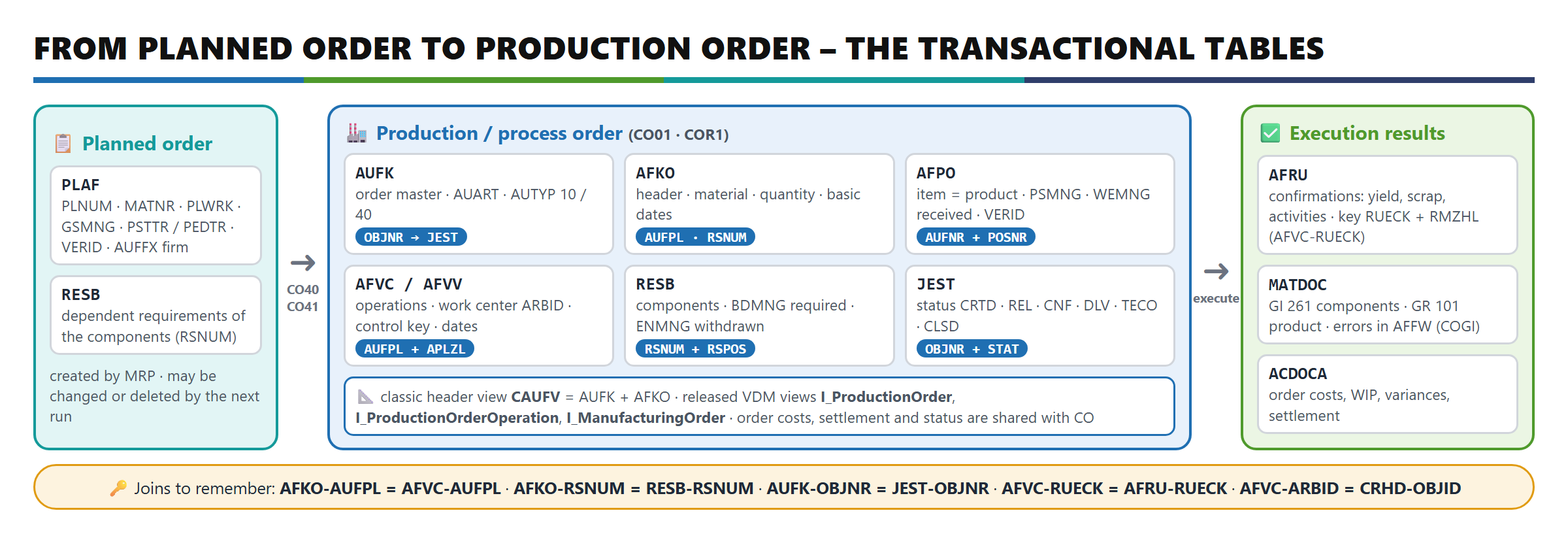
8.1 Planned order
PLAF holds every planned order (number PLNUM). Main fields: MATNR, PLWRK planning plant, PAART order type, BESKZ / SOBES procurement, GSMNG quantity, PSTTR / PEDTR start / finish, PERTR opening date, VERID production version, AUFFX firming flag, DISPO. Its components are reservations in RESB (dependent requirements, linked through RSNUM). When converted, the planned order is deleted.
8.2 Production and process order
Table | Content | Key / important fields |
|---|---|---|
AUFK | Order master (shared with CO internal orders, maintenance orders) | AUFNR; AUART order type, AUTYP category (10 production, 40 process), WERKS, OBJNR status object, KDAUF / KDPOS sales order |
AFKO | PP order header | AUFNR; PLNBEZ material, GAMNG total quantity, GSTRP / GLTRP basic start / finish, AUFPL routing number of operations, RSNUM reservation, DISPO, FEVOR |
AFPO | Order item (the product; co-products possible) | AUFNR, POSNR; MATNR, PSMNG quantity, WEMNG goods received, VERID, LGORT, DWERK |
AFVC | Order operations | AUFPL, APLZL; VORNR, ARBID work center, STEUS, LTXA1, RUECK confirmation number |
AFVV | Operation quantities, values, dates | AUFPL, APLZL; MGVRG quantity, VGW01 – VGW06, scheduled dates |
RESB | Component reservations / dependent requirements | RSNUM, RSPOS; MATNR, BDMNG requirement, ENMNG withdrawn, LGORT, RGEKZ backflush, AUFNR |
JEST / TJ02T | Object status of the order / status texts | OBJNR, STAT, INACT |
CAUFV | Database view AUFK + AFKO (classic way to read order headers) | AUFNR |
System status | Code | Meaning |
|---|---|---|
CRTD | I0001 | Created – not yet executable |
REL | I0002 | Released – goods movements and confirmations allowed |
PCNF / CNF | I0010 / I0009 | Partially / finally confirmed |
DLV | I0012 | Delivered – full goods receipt posted |
TECO | I0045 | Technically completed – reservations and capacity requirements are cleared |
CLSD | I0046 | Closed – no more postings |
8.3 Confirmations and goods movements
Table | Content | Key / important fields |
|---|---|---|
AFRU | Order confirmations | RUECK, RMZHL counter; AUFNR, VORNR, LMNGA yield, XMNGA scrap, ISM01 – ISM06 activities, BUDAT, STOKZ reversed |
AFFW | Goods movements with errors from confirmations / backflush (reprocessed in COGI) | Material, plant, error message |
MATDOC | Goods issue 261 and goods receipt 101 for the order (ECC: MKPF / MSEG) | AUFNR, BWART, MATNR |
ACDOCA | Order costs and stock values in S/4HANA (ECC: COEP / COSS / COSP, BSEG) | Object number, account |
Example – components of a production order with withdrawn quantity
|
- Number ranges: planned orders and MRP have their own number ranges in MRP customizing; production and process orders draw their numbers from the order type's number range group (shared with other order categories); confirmation numbers per operation (AFVC-RUECK).
Part 9 – MRP results and the planning file: ECC vs S/4HANA
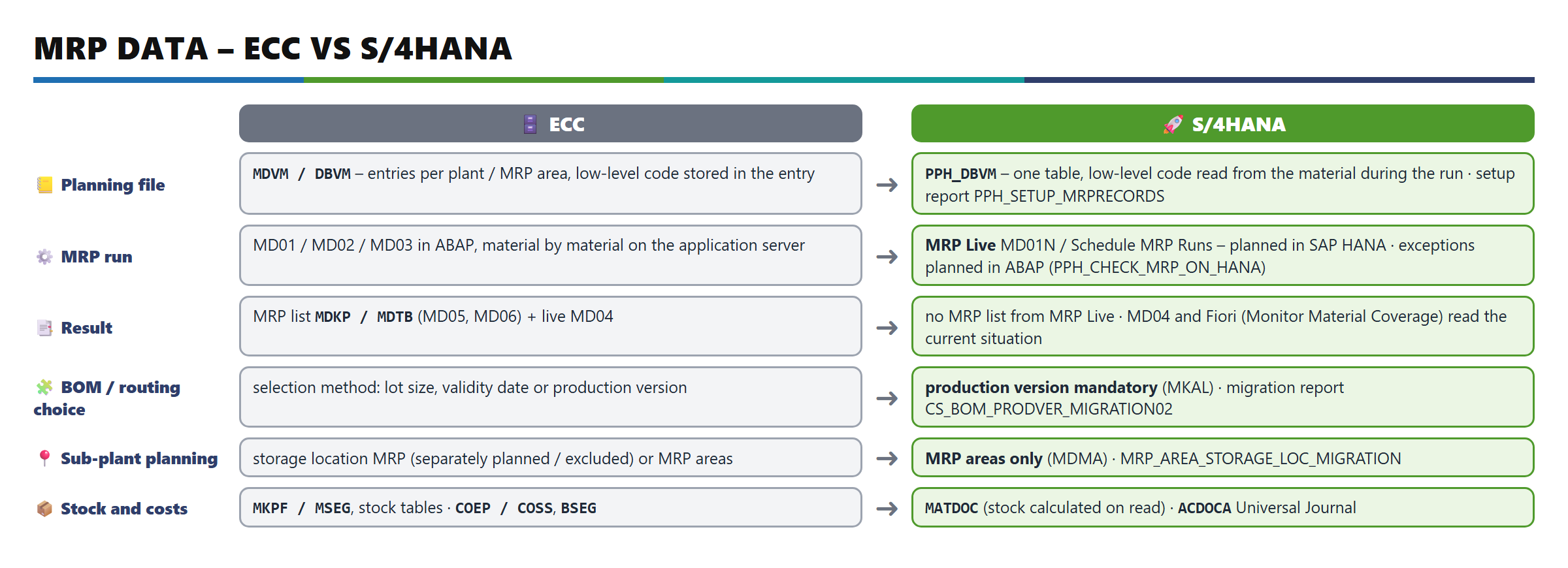
Object | ECC | S/4HANA |
|---|---|---|
Planning file – which materials need planning | MDVM / DBVM (plant / MRP area entries) | Single table PPH_DBVM; low-level code read from the material during the run; consistency reports, PPH_SETUP_MRPRECORDS initial setup |
MRP list – saved result of the last run | MDKP header, MDTB lines; displayed in MD05 / MD06 | MRP Live (MD01N) does not write MRP lists; analyse with MD04 or the Fiori apps |
Stock / requirements list (MD04) | Built at runtime from orders, reservations, stock | Same principle, read from the in-memory tables; also in Fiori (Monitor Material Coverage; stock / requirements list as a tab in Manage Material Coverage) |
Requirements and receipts | PLAF, RESB, EBAN, EKET, VBBE, PBED, AFPO … | Unchanged tables; stock from MATDOC |
Storage location MRP | MARD-DISKZ separately planned / excluded | Not available – MRP areas (MDMA) |
- Classic MRP (MD01, MD02, MD03 with MRP list option) still writes MDKP / MDTB on-premise; custom reports that read MDTB therefore break or show old data once the plant moves to MRP Live. Read current results through MD04 logic (function module MD_STOCK_REQUIREMENTS_LIST_API or BAPI_MATERIAL_STOCK_REQ_LIST, page 05) or released CDS views.
- Report PPH_CHECK_MRP_ON_HANA (older releases; shown as obsolete in newer ones) lists materials that MRP Live cannot plan in SAP HANA and the reason; those are planned with the classic ABAP logic in the same run.
Part 10 – Released CDS views
New code and analytics should read PP data through the virtual data model (VDM) instead of the tables. The basic interface views below are released (C1 contract) in current S/4HANA releases. ADT (API state of the view) and the View Browser app show the release state per system – the list grows with every release and some views differ between private and public cloud.
Object | Interface view | Main table behind it |
|---|---|---|
Planned order | I_PlannedOrder | PLAF |
Production order (and internal order data) | I_ProductionOrder | AUFK / AFKO |
Production order operation | I_ProductionOrderOperation_2 | AFVC / AFVV |
Production order status (system and user status) | I_MfgOrderWithStatus | JEST |
Manufacturing order (production and process orders together) | I_ManufacturingOrder with item / operation views | AUFK / AFKO / AFPO |
Bill of material | I_BillOfMaterial, I_BillOfMaterialItem, I_MaterialBOMLink | STKO, STPO, MAST |
Work center | I_WorkCenter | CRHD (+ CRCO) |
Routing operation | I_RoutingOperation | PLPO |
Capacity requirements | I_CapacityRequirement | KBKO / KBED |
- For write access use the APIs and RAP business objects (production order, planned order, BOM, routing, PIR APIs) – page 05. How to build on released views: ABAP on HANA › 05 CDS Views.
|
Part 11 – Interview questions
Q1. Which material master fields matter most for MRP?
MRP type (DISMM), MRP controller (DISPO), lot size (DISLS + limits), procurement type (BESKZ), special procurement (SOBSL), in-house production / planned delivery time, safety stock, strategy group (STRGR) and the BOM selection method – all in MARC (MDMA per MRP area).
Q2. Explain the BOM tables and how you read a BOM.
MAST links material, plant and usage to the BOM number and alternative; STKO is the header per alternative; STAS assigns items to alternatives; STPO holds the items. For multi-level explosion use CS_BOM_EXPL_MAT_V2 instead of own recursion.
Q3. What are BOM usage and BOM category?
Usage (STLAN) says which area the BOM is for – 1 production, 2 engineering, 5 sales, 6 costing. Category (STLTY) says what it belongs to – M material, K sales order, P WBS element, E equipment.
Q4. Which tables hold routings and how are they linked to the work center?
MAPL (material allocation), PLKO (header), PLAS (operation selection), PLPO (operations). PLPO-ARBID points to CRHD-OBJID, the internal work center key.
Q5. What is a production version and why is it mandatory in S/4HANA?
MKAL combines a BOM alternative and a routing for a lot-size range and validity. In S/4HANA MRP and order creation select BOM and routing only through the production version, so every produced material needs one; in ECC it was optional (BOM alternative also by lot size or date via MARC-ALTSL).
Q6. Name the production order tables.
AUFK master, AFKO header, AFPO item, AFVC / AFVV operations, RESB components, JEST status, AFRU confirmations; goods movements in MATDOC and costs in ACDOCA (ECC MKPF / MSEG and COEP).
Q7. How do you find whether a production order is released or technically completed?
Read JEST with the order's OBJNR (AUFK-OBJNR) and INACT = space: I0002 REL, I0045 TECO, I0046 CLSD. In code prefer function module STATUS_READ or the released view I_MfgOrderWithStatus.
Q8. What is the difference between PLAF and AFKO / AFPO?
PLAF is the planned order – an MRP proposal that MRP may change or delete. AFKO / AFPO is the production order – a binding execution document with operations, reservations and costs.
Q9. Which tables store PIRs?
PBIM (header per material, plant, requirements type, version) and PBED (schedule lines with date and quantity); history in PBHI.
Q10. What changed in the MRP tables in S/4HANA?
The planning file is one table PPH_DBVM; MRP Live does not write MRP lists (MDKP / MDTB); storage location MRP is replaced by MRP areas; stock comes from MATDOC.
Q11. Why should a custom report use CDS views instead of AFKO / PLAF?
Released views are a stable contract (upgrade-safe, cloud-ready), carry semantics and associations, work in public cloud where tables are not accessible, and push the joins to SAP HANA.
🏠 Start Here · ◀ 01 · Overview & Org · 03 · Processes & Config ▶ · Sections: CORE ABAP | OOPS ABAP | ABAP on HANA | Clean Core | RAP | ABAP Points | SAP Fiori | SAPUI5 | Mobile Development (MDK) | BTP Foundations | BTP Development | CAP | SAP Build | ABAP on BTP | Integration Suite | SAP Business AI | SAP BASIS | Security | SAP SDLC
Functional: FICO ABAP | TRM ABAP | VIM | SAP BIS | SD ABAP | MM ABAP | PP ABAP | QM ABAP | PM ABAP | PS ABAP | EWM | TM ABAP | GTM ABAP | EHS ABAP | HR ABAP | BW | SAP Datasphere | SAP Business Data Cloud | SAP MDG | SAP Analytics Cloud | SAP Ariba | SAP CX | SAP IBP