How production actually runs in the system: the make-to-stock cycle from forecast to settled production order, the MRP run (classic and MRP Live) and how planners read its result in MD04, the execution steps of a production order, the variants for make-to-order, process manufacturing, repetitive manufacturing and KANBAN, a short look at capacity planning, and the customizing that controls all of it – with the SAP GUI t-codes and Fiori apps per step. Tables behind each step: page 02; postings to FI / CO and interfaces: page 04.
Part 1 – Make-to-stock end to end
The standard discrete make-to-stock cycle (planning strategy 10) has ten steps. Every step creates or changes a document you can read in the tables of page 02.
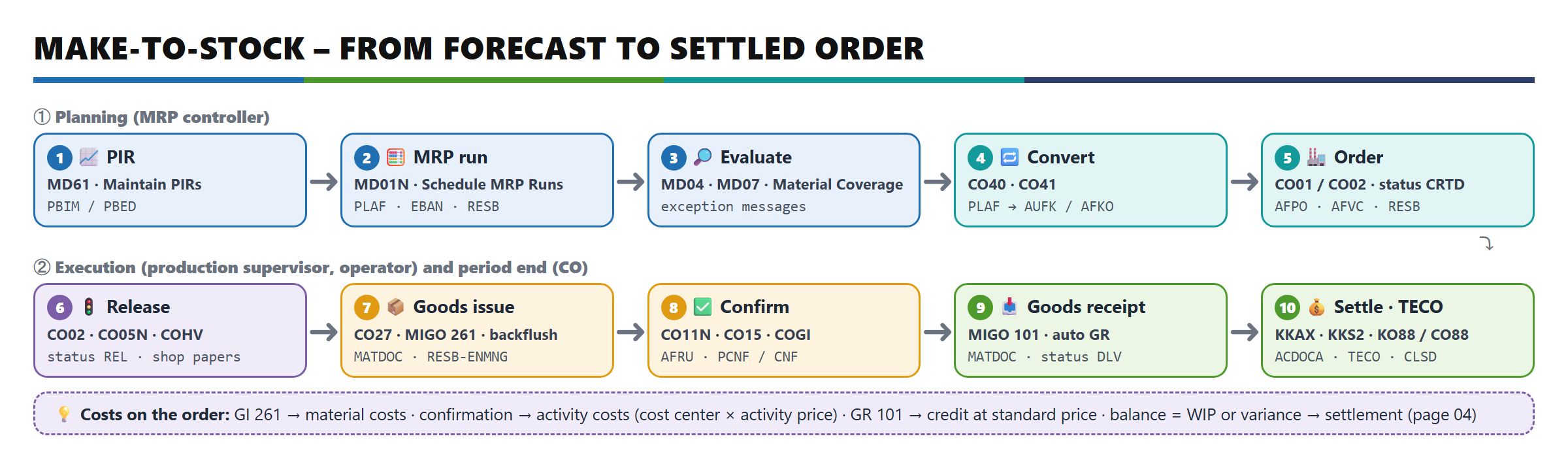
# | Step | T-code (Fiori) | Result / tables |
|---|---|---|---|
1 | Enter the forecast as planned independent requirements | MD61 (Maintain PIRs) | PBIM / PBED |
2 | Run MRP: net requirements, lot sizes, scheduling, BOM explosion | S/4HANA MD01N MRP Live (Schedule MRP Runs), ECC MD01; single material MD02 / MD03 | PLAF planned orders, EBAN purchase requisitions, RESB dependent requirements |
3 | Evaluate the result, react to exception messages | MD04 / MD07 (Monitor Material Coverage, Manage Material Coverage) | Read only |
4 | Convert the planned order into a production order | CO40 single, CO41 collective, or from MD04 | PLAF deleted → AUFK / AFKO / AFPO / AFVC / RESB |
5 | Create / check the order: BOM and routing copied via production version, scheduled, availability checked, plan costs calculated | CO01 (manual), CO02 change | Status CRTD |
6 | Release the order (manually, collectively or at creation via the scheduling profile); print shop papers | CO02, CO05N, COHV (Manage Production Orders) | Status REL; goods movements and confirmations now allowed |
7 | Stage components and post the goods issue – manually or by backflush at confirmation | CO27 picking list, MIGO movement type 261; EWM staging | MATDOC (ECC MKPF / MSEG); RESB-ENMNG increases |
8 | Confirm operations: yield, scrap, activities, personnel | CO11N operation, CO15 order header, CO13 cancel; errors in COGI | AFRU; status PCNF / CNF; activity costs |
9 | Goods receipt of the product into stock | MIGO with order, movement type 101 (or automatic GR at the last confirmation) | MATDOC; AFPO-WEMNG; status DLV |
10 | Period end: WIP, variances, settlement; then technically complete and close | KKAX WIP, KKS2 variances, KO88 single / CO88 collective settlement; TECO in CO02 / COHV | ACDOCA (ECC COEP / COSS, BSEG); status TECO, CLSD |
- S/4HANA: MB31 (goods receipt for an order) is not available – goods receipts go through MIGO or the confirmation (MM ABAP page 03).
- Costs flow without a manual step: goods issue debits the order with material costs, confirmations add activity costs (work center cost center × activity price), goods receipt credits the order with the standard price; the balance is WIP or variance (page 04).
Part 2 – The MRP run: classic MRP and MRP Live
MRP ensures that every requirement is covered in time: for each material it compares available stock and receipts with requirements and creates procurement proposals for the shortage, level by level down the BOM.
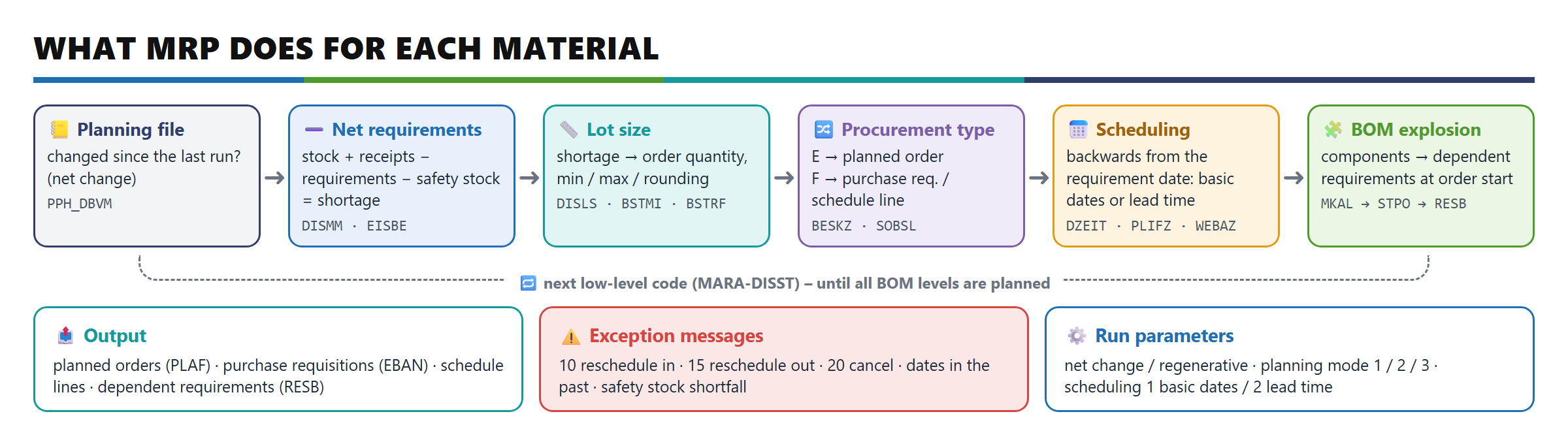
2.1 The steps per material
Step | What happens | Driven by |
|---|---|---|
Planning file check | Only materials with a change relevant for MRP (net change) are planned, unless the run is regenerative | PPH_DBVM (ECC: MDVM / DBVM) |
Net requirements calculation | Plant stock + firm receipts − requirements − safety stock → shortage date and quantity | MRP type (DISMM), stock, PIRs, sales orders, dependent requirements |
Lot sizing | Shortage → order quantity | Lot size (DISLS), min / max / rounding |
Procurement type | In-house → planned order; external → purchase requisition or schedule line (classic MRP also offers planned orders via the creation indicator; MRP Live does not) | BESKZ, SOBSL, source list / quota |
Scheduling | Backward from the requirement date: basic dates from in-house production time or planned delivery time + GR processing time, or lead time scheduling from the routing | DZEIT, PLIFZ, WEBAZ, scheduling margin key, routing |
BOM explosion | Components of the planned order become dependent requirements (RESB) on the order start date | Production version → BOM alternative |
Next level | The run continues with the next low-level code until all levels are planned | Low-level code (MARA-DISST) |
2.2 Run parameters
Parameter | Options |
|---|---|
Processing | Net change (only changed materials, the normal daily run) or regenerative (every material in scope) |
Planning mode | 1 adapt planning data (keep existing proposals, adjust quantities and dates), 2 re-explode BOM and routing of existing proposals, 3 delete and recreate all proposals |
Scheduling | 1 basic dates, 2 lead time scheduling (routing-based, creates capacity requirements) |
Scope | Plant(s), MRP controller, material, product group, planning scope; stock transfer materials across plants |
2.3 Classic MRP vs MRP Live
Topic | Classic MRP (MD01, MD02, MD03, MDBT) | MRP Live (MD01N, Schedule MRP Runs) |
|---|---|---|
Where it runs | ABAP on the application server, one material after another | Mostly in SAP HANA (database procedures), reading and writing in mass |
Scope | One plant per run (or a scope of plants), MRP lists optional | Several plants in one run including stock transfers; no MRP lists |
Performance | Hours for large plants | Much shorter; designed for running more often |
Exceptions | – | Materials that cannot be planned in HANA (functions not supported there) and materials flagged in MD_MRP_FORCE_CLASSIC are planned with the ABAP logic in the same run; report PPH_CHECK_MRP_ON_HANA lists them (older releases; shown as obsolete in newer ones) |
Enhancements | Classic MRP BAdIs and user exits all called | Classic MRP BAdIs are not called for materials planned in HANA: port the logic to the AMDP BAdIs or force the materials to classic planning (page 05 Part 4) – a reason to keep MRP enhancements minimal |
Status in S/4HANA | Still available on-premise | The strategic MRP run; also behind the Fiori app Schedule MRP Runs |
- MPS items (MRP types M0 – M4) are planned first and separately (MD40 / MD43); MRP then plans the rest with the firmed MPS orders as fixed input.
- Consumption-based planning (VB, VM reorder point; VV forecast-based) skips the BOM-driven net requirements logic but uses the same run.
Part 3 – Evaluating MRP: MD04, exception messages and the MRP apps
MD04 (stock / requirements list) is the planner's main screen: one line per MRP element in date order with the running available quantity. It is built at runtime from the current documents, so it always shows the live situation. MD07 shows the same for many materials (traffic lights by days of supply); MD05 shows the saved MRP list of a classic run.
MRP element (MD04) | Meaning | Table |
|---|---|---|
IndReq | Planned independent requirement | PBED |
CusOrd | Sales order requirement | VBBE |
DepReq | Dependent requirement of a planned or production order | RESB |
PlOrd. | Planned order | PLAF |
PrdOrd | Production order (receipt) | AFPO |
PurRqs / POitem | Purchase requisition / purchase order item | EBAN / EKET |
Stock | Plant / MRP area stock at the start | MATDOC (calculated; ECC MARD / MCHB) |
Exception messages
MRP attaches exception messages to elements that need attention, for example 10 bring process forward (reschedule in), 15 postpone process (reschedule out), 20 cancel process, plus messages for start or finish dates in the past and for safety stock shortfalls. Planners filter MD07 and the Fiori apps by these messages instead of reading every material.
MRP apps (MRP cockpit) in S/4HANA
- Monitor Material Coverage / Manage Material Coverage – materials with shortages in a time window, with solution proposals (reschedule, change quantity, create a proposal, start MRP for one material).
- Stock / requirements list – a tab in Manage Material Coverage, the Fiori counterpart of MD04.
- Schedule MRP Runs – plans MRP Live as an application job; replaces scheduling MD01N as a background job by hand.
- Monitor Production Orders / Manage Production Orders – orders with issues (missing parts, delays, quantity deviations) for the production supervisor or MRP controller.
Example – planned orders whose opening date is reached (due for conversion)
|
Part 4 – Executing a production order
4.1 Creation and release
- Order type (e.g. PP01) decides number range, status profile, settlement profile, BOM / routing selection and costing variants (customizing OPJH / OPL8, Part 9).
- At creation the order copies the BOM into reservations (RESB) and the routing into operations (AFVC), schedules the operations (lead time scheduling), creates capacity requirements and calculates plan costs.
- Availability check for components (and optionally capacity and PRTs) at creation and / or release; missing parts can block the release (checking control OPJK). Missing parts list: CO24; overview CO09.
- Release makes the order executable: shop papers can be printed (CO04N), goods movements and confirmations are allowed. Release can be automatic at creation (production scheduling profile), collective (CO05N) or by mass processing (COHV).
4.2 Goods issue and confirmation
- Manual goods issue: MIGO with reference to the order or reservation, movement type 261 (reversal 262).
- Backflush: components flagged for backflush (material master MARC-RGEKZ, work center or routing) are issued automatically when the operation they are allocated to is confirmed.
- Confirmation (CO11N): yield, scrap, rework, activity quantities (setup, machine, labour), personnel and final-confirmation flag. Activities post costs; the final confirmation clears remaining capacity requirements and can trigger automatic goods receipt.
- Failed goods movements of a confirmation (no stock, locked material) land in COGI and must be reprocessed – a classic support topic.
4.3 Completion
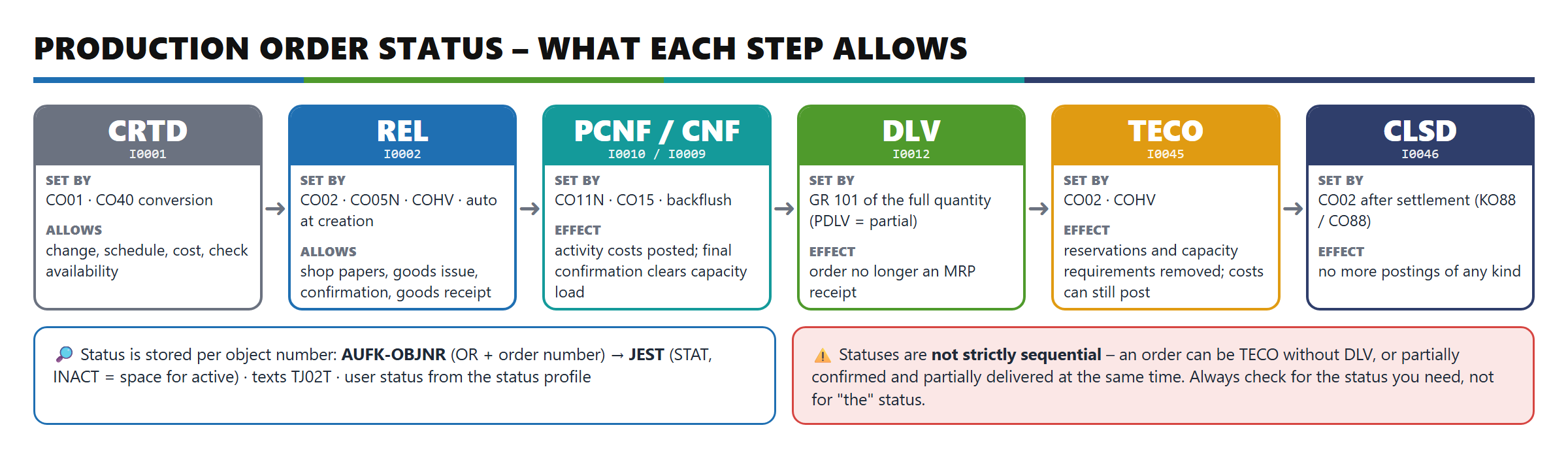
- DLV is set when the full quantity is received; TECO (technically complete) ends the order logistically – open reservations and capacity requirements are removed but costs can still post.
- Settlement (KO88 / CO88) moves the order balance to stock (price difference) or to the sales order / profitability analysis; variances are calculated with KKS2 / KKS1. CLSD blocks further postings.
Example – released production orders that are not yet technically complete
|
In new code prefer the released view I_MfgOrderWithStatus (page 02 Part 10) or function module STATUS_READ over joining JEST yourself.
Part 5 – Make-to-order and engineer-to-order
In make-to-order (strategy 20) nothing is produced before a sales order exists, and everything produced for it stays assigned to it.
# | Step | T-code | What is different from MTS |
|---|---|---|---|
1 | Sales order with an item category for MTO | VA01 | Requirement in an individual customer segment (sales order + item), visible in MD04 as its own segment |
2 | Plan the sales order | MD01N (ECC MD01) or MD50 (multi-level planning for one sales order) | Planned orders carry the sales order account assignment |
3 | Convert and produce | CO40 / CO41, CO01 … | Production order with KDAUF / KDPOS |
4 | Goods receipt | MIGO 101 | Into sales order stock (special stock E, table MSKA) |
5 | Deliver | VL01N | Delivery from the sales order stock |
6 | Settle | KO88 / CO88 | Valuated sales order stock: settle to stock; otherwise to the sales order / profitability analysis |
- Assemble-to-order (40, 50, 70): PIRs plan components early; the sales order consumes the PIRs within the consumption window and triggers the final assembly.
- Configurable products (strategy 25, variant configuration) explode a super BOM with the characteristic values of the sales order item.
- Engineer-to-order: a PS project (WBS elements, network activities) carries the demand; MRP plans project requirements and stock is project stock (special stock Q).
Part 6 – Process manufacturing (PP-PI)
The process order follows the same planning cycle as the production order but uses recipe-oriented master data and a process control layer.
Topic | PP-PI object | T-code |
|---|---|---|
Master data | Resource (instead of work center), master recipe with operations and phases (instead of routing) | CRC1 – CRC3, C201 – C203 |
Order | Process order (order type e.g. PI01, AUTYP 40) | COR1 create, COR2 change, COR3 display |
Process control | Control recipe sent to a process control system or shown to the operator as a PI sheet; process messages report actual data back | CO53 control recipe monitor, CO60 PI sheets |
Confirmation | Phase confirmations | COR6N |
Typical | Batch management, potency / active ingredient, co- and by-products, quality integration | – |
- Process orders use the same tables as production orders (AUFK, AFKO, AFPO, AFVC, RESB, AFRU) – custom reports filter on AUTYP = 40 or the order type.
Part 7 – Repetitive manufacturing and KANBAN
7.1 Repetitive manufacturing (PP-REM)
- Prerequisites: REM allowed in the material (MARC-SAUFT) with a REM profile, and a production version that allows REM and names the production line.
- Planning: MRP creates run schedule quantities (planned orders for the line); the planner dispatches them in the planning table MF50.
- Execution: MFBF backflush posts the goods receipt of the assembly (movement type 131) and the component consumption (261) in one step; no production order, no operation-level confirmation by default. Staging via pull list (MF60).
- Costing: costs are collected per period on a product cost collector (KKF6N) and settled at period end.
7.2 KANBAN (PP-KAB)
- A control cycle (PKMC) defines the supply area, number of kanbans, quantity per kanban and the replenishment strategy: in-house production (e.g. run schedule quantity), external procurement (purchase order or schedule line) or stock transfer.
- When a container becomes empty (status change on the kanban board PK13N, by scanner or automatically) the replenishment element is created; setting it to full posts the goods receipt.
- Materials controlled by KANBAN are usually excluded from MRP for the supply area – MRP plans only the source.
Part 8 – Capacity planning
MRP and order scheduling create capacity requirements (KBKO / KBED) per work center but do not check them. Capacity planning shows the load and moves operations so that it becomes feasible.
Task | T-code / app | What it does |
|---|---|---|
Evaluate load | CM01 (work center load) | Requirement vs available capacity per period; overloads in red |
Level capacity | CM21 graphical planning table, CM25 variable planning table (ECC standard; S/4HANA compatibility scope – apps Capacity Scheduling Table / Board) | Dispatch operations to periods / work centers, finite scheduling, sequencing |
Fiori | Manage Work Center Capacity | Capacity view per work center and shift |
Advanced | Embedded PP/DS (detailed scheduling board) | Finite, optimised, sequence-dependent scheduling with heuristics |
- Capacity requirements exist only for lead time scheduled proposals (scheduling 2 in the MRP run) and orders.
- Settings: overall profile for leveling, available capacity in the work center (shifts, utilization), scheduling formulas.
Part 9 – Key configuration
IMG paths start at SPRO → Production. The table gives the t-codes developers and functional colleagues use most and what each setting controls.
Area | T-code / IMG | What it controls |
|---|---|---|
Plant parameters (MRP) | OPPQ | Overall MRP settings per plant: number ranges, planning file, external procurement, rescheduling, BOM / routing selection, available stock |
MRP groups | OPPR | Settings for a group of materials (MARC-DISGR): strategy group, planning horizon, rescheduling horizon, conversion order types, time fence |
MRP controllers | OMD0 | Keys for MARC-DISPO (T024D) |
Lot-sizing procedures | OMI4 | EX, FX, period and optimum lot sizes (T439A) |
Special procurement | OMD9 | Keys for MARC-SOBSL: subcontracting, stock transfer, phantom, direct production, production in another plant |
MRP areas | OMIZ | Storage location and subcontractor MRP areas |
Planning strategies / strategy groups | SPRO → Production → Production Planning → Demand Management → Planned Independent Requirements → Planning Strategy | Requirement types (LSF, VSF, VSE …), consumption, strategy groups for MARC-STRGR |
Order types | OPJH | Production order types (PP01 …): number range, status profile, settlement profile, plant assignment |
Order-type-dependent parameters | OPL8 | Per order type and plant: BOM / routing selection and production version, costing variants, batch, change documents |
Scheduling parameters | OPU3 | Scheduling type, adjust dates, capacity requirements, automatic scheduling for production orders |
Availability check | OPJK | Checking control: when (creation / release), which checking rule, release despite missing parts |
Confirmation parameters | OPK4 | Defaults and checks of confirmations, goods movements, error handling |
Production scheduling profile | OPKP | Automatic release at creation, automatic goods receipt, batch creation, shop paper printing (MARC-SFCPF) |
- Developers meet this customizing when an order behaves unexpectedly: always check order type (OPJH / OPL8), scheduling profile (OPKP) and control key of the operation before suspecting custom code.
- Plant parameters and MRP groups apply to both classic MRP and MRP Live; the MRP group also controls whether MRP-created purchase requisitions must be handed over to purchasing (page 06 Part 2).
Part 10 – Fiori apps per role
Role | Typical apps | SAP GUI counterpart |
|---|---|---|
MRP controller | Schedule MRP Runs, Monitor / Manage Material Coverage (with the stock / requirements list tab), Maintain PIRs | MD01N, MD04, MD07, MD61 |
Production planner | Manage Work Center Capacity, convert planned orders from the coverage apps | CM01, CM21, CO40 / CO41 |
Production supervisor | Monitor Production Orders, Manage Production Orders, release and reschedule from the list | COOIS, COHV, CO05N, CO02 |
Production operator | Confirmation and work-queue apps for operations | CO11N, COR6N |
Analyst | Embedded analytics on released CDS views (order, operation, confirmation) | COOIS, PP information system in LIS (legacy) |
- The order information system COOIS (production orders, also process orders with COOISPI) remains the most-used list report on-premise and is the typical template for custom reports.
Part 11 – Interview questions
Q1. Walk through the make-to-stock process with t-codes.
PIR MD61 → MRP MD01N (ECC MD01) → evaluate MD04 → convert CO40 / CO41 → production order CO01 / CO02 → release CO02 / CO05N → goods issue 261 (MIGO or backflush) → confirmation CO11N → goods receipt 101 → WIP / variance / settlement KKAX, KKS2, KO88 → TECO and close.
Q2. What does MRP do for one material?
Net requirements calculation (stock + receipts − requirements − safety stock), lot sizing, procurement type decision, scheduling backwards from the requirement date and BOM explosion into dependent requirements for the next low-level code.
Q3. Difference between MD01 and MD01N?
MD01 is classic MRP in ABAP per plant, optionally writing MRP lists. MD01N is MRP Live: planned in SAP HANA, several plants with stock transfers in one run, no MRP lists, much faster; materials that cannot be planned in HANA fall back to the ABAP logic.
Q4. What are planning modes 1, 2 and 3?
1 adapts existing proposals, 2 re-explodes BOM and routing of existing proposals, 3 deletes and recreates all proposals.
Q5. What does MD04 show and where does the data come from?
All MRP elements of a material in date order with the available quantity – PIRs, sales orders, dependent requirements, planned and production orders, purchase requisitions and orders, stock. It is built at runtime from the documents, not from the MRP list.
Q6. Name the production order statuses and what TECO does.
CRTD, REL, PCNF / CNF, DLV, TECO, CLSD. TECO ends the order logistically: open reservations and capacity requirements are removed, but costs can still be posted and the order can be settled.
Q7. What is backflushing and where is it controlled?
Automatic goods issue (261) of components at confirmation of the operation they are allocated to. Controlled by the backflush indicator in the material master, work center or routing component allocation.
Q8. How does make-to-order differ from make-to-stock in the system?
The sales order creates a requirement in an individual customer segment; planned and production orders carry the sales order assignment; the product goes into sales order stock E and is delivered from there; settlement goes to stock (valuated) or the sales order.
Q9. How does repetitive manufacturing post production?
MFBF backflush: goods receipt of the assembly with movement type 131 and consumption of components with 261 in one step, costs on a product cost collector settled per period – no production orders.
Q10. Which customizing controls a production order?
Order type (OPJH) and its plant-dependent parameters (OPL8), scheduling parameters (OPU3), availability checking control (OPJK), confirmation parameters (OPK4), production scheduling profile (OPKP) and the control keys of the operations.
Q11. A confirmation was posted but the components were not issued – where do you look?
COGI: failed goods movements from confirmations / backflush (table AFFW), e.g. missing stock or a locked material. Fix the cause and reprocess there.
Q12. Does the MRP run check capacity, and what do you use instead?
No, it plans with infinite capacity. Lead time scheduling creates capacity requirements, which are evaluated with CM01 and leveled with CM21 / CM25 (S/4HANA: compatibility scope; apps Capacity Scheduling Table / Board), or scheduled finitely with embedded PP/DS.
🏠 Start Here · ◀ 02 · Master Data · 04 · Integration & Reporting ▶ · Sections: CORE ABAP | OOPS ABAP | ABAP on HANA | Clean Core | RAP | ABAP Points | SAP Fiori | SAPUI5 | Mobile Development (MDK) | BTP Foundations | BTP Development | CAP | SAP Build | ABAP on BTP | Integration Suite | SAP Business AI | SAP BASIS | Security | SAP SDLC
Functional: FICO ABAP | TRM ABAP | VIM | SAP BIS | SD ABAP | MM ABAP | PP ABAP | QM ABAP | PM ABAP | PS ABAP | EWM | TM ABAP | GTM ABAP | EHS ABAP | HR ABAP | BW | SAP Datasphere | SAP Business Data Cloud | SAP MDG | SAP Analytics Cloud | SAP Ariba | SAP CX | SAP IBP