Production touches almost every other module: it reserves and consumes material (MM), asks for inspections (QM), competes with maintenance for machines (PM), collects and settles costs (CO / FI), produces for sales orders (SD), gets its components staged by the warehouse (EWM) and talks to the shop floor (MES / SAP Digital Manufacturing). This page shows which documents and postings each step creates, how the external interfaces work, and which standard reports and analytics exist before anyone writes a custom report. The process flows themselves are on page 03, the tables on page 02, enhancements and APIs in code on page 05.
Part 1 – The order lifecycle and the documents it creates
A production order is the hub of many follow-on documents. Knowing which step writes what is the basis for every integration question and for debugging ("why is there no goods issue?", "why does the order still carry a balance?").
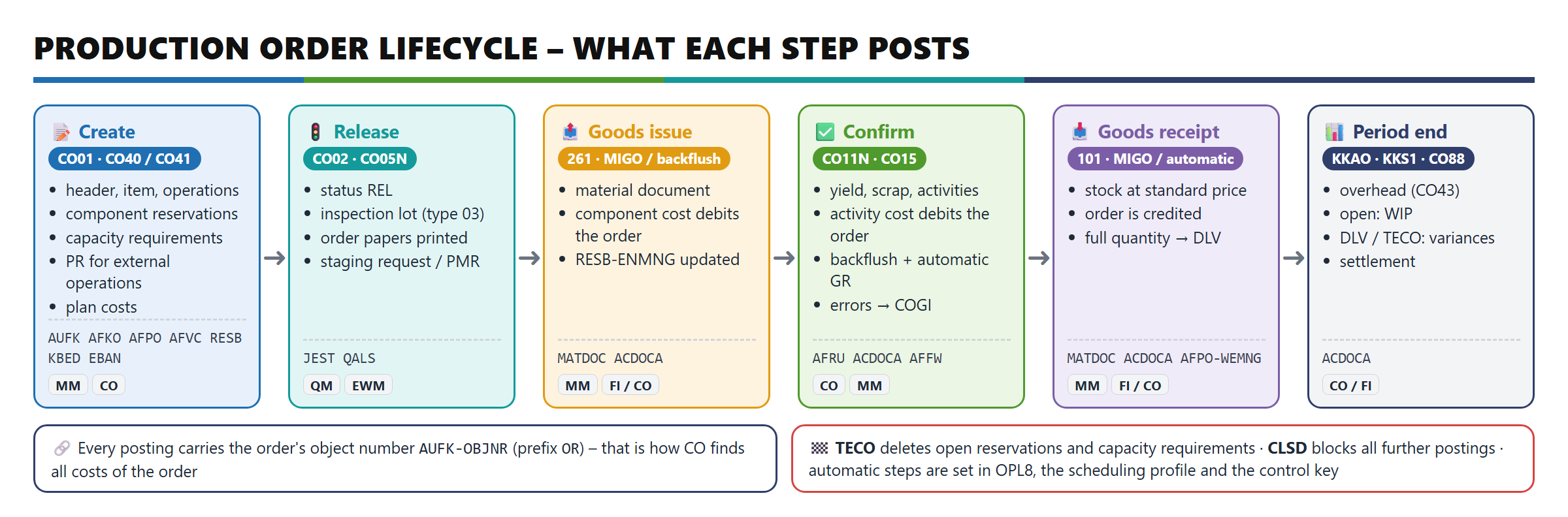
Step | Document / object created | Tables | Other module |
|---|---|---|---|
Create (CO01, conversion CO40 / CO41) | Order header, item, operations; component reservations; capacity requirements; purchase requisitions for external operations and non-stock components; planned costs (preliminary costing) | AUFK, AFKO, AFPO, AFVC, RESB, KBKO / KBED, EBAN | MM, CO |
Release (CO02, CO05N) | Status REL; inspection lot for in-process inspection; order papers; staging requests (EWM) | JEST, QALS | QM, EWM |
Goods issue (MIGO 261 or backflush) | Material document; consumption debits the order | MATDOC, ACDOCA, RESB-ENMNG | MM, FI / CO |
Confirmation (CO11N, CO15) | Confirmation; activity costs from the work center's activity types; backflush and automatic goods receipt | AFRU, ACDOCA, AFFW (errors) | CO, MM, HR (time) |
Goods receipt (MIGO 101 or automatic) | Material document; stock increases at standard price, the order is credited | MATDOC, ACDOCA, AFPO-WEMNG | MM, FI / CO |
Period end (CO43, KKAO, KKS1, CO88) | Overhead, WIP or variances, settlement | ACDOCA | CO / FI |
Technical completion / close (TECO, CLSD) | Open reservations and capacity requirements are deleted; no more postings after CLSD | JEST | MM, capacity |
- Every posting carries the order's object number (AUFK-OBJNR, prefix
OR) so CO can find all costs of the order; in S/4HANA they all land in ACDOCA (details: FICO ABAP › 02); in ECC in COEP / COSS / COSP (CO) and BSEG (FI), with the material documents in MKPF / MSEG instead of MATDOC. - What happens automatically (purchase requisition at creation or at release, inspection lot at release, automatic goods receipt) is controlled by the order-type-dependent parameters (OPL8), the production scheduling profile and the control key of the operation – see page 03.
Part 2 – MM: reservations, goods issue, backflush, goods receipt
Goods movements and stock types in general are taught in MM ABAP › 03 Inventory Management. Here are the production-specific parts.
Movement type | Meaning | Triggered by |
|---|---|---|
261 / 262 | Goods issue of a component to the order / reversal | MIGO (goods issue to order), backflush at confirmation, CO11N goods movement screen |
101 / 102 | Goods receipt of the product from the order / reversal | MIGO (goods receipt for order), automatic goods receipt at confirmation |
531 / 532 | Receipt of a by-product (BOM item with negative quantity) | Confirmation / MIGO |
101 for co-products | Several products from one order; costs split by an apportionment structure | Goods receipt per co-product item (AFPO) |
311 / 313 – 315 | Transfer of components to the production storage location (staging) | Picking list CO27, EWM / WM staging |
2.1 Reservations
- Created with the order (RESB, linked through AFKO-RSNUM); they are dependent requirements for MRP and the basis for staging and the picking list.
- RESB-ENMNG (withdrawn quantity) is updated by every goods issue; TECO sets the remaining reservations to not relevant for MRP.
- Missing parts: the availability check at creation / release (order-type settings) and the missing parts information system CO24.
2.2 Backflush
- Backflush = automatic goods issue 261 when the operation the component is allocated to is confirmed. It is switched on per material (MRP 2, MARC-RGEKZ), per work center or per routing component; the reservation carries RESB-RGEKZ.
- Failed backflush postings (no stock, locked material, missing batch) do not stop the confirmation: they are stored in AFFW and reprocessed in COGI. An empty COGI is part of every period-end checklist – otherwise costs and stock are wrong.
- Repetitive manufacturing backflushes in MFBF (component issue and goods receipt in one step); process orders use COR6N.
2.3 Goods receipt
- Manual with MIGO (101 against the order) or automatic at the confirmation of the operation whose control key has the automatic goods receipt flag (usually the last operation).
- The quantity received updates AFPO-WEMNG; when the full quantity is received the order gets DLV (delivered). Underdelivery / overdelivery tolerances come from the material (work scheduling view).
- Stock type at receipt: unrestricted, or quality inspection when inspection type 04 is active (Part 3).
2.4 External processing and subcontracting
- An operation with an external-processing control key (standard PP02) creates a purchase requisition with account assignment to the order; the PO's goods receipt posts the service cost to the order – no stock.
- Subcontracting of a whole assembly is an MM process (PO item category L, components provided with movement type 541) planned in a subcontractor MRP area – MM ABAP › 02 and page 01 Part 4.
Part 3 – QM and PM integration
3.1 QM: inspections in and after production
Inspection type | When the inspection lot is created | Inspection plan | Result |
|---|---|---|---|
03 In-process inspection for a production order | At order release | Routing operations with inspection characteristics (inspection points, e.g. every n pieces or per shift) | Results recorded during production; the confirmation can depend on them |
04 Goods receipt inspection from production | At goods receipt 101 | Inspection plan (task list type Q) or none | Stock posted to quality inspection stock; the usage decision (QA11) moves it to unrestricted or blocked stock |
- Inspection types are activated per material in the QM view (table QMAT); the lot is in QALS. Details of results recording and usage decisions: QM ABAP.
- Process industries (PP-PI) use the same inspection types with process orders; master recipes carry the inspection characteristics.
3.2 PM: machines, capacity and tools
- Capacity: a maintenance order on the equipment that is the production machine reduces the available capacity – typically through a shared (pooled) capacity of the production and maintenance work centers, or by blocking shifts. Without this link PP plans on a machine that is being repaired.
- Breakdowns: a malfunction notification can trigger rescheduling of the affected production orders (planning table CM21 or PP/DS).
- Production resources / tools (PRT): equipment, materials or documents used in an operation (moulds, gauges, test programs); assigned to routing operations and copied to the order.
- Maintenance processes in depth: PM ABAP.
Part 4 – CO: order costs, WIP, variances and settlement
The production order is a cost object. Its costs follow a fixed life cycle from plan to settlement. Product costing (CK11N, costing run CK40N) and the period-end close are taught in FICO ABAP › 04 Controlling (Parts 6 – 7) and › 05 Integration; here is what a PP person must know.
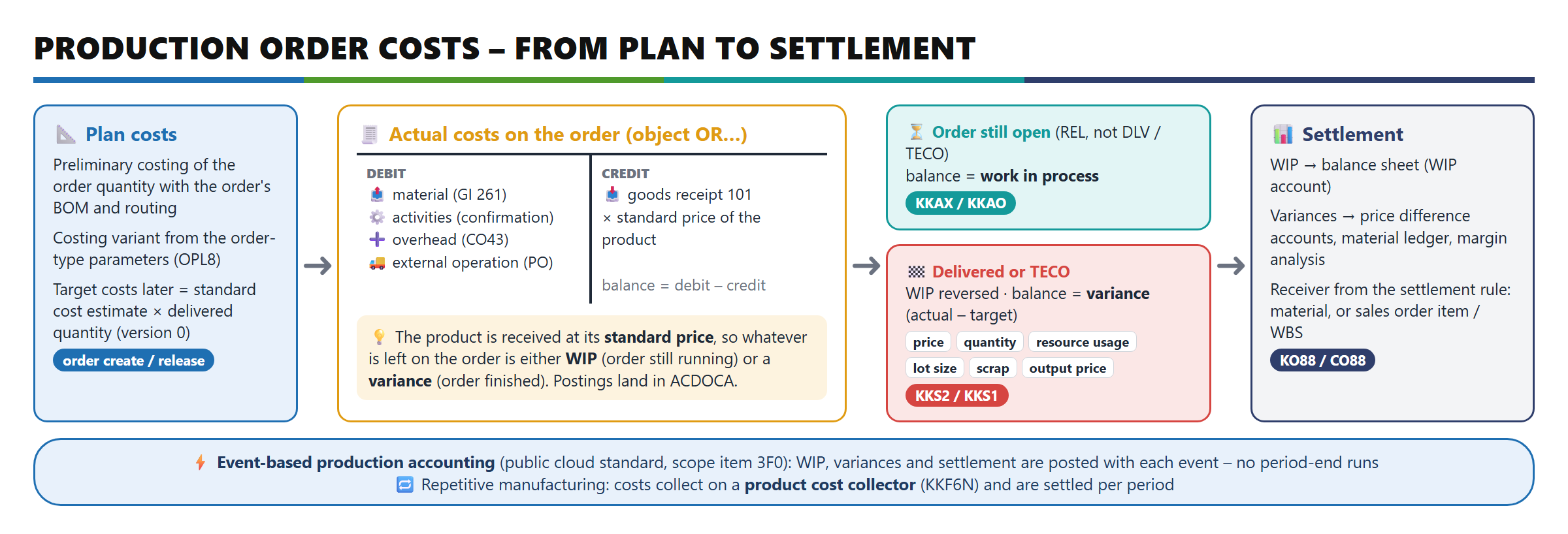
Cost element | Source | Posted by |
|---|---|---|
Plan costs | Preliminary costing of the order quantity with the order's BOM and routing (costing variant from the order-type-dependent parameters) | Order creation / release, CO02 |
Material costs | Goods issue 261 at the component's price | MIGO, backflush |
Activity costs | Confirmed activities × activity price of the work center's cost center (KP26) | Confirmation (CO11N, CO15) |
Overhead | Costing sheet surcharges | KGI2 single, CO43 collective |
External processing | Service PO for an external operation | GR / invoice for the PO |
Credit | Goods receipt of the product × standard price (price control S) | GR 101 |
4.1 Period-end: WIP, variances, settlement
Order status at period end | Calculation | Transaction (single / collective) |
|---|---|---|
Released, not finished (REL, not DLV / TECO) | Work in process = debits – credits; capitalized on the balance sheet | KKAX / KKAO |
Delivered or TECO | WIP is reversed; variances = actual costs – target costs of the delivered quantity (target cost version 0) | KKS2 / KKS1 |
Both | Settlement posts WIP to the balance sheet and variances to price difference accounts (with the material ledger) | KO88 / CO88 |
- Variance categories: input side price, quantity, resource-usage, remaining input variance; output side lot size, output price, mixed price; plus scrap. They explain why the order cost more than the standard cost estimate.
- The settlement rule (receiver: the material, or the sales order item / WBS element in non-stock scenarios) is generated automatically from the order type's settlement profile.
- Repetitive manufacturing does not settle individual orders: costs collect on a product cost collector (KKF6N) per material and production version and are settled per period.
- S/4HANA – event-based production cost posting: WIP, variances and settlement are posted in real time with each goods movement, confirmation and final delivery instead of at period end. It is the standard in SAP S/4HANA Cloud Public Edition (scope item 3F0, which replaced the period-end scope item BEI); on-premise and in the private cloud period-end processing is still the common approach.
Typical developer task here: a WIP / variance report per plant or MRP controller – read the released CO views (actual, plan and target costs of manufacturing orders) instead of ACDOCA joins; see Part 9 and FICO ABAP › 06.
Part 5 – SD: make-to-order and sales order stock
The planning strategies were introduced on page 01 Part 2; the MTO process flow is on page 03. Integration-wise, three things matter:
- Requirements: the sales order item passes its requirement to MRP (table VBBE). With MTO (strategy 20) MRP plans it in its own individual customer segment – MD04 shows a separate segment per sales order item.
- Account assignment: the planned order and the production order carry the sales order and item (AFPO-KDAUF / KDPOS, BAPI field SALES_ORDER); the goods receipt goes to sales order stock (special stock E, table MSKA) and the delivery is issued from it.
- Valuation and settlement: with valuated sales order stock the order settles to the material like MTS; with non-valuated stock (classic sales order controlling) the costs go to the sales order item and results analysis is needed. SAP S/4HANA Cloud Public Edition supports only valuated sales order stock for MTO; on-premise both exist, valuated is the recommended design.
- Availability: the sales order's ATP check (advanced ATP in S/4HANA) can include planned and production receipts; capable-to-promise that creates planned orders during the check runs in PP/DS.
- Assemble-to-order: the sales order consumes the PIRs (page 02 Part 7); configurable products pass the configuration to the order (BAPI field CONFIGURATION).
Part 6 – EWM: staging components to production
In a warehouse managed by EWM the components are not simply "issued": they are staged to a production supply area (PSA) near the line and consumed from there. The PSA is defined in S/4HANA (assigned to work centers) and mapped to an EWM PSA.
Staging method | How it works | Typical components |
|---|---|---|
Pick parts | Exact quantity per order, staged for one order (EWM: single-order staging) | Expensive or order-specific parts |
Release order parts | Quantities of several orders staged together (EWM: cross-order staging) | Parts used by many orders on the same line |
Crate parts | Full containers replenished independently of orders (e.g. by KANBAN or a minimum quantity in the PSA) | Cheap, high-volume parts (screws, labels) |
Integration type | Document that drives staging | Notes |
|---|---|---|
Advanced production integration | Production material request (PMR) created in EWM when the order is released; order changes update the PMR | Recommended in S/4HANA; consumption and goods receipt can be posted from EWM |
Delivery-based production supply | Outbound / inbound deliveries generated in the background for staging and receipt | Older approach, still supported |
- Goods receipt of the finished product creates a putaway warehouse task in EWM.
- Classic WM staging (control cycles LPK1, transfer requirements) is legacy – in S/4HANA the successor is embedded or decentralised EWM (warehouse org units: MM ABAP › 01).
Part 7 – External systems: MES, SAP Digital Manufacturing and IBP
S/4HANA plans and costs; a manufacturing execution system (MES) runs the shop floor minute by minute (dispatching, operator instructions, machine data, genealogy). The integration pattern is always the same: orders out, confirmations and goods movements back.
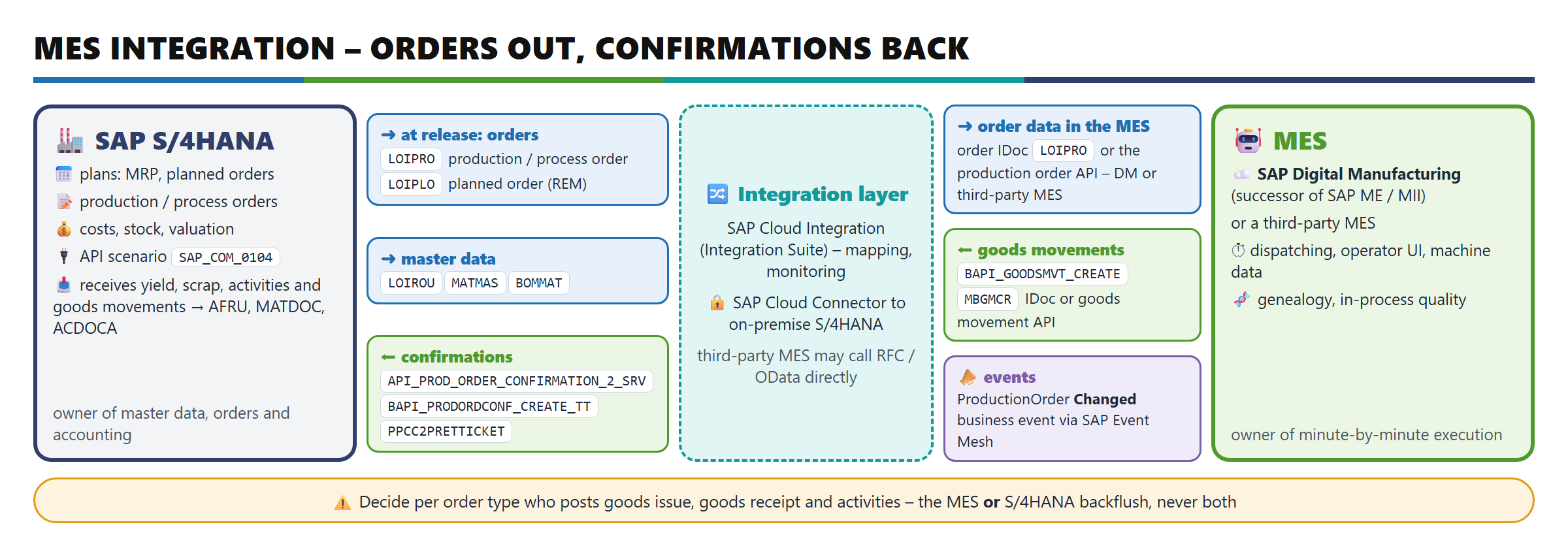
Direction | Object | Typical technology |
|---|---|---|
S/4HANA → MES | Production / process order | IDoc LOIPRO (basic type as documented by the MES, e.g. SAP Digital Manufacturing), sent at release; or the production order API |
S/4HANA → MES | Planned order (repetitive manufacturing) | IDoc LOIPLO |
S/4HANA → MES | Master data: routing, material, BOM | IDocs LOIROU, MATMAS, BOMMAT |
MES → S/4HANA | Operation confirmation (yield, scrap, activities) | OData API_PROD_ORDER_CONFIRMATION_2_SRV, BAPI_PRODORDCONF_CREATE_TT (RFC), IDoc PPCC2PRETTICKET |
MES → S/4HANA | Goods issue / receipt | Goods movement API or BAPI_GOODSMVT_CREATE, IDoc MBGMCR |
S/4HANA → any | Status changes | Business events, e.g. |
- SAP Digital Manufacturing (DM) is SAP's cloud MES (successor of SAP ME / MII). It integrates with S/4HANA through predefined integration flows on SAP Cloud Integration; an on-premise S/4HANA is reached through the SAP Cloud Connector.
- The released OData APIs for production are grouped in communication scenario SAP_COM_0104 (Production Planning Integration) – page 05 Part 7.
- Design rule: the MES must not confirm what S/4HANA already backflushes (and vice versa) – decide per order type who posts goods issue, goods receipt and activities.
- SAP IBP: forecasts and supply plans flow into S/4HANA as PIRs or planned orders; master data and stock / orders flow to IBP – via SAP Cloud Integration for data services (time-series planning) or real-time integration (order-based planning).
- IDoc and ALE technique (partner profiles, WE19, BD87): CORE ABAP › 07 Interfaces; CPI: SAP BTP Integration Suite › 01 SAP Cloud Integration.
Part 8 – Standard reports and Fiori apps
Before building a report, check these – most "custom production reports" are COOIS layouts or MD04 variants.
T-code | Report | Used for |
|---|---|---|
MD04 / MD07 | Stock / requirements list – single / collective | Live situation of a material: stock, receipts, requirements, exception messages |
MD05 / MD06 | MRP list – single / collective | Result of the last classic MRP run (not written by MRP Live) |
MD13 / MD16 | Display planned order / collective display | Planned orders |
CM01 | Capacity load per work center | Overload check after MRP |
CM21 / CM25 | Capacity leveling – graphical / variable planning table (S/4HANA: compatibility scope) | Dispatch operations |
COOIS / COOISPI | Production / process order information system | Headers, operations, components, confirmations, goods movements, documented goods movements – one report, many lists |
COHV / COHVPI | Mass processing of production / process orders | Release, print, TECO, confirm, schedule many orders |
CO27 | Picking list | Components to stage |
CO24 | Missing parts information system | Shortages |
COGI | Postprocessing of faulty goods movements | Backflush errors (AFFW) |
KKBC_ORD | Analyze order costs | Plan / target / actual costs of an order |
MB51 | Material document list | Goods movements of an order (field order) |
8.1 Fiori analytical apps
The operational Fiori apps per role (MRP cockpit, Manage Production Orders, confirmation apps) are listed on page 03 Part 10. For analysis the typical apps are:
App | Shows |
|---|---|
Excess Component Consumption (F2171) | Planned vs actually confirmed component consumption of production orders – where material is wasted |
Production Cost Analysis | Plan, target and actual costs and variances of manufacturing orders |
Monitor Material Coverage | Materials with shortages or coverage problems after MRP |
- App IDs and availability differ by release and edition – the SAP Fiori apps reference library lists them per release. The MRP cockpit apps replace the MRP list (MD05 / MD06) for MRP Live users.
Part 9 – Embedded analytics
Embedded analytics = real-time reporting in S/4HANA on CDS views without a separate BW. The virtual data model (VDM) layers apply to PP like to every module (ABAP on HANA › 05 CDS Views).
Layer | PP examples | Who builds |
|---|---|---|
Basic / interface views (I_) | I_PlannedOrder, I_ManufacturingOrder, I_ProductionOrderOperation_2, I_WorkCenter (page 02 Part 10) | SAP (released) |
Cube views (@Analytics.dataCategory: #CUBE) | Order quantities, confirmations, scrap, costs with dimensions plant, work center, material, period | SAP or developer |
Query views (C_, @Analytics.query) | Analytical queries behind the Fiori analytics apps | SAP, developer, or key user (Custom Analytical Queries app) |
- Consumers: Fiori analytical list pages and overview pages, Analysis for Office, the Query Browser, SAP Analytics Cloud (live connection).
- COOIS custom fields: add own fields to the order information system with BAdI WORKORDER_INFOSYSTEM (page 05) instead of copying COOIS into a Z report.
- Legacy: the LIS-based shop floor information system (info structures S0xx, MCP… reports) – use COOIS, Fiori apps and CDS analytics instead.
- Architect rule: operational reporting in S/4HANA (embedded analytics); cross-system or historical analytics in SAP Datasphere / BW.
Part 10 – Interview questions
Q1. Which documents does a production order create from creation to settlement?
Creation: reservations (RESB), capacity requirements, purchase requisitions for external operations, planned costs. Release: inspection lot (type 03), staging. Goods issue 261 and goods receipt 101: material documents in MATDOC and accounting lines in ACDOCA (ECC MKPF / MSEG, COEP / BSEG). Confirmations: AFRU and activity costs. Period end: WIP or variances and settlement.
Q2. What is backflush and what happens when it fails?
Automatic goods issue 261 of components when their operation is confirmed, switched on in the material, work center or routing. Failed postings do not block the confirmation; they go to AFFW and must be reprocessed in COGI before period end.
Q3. Which movement types are used in production?
261 / 262 goods issue to the order and reversal, 101 / 102 goods receipt from the order and reversal, 531 by-product receipt, 311 transfer for staging; 543 / 541 in subcontracting.
Q4. How is an automatic goods receipt triggered?
By the control key of the operation (automatic goods receipt flag), usually on the last operation: confirming it posts 101 for the confirmed yield.
Q5. Which QM inspection types belong to production?
03 in-process inspection, lot created at order release with characteristics on routing operations; 04 goods receipt inspection from production, lot created at GR 101 with stock in quality inspection until the usage decision.
Q6. Explain WIP and variance calculation for a production order.
While an order is released but not delivered, debits minus credits are WIP and capitalized. Once it is delivered or TECO, WIP is reversed and variances (actual minus target costs, target cost version 0) are calculated by category; settlement (CO88) posts WIP to the balance sheet and variances to price difference accounts.
Q7. What is event-based production cost posting?
An S/4HANA approach that posts WIP, variances and settlement in real time with each goods movement, confirmation and final delivery instead of period-end runs. It is the standard in the public cloud (scope item 3F0); on-premise and private cloud mostly still run the period-end steps.
Q8. How does make-to-order integrate PP with SD?
The sales order item creates an individual customer segment in MRP; planned and production orders are assigned to the sales order item; the goods receipt goes to sales order stock E (MSKA) and the delivery is taken from it. With valuated stock the order settles to the material.
Q9. What is a production supply area and how does EWM stage components?
A PSA is the staging location near the line, mapped between S/4HANA and EWM. With advanced production integration the order release creates a production material request in EWM; pick parts are staged per order, release order parts across orders, crate parts by container replenishment.
Q10. How would you integrate S/4HANA with an MES?
Orders out at release (LOIPRO IDoc or production order API), confirmations and goods movements back through the confirmation API / BAPI or IDocs, events for status changes. For SAP Digital Manufacturing use the standard integration flows via SAP Cloud Integration and the Cloud Connector, and agree who posts goods movements so nothing is posted twice.
Q11. A user asks for a report of open production orders with components. What do you check first?
Whether COOIS (with a saved layout, list Components) or a Fiori app already covers it; if a field is missing, extend COOIS with BAdI WORKORDER_INFOSYSTEM. Only then build a custom report on released CDS views.
Q12. Why do custom reports based on MD05 / MDTB show old data in S/4HANA?
MRP Live does not write MRP lists (MDKP / MDTB). Live data must come from the stock / requirements list logic (MD04, its APIs) or released CDS views; the MRP cockpit apps replace the MRP list.
🏠 Start Here · ◀ 03 · Processes & Config · 05 · Development ▶ · Sections: CORE ABAP | OOPS ABAP | ABAP on HANA | Clean Core | RAP | ABAP Points | SAP Fiori | SAPUI5 | Mobile Development (MDK) | BTP Foundations | BTP Development | CAP | SAP Build | ABAP on BTP | Integration Suite | SAP Business AI | SAP BASIS | Security | SAP SDLC
Functional: FICO ABAP | TRM ABAP | VIM | SAP BIS | SD ABAP | MM ABAP | PP ABAP | QM ABAP | PM ABAP | PS ABAP | EWM | TM ABAP | GTM ABAP | EHS ABAP | HR ABAP | BW | SAP Datasphere | SAP Business Data Cloud | SAP MDG | SAP Analytics Cloud | SAP Ariba | SAP CX | SAP IBP