What an ABAP developer builds in PP: checks and defaults in the production order (customer exits PPCO…, BAdI WORKORDER_UPDATE), logic around goods movements and confirmations (WORKORDER_GOODSMVT, WORKORDER_CONFIRM, CONFPP…), changes to MRP results (MD_… BAdIs, AMDP BAdIs for MRP Live), programs that create and confirm orders with BAPIs, MES interfaces with IDocs and OData APIs, and reports on CDS views. The general techniques are taught in CORE ABAP › 10 Enhancements and 07 Interfaces; tables and released views are on page 02; the integration context on page 04.
Part 1 – Where to enhance PP: choosing the technique
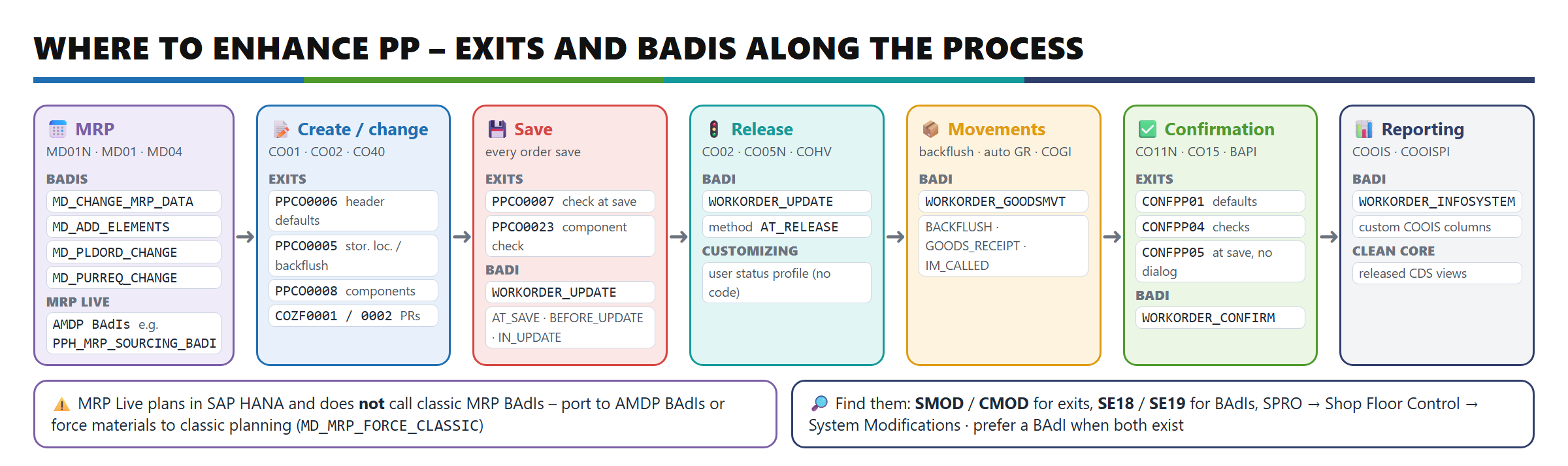
Requirement | Technique | Where |
|---|---|---|
Default or check order header fields at creation | Customer exit PPCO0006, BAdI WORKORDER_UPDATE | Parts 2, 3 |
Block saving an order that breaks a rule | PPCO0007 or WORKORDER_UPDATE → AT_SAVE | Parts 2, 3 |
Change components / storage location / backflush flag | PPCO0005, PPCO0008, PPCO0023 | Part 2 |
Change goods movements posted at confirmation (backflush, automatic GR) | BAdI WORKORDER_GOODSMVT | Part 3 |
Defaults and checks in CO11N / CO15 | CONFPP01 – CONFPP05, BAdI WORKORDER_CONFIRM | Parts 2, 3 |
Own fields in COOIS | BAdI WORKORDER_INFOSYSTEM | Part 3 |
Change MRP elements, planned orders, purchase requisitions | MD_CHANGE_MRP_DATA, MD_PLDORD_CHANGE, MD_PURREQ_CHANGE; AMDP BAdIs for MRP Live | Part 4 |
Create, release, confirm orders from a program or interface | BAPIs / released APIs | Parts 5, 7 |
Exchange orders and confirmations with an MES | IDocs LOIPRO / LOIPLO, OData APIs | Parts 6, 7 |
- Find the right exit: SMOD (search enhancements in package / application component PP-SFC), SE18 for BAdIs, SPRO → Production → Shop Floor Control → System Modifications, and SPRO → Production → Material Requirements Planning → Business Add-Ins. In the debugger a breakpoint on
CL_EXITHANDLER=>GET_INSTANCE(classic BAdIs) or the statementGET BADIshows which BAdIs a transaction calls. - Most PP exits and BAdIs serve production and process orders (same order logic); check the order category (AUTYP 10 / 40) inside the implementation if the rule applies to only one.
Part 2 – Customer exits for orders and confirmations
Customer exits (SMOD / CMOD) are function exits EXIT_<program>_nnn with a Z include in which you write the code. Create a CMOD project, assign the enhancement, edit the include, activate the project. The technique: CORE ABAP › 10 Enhancements.
2.1 Production order (PPCO…)
Enhancement | Purpose |
|---|---|
PPCO0001 | Order data in table form when the order is saved (function exit EXIT_SAPLCOBT_001; called during posting, not for checks) |
PPCO0002 | Additional checks when setting the deletion flag / deletion indicator |
PPCO0003 | Check exit for changes from the sales order, e.g. stop configuration changes after the order is released |
PPCO0005 | Change storage location and backflush indicator of the reservations when the order is created |
PPCO0006 | Predefine order header fields when an order is created |
PPCO0007 | Check or change header data when saving – the classic place to refuse saving (function exit EXIT_SAPLCOZV_001) |
PPCO0008 | Check added or changed components (may refuse them) |
PPCO0023 | Check changes to order components (EXIT_SAPLCOMK_014) |
COZF0001 / COZF0002 | Change the purchase requisition created for an externally processed operation / an externally procured component |
2.2 Confirmation (CONFPP…)
Enhancement | Function exit | Purpose |
|---|---|---|
CONFPP01 | EXIT_SAPLCORF_101 | Determine customer-specific default values (and modify the confirmation) |
CONFPP02 | EXIT_SAPLCORF_102 | Customer-specific input checks 1 – checks without changes to the confirmation |
CONFPP04 | EXIT_SAPLCORF_104 | Customer-specific input checks 2 – runs before the standard checks and may change the confirmation |
CONFPP05 | EXIT_SAPLCORF_105 | Customer enhancements during saving – update own tables; the confirmation cannot be changed and no dialog or error message is allowed |
CONFPP07 | – | Single screen entry: include a user-defined subscreen |
- The same pattern exists for PS confirmations (CONFPS01 – CONFPS05).
- Exits run in production and in background interfaces (BAPI, IDoc) – never send popups; use messages that the caller can collect.
Part 3 – BAdIs for orders, goods movements, confirmations and COOIS
BAdI | Called | Methods (examples) | Typical use |
|---|---|---|---|
WORKORDER_UPDATE | Whenever a production / process order is saved (CO01, CO02, conversion, mass processing, capacity leveling) | AT_SAVE, BEFORE_UPDATE, IN_UPDATE, AT_RELEASE, NUMBER_SWITCH | Checks at save (AT_SAVE can refuse with an error), checks at release, update own tables in the update task |
WORKORDER_GOODSMVT | Goods movements from orders and confirmations | BACKFLUSH, GOODS_RECEIPT, IM_CALLED | Change backflush or automatic GR items, react to inventory errors |
WORKORDER_CONFIRM | Confirmations (CO11N, CO15, BAPIs) | AT_SAVE, BEFORE_UPDATE, IN_UPDATE, AT_CANCEL_CHECK, INDIVIDUAL_CAPACITY | Checks before saving or cancelling a confirmation |
WORKORDER_INFOSYSTEM | COOIS / COOISPI | Methods to modify the list tables | Fill custom columns in COOIS lists |
- To refuse a save in AT_SAVE (WORKORDER_UPDATE, WORKORDER_CONFIRM) raise the method's exception with a message:
MESSAGE e001(zpp) RAISING error_with_message.– the user sees the message and the order stays unsaved. - Never
COMMIT WORKinside these BAdIs; own table updates belong in IN_UPDATE (runs in the update task) or BEFORE_UPDATE. - Implement in SE19; check in SE18 whether the BAdI allows multiple implementations. Prefer a BAdI to a customer exit when both exist at the same point.
Part 4 – MRP enhancements: classic BAdIs and MRP Live
BAdI | Purpose |
|---|---|
MD_CHANGE_MRP_DATA | Change MRP elements and MRP data of a material during the MRP run and in MD04 (e.g. exclude an element from planning) |
MD_ADD_ELEMENTS | Add own MRP elements (requirements / receipts) to the planning |
MD_PLDORD_CHANGE / MD_PLDORD_POST | Change planned orders created by MRP / act after saving |
MD_PURREQ_CHANGE / MD_PURREQ_POST | Change purchase requisitions created by MRP (methods such as CHANGE_BEFORE_SAVE_MRP) / act after saving |
MD_PLDORD_SCHEDULING | Influence the scheduling parameters of planned orders |
MRP Live and classic BAdIs: MRP Live (MD01N) runs its planning logic inside SAP HANA, so the classic ABAP BAdIs above are not called for materials planned in HANA. Options:
- Port the logic to the AMDP BAdIs SAP provides for MRP Live (SQLScript, e.g. PPH_MRP_SOURCING_BADI for source determination). AMDP technique: ABAP on HANA › 06 AMDP & SQLScript.
- Or force the affected materials to be planned with the classic ABAP logic inside the MD01N run (transaction MD_MRP_FORCE_CLASSIC). Each forced material costs MRP Live performance.
- Report PPH_CHECK_MRP_ON_HANA (older releases; shown as obsolete in newer ones) lists the materials that cannot be planned in HANA and why.
- Reading MRP results in code: the stock / requirements list via function module MD_STOCK_REQUIREMENTS_LIST_API (one material and plant per call, MRP elements in table MDPSX) or BAPI_MATERIAL_STOCK_REQ_LIST. Do not read MDKP / MDTB – MRP Live does not write them (page 02 Part 9).
Part 5 – BAPIs and function modules
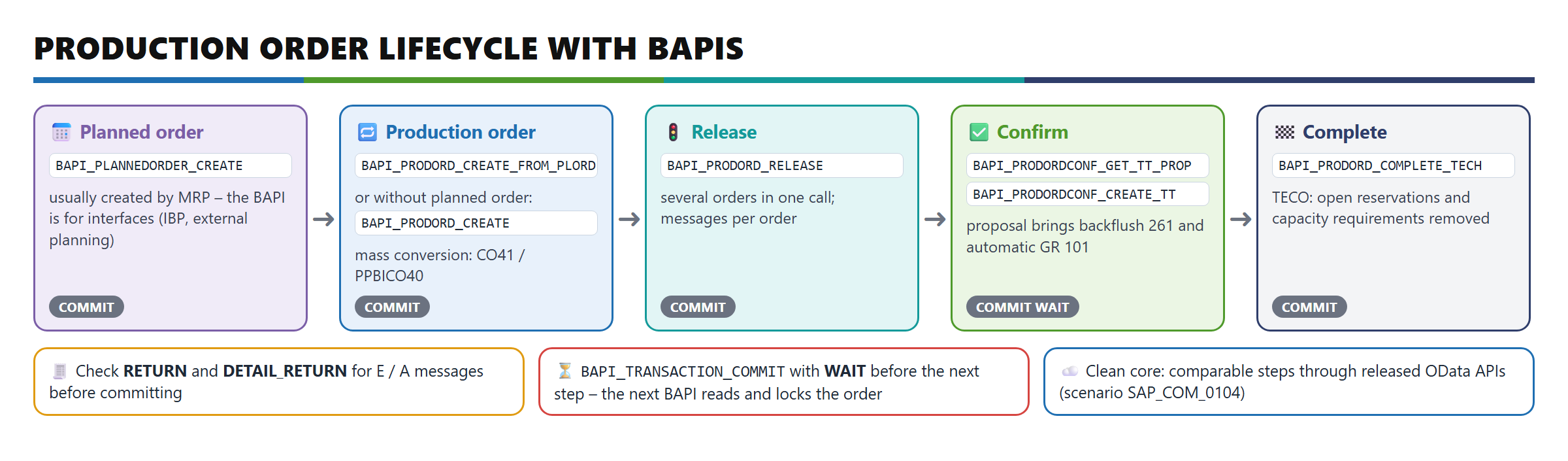
BAPI / FM | Purpose |
|---|---|
BAPI_PLANNEDORDER_CREATE / _CHANGE / _DELETE / _GET_DETAIL | Planned orders |
BAPI_PRODORD_CREATE_FROM_PLORD | Convert a planned order into a production order (CO40); mass conversion in background: PPBICO40 / CO41 |
BAPI_PRODORD_CREATE | Create a production order (CO01) – structure BAPI_PP_ORDER_CREATE: MATERIAL, PLANT, ORDER_TYPE, QUANTITY, BASIC_START_DATE / BASIC_END_DATE, PROD_VERSION, SALES_ORDER … |
BAPI_PRODORD_CHANGE | Change header data (dates, quantity, priority) |
BAPI_PRODORD_RELEASE | Release orders (CO02 / CO05N) |
BAPI_PRODORD_COMPLETE_TECH / BAPI_PRODORD_SET_DELETION_FLAG | TECO / deletion flag |
BAPI_PRODORD_GET_DETAIL | Read an order with operations, components, status |
BAPI_PRODORDCONF_CREATE_TT | Confirmation as time ticket (CO11N); siblings _CREATE_HDR (order header, CO15) and _CREATE_TE (time events) |
BAPI_PRODORDCONF_GET_TT_PROP | Proposal for a time ticket: activities and goods movements as CO11N would default them |
BAPI_PRODORDCONF_CANCEL | Cancel a confirmation (CO13) |
BAPI_PROCORD_CREATE / BAPI_PROCORDCONF_CREATE_TT | Process orders (PP-PI) |
CSAP_MAT_BOM_CREATE / CSAP_MAT_BOM_MAINTAIN / CSAP_MAT_BOM_READ | Material BOM create / change / read (CS01 – CS03) |
BAPI_MATERIAL_BOM_GROUP_CREATE | Create BOM groups with several alternatives / plants |
BAPI_ROUTING_CREATE | Create a routing |
BAPI_REQUIREMENTS_CREATE / _CHANGE | Planned independent requirements (MD61 / MD62); commits internally unless DO_COMMIT is passed initial |
CS_BOM_EXPL_MAT_V2 | Multi-level BOM explosion (CS12 logic) – not a BAPI and not released as an API, but stable and widely used in custom code |
BAPI_TRANSACTION_COMMIT / _ROLLBACK | End the LUW – the order and confirmation BAPIs do not commit by themselves |
5.1 Example: confirm an operation with backflush and goods receipt
- Two steps, like CO11N: BAPI_PRODORDCONF_GET_TT_PROP proposes the activities and the goods movements (backflush components, automatic GR) for the yield you enter; you check or change them and post with BAPI_PRODORDCONF_CREATE_TT. Calling CREATE_TT alone posts only what you pass.
- Leave PROPOSE-QUANTITY empty when you confirm a specific (partial) quantity, otherwise the proposal replaces your yield with the open quantity.
- FIN_CONF = 'X' is a final confirmation (status CNF), space a partial one; CLEAR_RES = 'X' also clears the open reservations.
|
- DETAIL_RETURN has one line per time ticket with the confirmation number (CONF_NO, CONF_CNT) or the error. Failed goods movements of a successful confirmation land in COGI (page 04 Part 2.2).
- Do not confirm the same operation twice in one LUW, and commit with WAIT before the next order – confirmations lock the order.
5.2 Example: multi-level BOM explosion
|
Part 6 – IDocs in PP
IDoc and ALE basics (partner profiles WE20, distribution model BD64, WE19 test tool, BD87 reprocessing): CORE ABAP › 07 Interfaces. The PP message types:
Message type | Direction | Content | Typical partner |
|---|---|---|---|
LOIPRO | Outbound | Production / process order (basic types LOIPRO01 … LOIPRO05; use the one the receiving MES documents) | MES, SAP Digital Manufacturing |
LOIPLO | Outbound | Planned order | MES for repetitive manufacturing |
LOIROU | Outbound | Routing | MES |
BOMMAT / MATMAS | Both | Material BOM / material master (ALE) | PLM, other SAP systems, MES |
PPCC2PRETTICKET | Inbound | Time ticket confirmation (processed via the PDC upload function of the confirmation BAPI) | MES / PDC |
MBGMCR | Inbound | Goods movement (BAPI_GOODSMVT_CREATE) | MES, scales, warehouse systems |
- LOIPRO is typically sent when the order is released, controlled by the distribution model (BD64); SAP Digital Manufacturing documents its setup per release.
- Any BAPI can be exposed as an IDoc with the BAPI-ALE interface (BDBG) – an option when no standard message type fits.
- Custom data: extend the basic type with a Z segment (WE30 / WE31) and fill it in the outbound user exit of the IDoc function module.
Part 7 – OData APIs, events, CDS views and key-user extensibility
API (SAP Business Accelerator Hub) | Content |
|---|---|
API_PRODUCTION_ORDER_2_SRV | Production orders with operations, components and status, plus order actions such as release (OData V4 successor: API_PRODUCTIONORDER) |
API_PROD_ORDER_CONFIRMATION_2_SRV | Create and read confirmations of production order operations, with their goods movements |
API_PLANNED_ORDERS | Create, read, change planned orders |
API_BILL_OF_MATERIAL_SRV (version 0002) | Material BOMs with items |
API_PRODUCTION_ROUTING | Routings with operations and component allocations |
API_WORK_CENTERS | Work centers |
API_MRP_MATERIALS_SRV_01 | MRP data and supply / demand items of materials – the API replacement for MD04 readers |
- These OData APIs exist only in S/4HANA – in ECC the same integration uses the BAPIs and IDocs of Parts 5 – 6. Most of these are in communication scenario SAP_COM_0104 (Production Planning Integration). In on-premise they are activated in /IWFND/MAINT_SERVICE; in the cloud through a communication arrangement.
- Newer releases add OData V4 / RAP-based versions of manufacturing APIs (e.g. API_PRODUCTIONORDER next to API_PRODUCTION_ORDER_2_SRV); for a new interface take the newest released version listed on the hub for your release.
- Events: S/4HANA raises business events such as
sap/s4/beh/productionorder/v1/ProductionOrder/Changed/v1– an MES or a BTP app can react without polling. - CDS views: read with the released interface views (I_PlannedOrder, I_ManufacturingOrder, I_ProductionOrderOperation_2, I_BillOfMaterial, I_WorkCenter – page 02 Part 10). Build your own view entities on top of them, add an analytical query or a Fiori elements app (ABAP on HANA › 05 CDS Views, RAP section).
- Key-user extensibility: the Custom Fields and Custom Logic apps offer business contexts and released BAdIs per object; check which manufacturing contexts your release provides before planning an append.
- Developer extensibility (ABAP Cloud): only released APIs, CDS views and BAdIs – no PPCO exits, no direct table reads. Clean-core rules: Clean Core › 01 Clean Core; PP-specific view: page 06.
Part 8 – Typical RICEFW objects in PP
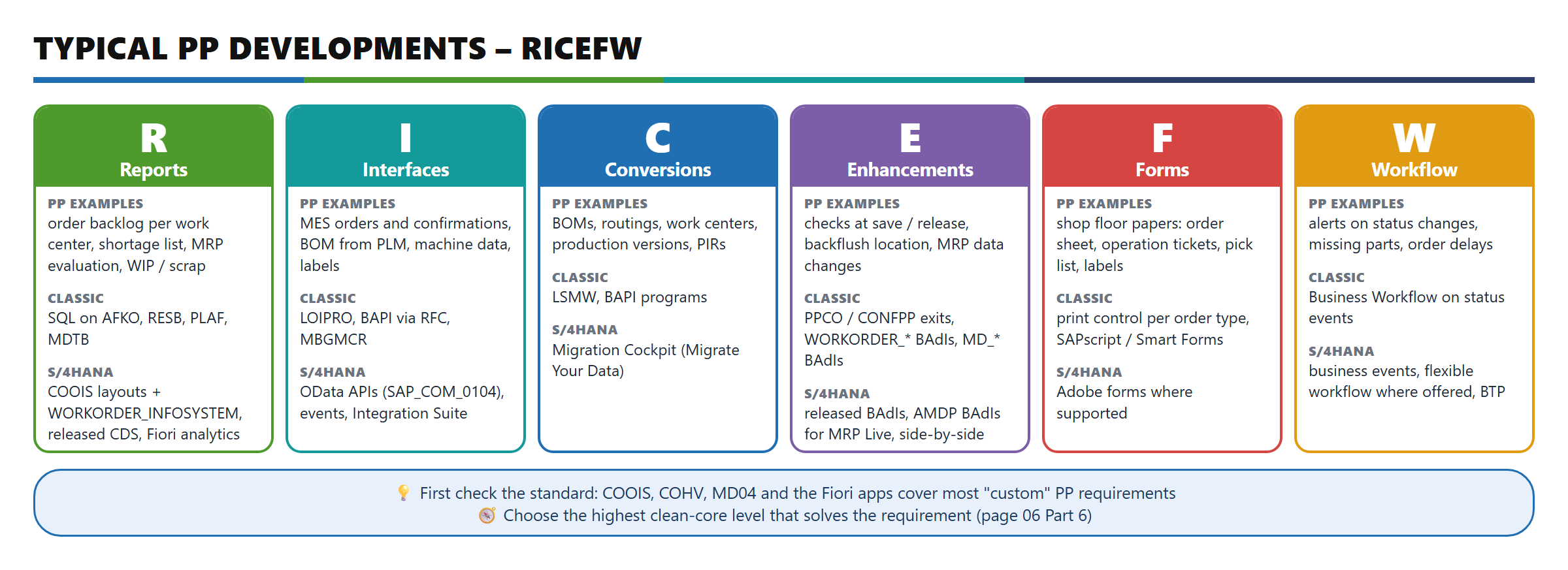
Type | Example | How (classic → S/4HANA way) |
|---|---|---|
R Report | Order backlog per work center; component shortage list; custom MRP evaluation (coverage, exception messages); WIP / scrap report | SQL on AFKO / RESB / PLAF → released CDS views, COOIS layouts + WORKORDER_INFOSYSTEM, Fiori analytics |
I Interface | MES order download and confirmation upload; machine data; BOM from PLM; labels and scales | LOIPRO + BAPI / IDoc → OData APIs, events, SAP Integration Suite |
C Conversion | BOMs, routings, work centers, production versions, PIRs | LSMW / BAPI programs → Migration Cockpit (page 06 Part 4) |
E Enhancement | Checks at order save / release, backflush storage location, MRP data changes | PPCO exits → BAdIs → released BAdIs where available |
F Form | Shop floor papers: order header sheet, operation tickets, pick list, labels | Print control per order type and paper with own print program and form (SAPscript / Smart Forms); Adobe forms where supported |
W Workflow | Notification on order status changes or missing parts | Business Workflow on status events → flexible workflow / events where offered |
- Mass changes (dates, status, TECO of hundreds of orders) are first COHV jobs; a Z program with BAPI_PRODORD_CHANGE / _COMPLETE_TECH only when COHV cannot do it.
Example – confirmed quantities per operation (custom report)
|
Part 9 – Interview questions
Q1. Which exits or BAdIs do you use to check a production order before it is saved?
Customer exit PPCO0007 (check or change header data at save) or BAdI WORKORDER_UPDATE method AT_SAVE, which can refuse the save by raising ERROR_WITH_MESSAGE. For release-specific checks WORKORDER_UPDATE~AT_RELEASE.
Q2. How do you change the goods movements posted at confirmation?
BAdI WORKORDER_GOODSMVT: method BACKFLUSH for component issues, GOODS_RECEIPT for the automatic GR, IM_CALLED to react to inventory errors. Alternatively pass adjusted GOODSMOVEMENTS to the confirmation BAPI.
Q3. Which customer exits exist for confirmations?
CONFPP01 default values, CONFPP02 / CONFPP04 input checks (04 may change the confirmation), CONFPP05 at save for own updates (no dialog, no error messages), CONFPP07 own subscreen. Plus BAdI WORKORDER_CONFIRM.
Q4. How do you post a confirmation with backflush from a program?
Call BAPI_PRODORDCONF_GET_TT_PROP with the order, operation and yield and PROPOSE-GOODSMOVEMENT = 'X' to get the backflush and GR movements, then BAPI_PRODORDCONF_CREATE_TT with the time tickets, goods movements and link table, check RETURN and DETAIL_RETURN, and commit with WAIT.
Q5. Your MD_CHANGE_MRP_DATA implementation stopped working after moving to MD01N. Why?
MRP Live plans in SAP HANA and does not call classic ABAP BAdIs. Port the logic to the AMDP BAdIs for MRP Live or force the materials to classic planning with MD_MRP_FORCE_CLASSIC; PPH_CHECK_MRP_ON_HANA shows which materials are planned classically (older releases; the report shows as obsolete in newer ones).
Q6. How do you add a custom column to COOIS?
Append the field to the COOIS list structure (e.g. IOHEADER for the header list) and fill it in an implementation of BAdI WORKORDER_INFOSYSTEM; the field then appears in the layout like a standard column.
Q7. Which BAPIs cover the production order lifecycle?
BAPI_PLANNEDORDER_CREATE, BAPI_PRODORD_CREATE_FROM_PLORD or BAPI_PRODORD_CREATE, BAPI_PRODORD_RELEASE, BAPI_PRODORDCONF_CREATE_TT, BAPI_PRODORD_COMPLETE_TECH – each followed by BAPI_TRANSACTION_COMMIT.
Q8. How do you explode a BOM in ABAP?
With CS_BOM_EXPL_MAT_V2 (application PP01, validity date, quantity, MEHRS = 'X' for multi-level); STB returns the items with level and quantity. Never write recursive SELECTs on STPO.
Q9. Which IDocs are used to connect an MES?
LOIPRO for production and process orders (also used by SAP Digital Manufacturing), LOIPLO for planned orders, LOIROU, MATMAS and BOMMAT for master data; confirmations come back via PPCC2PRETTICKET or the confirmation BAPI / API, goods movements via MBGMCR.
Q10. Which OData APIs would you use for a new MES integration?
API_PRODUCTION_ORDER_2_SRV to read orders, API_PROD_ORDER_CONFIRMATION_2_SRV for confirmations, API_PLANNED_ORDERS for planned orders, master data APIs for BOM, routing and work center – scenario SAP_COM_0104 – plus business events for status changes.
Q11. What are typical PP RICEFW objects?
Reports (backlog, shortages, MRP evaluations, WIP), MES and PLM interfaces, conversions of BOMs, routings, work centers and production versions, enhancements at order save and backflush, shop floor papers, and status-driven notifications.
Q12. How would you build the same order check in a clean-core way?
Use a released BAdI through Custom Logic or ABAP Cloud if one exists for the object; otherwise move the check to the integration layer or a side-by-side app on released APIs and events, and keep a classic BAdI only on-premise with a documented exception.
🏠 Start Here · ◀ 04 · Integration & Reporting · 06 · S/4HANA & Architect ▶ · Sections: CORE ABAP | OOPS ABAP | ABAP on HANA | Clean Core | RAP | ABAP Points | SAP Fiori | SAPUI5 | Mobile Development (MDK) | BTP Foundations | BTP Development | CAP | SAP Build | ABAP on BTP | Integration Suite | SAP Business AI | SAP BASIS | Security | SAP SDLC
Functional: FICO ABAP | TRM ABAP | VIM | SAP BIS | SD ABAP | MM ABAP | PP ABAP | QM ABAP | PM ABAP | PS ABAP | EWM | TM ABAP | GTM ABAP | EHS ABAP | HR ABAP | BW | SAP Datasphere | SAP Business Data Cloud | SAP MDG | SAP Analytics Cloud | SAP Ariba | SAP CX | SAP IBP