This page follows a project through its life: build the structure, plan costs and revenues, approve and release a budget, control it with availability control, execute (purchasing, materials, confirmations, cost postings), measure progress, bill the customer, recognise revenue, settle and close. For each step you get the business purpose, the t-codes and Fiori apps, and the customizing behind it. Objects and tables: page 02; postings to FI / CO / SD / MM in detail: page 04.
Part 1 – The project lifecycle at a glance
Every project, simple or complex, passes the same phases. The system status moves with it (CRTD → REL → TECO → CLSD, page 02 Part 7) and decides which transactions are allowed in each phase.
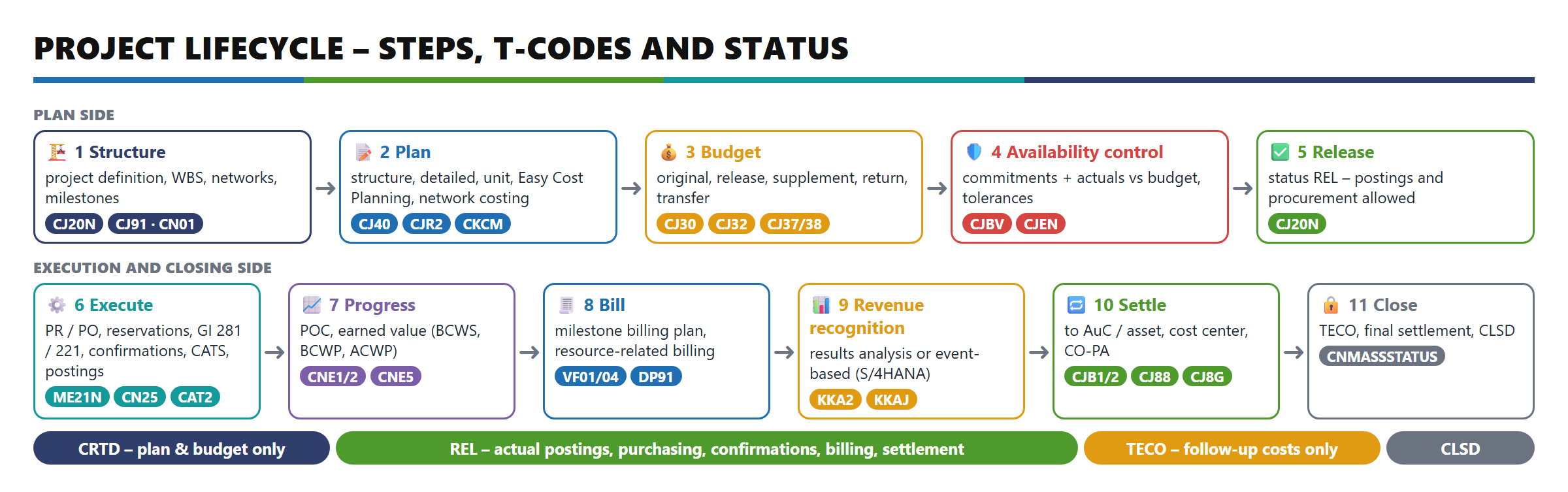
Phase | Status | Main t-codes (GUI) | Result |
|---|---|---|---|
1 Structure | CRTD | CJ20N, CJ91 / CN01 templates | Project definition, WBS, networks, milestones |
2 Plan | CRTD | CJ40, CJR2, CKCM, CJ42; network costing | Plan costs and revenues |
3 Budget | CRTD / BUDG | CJ30, CJ32, CJ37, CJ38, CJ34 | Approved and released budget, availability control active |
4 Release | REL | CJ20N (Edit → Status → Release) | Postings and procurement allowed |
5 Execute | REL | ME21N, MIGO, CN25 / CN27, CAT2 + CAT5, FB50 / KB21N | Commitments, actual costs, confirmations |
6 Progress | REL | CNE1 / CNE2, CNE5 | POC, earned value |
7 Bill | REL | VA01 + billing plan, DP91, VF01 / VF04 | Invoices, revenue |
8 Revenue recognition | REL / TECO | KKA2 / KKAJ or event-based revenue recognition | WIP, POC revenue, reserves |
9 Settle | REL / TECO | CJB1 / CJB2 (rules), CJ88 / CJ8G | Costs moved to AuC, asset, cost center, CO-PA |
10 Close | TECO → CLSD | CJ20N, CNMASSSTATUS | No more postings; archiving later |
Part 2 – Structuring and scheduling
- Create the project in CJ20N with a project profile; copy from a standard WBS (CJ91), a standard network (CN01) or an existing project. The coding mask (OPSJ) checks the keys.
- Dates: WBS elements carry basic, forecast and actual dates (PRTE). With networks, scheduling calculates earliest / latest dates of activities from durations and relationships (forward and backward pass, critical path) and passes them up to the WBS elements.
- Milestones with functions (e.g. release subsequent activities, include a standard network, start a workflow) automate the flow once their actual date is set.
- Graphical planning: project planning board CJ2B (compatibility scope) or the Fiori app Project Schedule (S/4HANA 2021 onwards).
Part 3 – Cost and revenue planning
Planning gives the expected cost and revenue of the project. PS offers several methods with increasing detail; the planning profile (OPSB) defines which are allowed, the planning horizon and the costing variant.
Method | T-code | Level of detail | When to use |
|---|---|---|---|
Structure (hierarchical) planning | CJ40 change, CJ41 display | One amount per WBS element and year, no cost elements | Early phase, rough estimates |
Detailed planning by cost element / activity type | CJR2 (and planning layouts) | Cost element and activity input per WBS and period | Precise plans, activity-based planning |
Unit costing | From CJ40 | Quantity × price lines (materials, activities, variable items) | Bottom-up estimates per WBS |
Easy Cost Planning | CKCM; execution services | Model-based costing with characteristics (costing model) | Quick, repeatable estimates; writes ACDOCP as of S/4HANA 2022 |
Network costing | Automatic in CJ20N / CN22 | Activities: work × activity price, external price, general costs, components | Projects with networks – plan comes from logistics |
Revenue planning | CJ42 (structure), sales order / billing plan | Revenue per billing element | Customer projects |
- Plan values are versions of CO (version 0 = plan / actual version). Several plan versions allow best case / worst case comparisons.
- S/4HANA: classic PS planning still works on-premise; the strategic direction is planning into ACDOCP (Fiori planning apps, SAP Analytics Cloud integration).
Part 4 – Budgeting
The budget is the approved cost frame. It is usually entered top-down on the upper WBS levels and distributed downwards; availability control checks against it. The budget profile (OPS9) defines time frame, overall vs annual values, currency and availability control activation.
Transaction | Purpose | Effect |
|---|---|---|
CJ30 / CJ31 | Original budget change / display | Budget per WBS element (overall and per year) |
CJ32 / CJ33 | Release budget change / display | Only the released part can be used when availability control is set to 'released' |
CJ37 | Budget supplement | Adds budget (top-down or to a WBS element) |
CJ38 | Budget return | Gives unused budget back to the superior WBS element |
CJ34 | Budget transfer | Moves budget between WBS elements, also between projects |
IM52 | Budget distribution from an investment program | Program position → investment WBS (Part 12) |
- Budget values are stored in BPGE (overall) and BPJA (annual) with budget documents (BPBK, BPEG / BPEJ); every budget change is a document.
- Budgeting sets status BUDG; the budget can be locked by a user status so that only supplements / returns change it.
Part 5 – Availability control
Availability control (AVC) checks every cost-relevant posting – purchase requisition, purchase order, goods issue, invoice, journal entry, confirmation – against the budget. It compares the assigned value (commitments + actual costs) with the budget and reacts when a tolerance limit is reached.
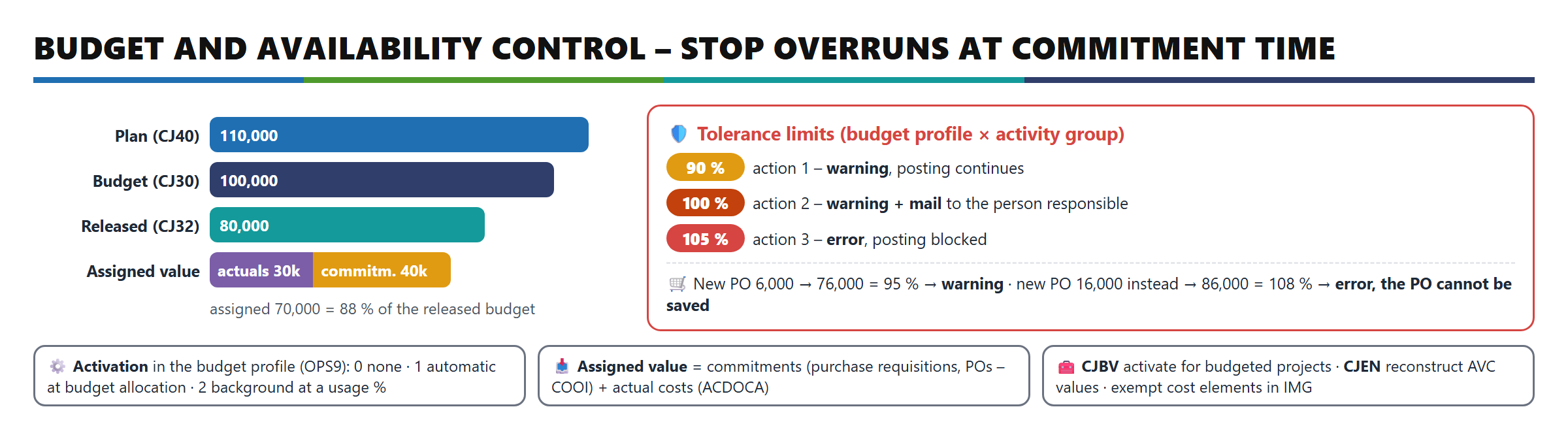
Setting | Where | What it does |
|---|---|---|
Activation type | Budget profile (OPS9) | 0 = cannot be activated, 1 = activated automatically when budget is allocated, 2 = activated in the background when the usage reaches a set percentage |
Usage basis | Budget profile | Check overall budget or annual budget; against total or released budget |
Tolerance limits | IMG: Project System → Costs → Budget → Define Tolerance Limits | Per budget profile, activity group (all transactions or groups such as purchase requisitions, purchase orders, actual postings) and usage %: action 1 warning, 2 warning with mail to the person responsible, 3 error (posting blocked) |
Exempt cost elements | IMG (budget) | Cost elements that are never checked, e.g. internal settlement |
- CJBV activates AVC for projects that were budgeted before activation; CJBN reconstructs the AVC values (after customizing changes or data corrections).
- Typical setup: 90 % warning, 100 % warning with mail, 105 % error. AVC runs on the level where the budget is; lower WBS elements without their own budget are checked against their superior.
- Developer note: an AVC error is a normal error message of the posting transaction (e.g. the PO cannot be saved). Interfaces that create POs or journal entries with WBS account assignment must expect it in the BAPI return table and route it to the person responsible, not retry blindly.
Part 6 – Release and execution
Release (status REL in CJ20N, partial release possible) allows actual postings and procurement. From then on, costs reach the project from many sources:
Source | How | Posting / document |
|---|---|---|
External activities / services | Network activity PS02 / PS05 creates a purchase requisition; purchasing creates the PO | EBAN → EKPO with account assignment N (network) or P (WBS); commitment in COOI; GR and invoice post actuals |
Stock materials | Components with item category L create reservations; goods issue to the network or WBS | RESB; movement type 281 (GI for network) or 221 (GI for project); project stock Q for engineer-to-order |
Non-stock materials | Item category N → purchase requisition for direct procurement | EBAN, PO, GR posts the cost directly |
Internal work | Confirmation of hours on network activities | CN25 individual, CN27 collective confirmation; AFRU; activity allocation to the WBS / network |
Time sheets | Employees record hours in CATS (CAT2 / Fiori My Timesheet) on activities or WBS elements | CAT5 transfers to PS (confirmations), CO activity allocation for WBS |
Direct postings | Journal entries, travel, invoices with WBS account assignment | FB50, MIRO, FB60 with WBS; ACDOCA-PS_PSP_PNR |
Internal allocations | Activity allocation, overhead surcharges, assessments | KB21N, costing sheet at period end |
- Every requisition and PO is checked by availability control at commitment time, not only at invoice time – that is why budget overruns are stopped early.
- Project stock (valuated or non-valuated) keeps materials reserved for one WBS element; MRP plans it separately (special stock Q, table MSPR – MM ABAP › 03).
Part 7 – Progress analysis, POC and earned value
Progress analysis measures how far the project really is, independent of the costs spent. It calculates the percentage of completion (POC) per WBS element or activity and the earned value.
Term | Meaning | Formula / source |
|---|---|---|
BCWS (planned value) | Budgeted cost of work scheduled – what should be done by today | Plan cost × planned POC |
BCWP (earned value) | Budgeted cost of work performed – value of what is really done | Plan (or budget) cost × actual POC |
ACWP (actual cost) | Actual cost of work performed | Actual costs on the object |
Cost variance | Over / under cost | BCWP − ACWP |
Schedule variance | Ahead of / behind schedule | BCWP − BCWS |
- Measuring methods (per object and value category): start-finish rules (0-100, 20-80, 50-50), milestone technique, estimation, time-proportional, degree of processing, quantity-proportional, secondary proportionality, cost-proportional.
- T-codes: CNE1 individual, CNE2 collective progress analysis; CNE5 progress analysis report (on-premise and private cloud; not delivered in the public edition, which uses Fiori alternatives).
- Progress (POC) is a controlling figure; recognising revenue from it is a separate step (Part 9).
Part 8 – Billing customer projects
A customer project links a sales order (or contract) item to the billing element WBS (VBAP-PS_PSP_PNR). Revenues post to that WBS element. Two billing methods dominate:
Method | How it works | Key objects |
|---|---|---|
Milestone billing | The sales order item has a billing plan with dates and percentages linked to project milestones. When the milestone's actual date is entered in PS, the billing block of that date is removed and the date is billed in VF01 / VF04. | Billing plan FPLA / FPLT, MLST with billing flag, billing documents VBRK / VBRP |
Resource-related billing (RRB) | DP91 reads the actual costs (hours, materials, expenses) of the WBS / network, groups them into dynamic items according to the DIP profile (ODP1) and creates a debit memo request; it is billed into an invoice. | DIP profile, debit memo request, billing document |
Periodic billing / down payments | Fixed amounts per period, or down payment requests in the billing plan | Billing plan, down payment clearing |
- The full order-to-cash view of service contracts with WBS elements and DP91 is in SD ABAP › 02 Part 7; postings and account determination on page 04.
Part 9 – Results analysis and revenue recognition
Costs and revenues of a long project rarely match period by period. Revenue recognition makes the profit appear in the right periods and values the work in process.
Approach | How | Availability |
|---|---|---|
Results analysis (RA) | Period-end run KKA2 (individual) / KKAJ (collective) per WBS with a results analysis key and version: calculates WIP, reserves, POC revenue or cost of sales; settlement then posts the result to FI and CO-PA | On-premise / private cloud (classic) |
Event-based revenue recognition (EBRR) | Revenue recognition postings are made with each event (cost posting, billing) in real time in ACDOCA; period-end only for adjustments | S/4HANA – the strategic method; the only one in the public edition |
- RA methods: revenue-based, cost-based POC, completed contract, quantity-based. The result is visible in the WBS element's line items and in margin analysis after settlement.
- Architect point: EBRR removes the period-end RA run and gives real-time margins, but it changes the posting logic – decide it during the design, together with the ledger and CO-PA set-up (page 06).
Part 10 – Settlement
Settlement moves the costs (and revenues) collected on WBS elements and networks to their final receivers. It is defined by a settlement rule per object (COBRA / COBRB) and controlled by the settlement profile (OKO7).
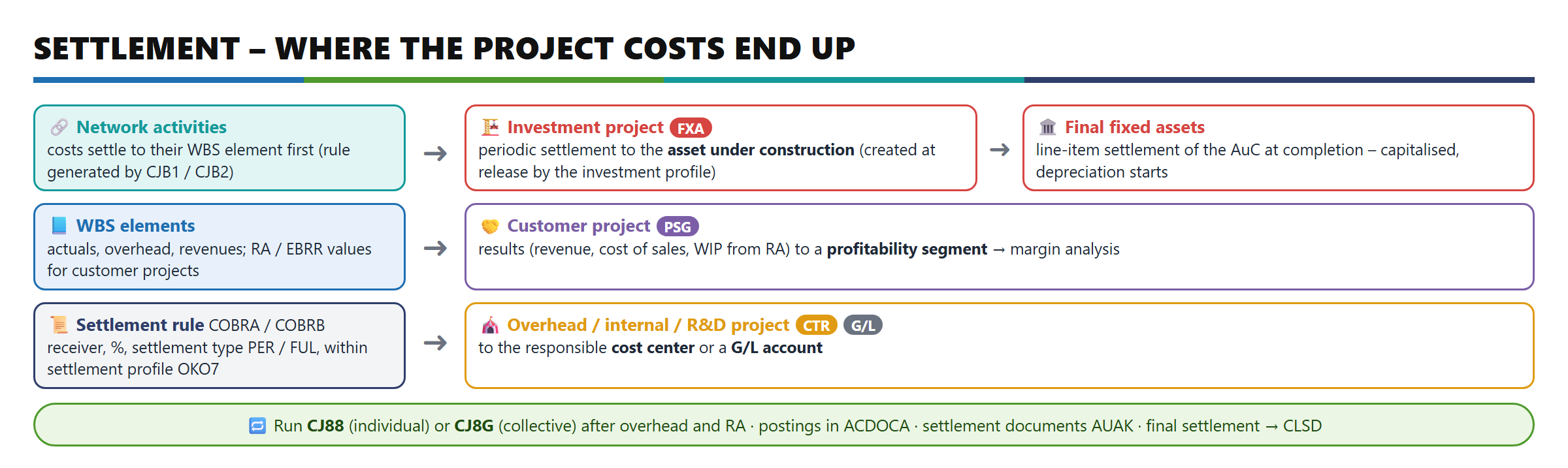
Receiver | Category | Typical project |
|---|---|---|
Asset under construction / fixed asset | FXA (the AuC is an asset) | Investment project |
Profitability segment | PSG | Customer project (results from RA / EBRR) |
Cost center | CTR | Overhead, internal, R&D project |
G/L account | G/L | Overhead project, special cases |
WBS element | WBS | Network activities to their WBS; sub-projects to a main WBS |
Sales order item / order | SDI / ORD | Special cases |
- Settlement rules: entered manually in CJ20N or generated by CJB1 / CJB2 with a strategy (e.g. WBS to its responsible cost center, activities to their WBS).
- Run: CJ88 individual, CJ8G collective settlement, period by period after all other period-end steps (overhead, RA). Settlement type PER periodic, FUL full settlement.
- Investment projects: the investment profile in the project profile creates an AuC when the WBS element is released; periodic settlement capitalises costs on the AuC; at completion a line-item settlement distributes the AuC to the final fixed assets (FI-AA, FICO ABAP › 03).
Part 11 – Closing: TECO and CLSD
- TECO (technically completed) when the work is finished: no new planning, no new requisitions; open POs can still be received and invoiced, open reservations are no longer relevant for MRP.
- Final period-end steps: last confirmations, RA / revenue recognition, final settlement (balance zero).
- CLSD (closed): no more actual postings to the WBS element, no hierarchy changes; the system checks that the object is fully settled (balance zero, as required by the settlement profile).
- Then the deletion flag, the deletion indicator and archiving with archiving object PS_PROJECT in SARA (project definitions, WBS elements and the networks assigned to them).
- Mass status changes: CJ20N for one project, CNMASSSTATUS for many, or BAPI_BUS2054_SET_STATUS in a program (page 05).
Part 12 – Investment programs (IM) in brief
Investment Management (IM) sits above projects for capital spending. An investment program is a hierarchy of program positions (e.g. per division and plant) that holds the capital budget for a fiscal year. Investment measures – WBS elements or internal orders – are assigned to program positions; budget is distributed to them (IM52) and cannot exceed the program budget.
- Appropriation requests capture investment ideas with variants and approvals before a project exists; approved requests become investment measures.
- The investment profile on the WBS adds the capital-spending logic: AuC, depreciation simulation, settlement to assets.
Part 13 – Key customizing and Fiori apps
Key customizing (SPRO → Project System)
Setting | T-code / IMG | Controls |
|---|---|---|
Project profile | OPSA | Defaults and all other profiles of a project (page 02 Part 6) |
Network type / network profile | OPSC / OPUU | Order type, number range, costing variants / user defaults, control keys |
Coding mask | OPSJ | Edit mask of project and WBS keys |
Planning profile | OPSB | Cost planning methods, horizon, costing variant |
Budget profile | OPS9 | Budget time frame, AVC activation |
Tolerance limits | IMG Costs → Budget | AVC warning / error thresholds per activity group |
Settlement profile | OKO7 | Receivers, settlement obligation, allocation structure |
Status profile | OK02 | User statuses and allowed business transactions |
DIP profile | ODP1 | Resource-related billing: sources, characteristics, material determination |
Results analysis key / version | IMG Revenues and Earnings | RA method, valuation, posting rules |
Version / simulation profile | OPTS / OPS4 | Project versions and simulation |
Fiori apps (examples)
App | Use | Since / note |
|---|---|---|
Project Cost Overview, Project Cost Line Items | Plan / actual costs of project, WBS, networks and assigned orders | S/4HANA 2022 FPS1 (on-premise / private cloud) |
Project Schedule | Gantt chart scheduling – successor of the project planning board | S/4HANA 2021 |
Project Claim Overview | Claim management (issues and claims with costs) | S/4HANA 2022 |
Event-Based Revenue Recognition – Projects | Monitor and adjust real-time revenue recognition | S/4HANA |
My Timesheet (and Manage Timesheet) | Time recording on WBS elements and activities | CATS-based |
Enterprise project apps | Create and control projects in the public edition | Public cloud |
- The GUI transactions CJ20N, CJ40, CJ30, CJ88 remain the daily tools on-premise; Fiori covers reporting and new functions first.
Part 14 – Interview questions
Q1. Walk me through the lifecycle of an investment project in PS.
Create the project with an investment profile (CJ20N), plan costs (CJ40), get budget from the investment program (IM52) or enter it (CJ30), release it so an AuC is created, procure and post costs under availability control, settle periodically to the AuC (CJ88), set TECO, settle the AuC to final assets and close the project.
Q2. Plan vs budget vs released budget?
Plan is the cost estimate (CJ40, CJR2, network costing). Budget is the approved limit (CJ30). Released budget (CJ32) is the part that may be used now; availability control can check against it instead of the total budget.
Q3. How does availability control work?
When active (budget profile, CJBV), every commitment and actual posting is compared with the budget. Tolerance limits per activity group trigger a warning, a warning with mail or an error at a usage percentage. CJBN reconstructs the values.
Q4. Which transactions are used for budget changes?
CJ30 original budget, CJ32 release, CJ37 supplement, CJ38 return, CJ34 transfer; IM52 for distribution from an investment program. Each change creates a budget document.
Q5. How do costs get onto a network activity?
Internal activities through confirmations (CN25, CATS + CAT5); external activities and non-stock components through purchase requisitions, POs, goods receipts and invoices; stock components through goods issue 281; plus overhead and allocations at period end.
Q6. Explain earned value.
Progress analysis (CNE1 / CNE2) calculates the POC. Earned value BCWP = plan cost × actual POC, compared with planned value BCWS and actual cost ACWP: BCWP − ACWP is the cost variance, BCWP − BCWS the schedule variance.
Q7. Milestone billing vs resource-related billing?
Milestone billing bills fixed amounts from the sales order billing plan when project milestones are reached. Resource-related billing (DP91, DIP profile) bills the actual costs of the project through a debit memo request.
Q8. Results analysis vs event-based revenue recognition?
RA (KKA2 / KKAJ) is a period-end run that calculates WIP, reserves and POC revenue and posts them via settlement. EBRR (S/4HANA) posts revenue recognition with each cost or billing event in real time and is the only option in the public edition.
Q9. What is a settlement rule and how is it created?
The receivers and percentages for settling a WBS element or network (COBRA / COBRB), within the limits of the settlement profile (OKO7). Created manually in CJ20N or generated by CJB1 / CJB2 with a strategy; executed with CJ88 / CJ8G.
Q10. What happens at TECO and at CLSD?
TECO blocks new planning and requisitions but allows follow-up costs from open commitments; open reservations are no longer relevant for MRP. CLSD is set after the final settlement and blocks actual postings to the WBS element and hierarchy changes.
Q11. Which customizing objects would you check first if a project behaves unexpectedly?
The project profile (OPSA) and the profiles it points to – planning (OPSB), budget (OPS9) with tolerance limits, settlement (OKO7), status profiles (OK02) – plus network type and profile (OPSC / OPUU) for networks.
Q12. As an architect, how would you design revenue recognition for customer projects in S/4HANA?
Prefer event-based revenue recognition for real-time margins and fewer period-end steps, use milestone or resource-related billing as the business requires, and align the WBS billing elements, profit centers and margin analysis characteristics early – RA only when a classic method is legally needed on-premise.
🏠 Start Here · ◀ 02 · Structures & Data · 04 · Integration & Reporting ▶ · Sections: CORE ABAP | OOPS ABAP | ABAP on HANA | Clean Core | RAP | ABAP Points | SAP Fiori | SAPUI5 | Mobile Development (MDK) | BTP Foundations | BTP Development | CAP | SAP Build | ABAP on BTP | Integration Suite | SAP Business AI | SAP BASIS | Security | SAP SDLC
Functional: FICO ABAP | TRM ABAP | VIM | SAP BIS | SD ABAP | MM ABAP | PP ABAP | QM ABAP | PM ABAP | PS ABAP | EWM | TM ABAP | GTM ABAP | EHS ABAP | HR ABAP | BW | SAP Datasphere | SAP Business Data Cloud | SAP MDG | SAP Analytics Cloud | SAP Ariba | SAP CX | SAP IBP