A project is only as good as the values that reach it. This page follows every flow into a project (purchasing, goods issues, time sheets, maintenance and production orders, overhead, billing) and out of it (results analysis, settlement to assets, cost centers and profitability), then the external scheduling tools and the reports an architect or developer is asked about: the classic project information system, the Fiori apps and embedded analytics on the Universal Journal. Structures and profiles are on page 02, the end-to-end processes and their customizing on page 03, exits, BAPIs and APIs on page 05.
Part 1 – How values reach a project
Every document that should end up on a project carries an account assignment to a WBS element (field PS_PSP_PNR, internal number) or to a network / network activity (AUFNR + activity). From the account assignment the system derives the CO object number (OBJNR): PR + internal number for a WBS element, NP + network number for a network, NV for a network activity. All values are stored against this object number, which is why custom reports join on OBJNR or PS_PSP_PNR, never on the external WBS key.
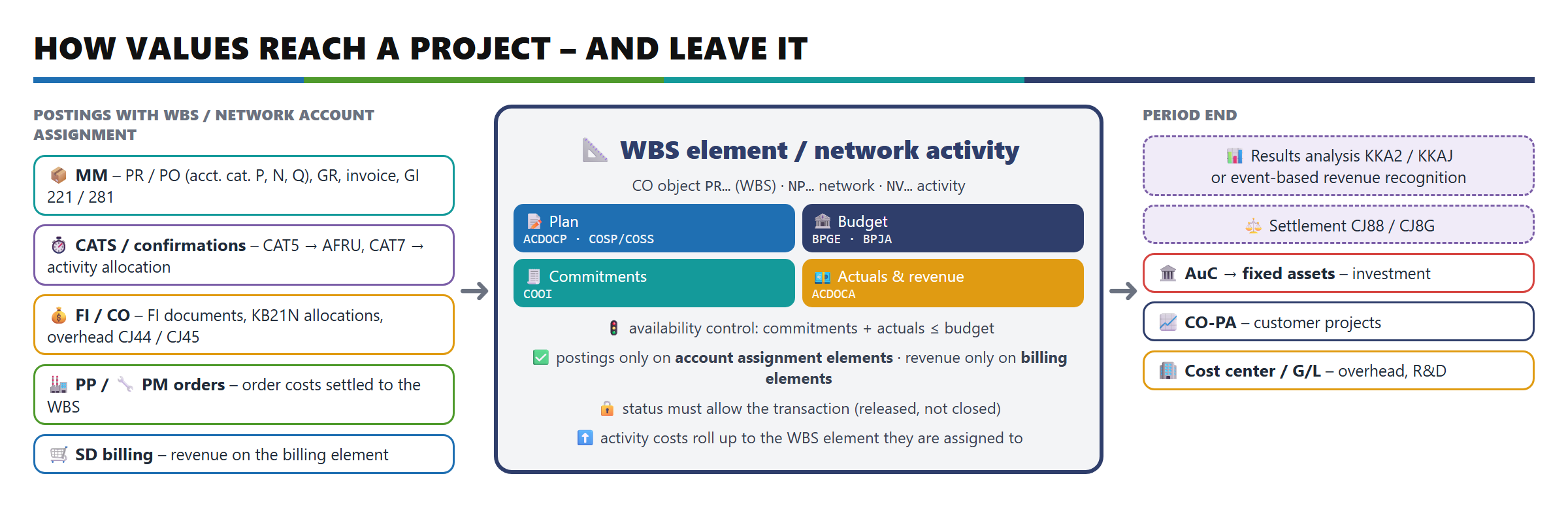
Value type | Created by | Stored in (S/4HANA) | Typical report |
|---|---|---|---|
Plan costs / revenues | Cost planning (CJ40 overall planning, easy cost planning, network costing, SAP Analytics Cloud / BPC planning) | ACDOCP (plan in the Universal Journal); classic CO plan totals COSP / COSS for older planning tools | Plan/actual reports, Project Cost Overview |
Budget | CJ30 original budget, CJ37 / CJ38 supplements / returns, IM52 distribution | BPGE (overall), BPJA (annual), BPEG / BPEJ line items | Budget/actual/commitment reports |
Commitments | Purchase requisitions and purchase orders with project account assignment | COOI (open items) | CJI5, availability control |
Actual costs | Goods issues, invoices, activity allocations, overhead, settlement from orders | ACDOCA (Universal Journal) with PS_PSP_PNR / OBJNR | CJI3N, Project Cost Line Items |
Revenues | Billing documents posted to the billing element | ACDOCA | Plan/actual revenue reports, results analysis |
Dates, progress, quantities | Scheduling, confirmations, progress analysis | PRTE, AFVV, AFRU, progress values | CN41N, CNE5 |
- Value tables in detail (COOI, BPGE / BPJA, COBRA / COBRB, settlement documents): page 02 Part 5.
- Plan vs budget vs commitments: plan is the expectation, budget the approved limit, commitments the money already promised to suppliers. Availability control checks commitments + actuals against the budget (process and tolerances: page 03).
- Network costs roll up to the WBS element the network or activity is assigned to. Whether the network collects costs on its header or on each activity is set by the network type (header- vs activity-assigned) – it decides which object you select in a custom report.
- Statistical WBS elements only record values for information (no settlement, no real costs); the real posting goes to another object such as a cost center.
Part 2 – FI / CO: actuals, overhead, results analysis, settlement and investment management
CO concepts (cost elements as G/L accounts, settlement, cost object controlling) are taught in FICO ABAP › 04 Controlling (Parts 1 and 7); the period-end sequence across modules in FICO ABAP › 05 Integration, Period-End Close & Reporting (Part 3.2). Here: what is special for projects.
2.1 Postings during the period
Posting | How it reaches the project | Note |
|---|---|---|
Supplier invoice / FI document | G/L line with WBS account assignment (FB60, MIRO for a PO assigned to P / N) | Only on account assignment elements; status must allow the business transaction (released) |
Internal activity allocation | Sender cost center + activity type → WBS or network activity (KB21N, CATS, network confirmation) | Secondary cost element, quantity × activity price |
Overhead | Costing sheet on the WBS element; overhead run CJ44 (individual) / CJ45 (collective) | Overhead on direct costs, credited to a cost center |
Order settlement to the project | Production, maintenance or internal orders with a settlement rule to the WBS | The project then settles further at its own period end |
Revenue | Billing document with the billing element | Only billing elements accept revenue |
2.2 Results analysis and revenue recognition – the accounting view
The process (results analysis keys, methods, KKA2 / KKAJ, event-based revenue recognition) is on page 03 Part 9. What matters for integration is where the result is posted:
Classic results analysis | Event-based revenue recognition (S/4HANA) | |
|---|---|---|
Posting | The run only calculates WIP, reserves and recognised revenue on the billing element; settlement posts them to FI (balance sheet) and CO-PA | Recognition postings (accruals / deferrals) are journal entries in ACDOCA at the moment of each cost or revenue posting |
Margin visible | After the period-end run and settlement | In real time, also in the Fiori project and margin reports |
Developer impact | Results in CO tables of the RA version; reports read them after the run | Extra journal entry lines with the WBS element – custom reports must not double-count them |
2.3 Settlement – the accounting view
Settlement rules, profiles, receivers and the CJ88 / CJ8G run are explained on page 03 Part 10. On the integration side:
- Settlement writes one settlement document; its lines go to ACDOCA with settlement cost elements (category 21 internal settlement, 22 external settlement) chosen by the allocation structure; the source structure settles cost groups separately.
- Settlement to an AuC or fixed asset creates an Asset Accounting posting (asset acquisition with transaction types for settlement) – the capitalisation is visible in the asset history.
- Settlement to a profitability segment: in costing-based CO-PA (common in ECC) the PA transfer structure maps the cost elements to value fields; in margin analysis (account-based CO-PA in ACDOCA, SAP’s recommendation in S/4HANA) the settlement lines keep their settlement cost elements and carry the market-segment characteristics – revenues, cost of sales and WIP / reserves arrive there.
- When everything is settled the WBS balance is zero – the precondition for status CLSD.
2.4 Investment management (IM) and Asset Accounting
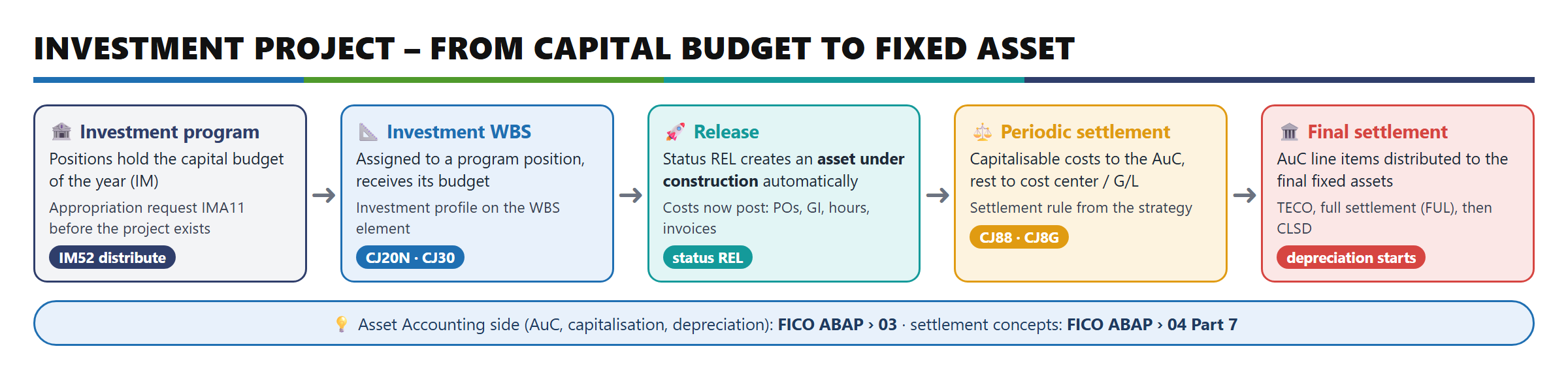
- IM in brief (investment programs, IM52 budget distribution, appropriation requests IMA11): page 03 Part 12.
- Integration points: the program position supplies the budget (availability control checks it); the investment profile (BAPI field INVEST_PROFILE) creates the AuC in Asset Accounting at release; settlement capitalises costs on the AuC and finally distributes them to the fixed assets.
- Asset Accounting details (AuC, capitalisation, depreciation): FICO ABAP › 03 Parts 9 and 10.
Part 3 – SD: customer projects, assembly processing and project billing
In a customer project SD sells and bills, PS plans and collects costs. The sales order item is assigned to a billing element (VBAP-PS_PSP_PNR) and revenue posts there. The SD side of service contracts and debit memo requests is on SD ABAP › 02 Part 7.
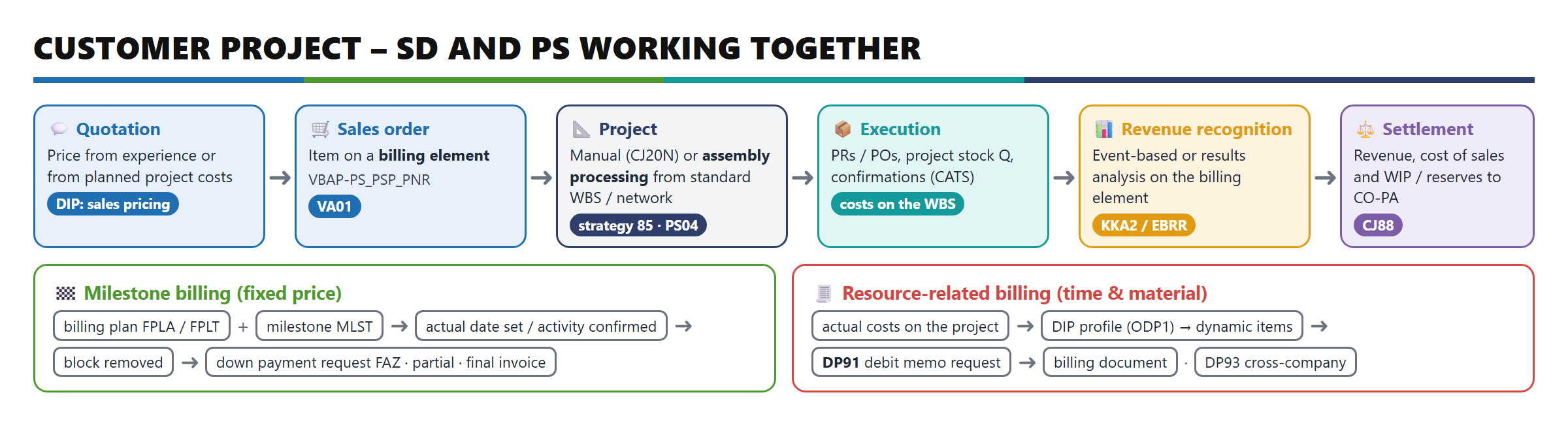
3.1 Linking the sales order and the project
Option | How | Typical use |
|---|---|---|
Manual assignment | Enter the WBS element on the sales order item (account assignment tab); the WBS must be a billing element | Large contracts where the project exists first |
Assembly processing with a network | The sales order creates the network (and WBS from a standard structure) automatically: planning strategy 85, requirements type KMPN, requirements class 212 with assembly type 2, network type PS04 | Engineer-to-order, configurable machines |
Assembly processing with production orders | The sales order item creates a production order account-assigned to the project / sales order | Make-to-order parts of a project (PP side: PP ABAP › 04 Part 5) |
Sales pricing from the project | A DIP profile with usage 'sales pricing' turns the planned costs into a quotation or sales order | Cost-plus quotations for one-off work |
3.2 Project billing – the integration details
Milestone billing, resource-related billing and periodic billing as processes: page 03 Part 8. The integration details an architect is asked about:
Topic | Details |
|---|---|
Milestone → billing plan | Billing plan dates (FPLA / FPLT) of the sales order item point to milestones (MLST) with the billing flag; a date stays blocked until its milestone gets an actual date – set manually or by confirming the activity that carries the milestone (Part 6) |
Down payments | Billing plan items with billing rule 4 create down payment requests (document type FAZ); partial and final invoices clear the received down payments |
Resource-related billing | DP91 reads the project's actual costs, summarises them into dynamic items with the DIP profile (ODP1, assigned via the item category), lets you change the Expenses and Sales price views and creates a debit memo request; DP93 handles cross-company-code billing |
S/4HANA | RRB can use the source actual costs from the Universal Journal (as of SAP S/4HANA 2022) instead of CO line items |
Revenue posting | The billing document posts revenue to the billing element (ACDOCA); revenue recognition or settlement then moves the margin to CO-PA (Part 2) |
- Milestone and resource-related billing can be combined on one project, including resource-related down payments.
Part 4 – MM: project procurement and project stock
Procurement documents and stock types in general: MM ABAP › 02 Procure-to-Pay and 03 Inventory Management. What PS adds:
Account assignment category | Assigns to | Used for |
|---|---|---|
P | WBS element | Purchase orders and requisitions directly on a WBS (consumables, services) |
N | Network / activity | External activities, services and non-stock components of a network |
Q | Project stock (project make-to-order) | Materials procured into project stock (special stock Q) |
4.1 Purchase requisitions from network activities
- External processing activity (work done by a supplier) and service activity (services with a service specification) create a purchase requisition with account assignment N.
- Non-stock material components create a purchase requisition; stock components create a reservation (RESB) or a requirement in project stock.
- The indicator Res./Purc. req. on the network (from the network profile) decides when the documents are created: never, from release, or immediately. The PR becomes a commitment on the activity; the PO, goods receipt and invoice then post to it.
4.2 Project stock (special stock Q)
Topic | Details |
|---|---|
Where | Stock assigned to a WBS element, table MSPR (with MATDOC in S/4HANA for movements) |
Valuated / non-valuated | Valuated project stock is valued at its own price, costs hit the project at goods issue; non-valuated stock posts costs to the WBS at goods receipt. The choice is made per project (valuation of special stock in the project definition) |
Movement types | 221 goods issue to a project (WBS), 281 goods issue to a network, 411 Q transfer from project stock to own stock |
MRP | Project MRP MD51 (classic MRP; in S/4HANA MD51 is not optimised for HANA – MRP Live MD01N is); grouping WBS elements (field WBS_MRP_ELEMENT) collect requirements of several WBS elements into one MRP segment |
Part 5 – PP and PM: production and maintenance orders on the project
Module | Integration | Values on the project |
|---|---|---|
PP | Production orders for project stock (assembly processing, project MRP) or with WBS account assignment; components issued from project stock | Order costs settle to the WBS (non-valuated stock) or the material (valuated stock); the WBS sees cost of goods issued |
PM / CS | Maintenance or service orders carry a WBS element on the header; shutdowns (turnarounds) group the orders by revision (REVNR) and use the project budget | Order costs roll up as commitments and actuals; the order settles to the WBS |
Networks with maintenance | Project activities (engineering, scaffolding) in a network, maintenance orders stay the execution objects | Both appear in the project structure reports |
- PM side and the decision table for shutdown projects: PM ABAP › 04 Part 4. PP order costs and settlement: PP ABAP › 04 Part 4.
- Reporting tip: the Project Cost Overview app includes header-assigned maintenance orders, internal orders and production orders assigned to the project (Part 9).
Part 6 – HR / CATS: time sheets and confirmations
Step | Transaction / table | Effect on the project |
|---|---|---|
Enter hours | CAT2 (Fiori: My Timesheet), stored in CATSDB | No posting yet; approval if the data entry profile requires it |
Transfer to PS | CAT5, interface table CATSPS | Creates network confirmations (AFRU): actual work, activity allocation, remaining work, dates |
Transfer to CO | CAT7 | CATS: transfer data to CO – activity allocation from the employee's cost center, e.g. to a WBS element (no network) |
Transfer to PM / CS | CAT9, interface table CATSPM | Confirmations of maintenance orders |
Direct confirmation | CN25 single, CN27 collective, CN28 display; BAPI BAPI_NETWORK_CONF_ADD (page 05) | Same AFRU confirmation without CATS |
- A network confirmation does three things at once: posts the actual cost (hours × activity price), updates the activity's actual dates and remaining work, and can set milestones that release billing plan dates (Part 3.2).
- Employee master data and time evaluation: HR ABAP.
Part 7 – External scheduling tools and integration technology
Planners often schedule in Microsoft Project or Oracle Primavera P6 while costs, procurement and billing run in PS. The integration options changed a lot with S/4HANA.
Option | Status | Use |
|---|---|---|
Open PS for Microsoft Project, MPX upload / download (CN06, CN07), export to Graneda / Access | Not available in S/4HANA (simplification item, SAP Note 2267288) | Legacy – replace with BAPIs or OData APIs |
SAP Enterprise Project Connection (EPC) 3.0 | Legacy: mainstream maintenance ended 14 October 2025 (Primavera integration 31 December 2024); on-premise only | SAP points to partner solutions and SAP Integration Suite |
PS BAPIs (ProjectDefinitionPI, WBSPI, NetworkPI) | Target BAPIs in S/4HANA | Synchronous create / change from middleware or a Z program (page 05) |
OData APIs: Project (API_PROJECT_V3, OData V4) and Project Network | S/4HANA on-premise / private cloud | REST integration via SAP Integration Suite (CPI) |
Enterprise Project API (API_ENTERPRISE_PROJECT_SRV_0002) | S/4HANA Cloud Public Edition (enterprise projects) | Cloud integration with planning tools |
SAP Portfolio and Project Management | Separately licensed (part of the S/4HANA stack) | Has its own Microsoft Project integration and links its projects to PS |
- A typical design: the scheduling tool owns dates and logic, S/4HANA owns structure, costs and budget; the interface moves dates and progress one way and WBS / cost data the other way, through SAP Integration Suite (Integration Suite › 02 SAP Cloud Integration).
- ALE: whole work breakdown structures can be distributed with message type PROJECT (basic type PROJECT01) – single WBS elements cannot be sent alone. Rarely used today.
Part 8 – Classic project information system
The SAP GUI information system is still the daily tool of most PS users on-premise. It has two families: structure reports (what the project contains) and cost / revenue reports (what it costs).
Transaction | Report | Use |
|---|---|---|
CN41N | Structure overview | Whole project in one hierarchy: WBS, networks, activities, milestones, components, with dates and costs |
CN42N / CN43N | Project definitions / WBS elements | Flat lists with master data fields – the quickest way to check statuses and profiles |
CN46N / CN47N | Networks / activities and elements | Activity dates, work, control keys |
CN52N / CN53N | Material components / milestones | Component status, procurement, milestone dates |
CJI3N | Actual cost line items | Every actual posting with document, cost element, partner (replaces CJI3, which is in the compatibility scope) |
CJI4N / CJI5 / CJI8 | Plan / commitment / budget line items | Drill-down for plan, open purchase documents and budget changes |
S_ALR_87013532 | Plan/actual/variance | Hierarchy report by WBS |
S_ALR_87013533 | Plan/actual/commitment/remaining plan/assigned | Cost control by WBS |
S_ALR_87013558 | Budget/actual/commitment/remaining plan/assigned | Budget control (availability) |
CJE0 | Run hierarchy report | Starts any (custom) drill-down report; built with CJE1 |
CNE5 | Progress analysis | Earned value, POC per WBS |
CN60 | Change documents for projects / networks | Who changed what (replaces CJCD, CODC, CN65) |
- Structure reports use a database profile and selection profile; cost reports read the Universal Journal (actuals) and plan / budget tables.
- Interview trap: hierarchy reports (S_ALR, CJE0) aggregate along the WBS hierarchy; line item reports (CJI3N) show documents. Reconciliation questions usually start in CJI3N.
Part 9 – Fiori apps and embedded analytics
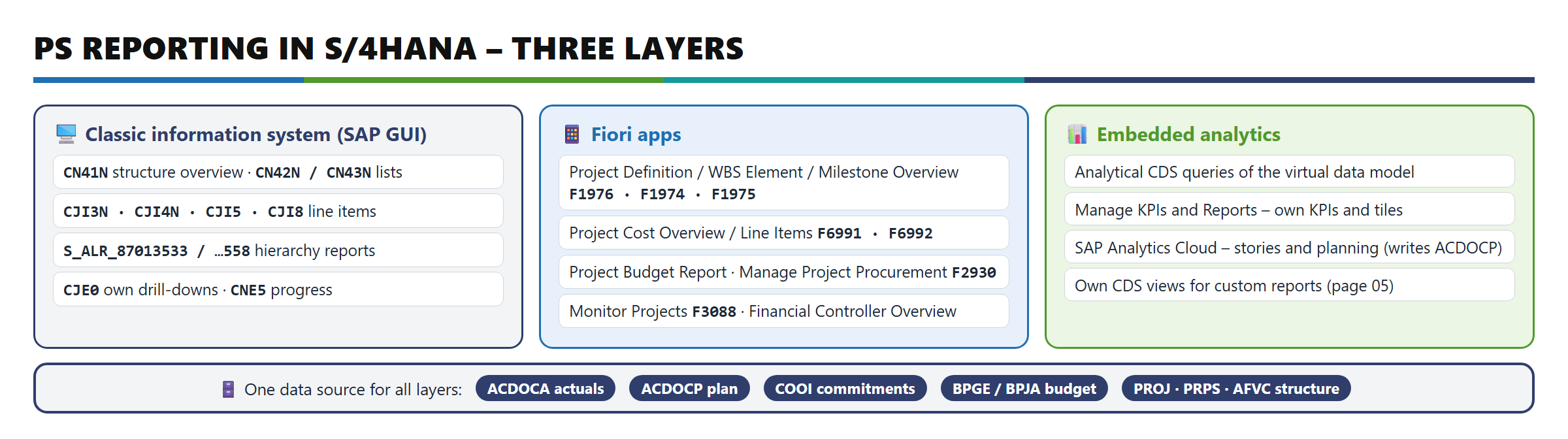
Fiori app (ID) | Content | Note |
|---|---|---|
Project Definition Overview (F1976), WBS Element Overview (F1974), Milestone Overview (F1975) | Lists of project objects with status and dates | Also Network, Network Activity and Material Component overviews |
Manage Project Procurement (F2930) | PRs, POs and goods receipts of a project | Replaces many MM list reports for project buyers |
Project Cost Overview (F6991) / Project Cost Line Items (F6992) | Plan (ACDOCP) and actual (ACDOCA) costs of the project including assigned networks and orders | Successors of Project Cost Report – Overview (F2513) / Line Items (F2538), deprecated in 2023; no commitments in the result |
Project Budget Report | Budget compared with actual and assigned values | Budget control, mainly for enterprise projects |
Monitor Projects (F3088), Project Financial Controller Overview | Overview pages with KPIs for the project financial controller role | Role-based entry points |
- The old Smart Business for Project Execution analytical apps (F0293 WBS Element Cost Variance, F0697 WBS Element Earned Value …) are not available in S/4HANA; SAP points to the overview apps above.
- Embedded analytics: the apps sit on CDS views of the virtual data model over ACDOCA (actuals) and ACDOCP (plan). Plan values only appear if the planning writes to ACDOCP (for example SAP Analytics Cloud or BPC planning).
- Manage KPIs and Reports builds own KPIs and reports on the analytical CDS queries; SAP Analytics Cloud adds stories and planning. Building own CDS views: page 05 and ABAP on HANA › 05 CDS Views.
Part 10 – Interview questions
Q1. How does a cost posting find its way to a WBS element?
The document carries the WBS account assignment (PS_PSP_PNR). The system derives the CO object number PR + internal number, checks the status and availability control, and writes the line to ACDOCA with that object; commitments from purchasing go to COOI first.
Q2. What is the difference between plan, budget and commitment?
Plan is the expected cost (ACDOCP or CO plan tables), budget the approved limit (BPGE / BPJA), commitment the open purchase requisitions and orders (COOI). Availability control compares commitments plus actuals with the budget.
Q3. Explain settlement for an investment project.
The investment profile creates an AuC when the WBS is released. Periodic settlement (CJ88) moves costs to the AuC; at completion a full settlement distributes the AuC line items to the final fixed assets according to the settlement rule.
Q4. How do settled project values reach CO-PA?
Settlement to a profitability segment: the allocation structure assigns settlement cost elements; with costing-based CO-PA (typical in ECC) the PA transfer structure maps the values (revenue, cost of sales, WIP / reserves) to value fields, with margin analysis (account-based, recommended in S/4HANA) they stay on the settlement cost elements with the characteristics; the settlement document is written to ACDOCA.
Q5. How does event-based revenue recognition change the integration with FI / CO?
Results analysis only calculates at period end and needs settlement to post. Event-based revenue recognition writes accrual / deferral journal entries in ACDOCA with every cost or revenue posting, so margins are visible in real time – custom reports must account for these extra lines.
Q6. How is a sales order linked to a project?
The sales order item is assigned to a billing element (VBAP-PS_PSP_PNR) manually, or created via assembly processing (strategy 85, requirements class 212, network type PS04) from a standard network and standard WBS.
Q7. Milestone billing vs resource-related billing?
Milestone billing bills fixed amounts or percentages from a billing plan whose dates are released when milestones get an actual date. Resource-related billing (DP91) bills the actual expenses, summarised by a DIP profile into dynamic items, through a debit memo request.
Q8. What is project stock and when is it valuated?
Special stock Q assigned to a WBS element (MSPR). Valuated project stock carries a value and costs hit the project at goods issue (221 / 281); non-valuated stock posts costs to the WBS at goods receipt. The valuation is chosen in the project definition.
Q9. How do CATS hours reach a project?
Hours are entered in CAT2 / My Timesheet (CATSDB). CAT5 transfers them to PS as network confirmations (AFRU); CAT7 transfers the data to CO (activity allocations, e.g. to WBS elements without a network).
Q10. A customer schedules in Primavera. How do you integrate?
Open PS and MPX are gone and EPC is out of mainstream maintenance, so use SAP Integration Suite or a partner connector on top of the Project / Project Network OData APIs or the PS BAPIs, with a clear split: the tool owns dates, S/4HANA owns structure, costs and budget.
Q11. Which reports do you use to analyse project costs?
CJI3N for actual line items, CJI5 for commitments, S_ALR_87013533 / 87013558 for plan / budget / actual / commitment by WBS, CN41N for the structure; in Fiori Project Cost Overview and Project Cost Line Items, Project Budget Report and Monitor Projects.
Q12. Why does the Project Cost Overview app show no planned costs?
The app reads plan data from ACDOCP. Plans made with classic tools that write only CO plan tables do not appear; planning must write to ACDOCP (for example SAP Analytics Cloud or BPC planning).
🏠 Start Here · ◀ 03 · Processes & Config · 05 · Development ▶ · Sections: CORE ABAP | OOPS ABAP | ABAP on HANA | Clean Core | RAP | ABAP Points | SAP Fiori | SAPUI5 | Mobile Development (MDK) | BTP Foundations | BTP Development | CAP | SAP Build | ABAP on BTP | Integration Suite | SAP Business AI | SAP BASIS | Security | SAP SDLC
Functional: FICO ABAP | TRM ABAP | VIM | SAP BIS | SD ABAP | MM ABAP | PP ABAP | QM ABAP | PM ABAP | PS ABAP | EWM | TM ABAP | GTM ABAP | EHS ABAP | HR ABAP | BW | SAP Datasphere | SAP Business Data Cloud | SAP MDG | SAP Analytics Cloud | SAP Ariba | SAP CX | SAP IBP