What an ABAP developer builds around the Project System: customer fields on WBS elements and activities, checks and defaults with validations, substitutions, customer exits and BAdIs, programs and interfaces that create projects with the PS BAPIs, budget and plan uploads, OData APIs and IDocs for external tools, CDS-based reports, and the clean-core options of S/4HANA. The general techniques are on CORE ABAP › 10 Enhancements and 07 Interfaces; this page shows where they are used in PS. Structures and tables: page 02; integration flows: page 04.
Part 1 – Where to enhance PS: choosing the technique
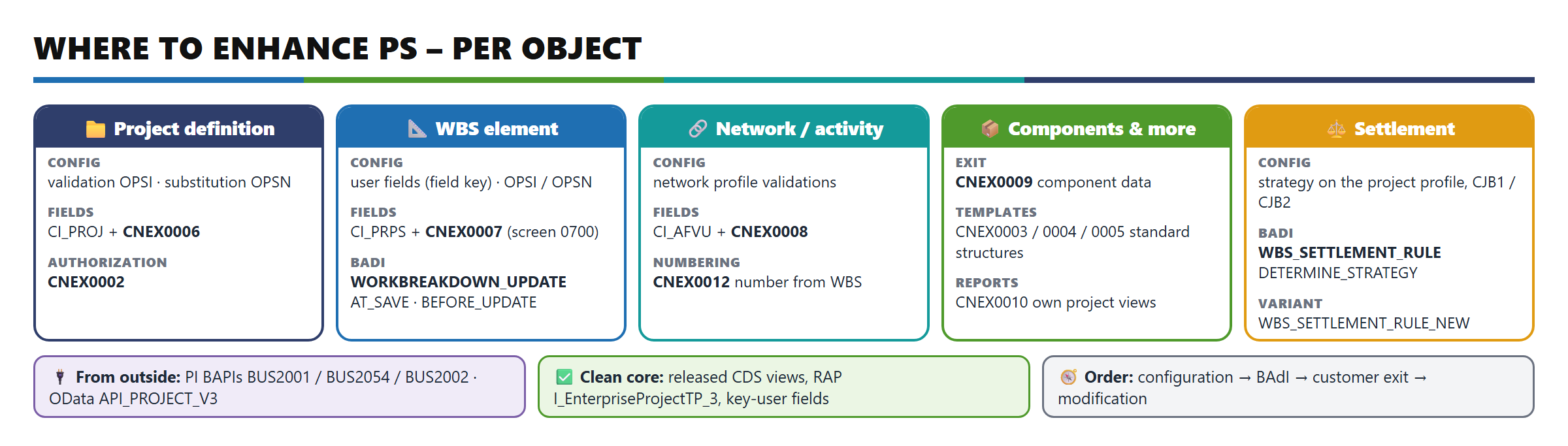
Requirement | Technique | Where |
|---|---|---|
Extra field on the WBS element / project definition / activity | Standard user fields first; otherwise customer include CI_PRPS / CI_PROJ / CI_AFVU + exit CNEX0007 / 0006 / 0008 | Part 2 |
Mandatory-field or consistency check when saving | Validation (OPSI) on the project / network profile | Part 3 |
Default or derive a field (profit center, person responsible …) | Substitution (OPSN) | Part 3 |
Complex check or follow-up action at save | BAdI WORKBREAKDOWN_UPDATE | Part 3 |
Generate settlement rules by own logic | BAdI WBS_SETTLEMENT_RULE with CJB1 / CJB2 | Part 3 |
Own authorization logic | Exit CNEX0002 | Part 2 |
Network number derived from the WBS | Exit CNEX0012 | Part 2 |
Create or change projects from outside | PS BAPIs (BUS2001 / BUS2054 / BUS2002) or OData API_PROJECT_V3 | Parts 4, 6 |
Upload budget or overall plan | FM KBPP_EXTERN_UPDATE_CO | Part 5 |
S/4HANA clean core | Released APIs and CDS views, key-user extensibility, side-by-side on SAP BTP | Parts 6, 7, page 06 |
- Order of preference: configuration (user fields, validations, substitutions) → BAdI → customer exit → modification. Validations and substitutions survive upgrades and need no code at all.
- Project Builder (CJ20N) is the single maintenance transaction in S/4HANA; test every enhancement there, not only in the old CJ01 / CJ02 / CN21 transactions.
Part 2 – Customer fields and customer exits (CNEX…)
PS customer exits are classic SMOD / CMOD enhancements (function exits, screen exits, menu exits) in function group XCN1. Create a CMOD project, assign the enhancement, write the code in the ZX… includes and activate the project. Technique in detail: CORE ABAP › 10 Enhancements.
Enhancement | Purpose | Customer include / table |
|---|---|---|
CNEX0002 | Additional authorization checks for project definitions, WBS elements and network headers | – |
CNEX0003 | Customer fields in the standard project definition | CI_PROJS (PROJS) |
CNEX0004 | Customer fields in the standard WBS element | CI_PRPSS (PRPSS) |
CNEX0005 | Customer fields in standard network activities | CI_PLPO (PLPO) |
CNEX0006 | Customer fields in the project definition | CI_PROJ (PROJ) |
CNEX0007 | Customer fields in WBS elements (exits EXIT_SAPLCJWB_004 / _005) | CI_PRPS (PRPS) |
CNEX0008 | Customer fields in network activities (exits EXIT_SAPLCONW_002 / _003) | CI_AFVU (AFVU) |
CNEX0009 | Process material component data in own logic and pass it back | – |
CNEX0010 | Customer-specific project views in the information system (hierarchy type 99) | – |
CNEX0012 | Derive the network number from the WBS element (EXIT_SAPLCOKO_002) | – |
2.1 Try the standard user fields first
- WBS elements and activities have user-defined fields (texts, quantities, values, dates, check boxes) whose labels come from a field key in customizing. They are in PRPS / AFVU already, appear in CJ20N, the info system and the BAPIs (USER_FIELD_KEY, USER_FIELD_CHAR20_1 … in BAPI_BUS2054_NEW) – no development needed.
- Use customer includes only when the user fields are not enough (more fields, own checks, F4 helps).
2.2 Example: a custom field on the WBS element (CNEX0007)
- Create structure CI_PRPS in SE11 with ZZ fields; activating it adds the fields to PRPS (PRPS and CI_PRPS together may not exceed 255 fields).
- Draw the fields on screen 0700 of program SAPLXCN1 as PRPS-ZZ… (not CI_PRPS-ZZ…, otherwise the values are not transported); CJ20N shows the subscreen on its customer enhancement tab.
- Code the two function exits and activate the CMOD project:
|
- The same pattern applies to the project definition (CNEX0006, CI_PROJ) and network activities (CNEX0008, CI_AFVU, screen exit in network maintenance).
- Mass change: CI_PRPS fields are not offered in CNMASS – plan a small Z program or a BAPI upload (Part 4) for mass updates.
- S/4HANA: CI-include fields can be added to PS Fiori apps (SAP KBA 2983949). In the public cloud there are no CI includes and no CMOD – use key-user extensibility on enterprise projects.
Part 3 – Validations, substitutions and BAdIs
3.1 Validations and substitutions
Tool | Transaction | Typical rule |
|---|---|---|
Validation | OPSI | WBS elements on level 2 must have a responsible cost center; investment WBS elements need an investment profile; description must follow a naming rule |
Substitution | OPSN | Derive the profit center from the plant; set the person responsible from the project definition; default the results analysis key on billing elements |
- Rules exist for the project definition, WBS element, network header and network activity; a rule only runs if it is entered in the project profile (project definition, WBS) or the network profile (network, activity).
- Rules use Boolean conditions on the PS structures and can call user exits (ABAP form routines) for logic that the formula editor cannot express.
- They run when the user triggers them or when saving, depending on the profile settings – if a rule "does not fire", check the profile assignment first (SAP Note 440186 FAQ).
3.2 BAdIs
BAdI | Methods / use | Watch out |
|---|---|---|
WORKBREAKDOWN_UPDATE | AT_SAVE – checks on the changed WBS elements, raise an error to stop the save; BEFORE_UPDATE – follow-up actions (e.g. set a user status, write a Z table) | Import parameters are read-only – you cannot change WBS fields here (use a substitution or the BAPI); only called for objects flagged as changed |
WBS_SETTLEMENT_RULE | DETERMINE_STRATEGY – choose the settlement strategy per WBS for CJB1 / CJB2 | Customizing (strategy on the project profile) may already be enough |
WBS_SETTLEMENT_RULE_NEW | GET_TEMPLATE – which object's rule to copy | Needs business function OPS_PS_CI_1 |
- Find more BAdIs with SE18 by package (CJ…, CN…) or a breakpoint on
CL_EXITHANDLER=>GET_INSTANCEandGET BADIwhile running CJ20N; implement them in SE19. - Known gap: some status changes in CJ20N (e.g. TECO, CLSD) do not call WORKBREAKDOWN_UPDATE~AT_SAVE (SAP KBA 2915621) – status-dependent checks may need a user status with a status profile instead.
Part 4 – PS BAPIs: creating projects, WBS elements and networks
PS has two BAPI generations. The old BAPIs of business objects ProjectDefinition, WorkBreakdownStruct and Network (BAPI_PROJECT_MAINTAIN, BAPI_NETWORK_MAINTAIN …) are not the target architecture in S/4HANA (SAP Note 2267386). Use the PI BAPIs of ProjectDefinitionPI (BUS2001), WBSPI (BUS2054) and NetworkPI (BUS2002) in package CNIF_PI – or the OData APIs (Part 6).
BAPI | Purpose |
|---|---|
BAPI_PS_INITIALIZATION | Start a PS processing unit – once, before the first PI BAPI |
BAPI_BUS2001_CREATE / _CHANGE / _DELETE / _GETDATA / _SET_STATUS | Project definition |
BAPI_BUS2054_CREATE_MULTI / _CHANGE_MULTI / _DELETE_MULTI / _GETDATA | WBS elements of one project (many per call) |
BAPI_BUS2054_SET_STATUS / BAPI_BUS2054_GET_STATUS | Release, TECO, user status of WBS elements / read active statuses |
BAPI_BUS2002_CREATE / _CHANGE / _GETDATA | Network header |
BAPI_BUS2002_ACT_CREATE_MULTI / _ACT_CHANGE_MULTI | Activities of one network per call |
BAPI_PS_PRECOMMIT | Runs the checks and prepares the update of everything created in the processing unit |
BAPI_TRANSACTION_COMMIT / _ROLLBACK | End the LUW – the PI BAPIs never commit themselves |
BAPI_NETWORK_CONF_ADD | Confirm network activities (actual work, dates, final confirmation) |
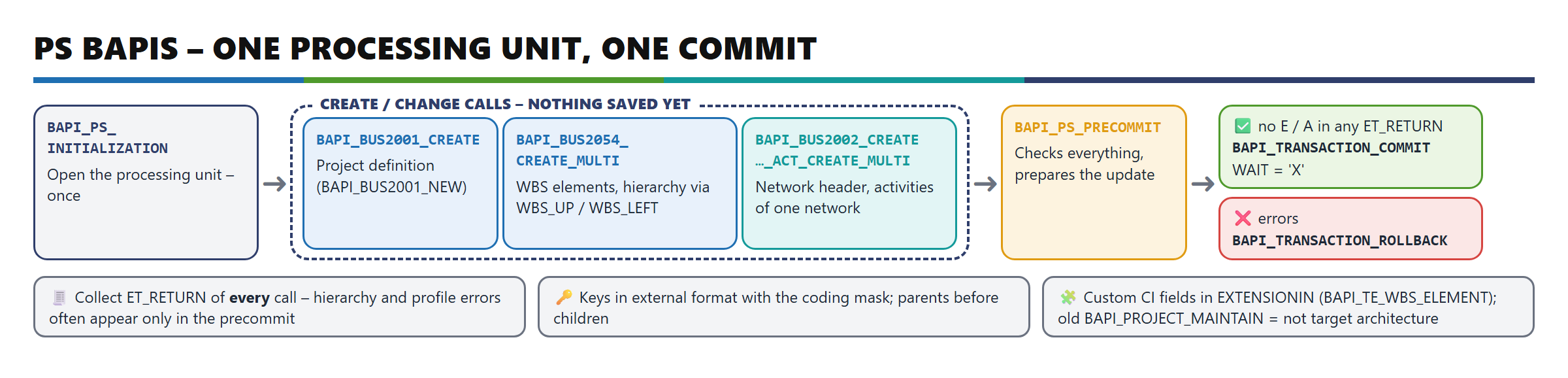
4.1 Example: create a project definition with three WBS elements
- Fill WBS_UP (superior WBS element) and WBS_LEFT (left neighbour on the same level) to build the hierarchy; parents come before their children in IT_WBS_ELEMENT.
- Keys are passed in external format (with the coding mask); the operative indicators are WBS_PLANNING_ELEMENT, WBS_ACCOUNT_ASSIGNMENT_ELEMENT and WBS_BILLING_ELEMENT.
- Collect the RETURN tables of every call and of the precommit – many errors (hierarchy, profile checks) only show up in BAPI_PS_PRECOMMIT.
|
- Without BAPI_PS_INITIALIZATION the create BAPIs fail with "no initialization"; one initialization covers the whole unit up to the commit.
- A network with activities follows the same pattern: BAPI_BUS2002_CREATE for the header, then BAPI_BUS2002_ACT_CREATE_MULTI with the network number, then precommit and commit.
- Customer fields (CI_PRPS) travel in EXTENSIONIN with structure BAPI_TE_WBS_ELEMENT (key + ZZ fields) – the standard BAPI extension technique of CORE ABAP › 07 Interfaces.
Part 5 – Budget, plan, settlement rules and confirmations from a program
Task | Tool | Remarks |
|---|---|---|
Upload original budget or overall plan (like CJ30 / CJ40) | FM KBPP_EXTERN_UPDATE_CO (SAP Note 625613) | Not a BAPI; values must be consistent bottom-up; test currencies without decimals |
Plan costs by cost element and period | CO planning BAPIs / planning in SAP Analytics Cloud | In S/4HANA plan data for reporting lives in ACDOCP |
Distribute investment program budget (IM52) | IM52, or the mass-upload alternative in SAP KBA 3542089 | Mass budget distribution to WBS |
Create settlement rules | CJB1 / CJB2 with BAdI WBS_SETTLEMENT_RULE | Rules from the strategy of the project profile |
Set statuses (release, TECO) | BAPI_BUS2054_SET_STATUS, BAPI_BUS2001_SET_STATUS | Same processing-unit pattern as in Part 4 |
Confirm network activities | BAPI_NETWORK_CONF_ADD | Interfaces from field service or time recording tools; CATS uses CAT5 (page 04) |
Part 6 – OData APIs, IDocs and integration
API / interface | Edition | Content |
|---|---|---|
Project – API_PROJECT_V3 (Business Accelerator Hub: OP_API_PROJECT_V3_0001) | On-premise / private cloud (OData V4) | Create, read, change project definitions and WBS elements |
Project Network (OP_API_PROJECTNETWORK_0001) | On-premise / private cloud | Networks and activities |
Enterprise Project – API_ENTERPRISE_PROJECT_SRV_0002 | Public cloud (OData V2) | Entities A_EnterpriseProject, A_EnterpriseProjectElement …; status changes via function imports such as ChangeEntProjProcgStatus |
PS BAPIs via RFC | On-premise / private cloud | Synchronous calls from middleware (Part 4) |
IDoc PROJECT (basic type PROJECT01) | On-premise | ALE distribution of complete work breakdown structures |
- Activate OData V4 services with service groups in /IWFND/V4_ADMIN (V2: /IWFND/MAINT_SERVICE); the service group of the Project API is API_PROJECT_V3.
- Integration with Primavera or Microsoft Project runs through SAP Integration Suite (CPI) on top of these APIs (page 04 Part 7); OData basics: CORE ABAP › 08 OData.
- Every API listed here is documented on the SAP Business Accelerator Hub (api.sap.com) with its entities and a sandbox.
Part 7 – Reading project data: tables, CDS views and a cost report
Object | Tables (on-premise) | Released CDS views |
|---|---|---|
Project definition | PROJ (PSPNR internal, PSPID external) | I_EnterpriseProject (public cloud); I_ProjectData_2 (private cloud / on-premise) |
WBS element | PRPS (PSPNR internal, POSID external), hierarchy PRHI | I_EnterpriseProjectElement (public cloud); I_WBSElementBasicData, I_WBSElementData_2 (private cloud / on-premise) |
Network / activity | AUFK, AFKO / AFVC, AFVV, AFVU | Network and activity views of the overview apps |
Components, milestones | RESB, MLST | – |
Status | JEST (object number), TJ02T / TJ30T texts | Status fields in the views |
Costs | ACDOCA (actual), ACDOCP (plan), COOI (commitments), BPGE / BPJA (budget) | Journal entry and plan views of the VDM |
- Full table list and the released CDS views with their release notes: page 02 Parts 5 and 10.
- RAP: I_EnterpriseProjectTP_3 is the transactional interface released for developer extensibility (EML in ABAP Cloud) – see RAP › 08 · EML.
- Joining WBS keys: documents store the internal number (PS_PSP_PNR); join PRPS on PSPNR and filter on PRPS-POSID for the external key. Status texts: FM STATUS_TEXT_EDIT or the GET_STATUS BAPIs.
7.1 Example: actual costs per WBS element of a project
|
- PRPS-PSPHI points from every WBS element to its project definition. The OBJNR filter keeps the lines posted to WBS elements themselves (
PR…); postings to network activities (OBJNRNV…, fields ACDOCA-NPLNR / NPLNR_VORGN) are added through the activity's WBS assignment (AFVC-PROJN) if needed. - For ABAP Cloud or clean core, build the same report on released CDS views (enterprise project views plus journal entry views) instead of ACDOCA / PRPS; the release state of each view is shown in its ADT properties. CDS basics: ABAP on HANA › 05 CDS Views.
Part 8 – Typical RICEFW objects in PS
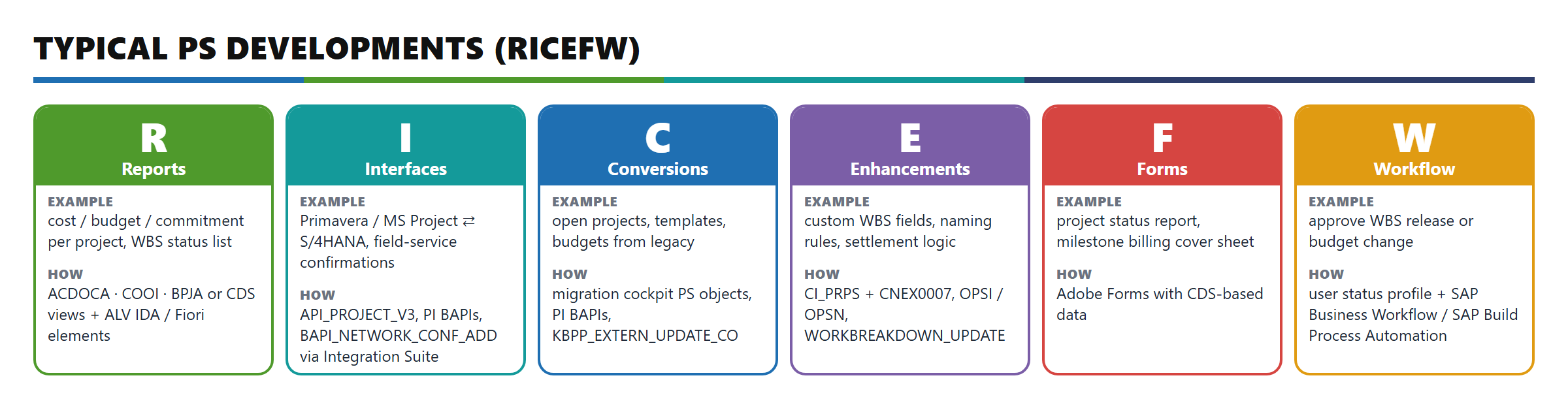
Type | Example | Technique |
|---|---|---|
Report | Project cost / budget dashboard, open commitments per project, WBS status list | ACDOCA / COOI / BPJA or CDS views + ALV IDA / Fiori elements |
Interface | Primavera / MS Project dates ⇄ S/4HANA; field service confirmations | OData APIs or BAPIs via SAP Integration Suite; BAPI_NETWORK_CONF_ADD |
Conversion | Project templates and open projects from legacy; budget load | Migration cockpit objects (page 06), PS BAPIs, KBPP_EXTERN_UPDATE_CO |
Enhancement | Custom WBS fields, naming validations, settlement rule logic | CI_PRPS + CNEX0007, OPSI / OPSN, WBS_SETTLEMENT_RULE |
Form | Project status report, milestone billing cover sheet | Adobe Forms on CDS data |
Workflow | Approval of WBS release or budget changes | SAP Business Workflow (CORE ABAP › 12) or SAP Build Process Automation; status profile with user statuses |
Part 9 – Interview questions
Q1. How do you add a custom field to a WBS element?
First check the standard user fields (field key). Otherwise create CI_PRPS with ZZ fields, draw them as PRPS-ZZ… on screen 0700 of SAPLXCN1, code EXIT_SAPLCJWB_004 / 005 of CNEX0007 and activate the CMOD project; for BAPIs pass the fields in EXTENSIONIN with BAPI_TE_WBS_ELEMENT.
Q2. Which enhancement is used for custom fields in network activities?
CNEX0008 with customer include CI_AFVU (table AFVU) and exits EXIT_SAPLCONW_002 / 003; CNEX0006 is the project definition (CI_PROJ), CNEX0007 the WBS element (CI_PRPS).
Q3. Validation, substitution or BAdI for a WBS check?
Simple field checks and defaults: validation (OPSI) and substitution (OPSN) assigned to the project profile – no code. Complex logic across objects or follow-up actions: BAdI WORKBREAKDOWN_UPDATE (AT_SAVE for errors, BEFORE_UPDATE for follow-up).
Q4. Can you change WBS fields in WORKBREAKDOWN_UPDATE?
No – its parameters are import-only. Derive values with a substitution, or change them afterwards with BAPI_BUS2054_CHANGE_MULTI.
Q5. Describe the call sequence of the PS PI BAPIs.
BAPI_PS_INITIALIZATION, then the create / change BAPIs (BUS2001, BUS2054, BUS2002), then BAPI_PS_PRECOMMIT, check all return tables, then BAPI_TRANSACTION_COMMIT or ROLLBACK.
Q6. Why is BAPI_PROJECT_MAINTAIN not recommended in S/4HANA?
The BAPIs of ProjectDefinition, WorkBreakdownStruct and Network are not the target architecture (SAP Note 2267386); SAP recommends the PI BAPIs (ProjectDefinitionPI, WBSPI, NetworkPI) or the Project / Project Network OData APIs.
Q7. How do you build the WBS hierarchy in BAPI_BUS2054_CREATE_MULTI?
With WBS_UP (superior element) and WBS_LEFT (left neighbour) in BAPI_BUS2054_NEW; level-1 elements have no WBS_UP; parents must be passed before their children.
Q8. How do you upload project budgets?
With FM KBPP_EXTERN_UPDATE_CO (overall planning and budgeting interface, SAP Note 625613) – there is no BAPI for CJ30; for investment programs, budget distribution as in IM52.
Q9. Which APIs exist for projects in S/4HANA?
On-premise / private cloud: Project (API_PROJECT_V3, OData V4) and Project Network, plus the PI BAPIs. Public cloud: Enterprise Project API (API_ENTERPRISE_PROJECT_SRV_0002). All on the SAP Business Accelerator Hub.
Q10. Why do you join on PS_PSP_PNR and not on POSID?
Documents (ACDOCA, EKKN, VBAP, MATDOC) store the internal WBS number; the external key with the coding mask is only in PRPS-POSID. Join PRPS on PSPNR and filter on POSID.
Q11. How would you generate settlement rules for hundreds of WBS elements?
Define a settlement strategy in the project profile and run CJB1 / CJB2; if the receiver depends on own logic, implement BAdI WBS_SETTLEMENT_RULE (DETERMINE_STRATEGY).
Q12. How do you extend projects in the public cloud?
No CMOD or CI includes: key-user extensibility for fields and logic, released APIs (API_ENTERPRISE_PROJECT_SRV_0002), released CDS views such as I_EnterpriseProject / I_EnterpriseProjectElement and RAP interfaces, and side-by-side apps on SAP BTP.
🏠 Start Here · ◀ 04 · Integration & Reporting · 06 · S/4HANA & Architect ▶ · Sections: CORE ABAP | OOPS ABAP | ABAP on HANA | Clean Core | RAP | ABAP Points | SAP Fiori | SAPUI5 | Mobile Development (MDK) | BTP Foundations | BTP Development | CAP | SAP Build | ABAP on BTP | Integration Suite | SAP Business AI | SAP BASIS | Security | SAP SDLC
Functional: FICO ABAP | TRM ABAP | VIM | SAP BIS | SD ABAP | MM ABAP | PP ABAP | QM ABAP | PM ABAP | PS ABAP | EWM | TM ABAP | GTM ABAP | EHS ABAP | HR ABAP | BW | SAP Datasphere | SAP Business Data Cloud | SAP MDG | SAP Analytics Cloud | SAP Ariba | SAP CX | SAP IBP