This page runs the QM processes end to end: which event creates which inspection lot, how a goods receipt inspection flows from the goods movement to the usage decision and the stock posting, how production, delivery, source and calibration inspections differ, how QM in procurement, quality notifications and certificates work, and which customizing and transactions belong to each step. Master data and tables behind every step: page 02; postings to MM / FI and external interfaces: page 04; exits and BAdIs: page 05.
Part 1 – Inspection lot origins and inspection types
The inspection lot origin is fixed by SAP and says which event created the lot; the inspection type (customizing) belongs to one origin and controls the processing. A lot is created automatically only when the inspection type is active in the material's inspection setup for that plant (page 02 Part 2).
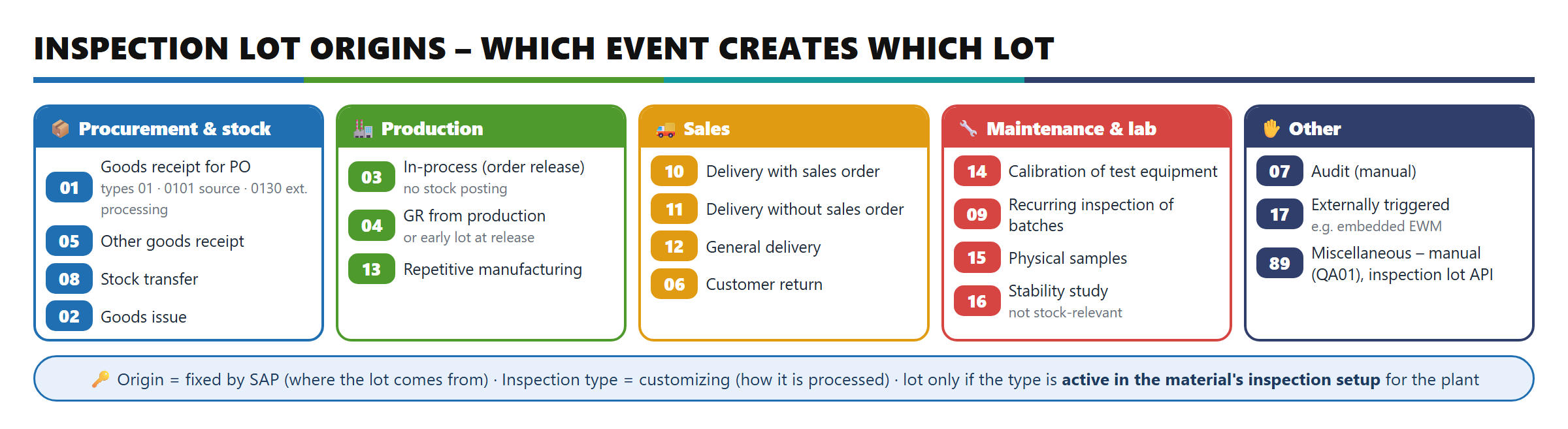
Origin | Event | Created | Standard inspection types |
|---|---|---|---|
01 | Goods receipt for a purchase order (also model inspection and external processing) | Auto / manual | 01, 0101, 0130 |
02 | Goods issue | Auto / manual | 02 |
03 | Production: release of a production or process order (in-process inspection) | Auto / manual | 03 |
04 | Goods receipt from production (or early lot at order release) | Auto / manual | 04 |
05 | Other goods receipts (without purchase order) | Auto / manual | 05 |
06 | Customer return | Auto / manual | 06 |
07 | Audit | Manual | 07 |
08 | Stock transfer | Auto / manual | 08 |
09 | Recurring inspection of batches | Auto / manual | 09 |
10 / 11 / 12 | Delivery to customer with sales order / without sales order / general delivery | Auto | 10, 11, 12 |
13 | Repetitive manufacturing (run schedule header) | Auto | 13 |
14 | Plant maintenance – calibration of test equipment | Auto | 14 |
15 | Physical samples (sample management) | Manual | 15 |
16 | Stability study (lots not stock-relevant) | Auto / manual | 16, 1601, 1602 |
17 | Extended Warehouse inspection (QIE inspection documents, e.g. EWM with inspection rules) | Auto | 17 |
89 | Miscellaneous – manual lot with QA01, also created by the inspection lot API | Manual | 89 |
- Several types of one origin can be active for a material (e.g. 01 and 0101); the preferred inspection type decides which one the event uses.
- The movement type decides whether a goods movement is QM-relevant and which origin it has – so a 101 for a purchase order creates an origin-01 lot, a 101 for a production order an origin-04 lot.
Part 2 – Goods receipt inspection end to end
The most common QM process and the one every interviewer asks about. Prerequisites: inspection type 01 active with "post to inspection stock" for the material and plant, optionally an inspection plan (usage 5 goods receipt) or a material specification.
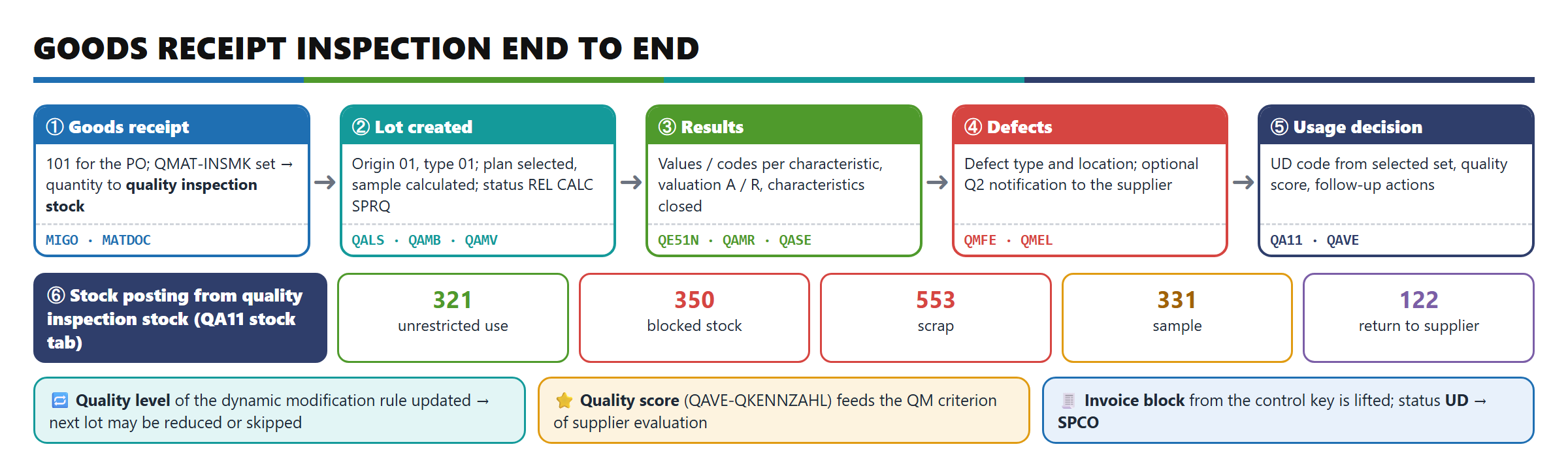
Step | What happens | T-code / Fiori app | Data written |
|---|---|---|---|
1. Goods receipt | MIGO posts 101 against the PO; because QMAT-INSMK is set the quantity goes to quality inspection stock (stock type Q) | MIGO; Post Goods Receipt for Purchasing Document | MATDOC (in ECC MKPF / MSEG) |
2. Lot creation | The goods movement creates an inspection lot of origin 01 in the same LUW; the plan is selected, the sample calculated (CALC), status SPRQ | Automatic; QA03 / Manage Inspection Lots | QALS, QAMB, QAMV, JEST |
3. Inspection | The technician takes the sample and records values or codes per characteristic; each characteristic is valuated and closed | QE51N, QE01; Record Inspection Results | QAMR, QASR, QASE |
4. Defects | Rejected characteristics record defects; a defect report can create a quality notification (e.g. Q2 complaint against the supplier) | Defect recording in QE51N, QF01; Manage Defects | QMFE, QMEL |
5. Usage decision | The engineer chooses a UD code from the selected set (accepted / rejected), the quality score is calculated, follow-up actions run | QA11; Manage Usage Decisions | QAVE, status UD |
6. Stock posting | On the stock tab of the UD the lot quantity is posted out of quality inspection stock: 321 unrestricted, 350 blocked, 553 scrap, 331 sample, 122 return to supplier | QA11 (same screen) | MATDOC, QALS-LMENGE01…09, status SPCO |
7. Follow-on | Quality level of the dynamic modification rule updated; quality score feeds supplier evaluation; invoice block released if the control key blocks invoices | Automatic | QDQL |
- Until step 6 the goods cannot be consumed: goods issues for production or sales take only unrestricted stock.
- QA32 is the classic worklist for the whole flow: select lots, then branch into results, defects and usage decision. For materials with automatic usage decision planned (QMAT-AVE) the job QA10 makes the decision after the waiting time if nothing was rejected.
Part 3 – Results recording and defects
- Results recording (QE51N worklist, QE01 / QE02 / QE03 per lot, Fiori Record Inspection Results): the inspector enters a summarized result, single values per sample unit, or a code. The system valuates each characteristic against limits or code valuations (A / R) and closes it.
- Characteristic attributes from the MIC steer the screen: required vs optional characteristics, long-term characteristics (closed after the usage decision), skip by dynamic modification.
- Inspection points split one lot into several result sets – per time interval or quantity in production, per equipment in calibration, per sample in sample management.
- Defects are recorded per lot, operation or characteristic with a defect type (catalog 9), location (E) and number; the report type of the work center or user decides the screen. Rejected characteristics can propose defect recording automatically.
- Results from external systems (LIMS, measuring machines, SAP Digital Manufacturing) arrive through the QM-IDI interface or APIs (page 04).
- SPC: for SPC characteristics the control chart is updated while results are recorded and can be displayed from the results screen.
Part 4 – Usage decision and stock posting
The usage decision (UD) closes the inspection lot. It is made once per lot (partial lots and inspection points can have their own decisions) and can be changed later only with a history.
Element | Content |
|---|---|
UD code | Code from catalog type 3 in the selected set of the plant, e.g. A1 accepted, A2 accepted with deviation, R1 rejected – scrap; the code carries the valuation A or R |
Quality score | Calculated with the procedure of the inspection type (from the code, from the share of defectives or the characteristic valuations); stored in QAVE-QKENNZAHL |
Follow-up action | Function modules started by the UD code – e.g. trigger a notification, update the batch, set an equipment status; defined in customizing and assigned to the code |
Stock posting | Only for lots with quality inspection stock: quantities to unrestricted (321), blocked (350), scrap (553), sample (331), another material, return to supplier (122), reserves |
Batch | Batch status and classification values can be updated from the results |
- Transactions QA11 record, QA12 change, QA13 display, QA16 collective usage decision for accepted lots, QA10 automatic usage decision (job). Fiori: Manage Usage Decisions; a quick UD is also possible from the Quality Engineer Overview.
- Usage decision and stock posting are separate steps: a lot can have status UD without SPCO when the stock is posted later (QA12, stock tab).
- Developer note: the UD writes QAVE, updates QALS (STAT35, LMENGE*), creates material documents linked in QAMB and calls follow-up actions – custom logic belongs in the QM BAdIs and user exits for the UD (page 05), never in a direct table update.
Part 5 – Inspections in production
Inspection | Trigger | Inspection specifications | Results |
|---|---|---|---|
In-process (03) | Release of a production or process order whose order type has inspection type 03 (order type dependent parameters, OPL8) | Characteristics in the operations of the routing or master recipe; inspection points per time or quantity | QE51N, or with the confirmation; no stock posting – the lot accompanies the order |
GR from production (04) | Goods receipt 101 for the order; or an early lot already at order release | Inspection plan usage 1 or 3, or material specification | Usage decision and stock posting as in Part 2 |
Repetitive manufacturing (13) | Run schedule header / production version | Characteristics of the rate routing | Inspection points per period or quantity |
- Results of in-process inspection can be copied to the batch of the product; the usage decision of lot 03 does not post stock.
- PP side of the process (order release, confirmation, goods receipt): PP ABAP › 03.
Part 6 – Other inspections: source, stock transfer, delivery, recurring, calibration
Inspection | How it works | Key settings / t-codes |
|---|---|---|
Source inspection | Inspection at the supplier before shipping. QI07 creates lots for PO items due within the lead time; the No Inspection flag in the Q-info record suppresses the GR lot | Q-info record: source inspection type, lead time, No Inspection flag; that inspection type active in the material |
External processing (0130) | Goods receipt of a subcontracted operation of a production order | Inspection type 0130 active; plan for external processing |
Stock transfer (08) | Goods receipt of a stock transport order or transfer posting into another plant | Inspection type 08 active in the receiving plant |
Customer return (06) | Returns delivery posted to quality inspection stock | Inspection type 06; UD decides restock or scrap |
Delivery (10 / 11 / 12) | Creating the outbound delivery creates the lot; goods issue can wait for the usage decision; results feed the certificate of analysis | Inspection type 10 / 11 / 12 active; QM settings in delivery customizing |
Recurring inspection (09) | Batches in stock whose next inspection date is due are re-inspected (e.g. shelf life) | Inspection interval in the QM view; deadline monitoring QA07 (job) |
Calibration (14) | Maintenance plan → calibration order (standard order type PM05) whose task list contains MICs → releasing the order creates a lot of type 14 with one inspection point per equipment → results and a UD per equipment, whose follow-up actions can block the equipment or create a notification → UD of the lot | Equipment of the test equipment category, task list with MICs, maintenance plan; inspection type 14 assigned to the order type (PM customizing) |
Manual (89) | Ad-hoc inspection without a logistics event | QA01 |
Part 7 – QM in procurement: Q-info record, release and blocks
QM in procurement checks quality before the goods arrive. It is switched on with the QM in procurement indicator (MARA-QMPUR) and a control key in the plant data of the material.
Control key requires | Effect in purchasing |
|---|---|
Supplier release | A quality info record with a valid release date / quantity must exist, else the PO is blocked |
Technical delivery terms / QA agreement | Documents (Q02 / Q01) must exist and are output with the RFQ or PO |
Certificate | A certificate of the given certificate type is expected for each PO item or GR; a missing certificate can create a notification |
Invoice block | The supplier invoice is blocked until the usage decision is made |
- Procurement block: a block for all materials of a supplier is set in the supplier master; a block for one material sits in the Q-info record. A block key defines which functions are blocked: RFQ, purchase order, goods receipt.
- Supplier QM system: the target QM system of the material is checked against the actual QM system of the supplier (supplier master or Q-info record) when the PO is created.
- Supply relationship status (model, pre-series, series) in the Q-info record picks a different inspection type and plan usage per phase – the basis of first article inspection.
- Transactions QI01 – QI03, QI06 mass maintenance, QI07 source inspection; Fiori Manage Quality Info Records.
Part 8 – Quality notifications
A quality notification records a problem, its defects and causes, and the tasks and activities that solve it. It can refer to an inspection lot, a purchase order, a delivery, a material or batch.
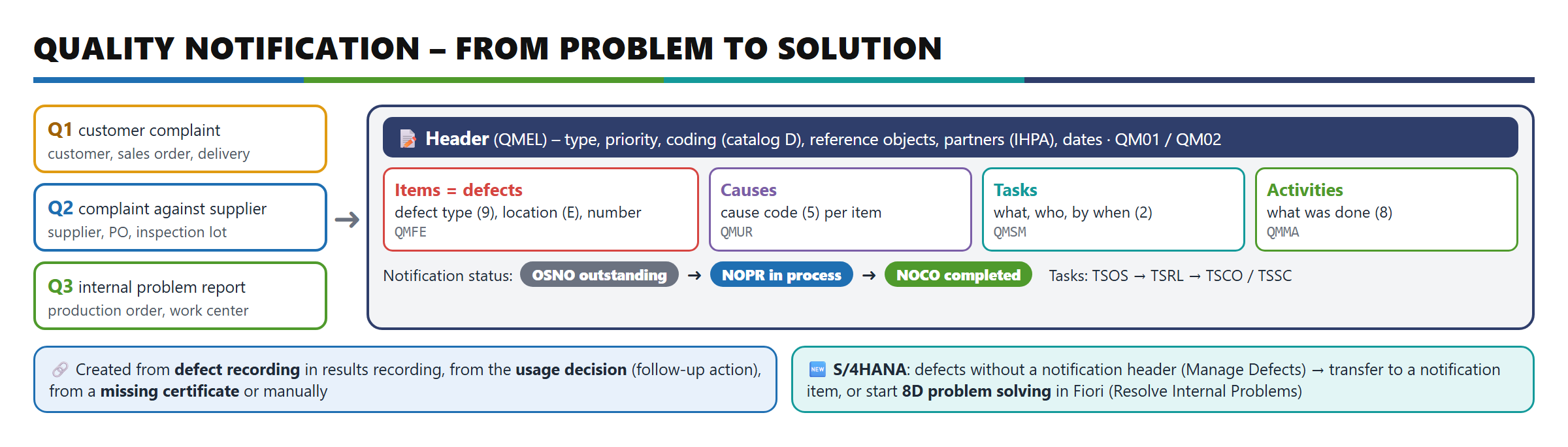
Type | Use | Typical reference |
|---|---|---|
Q1 Customer complaint | Complaint from a customer about delivered goods | Customer, sales order, delivery, batch |
Q2 Complaint against supplier | Defective goods received from a supplier; can be sent to the supplier and used in supplier evaluation | Supplier, PO, inspection lot, material document |
Q3 Internal problem report | Problems found in-house (production, warehouse) | Production order, work center, inspection lot |
Part of the notification | Content (catalog) | Table |
|---|---|---|
Header | Type, priority, coding (D), reference objects, partners, dates | QMEL, IHPA |
Items | Defect type (9), defect location (E), number of defects | QMFE |
Causes | Cause code (5) per item | QMUR |
Tasks | What must be done, by whom, by when (2); status released / completed / successful | QMSM |
Activities | What was done (8) | QMMA |
- Status: OSNO outstanding → NOPR in process → NOCO completed; tasks TSOS outstanding, TSRL released, TSCO completed, TSSC successful. The action box offers follow-up functions (e.g. create task, print, send to supplier).
- Transactions QM01 / QM02 / QM03, lists QM10 / QM11, simplified view IQS21. Fiori: Manage Defects, Process Quality Tasks.
- S/4HANA: defects can be recorded on their own and transferred to a notification later; from a defect a Fiori 8D problem-solving process can be started (app Resolve Internal Problems for internal problems). 8D runs in Fiori only.
Part 9 – Quality certificates
Direction | Process | T-codes |
|---|---|---|
Outgoing – certificate of analysis to the customer | A certificate profile defines which characteristics and values are printed; a profile assignment finds the profile per material / customer (condition technique); the certificate is output for the delivery item, an inspection lot or a batch | QC01 – QC03 profile, QC15 – QC17 assignment, QC20 for deliveries, QC21 for an inspection lot, QC22 for a batch |
Incoming – certificate from the supplier | The control key requires a certificate of a certificate type; the certificate receipt is entered after the goods receipt and checked | QC51 certificate receipt in procurement |
- Tables: QCVK / QCVM certificate profile, QCPR certificates in procurement (page 02 Part 10). Output type LQCA, the electronic certificate (IDoc QALITY02), the form and its exits: page 04 Part 4.2 and CORE ABAP › 11 Forms.
Part 10 – Key customizing
All QM customizing is under SPRO → Quality Management (direct entry QCC0). The settings an architect or developer must know:
IMG area → activity | What it controls |
|---|---|
Quality Inspection → Inspection Lot Creation → Maintain Inspection Types | Attributes of each inspection type, e.g. status profile, notification type for defects, default values for the usage decision |
Quality Inspection → Inspection Lot Creation → Maintain Inspection Lot Origins and Assign Inspection Types | Which inspection types belong to which origin; the variants of each origin |
Quality Inspection → Inspection Lot Creation → number ranges | Lot number intervals per origin |
Quality Inspection → Inspection Lot Completion → Define Follow-Up Actions | Function modules run by a UD code |
Quality Planning → Basic Data → catalogs, sampling, SPC | Catalog types, sampling types, valuation modes, control chart types |
QM in Logistics → QM in Procurement | Control keys, certificate types, block keys, supplier QM systems |
Quality Notification → Notification Creation → Notification Type | Notification types, number ranges, screen templates, catalog profile, partner determination |
Quality Notification → Notification Processing | Priorities, response times, action box, status profile |
Quality Certificate | Certificate types, certificate output |
PP order type dependent parameters (OPL8) | Inspection type for in-process inspection of the order type |
- Customizing vs master data: inspection types, origins and follow-up actions are customizing (transported); MICs, code groups, selected sets, sampling procedures and plans are master data (created in each system or migrated) – a frequent interview trap.
Part 11 – T-codes and Fiori apps per step
Step | SAP GUI | Fiori app (S/4HANA) |
|---|---|---|
Inspection setup | MM02 QM view, QA08 | Product master apps |
Plans and characteristics | QS21, QS31, QS41, QS51, QDV1, QDR1, QP01 | Manage Inspection Plans |
Supplier quality | QI01, QI06, QI07 | Manage Quality Info Records |
Inspection lot | QA01 – QA03, QA32, QA33 | Manage Inspection Lots |
Results recording | QE51N, QE01 – QE03 | Record Inspection Results |
Defects | QF01, defect recording in QE51N | Manage Defects |
Usage decision | QA11 – QA13, QA16, QA10 | Manage Usage Decisions |
Notifications | QM01 – QM03, QM10, QM11, IQS21 | Process Quality Tasks; Resolve Internal Problems (8D) |
Certificates | QC01, QC15, QC20 – QC22, QC51 | – |
Recurring inspection | QA07 | – |
Example – aging list of open inspection lots
A typical custom report: lots in quality inspection stock that are still waiting for a usage decision after N days.
|
- In ABAP Cloud the same list reads the released inspection lot CDS view (page 02 Part 11) instead of QALS.
Part 12 – Interview questions
Q1. Walk me through a goods receipt inspection.
GR 101 in MIGO posts to quality inspection stock and creates a lot of origin 01 (QALS, QAMB). The plan is selected and the sample calculated; results are recorded in QE51N, defects can create a Q2 notification; the UD in QA11 sets the code and quality score and posts the stock (321 unrestricted, 350 blocked, 553 scrap, 122 return). Quality level and supplier evaluation are updated.
Q2. Why was no inspection lot created at goods receipt?
Typical causes: the inspection type is not active in the material's QM view for that plant, the movement type is not QM-relevant, the Q-info record's No Inspection flag (source inspection) is set, dynamic modification set the lot to skip, or a user exit suppressed the lot.
Q3. What is the difference between origins 03 and 04?
03 is the in-process lot created at order release, with characteristics from the routing operations and no stock posting. 04 is created at goods receipt from production (or early at release) and ends with a usage decision that posts the product out of quality inspection stock.
Q4. What happens at usage decision?
A code from catalog type 3 with valuation A / R is chosen, the quality score calculated, follow-up actions run, the stock is posted out of quality inspection stock and status UD (and SPCO) is set; QAVE and QALS are updated, material documents linked in QAMB.
Q5. What is source inspection?
Inspection at the supplier before delivery: Q-info record with source inspection type and lead time, QI07 lists open POs and creates the lots; with the No Inspection flag the goods receipt creates no further lot.
Q6. How do you block a supplier for a material?
With a block key in the quality info record (one material) or in the supplier master (all materials); the key decides whether RFQs, purchase orders or goods receipts are blocked. Missing release in the Q-info record also blocks POs when the control key requires release.
Q7. What are Q1, Q2 and Q3 notifications?
Customer complaint, complaint against a supplier and internal problem report. Each has items (defects), causes, tasks and activities coded with catalogs and is stored in QMEL, QMFE, QMUR, QMSM and QMMA.
Q8. How is a certificate of analysis created for a customer?
A certificate profile (QC01) defines the characteristics, a profile assignment (QC15) finds it per material / customer, and the certificate is output for the delivery (QC20 or output of the delivery), the inspection lot (QC21) or the batch (QC22).
Q9. How is calibration of test equipment handled?
Test equipment is a PM equipment; a maintenance plan creates calibration orders (PM05) and releasing an order generates an inspection lot of origin 14 with one inspection point per equipment; the equipment UD and its follow-up actions can block the equipment.
Q10. Which settings are customizing and which are master data in QM?
Customizing: inspection types, lot origins assignment, number ranges, follow-up actions, notification types, control keys, catalog types. Master data: MICs, methods, code groups, selected sets, sampling procedures, dynamic modification rules, inspection plans, Q-info records.
Q11. What changes in S/4HANA for the quality technician and engineer?
Fiori apps per role – Manage Inspection Lots, Record Inspection Results, Manage Defects, Manage Usage Decisions, Process Quality Tasks – standalone defects and 8D problem solving in Fiori. The QM processes and tables themselves stay the same.
Q12. As an architect, when do you activate QM for goods receipt and when not?
Activate it where the risk justifies blocking stock: critical or regulated materials, new suppliers, batch-managed products. Use dynamic modification and skip lots for proven suppliers, and avoid inspection stock for low-risk materials because every lot delays availability and needs a usage decision.
🏠 Start Here · ◀ 02 · Master Data · 04 · Integration & Reporting ▶ · Sections: CORE ABAP | OOPS ABAP | ABAP on HANA | Clean Core | RAP | ABAP Points | SAP Fiori | SAPUI5 | Mobile Development (MDK) | BTP Foundations | BTP Development | CAP | SAP Build | ABAP on BTP | Integration Suite | SAP Business AI | SAP BASIS | Security | SAP SDLC
Functional: FICO ABAP | TRM ABAP | VIM | SAP BIS | SD ABAP | MM ABAP | PP ABAP | QM ABAP | PM ABAP | PS ABAP | EWM | TM ABAP | GTM ABAP | EHS ABAP | HR ABAP | BW | SAP Datasphere | SAP Business Data Cloud | SAP MDG | SAP Analytics Cloud | SAP Ariba | SAP CX | SAP IBP