QM does not run on its own: an inspection lot is almost always created by another module (a goods receipt in MM, a production order in PP, a delivery in SD, a calibration order in PM) and the usage decision sends results back – stock postings, vendor scores, costs, equipment status. This page shows each integration point with the documents, inspection types and movement types involved, the connection to EWM and to external lab systems (LIMS), and the standard reports and Fiori analytics. Master data and tables: page 02; results recording and usage decision in detail: page 03; exits, BAPIs and APIs: page 05.
Part 1 – The QM integration map
The inspection lot origin (2 digits) says which business event created the lot; each inspection type belongs to one origin and is activated per material in the inspection setup (page 02). The standard inspection type usually has the same number as its origin.
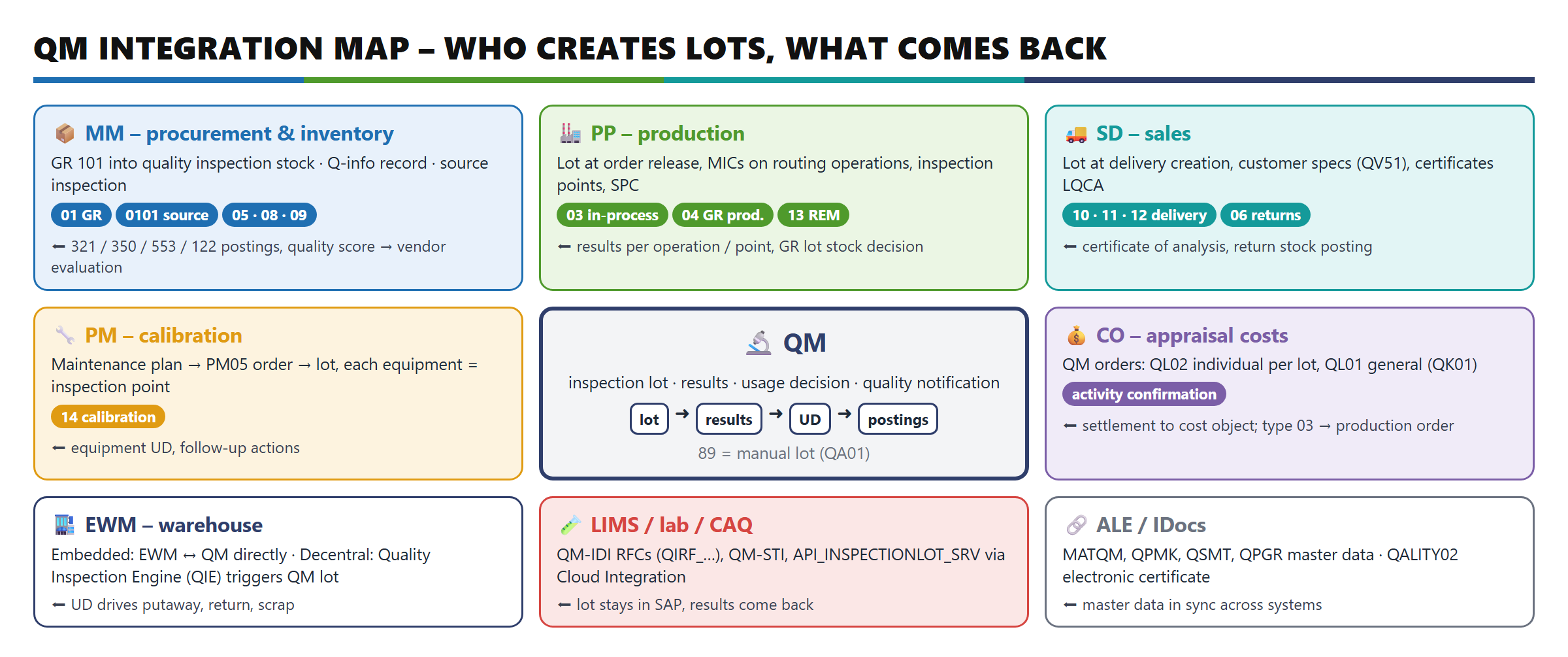
Module | Trigger | Origin / standard inspection type | What comes back from QM |
|---|---|---|---|
MM procurement | Goods receipt for a purchase order | 01 (model inspection: 0101) | Stock posting from QI stock, quality score for vendor evaluation |
MM inventory | Other goods receipt / stock transfer / batch due for re-inspection | 05 / 08 / 09 | Stock posting, next inspection date of the batch |
PP production | Release of a production order / goods receipt from production / REM | 03 / 04 / 13 | Results per operation and inspection point, stock posting of the GR lot |
SD sales | Creation of an outbound delivery / customer return | 10, 11, 12 / 06 | Delivery released for goods issue, quality certificate, return stock posting |
PM maintenance | Release of a calibration order | 14 | Equipment usage decision, follow-up actions (e.g. equipment status, notification) |
CO controlling | Inspection lot assigned to a QM order | – | Appraisal costs via activity confirmation, settled to a cost object |
EWM | Inbound delivery / warehouse stock | Lots created via QM with or without inspection rules (embedded) or QIE (decentral) | Usage decision drives putaway, return, scrap |
Batch management | Batch due for its next inspection date | 09 | Results copied to the batch classification, batch status, next inspection date |
Manual | QA01 (any material, any reason) | 89 | Stock posting if the lot manages stock |
Part 2 – QM in procurement (MM)
2.1 Goods receipt into quality inspection stock
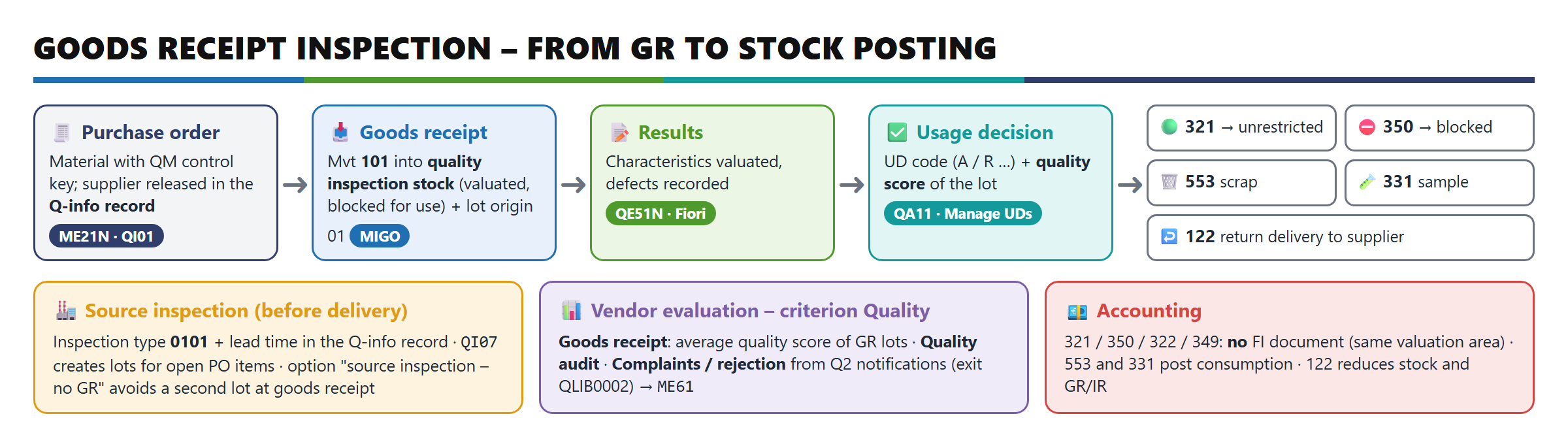
The goods receipt inspection step by step (lot, results, usage decision) is on page 03 Part 2. Here is the MM side: the goods receipt (movement type 101) posts into quality inspection stock (stock type Q) when Post to inspection stock is set in the inspection setup. The stock is valuated (it is on the balance sheet) but cannot be issued until the usage decision moves it with the movement types below.
Movement type | Meaning | Posted by |
|---|---|---|
101 | GR for purchase order into quality inspection stock | MIGO; lot origin 01 created |
321 / 322 | Quality inspection → unrestricted / reversal (unrestricted → quality inspection) | Usage decision stock posting (QA11) or MIGO transfer posting |
350 / 349 | Quality inspection → blocked / blocked → quality inspection (349 is its own movement type, not a reversal) | Usage decision (rejected goods) or MIGO |
331 | Sample withdrawal from quality inspection stock (destructive sample, like scrapping) | Usage decision (sample quantity) or MIGO |
553 | Scrapping from quality inspection stock | Usage decision |
122 | Return delivery to the supplier – also possible from quality inspection stock | Usage decision (return delivery) or MIGO |
- Transfer postings between stock types in the same plant have no accounting effect (same valuation area); scrapping and sample withdrawal post consumption to the G/L (OBYC, see MM ABAP › 03).
- Stock in quality inspection is shown in MMBE / Stock – Single Material in the column Quality Inspection; in S/4HANA it is calculated from MATDOC like every other stock type.
- Quality inspection stock without QM: the indicator Post to inspection stock in the material master (purchasing view) sends goods receipts to QI stock without any inspection lot. With QM active, the inspection setup of the inspection type controls the posting instead.
2.2 QM in procurement: where it touches purchasing
The settings (QM in procurement indicator MARA-QMPUR, control key, Q-info record, blocks) and source inspection are taught on page 03 Parts 6 and 7; the Q-info record fields on page 02 Part 8. The effect on each MM document:
MM document | QM check or effect |
|---|---|
Request for quotation / purchase order | Supplier release in the Q-info record, procurement block, supplier QM system; QA agreement and technical delivery terms output with the document |
Goods receipt | Lot creation and posting to quality inspection stock; no GR lot when the Q-info record's No Inspection flag is set (source inspection); certificate receipt expected |
Supplier invoice | Blocked for payment until the usage decision when the control key requires it |
2.3 Vendor evaluation with the quality score
MM vendor evaluation (ME61 maintain; it calculates and proposes the automatic scores) scores each supplier on main criteria. ECC and S/4HANA on-premise both have this classic vendor evaluation; in S/4HANA the LIS-based vendor evaluation is not the target architecture – SAP recommends supplier evaluation on CDS views (Fiori). The main criterion Quality has three standard automatic subcriteria, all fed by QM:
Subcriterion | Source in QM | How the score is formed |
|---|---|---|
Goods receipt | Inspection lots for goods receipts against purchase orders (origin 01) | Average of the lots' quality scores, calculated at the usage decision with the quality score procedure of the inspection type (e.g. from the UD code) |
Quality audit | Audit results at the supplier (audit management) | Audit score |
Complaints / rejection level | Quality notifications against the supplier (complaint, Q2) | Complaint score from the value of complained goods vs. GR value; own logic via exit QLIB0002 |
2.4 Returns and complaints against suppliers
- Rejected goods: usage decision with code R (rejected) → stock posting return delivery (122) or blocked stock (350) for later return; the lot's quality score lowers the vendor score.
- Create a quality notification of type Q2 (complaint against supplier) from the lot or the usage decision – defects, causes, tasks (8D), and the complaint score in vendor evaluation (page 03).
Part 3 – QM in production (PP)
Inspection types 03 (in-process, created at order release), 04 (goods receipt from production) and 13 (repetitive manufacturing) with their triggers and specifications: page 03 Part 5. The PP side of the order: PP ABAP › 03. What matters for the integration:
- Inspection characteristics live in the routing / master recipe operations (CA02 / C202) and are copied into the order and the 03 lot; results can be recorded together with the confirmation.
- An in-process lot (03) manages no stock: its usage decision posts nothing – it documents the quality of the order. Stock decisions are made on the GR lot (04).
- Inspection points record results at regular intervals during an operation (e.g. every 2 hours or every 100 pieces). The routing header defines the inspection point type – free, equipment, functional location or physical sample – and the operation defines the inspection frequency. Each inspection point gets its own valuation (UD per point); in process industries the valuations can create partial lots for batches.
- Problems found during production are documented as quality notifications; customer exit QQMA0028 can create a notification from a production order confirmation.
- Costs: for inspection type 03 the inspection activities are confirmed on the production order itself, so the appraisal costs end up in product costing – no QM order (Part 6).
- SPC: characteristics with an SPC criterion (e.g. per work center / material) feed control charts across lots (QGC1 / QGC2; Fiori Manage Control Charts).
Part 4 – QM in sales and distribution (SD)
4.1 Inspection at delivery
- Inspection types 10 (delivery to customer with sales order), 11 (without sales order) and 12 (delivery – general) create a lot when the outbound delivery is created. The lot manages no stock; it documents that the goods meet the customer's specification before goods issue (delivery processing: SD ABAP › 02).
- Prerequisites: an inspection lot origin is assigned to the delivery type in customizing and the inspection type is active in the material's QM view.
- Customer-specific requirements (e.g. tighter limits, a different plan) are kept per customer / sales organisation / material in the quality info record – sales (QV51); it takes precedence over the settings at customer level.
- Customer returns: inspection type 06 creates a lot for the return delivery; the usage decision decides between unrestricted, blocked or scrap. A Q1 notification (customer complaint) documents the problem and the corrective actions.
4.2 Certificates of analysis: output, IDoc and form
Certificate profile (QC01), profile assignment (QC15) and manual creation (QC20 – QC22) are taught on page 03 Part 9. The SD and interface side:
Object | Purpose | Where |
|---|---|---|
Output type LQCA | Delivery output that triggers the certificate for the recipient (condition records per customer / material) | Output condition records of the delivery |
Electronic certificate | Send the certificate as IDoc QALITY02 | Partner profile, exit QCE10002 |
- The certificate form is a classic developer task (SAPscript / Smart Form in ECC, Adobe form with S/4HANA output management) – exits QC100003 (profile determination) and QC100004 (before form printout); see page 05 and CORE ABAP › 11 Forms.
- Inbound side: certificates from suppliers are expected at goods receipt when the QM control key requires a certificate; the receipt is confirmed with QC51 (page 03 Part 9).
Part 5 – Test equipment calibration (PM)
Measuring instruments must be calibrated regularly. The calibration flow (plan → order → lot 14 → results and UD per equipment) is on page 03 Part 6. QM and PM share the work: PM plans and executes the order, QM records the measurements and makes the decision.
Object | Owned by | Integration point |
|---|---|---|
Equipment of the test equipment category | PM | Becomes an inspection point of type equipment in the lot; its status can be changed by the equipment UD |
Maintenance task list with MICs | PM (operations) + QM (MICs) | Characteristics are copied into the calibration lot |
Maintenance plan, scheduling (IP42 / IP10) | PM | Creates the calibration orders on time |
Calibration order (standard type PM05) | PM | Order type assigned to inspection type 14; release creates the lot – no lot when the assignment is missing |
Inspection lot, results, usage decision | QM | Follow-up actions: block the equipment, create a PM notification for repair |
- Fiori role Calibration Technician; public cloud: check the feature scope – calibration was requested there as a separate feature. PM side in depth: PM ABAP.
Part 6 – Appraisal costs and QM orders (CO)
Appraisal costs are the costs of inspecting (lab time, machine time). QM collects them on QM orders (internal-order-like CO objects) by confirming activities.
Option | Standard order type | How it works |
|---|---|---|
Individual QM order | QL02 | Created automatically per inspection lot (indicator in the material's inspection setup, QK01); settled after the lot is completed to the account assignment in the order header |
General QM order | QL01 | Created once (QK01 / central maintenance) and assigned to every lot of a material / inspection type; settled periodically |
Production order | – | Inspection type 03: activities are confirmed on the production order – costs flow into the product cost |
- Activities are confirmed during results recording or at the usage decision (work center activity types × time); exit QLCO0002 presets the confirmation data.
- Cost report from the inspection lot (Extras → Costs → Cost report QM order); settlement with the standard CO order settlement (KO88 / KO8G) – internal orders and settlement: FICO ABAP › 04.
- Nonconformity costs (rework, scrap, complaint handling) are collected on orders created from quality notifications – the two together give the cost of poor quality.
Part 7 – QM and the warehouse (EWM)
In decentral EWM inspections are handled by the Quality Inspection Engine (QIE), a separate component on the EWM side: inspection rules decide which inspection documents are created, and when QM integration is active the QIE triggers an inspection lot in QM and QM sends the usage decision back. In embedded EWM in S/4HANA, EWM inspection rules are optional (with rules: lots of origin 17; without: inspection setup in the material master); the lot is created and decided in QM – the decision then drives the warehouse follow-up (putaway, return to supplier, scrapping, further inspection). Not all QIE inspection object types exist in embedded EWM. Partial usage decisions (part accepted, part rejected) are supported in both. Warehouse processes in depth: EWM section.
Part 8 – External systems: LIMS, QM-IDI, ALE and APIs
8.1 LIMS and lab instruments via QM-IDI
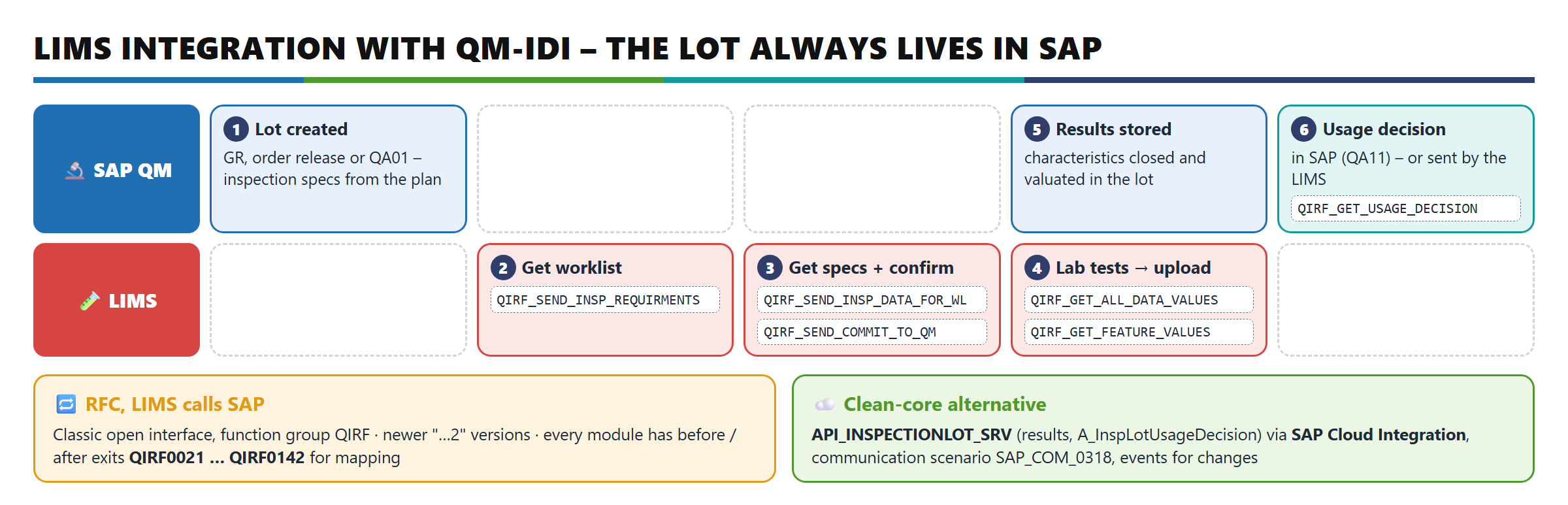
Laboratories often run a LIMS (laboratory information management system) or CAQ system. SAP's classic open interface for this is QM-IDI (inspection data interface): RFC function modules of function group QIRF that the subsystem calls. The lot is always created in SAP; the LIMS pulls the work and pushes results back.
Step | Function module (RFC) | Direction |
|---|---|---|
Worklist of lots / operations for the subsystem | QIRF_SEND_INSP_REQUIRMENTS (spelt this way) | SAP → LIMS |
Inspection specifications of the worklist | QIRF_SEND_INSP_DATA_FOR_WL (newer: …_WL2) | SAP → LIMS |
Confirm the download | QIRF_SEND_COMMIT_TO_QM | LIMS → SAP |
Results: characteristic / sample / original values | QIRF_GET_FEATURE_VALUES, QIRF_GET_SAMPLE_VALUES, QIRF_GET_ORIGINAL_VALUES (…2 versions) | LIMS → SAP |
All record types in one call | QIRF_GET_ALL_DATA_VALUES (…2) | LIMS → SAP |
Usage decision from the subsystem | QIRF_GET_USAGE_DECISION (…2) | LIMS → SAP |
- Each QIRF module has a before / after function exit (EXIT_SAPLQIRF_*) for own mapping logic; IMG: Quality Inspection → Subsystems → Process Quality Inspections Using QM-IDI.
- QM-STI is a second classic interface for statistical / CAQ software (exits QIST0002 …).
8.2 ALE / IDocs for QM master data and certificates
Message type | Object | Remark |
|---|---|---|
MATQM | Inspection setup of a material | BAPI-based ALE; default inbound FM BAPI_IDOC_INPUT1 |
QPMK | Master inspection characteristics | Exits QPMK0010 / QPMK0020 |
QSMT | Inspection methods | Exits QSMT0010 / QSMT0020 |
QPGR | Catalog code groups and codes | Exit QPGR0020 |
IDoc type QALITY02 | Electronic quality certificate | Exit QCE10002 |
- IMG: Quality Management → Environment → Central Functions → Distribute ALE master data; model views in BD64 (QPMK / QSMT may have to be typed in manually). ALE basics: CORE ABAP › 07 Interfaces.
8.3 APIs and events (S/4HANA)
- API_INSPECTIONLOT_SRV (OData V2) – inspection lots, operations, characteristics, results, subsets and the usage decision (entity A_InspLotUsageDecision); communication scenario SAP_COM_0318 Quality Inspection Process Integration. This is the clean-core way for a modern LIMS / MES to record results – usually via SAP Cloud Integration (see Integration Suite › 02).
- Master data APIs (inspection plan, master inspection characteristic, inspection method, quality info record) and the quality notification API: page 05 Part 6.
- Business events such as InspectionLotChanged let subscribers react without polling (note: in the public cloud a usage decision does not raise InspectionLotChanged).
Part 9 – Standard reports and Fiori analytics
9.1 SAP GUI reports and worklists
T-code | Purpose |
|---|---|
QA32 / QA33 | Worklist of inspection lots (change / display) – the daily entry point: select by plant, origin, dates, status; jump to results recording and usage decision |
QE51N | Results recording worklist |
QA10 / report RQEVAI30 | Automatic usage decision (background job for lots without defects) |
QGA1 | Time line of quality scores (per material / supplier); S/4HANA: SAP GUI only, not via the Fiori launchpad – Fiori successor Inspection Lot Detailed Analytics |
QGA2 / QGA3 | Display / print inspection results |
QGA4 | General QM evaluations (menu) |
QGC1 / QGC2 | Control charts (SPC) |
QM10 / QM11 | Change / display list of quality notifications |
MCXV and other MCX… reports | ECC: QM information system (QMIS, LIS-based) – notification and inspection analyses · S/4HANA: compatibility scope only (ID 473, SAP Note 2269324), MC… transactions removed from the Fiori launchpad; successor: embedded analytics below |
9.2 Fiori analytical apps and overview pages (embedded analytics)
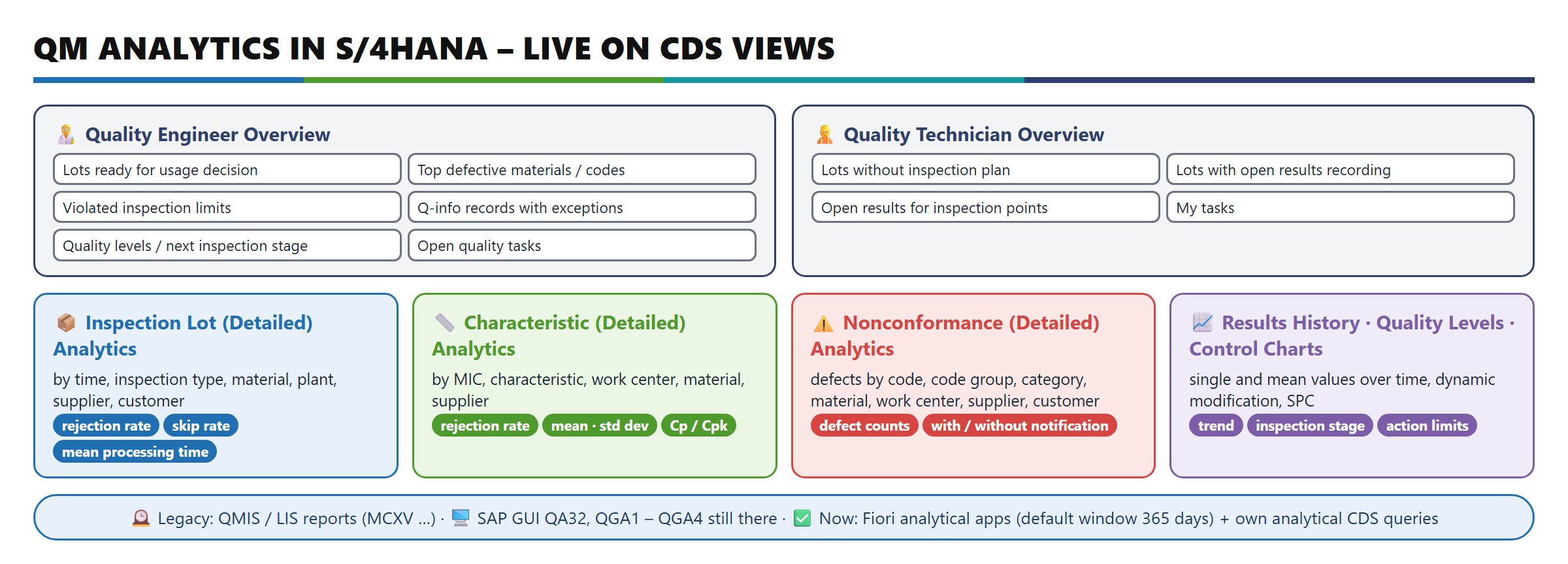
The S/4HANA analytics read the QM tables live through CDS views (no LIS update, no BW needed). Standard apps:
App | Analyses (default: last 365 days) |
|---|---|
Inspection Lot Analytics | Accepted and rejected lots, rejection rate, skip rate, number of lots, mean processing time – by time, inspection type, material, plant, supplier, customer |
Characteristic Analytics / Characteristic Detailed Analytics | Accepted / rejected inspections, rejection rate per MIC, mean value, standard deviation, Cp / Cpk |
Nonconformance Analytics / Nonconformance Detailed Analytics | Defects by defect code / code group / category, material, work center, supplier, customer – with or without notification |
Display Results History | Mean and single values of quantitative characteristics over time |
Manage Quality Levels | Dynamic modification: quality levels and inspection stages over time |
Quality Engineer Overview / Quality Technician Overview | Overview pages with cards, e.g. lots ready for usage decision, top defective materials / codes, violated inspection limits, Q-info records with exceptions, open quality tasks |
- Typical quality KPIs an architect is asked about: rejection rate of lots, first pass yield, skip rate, lead time from lot creation to usage decision, supplier quality score, number of complaints per supplier, Cp / Cpk of critical characteristics.
- Own KPIs: a custom analytical CDS query on released QM views (page 05 Part 6) consumed in a Fiori analytical list page or SAP Analytics Cloud – see ABAP on HANA › 05 CDS Views.
Part 10 – Interview questions
Q1. What happens technically when goods are received for a material with inspection type 01 active?
Movement type 101 posts the quantity into quality inspection stock (valuated, not usable) and an inspection lot of origin 01 is created in the same update. Results are recorded against the lot; the usage decision posts the stock: 321 to unrestricted, 350 to blocked, 553 scrap, 331 sample, 122 return to supplier.
Q2. Does a transfer from quality inspection to unrestricted stock create an accounting document?
No. 321 changes only the stock type inside the same plant and valuation area, so the value does not change. Scrapping (553) or a sample withdrawal (331) do post – consumption against stock.
Q3. How does QM feed vendor evaluation?
The main criterion Quality has the automatic subcriteria goods receipt (average quality score of GR lots, calculated at the usage decision), quality audit and complaints / rejection level (from Q2 notifications, exit QLIB0002). ME61 reads the lots and proposes the scores.
Q4. Where does QM in procurement act on the MM documents?
At the RFQ / purchase order (supplier release in the Q-info record, procurement block, supplier QM system, QA agreement documents), at the goods receipt (lot and quality inspection stock, no GR lot if the Q-info record's No Inspection flag is set, certificate expected) and at the invoice (payment block until the usage decision if the control key says so).
Q5. Why does the usage decision of a production in-process lot post no stock?
Inspection type 03 lots are created at order release and do not manage stock – they document the process. Stock is decided on the goods receipt lot (type 04) or by batch.
Q6. What are inspection points?
Repeated recording points within one operation – time- or quantity-based (free), or per equipment, functional location or physical sample. Each point has its own valuation; in PM calibration each equipment is an inspection point.
Q7. How does a certificate of analysis technically reach the customer?
ECC (NAST output control): output type LQCA on the outbound delivery, found by condition records per customer / material, triggers the certificate for the recipient · S/4HANA output management (standard in the public cloud): output type QUALITY_CERTIFICATE for the outbound delivery item, found in Output Parameter Determination; the content comes from the certificate profile. It is printed or e-mailed as a form or sent as IDoc QALITY02 (exit QCE10002 for extra segments).
Q8. Which objects does PM own and which does QM own in calibration?
PM owns the test equipment, the maintenance task list operations, the maintenance plan and the PM05 calibration order; QM owns the MICs, the type 14 lot, the results and the usage decision. The link is the assignment of inspection type 14 to the order type and the equipment as inspection point, whose UD can block the equipment.
Q9. Where do appraisal costs go?
To QM orders: individual per lot (QL02, created automatically) or general per material / inspection type (QL01, settled periodically), assigned in QK01. For type 03 they go to the production order.
Q10. A LIMS must receive inspection lots and send results. Which options do you have?
Classic: QM-IDI RFCs (QIRF_SEND_INSP_REQUIRMENTS / …_DATA_FOR_WL to download, QIRF_GET_… to upload results and the UD) with QIRF exits for mapping. Modern / clean core: API_INSPECTIONLOT_SRV through SAP Cloud Integration, plus events. The lot and the usage decision stay in SAP either way.
Q11. Is the Quality Inspection Engine used with embedded EWM in S/4HANA?
Optionally. Embedded EWM works with or without EWM inspection rules (with rules: lots of origin 17) – lots are created and decided in QM. The QIE is used for decentral EWM, where it can trigger lots in an ERP / S/4HANA QM and receive the UD.
Q12. Which reports would you show a quality manager in S/4HANA?
QA32 as worklist, QGA1 / QGA2 for scores and results, QM10 / QM11 for notifications – and in Fiori the Quality Engineer Overview, Inspection Lot / Characteristic / Nonconformance (Detailed) Analytics with rejection rate, skip rate, processing time and Cp / Cpk. MCXV (LIS) is legacy.
🏠 Start Here · ◀ 03 · Processes & Config · 05 · Development ▶ · Sections: CORE ABAP | OOPS ABAP | ABAP on HANA | Clean Core | RAP | ABAP Points | SAP Fiori | SAPUI5 | Mobile Development (MDK) | BTP Foundations | BTP Development | CAP | SAP Build | ABAP on BTP | Integration Suite | SAP Business AI | SAP BASIS | Security | SAP SDLC
Functional: FICO ABAP | TRM ABAP | VIM | SAP BIS | SD ABAP | MM ABAP | PP ABAP | QM ABAP | PM ABAP | PS ABAP | EWM | TM ABAP | GTM ABAP | EHS ABAP | HR ABAP | BW | SAP Datasphere | SAP Business Data Cloud | SAP MDG | SAP Analytics Cloud | SAP Ariba | SAP CX | SAP IBP