This page turns the base BO into apps people can use: projection views, metadata extensions, value help and search for the reps' list report and object page (R2), a second, simpler projection and service for the managers' approval app (R11, UI side), access control by sales organisation with the authorization object and PFCG / IAM roles (R3), and finally the service definition, binding, preview and the deployed Fiori app.
Part 1 – Requirements and the projection views (R2)
The base BO from 02 · Data Model & CDS is reusable and knows nothing about screens. The projection is the shop window for one app: it picks fields, adds search and value help, and the metadata extension arranges them on the screen. Fiori elements then draws the whole app from these annotations – no UI5 code. Access control decides which rows reach the window at all, and the service opens it to the outside.
1.1 Requirements on this page
R-ID | Requirement | Where on this page |
|---|---|---|
R2 | Users find orders by customer, status or date; see the amount and status colour | Part 1 (projection), Part 2 (list report, object page), Part 3 (value help, search) |
R3 | A rep sees only orders of their sales organisation | Part 5 (access control, authorization object, PFCG / IAM). Behavior authorization → 06 · Feature Control, Authorization & Numbering |
R11 | Approver uses a separate, simpler app (approve / reject only) | Part 4 (UI side: approver projection, metadata extension, service). Projection BDEF → 04 · Behavior Definition & Behavior Pool |
R1, R7 | Create, edit, delete; Approve / Reject buttons | Part 2 (buttons), Part 6 (preview) |
1.2 Projection views
One base BO can have several projections (the processor app here, the approver app in Part 4), each exposing a different subset. ADT: right-click ZR_SalesOrder → New Data Definition → template *Define Projection View*.
|
|
Provider contract | Use |
|---|---|
transactional_query | Projection for a transactional OData service (UI or Web API) – this page |
transactional_interface | BO interface ( |
analytical_query | Analytical queries (InA) |
redirected to composition child / parent– the projection tree must point to projection entities. Common mistake: forgetting the redirect – the service would expose theZR_child and activation fails._Customer.CustomerNameis a path expression: the name is read fromI_Customerwithout exposing the association in the service. Such fields are read-only.- Common mistake: putting logic in the projection. All behavior lives in the base BO; the projection only exposes it (
use …in the projection BDEF, → 04) and adds UI metadata. - Check the element names of a released value-help view in ADT before using it (e.g. the unit element of
I_UnitOfMeasureStdVH).
Part 2 – Metadata extensions: list report and object page (R2)
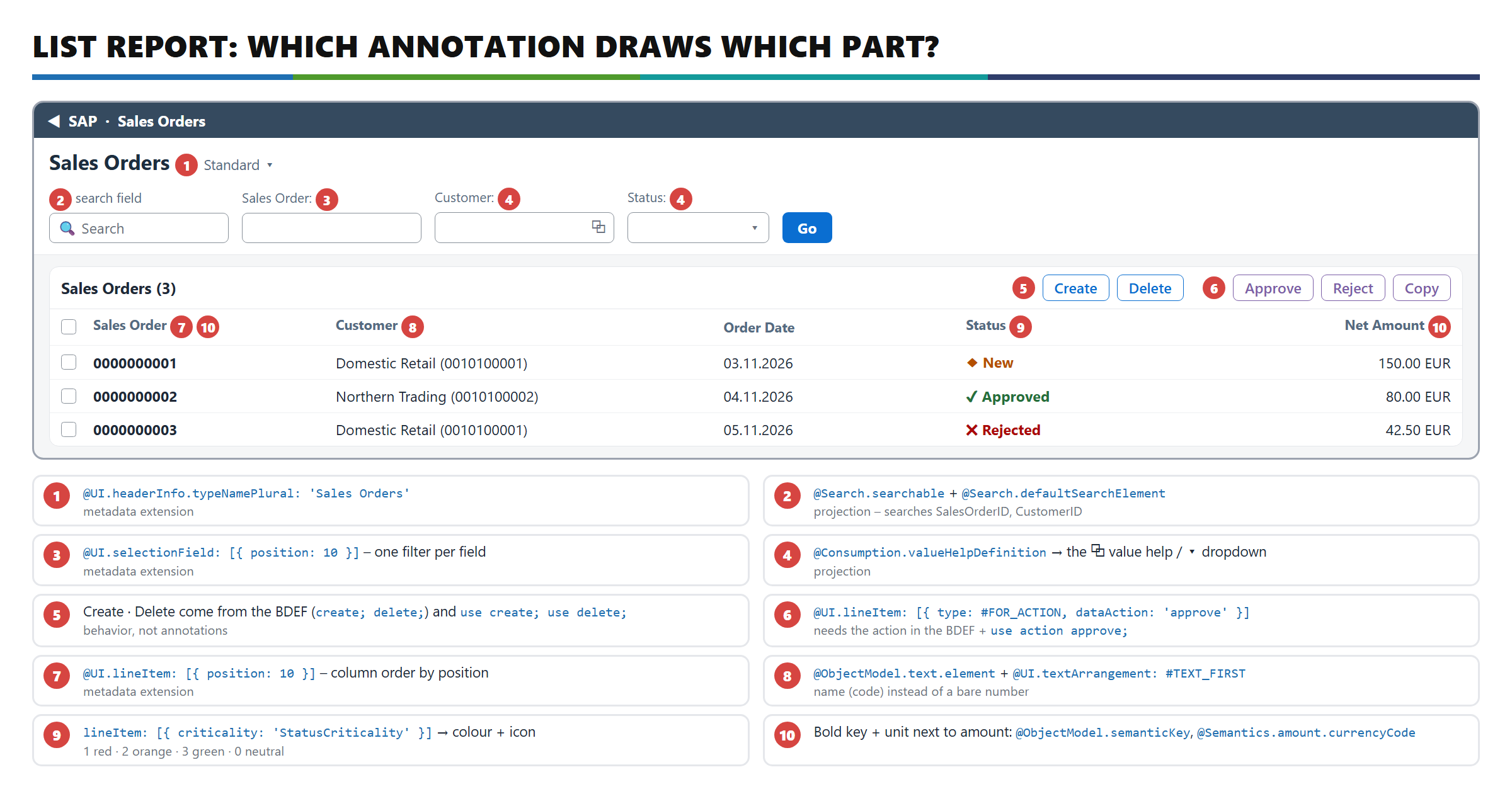
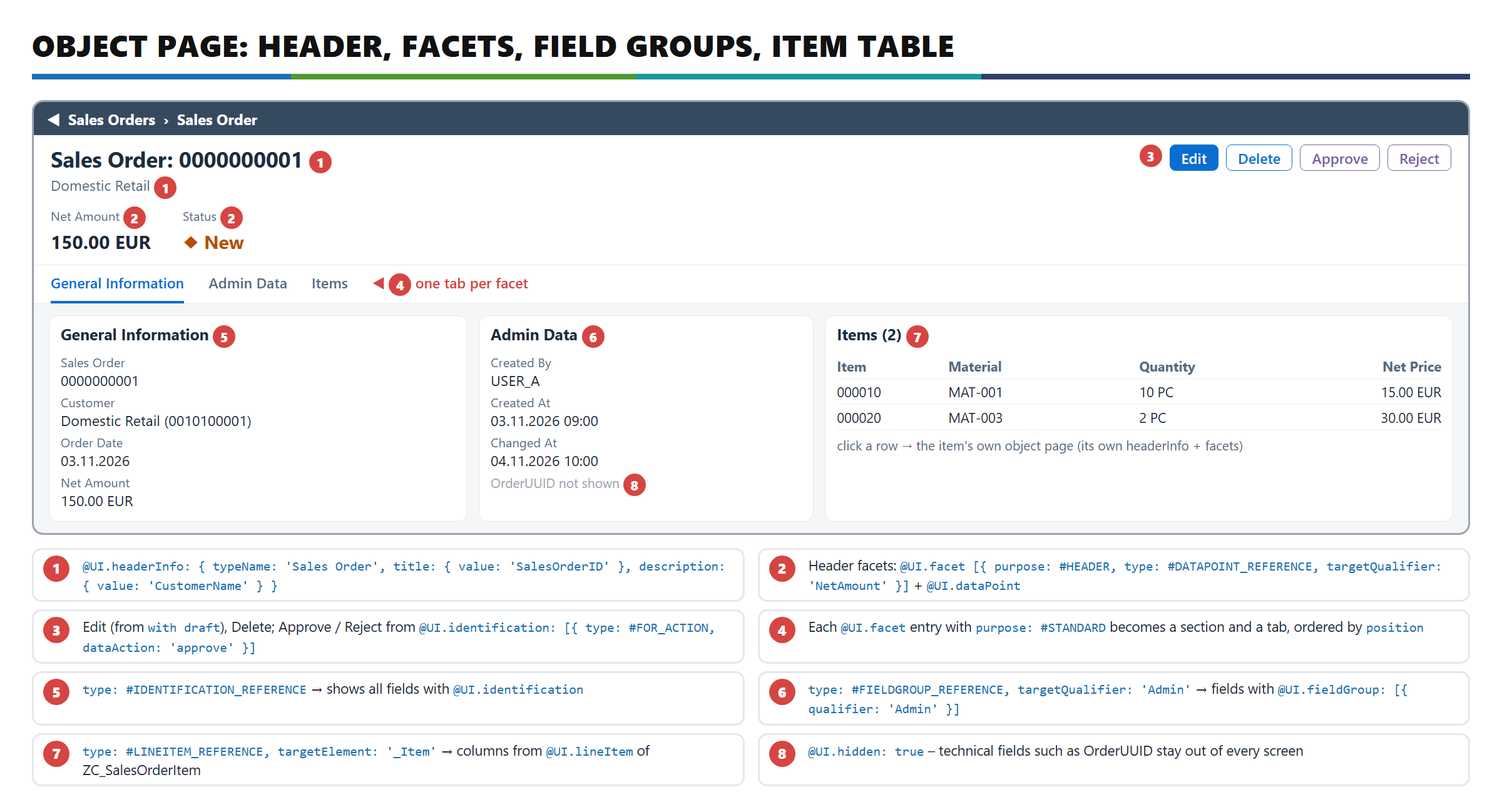
A metadata extension keeps the long @UI annotations out of the view. ADT: right-click the projection → New Metadata Extension (same name as the entity). @Metadata.layer: #CUSTOMER is the layer for customer objects. R2 in screen terms: filter fields for customer, status and date, an amount column and a coloured status.
2.1 Header metadata extension
|
2.2 Item metadata extension
A second metadata extension ZC_SalesOrderItem gives the item table its columns and the item object page:
|
2.3 Which annotation draws what
Annotation | Screen area |
|---|---|
@UI.headerInfo | Title of list (typeNamePlural) and object page (typeName, title, description) |
@UI.selectionField | Filter fields in the list report's filter bar (R2: customer, status, date) |
@UI.lineItem | Table columns (list report, or item table in the object page); |
@UI.identification | Fields of the |
@UI.facet | Sections / tabs of the object page; |
@UI.fieldGroup | Named group of fields for a |
@UI.dataPoint | A highlighted value (KPI) in the header |
criticality | Colour + icon: 0 neutral, 1 red (negative), 2 orange (critical), 3 green (positive) |
@UI.hidden | Field is transported but never shown |
@UI.presentationVariant | Default sort order (and more) of the list |
@UI.textArrangement |
|
- A
#FOR_ACTIONbutton appears only if the action also exists in the base BDEF and is exposed withuse actionin the projection BDEF (→ 04 · Behavior Definition & Behavior Pool). Whether it is enabled for this order and this user is feature control and authorization (R7 → 06 · Feature Control, Authorization & Numbering): reps see Approve greyed out. - Read-only (grey) fields come from the BDEF (
field ( readonly )), not from annotations. - Common mistake:
@Metadata.allowExtensions: truemissing on the projection – the metadata extension activates with an error and the app shows only key fields.
Part 3 – Value help, text and search (R2)
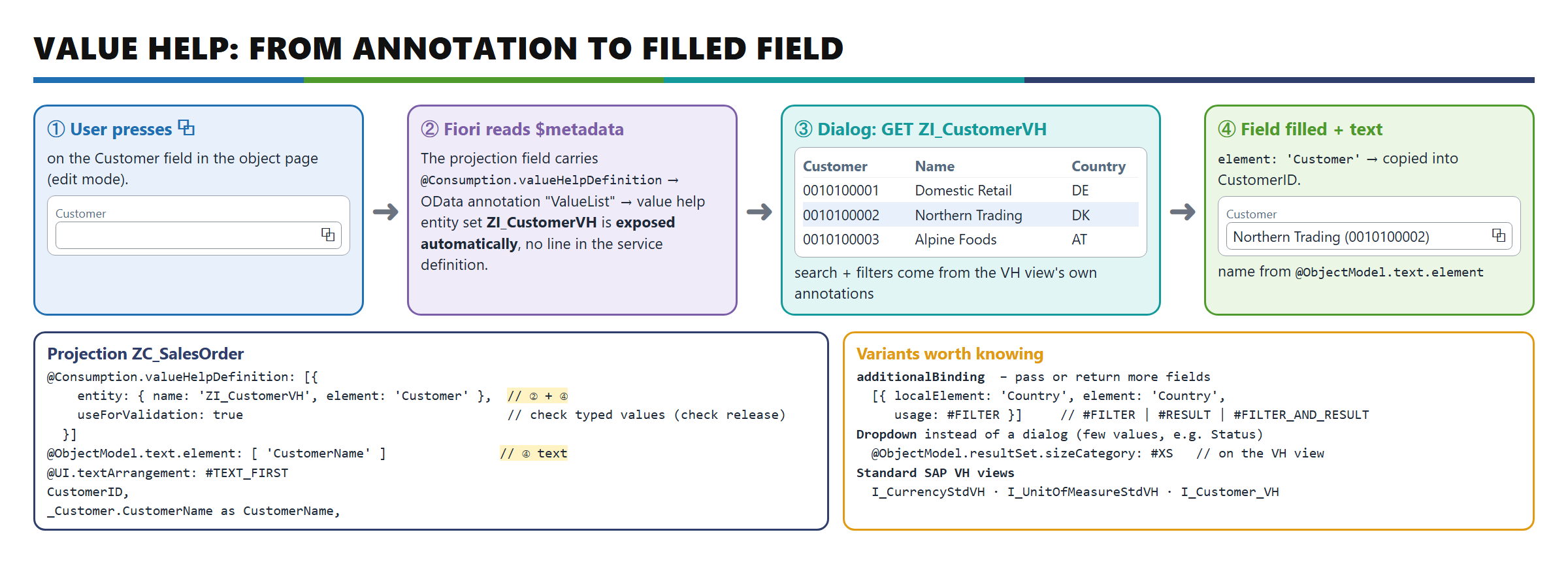
"Find orders by customer" (R2) means the user must not type customer numbers from memory: a value help offers them, the name is shown next to the number, and the search box finds orders by number or customer, even with typos.
3.1 Value-help views
A value help is just another CDS view. Wrap the released view so you control the columns and the search:
|
|
DDCDS_CUSTOMER_DOMAIN_VALUE_Tis a released table function that reads the fixed values and texts of your own domains (only domains in ABAP Cloud software components – check your release). Alternative: a small own table with the status texts.@ObjectModel.resultSet.sizeCategory: #XSturns the value help into a dropdown – good for 2–20 values.ZI_CustomerVHhas no access control of its own (#NOT_REQUIRED): the access control ofI_Customerdoes not carry over to a view that selects from it. If customers must be restricted too, give the value help its own role.- additionalBinding passes or returns further fields:
additionalBinding: [{ localElement: 'Country', element: 'Country', usage: #FILTER }]would pre-filter the customer dialog by a Country field of the order.#RESULTcopies a value back,#FILTER_AND_RESULTdoes both. - Value-help views used in the projection are exposed in the service automatically – no
exposeline. - Newer releases support
useForValidation: trueinside@Consumption.valueHelpDefinition, so typed values are checked against the value help – check your release. The business check "customer exists and is not blocked" (R6) still belongs in a validation (→ 05 · Business Logic & Messages).
3.2 Text and search
- Text next to a code:
@ObjectModel.text.element: [ 'CustomerName' ]+@UI.textArrangement. The text element must be in the projection (_Customer.CustomerName as CustomerName). - Search:
@Search.searchable: trueon the view,@Search.defaultSearchElement: trueon the fields the search box looks in,@Search.fuzzinessThreshold(0–1) for typo-tolerant search.
3.3 More useful elements
Need | How |
|---|---|
Simple calculated field | CASE / arithmetic in the base view, e.g. |
Field calculated in ABAP | Virtual element in the projection (→ 11 · Files, Custom Entities & Integration) |
Fields of another entity | Path expression |
Default sort | @UI.presentationVariant |
Default filter value |
|
Edit many rows in one table | Multi-inline edit via a singleton root entity that composes the real table (newer releases; see the ABAP cheat sheets – check your release) |
Read-only list with totals | Projection with |
Part 4 – Processor and approver apps on one BO (R11)
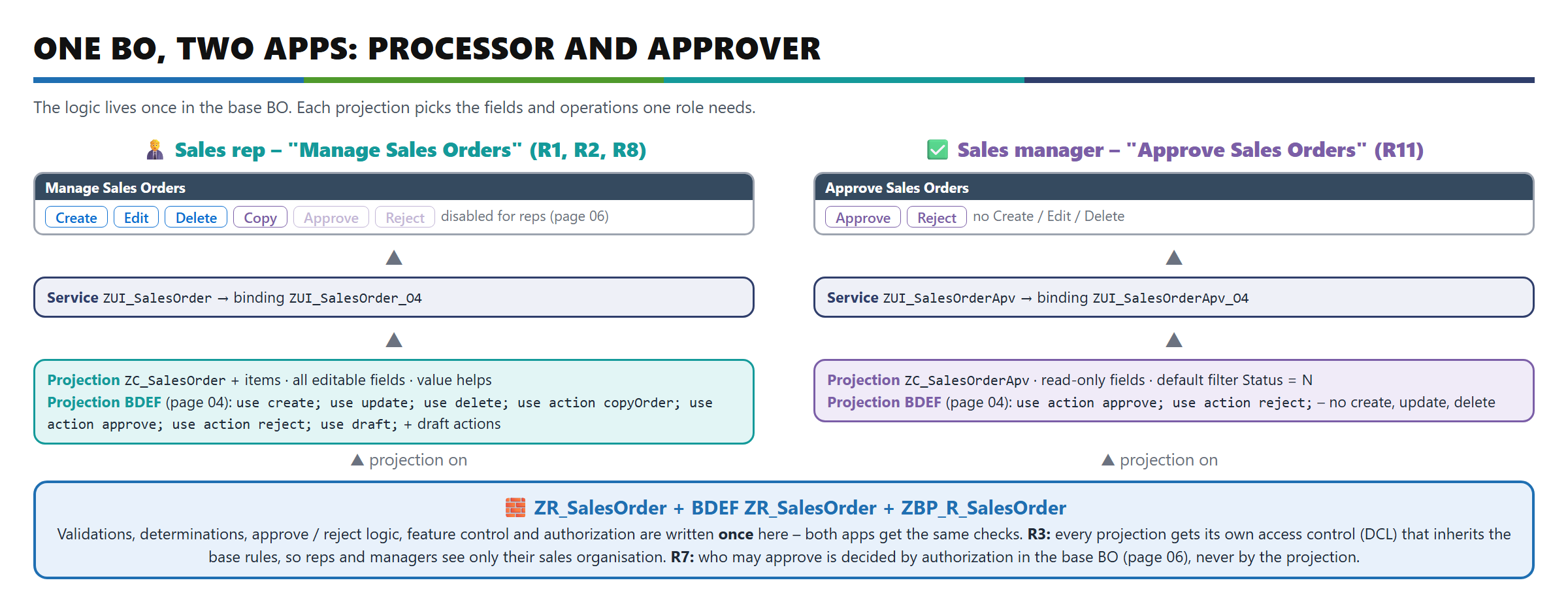
R11: the sales manager wants a separate, simpler app that only approves or rejects. Instead of a second BO you build a second projection, metadata extension and service on the same base BO. All logic (validations, approve, reject) stays written once in ZR_SalesOrder.
4.1 Approver projection view
|
|
- The approver tree needs its own item projection:
ZC_SalesOrderItemalready redirects_SalesOrderto the processor root, and a composition child belongs to exactly one projection tree. - Fewer fields, no value helps: the manager decides on customer, amount and items, but edits nothing.
- The projection BDEF exposes only
use action approve; use action reject;plus the items for display – no create, update or delete (→ 04 · Behavior Definition & Behavior Pool).
4.2 Approver metadata extension and service
|
|
- The item columns come from a small metadata extension
ZC_SalesOrderItemApvwith@UI.lineItemon ItemNo, MaterialID, Quantity and NetPrice, as in Part 2.2. - Binding
ZUI_SalesOrderApv_O4(OData V4 – UI), its own IAM app / PFCG start authorization and its own access controlZC_SALESORDERAPV(Part 5), so only managers get the approver tile. - Interview tip: "The projection only decides which buttons a role sees. Who may really approve is checked in the base BO, so the rule also holds for EML callers and the Web API."
Part 5 – Access control (DCL) and authorization objects (R3)
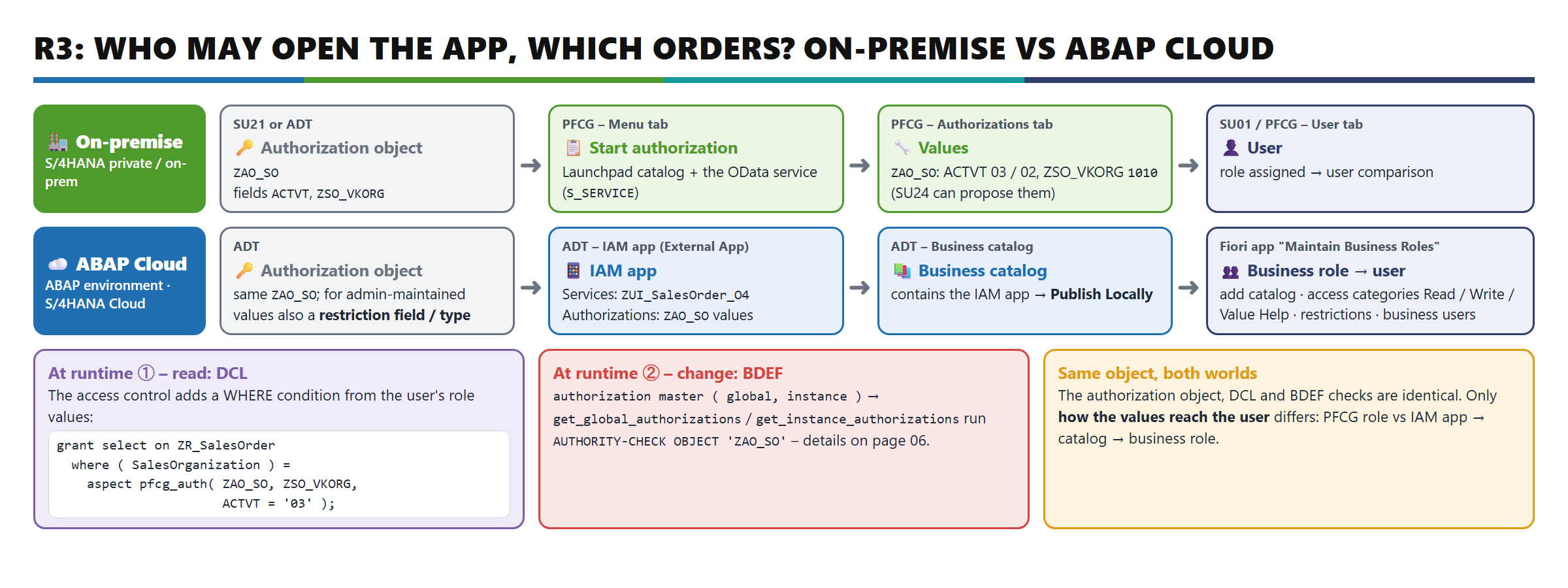
Two questions: may the user open the app at all, and which orders may they see? R3 answers the second one: a rep sees only orders of their sales organisation. The authorization object and the access control are the same everywhere; only the way the values reach the user differs – a PFCG role on-premise, an IAM app → business catalog → business role in ABAP Cloud.
5.1 Authorization object
Create authorization field ZSO_VKORG (data element ZDE_SALES_ORG) and authorization object ZAO_SO with fields ACTVT and ZSO_VKORG – in ADT (*New → Authorization Field / Authorization Object*), or SU20 / SU21 on-premise. Activities: 01 create, 02 change, 03 display, 06 delete. The same object is checked for changes in the behavior pool (→ 06 · Feature Control, Authorization & Numbering).
5.2 Access control – which rows a user may read
ADT: right-click the view → New Access Control. The role adds a WHERE condition to every read: list report, object page, OData and EML reads.
|
|
- Each access control is its own repository object; the two roles above are shown together only to save space.
- Each CDS level needs its own access control – a projection does not inherit it automatically;
inheriting conditions from entityreuses the rules. The item view is protected the same way, or reached only through its order. - Simple variant without an authorization object:
where CreatedBy = aspect user(users see only their own orders). - The access control protects reading. Create, update, delete and actions – e.g. a rep creating an order for another sales organisation, or approving (R7) – are protected by authorization in the BDEF (→ 06 · Feature Control, Authorization & Numbering).
- Common mistake:
#CHECKon the view but no role → only a warning, everyone sees everything. Or a role with a wrong condition → the list is empty and nobody knows why (check with the access control test in ADT).
5.3 Getting the values to the user
Step | On-premise (PFCG) | ABAP Cloud (IAM) |
|---|---|---|
Start the app | PFCG role menu: launchpad catalog + the OData service (start authorization | IAM app (type External App) lists the service |
Values | PFCG Authorizations tab: ZAO_SO with ACTVT 02/03, ZSO_VKORG 1010; SU24 can propose default values for the service | IAM app Authorizations tab: ZAO_SO values; values that an admin maintains later use restriction fields / types |
Bundle | The role itself | Business catalog (ADT) containing the IAM app → Publish Locally |
Assign | SU01 / PFCG user tab, user comparison | Fiori app Maintain Business Roles: add the catalog, set access categories (Read, Write, Value Help) and restrictions, add business users |
- For R11 the manager gets a second role or catalog with the approver service
ZUI_SalesOrderApv_O4; the rep's role does not contain it, so the rep never sees that tile. - Interview tip: "The access control filters what I can read; BDEF authorization checks what I can change; PFCG or IAM only delivers the values to the user."
Part 6 – Service definition, service binding and preview
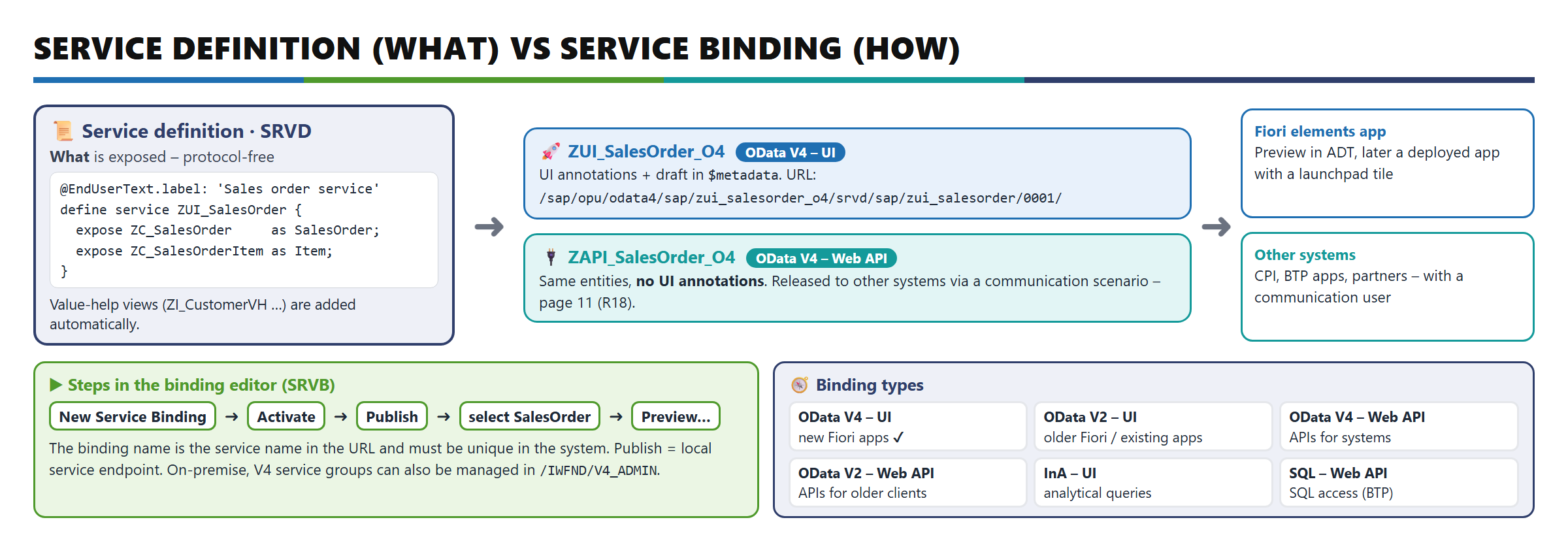
The BO is finished, but nobody outside ABAP can reach it yet. The service definition says *what* to expose (which entities), the service binding says *how* (OData V2 or V4, UI or Web API). Think of a menu (definition) and the delivery channel (binding: dine-in or takeaway).
6.1 Service definition – what to expose
|
- Repository object type SRVD (service binding = SRVB) – transported, syntax-checked and activated like any ABAP object. ADT: right-click ZC_SalesOrder → New Service Definition.
- The alias (
as SalesOrder) becomes the OData entity set name. Value-help views used in the projection are exposed automatically. - A service definition can expose entities of several BOs. Newer releases can also expose an AMDP method (since BTP 2502 – check your release).
- A UI service can even be built on an SAP-released BO interface whose view allows it (
@ObjectModel.supportedCapabilities: [#UI_PROVIDER_PROJECTION_SOURCE]) – check your release.
6.2 Service binding – how to expose
Binding type | Use |
|---|---|
OData V4 – UI | Fiori elements apps – recommended for new transactional apps (draft, side effects) |
OData V2 – UI | Existing or older Fiori apps |
OData V4 / V2 – Web API | API for other systems – no UI annotations (R18 → 11 · Files, Custom Entities & Integration) |
InA – UI | Analytical queries (live access from analytics clients) |
SQL – Web API | SQL access to published CDS objects (SAP Business AI Platform, ABAP environment) |
OData V2 | OData V4 | |
|---|---|---|
Status | Mature, still supported | SAP's recommendation for new RAP apps |
Draft, side effects, newer Fiori features | Partly (some features V4-only, e.g. side-effect messages) | Full support |
Batch / payload | Verbose JSON | Leaner JSON, better |
Choose when | The consumer only speaks V2 | Always, unless a consumer forces V2 |
- The service name equals the binding name and must be unique in the system:
ZUI_SalesOrder_O4(UI),ZUI_SalesOrderApv_O4(approver UI),ZAPI_SalesOrder_O4(Web API). Suffixes_O4/_O2show the protocol. - After creating the binding: Activate → Publish → select
SalesOrder→ Preview (Fiori elements preview in the browser). Publishing creates the local service endpoint; on-premise V4 services can also be managed in/IWFND/V4_ADMIN. - Common mistake: changing the service definition (new entity, new alias) without re-publishing the binding – the app still sees the old
$metadata. Re-publish, then clear the browser / app cache.
6.3 What you see in the preview
Screen | Comes from |
|---|---|
List report with search and filter bar (Sales Order, Customer, Date, Status) and columns (R2) |
|
Only orders of my sales organisation (R3) | Access control |
Buttons Create, Delete, Copy, Approve, Reject (R1, R7, R8) | BDEF operations and actions + |
Object page with header, General Information, Admin Data and Items |
|
Edit → fields editable, Save / Discard Draft (R10) |
|
Grey (read-only) fields: Sales Order, Status, Net Amount |
|
Coloured status (R2) | criticality: 'StatusCriticality' |
6.4 Preview problems
- 403 Forbidden: most often missing authorization for the service (on-premise: no start authorization
S_SERVICEin the user's role; cloud: the service is not in an IAM app / business role). Less often a blocked HTTP service (UCON allowlist). On-premise,/IWFND/ERROR_LOGshows the reason. - Empty list: no data in the tables (demo class on 02 · Data Model & CDS) or the access control filters every row – e.g. the user has no ZAO_SO value for the sales organisation of the demo orders.
Part 7 – OData requests and the deployed Fiori app
7.1 What an OData request looks like
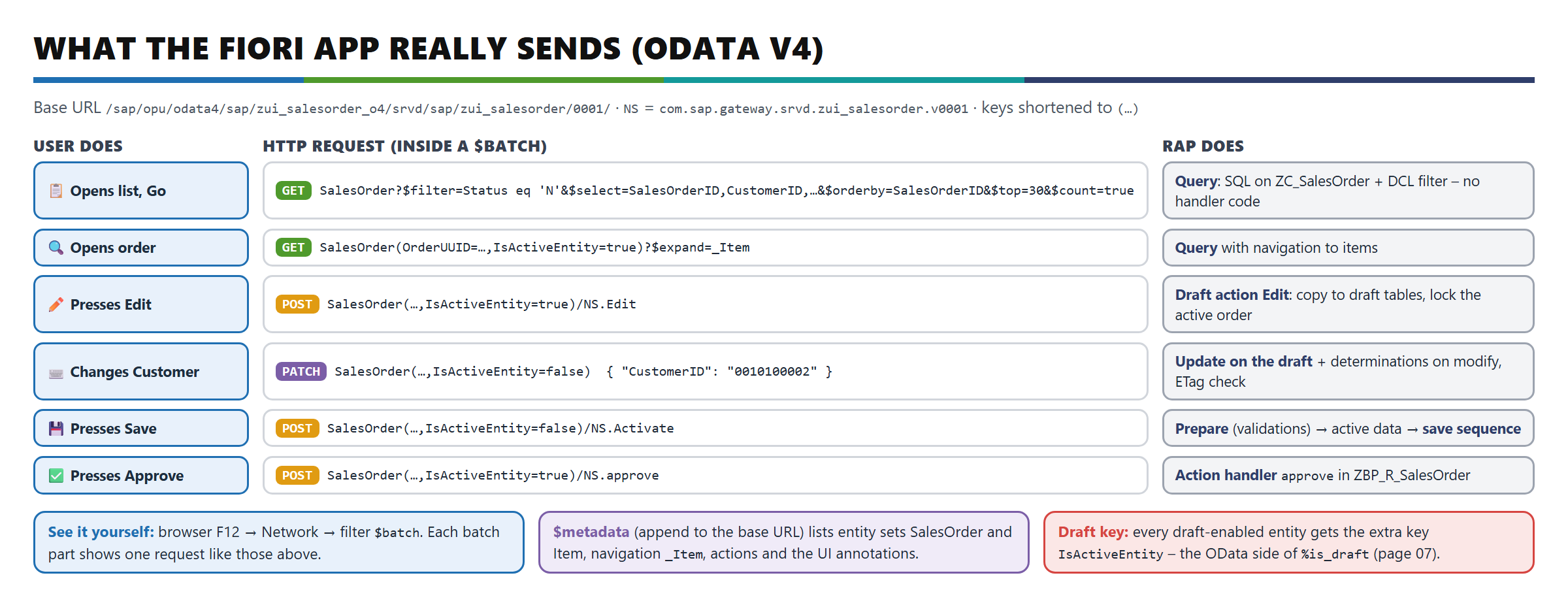
The preview and the real app send plain HTTP requests, bundled in $batch. Knowing them makes debugging much easier (browser F12 → Network).
|
- Base URL
...of the V4 UI binding:/sap/opu/odata4/sap/zui_salesorder_o4/srvd/sap/zui_salesorder/0001/– the binding name, then the service definition name and version.<NS>is the namespacecom.sap.gateway.srvd.zui_salesorder.v0001. IsActiveEntityis the extra key every draft-enabled entity gets – the OData view of%is_draft(→ 07 · Locking, Draft & Side Effects).- Reads are queries (SQL on the projection, filtered by the access control) with no handler code; changes and actions go through the transactional runtime and the behavior pool.
7.2 Building and deploying the Fiori elements app
The preview is for developers. Users get a deployed app with a launchpad tile – one for the reps, one for the managers (R11).
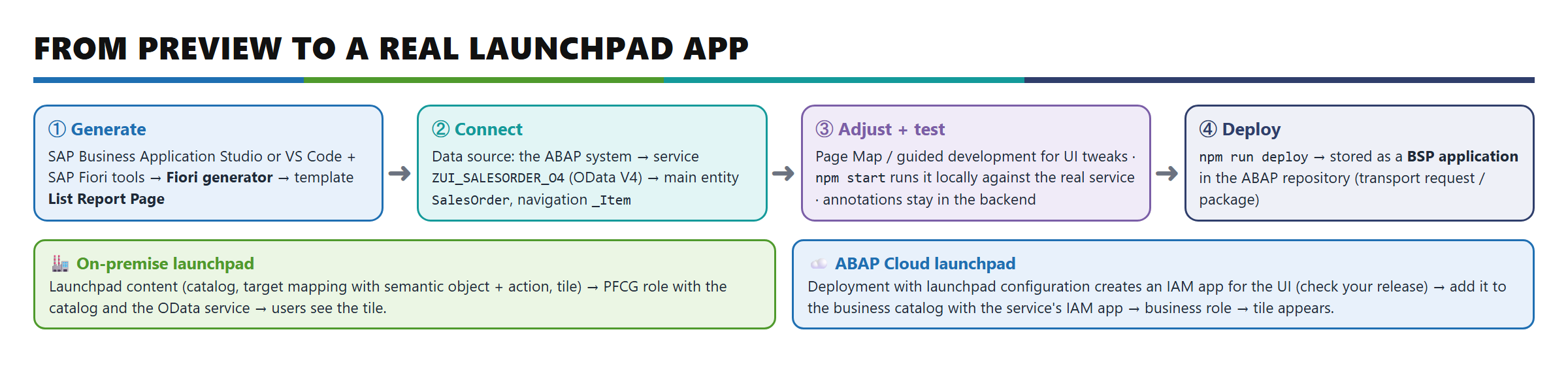
- Generate: SAP Business Application Studio (BTP) or VS Code with SAP Fiori tools → *Fiori generator* → *List Report Page* → data source: the ABAP system → service
ZUI_SALESORDER_O4→ main entitySalesOrder, navigation entity_Item. The approver app is generated the same way fromZUI_SALESORDERAPV_O4. - Test:
npm startruns the app locally against the real service; the layout still comes from the backend annotations, so most changes are made in the metadata extension, not in the app. - Deploy:
npm run deploystores the app as a BSP application in the ABAP repository (package + transport request). - Tile on-premise: launchpad content (catalog, target mapping with semantic object and action, tile) + PFCG role with the catalog and the OData service.
- Tile in ABAP Cloud: deploying with launchpad configuration creates an IAM app for the UI (check your release); add it with the service's IAM app to the business catalog and assign the business role (Part 5).
- Typical RAP apps: simple data maintenance (the modern replacement for SM30 table maintenance), work lists (list report) and master-detail apps (list report + object page with a child table, like this one).
Part 8 – Interview questions
Q1. Why projection views, and why several projections on one BO?
A projection gives one service its subset of fields plus UI semantics (value help, search, metadata extension); provider contract transactional_query marks it for a transactional service. The base BO stays reusable. Different roles get different projections: ZC_SalesOrder for reps with create, edit and copy, ZC_SalesOrderApv for managers with only approve and reject – each with its own projection BDEF, metadata extension and service.
Q2. Access control (DCL) vs behavior authorization?
An access control filters which rows a user may read – it adds a WHERE condition to every select on the view, e.g. only the user's sales organisation. Behavior authorization (global / instance in the BDEF) decides whether a user may change data or execute an action such as Approve. A complete app needs both.
Q3. Service definition vs service binding?
The service definition says which entities are exposed and is protocol-agnostic. The service binding adds the protocol and scenario – OData V2 or V4, UI or Web API – and is published and previewed in ADT. One definition can have several bindings, e.g. ZUI_SalesOrder_O4 for the app and a Web API binding.
Q4. Why put UI annotations in a metadata extension?
It keeps the projection readable and separates layout from data: @UI annotations for list report and object page live in their own object, layered (#CUSTOMER and others) and changeable without touching the view. The projection must allow it with @Metadata.allowExtensions: true.
Q5. How do you build a value help for the customer field?
Create a small CDS view on the released I_Customer with search annotations and a text element, then point the projection field to it with @Consumption.valueHelpDefinition. The service exposes the value-help view automatically. For few fixed values I use a dropdown (@ObjectModel.resultSet.sizeCategory: #XS).
Q6. Does a projection inherit the access control of its base view?
No. Every CDS view entity with #CHECK needs its own role. For a projection I write grant select on ZC_SalesOrder where inheriting conditions from entity ZR_SalesOrder, so the rules are maintained once in the base role.
Q7. OData V2 or V4 for a new RAP app?
V4 – it is SAP's recommendation for new transactional apps and supports draft, side effects and newer Fiori elements features fully. V2 only when a consumer cannot speak V4.
Q8. The preview returns 403 or an empty list. What do you check?
403: the user's role lacks the service – S_SERVICE in PFCG on-premise, or the service is not in an IAM app / business role in the cloud; /IWFND/ERROR_LOG helps on-premise. Empty list: first whether the tables contain data, then the access control – the user may have no authorization value for the orders' sales organisation.
Q9. How do you get from the ADT preview to a launchpad tile?
Generate a Fiori elements List Report in Business Application Studio or VS Code from the published UI service, test it with npm start, deploy it as a BSP application, then add launchpad content and a PFCG role on-premise, or an IAM app in a business catalog and business role in ABAP Cloud.
🏠 Start Here · ◀ 02 · Data Model & CDS · 04 · BDEF & Behavior Pool ▶ · Sections: CORE ABAP | OOPS ABAP | ABAP on HANA | Clean Core | RAP | ABAP Points | SAP Fiori | SAPUI5 | Mobile Development (MDK) | BTP Foundations | BTP Development | CAP | SAP Build | ABAP on BTP | Integration Suite | SAP Business AI | SAP BASIS | Security | SAP SDLC
Functional: FICO ABAP | TRM ABAP | VIM | SAP BIS | SD ABAP | MM ABAP | PP ABAP | QM ABAP | PM ABAP | PS ABAP | EWM | TM ABAP | EHS ABAP | HR ABAP | BW | SAP MDG | SAP Analytics Cloud | SAP Ariba | SAP CX | SAP IBP