This page writes the rule book of the Sales Order business object: the behavior definition (BDEF) ZR_SalesOrder with every line tied to a requirement (R1, R4, R5, R6, R7, R8), the projection BDEFs for the processor and the approver app (R11) including augment and the released interface BDEF, and the behavior pool ZBP_R_SalesOrder with its handler and saver classes and the method signature for each BDEF element.
Part 1 – Why a behavior definition, and which requirements it carries
R-ID | Requirement | Where on this page |
|---|---|---|
R1 | Reps create an order with several items, edit and delete it | Part 3 (operations, create by association), Part 4 (full BDEF) |
R4 | A new order starts with status N | Part 4: |
R5 | Net amount = sum of item net values, refreshed at once | Part 4: |
R6 | Customer valid, quantity > 0, bad input rejected early | Part 4: validations, precheck, |
R7 | Manager approves or rejects | Part 4: |
R8 | Copy an existing order | Part 4: |
R11 | Approver uses a separate, simpler app | Part 5 (approver projection BDEF), Part 6 (augment) |
The CDS views (→ see 02 · Data Model & CDS) describe what the data looks like. The behavior definition (BDEF, written in BDL, the Behavior Definition Language) describes what you may do with it: create, change, delete, approve, copy, which fields are locked, what is calculated automatically and what is checked before saving. It is the rule book of the business object. The behavior pool (Part 7) is the ABAP class where the rules that need code are implemented.
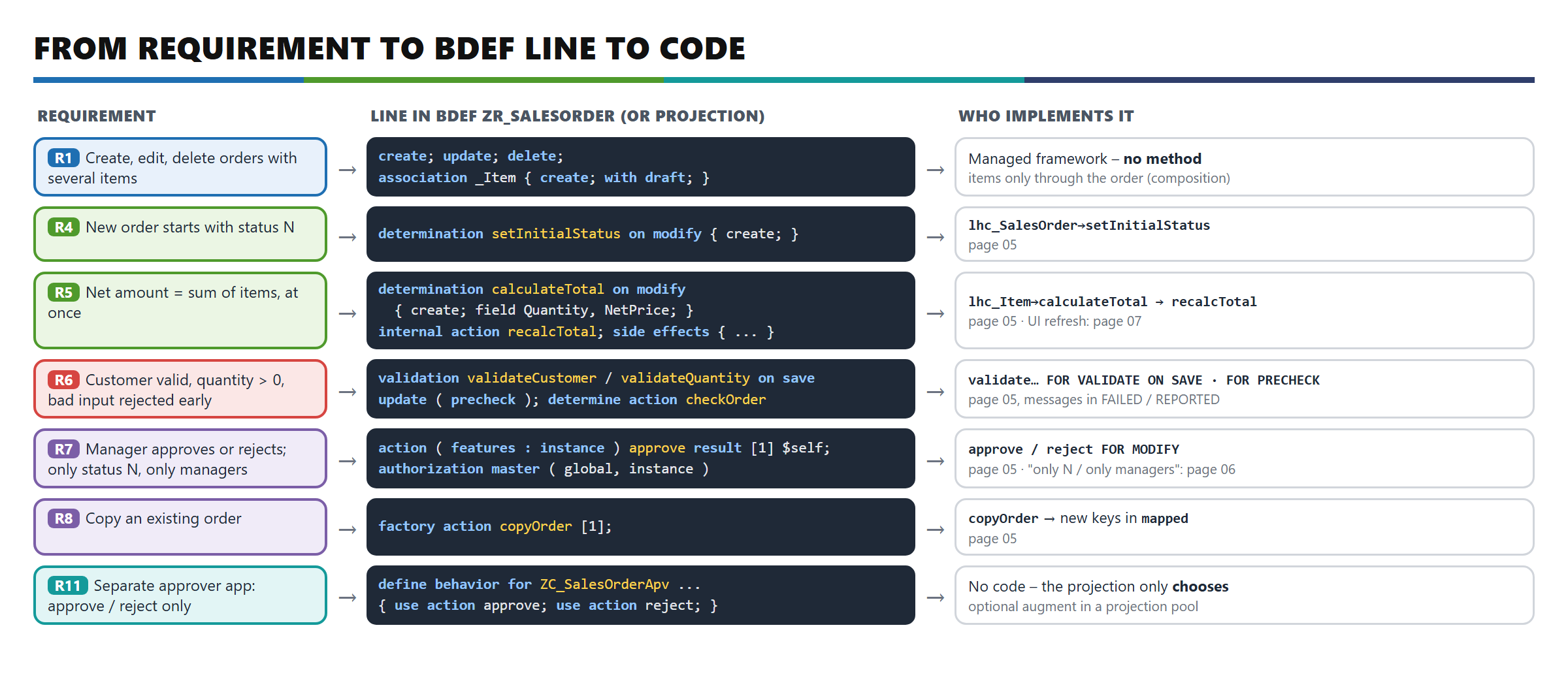
Every requirement of the Sales Order Approval app that is about behavior becomes one or two BDEF lines. The picture shows the mapping that this page builds up step by step:
- ADT: right-click the root view entity
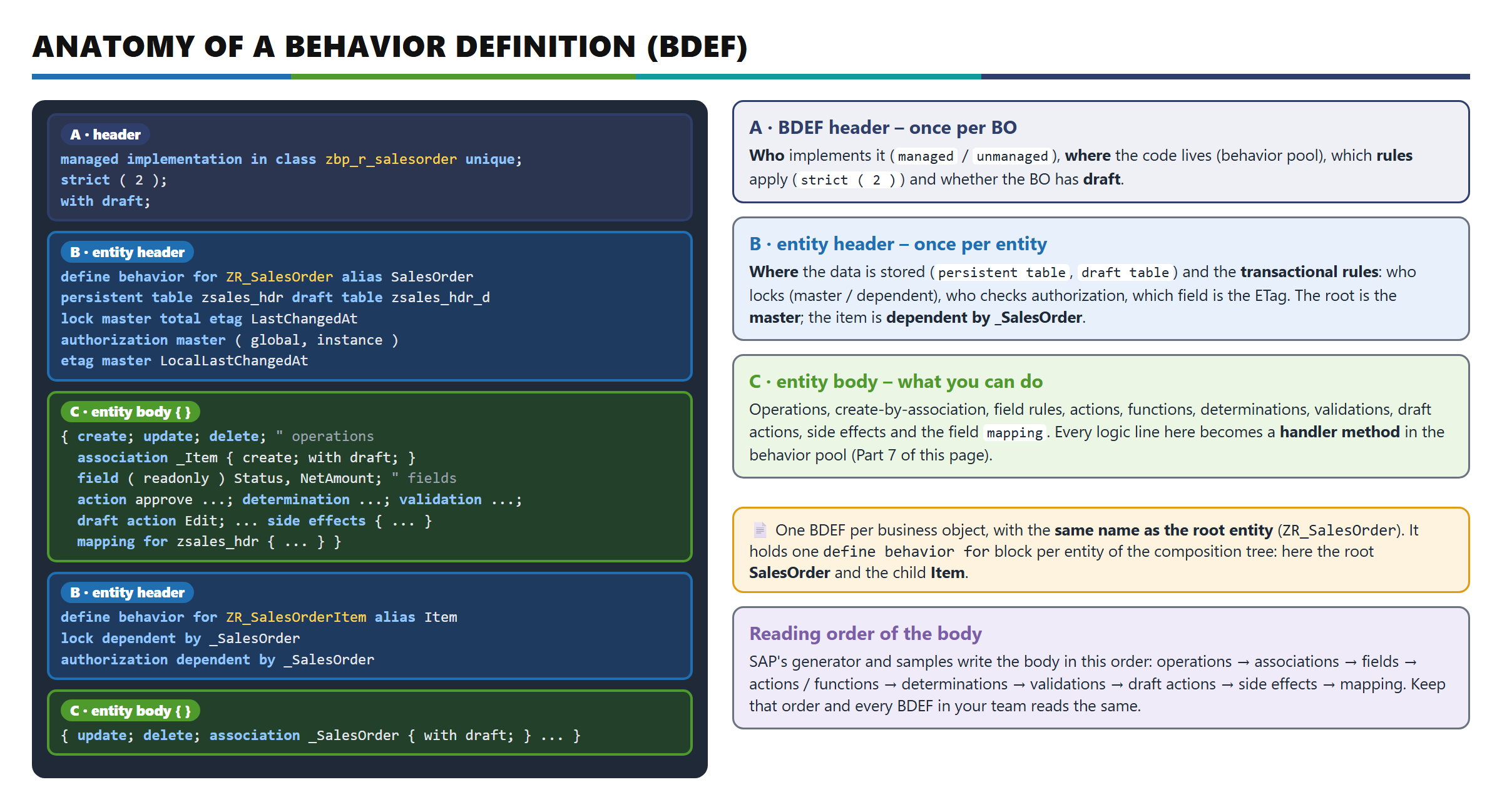
ZR_SalesOrder→ New Behavior Definition, implementation type *Managed*. The BDEF gets the same name as the root entity and covers the whole composition tree. - One
define behavior forblock per entity: hereZR_SalesOrder(aliasSalesOrder) andZR_SalesOrderItem(aliasItem). The alias is the short name you use in EML and in handler signatures (FOR SalesOrder~approve).
Part 2 – The BDEF header and the entity header
2.1 The header: implementation type, behavior pool, strict mode, draft
|
Header line | Meaning |
|---|---|
managed | The framework implements create, update, delete, read, lock and the save. You add only business logic (implementation types → see 01 · RAP Foundations). |
unmanaged | You implement every operation yourself, usually around existing code (→ see 09 · Unmanaged Scenario & Save Variants). |
implementation in class zbp_r_salesorder unique | The behavior pool. |
strict ( 2 ) | Strict mode, version 2: additional syntax checks that forbid outdated syntax and demand explicit declarations (for example authorization for every entity and the draft actions). The exact rule list is in the keyword documentation of your release. |
with draft | Draft-enabled: every entity needs a |
| Managed BO with own save code (R14, R13 → page 09). |
2.2 The entity header: tables, locks, authorization, ETag
|
- Master vs dependent: the root is
lock masterandauthorization master; the item sayslock dependent by _SalesOrderandauthorization dependent by _SalesOrder– locking or checking an item goes through its order. That matches R1: an item never lives on its own. - Which field for which ETag:
etag master LocalLastChangedAtchanges with every change of this instance;total etag LastChangedAtchanges only when the active order is saved. How locks and ETags work (R10) → see 07 · Locking, Draft & Side Effects. - Common mistake: a draft BDEF without
total etagon the root – the syntax check rejects it.
Part 3 – The entity body: operations, field characteristics, mapping
3.1 Operations and create by association (R1)
|
association _Item { create; }= create by association: the Fiori Create button above the Items table, EMLCREATE BY \_Item. The item entity itself has nocreate;– an item cannot exist without its order.with draft;inside the association is required in a draft BO, so draft items stay linked to the draft order. The child repeats it:association _SalesOrder { with draft; }.( features : instance )only declares that code decides per order whether Edit, Delete or Create item is allowed (e.g. not for approved orders). The methodget_instance_features→ see 06 · Feature Control, Authorization & Numbering.- Newer releases add non-standard association operations (link, unlink, BTP 2502) and editable hierarchies – check your release before using them.
3.2 Field characteristics – static field control
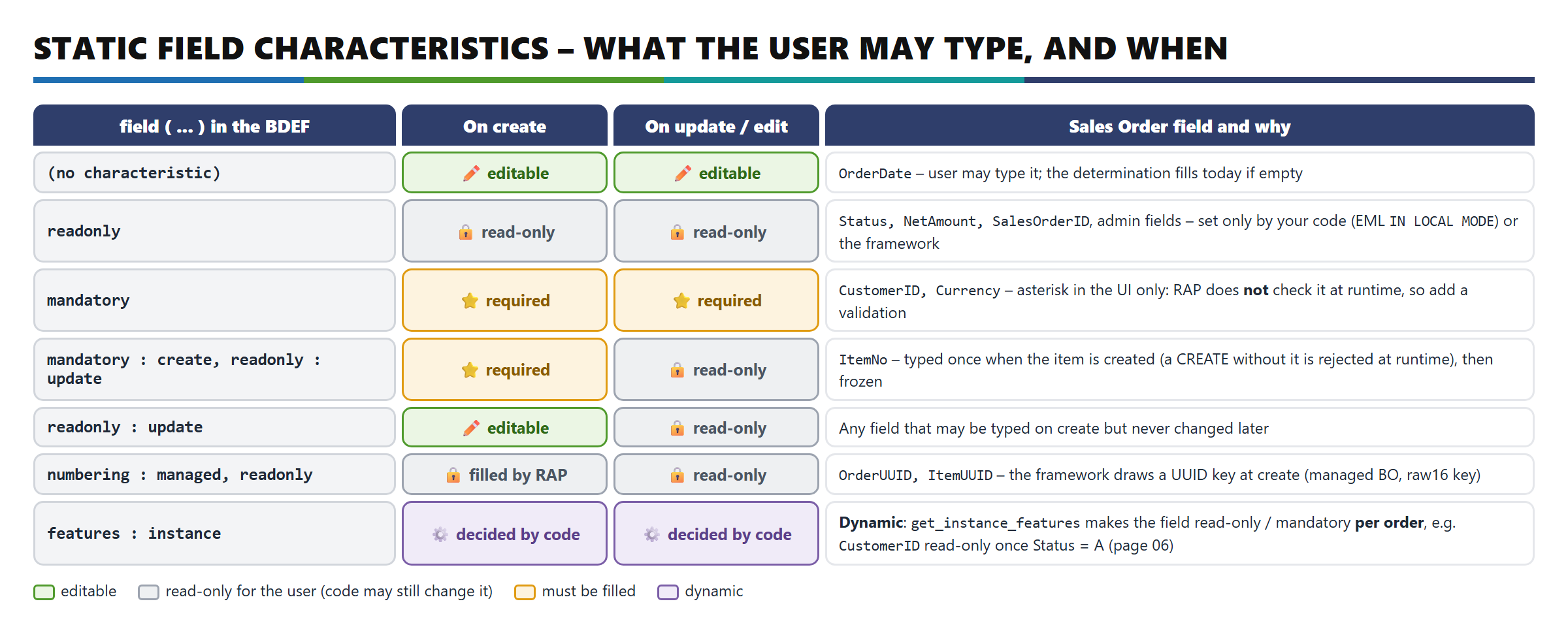
Field characteristics are rules that are the same for every instance. They make the UI show a field as read-only or required and protect the field from changes by consumers.
|
readonlystops consumers (UI, EML from outside the BO). Your own code still changes the field with EMLIN LOCAL MODE– that is how the determinations setStatus(R4) andNetAmount(R5).- Common mistake: relying on
mandatoryalone. It marks the field in the UI, but the RAP runtime does not check it – an empty CustomerID still reaches the save. That is why R6 needs the validationvalidateCustomer.mandatory : createis different: a CREATE without the field is rejected at runtime. - Admin fields (CreatedBy, LocalLastChangedAt, ...) are filled by the managed framework because of their
@Semanticsannotations in the CDS view; mark themreadonly. - Rules that depend on the data of one order (CustomerID read-only once approved) are dynamic field control:
field ( features : instance )→ page 06.
3.3 Mapping
|
- Mapping connects CDS element names (CamelCase) with table field names (snake_case). The managed framework needs it to read and write the persistent and draft tables.
correspondingmaps elements with the same name automatically (check your release). In the Sales Order BO every CDS name differs from its column, so the full BDEF in Part 4 lists all fields.
Part 4 – The full annotated BDEF of the Sales Order
This is the complete base BDEF ZR_SalesOrder that the following pages implement. The comments name the requirement each line serves and the page where its code or rules are explained.
|
- After activating, ADT shows warnings with quick fixes (Ctrl+1): create the draft tables
zsales_hdr_d/zsales_itm_dand the behavior pool with all method stubs. - Draft actions,
Prepare,total etagand bothside effectsblocks are explained on 07 · Locking, Draft & Side Effects; numbering (setSalesOrderId, R9) on 06. All other lines are implemented on 05 · Business Logic & Messages. internal action recalcTotal– no button and no projection; only the BO's own code calls it (fromcalculateTotal, page 05).determine action checkOrderneeds no handler method: it only runs the listed validations.
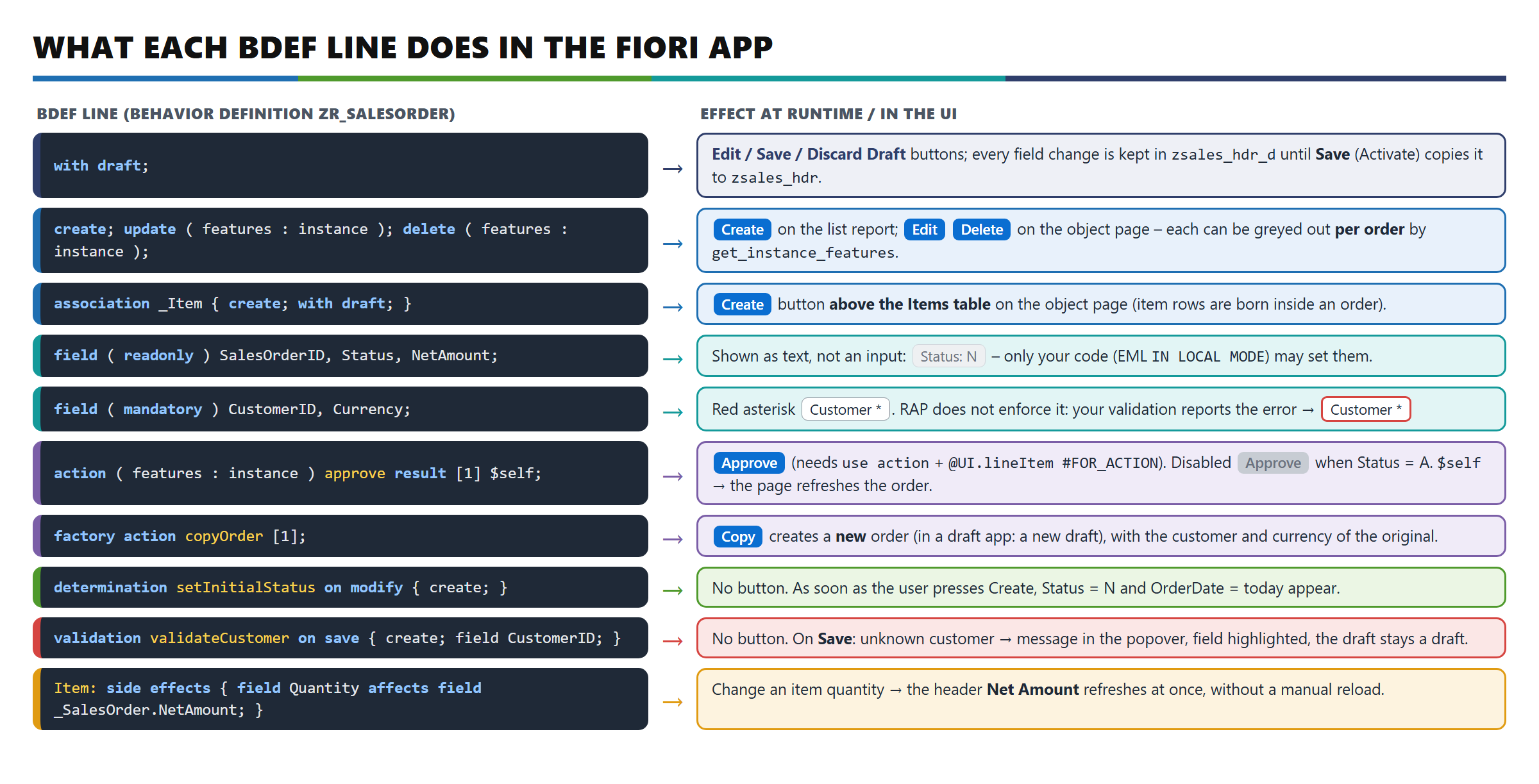
4.1 What each line does in the app
4.2 Keyword reference
Keyword | Meaning |
|---|---|
| Who implements CRUD + save: framework or you |
strict ( 2 ) | Strict mode – additional syntax checks (always use it for new BOs) |
with draft | Draft-enabled BO; needs |
| Where active / draft data is stored (managed only) |
| Root locks the whole BO; children are locked via the root |
| Optimistic concurrency per instance / via the parent / for the whole BO in draft (page 07) |
| Where authorization is checked (page 06) |
create; update; delete; | Standard operations; |
association _Item { create; with draft; } | Create by association; navigation in draft |
field ( readonly | mandatory | readonly : update | mandatory : create ) | Static field control |
field ( numbering : managed ) | Framework assigns a UUID key (other numbering: page 06) |
| Dynamic feature control per instance (page 06) |
determination … on modify | on save { create; update; delete; field X; } | Sets values automatically when the trigger fires (page 05) |
validation … on save { create; update; field X; } | Checks before save; FAILED rejects the save (page 05) |
| Custom operation / creates new instances (copy) / not bound to an instance / callable only inside the BO (page 05) |
action … parameter ZD_… result [1] $self | Input via an abstract entity; result = changed instance |
function … result [1] … | Read-only operation returning data (page 05) |
determine action X { validation …; determination …; } | Runs listed on-save logic on demand (page 05) |
| Reject a request before it reaches the buffer (page 05) |
draft action Edit | Activate optimized | Discard | Resume; draft determine action Prepare | Draft actions (page 07) |
| Own key assignment (page 06) |
| Own save logic in a managed BO (page 09) |
side effects { … } | Tell the UI what to reload (page 07) |
mapping for <table> [corresponding] | Maps CDS element names to table field names |
event … [parameter …] | Business event raised in the save (page 10) |
- Common mistake: adding a determination or action to the BDEF and activating without creating the method – the behavior pool no longer compiles. Use Ctrl+1 on the warning to generate the stub.
Part 5 – Projection BDEF: the processor app and the approver app (R11)
The base BDEF holds everything the BO can do. A Fiori app or an API should see only what it needs. The projection BDEF is the shop window for one service: it contains no logic and only reuses (use) behavior from the base BO. That is how R11 is solved – one BO, two apps with different buttons.
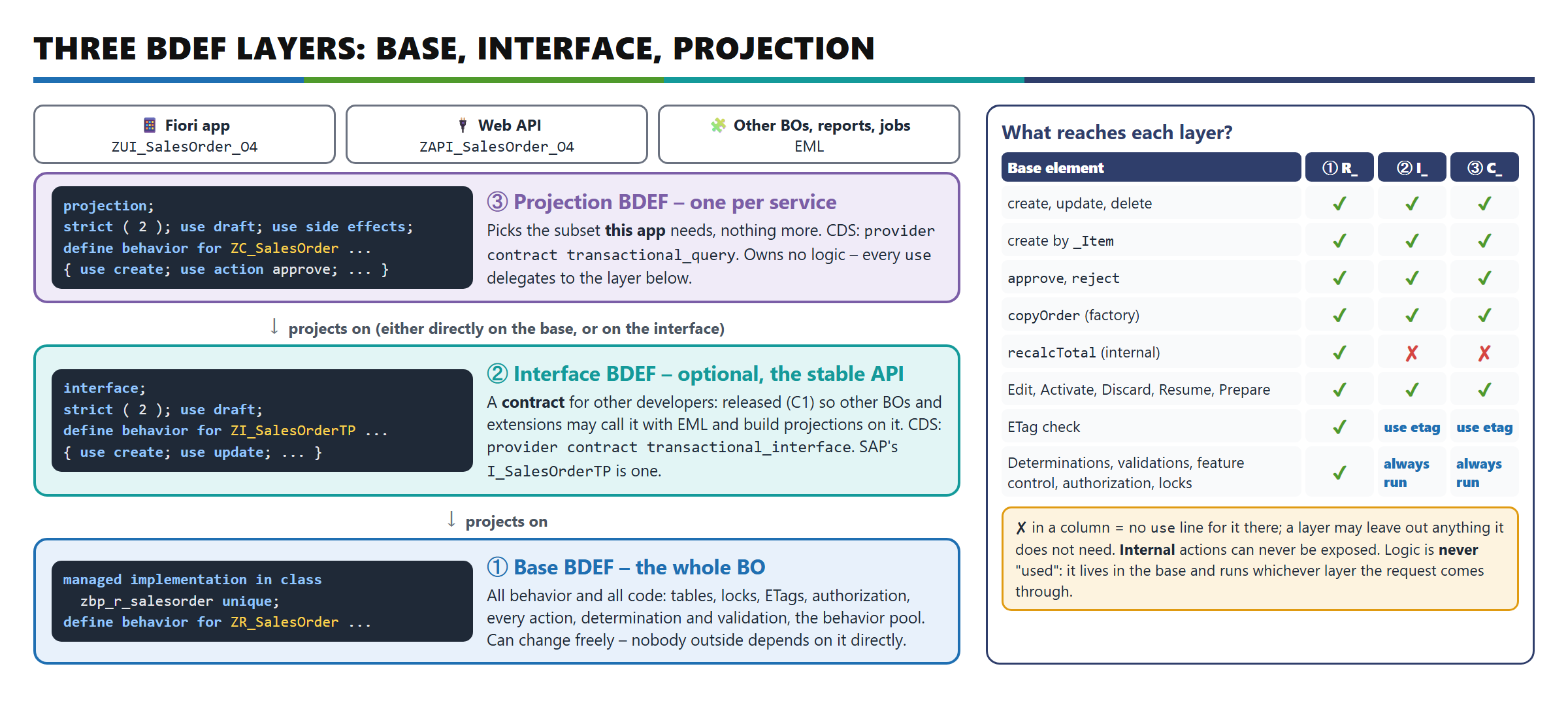
5.1 The processor projection ZC_SalesOrder
ADT: right-click the projection view ZC_SalesOrder (provider contract transactional_query, → see 03 · Projection, UI, Access Control & Service) → New Behavior Definition; the type *Projection* is proposed.
|
Projection keyword | What it does |
|---|---|
projection; | Marks a projection BDEF (no implementation type – the base BO implements everything) |
use draft; | The service works with draft; needed when the base BO has |
use side effects; | Passes the base BO's side effects to the UI (otherwise the UI never reloads) |
use etag | Passes the ETag check through to the OData service (HTTP If-Match) |
use create; use update; use delete; | Exposes the standard operations |
use action approve; | Exposes an action (also draft, factory and determine actions) |
use association _Item { create; with draft; } | Exposes create by association and draft navigation |
- What you leave out does not exist for this service: no
use delete→ no Delete button and no DELETE request accepted. - Logic is never "used" – determinations, validations, feature control, authorization and locks run in the base BO for every request, whichever projection it comes through.
- Internal actions (
recalcTotal) cannot be exposed – they are for the BO's own code only. - Common mistake: adding a new action to the base BDEF and forgetting
use actionin the projection – the button never appears (the#FOR_ACTIONUI annotation is the other half → page 03).
5.2 The approver projection ZC_SalesOrderApv
R11 – the manager's app shows the orders and offers only Approve and Reject. The approver projection views ZC_SalesOrderApv / ZC_SalesOrderItemApv, their metadata extension, the service ZUI_SalesOrderApv and the business role are built on page 03; here is the behavior side:
|
- Approve and Reject run on the active order. Without
use action Editthe manager can never open an edit draft, so all fields stay read-only. Whether the approver service needs draft at all is a design choice – check the processor/approver projections in SAP's flight reference scenario of your release. - Both apps run the same
approvemethod, feature control and authorization: "only status N" and "only managers" (R7) are enforced in the base BO (page 06), so they also hold for EML callers (R12) and the Web API. The projection only hides buttons.
Part 6 – Augment and the interface BDEF
6.1 Projection-specific logic: augment
Sometimes one app needs a little extra behavior that does not belong in the base BO, for example a default that only the processor app proposes. A projection can then get its own behavior pool:
|
|
- Augmentation runs in the projection before the request is handed to the base BO. It adds to the request with
MODIFY AUGMENTING ENTITY … [RELATING TO … BY …](not with a normal MODIFY – the data is not in the buffer yet) and has no response parameters. Read-only fields cannot be set this way. Check the exact statement and the generated stub in your release. - A projection can also define its own actions and functions, implemented in the projection behavior pool – check your release.
- Rule of thumb: if the logic is true for every app (status N, total, checks), it belongs in the base BO; augment only for real app-specific needs.
6.2 The interface BDEF – a stable contract
If other developers (the nightly job of R12, another BO, an extension of R19) call your BO, they should not depend on ZR_SalesOrder directly – you could never again rename a field. The interface layer is a projection that you release (C1 contract, use in cloud development) and keep stable.
|
|
- Consumers then call
MODIFY ENTITIES OF zi_salesordertp …(→ see 08 · EML), and a UI projection may be built on the interface instead of the base:define root view entity ZC_SalesOrder provider contract transactional_query as projection on ZI_SalesOrderTP(check your release). - Why SAP releases BOs this way: SAP's own BOs follow exactly this pattern.
I_SalesOrderTPis the released interface; the R_ view and the base BDEF behind it are internal and may change with any release. Your code uses only the released I_…TP object (R18 → page 11; clean core → page 13).
Base BDEF | Interface BDEF | Projection BDEF | |
|---|---|---|---|
First line |
| interface; | projection; |
CDS provider contract | – (R_ view) | transactional_interface | transactional_query |
Contains logic | Yes – all of it | No | No (except augment / own actions) |
Used by | Only the layers above | Other BOs, EML consumers, extensions, projections | One OData service (UI or Web API) |
Stable? | Internal, may change | Yes – released (C1) | Belongs to its app |
Part 7 – The behavior pool ZBP_R_SalesOrder
The BDEF lists the rules; the behavior pool is the ABAP class where the rules that need code live. It is a special global class with local classes inside – like a building (the global class) with one office per entity (handler classes) and one back office that files everything at the end (the saver class).
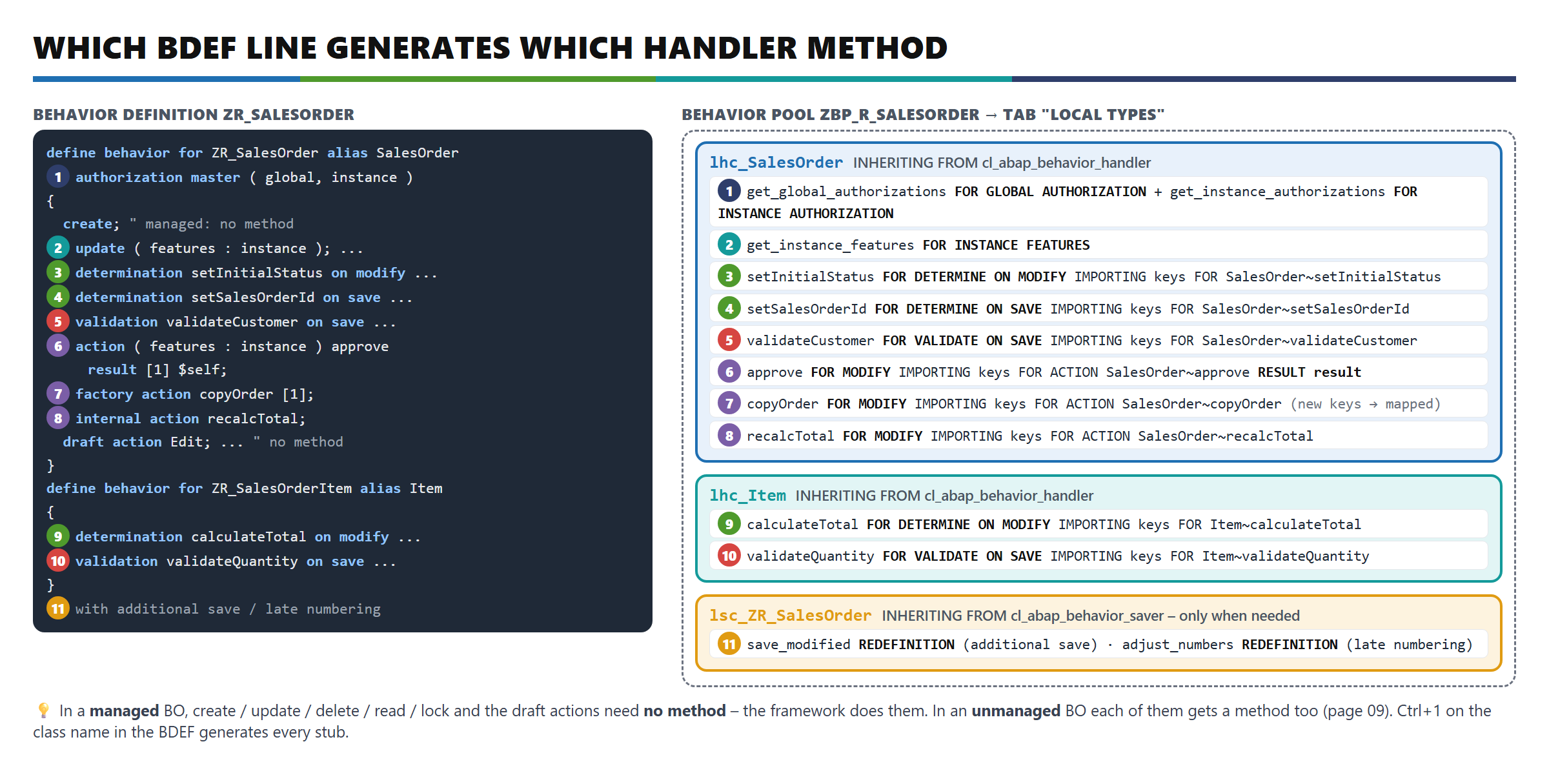
7.1 The global class
|
FOR BEHAVIOR OF zr_salesorderlinks the class to the BDEF.ABSTRACT FINAL– nobody instantiates or inherits from it; the RAP runtime calls the local classes directly.- The global class is usually empty. All code goes into the Local Types tab (CCIMP include).
- ADT generates everything: cursor on the class name in the BDEF header → Ctrl+1 → *Create behavior implementation*. After adding a new action later, Ctrl+1 on the warning adds the missing method.
7.2 Handler classes and the saver class
Handler class | Saver class | |
|---|---|---|
Inherits from | cl_abap_behavior_handler | cl_abap_behavior_saver |
Here |
| lsc_ZR_SalesOrder |
Runs in | Interaction phase – on every request | Save sequence – once per COMMIT ENTITIES |
Works on | The transactional buffer (via EML | The database (save) and final keys |
Methods | One per BDEF element that needs code |
|
Needed in a managed BO? | Yes, as soon as there is any logic | Only for additional / unmanaged save or late numbering (pages 06, 09) |
- Interaction phase, buffer and save sequence → see 01 · RAP Foundations. In a managed BO the framework already runs finalize, check_before_save and save; your on-save determinations and validations are called from there.
- Never
COMMIT WORK,ROLLBACK WORKor direct database writes in a handler – the framework controls the transaction. Strict mode turns many of these into errors.
7.3 The handler class definitions for the Sales Order
|
The implementations follow on 05 · Business Logic & Messages (and authorization and features on 06). Local class names are not case-sensitive; ADT generates them as shown. Method names are free – the FOR … addition is what links a method to its BDEF element.
Part 8 – Method signatures, response parameters and several pools
8.1 Method signatures for each BDEF element
BDEF element | Handler method declaration |
|---|---|
determination on modify | METHODS x FOR DETERMINE ON MODIFY IMPORTING keys FOR SalesOrder~x. |
determination on save | METHODS x FOR DETERMINE ON SAVE IMPORTING keys FOR SalesOrder~x. |
validation | METHODS x FOR VALIDATE ON SAVE IMPORTING keys FOR SalesOrder~x. |
action with result | METHODS x FOR MODIFY IMPORTING keys FOR ACTION SalesOrder~x RESULT result. |
factory / internal action |
|
function | METHODS x FOR READ IMPORTING keys FOR FUNCTION SalesOrder~x RESULT result. |
features : instance | METHODS get_instance_features FOR INSTANCE FEATURES IMPORTING keys REQUEST requested_features FOR SalesOrder RESULT result. |
authorization ( instance ) | METHODS get_instance_authorizations FOR INSTANCE AUTHORIZATION IMPORTING keys REQUEST requested_authorizations FOR SalesOrder RESULT result. |
authorization ( global ) | METHODS get_global_authorizations FOR GLOBAL AUTHORIZATION IMPORTING REQUEST requested_authorizations FOR SalesOrder RESULT result. |
precheck on update | METHODS precheck_update FOR PRECHECK IMPORTING entities FOR UPDATE Item. |
early numbering | METHODS earlynumbering_create FOR NUMBERING IMPORTING entities FOR CREATE SalesOrder. |
augment (projection pool) | METHODS augment_create FOR MODIFY IMPORTING entities FOR CREATE SalesOrder. |
- Determine actions and draft actions need no method in a managed BO. For precheck and augment, compare with the stub that Ctrl+1 generates in your release.
Unmanaged BO only (→ see 09 · Unmanaged Scenario & Save Variants) – the standard operations need methods too:
Operation | Handler method declaration |
|---|---|
create | METHODS create FOR MODIFY IMPORTING entities FOR CREATE SalesOrder. |
update | METHODS update FOR MODIFY IMPORTING entities FOR UPDATE SalesOrder. |
delete | METHODS delete FOR MODIFY IMPORTING keys FOR DELETE SalesOrder. |
read | METHODS read FOR READ IMPORTING keys FOR READ SalesOrder RESULT result. |
lock | METHODS lock FOR LOCK IMPORTING keys FOR LOCK SalesOrder. |
create by association | METHODS cba_Item FOR MODIFY IMPORTING entities_cba FOR CREATE SalesOrder\_Item. |
read by association | METHODS rba_Item FOR READ IMPORTING keys_rba FOR READ SalesOrder\_Item FULL result_requested RESULT result LINK association_links. |
8.2 Implicit parameters every handler gets
- Every handler method has implicit response parameters:
failedandreported, plusmappedin modify methods that create instances. How to fill them → see 05 · Business Logic & Messages. - The importing parameters are tables: one call handles many instances (mass-enabled). Always loop or use
FOR … IN keys, neverkeys[ 1 ]. - Common mistake: using
keys-%keyinstead of%tky– with draft the same key exists twice (draft and active), and only%tky(key +%is_draft) tells them apart.CORRESPONDING #( keys )keeps%tky. IN LOCAL MODE– inside the pool, EML skips feature control and authorization checks, because the BO is changing itself (e.g. setting the read-only Status). EML itself → see 08 · EML.
8.3 Several behavior pools and helper classes
|
- Large BOs split the code: one pool per entity (as above), or the root's pool for everything. Each behavior is still implemented in exactly one class (
unique). - Newer releases add auxiliary classes (
auxiliary class …, BTP 2408) – helper classes that may useIN LOCAL MODEandPRIVILEGEDlike the pool – and BDEF friends (with friends, BTP 2402), which may call internal operations of another BO. Check your release.
Part 9 – Interview questions
Q1. What is in a behavior definition?
The header (implementation type and behavior pool, strict mode, draft), then per entity the transactional characteristics (persistent and draft table, lock master or dependent, authorization, ETag) and the body: operations, association operations, field control, actions, functions, determinations, validations, draft actions, side effects and the mapping.
Q2. What does strict ( 2 ) do?
Strict mode makes the BDEF syntax check stricter: it forbids outdated syntax and demands explicit declarations such as authorization and the draft actions. Version 2 adds further checks. New BDEFs should always use the latest strict mode; RAP extensibility even requires it.
Q3. Why can an item not be created directly, and what does with draft in the association do?
The item is a composition child: it exists only with its order. So the item has no create; – it is created by association (association _Item { create; } on the root, EML CREATE BY \_Item). In a draft BO, with draft on both association directions keeps draft items linked to the draft order.
Q4. mandatory vs mandatory : create?
mandatory only marks the field in the UI; the runtime does not reject an empty value, so you need a validation. mandatory : create is enforced: a CREATE without the field is rejected. Combined with readonly : update it gives a field that is typed once and then frozen, such as the item number.
Q5. Why release a BO through an interface BDEF?
An interface BDEF (interface; on a view with provider contract transactional_interface) is a stable facade over the BO. Consumers and extensions use the interface, so the implementation underneath can change without breaking them. SAP releases its own BOs this way, e.g. I_SalesOrderTP for EML and extension.
Q6. Approvers must approve, reps may only create and edit. How do you design it?
One base BO with all behavior and two projections with their own projection BDEFs: ZC_SalesOrder with create, update, delete and copy, ZC_SalesOrderApv with only use action approve; use action reject;, each with its own service and app. Security still lives in the base BO: instance feature control allows Approve only for status N and instance authorization checks the manager's authorization, so the rules also hold for EML and Web API callers.
Q7. What is augmentation?
In a projection BDEF an operation can be declared with augment (use create ( augment );). The projection behavior pool then enriches the incoming request with MODIFY AUGMENTING ENTITY before it reaches the base BO, for example to fill a default that only this app knows. It has no response parameters of its own and cannot set read-only fields.
Q8. Handler class vs saver class?
Handler classes (lhc_, inherit from cl_abap_behavior_handler) implement the interaction phase: actions, determinations, validations, prechecks, feature control, authorization (and all operations in an unmanaged BO). The saver class (lsc_, inherits from cl_abap_behavior_saver) implements the save sequence methods finalize, check_before_save, adjust_numbers, save / save_modified and cleanup; a managed BO needs it only for additional or unmanaged save and late numbering.
Q9. Users see "instance not found" only in the draft app. What do you check?
Whether the handlers use %key instead of %tky. In a draft BO the same key exists as draft and active, so READ, MODIFY, FAILED and REPORTED must use %tky (or CORRESPONDING #( keys ), which keeps %is_draft). I would confirm it in the debugger by looking at %is_draft in keys.
Q10. You added an action to the base BDEF but the button does not appear. Why?
Typical causes: the projection BDEF lacks use action, the projection view or metadata extension lacks the @UI.lineItem / @UI.identification entry of type #FOR_ACTION, or instance feature control disables it for that order. If the pool does not compile, the method stub is missing – Ctrl+1 creates it.
🏠 Start Here · ◀ 03 · Projection & Service · 05 · Logic & Messages ▶ · Sections: CORE ABAP | OOPS ABAP | ABAP on HANA | Clean Core | RAP | ABAP Points | SAP Fiori | SAPUI5 | Mobile Development (MDK) | BTP Foundations | BTP Development | CAP | SAP Build | ABAP on BTP | Integration Suite | SAP Business AI | SAP BASIS | Security | SAP SDLC
Functional: FICO ABAP | TRM ABAP | VIM | SAP BIS | SD ABAP | MM ABAP | PP ABAP | QM ABAP | PM ABAP | PS ABAP | EWM | TM ABAP | EHS ABAP | HR ABAP | BW | SAP MDG | SAP Analytics Cloud | SAP Ariba | SAP CX | SAP IBP