This page implements the business logic of the Sales Order BO in the behavior pool: determinations for the initial status (R4) and the net amount (R5), validations, a precheck and a determine action that reject bad data (R6), the actions approve and reject (R7) and the factory action copyOrder (R8), plus functions and default values, and how every handler answers through FAILED, REPORTED and MAPPED with messages.
Part 1 – Which kind of logic for which requirement
R-ID | Requirement | Where on this page |
|---|---|---|
R4 | A new order starts with status N | Part 2: determination |
R5 | Net amount = sum of item net values, refreshed at once | Part 2: |
R6 | Customer must exist and not be blocked; quantity > 0; reject bad input early | Part 3 (validations, precheck), Part 5 ( |
R7 | Manager approves or rejects | Part 4: actions |
R8 | Copy an existing order | Part 4: factory action |
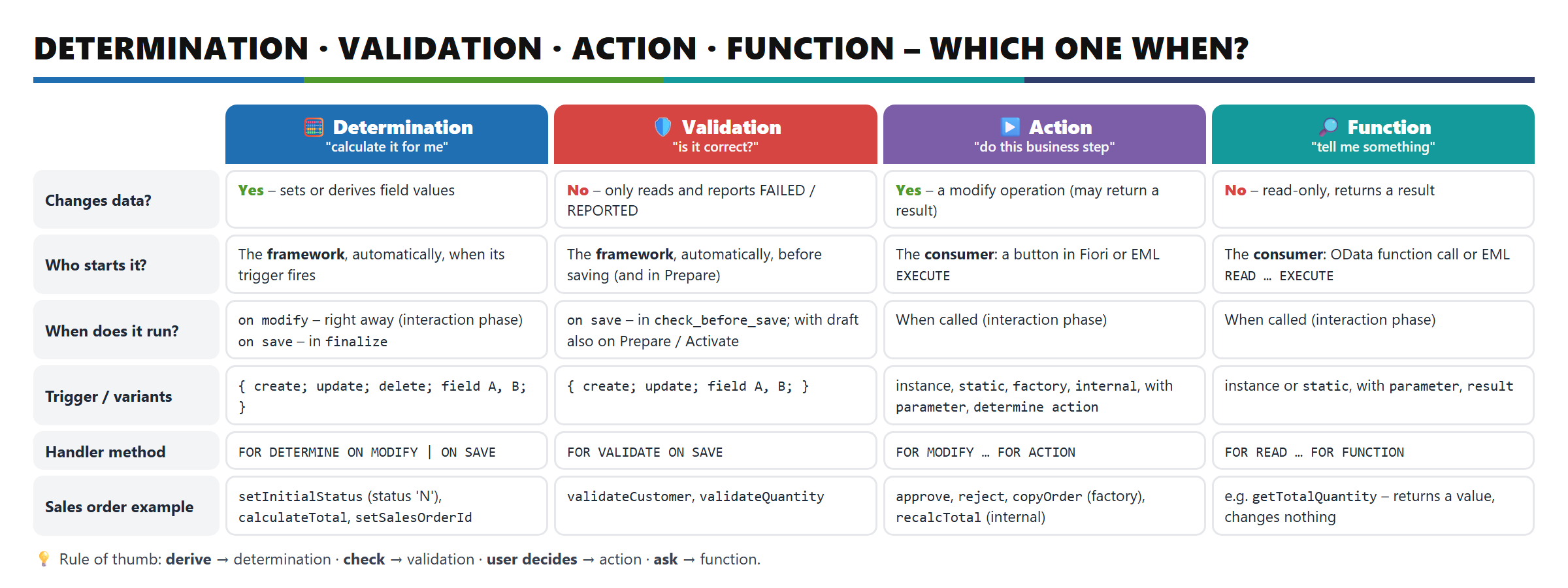
A business object is more than a table: it calculates values, refuses wrong data and offers business steps. RAP gives each kind of logic its own building block, so the framework knows when to call it. Like a shop: the till adds up the total by itself (determination), the cashier checks the coupon at checkout (validation), the bouncer turns people away at the door (precheck), and the customer presses a button to ask for gift wrapping (action).
All BDEF lines used here are in the full BDEF on 04 · Behavior Definition & Behavior Pool; this page shows only the line each method belongs to.
- Buffer, interaction phase and save sequence → see 01 · RAP Foundations. The EML statements used in the handlers (
READ ENTITIES,MODIFY ENTITIES … IN LOCAL MODE) → see 08 · EML.
Part 2 – Determinations: status and total (R4, R5)
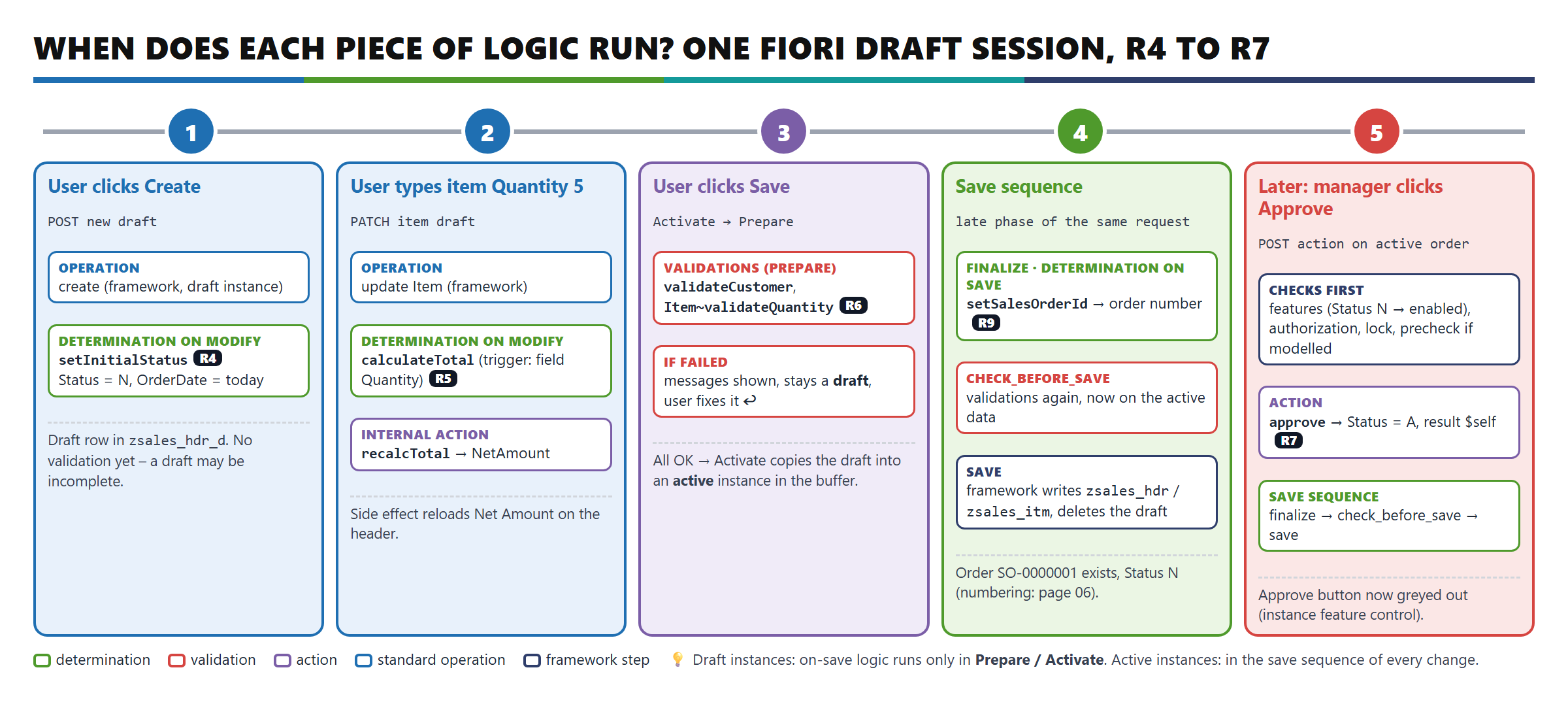
A determination changes data when its trigger fires (create, update, delete, a field change). on modify runs immediately in the interaction phase, so the user sees the result at once; on save runs in finalize just before saving (for draft instances: when the draft is activated).
on modify | on save | |
|---|---|---|
Runs | Right after the triggering change, in the interaction phase | In |
User sees the result | Immediately (with a side effect, page 07) | Only after saving |
Typical use | Defaults, derived fields, totals | Values that must be set exactly once |
Sales Order |
|
|
2.1 R4 – a new order starts with status N
|
IN LOCAL MODElets the BO setStatus, although the field isreadonlyfor consumers.setSalesOrderId(on save, R9) gives the order its number SO-0000001…; the number range and why strictly gap-free numbers need late numbering → see 06 · Feature Control, Authorization & Numbering.
2.2 R5 – item change → header total
The determination sits on the item and calls the header's internal action, so the total is calculated in one place (also reusable from the copy and from EML):
|
- The backend value is correct at once; that the Fiori header shows it at once (the "refreshed at once" part of R5) is the job of the side effect
field Quantity affects field _SalesOrder.NetAmount→ see 07 · Locking, Draft & Side Effects. - The example assumes one currency per order; a real app converts item amounts first.
- Deleting an item should also refresh the total. Whether a determination can react to the trigger
delete;depends on the determination type and release – check the keyword documentation (BDL, determination triggers) before you rely on it.
2.3 Trigger rules and pitfalls
{ create; }= only new instances;field Quantity= that field changed;update;= any change;delete;= instance deleted.- Common mistake: a determination that does not check whether its work is already done. Triggers can fire again (draft, several requests) – always make determinations idempotent (see the
DELETE orders WHERE Status IS NOT INITIALabove). - Common mistake: a determination that changes the fields of its own trigger. The framework stops endless cascades, but the result becomes hard to predict – keep trigger fields and changed fields separate.
Part 3 – Validations and precheck: reject bad data (R6)
3.1 Validations – check before saving
A validation only reads and reports. If it adds an instance to failed, the save is rejected and the messages in reported are shown. Validations exist only on save: they run in check_before_save and, with draft, when the user clicks Save (the Prepare determine action, before Activate). A draft may be incomplete while the user is still typing – that is why validations do not run on every change.
R6 – the customer must exist and must not be blocked for orders:
|
- Check the exact name of the order-block field of
I_Customerin your release (ADT: open the view, F2). An empty CustomerID is caught too, becausemandatoryalone is not checked at runtime (page 04).
R6 – every item needs a quantity greater than 0. Messages on a child carry %path (the parent's key), so Fiori shows them on the right item:
|
- Add
update;to the trigger ({ create; update; field CustomerID; }) if the check must also run on every change of an existing order;field CustomerIDalone already reacts to changes of that field. - Every validation that should run on Save in a draft app must also be listed in
draft determine action Prepare(page 04, Part 4) – otherwise the user only sees the error at the very end. - Common mistake: changing data in a validation. Validations only check – use a determination to change.
3.2 Precheck – the bouncer at the door
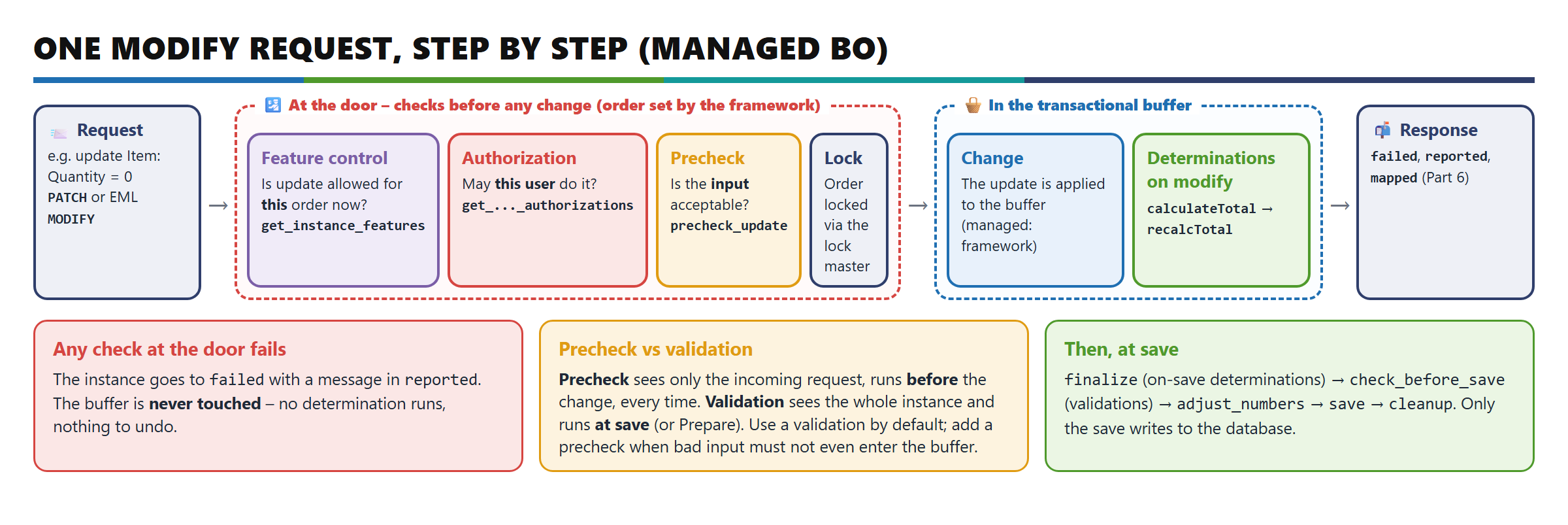
A validation is the check at the checkout: it sees the complete order, but only at save. A precheck is the bouncer at the door: it sees only the incoming request and rejects it before anything reaches the transactional buffer – nothing to undo, and no determination calculates with the bad value. That is the "reject obviously bad input early" part of R6. It can be added to create, update, delete and actions (update ( precheck );, action ( precheck ) approve …).
|
%control-Quantitytells whether the request changes the quantity at all; without that check an update of another field (with Quantity initial inentities) would be judged too.- Use a validation by default (it sees the whole instance and also runs when the data came another way). Add a precheck when bad input must not even enter the buffer or the draft. The precheck covers only the operation it is declared on – new items come through create by association, so
validateQuantitystays. - The signature follows SAP examples; compare with the stub that Ctrl+1 generates in your release.
Part 4 – Actions: approve, reject and copy (R7, R8)
4.1 R7 – approve and reject
|
approvedoes not check the status itself. "Approve only for status N" is instance feature control, "only for managers" is instance authorization – the framework rejects the call before the method runs. Both → see 06 · Feature Control, Authorization & Numbering.result [1] $selfreturns the changed order, so Fiori refreshes the page. Raising the eventOrderApproved(R15) happens in the save → see 10 · Business Events & Event-Driven RAP.
4.2 R8 – copy an existing order (factory action)
|
- The caller (Fiori Copy button or EML) sends a
%cidper source key; the factory returns the new keys inmappedunder that%cid.%param-%is_draftdecides whether the copy is created as draft (Fiori) or active. - The other requirements work by themselves:
Statusis not copied, sosetInitialStatussets N (R4); the new items firecalculateTotal(R5); validations run on save (R6); the copy gets its own order number when saved (R9).
4.3 Actions with a parameter
If the business wants a rejection reason, reject gets a parameter. The parameter is an abstract entity; Fiori shows its fields in a popup:
|
|
key-%paramholds the popup values. A real app would also store the reason in its own field of the order (not part of the BDEF on page 04).
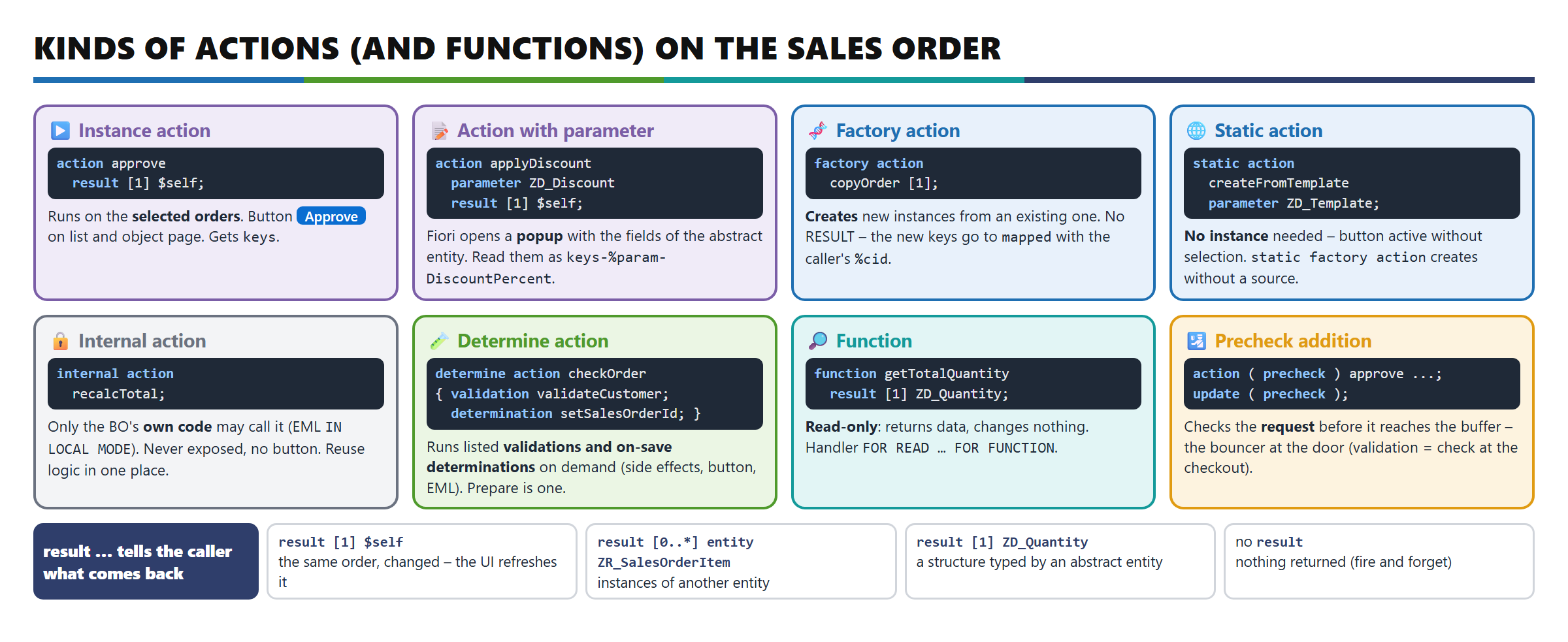
4.4 Action kinds and result types
Action kind | BDEF | Use |
|---|---|---|
Instance action | action approve result [1] $self; | Works on selected orders (R7) |
With parameter | action reject parameter ZD_RejectReason result [1] $self; | User enters values in a popup – the parameter is an abstract entity |
Factory action | factory action copyOrder [1]; | Creates new instances (R8); returns keys in |
Static action | static action … ; | Not bound to an instance (button without selection) |
Static factory | static factory action … [1]; | Creates a new instance without a source |
Internal action | internal action recalcTotal; | Only callable from the BO's own code (R5) |
Determine action | determine action checkOrder { … } | Runs listed checks on demand (R6, Part 5) |
Draft actions |
| Edit, Activate, Discard, Resume, Prepare (page 07) |
Result type | Meaning |
|---|---|
result [1] $self | Returns the same instance (changed) – Fiori refreshes it |
result [0..*] entity ZR_SalesOrderItem | Returns instances of another entity |
result [1] ZD_Quantity | Returns a structure typed by an abstract entity |
no | Returns nothing |
Part 5 – Functions, determine actions and default values
5.1 Functions – read-only answers
A function returns data without changing anything – a question, not a command. Example: the manager wants the total quantity of an order before approving it.
|
- EML:
READ ENTITIES OF zr_salesorder ENTITY SalesOrder EXECUTE getTotalQuantity FROM …. OData: a function call (GET). The function is an extra example, not part of the BDEF on page 04. - Action vs function in one line: an action is a modify operation (can change data, may return a result), a function is a read operation (never changes data).
5.2 Determine actions – run checks on demand (R6)
|
- A determine action bundles validations and on-save determinations (on-modify determinations are not allowed). Determinations run before validations, whatever the order in the list.
( always )aftervalidation/determinationruns it even if its trigger did not fire. - It needs no handler method. It is called by a side effect (
determine action checkOrder executed on field CustomerID affects messages– the customer is checked as soon as it is typed, → page 07), by a button, or by EMLEXECUTE checkOrder. draft determine action Prepareis the built-in example: Activate calls it before saving the draft.
5.3 Default values and recommendations (check your release)
- Default values functions (BTP 2311, S/4HANA 2025):
create { default function GetDefaultsForCreate; }proposes values when the user opens the Create dialog, for example the rep's usual currency. Actions with a parameter can have one too:action … { default function … ; }. - Recommendations (BTP 2602):
field ( recommendations ) …with a recommendation function – rule-based or AI-based value suggestions in the UI. - Unlike
setInitialStatus, a default value is only a proposal in the UI; a value that must always be set (R4) stays a determination.
Part 6 – Response parameters FAILED, REPORTED, MAPPED
A handler cannot simply raise an exception or MESSAGE … TYPE 'E' – it works on many instances at once and runs inside a framework that may continue with the others. So every handler answers through three response tables: which instances failed (FAILED), what the user should read (REPORTED) and which keys new instances got (MAPPED). Like a delivery note: rejected items, remarks, and the new tracking numbers.
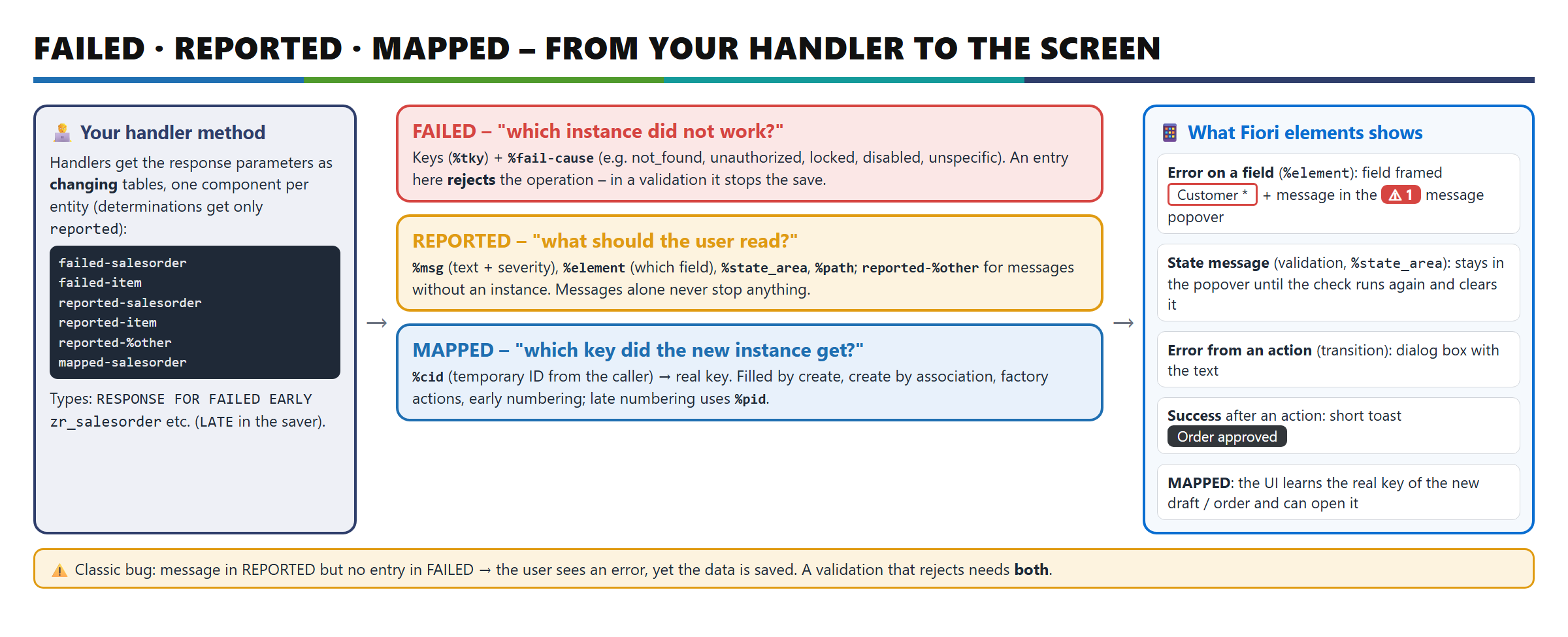
Parameter | Content | Sales Order example |
|---|---|---|
FAILED | Keys of instances that failed + |
|
REPORTED | Messages: | Error texts (R6), "Order approved" (R7) |
MAPPED |
|
|
- They are deep structures with one table per entity:
failed-salesorder,failed-item,reported-salesorder,reported-item,reported-%other,mapped-salesorder. - Their types:
RESPONSE FOR FAILED EARLY zr_salesorder(andREPORTED,MAPPED) in the interaction phase;LATEin the save sequence. An EML caller receives the same three tables (→ page 08). - Determinations have only
reported– they can warn but not reject. If something must stop the save, write a validation. - Only an entry in FAILED stops the operation or the save – a message alone (even of severity error) does not.
- Common mistake: filling REPORTED but forgetting FAILED – the user sees the error but the data is saved anyway.
|
%fail-causehelps the consumer react (OData turns it into a suitable HTTP status); validations usually leave it at the default (unspecific).- In the late save (
adjust_numbers,save) nothing may fail any more; unavoidable errors from legacy code are reported withcl_abap_behavior_saver_failed(BTP 2311 – check your release; → page 09).
Part 7 – Messages: anatomy, message class, severities
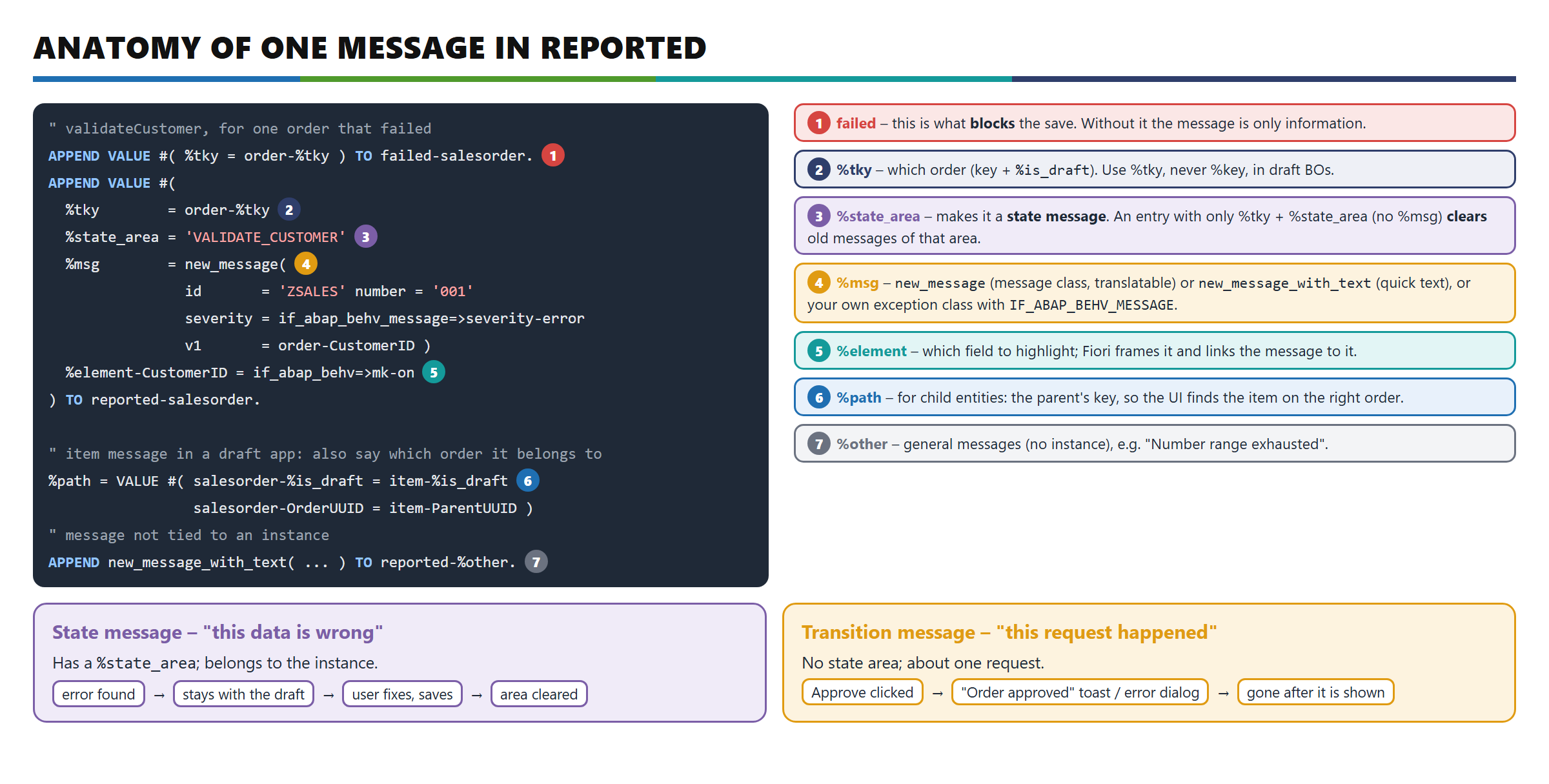
Component | Meaning |
|---|---|
%tky | Which instance (key + |
%msg | The message object ( |
%element-<field> |
|
%state_area | Makes it a state message; groups messages of one check so they can be cleared together |
%path | For child entities: the parent's key, so Fiori shows the message on the right item |
reported-%other | Messages not related to an instance |
- Common mistake: forgetting
%element– the message appears in the popover but the user cannot see which field is wrong.
7.1 Creating a message
- Quick text:
new_message_with_text( severity = … text = '…' )– fine for learning, not translatable. - Prefer a message class:
new_message( id = 'ZSALES' number = '001' severity = … v1 = … )– translatable texts (message class in ADT). - Both methods are inherited from
cl_abap_behavior_handler, so they are available in every handler method.
|
Reusable texts with attributes: an exception class that implements IF_ABAP_BEHV_MESSAGE (SAP's samples use /DMO/CM_FLIGHT_MESSAGES). The constructor sets the severity:
|
7.2 Severities and how Fiori shows them
Severity | Constant | Typical Fiori display |
|---|---|---|
Error | if_abap_behv_message=>severity-error | Red; with |
Warning | …=>severity-warning | Yellow entry in the message popover; does not block |
Information | …=>severity-information | Blue entry / dialog; does not block |
Success | …=>severity-success | Short toast after an action, e.g. "Order approved" |
7.3 State messages vs transition messages
State message | Transition message | |
|---|---|---|
Has | Yes | No |
Describes | A problem of the data ("customer unknown") | The result of one request ("order approved") |
Lives | With the instance (draft) until the check runs again and clears it | Shown once, then gone |
Sales Order |
|
|
- Clearing: at the start of a validation, append an entry with only
%tky+%state_area(no%msg) for every checked instance, as both validations in Part 3 do. That removes the old messages of this check; without it a corrected error stays in the popover.
Part 8 – Interview questions
Q1. Determination vs validation?
A determination changes data automatically when its trigger fires – on modify immediately, on save in finalize. A validation only checks, on save, and reports problems in FAILED and REPORTED; an entry in FAILED stops the save. Both must be written idempotently. Rule: if it changes data, determination; if it only checks, validation.
Q2. Determination on modify or on save?
On modify when the user should see the value at once (status N on create, the order total); on save when a value must be set exactly once just before saving, such as a number. In a draft app on-save logic runs only when the draft is activated.
Q3. Precheck vs validation?
A precheck (update ( precheck );, action ( precheck ) approve) runs before the change reaches the transactional buffer, so bad input is rejected immediately and never stored, not even in a draft. A validation runs on save on the data already in the buffer and sees the whole instance. Use a precheck to stop impossible requests early, a validation for consistency checks.
Q4. Action vs function, and which action types exist?
An action is a modify operation the consumer triggers, such as Approve; it can change data and return a result. A function is read-only. Action types: instance, static, factory (create new instances, e.g. copyOrder), internal (only callable inside the BO), with parameter (abstract entity), determine actions (run checks on demand) and draft actions.
Q5. How does a factory action return the new instance?
The caller passes a %cid per source key. The method creates the new instances with EML IN LOCAL MODE (header and, with CREATE BY \_Item and %cid_ref, the items) and copies the MAPPED result into its own mapped parameter, so the caller can map its %cid to the new key.
Q6. What is a determine action?
A named bundle of validations and on-save determinations (determine action checkOrder { validation validateCustomer; … }) that can be run on demand – by a side effect when a field changes, by a button or by EML EXECUTE. On-modify determinations are not allowed in it. draft determine action Prepare is the built-in one that Activate calls.
Q7. FAILED, MAPPED, REPORTED?
FAILED lists the instances that failed with a %fail-cause; MAPPED maps %cid to the real keys of created instances; REPORTED holds the messages with %msg, %element, %state_area and %path. Only FAILED stops an operation or a save – a message alone does not.
Q8. State messages vs transition messages?
State messages belong to the state of an instance (e.g. quantity 0) and stay until the problem is fixed; they are bound to %tky and a %state_area, which the validation clears before each check. Transition messages belong to one request (e.g. "Order approved") and are shown once.
Q9. The order total in the header does not update when an item quantity changes.
First check that the determination calculateTotal fires on the item fields Quantity and NetPrice and writes the header with IN LOCAL MODE (here through the internal action recalcTotal). If the value is correct after a refresh, the backend is fine and the UI just did not reload: add the side effect field Quantity affects field _SalesOrder.NetAmount and use side effects in the projection.
Q10. Why must determinations be idempotent?
Their triggers can fire more than once for the same instance – in a draft session, across several requests, or because another determination changed a trigger field. A determination that checks whether its work is already done (e.g. only orders without a status) gives the same result however often it runs.
🏠 Start Here · ◀ 04 · BDEF & Behavior Pool · 06 · Control, Auth & Numbering ▶ · Sections: CORE ABAP | OOPS ABAP | ABAP on HANA | Clean Core | RAP | ABAP Points | SAP Fiori | SAPUI5 | Mobile Development (MDK) | BTP Foundations | BTP Development | CAP | SAP Build | ABAP on BTP | Integration Suite | SAP Business AI | SAP BASIS | Security | SAP SDLC
Functional: FICO ABAP | TRM ABAP | VIM | SAP BIS | SD ABAP | MM ABAP | PP ABAP | QM ABAP | PM ABAP | PS ABAP | EWM | TM ABAP | EHS ABAP | HR ABAP | BW | SAP MDG | SAP Analytics Cloud | SAP Ariba | SAP CX | SAP IBP