How SAC gets its data and where its plan data goes: live connections (S/4HANA, BW, BPC, HANA, Datasphere, IBP, universes) with the set-up an ABAP / Basis team does on the source side, import connections (OData services, SAC agent, SAP Cloud Connector), the planning round trip with S/4HANA (actuals in, approved plan out to ACDOCP), embedded SAC and Fiori launchpad tiles, the other SAP cloud products, identity and monitoring. Live vs acquired data as a concept: page 01 Part 3; the planning process itself: page 02 Part 7; APIs, scripting and the CDS query code: page 04.
Part 1 – The integration landscape at a glance
SAC exchanges data in four directions: live queries (data stays in the source), import jobs (data copied into SAC models), export jobs (plan data pushed back, mainly to S/4HANA) and REST APIs (other systems pull from or push into SAC). Identity runs alongside all of them through a SAML identity provider.
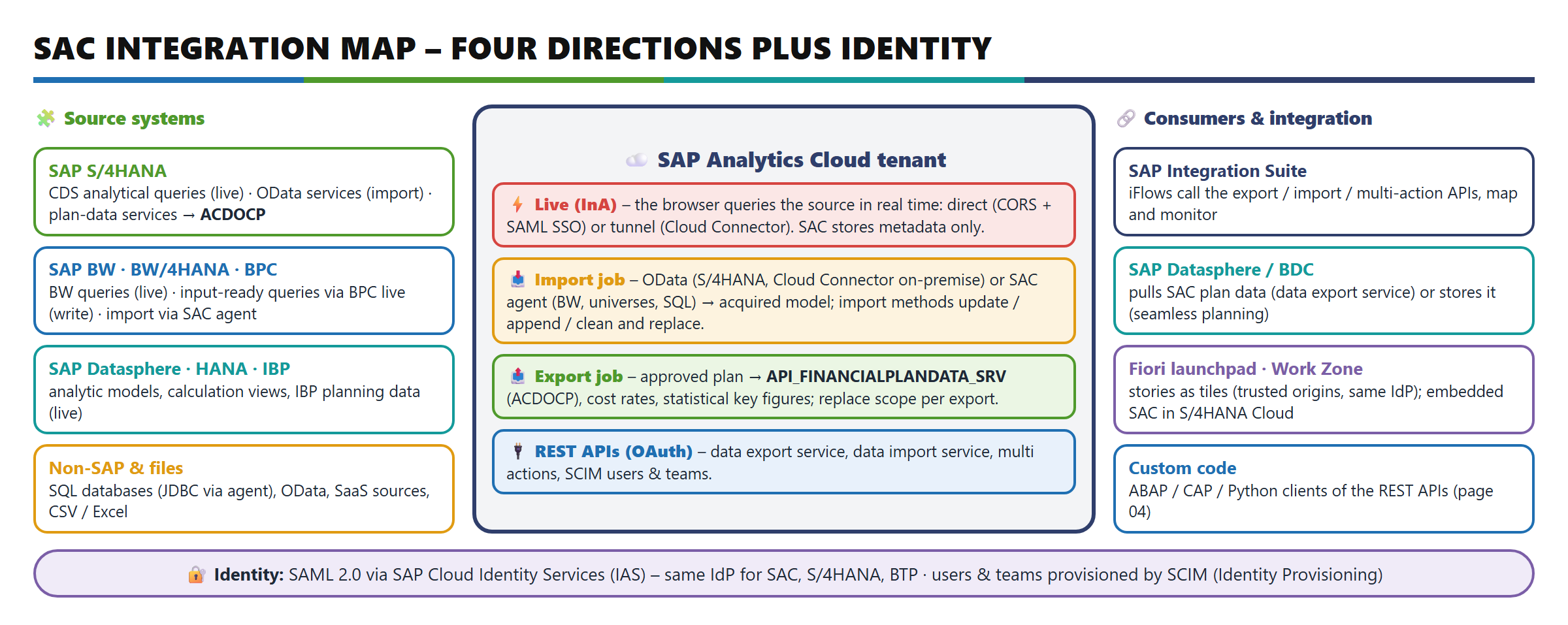
Direction | Technique | Typical use | Owner of the source-side work |
|---|---|---|---|
Live (read) | InA protocol from the browser to the source | Operational reporting on S/4HANA CDS queries, BW queries, Datasphere models | ABAP developer (CDS queries), Basis (ICF, CORS, SSO) |
Live (write) | BPC live connection | Planning on BW-IP / BPC embedded models with SAC as UI | BW / BPC team |
Import | Import job via OData, SAC agent, files, cloud connectors | Actuals and master data for SAC planning, blending non-SAP data | ABAP developer (OData services), Basis (Cloud Connector) |
Export | Export job to the S/4HANA plan-data OData services | Approved plan to ACDOCP, cost rates, statistical key figures | FI/CO consultant (plan categories), ABAP / Basis (services) |
APIs | SAC REST APIs (OAuth) | Integration Suite flows, data replication, user provisioning | Integration developer (page 04 Part 5) |
Part 2 – Live connections: InA, connection methods and sources
InA (Information Access) is SAP's REST/HTTP-based query protocol. In a live connection the user's browser sends InA requests to the source system and renders the result; SAC stores only the metadata (model definition, story). The data never lands in the SAC tenant, and the source system's authorizations decide what each user sees.
2.1 Connection methods
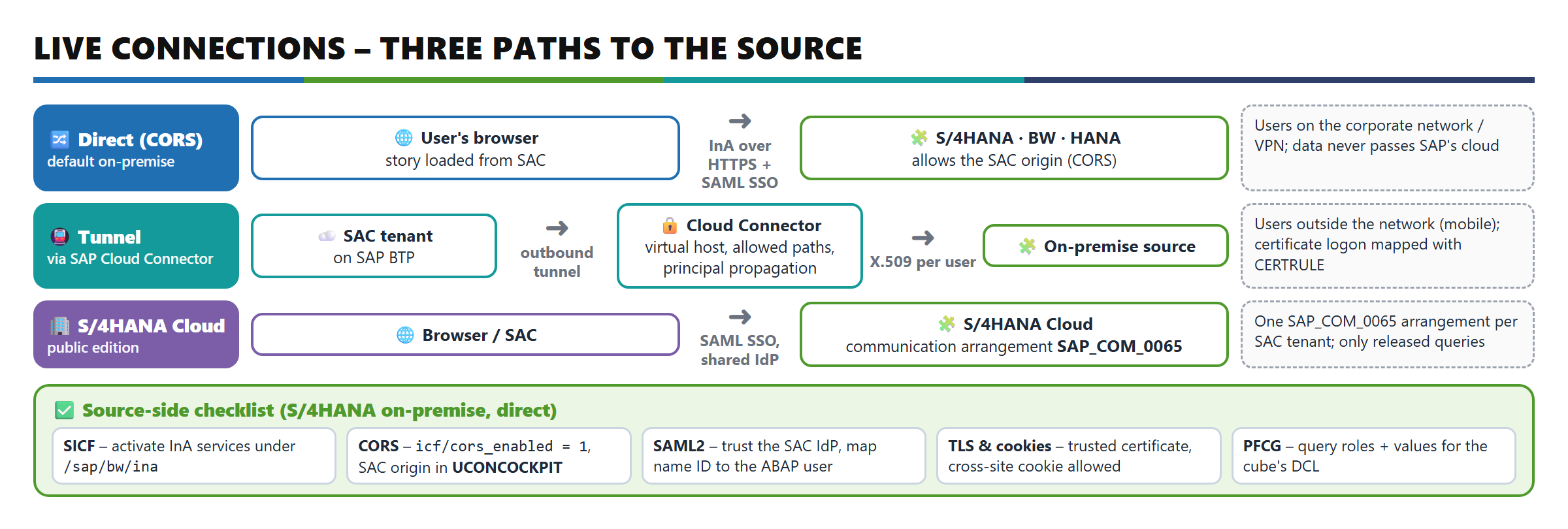
Method | How it works | When to use it |
|---|---|---|
Direct (CORS) | Browser → source URL over HTTPS. The source must accept cross-origin requests from the SAC tenant (CORS) and authenticate the user, normally by SAML single sign-on with the same identity provider as SAC | Default for S/4HANA on-premise, BW/4HANA, HANA: the source is reachable from the users' network (intranet or VPN); no data passes SAP's cloud |
Tunnel | SAC → SAP Cloud Connector in the customer network → source; single sign-on by principal propagation (the Cloud Connector issues a short-lived certificate for the user) | Users outside the corporate network (e.g. mobile) must reach on-premise data; requires the Cloud Connector and certificate-based logon in the source |
S/4HANA Cloud | Communication arrangement for scenario SAP_COM_0065 (SAP Analytics Cloud Integration) in S/4HANA Cloud with OAuth 2.0; SAML SSO in SAC (the same identity provider is not required with OAuth) | S/4HANA Cloud Public Edition; one SAP_COM_0065 arrangement per SAC tenant |
- Legacy: very old HANA live connections used a proxy option, deprecated since 2017 – direct or tunnel connections replaced it.
2.2 S/4HANA on-premise: the source-side checklist
Step | Where | What to do |
|---|---|---|
1. InA services | SICF | Activate the services under |
2. CORS | Profile parameter | Allow the SAC tenant URL as origin with the methods and headers SAC needs; the older alternative is an ICM rewrite script |
3. Single sign-on | SAML2 transaction | Trust the same SAML identity provider as SAC and map the SAML name ID (user ID or e-mail) to the S/4HANA user. From S/4HANA 1909 choose SAML Single Sign On (Standard-Compliant) in the SAC connection dialog |
4. TLS and cookies | ICM / Web Dispatcher | Valid certificate trusted by the browser; session cookies must work in a cross-site context (HTTPS, SameSite=None) – a frequent cause of failures after browser updates |
5. Authorizations | PFCG | Roles that allow running analytical queries plus the PFCG values read by the CDS access controls (DCL) of the queries |
6. Connection in SAC | SAC → Connections → Live Data → SAP S/4HANA | Host, HTTPS port, client, authentication method; then create a live model on a query or open the query in a story |
2.3 What SAC sees in S/4HANA: CDS analytical queries
- A live connection to S/4HANA consumes CDS analytical queries only – today defined as
define transient view entity … provider contract analytical_queryon a cube view; older queries carry@Analytics.query: true. Plain interface views, cubes or tables are not visible. - The query's technical name in the analytic engine (and in RSRT) is
2C+ view name (for older DDIC-based queries2C+ SQL view name) – search for it in the SAC model dialog. - The query defines everything SAC shows: dimensions and their texts, measures, hierarchies, restricted and calculated measures, and variables, which appear as prompts in the story. A missing field is fixed in CDS, not in SAC.
- S/4HANA Cloud: only released queries and queries created by key users with the Custom Analytical Queries app are available; on-premise, your own
ZC_…queries work as well. - Authorizations are enforced in S/4HANA through the DCL role on the cube – SAC adds nothing. Code example and design rules for the query: page 04 Part 7; background: ABAP on HANA › 05 CDS Views Parts 9 and 10.
2.4 Other live sources
Source | What SAC consumes | Remarks |
|---|---|---|
SAP BW, BW/4HANA | BW (BEx) queries via InA, incl. variables, hierarchies, structures | Feature support depends on the BW release (SAP's support matrix for BW live connectivity); read-only |
SAP BPC embedded / BW-IP | Input-ready queries on aggregation levels through a BPC live connection | The only live write scenario: data entry writes straight into BW; SAC data actions do not run on these models (BW planning functions / sequences do) |
SAP HANA, SAP HANA Cloud | Calculation views | Direct (CORS + SSO) or tunnel |
SAP Datasphere | Analytic models and views exposed for consumption | Strategic data layer; seamless planning and live versions: page 01 Part 4 |
SAP IBP | IBP planning data in real time | Live connection type SAP Integrated Business Planning; communication scenario configured in IBP |
SAP BusinessObjects universes | UNX / UNV universes | Through the on-premise component SAP BusinessObjects Live Data Connect; data stays behind the firewall |
- Limits of live models: no SAC planning (except BPC live), some smart features and blending options are restricted, and performance depends entirely on the source query.
Part 3 – Import (acquired) connections
Import connections copy data into an SAC model (acquired data) by scheduled import jobs. They are required for native SAC planning on S/4HANA data and for blending SAP and non-SAP sources.
Connection type | How data is read | Infrastructure |
|---|---|---|
SAP S/4HANA | OData V2 services; SAC browses the gateway catalog ( | On-premise: SAP Cloud Connector (back-end type ABAP, HTTPS); no SAC agent needed. S/4HANA Cloud: no Cloud Connector, set up via scope item 1YB |
OData Services | Any OData service (SAP or non-SAP) | Cloud Connector for on-premise services |
SAP BW / BW/4HANA, SAP BPC, SAP Universe, SAP ERP (ECC) | Queries, BPC models, universe queries; ECC: only classic InfoSet queries / SAP Queries (S/4HANA instead: OData, above); SAP ERP is not available for the new model type | Cloud Connector + SAP Analytics Cloud agent (BPC imports need no agent) |
SQL databases | Tables and views via JDBC | Cloud Connector + SAC agent with JDBC driver |
Files | CSV / Excel upload, files on a file server | Browser upload; file server via agent |
Cloud applications | e.g. SAP SuccessFactors, SAP SuccessFactors Workforce Analytics, other SaaS and cloud databases | Connector per source, configured in SAC |
Data Import API | External systems push rows into a model | REST API (page 04 Part 5) |
3.1 SAP Cloud Connector and SAC agent
- The SAP Cloud Connector is installed in the customer network and opens an outbound tunnel to SAP BTP; SAC reaches on-premise systems through it without inbound firewall ports. It maps a virtual host to the internal host and restricts the allowed URL paths.
- The SAC agent is a Java web application (deployed on a Tomcat server next to the Cloud Connector) that talks to BW, universes and JDBC sources – BPC imports and OData-based S/4HANA imports do not need it.
- Import connections normally use a technical user whose credentials are stored in the connection ("share these credentials"). The source's row-level security therefore does not reach SAC users – restrict acquired data with SAC data access control (page 02 Part 3).
3.2 The S/4HANA side of an import
- SAC reads OData services, not CDS views directly, and it cannot import from CDS analytical queries. Typical sources: SAP's released APIs and business-content services, or a custom CDS view exposed through a service definition and an OData V2 service binding (CORE ABAP › 08 OData).
- Design the service for bulk reads: flat entity, filterable fields (fiscal year, company code, ledger), server-side paging, no one-to-many navigation (SAC does not follow it).
- Activate the service in /IWFND/MAINT_SERVICE (on-premise) and test it in /IWFND/GW_CLIENT before building the SAC job.
3.3 Import jobs
- An import job queries the source, applies wrangling (mapping, transformations, filters) and writes into the model; it can be run once or scheduled, and planning models let you choose the import method: Update, Append, Clean and replace selected version data or Clean and replace subset of data.
- Master data (dimension members, hierarchies, properties) is imported into dimensions; fact data into the model. Import master data first, otherwise fact rows with unknown members are rejected.
- Multi actions can contain a data import step, so a monthly cycle can import actuals, run data actions and publish in one run (page 02 Part 6).
Part 4 – Planning integration with S/4HANA: actuals in, plan out
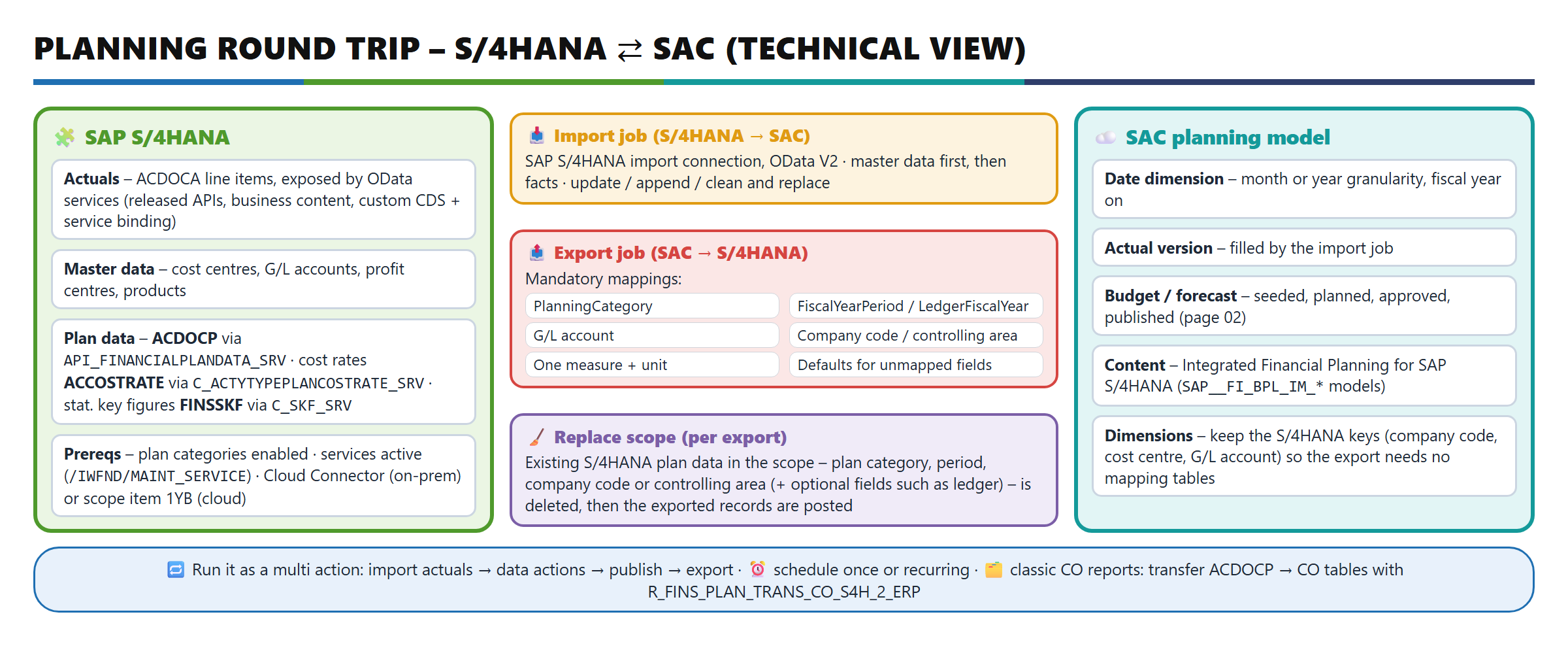
Native SAC planning works on acquired (or Datasphere-stored) data, so S/4HANA planning integration is a round trip: actuals and master data are imported, the plan is built in SAC, and the approved plan is exported to S/4HANA plan data. The business process is on page 02 Part 7; here are the technical pieces.
4.1 Inbound: actuals and master data
- Master data (cost centres, G/L accounts, profit centres, products) and actual line items come through OData services over the SAP S/4HANA import connection; jobs run once or on a schedule.
- SAP's business content Integrated Financial Planning for SAP S/4HANA (Content Network) delivers ready-made models, stories and data actions – e.g. models
SAP__FI_BPL_IM_COSTCENTER,SAP__FI_BPL_IM_PRODUCTCOST,SAP__FI_BPL_IM_PROFITABILITY,SAP__FI_BPL_IM_CAPEXandSAP__FI_BPL_IM_FINANCIAL_STATEMENT– including the import and export mappings; projects usually start from it (page 05). - Alternative: actuals replicated into SAP Datasphere (or delivered as data products in Business Data Cloud) and used as a live version or through seamless planning (page 01 Part 4).
4.2 Outbound: export to S/4HANA plan data
OData service | S/4HANA target | Content |
|---|---|---|
API_FINANCIALPLANDATA_SRV | Table ACDOCP (plan data line items) | Financial plan data: cost centre, P&L, balance sheet, project and order plans |
C_ACTYTYPEPLANCOSTRATE_SRV | Table ACCOSTRATE | Plan cost rates of activity types |
C_SKF_SRV | Table FINSSKF | Statistical key figures (plan) |
- Prerequisites in SAC: the model's date dimension has month or year granularity and fiscal year settings switched on; the user needs execute rights on other data sources, read on the model and access to the connection.
- Mapping: mandatory targets are PlanningCategory, the time field (FiscalYearPeriod or LedgerFiscalYear), G/L account, an organisational field (company code or controlling area) and the measure with its unit. Only one measure / unit pair per export; target fields without a source get a default value. One SAC version can feed several S/4HANA plan categories.
- Replace scope: each export defines the slice it replaces in S/4HANA. Plan category, the time field and company code or controlling area are mandatory; further fields (e.g. ledger) can be added. Existing plan data in the scope is deleted first, then the exported records are posted. Design the scope carefully – too wide removes plan data other processes wrote, too narrow leaves outdated values.
- Exports run in the background and can be run manually or scheduled (once or recurring); the data import step of a multi action does not run export jobs.
- S/4HANA side: plan categories must exist and be enabled for the planning use in customizing; on-premise the services must be activated in /IWFND/MAINT_SERVICE and reachable through the Cloud Connector; in S/4HANA Cloud the integration is set up with scope item 1YB.
- Reports that still read the classic CO tables need a transfer: programs R_FINS_PLAN_TRANS_CO_S4H_2_ERP (ACDOCP → CO tables) and R_FINS_PLAN_TRANS_CO_ERP_2_S4H (CO tables → ACDOCP).
4.3 Other write-back routes
Route | When |
|---|---|
BPC live connection | Planning stays in BW-IP / BPC embedded; SAC is the data-entry UI and writes directly into BW (Part 6) |
Data Export Service pulled by SAP Integration Suite, Datasphere or custom code | Plan data goes to non-S/4HANA targets or needs mapping logic SAC's export cannot do (page 04 Part 5) |
Multi action API step | After publishing, call an HTTP API (e.g. a BTP service or an S/4HANA endpoint) to trigger follow-on processing |
Seamless planning | Plan data is stored in Datasphere and consumed there – no export at all |
Part 5 – Embedded SAC and SAC in the Fiori launchpad
- Embedded SAC in S/4HANA Cloud Public Edition (page 01 Part 5.1): SAC runs behind the scenes and reads the system's own CDS analytical queries through a live connection. Key users create stories in Manage KPIs and Reports and publish them as Fiori tiles. It is included commercially in the public edition but limited to that system's data – no planning, no other sources.
- S/4HANA on-premise and private cloud: a standalone SAC tenant with a live connection; stories are added to the Fiori launchpad or SAP Build Work Zone as URL tiles. The SAC tenant must list the launchpad host under trusted origins (System → Administration → App Integration), and both sides should use the same identity provider so the user is not asked to log on twice.
- Embedded SAC in other SAP cloud products: e.g. stories in SAP SuccessFactors People Analytics run on an embedded SAC that sees only that product's data.
- SAC, embedded edition was a separate SAP BTP service for embedding SAC in custom BTP applications; it was deprecated on 15 March 2025 (no new CPEA contracts, no renewal) and was never the planning-capable enterprise tenant (page 05).
Part 6 – Other SAP products: BPC, IBP, SuccessFactors, Datasphere
Product | Integration with SAC | Notes |
|---|---|---|
SAP BPC embedded / BW-IP | BPC live connection: input-ready queries, write-back into BW in real time; BPC planning sequences can be triggered from SAC | Hybrid planning during a BPC → SAC transition; some SAC planning features are unavailable on these models (SAP Note 2969947) |
SAP BPC standard | No live connection – data is imported into SAC and written back to BPC | Near-real-time replication, not live; at least one Planning Professional user is needed to set up the BPC connection |
SAP IBP | Live connection to IBP planning data; import via IBP OData APIs; the Integrated Financial Planning content links supply and financial plans | See SAP IBP section › 03 |
SAP SuccessFactors | Import connections (SuccessFactors, Workforce Analytics); People Analytics stories run on embedded SAC; the Integrated Financial Planning content integrates workforce data | See HR ABAP › 06 |
SAP Datasphere | Live connection to analytic models, live versions, seamless planning, Data Export Service as a source in Datasphere | Strategic data layer, part of Business Data Cloud (page 01 Part 4, BTP Development › 04) |
SAP Integration Suite | Calls SAC REST APIs (export, import, multi actions) in iFlows | Integration Suite › 02 SAP CPI |
Part 7 – Identity, single sign-on and users
- Identity provider: SAC authenticates users with SAML 2.0 – either SAP's default identity provider or a custom IdP, in SAP landscapes usually SAP Cloud Identity Services – Identity Authentication (IAS), which in turn can proxy the corporate directory (e.g. Microsoft Entra ID).
- User mapping: the SAML assertion identifies the user by user ID, e-mail or a custom attribute. For live connections the source system must map the same identifier to its own user (SAML2 configuration in S/4HANA) – mismatches are the most common cause of "user not found" errors.
- One IdP for all: using the same IAS tenant for SAC, S/4HANA (Fiori), BTP and Datasphere gives single sign-on across stories, tiles and live queries.
- Provisioning: users and teams are created manually, by CSV, or automatically through the SCIM API – typically by the SAP Cloud Identity Services – Identity Provisioning service reading groups from the corporate directory (page 04 Part 5).
- Technical users: import and export connections use stored technical credentials; API clients use OAuth clients created in System → Administration → App Integration. Neither should be a personal user.
- Tunnel SSO: principal propagation through the Cloud Connector (X.509 certificate per user, mapped to the ABAP user via CERTRULE).
Part 8 – Monitoring and troubleshooting
Symptom | Where to look | Typical cause |
|---|---|---|
Live story shows "wrong credentials, or CORS is not configured correctly" | Browser developer tools (network tab, InA requests), UCONCOCKPIT, SICF | SAC origin missing in the CORS allowlist, InA services inactive, cookie blocked, certificate not trusted |
Query not offered in the model dialog | RSRT with | Not an analytical query, not released (S/4HANA Cloud), user lacks authorization |
Live story shows no or too little data | Source authorizations: DCL role of the cube, PFCG values, SU53 | Missing PFCG values for the DCL conditions |
Import job fails or is incomplete | SAC data management (job history, rejected rows), /IWFND/ERROR_LOG, /IWFND/GW_CLIENT, Cloud Connector monitor | Service not active, unknown dimension members, timeouts on large reads |
Export to S/4HANA fails | SAC export job log, /IWFND/ERROR_LOG, application log of the plan-data service | Plan category not enabled, unmapped mandatory fields, master data missing in S/4HANA |
Tunnel connection fails | Cloud Connector access control and audit log | Virtual host or path not exposed, principal propagation not trusted |
Part 9 – Interview questions
Q1. How does a live connection from SAC to S/4HANA work technically?
The user's browser sends InA (Information Access) queries over HTTPS to the S/4HANA InA services under /sap/bw/ina, either directly (CORS plus SAML single sign-on) or through a tunnel via the SAP Cloud Connector. S/4HANA runs the CDS analytical query with the user's authorizations; SAC stores only metadata.
Q2. What must the ABAP / Basis team configure for a direct live connection?
Activate the InA ICF services, enable CORS (icf/cors_enabled and the SAC origin in UCONCOCKPIT), set up SAML2 trust to the same identity provider as SAC with matching user mapping, provide a valid TLS certificate, and give users roles for the queries and the PFCG values their DCL needs.
Q3. Direct vs tunnel connection – when do you choose which?
Direct is the default: the browser reaches the source on the corporate network and no data passes SAP's cloud. Tunnel goes through the SAP Cloud Connector with principal propagation and is chosen when users outside the network must reach on-premise data.
Q4. Which S/4HANA objects can SAC consume live, and which by import?
Live: CDS analytical queries only (transient view entities with provider contract analytical_query or legacy @Analytics.query views), released ones in S/4HANA Cloud. Import: OData V2 services – released APIs or custom services on CDS views. Import cannot read analytical queries.
Q5. How do you connect SAC to S/4HANA Cloud Public Edition?
Live: a communication arrangement for scenario SAP_COM_0065 with OAuth 2.0 and SAML SSO in SAC (no shared identity provider needed), one arrangement per SAC tenant. Import and export: the SAP S/4HANA connection type over OData, configured with scope item 1YB, without a Cloud Connector.
Q6. What do the SAP Cloud Connector and the SAC agent do?
The Cloud Connector opens an outbound tunnel from the customer network so SAC can reach on-premise systems without inbound ports; it is used for tunnel live connections and on-premise imports. The SAC agent, deployed next to it, reads BW, universes, JDBC sources and ECC (SAP ERP connection: InfoSet / SAP queries); BPC imports and OData imports from S/4HANA do not need it.
Q7. How does approved plan data get from SAC into S/4HANA?
With an export job on the SAP S/4HANA connection to API_FINANCIALPLANDATA_SRV, which writes plan line items to ACDOCP (cost rates and statistical key figures have their own services). Plan category, fiscal period, G/L account, company code or controlling area and one measure / unit are mapped, and a replace scope defines which S/4HANA slice is replaced.
Q8. Which prerequisites must a model meet to export to S/4HANA?
Date dimension with month or year granularity and fiscal year switched on, a mapping for all mandatory targets, one measure / unit pair per export, plan categories that exist and are enabled in S/4HANA, and on-premise an activated service reachable through the Cloud Connector.
Q9. Can you plan in SAC on live data?
Native SAC planning needs acquired data or seamless planning in Datasphere. The live exception is the BPC live connection: input-ready queries on BW-IP / BPC embedded models write directly into BW, with BW planning functions instead of SAC data actions. S/4HANA CDS queries are read-only.
Q10. How is security handled differently for live and import connections?
Live: each user is authenticated in the source by SSO and the source authorizations (DCL, PFCG) apply. Import: a technical user reads all data, so restrictions must be rebuilt in SAC with data access control on dimensions and with roles, teams and folder sharing.
Q11. What is embedded SAC in S/4HANA and how does it differ from a standalone tenant?
In S/4HANA Cloud Public Edition an embedded SAC powers stories created in Manage KPIs and Reports on that system's CDS queries via a live connection. A standalone tenant adds planning, other sources, predictive features and the APIs; on-premise systems use a standalone tenant and add stories as Fiori tiles.
Q12. A live story suddenly fails with a CORS error. How do you analyse it?
Open the browser developer tools and check the InA requests: blocked preflight, missing Access-Control headers or a dropped session cookie. Then check the SAC origin in UCONCOCKPIT, the InA services in SICF, the certificate, cookie settings after browser updates and the SAML user mapping.
🏠 Start Here · ◀ 02 · Capabilities & Data · 04 · Extensibility ▶ · Sections: CORE ABAP | OOPS ABAP | ABAP on HANA | Clean Core | RAP | ABAP Points | SAP Fiori | SAPUI5 | Mobile Development (MDK) | BTP Foundations | BTP Development | CAP | SAP Build | ABAP on BTP | Integration Suite | SAP Business AI | SAP BASIS | Security | SAP SDLC
Functional: FICO ABAP | TRM ABAP | VIM | SAP BIS | SD ABAP | MM ABAP | PP ABAP | QM ABAP | PM ABAP | PS ABAP | EWM | TM ABAP | GTM ABAP | EHS ABAP | HR ABAP | BW | SAP Datasphere | SAP Business Data Cloud | SAP MDG | SAP Analytics Cloud | SAP Ariba | SAP CX | SAP IBP