This page follows the documents through SAP Ariba end to end: source-to-contract (sourcing request, sourcing project, event, award, contract workspace, compliance contract), procure-to-pay (requisition, approval, purchase order, supplier confirmation and ship notice on SAP Business Network, receipt, invoice, invoice reconciliation, payment in the ERP) and supplier management (request, registration, qualification, preferred status, performance, risk). It then covers approval rules, catalogs, the key business objects and which master data the ERP owns. Solution names and the architecture: page 01; the technical integration with S/4HANA: page 03.
Part 1 – The document chain at a glance
Every Ariba process is a chain of documents, each with its own approval flow and status. The upstream chain ends in a contract; the downstream chain uses that contract and ends with a payment in the ERP. Most documents are approvables: Ariba builds an approval flow for them from approval rules (Part 6).
Process | Document chain | Solution |
|---|---|---|
Source-to-contract | Sourcing request → sourcing project → event (RFI / RFP / auction) → award → contract workspace → compliance contract | Sourcing, Contracts |
Procure-to-pay | Requisition → approval → purchase order → order confirmation → ship notice → receipt → invoice → invoice reconciliation (IR) → payment (ERP) | Buying and Invoicing, SAP Business Network |
Supplier management | Supplier request → registration → qualification → preferred status → performance review; risk assessment in parallel | Supplier Lifecycle and Performance, Supplier Risk |
Spend visibility | ERP and Ariba spend data → classification and enrichment → spend reports → new sourcing projects | Spend Analysis, Category Management |
- Intake (next-gen): SAP Ariba Intake Management puts one entry point in front of all these chains – the employee describes the need and the request is routed to buying, sourcing or contracting.
- Spend analysis loads spend from ERPs (invoices, POs, AP data) and other sources, classifies it to commodities and suppliers (data enrichment) and shows where sourcing can save money; Category Management turns that into category strategies and plans that start sourcing projects.
Part 2 – Sourcing: from request to award
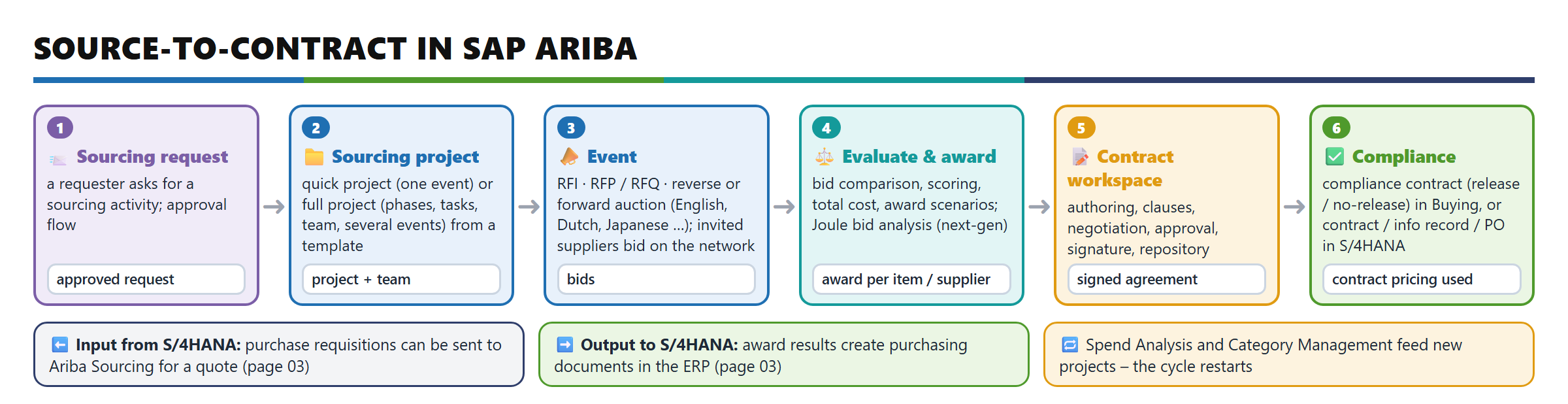
2.1 Steps
- 1. Sourcing request: a business user asks procurement to source something. After approval, a sourcing manager creates a sourcing project or event from it.
- 2. Sourcing project: the container of the work, created from a template (phases, tasks, documents, team, approval steps). A quick project holds a single event and no project management; a full project holds several events, sub-projects, tasks, documents and a project team. In guided sourcing the same choice is called single event vs full project.
- 3. Event: suppliers are invited and respond through SAP Business Network. The event has content (line items, lots, questions, attachments, terms), rules (timing, currency, visibility of bids) and participants.
- 4. Evaluate and award: bids are compared line by line, scored (weighted questions), analysed by total cost and in award scenarios, then awarded per item or lot to one or several suppliers.
- 5. Contract: the award is turned into a contract workspace (Part 3) or – for one-off buys – handed directly to purchasing.
- 6. Hand-over to the ERP: with S/4HANA integration, award results create purchasing documents in the ERP, and purchase requisitions from S/4HANA can be sent to Ariba Sourcing for quotes (page 03).
2.2 Event types
Event type | Purpose | Typical use |
|---|---|---|
RFI – request for information | Collect information, no prices | Market scan, pre-qualify suppliers before an RFP |
RFP / RFQ – request for proposal / quotation | Sealed bids with prices and answers, several rounds possible | Most indirect and direct sourcing |
Reverse auction | Suppliers bid prices down in real time; formats such as English (open), Dutch, Japanese, total cost; traffic-light bidding as an option | Commodities with clear specifications and competition |
Forward auction | Buyers bid prices up | Selling scrap, surplus assets |
- Templates are the main configuration object of sourcing: project templates, event templates, questionnaire content, rules and conditional tasks. Administrators maintain them; buyers only pick one. This is where company policy (e.g. three bids above a threshold) is enforced.
- Direct-spend sourcing adds features such as items with material numbers, bills of materials, scheduling and formulas; AI features of next-gen Ariba include a Joule agent for bid analysis (page 01 Part 6.2).
Part 3 – Contracts: contract workspace and compliance contract
Ariba separates the legal contract (negotiated, signed, stored in SAP Ariba Contracts) from the compliance contract that buying uses to apply contract prices and limits.
Object | What it is | Key points |
|---|---|---|
Contract request | A request to a contract manager to create a contract workspace | Approval flow; starts the contract process |
Contract workspace (procurement) | The container of one agreement: documents, contract terms, tasks, team, approvals, signature, milestones, amendments | Created from a template, from a sourcing award or manually; IDs prefixed CW |
Contract workspace (sales) | The same for sell-side contracts | Same tools, different templates |
Clause library / authoring | Main agreement assembled from approved clauses in Word | Deviations from standard clauses can trigger legal approval |
Contract terms document | Structured terms inside the workspace (items, prices, limits, validity) | Opening it in a suite-integrated site creates a contract compliance request |
Compliance contract | The contract as used by Buying and Invoicing | Generated when the contract compliance request is approved |
3.1 Release and no-release contracts
Type | Behaviour | Typical case |
|---|---|---|
Release order contract (Release Required = Yes) | POs (release orders) are created against the contract; contract prices and discounts are applied on the PO; release access can be limited to users or groups | Framework agreement for catalog items or services |
No-release order contract (Release Required = No) | No POs; you can receive against the contract and the supplier invoices against the contract directly | Subscriptions, rent, recurring services |
- Limits and hard limits: a contract carries a maximum amount; limits and tolerances are monitored by contract compliance (Part 5).
- Integration: contracts can also be replicated to S/4HANA (as purchase contracts / outline agreements) when POs are created in the ERP – page 03. In next-gen SAP Ariba, contract lifecycle features are extended through Icertis integration and Joule contract summaries.
Part 4 – Buying: requisition to receipt
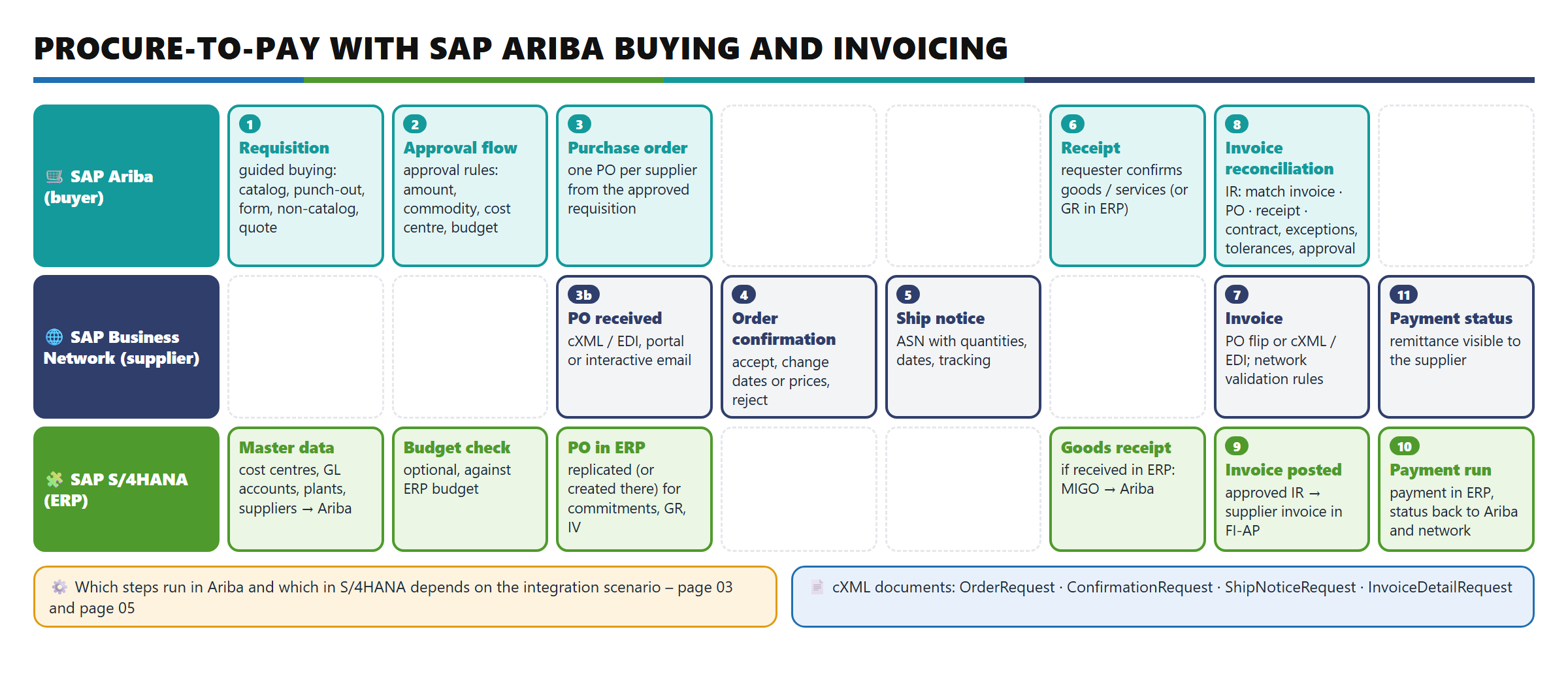
4.1 Requisition channels
Channel | How the requester buys | Control |
|---|---|---|
Catalog item | Search the catalog in guided buying, add to cart | Price and supplier fixed by contract – the cheapest, best-controlled channel |
Punch-out | Jump to the supplier's web shop, fill a cart there, return it to Ariba | Supplier hosts content and prices; cart returns as requisition lines (Part 7) |
Form (guided buying) | Fill a form for a specific need (e.g. software, consulting) with the fields procurement needs | Forms and policies are configured per category |
Non-catalog request | Free-text description, supplier, price | Highest risk – usually extra approval by purchasing |
Quote request | Ask suppliers for quotes from guided buying (simple sourcing) | Uses SAP Ariba Sourcing behind the scenes |
Spot buy | Marketplace content from third-party marketplaces inside guided buying | Low-value items not covered by catalogs |
- Guided buying shows landing pages with tiles per category, checks policies (e.g. use the preferred supplier, warn above an amount) and leads casual users to the right channel. Professional buyers work in the classic UI.
- Accounting: each requisition line carries account assignment (cost centre, WBS element, internal order, asset, GL account) taken from the ERP master data loaded into Ariba; defaults come from the user profile. An optional budget check can call the ERP.
4.2 Requisition statuses
Status | Meaning |
|---|---|
Composing | Being created; visible only to its author |
Submitted | In the approval flow until the last approver approves or one denies |
Approved | Short transitional status after the last approval |
Ordering / Ordered | POs are being created and sent (depends on the supplier's routing method) / sent |
Receiving / Received | First partial receipt entered / full quantity or amount received |
Denied / Canceled | Rejected by an approver / withdrawn |
4.3 Purchase order, confirmation, ship notice, receipt
- Purchase order: the approved requisition is split into one PO per supplier (and per ordering criteria). The PO is either created in Ariba and sent to the supplier over SAP Business Network, or created in the ERP – which depends on the integration scenario (page 03).
- Supplier routing: for each supplier location the ordering method (SAP Business Network, email, fax or print) decides how an Ariba PO is transmitted.
- Order confirmation: the supplier confirms, changes (dates, quantities, prices – if allowed by the buyer's rules) or rejects the PO on the network.
- Ship notice (ASN): quantities, dates and tracking of the shipment.
- Receipt: the requester confirms delivery of goods or services in Ariba (by quantity or amount), or the goods receipt is posted in S/4HANA (MIGO) and sent to Ariba. Service orders can use service entry sheets on the network.
- Change orders: a changed PO creates a new version (V2, V3 …) that is sent to the supplier again.
Part 5 – Invoicing and invoice reconciliation
Suppliers create invoices on SAP Business Network – by flipping the PO in the portal, from interactive email or by cXML / EDI. The network validates them against the buyer's invoicing rules (e.g. allow non-PO invoices, require tax, invoice only confirmed quantities) before they reach Ariba. Paper invoices can be digitised through invoice capture (OCR) services.
5.1 The invoice reconciliation document (IR)
- Every invoice tied to a PO or contract creates an invoice reconciliation (IR) document in Ariba. Automatic reconciliation matches the invoice against the PO, receipt and contract and raises exceptions where values differ.
- Each exception type has a tolerance (absolute and / or percentage) and a handler group. Within tolerance → no exception; outside → the IR goes to manual reconciliation.
- The approval rules for IRs add the exception handlers as the first approvers; they accept, dispute or refer the exceptions. IRs cannot be denied or withdrawn – they are approved, re-reconciled or rejected back to the supplier.
Exception (examples) | Raised when |
|---|---|
PO price variance | Invoice unit price differs from the PO price beyond tolerance |
PO received quantity variance | Invoiced quantity exceeds the received quantity |
Amount / quantity variance | Invoiced amount or quantity exceeds the ordered one |
Contract price variance / contract limit | Price differs from the contract or the contract maximum would be exceeded |
Catalog price variance | Price differs from the catalog price |
Tax, freight, handling, special charge variance | Charge lines differ from what was expected or allowed |
Unmatched invoice | The invoice cannot be matched to an order or contract |
5.2 IR statuses and payment
Status | Meaning |
|---|---|
Reconciling | Being reconciled; exception handlers work on it |
Approving | In the approval flow |
Approved | Short status; the payment request is generated |
Paying | Payment request sent to the ERP (Paying Failed if transmission fails) |
Paid | Payment confirmed by the ERP |
Rejected | Rejected back to the supplier, who can correct and resubmit |
- Payment is always in the ERP: the approved invoice is posted in S/4HANA as a supplier invoice (FI-AP), paid by the payment run, and the payment status / remittance flows back to Ariba and to the supplier on the network (page 03).
- SAP Ariba Invoice Management runs the same invoice and reconciliation logic for POs that were created in the ERP, without Ariba Buying.
- Joule for simplified invoice creation (next-gen) helps employees outside accounts payable submit invoices with minimal input.
Part 6 – Approval rules
When an approvable is created or changed, Ariba evaluates the approval rules for that document type and builds an approval flow (a graph of approvers, serial and parallel). Administrators maintain approval processes per approvable type (requisition, invoice reconciliation, contract request, supplier request …) on the Manage Approval Processes page; requisition processes can be managed by purchasing administrators, all types by customer administrators.
Rule type | What it does | Example |
|---|---|---|
Base rule | Adds approvers or groups when a condition is met | Line with commodity code CAPEX → facilities manager approves |
Chain rule | Adds approvers up a hierarchy until a limit is reached | Supervisors up the reporting line until the approval limit covers the amount; inactive supervisors are skipped |
Filter rule | Removes approvers added by base and chain rules | Remove the requester if he is also an approver |
Edit rule | Prevents editing of the document under conditions | Approvers may not change the supplier |
- Conditions combine fields of the document (amount, commodity code, account assignment, company code, supplier, user group) with AND / OR and sub-conditions; approvers can be users, groups, roles derived from data (e.g. cost centre owner) or lookup tables.
- Child realms inherit approval processes from the parent realm (page 01 Part 6).
- Design tip: approval logic belongs in Ariba, not in the ERP. If the ERP must approve (e.g. budget owners maintained only in S/4HANA), use an external approval integration rather than duplicating rules – page 03.
Part 7 – Catalogs and commodity codes
Catalog type | How it works | Pros / cons |
|---|---|---|
Static catalog – CIF | Catalog Interchange Format: a text / CSV file of items (supplier part number, description, price, unit of measure, commodity code, lead time); Excel files are converted to CIF on the network | Simple, searchable in Ariba, prices fixed – but must be re-uploaded on change |
Static catalog – cXML | Same content in cXML format | Richer structure, used by larger suppliers |
Punch-out level 1 | User jumps to the supplier's web shop (cXML PunchOutSetupRequest); supplier controls content and prices; cart is returned to Ariba | Always current content; less searchability inside Ariba |
Punch-out level 2 | Items appear in Ariba search through a static index file and open the supplier's shop at item level | Best user experience; more set-up effort |
- Publishing: suppliers upload catalogs to their SAP Business Network account and publish them to the buyer; the buyer's catalog manager reviews and approves them (catalog approval) before users see them. Content management features allow buyers to edit and enrich content.
- Catalog views and restrictions: content can be limited by user group, company code or region; in multi-ERP setups catalogs live in the parent realm and child realms subscribe to them.
- Commodity codes: Ariba classifies items and spend with UNSPSC commodity codes. A commodity code mapping translates them to ERP material groups (and can derive default GL accounts / account assignment), so a guided buying line arrives in S/4HANA with a valid material group.
- Punch-out vs ERP catalogs: S/4HANA self-service requisitioning can use OCI punch-out catalogs on its own; with Ariba the catalogs are managed once in Ariba for all employees.
Part 8 – Supplier management and supplier risk
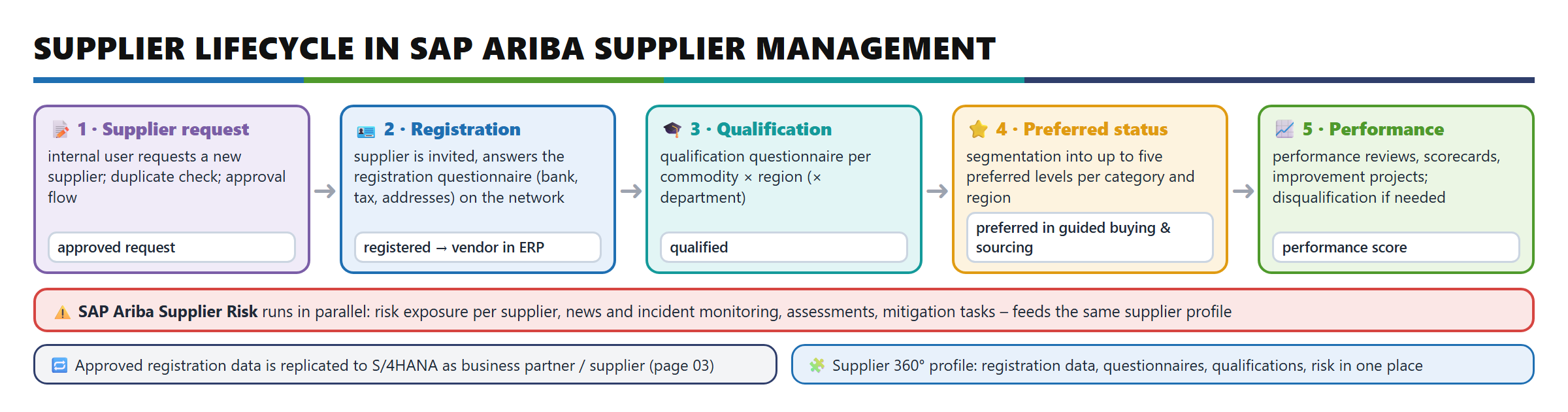
Step | What happens | Result |
|---|---|---|
Supplier request | An internal user requests a new supplier; duplicate check; approval flow | Approved request |
Registration | The supplier contact is invited and answers the registration questionnaire (company, addresses, bank, tax, certificates); approvers review it | Registered supplier; data used to create the vendor in the ERP |
Qualification | A qualification questionnaire per commodity × region (optionally × department), reviewed by category managers | Qualified / disqualified per category |
Preferred status | Segmentation into up to five preferred levels (1 = most preferred); only qualified suppliers can become preferred | Preferred suppliers shown first in guided buying and sourcing |
Performance | Performance reviews and scorecards, improvement projects | Basis for renewal, phase-out or disqualification |
- Supplier 360° profile: one view of a supplier's registration data, questionnaires, qualifications, preferred status, risk and activity.
- Supplier Risk: risk exposure per supplier from internal and external data, grouped into risk areas such as financial, operational, regulatory and environmental / social, news and incident monitoring, risk assessment projects and mitigation tasks.
- AI (next-gen): AI supplier-response summaries help reviewers read long questionnaire answers.
- ERP link: approved suppliers are replicated to S/4HANA as business partners with the supplier role; changes made in the ERP flow back. The supplier master on the network (ANID) is linked to the ERP supplier number – page 03.
Part 9 – Key business objects
Ariba is not an ABAP system and has no tables you can read with SQL; you work with business objects through the UI, reports, exports and APIs (page 04). The S/4HANA column shows the counterpart when the document is integrated.
Ariba object | Purpose | Key content | S/4HANA counterpart |
|---|---|---|---|
Requisition | Employee's request to buy | Lines, supplier, account assignment, approval flow | Purchase requisition (EBAN) if replicated |
Purchase order | Order to the supplier | Lines, prices, delivery, versions | PO (EKKO / EKPO) |
Receipt | Confirmation of delivery | Received quantity or amount | Goods receipt (MATDOC) / service entry sheet |
Invoice | Supplier's bill (from the network) | Lines, taxes, charges, references to PO / contract | Supplier invoice (RBKP / RSEG) |
Invoice reconciliation (IR) | Matching and approval of an invoice | Exceptions, tolerances, approval flow, status | Posted invoice + FI document (BKPF / ACDOCA) |
Payment request | Instruction to pay an approved IR | Amount, payment terms, status | Payment run (F110) result |
Sourcing project / event | Container and bidding round | Template, team, items, rules, participants, bids | RFQ / quotation if integrated |
Contract workspace | Legal agreement lifecycle | Documents, terms, tasks, signatures, amendments | – |
Compliance contract | Contract used by buying | Items, prices, limits, release type | Purchase contract (outline agreement) |
Supplier (SM / network) | Supplier master and profile | Registration data, qualifications, ANID | Business partner, supplier role (LFA1) |
Commodity code | Classification (UNSPSC) | Code, mapping | Material group (T023) |
- Approvable is the generic term for all objects with an approval flow (requisition, IR, contract request, sourcing request, supplier request). Each approvable has a status, history and comments.
- Reporting on these objects uses Ariba's own reporting (prepackaged and custom reports, analytical reporting); the reporting and analytical APIs are covered on page 04.
Part 10 – Master data: owned in the ERP vs owned in Ariba
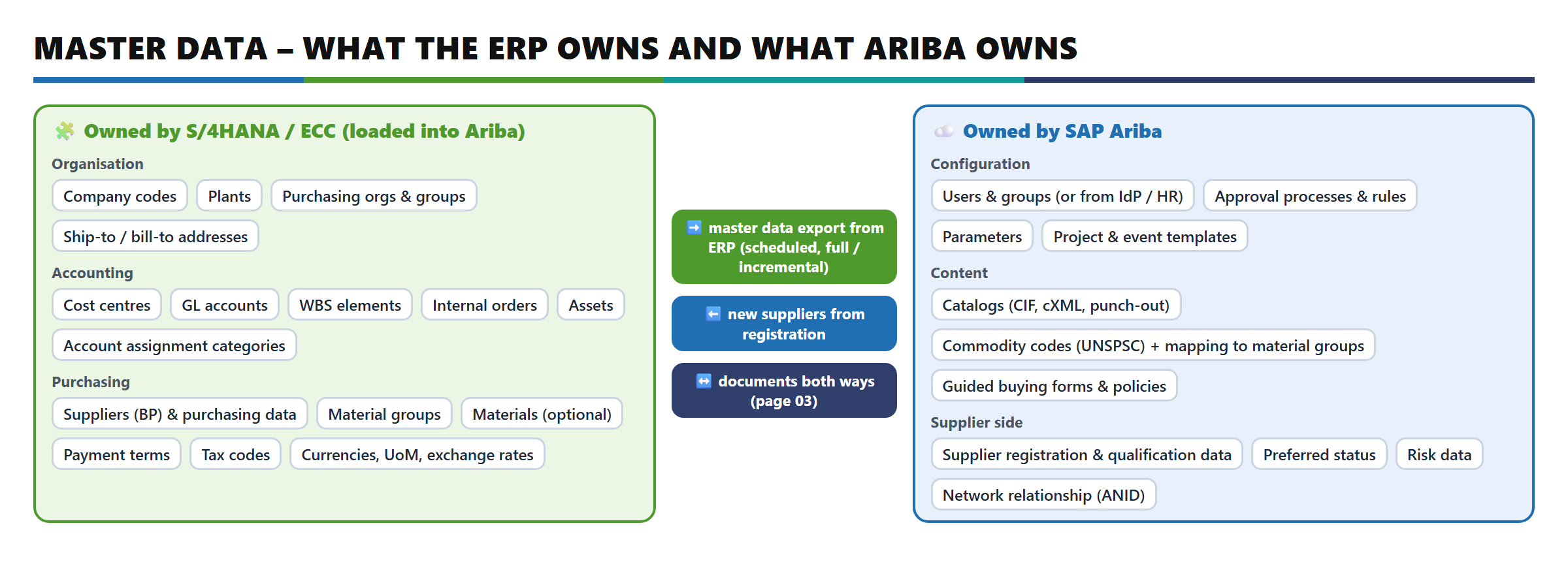
- ERP is the system of record for organisational, accounting and financial master data. It is exported to Ariba on a schedule (full and incremental loads) and must exist before documents are created – a missing cost centre in Ariba means a requisition cannot be submitted.
- Ariba is the system of record for procurement configuration (approval rules, templates, guided buying policies), catalogs and the commodity code mapping, and – with Supplier Lifecycle and Performance – for supplier onboarding data, which then creates the supplier in the ERP.
- Users are maintained in Ariba or loaded from an identity provider / HR system; single sign-on via SAP Cloud Identity Services or the corporate IdP (page 03).
- Multi-ERP: common data goes to the parent realm, ERP-specific data (accounting objects, plants, company codes) to the child realm of that ERP (page 01 Part 6).
- Supplier master is the critical object: decide one owner (SLP or the ERP), one number (ERP supplier number linked to the network ANID) and one direction of replication – page 05.
Part 11 – Interview questions
Q1. Walk me through procure-to-pay with SAP Ariba.
Requisition in guided buying (catalog, punch-out, form, non-catalog) → approval flow from approval rules → PO sent to the supplier over SAP Business Network → order confirmation and ship notice → receipt in Ariba or goods receipt in S/4HANA → supplier invoice on the network → invoice reconciliation in Ariba → invoice posted and paid in S/4HANA, payment status back to the network.
Q2. Walk me through source-to-contract.
Sourcing request → sourcing project (quick or full) from a template → event (RFI, RFP, auction) with suppliers bidding on the network → evaluation and award → contract workspace with authoring, approval and signature → compliance contract used by buying, or purchasing documents in S/4HANA.
Q3. What is the difference between a quick project and a full project?
A quick project runs a single event without project management. A full project is a container with phases, tasks, documents, a team and several events or sub-projects, built from a project template.
Q4. What is a contract workspace and what is a compliance contract?
The contract workspace in SAP Ariba Contracts manages the legal agreement: documents, clauses, tasks, approvals, signature, amendments. The compliance contract is the contract as used in Buying and Invoicing to apply prices and limits; it is generated when the contract compliance request is approved.
Q5. Release vs no-release contract?
With a release order contract, POs (release orders) are created against the contract with contract pricing. With a no-release contract there are no POs; receipts and invoices go directly against the contract – typical for recurring services.
Q6. What is an invoice reconciliation document?
The Ariba document created for each invoice: it matches the invoice against PO, receipt and contract, raises exceptions (price, quantity, amount, tax, contract limit) outside configured tolerances, routes them to handler groups and approvers, and after approval sends the payment request to the ERP.
Q7. How do approval rules work in Ariba?
For each approvable type an approval process holds rules: base rules add approvers on conditions, chain rules add managers up the hierarchy until a limit, filter rules remove approvers, edit rules lock fields. Ariba evaluates them when the document is submitted or changed and builds the flow.
Q8. CIF catalog vs punch-out?
A CIF (or cXML) catalog is uploaded content searchable in Ariba with fixed prices. Punch-out sends the user to the supplier's shop and returns the cart; level 1 starts at the shop, level 2 shows items in Ariba search via an index file and opens the shop at item level.
Q9. Which master data comes from the ERP and which lives in Ariba?
From the ERP: company codes, plants, purchasing organisations and groups, cost centres, GL accounts, WBS elements, internal orders, assets, suppliers, material groups, payment terms, tax codes, currencies. In Ariba: users and groups (or from an IdP), approval rules, templates, catalogs, commodity code mapping and supplier onboarding and risk data.
Q10. How does a supplier get from request to preferred?
Supplier request and approval → invitation and registration questionnaire → approved registration creates the supplier in the ERP → qualification questionnaire per commodity and region → preferred status (up to five levels) → performance reviews. Supplier Risk monitors the supplier in parallel.
Q11. Why are commodity codes important for integration?
Ariba classifies everything with UNSPSC codes; the ERP uses material groups. The commodity code mapping translates one to the other and can derive account assignment, so requisitions and POs arrive in S/4HANA with valid material groups and GL accounts, and spend analysis stays consistent.
Q12. Can you query Ariba tables from ABAP?
No. Ariba is SaaS with no database access. Data comes to S/4HANA through the integration (documents and master data), and Ariba data is read through reports, exports and the Ariba APIs (e.g. reporting or document APIs) – page 03 and page 04.
🏠 Start Here · ◀ 01 · Overview & Architecture · 03 · Integration ▶ · Sections: CORE ABAP | OOPS ABAP | ABAP on HANA | Clean Core | RAP | ABAP Points | SAP Fiori | SAPUI5 | Mobile Development (MDK) | BTP Foundations | BTP Development | CAP | SAP Build | ABAP on BTP | Integration Suite | SAP Business AI | SAP BASIS | Security | SAP SDLC
Functional: FICO ABAP | TRM ABAP | VIM | SAP BIS | SD ABAP | MM ABAP | PP ABAP | QM ABAP | PM ABAP | PS ABAP | EWM | TM ABAP | GTM ABAP | EHS ABAP | HR ABAP | BW | SAP Datasphere | SAP Business Data Cloud | SAP MDG | SAP Analytics Cloud | SAP Ariba | SAP CX | SAP IBP