SAP Ariba and SAP Business Network only work together with an ERP: the ERP sends master data and purchasing documents, Ariba and the network send back approved requisitions, confirmations, ship notices and invoices, and the ERP posts and pays. This page explains the integration technology (the managed gateway, formerly Cloud Integration Gateway), what is installed and configured on the S/4HANA or ECC side, which IDocs and web services carry which document, how master data and suppliers are replicated, how ECC, S/4HANA and S/4HANA Cloud differ, where an ABAP developer enhances the integration, how to monitor it and how identity and security work. The processes behind the documents: page 02; APIs and custom extensions: page 04; architecture decisions: page 05.
Part 1 – What is integrated: the landscape at a glance
There are three integration pairs. They often run through the same gateway, but they are configured and tested separately, and each has its own owner in a project.
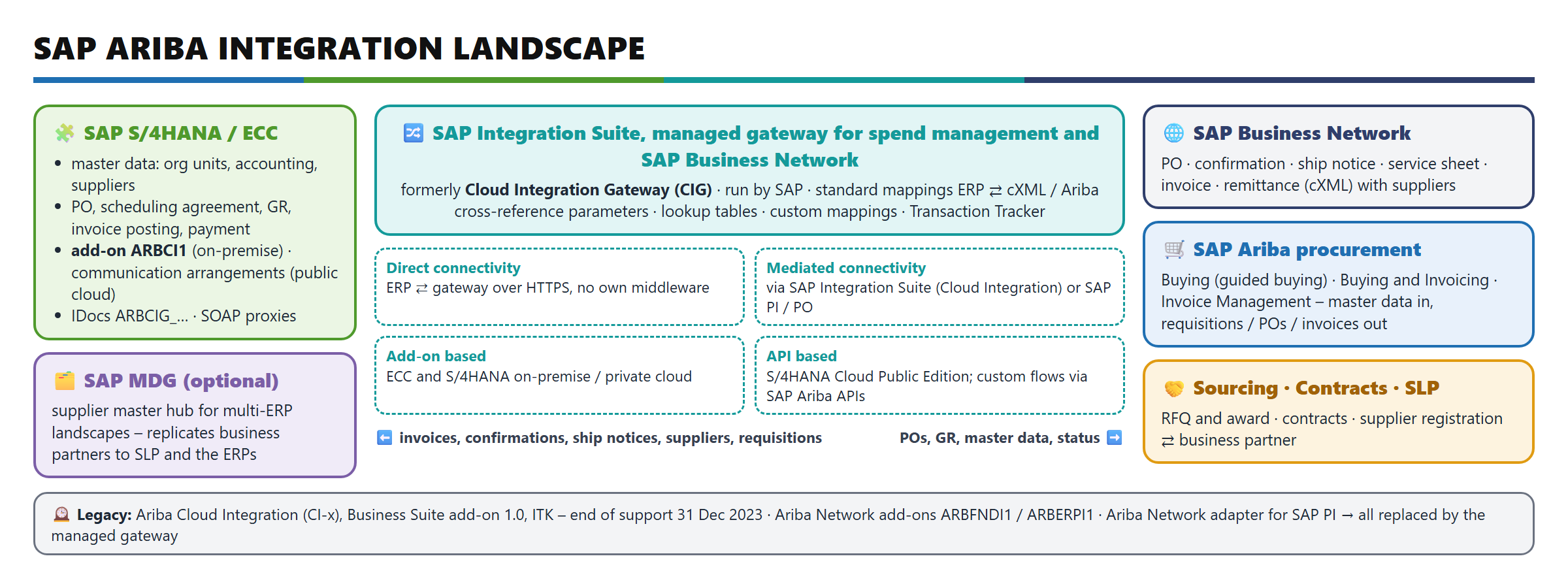
Integration pair | What flows | Typical scenario |
|---|---|---|
ERP ↔ SAP Business Network | PO, change and cancel, order confirmation, ship notice, service entry sheet, goods receipt, invoice, invoice status, payment remittance, scheduling agreement releases | Supplier collaboration for POs created in the ERP (direct and indirect material) |
ERP ↔ SAP Ariba procurement (Buying, Buying and Invoicing, Invoice Management) | Master data to Ariba; requisitions, POs, receipts, invoices and payment status between Ariba and the ERP | Guided buying with the requisition or PO handed to S/4HANA; Ariba invoice reconciliation with posting in S/4HANA |
ERP ↔ SAP Ariba strategic sourcing and supplier management (Sourcing, Contracts, SLP) | Requests for quotation and awards, contracts, supplier (business partner) data, master data for sourcing | S/4HANA purchase requisition sourced in Ariba; award creates a PO or contract; new supplier registered in SLP becomes a business partner |
- One ERP, many targets: the same S/4HANA system usually talks to all three, through one gateway account with separate projects per solution.
- Test and production are separate end to end: S/4HANA QA ↔ Ariba test site ↔ network test account (ANID with suffix -T); S/4HANA production ↔ production site ↔ production account (page 01 Part 6).
- Payment stays in the ERP: Ariba never posts to the general ledger; the ERP sends invoice status and payment information back so the requester and the supplier see it.
Part 2 – Integration technology: the managed gateway and its predecessors
2.1 SAP Integration Suite, managed gateway for spend management and SAP Business Network
The standard integration is an integration-as-a-service operated by SAP: SAP delivers and maintains the mappings between the ERP formats (IDocs, SOAP messages) and Ariba's formats (cXML for the network, the solutions' own interfaces). The customer installs an add-on in the ERP, configures a project in the gateway portal and tests; there is no integration build in the classic sense.
Period | Name |
|---|---|
Until May 2022 | SAP Ariba Cloud Integration Gateway (CIG) – still the name most people use |
May 2022 | SAP Integration Suite, managed gateway |
From January 2023 | SAP Integration Suite, managed gateway for spend management and SAP Business Network – short form in SAP documentation: Managed Gateway for Spend&Network |
- Standard mappings cover every supported document. Customer-specific differences are handled by cross-reference parameters (single settings per scenario), lookup tables (value lists, needed for a few transactions) and custom mappings built by the buyer in the gateway's mapping tool – details on page 04.
- Portal: the buyer's integration team works in the managed gateway portal (projects per solution, connection settings, cross-references, mappings, test and production, Transaction Tracker for message logs).
- Add-on based vs API-based: with on-premise ERPs the gateway talks to the add-on (Part 3); with S/4HANA Cloud the gateway uses the standard APIs and communication arrangements of S/4HANA (Part 6).
2.2 Direct and mediated connectivity
Option | How it works | When to use it |
|---|---|---|
Direct connectivity | The ERP connects to the managed gateway over HTTPS without own middleware | Default for most customers – least effort, SAP maintains the mappings |
Mediated connectivity | The messages pass through the customer's middleware – SAP Integration Suite (Cloud Integration) or SAP PI / PO – on the way to the gateway | Company policy that all B2B traffic goes through the central middleware; extra routing, enrichment or non-SAP systems |
Custom integration via APIs | Own flows (Integration Suite, BTP, other tools) call the SAP Ariba APIs (page 04) | Data or scenarios the gateway does not cover, reporting extracts, non-SAP ERPs |
2.3 Legacy integration options – know them for interviews
Legacy option | What it was | Status / successor |
|---|---|---|
Ariba Network Adapter for SAP NetWeaver (part of Ariba Cloud Integration, CI-x) | Adapter in SAP PI that translated cXML for the network integration in mediated mode | End of support 31 December 2023; replaced by the managed gateway (direct or via Integration Suite) |
Ariba Network Integration for SAP Business Suite = SAP Business Suite Add-on 1.0 (BSAO; add-ons ARBFNDI1 / ARBFNDI2, ARBERPI1) | ECC add-on for PO / invoice collaboration with the network (direct, with polling, or via PI) | End of support 31 December 2023; built into S/4HANA (Part 6); successor is the managed gateway add-on |
Ariba Cloud Integration (CI-x releases) | Integration of the Ariba procurement and sourcing solutions with SAP ERP, typically through PI | End of support 31 December 2023; migration to the managed gateway |
SAP Ariba Integration Toolkit (ITK) | Java tool for file-based (CSV) import and export with Ariba solutions, used for non-SAP systems | End of support 31 December 2023; replaced by the managed gateway, the SAP Ariba APIs or SAP Integration Suite flows |
- Migration projects ("CIG migration") from CI-x, ITK or the old network add-on are still common: same business scenarios, new add-on, new mappings, full regression test.
Part 3 – The ERP side: add-ons, IMG structure and technical objects
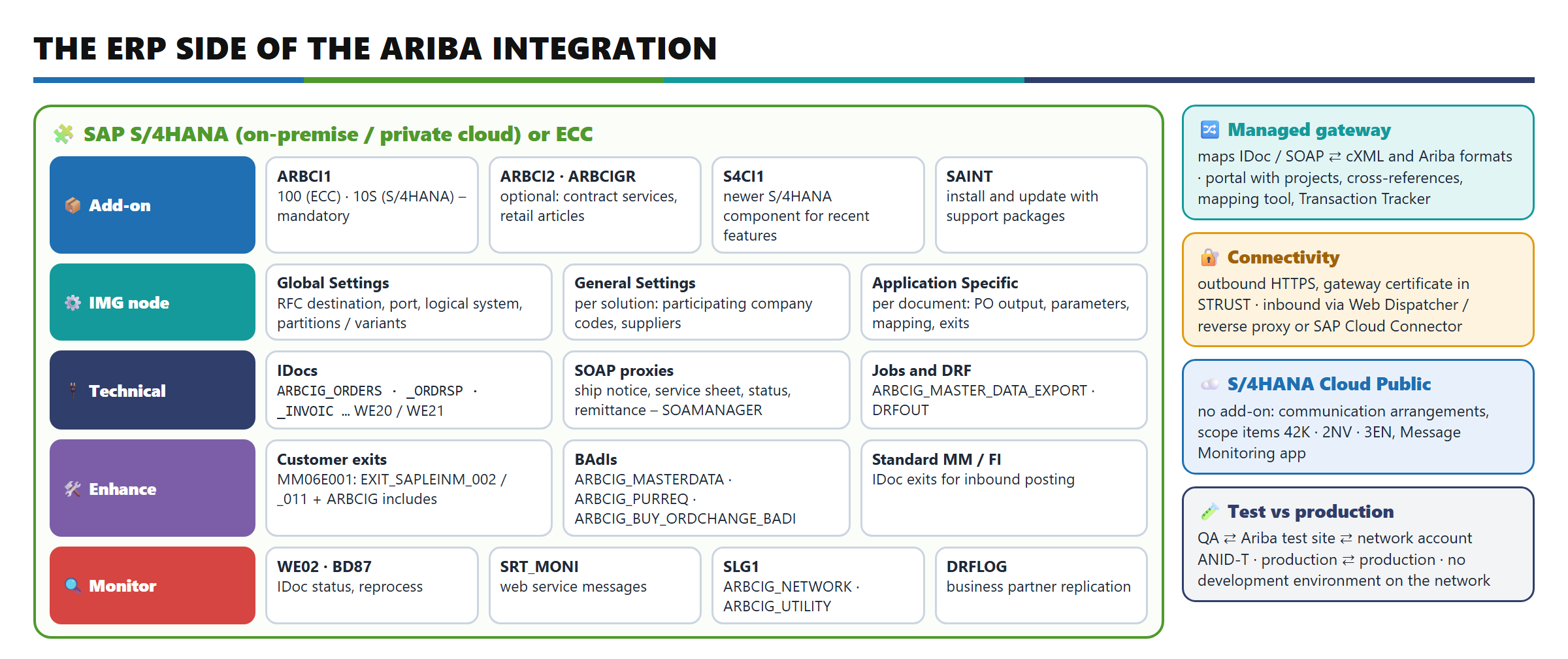
3.1 Add-on components
Component | Installed on | Purpose |
|---|---|---|
ARBCI1 100 | SAP ERP 6.0 (ECC) | Core managed gateway add-on for ECC ("Ariba Cloud Int SAP ERP") |
ARBCI1 10S | S/4HANA on-premise / private cloud | Core managed gateway add-on for S/4HANA – mandatory |
ARBCI2 10S | S/4HANA on-premise / private cloud | Optional – contract services of SAP Ariba Sourcing |
ARBCIGR 10S | S/4HANA | Optional – retail article master data for SAP Ariba Sourcing |
S4CI1 | S/4HANA | Newer S/4HANA component required by recent gateway features together with a current ARBCI1 support package |
- Installation: Basis downloads the add-on from the SAP Support Portal and installs it with SAINT; since release 2602 a new add-on support package ships every quarter (February, May, August, November) – keep it current, new features often require a minimum support package.
- S/4HANA Cloud Public Edition cannot install add-ons; it uses communication arrangements and the API-based gateway integration (Part 6).
3.2 IMG structure
After installation, SPRO contains Integration with Other SAP Components › Managed Gateway for Spend&Network for Buyer with sub-nodes such as SAP Business Network Integration and Master Data Integration. Each integration is configured on three levels:
Level | Applies to | Examples |
|---|---|---|
Global Settings | Every Ariba integration | RFC destination to the gateway, port definition, logical system, receiver port, sending SAP system information to the gateway, attachments and comments, mapping variants and partitions, parameter and prefilter values |
General Settings | One solution (e.g. SAP Business Network), all documents | Which company codes, purchasing organisations and suppliers take part; connection per solution |
Application Specific Settings | One document type (e.g. Purchase Order) | Output control for the PO, parameters, mapping settings for PO / scheduling agreement outbound, customer exit, service PO keys |
3.3 Technical objects you will meet
Object | Transaction | Role in the Ariba integration |
|---|---|---|
RFC destination (HTTP) | SM59 | Endpoint of the managed gateway; the gateway certificate must be in the trust store (STRUST) |
Port, logical system, partner profile | WE21, BD54, WE20 | IDoc-based documents: outbound / inbound parameters per message type with the ARBCIG_ basic types (Part 4) |
Output determination | NACE / output management | The PO output triggers the outbound ORDERS message to the network |
Web service configuration | SOAMANAGER | Proxy-based documents (ship notice, service entry sheet, remittance, status updates …): logical ports and endpoints |
Background jobs | SM36 / SM37 | Master data export, periodic processing |
Data Replication Framework | DRFIMG, DRFOUT | Business partner replication to SLP (Part 5) |
Part 4 – Document flows: IDocs and web services
The add-on uses both technologies: classic purchasing documents travel as IDocs with Ariba-specific basic types (ARBCIG_…), newer documents as ABAP proxies (SOAP web services). The gateway maps both to cXML for the network.
4.1 IDoc-based documents
Document | Basic type | Message type | Direction (seen from the ERP) |
|---|---|---|---|
Request for quotation | ARBCIG_REQOTE | REQOTE | Outbound |
Purchase order, change, cancel | ARBCIG_ORDERS | ORDERS | Outbound |
Scheduling agreement release | ARBCIG_DELINS | DELINS | Outbound |
Order inquiry | ARBCIG_ORDENQ | ORDERS | Outbound |
Order confirmation | ARBCIG_ORDRSP | ORDRSP | Inbound |
Invoice from the network | ARBCIG_INVOIC | INVOIC | Inbound |
Copy (CC) invoice – MM | ARBCIG_GSVERF | GSVERF | Outbound |
Copy (CC) invoice – FI | ARBCIG_FIDCC2 | FIDCC2 | Outbound |
Pay Me Now (early payment) | ARBCIG_FIDCCH | FIDCCH | Inbound |
Payment remittance | ARBCIG_REMADV | REMADV | Outbound |
4.2 Web-service (proxy) documents – examples
Direction | Documents |
|---|---|
Inbound to the ERP | Advance ship notice (creates the inbound delivery), service entry sheet, remittance advice, payment receipt confirmation, document status update, quality notification, component consumption, replenishment order, FI invoice, credit memo cancel |
Outbound from the ERP | Ship notice request, receipt request (goods receipt to the supplier), invoice status update, service entry sheet response, ERP-initiated service sheet, requisition, payment proposal, remittance (batch / cancellation), quality inspection documents, document status update |
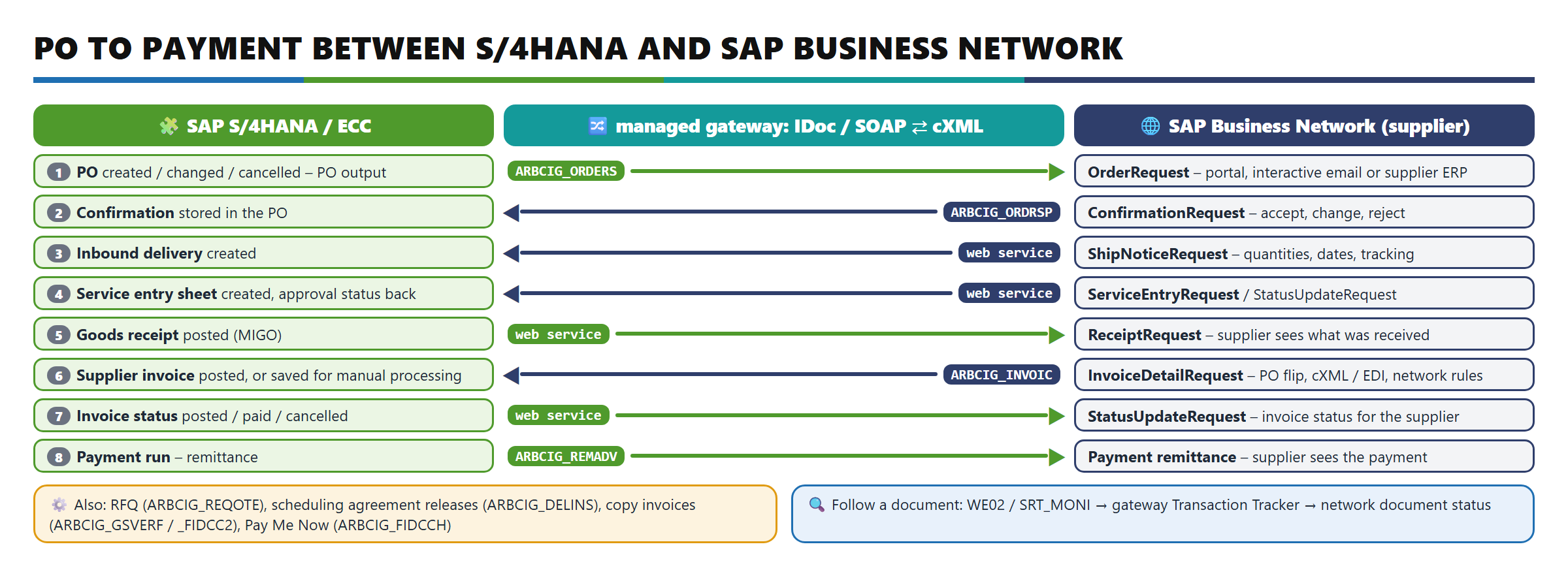
4.3 The PO-to-payment chain with the network
Step | ERP side | Network side (cXML) |
|---|---|---|
1. PO created / changed / cancelled | PO output → ARBCIG_ORDERS IDoc | OrderRequest (new, update, delete) |
2. Supplier confirms | ARBCIG_ORDRSP → confirmation in the PO | ConfirmationRequest |
3. Supplier ships | Web service → inbound delivery | ShipNoticeRequest |
4. Services performed | Web service → service entry sheet; approval status back | ServiceEntryRequest / StatusUpdateRequest |
5. Goods received | Goods receipt (MIGO) → receipt request | ReceiptRequest |
6. Supplier invoices | ARBCIG_INVOIC → supplier invoice (posted or parked if errors) | InvoiceDetailRequest |
7. Invoice posted / paid | Invoice status update; payment remittance | StatusUpdateRequest, payment remittance |
4.4 Flows with the Ariba solutions
- Guided buying with S/4HANA (scope item 2NV): the requisition is created and approved in guided buying (with an optional real-time budget check in S/4HANA); after full approval it is replicated to S/4HANA as a purchase requisition, purchasing converts it to a PO, and status and follow-on document numbers flow back (e.g. through
PurchaseOrderItemHistoryNotification_Out). The requisition shows the ERP reference ID. - Guided buying for central procurement (scope item 3EN): the same with an S/4HANA central procurement hub in between, which distributes the documents to the connected back ends.
- Ariba-created POs (Buying and Invoicing): POs are created in Ariba, sent to the supplier by the network and copied to the ERP for commitments and receipts; approved invoice reconciliations are sent to the ERP for posting, payment status comes back (page 02 Part 5).
- Sourcing: a purchase requisition in S/4HANA can be sent as a request for quotation to SAP Ariba Sourcing; the award creates the follow-on document (PO or contract) in the ERP. Contracts from SAP Ariba Contracts can be replicated as outline agreements (component ARBCI2 for contract services).
Part 5 – Master data and supplier replication
5.1 Master data export to the Ariba solutions
- Program ARBCIG_MASTER_DATA_EXPORT extracts ERP master data for SAP Ariba procurement and sourcing (company codes, plants, purchasing organisations and groups, cost centres, GL accounts, WBS elements, internal orders, assets, suppliers, payment terms, material groups and more – page 02 Part 10).
- It runs as a scheduled background job: a full load at go-live and after big changes, incremental loads for daily changes. Missing master data in Ariba is the most frequent reason why users cannot submit requisitions.
- BAdI ARBCIG_MASTERDATA is the common BAdI for all master data extracts – used to add custom fields or filter records (IMG: Master Data Integration › Enhancements › Business Add-Ins). For Sourcing, the extended schema (schema.csv) must match the custom fields.
- Multi-ERP: each ERP exports to its child realm; common data goes to the parent realm (page 01 Part 6). Partitions and variants in the global settings identify which realm and ERP a record belongs to.
5.2 Supplier replication with SLP and MDG
Topic | How it works |
|---|---|
Services | Standard business partner web services |
Direction | Bidirectional: a supplier approved in SLP is created as a business partner with the supplier role; changes in the ERP flow back to SLP |
Outbound from the ERP | Data Replication Framework – replication model in DRFIMG, manual replication with DRFOUT, log in DRFLOG |
Key mapping | The gateway supports key mapping between SLP supplier IDs and ERP business partner / vendor IDs; a duplicate in MDG gets an additional key mapping instead of a second partner |
MDG-S | Not needed for one ERP; required in a multi-ERP landscape to harmonise supplier data across SAP and non-SAP systems (MDG hub replicates to SLP and the ERPs) |
S/4HANA Cloud | Business partner replication to Ariba applications can use SAP Master Data Integration on SAP BTP |
- Network link: the ERP supplier number is linked to the supplier's ANID on the network (supplier enablement, page 05); without this link no document can be routed.
Part 6 – ECC vs S/4HANA vs S/4HANA Cloud
Aspect | SAP ECC 6.0 | S/4HANA on-premise / private cloud | S/4HANA Cloud Public Edition |
|---|---|---|---|
Integration component | Add-on ARBCI1 100 (legacy: ARBFNDI1 / ARBERPI1) | Add-on ARBCI1 10S (+ ARBCI2, ARBCIGR, S4CI1); a legacy cXML network integration is also built into S/4HANA (since release 1511) | No add-on – communication arrangements and standard APIs |
Supplier master | Vendor (LFA1 / LFB1 / LFM1) | Business partner with supplier role (LFA1 still filled through CVI) | Business partner |
Configuration | SPRO add-on nodes | SPRO add-on nodes; SAP Best Practices scope items | Scope items (e.g. 42K Automation of Source-to-Pay with SAP Business Network, 2NV, 3EN) and communication arrangements |
Inbound connectivity | Reverse proxy / Web Dispatcher or middleware | Same; private cloud typically via SAP Cloud Connector | Managed by SAP |
Monitoring | WE02, SRT_MONI, SLG1 | WE02, SRT_MONI, SLG1, SAP Cloud ALM | Message Monitoring app, SAP Cloud ALM |
Extensibility | Exits, BAdIs, modifications possible | Add-on BAdIs and exits, released APIs – clean core preferred | Key-user and developer extensibility only; mapping tool in the gateway |
- Conversion ECC → S/4HANA: the business scenarios stay; the add-on is replaced by the S/4HANA version, vendor-based mappings move to business partners, and every flow is regression-tested against the network test account.
- Legacy direct integration in S/4HANA: the older built-in Ariba Network integration (application log object CXML_INTEGRATION in S/4HANA 1610 and later) is still found in early adopters; SAP's current standard is the managed gateway.
Part 7 – Enhancing the integration in ABAP
Configuration and gateway mappings come first (page 04 Part 6). ABAP is needed when data that the standard does not carry must be filled on the ERP side – a custom field, a special accounting split, a filter. Use the enhancement points delivered by the add-on; never modify its code.
Enhancement point | Type | Used for |
|---|---|---|
Enhancement MM06E001, exit EXIT_SAPLEINM_002 (include ZXM06U02) | Customer exit (CMOD project) | PO outbound: the add-on delivers includes |
Exit EXIT_SAPLEINM_011 (include ZXM06U33) | Customer exit | Include |
Implicit enhancement in include LEINMF0Q (program SAPLEINM) with | Implicit enhancement | Change and cancel information of the PO in the ARBCIG_ORDERS IDoc (enhancement point at the start of form |
BAdI ARBCIG_MASTERDATA | BAdI | Custom fields and filters in all master data extracts |
BAdIs for Buying integration, e.g. ARBCIG_PURREQ, ARBCIG_BUY_ORDCHANGE_BADI | BAdI | Purchase requisition and PO change processing for SAP Ariba Buying |
Standard IDoc exits and BAdIs of MM / FI | Exits, BAdIs | Inbound posting of confirmations and invoices (CORE ABAP › 07 Interfaces, MM ABAP › 03 Inventory & Invoices) |
The add-on includes are activated by placing them in the customer-exit includes (the IMG activity under Application Specific Settings › Purchase Order guides you through the CMOD project):
|
- Fixed IDoc structure: the ARBCIG_ basic types have a predefined segment structure (WE30). Custom values are placed in existing segments or sent as cXML extrinsics through a custom mapping in the gateway – do not create IDoc extensions without checking that the gateway can map them.
- Find the BAdIs of your release in SPRO under the add-on node (Enhancements › Business Add-Ins) and in SE18 with the ARBCIG prefix; the configuration guide of the gateway documents the methods.
- Clean core: in S/4HANA Cloud there are no customer exits; use the gateway mapping tool, released APIs and key-user extensibility instead (Clean Core › 01 Clean Core).
Part 8 – Monitoring and troubleshooting
Where | Tool | What you see |
|---|---|---|
ERP – IDocs | WE02 / WE05, BD87 (reprocess) | ARBCIG_ IDocs with status (e.g. 03 sent, 51 error) and segment data |
ERP – web services | SRT_MONI (also from SOAMANAGER) | Proxy messages in and out, payloads, SOAP faults |
ERP – application log | SLG1 | Gateway add-on objects ARBCIG_NETWORK and ARBCIG_UTILITY; older network add-on objects ARIBA_INTEGRATION (ECC, S/4HANA before 1610) and CXML_INTEGRATION (S/4HANA 1610+) |
ERP – business partner | DRFLOG, BP | Replication status to SLP, duplicates |
Managed gateway | Portal › Transaction Tracker | Every document with mapping and delivery status, error text, payload before and after mapping |
SAP Ariba / network | Integration status pages (e.g. SLP Integration Message Status), network document status, failed transmissions | Whether the document reached the solution or the supplier |
Central | SAP Cloud ALM integration monitoring (and Focused Run) | End-to-end view with alerts across ERP, gateway and Ariba |
S/4HANA Cloud | Message Monitoring app | Inbound and outbound messages per communication arrangement |
8.1 Typical errors
Symptom | Usual cause |
|---|---|
PO not on the network | Supplier not linked to an ANID / not in the participating list, output not triggered, IDoc in status 02 / 29 (port, RFC destination, certificate) |
Invoice IDoc in status 51 | Missing tax code mapping, PO reference not found, quantity / price variance blocks posting, posting period closed |
Ship notice rejected | Ordered item not confirmed, quantities above PO, missing inbound delivery settings (confirmation control key) |
Requisition cannot be submitted in Ariba | Master data not exported (cost centre, GL account, commodity code mapping) |
Business partner not created | No replication model, duplicate check, missing mandatory fields |
- Message flow for analysis: start at the side that sent the document, follow it through the Transaction Tracker and end in the receiving system's log – most errors are master data or mapping, not technical.
- SAP AIF is not part of the standard Ariba integration; teams that already monitor custom interfaces in AIF often keep the Ariba add-on monitoring in SLG1 / SRT_MONI / Cloud ALM.
Part 9 – Security, identity and connectivity
Area | Approach |
|---|---|
User SSO | SAML 2.0 single sign-on for SAP Ariba and the buyer's SAP Business Network account; SAP Cloud Identity Services – Identity Authentication (IAS) acts as identity provider to Ariba and as proxy to the corporate IdP (e.g. Microsoft Entra ID / ADFS); non-corporate users can authenticate directly at IAS |
Users and groups | Loaded into Ariba (CSV / master data) or provisioned from the IdP; Ariba groups carry the permissions; the network buyer account maps corporate user names for SAML |
ERP → gateway | HTTPS with the gateway's certificate in STRUST and the credentials configured in the RFC destination; no credentials in code |
Gateway → ERP | Inbound calls need a reachable endpoint: reverse proxy / SAP Web Dispatcher, middleware, or SAP Cloud Connector (reverse-invoke proxy, no inbound firewall opening) – common in private cloud |
API access | OAuth 2.0 client credentials plus an application key per registered application (page 04) |
Suppliers | Each supplier has its own network account and users; the buyer controls the trading relationship and invoicing rules |
Data residency | Data centre of the realm and network (page 01 Part 6); mappings and messages pass the gateway in SAP's cloud |
- Segregation: connect the S/4HANA development client to nothing or to a test account only; the network has test and production but no development environment.
- Authorisations in the ERP: RFC / service users for inbound processing need only the posting authorisations of their scenario (PO confirmation, inbound delivery, invoice).
Part 10 – Interview questions
Q1. How is SAP Ariba integrated with S/4HANA?
Through SAP Integration Suite, managed gateway for spend management and SAP Business Network (formerly Cloud Integration Gateway). The on-premise ERP gets the gateway add-on (ARBCI1); documents travel as ARBCIG_ IDocs or SOAP proxies to the gateway, which maps them to cXML for the network or to the Ariba solutions' formats. S/4HANA Cloud uses communication arrangements and APIs instead of the add-on.
Q2. What is the difference between direct and mediated connectivity?
Direct: the ERP connects to the managed gateway over HTTPS without own middleware. Mediated: messages pass through the customer's SAP Integration Suite or PI / PO first – used when all B2B traffic must go through central middleware or extra routing is needed.
Q3. Which IDocs are used for PO, confirmation and invoice?
ARBCIG_ORDERS (message type ORDERS) for PO create, change and cancel; ARBCIG_ORDRSP (ORDRSP) inbound for order confirmations; ARBCIG_INVOIC (INVOIC) inbound for invoices. Ship notices, service entry sheets, status updates and remittances use web services.
Q4. Which legacy integration options were replaced by the managed gateway?
Ariba Cloud Integration (CI-x, incl. the Ariba Network Adapter for SAP NetWeaver on PI), the SAP Business Suite add-on 1.0 (Ariba Network Integration add-ons ARBFNDI1 / ARBFNDI2 / ARBERPI1 for ECC) and the Integration Toolkit – all with end of support 31 December 2023.
Q5. How do suppliers registered in SLP reach S/4HANA?
Through the business partner services BusinessPartnerSUITEBulkReplicateRequest / Confirmation via the gateway: an approved supplier becomes a business partner with the supplier role; changes go back via DRF (DRFOUT, monitored in DRFLOG). With several ERPs, MDG-S harmonises the supplier and replicates it.
Q6. How do you add a custom field to the PO sent to the network?
First check whether the gateway mapping tool can map an existing field or an extrinsic. If the value must be computed in the ERP, fill it in the customer exit EXIT_SAPLEINM_002 (ZXM06U02) after the add-on includes, then map it in the gateway to a cXML extrinsic. Test with the network test account.
Q7. Where do you look when an invoice from the network did not post?
Transaction Tracker in the gateway portal for the mapping status, then WE02 / BD87 for the ARBCIG_INVOIC IDoc (status 51 and message), SLG1 for add-on logs. Usual causes are tax code mapping, PO reference or variance; after correction reprocess the IDoc.
Q8. How does master data get into Ariba?
Program ARBCIG_MASTER_DATA_EXPORT, scheduled as a full load initially and incremental loads afterwards. BAdI ARBCIG_MASTERDATA adds custom fields or filters. In multi-ERP landscapes each ERP feeds its child realm.
Q9. What changes for the integration in an ECC to S/4HANA conversion?
The add-on version changes (ARBCI1 100 → 10S, plus S4CI1 for new features), suppliers become business partners, output and posting logic follow S/4HANA, and all scenarios are regression-tested. The business flows and the gateway project stay.
Q10. How does guided buying hand requisitions to S/4HANA?
In scope item 2NV the approved requisition is replicated through the gateway as an S/4HANA purchase requisition; purchasing creates the PO, and status and follow-on numbers flow back. With central procurement (3EN) the hub distributes the documents to the back ends.
Q11. How is single sign-on set up for SAP Ariba?
SAML 2.0. Commonly SAP Cloud Identity Services – Identity Authentication is the identity provider for Ariba and proxies to the corporate IdP, so employees log on with their company account; the network buyer account maps corporate user names.
Q12. How do you monitor the Ariba integration end to end?
ERP: WE02 / BD87 for IDocs, SRT_MONI for web services, SLG1 for the add-on application log, DRFLOG for business partners. Gateway: Transaction Tracker. Ariba and network: document and integration status. Centrally: SAP Cloud ALM integration monitoring with alerts.
🏠 Start Here · ◀ 02 · Capabilities & Data · 04 · Extensibility ▶ · Sections: CORE ABAP | OOPS ABAP | ABAP on HANA | Clean Core | RAP | ABAP Points | SAP Fiori | SAPUI5 | Mobile Development (MDK) | BTP Foundations | BTP Development | CAP | SAP Build | ABAP on BTP | Integration Suite | SAP Business AI | SAP BASIS | Security | SAP SDLC
Functional: FICO ABAP | TRM ABAP | VIM | SAP BIS | SD ABAP | MM ABAP | PP ABAP | QM ABAP | PM ABAP | PS ABAP | EWM | TM ABAP | GTM ABAP | EHS ABAP | HR ABAP | BW | SAP Datasphere | SAP Business Data Cloud | SAP MDG | SAP Analytics Cloud | SAP Ariba | SAP CX | SAP IBP