SAP Business Integrity Screening is a generic solution: the data it screens, the rules it applies and much of the investigator's toolset are defined by the customer. This page is the developer's view – how you introduce a new data model, write detection methods (scripted AMDP, address screening, business rules, predictive), extend the network analysis, define worklists and enhance the user interface – plus the BAdIs, testing and transport. Concepts of detection and investigation are on pages 02 and 03; AMDP and CDS syntax in ABAP on HANA › 05 CDS Views and 06 AMDP & SQLScript.
Part 1 – The technology base: ABAP-managed database objects
SAP Business Integrity Screening enables you to use ABAP-managed database objects for most of the extensions. For data access in SAP Business Integrity Screening, the following ABAP-managed database objects are relevant:
Object | Technology | Typical use in BIS |
|---|---|---|
Core Data Services – CDS views | Declarative data modelling language | Investigation and detection object types, address views, worklists, predictive data views |
Core Data Services – table functions | Use SQLScript, thereby enabling all SAP HANA features and objects (implemented by an AMDP function) | The same, when the logic needs SQLScript or another database schema (Part 2.4) – SAP's own content mostly uses table functions (FRA_TF_…) |
ABAP Managed Database Procedures (AMDP) | Implemented in SQLScript, as methods of a global ABAP class | Scripted detection methods, address screening filters, network analysis data providers |
Why ABAP-managed and not native HANA repository objects: one development environment for application and database objects (ABAP Development Tools in Eclipse), syntax check and code completion, reuse of ABAP data types, transport and lifecycle management fully in the ABAP stack, and no HANA database user is needed for development and testing – while SQLScript still gives you every native HANA feature. AMDP code can only be edited in ADT, not in SAP GUI.
The key extension areas:
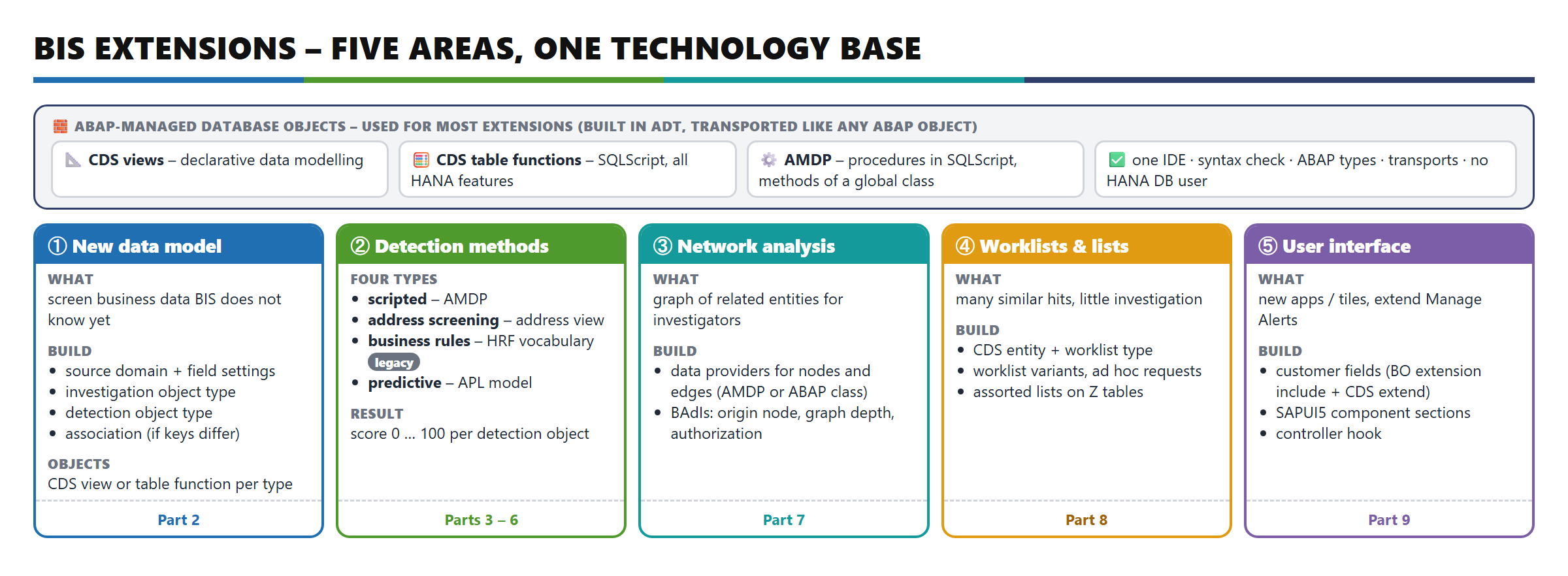
Extension area | What you do | Part |
|---|---|---|
Introduction of a new data model | Define new source domains and field settings for custom business data. Maintain investigation and detection object types, and set their associations | 2 |
Definition of detection methods | Four primary types can be implemented: scripted detection methods (ABAP-managed database procedures for flexible logic), address screening detection methods (screen persons and organisations against address lists to detect fraud or compliance issues), detection methods with business rules (HRF vocabulary set up in SAP HANA Studio required) and predictive detection methods (predictive analytics to identify likely irregularities) | 3 – 6 |
Network analysis | Visualises relationships within entities, helping investigators spot suspicious patterns; extendable via additional data providers and BAdIs | 7 |
Worklists | Organise and manage results from data access or detection processes – especially useful for bulk scenarios with minimal investigation required | 8 |
User interface enhancements | Add new apps / tiles or extend existing ones (like Manage Alerts) with additional fields, sections, or custom code through a controller hook implementation | 9 |
Part 2 – A new data model: source domains, object types, associations
To screen your own business data you define a data model: investigation and detection object types based on source domains with field settings (concepts: page 02 Part 1). All of it is maintained in the Customizing activity Maintain Detection and Investigation Data Model; the data itself is read through CDS entities you write.
2.1 Questions to answer first
For | Question | Example (insurance) |
|---|---|---|
Detection object type | Key fields (1 – 15)? | Claim + subclaim number |
Selection criteria, so different strategies can take different subsets? | Policy product, line of business, incident type | |
The one date field for time-based selection in detection runs? | Creation date | |
Investigation object type | Key fields? | Claim number |
Which data fields should be copied into the alert (search, filter, investigation)? | Line of business, policy holder, incident type | |
Which field provides the authorization value? | Becomes the alert's access group (FRA_ALERT) |
2.2 Source domain and field settings
- A source domain represents a business domain that delivers detection and investigation data – usually one source system (or several that serve a common purpose). Field names are unique within a source domain.
- Field settings make values look and behave as in the source application: date and amount formatting per user and currency, value helps and checks, language-dependent texts.
- Fields used as key, additional ID, date, location, access group or selection field are created automatically when you define an object type on a CDS entity; you only add method parameters manually (and adjust settings, e.g. a value help).
- Allowed field types: CHAR, NUMC, DATS, TIMS, CUKY with at most 40 characters.
2.3 Object types and associations – rules for the CDS entities
Entity | Read when | Implementation rules |
|---|---|---|
Investigation object type | During alert creation – adds investigation object data to the alert | One row per investigation object; no input parameters; up to 15 key fields; one date field and up to 4 character fields copied into the alert; optional field for the FRA_ALERT access group |
Detection object type | Mass detection and calibration – builds the working set | One row per detection object; no input parameters; up to 15 key fields; a date field is mandatory; any further attributes as selection fields (CHAR/NUMC: EQ, NE, CP, ranges; DATS/TIMS/CUKY: EQ, NE, GT, LT, GE, LE, BT) |
Association | To derive the investigation object of a detection object | Needed only when the detection object keys do not contain the investigation object keys; must contain both key sets; one association entity per detection object type |
- None of these entities may expose a client attribute – but the logic must filter on the current client (Part 2.4).
- Why a separate working set step: all methods of a strategy see the same objects, methods need not repeat the selection, and the CDS entity can use the full power of SQL; online detection takes the working set from the request instead.
A detection object type for supplier invoice items as a CDS table function – the pattern SAP's own content uses (e.g. FRA_TF_ERP_VENDOR_INV_ITEM_DO):
|
|
2.4 Best practices: client, schema mapping, replicated data, several source systems
Topic | Rule |
|---|---|
Client – CDS views | Annotate |
Client – table functions |
|
Client – AMDP | Do not use |
Schema mapping | Replicated data lives in other schemas whose names differ between development, test and production. Define logical schemas in DB_SCHEMA_MAP and read with |
Replicated date and time | Arrive as ABAP-formatted character fields; join table M_TIME_DIMENSION (schema _SYS_BI) or convert in SQLScript |
Language | CDS entities and AMDPs read descriptions in the logon language |
Several source systems | One replication schema per source system; a system-specific layer (one schema each, adds field BUSINESS_SYSTEM, no client filter because several clients share a table) and a cross-system layer (UNION of all systems) that the object types use; business systems are defined in Customizing Define a Business System (e.g. ERP_001 for client 001 of system ERP) |
- Replication itself (hub deployment): SAP recommends SAP Landscape Transformation Replication Server for data from other SAP applications (except SAP BW); SAP HANA smart data integration is another option. Replicate the business tables, related master data, configuration and text tables, and system data such as countries, currencies and exchange rates. Co-deployed BIS reads local S/4HANA data without replication (page 05 Part 4).
- Replicated data cannot be read with ABAP SQL from ABAP (other schema): use CDS, AMDP or ADBC. Relevant for new object types, detection methods, Manage Alerts sections and alert BAdIs.
Part 3 – Scripted detection methods with AMDP
A scripted detection method implements its logic in ABAP-managed database procedures – the most flexible method type and the recommended one for new rules, at the cost of development work. Two steps: develop the AMDPs, then define the detection method in the Manage Detection Methods app (it makes the procedures known and assigns the detection object type and a description). The three procedures and where they run are introduced on page 02 Part 8; here is how to build them.
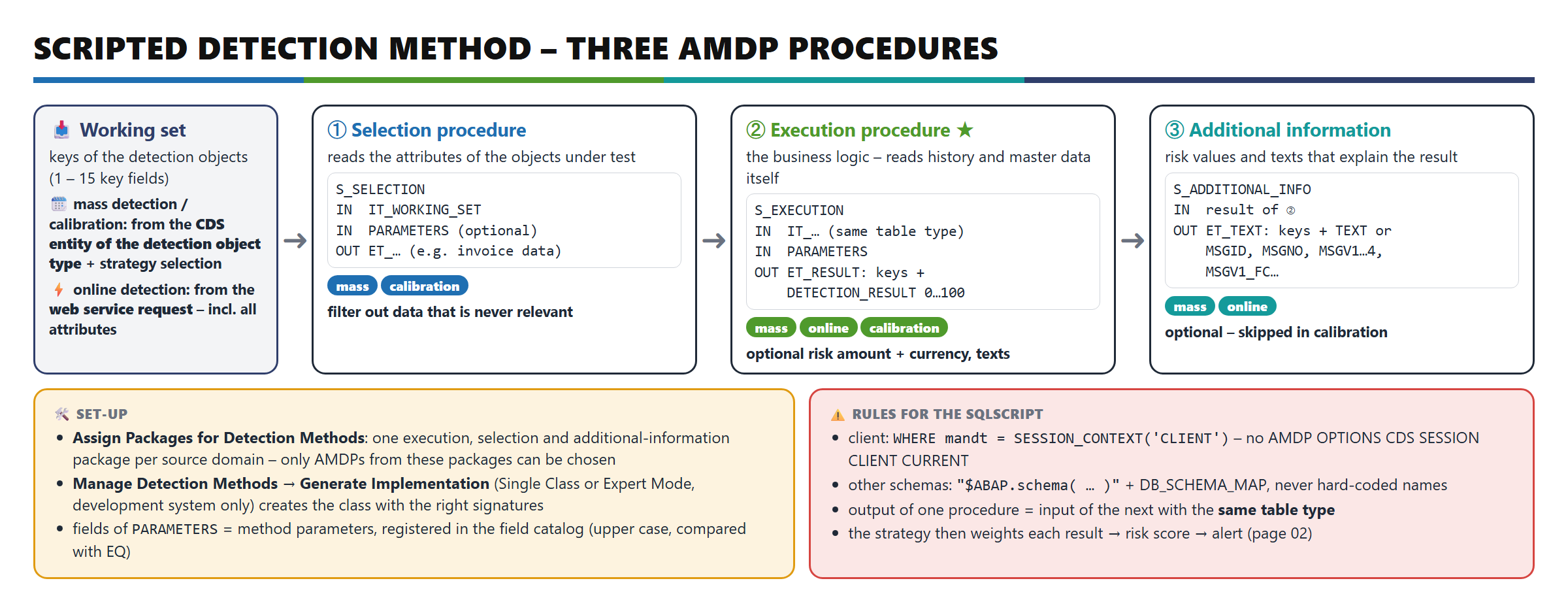
3.1 Input and output of a detection method
Direction | Content |
|---|---|
Input | Table of detection objects to process (the working set, 1 – 15 key fields); attributes of these objects; detection method parameter values |
Output | Table of detection results: identification of the detection object, detection result (integer 0 – 100), risk amount and currency, texts that explain the result |
- Mass detection and calibration read the attributes from the database (selection procedure). In online detection the object is not yet stored – its attributes come from the online detection enterprise service; the input tables of the request have the same names as the input tables of the execution procedure. Data beyond the current object (history, master data) is read from the database in the execution procedure in every mode.
- Calibration uses only the detection results and is performance-critical, so risk amounts and texts belong in the additional information procedure (skipped in calibration). Without one, either no risk values and texts are produced or the execution procedure returns them.
3.2 Packages, generation and parameters
Step | Where | Detail |
|---|---|---|
Assign packages | Customizing Assign Packages for Detection Methods | Per source domain one ABAP Execution Package, ABAP Selection Package and ABAP Additional Information Package. Value helps offer only AMDPs from these packages – usability and security: no arbitrary code can run as a detection method, and the packages can be monitored and their authorizations restricted |
Generate the class | Manage Detection Methods → Generate Implementation Single Class or Expert Mode (development system only) | Choose the detection object type (defines the key fields of the signatures and the target packages), package, class name, optional parameters and a transport request; Expert Mode allows a separate class per procedure. Transfer fills the Create Scripted Detection Method (ABAP) dialog – add a technical ID and name |
Add parameters | Input table PARAMETERS of the execution procedure | Each field is one method parameter; values are set in the strategy; compared with EQ only. Register the fields in the field catalog of the source domain under the same (upper-case) names |
Fill the logic | ADT | Add the attribute fields the selection procedure must deliver (the generator only knows the keys and uses generic names such as IT_DATA – rename them) |
- Parameter naming: same semantics → same field name (one field catalog entry); different semantics → different names; reuse the database field name when one exists. Parameters let business users run the same method with different values without touching SQLScript.
3.3 Best practices
- Logic in the execution procedure, not merged into the selection – only then mass, online and calibration run the same logic.
- Reduce data volume early – filter large tables before joins. Balance with the rule above: the selection drops data that is never relevant (e.g. only burglary claims), the execution classifies suspicious versus not suspicious (e.g. the damage amount check).
- Additional data for the alert: determine it in the method only when it is tied to the method logic; otherwise use the enrichment view of the investigation object type or the BAdI Modify Alert at Creation or Update (Part 10).
- Translatable, formatted texts: fill ET_TEXT with a T100 message (MSGID, MSGNO, MSGV1–4) and, per variable, MSGVn_FC = a field of the source domain whose settings format the value (amount, currency, date). Example: MSGV1 = '1500' with MSGV1_FC = 'CURRENCY_VALUE', MSGV2 = 'EUR' with MSGV2_FC = 'CURRENCY'.
- Performance tools: SAP HANA performance trace, SQL trace and SQL plan visualization.
- Reusable SAP helpers:
CL_FRA_HRCL_COUNTRY_RANK=>GET_BOTTOM_RANKED_HRCreturns the n lowest ranks of a high-risk country/region list (input IV_LIST_ID, IV_BOTTOM_N_RANKS 1 – 99999; ties share a rank, so n ranks can return more countries; T005 codes; do not rely on the order) – sample methodCL_FRA_ERP_DM_INV_HI_RISK_CNTR=>S_EXECUTION. Suspicious terms:CL_FRA_KEYWORD_SCREENING=>SCREEN_KEYWORDS_PARALLELfor online checks (fuzzy CONTAINS per text line); for mass detection loop over the terms and fuzzy-search the documents instead.
Part 4 – Example: a scripted detection method as an AMDP class
Rule: an invoice is suspicious when the supplier was created shortly before the posting date (fake supplier pattern). Detection object type: the supplier invoice item from Part 2.3. Parameter MAX_SUPPLIER_AGE (days): result 100 when the supplier is younger than half of it, 60 when younger than the full value. Like SAP's own samples, the class implements only IF_AMDP_MARKER_HDB – there is no BIS-specific interface; the method definition references its static methods. Method names follow SAP's content (S_SELECTION, S_EXECUTION, S_ADDITIONAL_INFO, e.g. in CL_FRA_ERP_INV_DM_SIM_AMOUNT). In a project the skeleton comes from Generate Implementation in Manage Detection Methods; its ET_RESULT also offers the optional risk amount and currency, and a text can be a plain text or a T100 message with MSGVn_FC formatting. The example keeps only the fields it uses.
|
|
Point | Why it is done this way |
|---|---|
Only hits are returned | Objects without a row in ET_RESULT simply score nothing for this method; the strategy weights the 100 / 60 (page 02 Part 5) |
Supplier creation date read in S_EXECUTION | Online detection never calls S_SELECTION – master data read there would be missing online |
| The working set has no client; database objects do not know the ABAP client by themselves |
Same table types between procedures | Output of one procedure is the input of the next (ET_INVOICE_ITEM → IT_INVOICE_ITEM, ET_RESULT_ADDINF → IT_RESULT_ADDINF), otherwise the caller cannot match them |
Graded result | Lets one method express strong and weak suspicion; calibration can tune the parameter and the weight without code changes |
- Then: put the class into the packages assigned for the source domain, create the method in Manage Detection Methods (type Scripted – ABAP), register MAX_SUPPLIER_AGE in the field catalog, add the method to a strategy, simulate and calibrate (Part 11).
- Legacy: scripted methods as SQLScript procedures in the SAP HANA repository (with the procedures wizard FRA_DM_WIZARD_SIMPLE, edited in SAP HANA studio and transported from the HANA repository) are kept only for backward compatibility – use ABAP-managed methods.
Part 5 – Address screening methods: address views and filters
Address screening methods screen persons and organisations against address screening lists (configuration and parameters: page 02 Part 6). The developer only provides an address view – a CDS entity that delivers names and addresses of a detection object type; the infrastructure generates the complex screening logic. SAP delivers standard address views for the person and organisation object types of the standard Customizing.
Field | Type | Rule |
|---|---|---|
Key fields of the detection object type | as defined | Mandatory, e.g. VENDOR + COMPANY_CODE |
ADDRESS_ID | CHAR 32 | Mandatory; reconnects screened addresses to their objects (need not be globally unique) |
ADDRESS_VARIANT | CHAR 1 | Mandatory field, may be empty (e.g. Latin / non-Latin notation); map source values in Map External Address Variant to Internal Address Variant |
VALID_FROM / VALID_TO | DATS | VALID_FROM mandatory (00000000 if unknown), VALID_TO optional |
NAME | CHAR 800 | Mandatory; a single database column (1:1) with a full-text index using ;,-& as separators – otherwise advanced fuzzy options do not work |
ADDRESS | CHAR 400 | Same index rule; may be empty for name-only screening |
COUNTRY | CHAR 3 | SAP country/region code (T005); may be empty for name-only screening |
PARTNER_ID / PARTNER_FUNCTION | CHAR 60 / CHAR 10 | Optional; shown in the hit details only |
- Several name/address sets per detection object type → several address views. Assign their package in Assign Packages for Detection Methods (section ABAP Address Screening, per detection object type) – only views from that package are offered.
- Because NAME and ADDRESS must be single indexed columns, a view that concatenates fields at runtime is not enough: SAP's example adds NAME and ADDRESS columns to the source table (e.g. LFB1), fills them from name1–4 and street, house number, postcode, city, and lets the CDS view expose them.
5.1 Address screening filter
- An AMDP class that runs after the regular screening and removes hits by extra attributes – a custom address screening type. Implement interface IF_FRA_ADDR_SCR_FILTER (it includes
IF_AMDP_MARKER_HDB) in a class in the same package as the address views; method FILTER_ADDR_SCREENING_RESULTS. - Input IT_SCREENING_RESULT: GEN_ADDRESS_KEY (detection object + address keys), ENTITY_KEY (matched list entity) and the filter fields (structure FRA_S_ADDR_SCR_ADD_BP_FIELDS: first, middle, last, company, maiden and alias names, gender, birth date, city district …) from the address view or the online request.
- Output ET_RESULT_KEYS_TO_KEEP (GEN_ADDRESS_KEY, ENTITY_KEY, FILTER_RESULT – affects alert lifecycle and intelligent screening; no new key combinations) and optional ET_TEXT_TO_ADD (GROUP_ORDER, TEXT or T100 MSGID / MSGNO / MSGV1–4 / MSGVn_FC). Hits not returned create no alert.
- Read list details through the CDS views of package FRA_EXT_ADDRESS_SCREENING_LIST (FRA_CV_EXT_ASLNAME, …ASLADDRESS, …ASLCOUNTRY, …ASLDATE, …ASLENTITY, …ASLLIST and more) with the entity key. Samples in package FRA_EXT_ADDRESS_SCREENING: CL_FRA_ADDR_FILTER_BIRTH_DATE, CL_FRA_ADDR_FILTER_GENDER_PERS (examples only, not for production).
Part 6 – Business rules (legacy) and predictive detection methods
6.1 Detection methods with business rules (HANA Rules Framework) – legacy
Business users formulate text rules or decision tables in the Detection Method Editor without programming; the programming happens before, when a developer creates an HRF vocabulary in SAP HANA studio. SAP no longer recommends this type (HRF: backward compatibility only, not for new implementations) – use ABAP-managed scripted methods. It works only with object types based on SAP HANA views, not CDS entities. Know it for existing systems:
Item | Content |
|---|---|
Prerequisites | SAP HANA Rules Framework installed in the BIS HANA database; task list FRA_HRF_SETUP run in the ABAP system |
Vocabulary | One per detection object type (Customizing). Only the data object (views only, with the detection object view as root) and the vocabulary – no action, output, rule template or rule service |
Build | SAP HANA studio: package, XS project, file |
Online detection | A mapping procedure per detection object type maps the generic input tables to the transient data objects of the vocabulary (Customizing HRF Settings); report FRA_GM_DOT_VOCABULARY_MAP_PROC shows the expected objects and types |
Migration | As of BIS 1.3 SP01 customer content can move completely to ABAP-managed objects (page 02 Part 3) |
- BRF+ is not a BIS method type. BRF+ is the ABAP rules engine (CORE ABAP › 13 BRF+); in BIS business users steer rules through method parameters, strategy weights and thresholds, and assorted lists (Part 8).
6.2 Predictive detection methods
Created in the Manage Predictive Detection Methods app. On creation the system trains a model with HANA auto-classification of the SAP HANA Automated Predictive Library (APL) on a generated training view; quality = predictive power and prediction confidence (0 – 1). At run time the model scores each object; the score threshold is a method parameter that calibration can move.
View | Purpose | Provided by |
|---|---|---|
Selection view | Selects the detection objects (date + selection fields) | SAP for standard detection object types |
Data view | Adds the attributes used for prediction – may be long | You (CDS view or table function, all keys of the detection object type) |
Alert decision view | Past alert decisions filtered by detection object type and investigation reason | SAP |
Historical decision view | Optional own history (e.g. old case spreadsheets) with BINARY_DECISION 1 = fraud, 0 = false positive | You – only if completed alerts are not enough |
- Prerequisites: APL and SAP Predictive Analytics integrator (PAi) installed in SAP HANA; field SCORE_THRESHOLD (DEC 13, 10 decimals) added to each relevant source domain.
- BINARY_DECISION in the training view: Confirmed → 1, False Alarm → 0, Closed Without Investigation → null (ignored); several items in one alert or several historical decisions: fraud wins; alert decisions win over historical ones.
- One predictive method per investigative intent – a model trained on mixed "fraud" and "compliance violation" alerts would learn to treat both the same.
Part 7 – Extending the network analysis
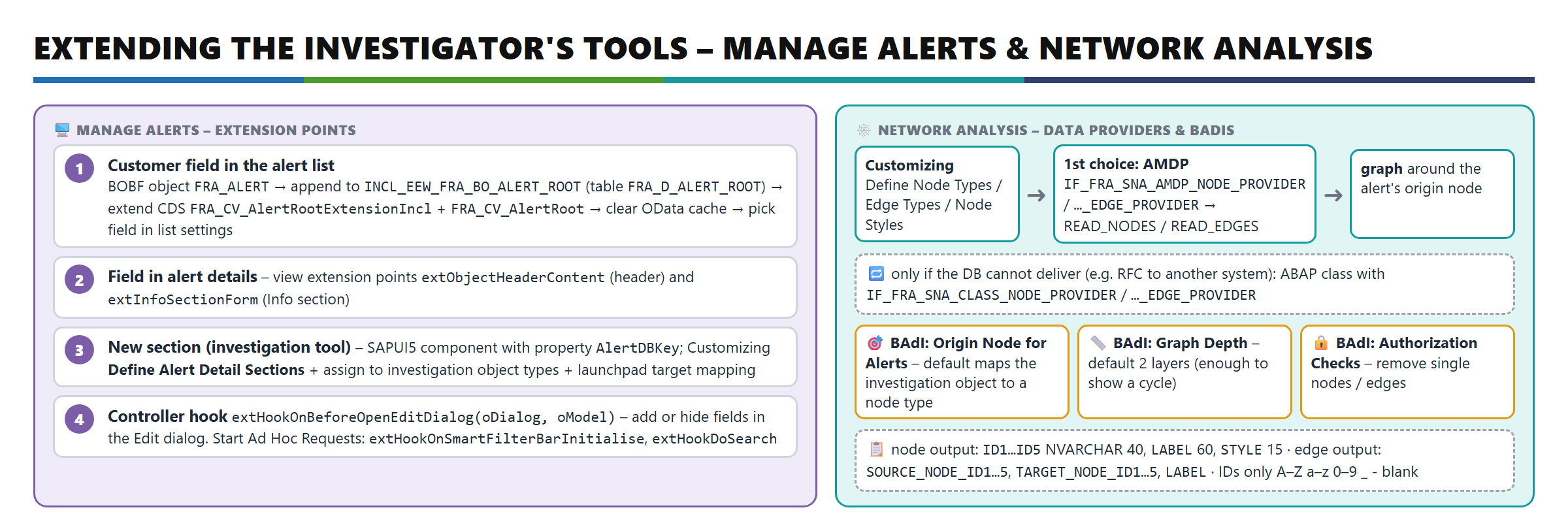
The network analysis visualises the relationships of entities so that investigators can identify suspicious or non-compliant constellations (user view: page 03 Part 7). There is no generic content: nodes and edges depend on your data, so you develop data providers and set them up in Customizing Define Node Types for Network Analysis, Define Edge Types for Network Analysis (and node styles).
Data provider type | Interface | When |
|---|---|---|
AMDP (first choice) | IF_FRA_SNA_AMDP_NODE_PROVIDER / IF_FRA_SNA_AMDP_EDGE_PROVIDER – implement READ_NODES / READ_EDGES | Data is in the database |
ABAP class | IF_FRA_SNA_CLASS_NODE_PROVIDER / IF_FRA_SNA_CLASS_EDGE_PROVIDER | Only what the database cannot deliver, e.g. data via RFC from another system |
- Each interface has a method to instantiate the provider and one to read the nodes or edges; details are in the interface documentation. A HANA view can also be a source when it returns the structure below.
- Node output: ID1 – ID5 (NVARCHAR 40), LABEL (60), STYLE (15, a style from Define Node Styles). Edge output: SOURCE_NODE_ID1–5, TARGET_NODE_ID1–5, LABEL. Extra columns are ignored; avoid duplicates (the graph slows down).
- IDs: only A–Z, a–z, 0–9, blank, underscore and hyphen (they become HTML element IDs); split IDs over 40 characters across ID fields or hash them (HASH_SHA256 – less unique).
BAdI (Customizing name) | Purpose |
|---|---|
BAdI: Origin Node for Alerts in Network Analysis | Which node is the centre for an alert (claim, claimant, damaged object …). The active default implementation maps the investigation object to a node type – set up with Map Investigation Objects to Node Types (up to 15 ID fields 1:1) |
BAdI: Network Analysis Graph Depth | Default 2 layers – the minimum that reveals a cycle; replace to use other depths per alert (e.g. persons 2, documents 4); higher values clutter the graph |
BAdI: Authorization Checks for Network Analysis | Instance-level checks – remove single nodes and edges; category-level checks come from assigning node / edge types to an ACCESS_GROUP |
Part 8 – Worklists and assorted lists
Worklists are a complementary way to manage the results of a data access or detection process, for scenarios with many similar results that need no intensive investigation and classification – e.g. password compliance or budget spending (user view: page 03 Part 6).
Step | Detail |
|---|---|
1 · CDS entity | View or table function with all relevant fields in the right order; must contain the selection fields, be active, have no input parameters and at least one time selection field (date, period or year) |
2 · Worklist type | Customizing Maintain Worklist Data Model: register the entity, description, source domain, the field that controls item visibility per user; optional investigation object type (manual alerts from the worklist), navigation group, flag For Ad Hoc Requests |
3 · Worklist variant | App Manage Worklist Variants: selection conditions, optional investigation reason; can be distributed to other systems (FRA_DISTRIBUTE_WLV) |
Use | Start Ad Hoc Requests – temporary list on demand; persistent worklists created in batch (Create Worklist / FRA_WL_VAR_EXECUTION) and shown in My Worklists, each user seeing only authorized items |
Housekeeping | Report FRA_DEL_WORKLIST deletes worklists after a residence time |
- Authorization FRA_WL_VAR (variant); FRA_WLIST is the archiving object for worklists; BAdI FRA_BADI_WORKLIST_PROCESSING influences which items Manage Worklist Variants, My Worklists and Start Ad Hoc Requests display.
- Design rule: one shared persistent worklist whose items are filtered by authorization, not one worklist per user.
8.1 Assorted lists
Business users maintain extra data – parameters, block or allow lists – that detection methods or worklists join, without changing the strategy. Example: the compliance office supplies purchase order IDs to check each month; the selection procedure joins the list.
- Create a client-dependent Z/Y table (SE11) with at least one additional key field; register it as a list type in Customizing Manage Assorted Lists Data Model (one table per list type).
- App Manage Assorted List Data: create, edit, delete, upload (replaces all entries; first row = technical field names), export. Recommended limits: about 50 lists of up to 10,000 rows and 50 columns.
- Authorizations FRA_ALIST (list data) and FRA_GEN (generate HANA objects); generated objects in FRA_CLT_MONITOR (regenerate, delete orphaned entries; log object FRA_CL_TECH in SLG1).
Part 9 – User interface enhancements
9.1 New apps and tiles
- Build a new SAP Fiori app and expose it as a tile in the SAP Fiori launchpad. SAP's guide names the SAP Web IDE and the Launchpad Designer; today use SAP Business Application Studio and the launchpad content manager. A typical new app is a Fiori elements app on your own CDS-based OData service over BIS or business data (RAP section).
9.2 Extending Manage Alerts
Manage Alerts is the investigator's workplace (page 03 Part 3). It is a freestyle SAPUI5 app with documented extension points; extension projects replace or extend its views and controller.
Extension | How |
|---|---|
Customer field in the alert list | 1) Transaction BOBF → business object FRA_ALERT → node ROOT → extension include INCL_EEW_FRA_BO_ALERT_ROOT: add the field through an append structure (extends table FRA_D_ALERT_ROOT). 2) Extend CDS views FRA_CV_AlertRootExtensionIncl and FRA_CV_AlertRoot with only the new field. 3) Clear the OData metadata cache (Customizing Clear Cache). 4) The user selects the field in the list settings |
Other business objects | Same technique for FRA_DETECTION_METHOD, FRA_PERSONAL_SETTINGS, FRA_STRATEGY; types CHAR, STRING, DATS, INT4. New components reach the OData service automatically but appear in the UI only after a UI extension (except the alert list). Avoid nodes whose queries use SAP HANA views |
Data for alerts without code | Additional data fields from the enrichment view of the investigation object type (Customizing) |
Fields in alert details | View extension point extObjectHeaderContent in Object.view.xml (header) and extInfoSectionForm in InfoSection.view.xml (Info section), bound to fields of INCL_EEW_FRA_BO_ALERT_ROOT |
New section (investigation tool) | A SAPUI5 component ( |
Controller hook | Override the reserved function extHookOnBeforeOpenEditDialog(oDialog, oModel) of |
After UI changes | Update the SAPUI5 application index with FRA_CLEAR_BUFFER |
|
The alias RootExtension is required; the field name comes from your append. These are classic DDIC-based view extensions because the SAP views are DDIC-based. The controller hook in the custom controller of the extension project – hide the workflow phase for one investigation object type:
|
- The standard controller has an empty implementation; your merged custom controller overrides it, the standard code continues afterwards.
oModelis the AlertRoot model of the current alert.
9.3 Extending Start Ad Hoc Requests
- Controller hooks in Object.controller.js of
sap.grc.acs.fraud.myworklistvariants: extHookOnSmartFilterBarInitialise(oFilterBar, sWorklistType, aSelectionFields) – change the smart filter bar before display (mandatory fields, register on the Go button) and extHookDoSearch(…) – returntrue/falseto allow or suppress a search. - Typical use: send the query only when Go is pressed, not on Enter with too few filters – protects the system from long-running ad hoc requests.
- Tooling: the Extensibility Guide documents extension projects that replace the SAP controller with a custom one. For SAPUI5 apps in general, SAP's current tool is the adaptation project in SAP Business Application Studio.
Part 10 – BAdIs and integration extension points
The investigation BAdIs are in Customizing under Investigation → Business Add-Ins for Investigation; detection and service BAdIs next to their activities.
BAdI / interface | Use |
|---|---|
Modify Alert at Creation or Update (FRA_BADI_ALERT_MODIFY) | Change an alert when it is created or updated through the business object framework – fill Risk Value from replicated data (e.g. claim amount), fill customer extension fields |
Alert Item Aggregation | Manipulate the values aggregated from alert items into the alert root before they are stored |
Alert Update Determination (FRA_BADI_ALERT_UPDATE_REACTION) | Decide whether an existing alert is updated in response to detection results |
General Alert Action / Transfer Alert Action (FRA_BADI_AL_ACT_TRANSFER) | Own actions in the alert; transfer alerts to an external case management system (with services AlertDecisionRequest_In and AlertRevokeTransferRequest_In for the way back); filter value selects the implementation |
Enhancement of Alert Status Notification Service (FRA_BADI_CHANGED_ITEMS) | Enhancement of the alert status change notification – AlertStatusChangeNotification_Out tells the source system about created, closed or reopened alerts |
Online Detection with Generic Table Input Service Enhancement (FRA_BADI_SE_ONL_DET_GEN_TABLE) | Enhance the online detection service FraudDetection_GenericTable_Request_Sync_In; a further BAdI can select the detection strategy on the fly from the request data |
FRA_BADI_WORKLIST_PROCESSING | Filter worklist items (Part 8) |
Network analysis BAdIs | Origin node, graph depth, authorization checks (Part 7) |
IF_FRA_ADDR_SCR_FILTER | Address screening filter (Part 5.1) |
IF_FRA_SNA_…_PROVIDER | Network analysis data providers (Part 7) |
- Online detection services: FraudDetection_GenericTable_Request_Sync_In (synchronous, generic input tables named like the execution procedure inputs; strategy determined from the selection parameters of active strategies – check with the app Display Strategy Determination) or the older pair FraudDetectionRequest_In / FraudDetectionConfirmation_Out. Simulation mode returns alert information without creating an alert. Integration design: page 05 Part 7.
Part 11 – Testing, debugging, calibration and transport
Need | Tool |
|---|---|
Check generated objects | When you save a method or strategy, BIS generates the SAP HANA objects to run it. Generation Monitor for Detection Methods / for Detection Strategies (SAP menu → Business Integrity Screening → Tools → Detection) shows errors and the generated class names |
Debug a strategy | FRA_MASS_DET_TEST (Test Procedure for Mass Detection) runs a special version of the strategy's main procedure that changes no data and shows interim results; set the breakpoint in the class found in the generation monitor. AMDP code is debugged in ADT |
Test on real volumes | Mass detection simulation run (no alerts, also inactive versions) – FRA_MASS_DET_PP or the strategy screen; logs in FRA_MASS_DET_PP_LOG; delete simulation data and incomplete runs in the back end |
Tune the business effect | Calibration with historical data, Find Best Values (page 02 Part 7); a graded detection result and parameters give calibration something to tune |
Online detection | Simulation mode of the service; Display Online Detection Log (FRA_ONLINE_DET_LOG, application log object FRA_ONLINE); Display Strategy Determination |
Performance | SAP HANA performance trace, SQL trace, SQL plan visualization; package size and parallel jobs for mass runs (page 05 Part 4) |
What travels how
Object | Transport |
|---|---|
AMDP classes, CDS views / table functions, DDIC appends, Z tables, BSP / UI5 apps, BAdI implementations, message classes | Workbench transport (Generate Implementation asks for a request; local packages cannot be transported) |
Data model, package assignment, node / edge types, sections, worklist types, list types, business systems | Customizing transport; SAP standard content arrives as BC sets activated in expert mode (SCPR20) in the development client and transported |
Detection method and strategy definitions | Application objects (business objects FRA_DETECTION_METHOD, FRA_STRATEGY with versions) maintained in the apps; their HANA runtime objects are generated in each system. SAP creates its standard methods and strategies with eCATT scripts (SECATT, e.g. FRA_CREATE_DM_IA, FRA_CREATE_DS_IA_ALL_DET_OBJ); the project defines how its own methods and strategies are created in test and production (recreate in the apps or script them the same way) |
Worklist variants | Distribution to target groups (FRA_TRGTGRP, FRA_DISTRIBUTE_WLV) |
Part 12 – Interview questions
Q1. Which ABAP-managed database objects does BIS use for extensions, and why not HANA repository objects?
CDS views (declarative), CDS table functions (SQLScript, all HANA features) and AMDP (SQLScript procedures in a global class). They give one IDE (ADT), ABAP types, syntax checks and normal transports and need no HANA database user. HANA repository procedures and HRF are legacy.
Q2. What do you build to screen a new kind of business data?
A source domain with field settings, an investigation object type and a detection object type, each on a CDS entity (one row per object, up to 15 keys, no parameters, no client field; the detection entity needs a date field), and an association entity if the detection keys do not contain the investigation keys – all in Maintain Detection and Investigation Data Model.
Q3. How do you implement a scripted detection method?
Generate the class in Manage Detection Methods (Generate Implementation), implement S_SELECTION (attributes of the working set), S_EXECUTION (logic, ET_RESULT with keys and a result 0–100, PARAMETERS input) and optionally S_ADDITIONAL_INFO (ET_TEXT), keep the class in the packages assigned to the source domain, register parameters in the field catalog and create the method in the app.
Q4. Is there a BIS interface a scripted method class must implement?
No – it is a normal AMDP class with IF_AMDP_MARKER_HDB; the method definition points to its procedures. Interfaces exist for other extension points: IF_FRA_ADDR_SCR_FILTER for address screening filters and IF_FRA_SNA_AMDP_NODE_PROVIDER / _EDGE_PROVIDER (or the class variants) for network analysis.
Q5. Why must the detection logic sit in the execution procedure?
It is the only procedure that runs in mass detection, online detection and calibration. The selection procedure is skipped online (the request delivers the object), the additional information procedure is skipped in calibration.
Q6. How do you handle the client and different schemas in BIS SQLScript?
Filter client-specific tables with SESSION_CONTEXT('CLIENT'); no client field in object type entities, no AMDP OPTIONS CDS SESSION CLIENT CURRENT, no client parameter in table functions. For replication schemas use logical schemas from DB_SCHEMA_MAP with $ABAP.schema( … ) – never hard-coded schema names.
Q7. Why does BIS restrict detection methods to assigned packages?
Usability – value helps show only relevant AMDPs – and security: no arbitrary code can be run as a detection method, and the packages can be monitored and their authorizations restricted.
Q8. What does a developer deliver for address screening?
An address view (CDS entity) with the detection object keys, ADDRESS_ID, ADDRESS_VARIANT, VALID_FROM, NAME and ADDRESS as single full-text-indexed columns, optional COUNTRY and partner fields, assigned by package. Optionally an address screening filter class implementing IF_FRA_ADDR_SCR_FILTER that keeps only hits matching e.g. birth date or gender.
Q9. What do predictive detection methods need technically?
APL and PAi in SAP HANA, the SCORE_THRESHOLD field in the source domain, a data view with the predictive attributes and optionally a historical decision view with BINARY_DECISION. The generated training view joins them with SAP's selection and alert decision views; the model is trained with APL auto-classification per investigation reason.
Q10. How do you extend the network analysis?
Define node and edge types in Customizing, implement data providers – preferably AMDP via IF_FRA_SNA_AMDP_NODE_PROVIDER / _EDGE_PROVIDER (READ_NODES / READ_EDGES), ABAP classes only for things like RFC – and use the BAdIs for origin node, graph depth and instance authorization.
Q11. How do you add a customer field to Manage Alerts?
Append the field to INCL_EEW_FRA_BO_ALERT_ROOT of BOBF object FRA_ALERT, extend the CDS views FRA_CV_AlertRootExtensionIncl and FRA_CV_AlertRoot, clear the OData cache, then select it in the list settings; for the details use the view extension points, for logic the controller hook extHookOnBeforeOpenEditDialog, and fill it with the BAdI Modify Alert at Creation or Update.
Q12. How do you test a new detection method before go-live?
Check the generation monitor, debug with FRA_MASS_DET_TEST and the ADT AMDP debugger, run mass detection in simulation mode, calibrate the strategy on historical decisions, test online detection in simulation mode with the online detection log – and trace SQLScript with the HANA tools.
🏠 Start Here · ◀ 03 · Investigation · 05 · Architect View ▶ · Sections: CORE ABAP | OOPS ABAP | ABAP on HANA | Clean Core | RAP | ABAP Points | SAP Fiori | SAPUI5 | Mobile Development (MDK) | BTP Foundations | BTP Development | CAP | SAP Build | ABAP on BTP | Integration Suite | SAP Business AI | SAP BASIS | Security | SAP SDLC
Functional: FICO ABAP | TRM ABAP | VIM | SAP BIS | SD ABAP | MM ABAP | PP ABAP | QM ABAP | PM ABAP | PS ABAP | EWM | TM ABAP | GTM ABAP | EHS ABAP | HR ABAP | BW | SAP Datasphere | SAP Business Data Cloud | SAP MDG | SAP Analytics Cloud | SAP Ariba | SAP CX | SAP IBP