SAP Build Process Automation is the SAP Build component for business processes on SAP BTP: no-code workflows with forms and approvals, decisions (business rules), RPA bots, actions that call SAP and non-SAP APIs, and process visibility. This page covers the process itself at technical-consultant depth: the workflow basics every ABAP developer knows, the business process project and the process editor, every trigger type (form, API, event, scheduled), flow controls, events and error handling, process data (variables, context, script tasks), subprocesses and variants, the Sales Order Approval process end to end, the architect's choice between classic SAP Business Workflow and SAP Build Process Automation, and the legacy SAP Workflow Management. Forms, approval forms and decisions in depth: page 04; automations and the Desktop Agent: page 05; actions, destinations and event connectivity: page 06; release, deploy, My Inbox and monitoring: page 07. Facts as of November 2026.
Part 1 – Business processes and workflow basics
Large organisations run on pre-defined, standardised processes – leave request and approval, purchasing, order-to-cash, procure-to-pay, maintenance contracts, hiring. Software that models, executes and monitors such processes is called BPM (business process management). Automating a process is the most reliable way to make everybody follow it, to see where it is stuck and to measure it.
On-premise SAP automates processes with SAP Business Workflow (Workflow Builder, transaction SWDD; see CORE ABAP › 12 Workflow). The core terms carry over to the cloud:
Classic term | Meaning | SAP Build Process Automation |
|---|---|---|
Workflow definition | The modelled sequence of steps | Process (deployed as a workflow definition) |
Step / step type | One activity; kind of activity: activity, user decision, mail, condition … | Process step (form, approval, action, decision …) or flow control |
Workflow instance | One running execution of a definition | Process instance |
Container | The memory of an instance – data flowing through the steps | Process context – process inputs, step outputs, custom variables (JSON) |
Agent | User, role or organisational object a task is assigned to | Recipients – users or groups, often a decision output |
Work item | Runtime object of a dialog step in the agent's inbox | Task in My Inbox or SAP Task Center |
Triggering event | BOR / class event that starts the workflow | Event trigger (business event via an event broker) |
BRF+ / rule in a step | Decision logic called from the workflow | Decision (page 04) |
Background method | Synchronous system call in a step | Action (API call through a destination, page 06) |
1.1 What a workflow is
A workflow is an executable visual diagram of a structured, predefined set of activities that produce a desired result. It consists of:
- Activities / process steps – tasks done by people, systems or bots.
- Decision gateways – branch the flow by a condition or a business rule.
- Input – started by a person, by an application (API, event) or on a schedule.
- Output – the result of the steps or of the workflow itself.
Workflows are drawn in BPMN 2.0 (Business Process Model and Notation), the standard notation for events, tasks and gateways. SAP Build Process Automation uses a simplified, no-code version of it in the process editor and can import BPMN models (Part 2.3).
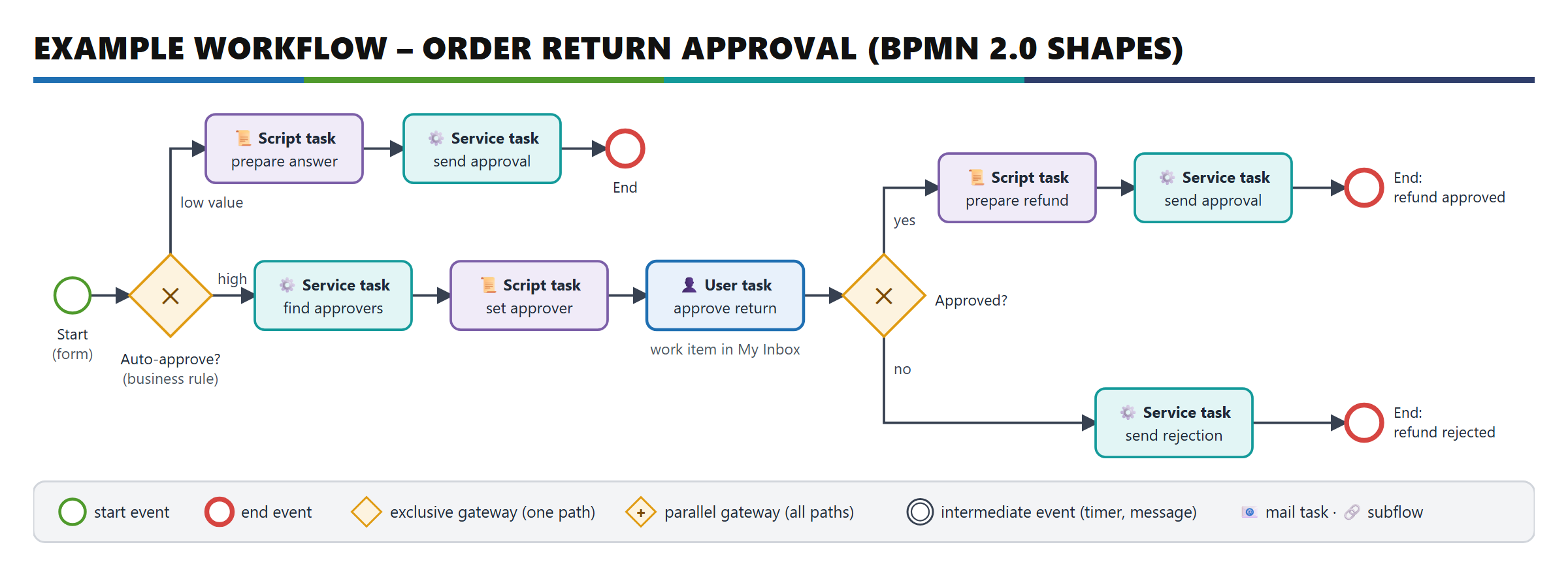
Reading the example: a return request starts the flow; a business rule decides whether it can be auto-approved (low value → prepare the answer and send it). High-value returns go to approvers found by another rule; the user task creates a work item in the approver's inbox; the second gateway ends in "refund approved" or "refund rejected". In SAP Build Process Automation the user task is an approval form, the rule a decision, the service tasks actions and the script tasks script tasks or decision outputs.
Part 2 – The business process project and the process editor
SAP Build Process Automation (released in February 2022) consolidated SAP Workflow Management and SAP Intelligent RPA into one low-code tool. Content is organised in projects that are created in the SAP Build lobby (Create › Build an Automated Process › Business Process) or from a template in the SAP Build Store. Portfolio, lobby and licensing: page 01.
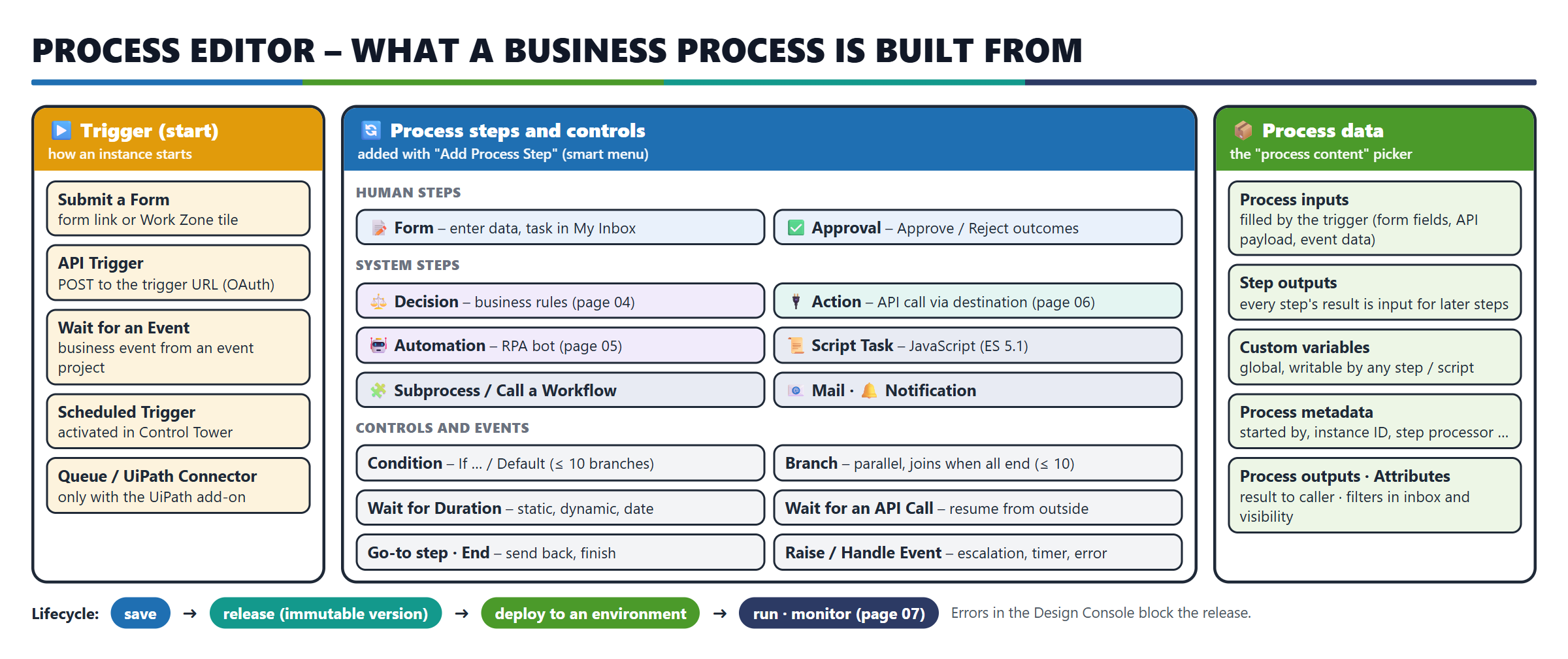
2.1 Artifacts of a business process project
Artifact | What it is | Details |
|---|---|---|
Process | The workflow: trigger, steps, flow controls, events; variables and attributes | this page |
Form / Approval form | No-code UI for start forms and inbox tasks; approval forms have Approve / Reject outcomes | page 04 |
Decision | Business rules as decision tables or text rules with typed inputs and output | page 04 |
Data type | Structure for inputs, outputs and variables (fields, lists, constraints) | page 04 |
Automation | RPA bot run by the Desktop Agent | page 05 |
Action (dependency) | API operation from a published action project, called through a destination | page 06 |
Script task | JavaScript step inside the process (data transformation) | Part 6 |
Notification template | Reusable e-mail / in-app / mobile message | Part 4 |
Event (dependency) | Business event from a published event project, used by an event trigger | Part 3 |
Visibility scenario | Dashboard definition over process instances | page 07 |
Guided process · variant template | Wizard for SAP Build Work Zone, advanced edition · pre-configured process for line-of-business experts | Part 7 |
Environment variable | Placeholder (destination, credentials, dates) whose value is set at deploy time per environment | page 07 |
- Dependencies – a project uses artifacts of other projects by adding them as dependencies (Manage the project properties › Dependencies): SDK packages (e.g. the BAPI SDK) and published action or business process projects. Adding an action to a process or a data source to a form adds the dependency implicitly; each dependency is pinned to a version that you update deliberately.
- Only processes in the same or a dependent project can be used as subprocesses (Part 7).
2.2 Creating a process
- Overview › Create › Process: name, identifier (prefilled), description, and a subject – the title of each instance; include the business key ("Sales order 4711").
- Add a Trigger (Part 3), then Add Process Step (smart menu) for every step or control. For each step you choose to create a new artifact or reuse an existing one; artifacts from dependent projects are marked. Steps can be reordered by drag and drop.
- Map every input of a step from the process content (trigger outputs, earlier step outputs, custom variables, process metadata). The Design Console lists all errors; a process with errors or with a placeholder cannot be released.
- Save → Release → Deploy: release creates an immutable version; deploy makes it runnable in an environment and asks for environment-variable values (page 07).
2.3 Other ways to create a process
Option | What it does | Limits |
|---|---|---|
Template from the SAP Build Store | Pre-built processes, bots and connectors (e.g. live process packages for S/4HANA) | Adapt and redeploy; check the content version |
Import a BPMN process | Imports .xml, .bpmn or .bpmn2 files (validated with SAP Signavio, IBM and SAP NetWeaver BPM models): userTask → form, scriptTask → script task, exclusiveGateway → condition, parallelGateway → branch; other elements become placeholders | One file per request, max 1 MB; only the first process in the file; review and replace placeholders |
Generate with generative AI | Prompt (5–1,000 characters) generates or extends a process, forms, data types, decision rules and script code; Explain summarises an existing process | Cannot generate branches, go-to steps or data mappings; generative AI features are deprecated and no longer available from January 2027 – AI assistance moves to Joule in SAP Build (page 10) |
Placeholder step | Typed stand-in (action, form, approval, decision, subprocess, mail, generic) for a step that is not designed yet | Must be replaced before release |
Part 3 – Triggers: how a process starts
A trigger creates a new process instance and fills the process inputs. Triggers of deployed projects are listed and managed in Control Tower › Environments › Triggers.
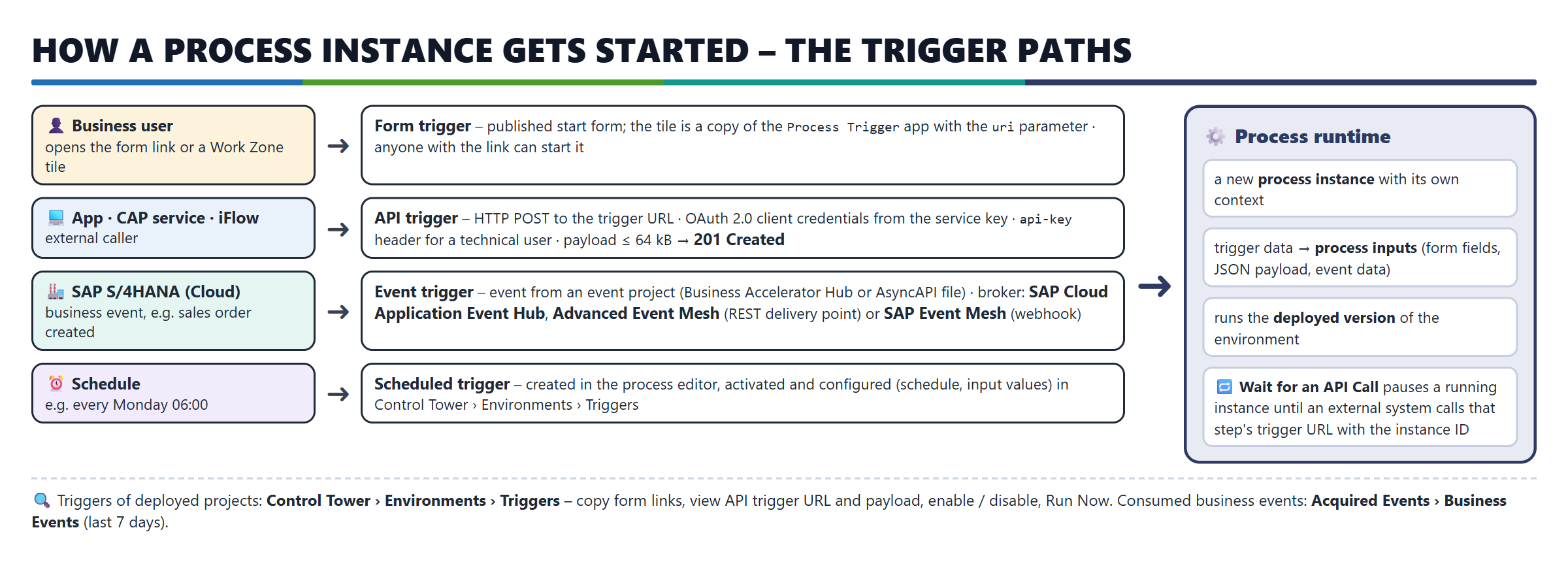
Trigger (editor name) | Started by | Configured | Typical use |
|---|---|---|---|
Form trigger (Submit a Form) | A user submits a start form – direct form link or a tile in SAP Build Work Zone | Form in the same project; links generated after deployment | Requests entered by people: leave, purchase, exception request |
API trigger | HTTP POST from another application (CAP app, SAP Build Apps, iFlow, any REST client) | Process inputs in the editor; URL and payload example in Control Tower | Start from a custom UI or back-end after own checks |
Event trigger (Wait for an Event) | A business event from SAP S/4HANA, S/4HANA Cloud or another source | Event from a published event project | Real-time, decoupled start: order created, business partner changed |
Scheduled trigger | A schedule | Created in the editor; activated and scheduled in Control Tower after deployment | Periodic processes, e.g. weekly review |
Queue trigger · UiPath connector trigger | A new item in a UiPath queue or a UiPath event | Requires SAP Build Process Automation, foundation add-on by UiPath | Mixed SAP / UiPath automation |
3.1 Form trigger
- Add a Trigger › Submit a Form › choose or create a form of the same project. Its fields become the process inputs.
- After deployment the trigger offers a Form Link (direct URL) and a Launchpad Configuration Parameter. For a Work Zone tile, copy the Process Trigger app in the Content Manager and paste the parameter into its
urinavigation parameter (page 08). - A start form must have no extra outcome buttons: whichever button is pressed, the process starts.
- Security: starting a process via a form is not restricted to users or groups – anyone who can log on and has the link can start it. Restrict with the Work Zone site / role assignment, or use an API trigger behind your own authorization check.
3.2 API trigger
- Add a Trigger › API Trigger; define the process inputs (Variables › Process Inputs › Configure). Dates use ISO 8601 (
2026-03-16,15:33:16). - After release and deployment: Control Tower › Environments › Triggers › View shows the trigger URL and a payload example. The caller authenticates with OAuth 2.0 client credentials from the service key of the SAP Build Process Automation instance (
clientid,clientsecret, token URL =url+/oauth/token). - A technical user also sends an API key of the target environment in the
api-keyheader (created in Control Tower › Environments › API Keys, visible only once). If only one environment is used, the key can be set in the service-instance configuration instead. - Success returns 201 Created; the payload is limited to 64 kB. Process instances are processed asynchronously – the call does not wait for the process.
|
Copy URL and payload from the trigger dialog – never hard-code them. In a CAP application call the trigger through a destination (OAuth2ClientCredentials) so the token is fetched for you, and put the API key into an additional destination property that you send as api-key header.
3.3 Event trigger
- Event project first: Connectors › Events › Create – pick a standard event specification from the SAP Business Accelerator Hub, upload an AsyncAPI 2.0 specification (SAP events follow CloudEvents 1.0), or use the Unified Customer Landscape. Release and publish the event project.
- In the process: Add a Trigger › Wait for an Event › choose the event (trigger name max 64 characters). The event payload (
data) becomes the process inputs. - Event broker between the source and SAP Build Process Automation (set up once; page 06):
- SAP Cloud Application Event Hub – the default eventing service for SAP BTP; a formation of type "Eventing Between SAP Cloud Systems" and an integration dependency list the event types.
- SAP Integration Suite, advanced event mesh – a REST Delivery Point forwards a queue to SAP Build Process Automation (headers
Content-Type: application/cloudevents+json,WebHook-Request-Origin). - SAP Event Mesh – a webhook subscription on the queue to the
…/internal/be/v1/eventsendpoint of the instance, authenticated with the service key.
- Manage triggers in the project Overview (activate / deactivate) or in Control Tower (enable, disable, Run Now with a JSON input for testing). Acquired Events › Business Events shows consumed business events of the last 7 days with source and payload.
- S/4HANA business events are notifications: they carry keys (e.g. sales order, sales organisation, sold-to party) – read the details with an action as the first step.
3.4 Scheduled trigger and Wait for an API Call
- Scheduled trigger – Add a Trigger › Scheduled Trigger, release and deploy, then activate it in Control Tower and set the schedule and input values. A scheduled trigger can also be added later to a deployed project (Add Trigger › Scheduled; needs the ProcessAutomationAdmin and ProcessAutomationDeveloper roles).
- Wait for an API Call (Controls and Events) pauses a running instance until an external system calls that step's own API trigger with the process instance ID; extra data can be passed as inputs. Use the
…/public/unified/v1/triggers/api/…endpoint – the classic…/workflow/rest/v1/messagesendpoint is not supported for processes built in SAP Build Process Automation.
Part 4 – Process steps and flow controls
Step | Purpose | Key settings |
|---|---|---|
Form | A person enters or completes data; task in the inbox | Subject, recipients, due date, outcomes (page 04) |
Approval | A person approves or rejects; each outcome becomes a branch | Same as form; Approve / Reject buttons by default |
Decision | Evaluates business rules, returns the output structure | Input mapping (page 04) |
Action | Calls an API operation through a destination variable | Inputs, retry after error, run on behalf of, error handler (Part 5) |
Automation | Runs an RPA bot on a Desktop Agent | Agent attributes, inputs (page 05) |
Subprocess / Call a Workflow | Runs another process or a BAS workflow | Inputs / outputs, run in parallel (Part 7) |
Script Task | JavaScript transformation of process data | ES 5.1, writes only custom variables (Part 6) |
Sends an e-mail through the SMTP mail destination | To, CC, BCC, subject, body with process content | |
Notification | Sends a notification template (e-mail, in-app, mobile) | Template, variable mapping, user / group recipients |
Placeholder | Stand-in for an undesigned step | Replace before release |
Flow control | Behaviour | Rules and limits |
|---|---|---|
Condition | Routes the instance by IF conditions on process content; Default branch if none is met | Up to 10 branch conditions; condition groups with All / Any; branch order is not guaranteed – if several are true, the first true branch evaluated wins, so make conditions exclusive |
Branch | Runs steps in parallel branches; continues when all branches are complete | Up to 10 branches; the number is fixed at design time (dynamic parallelism: subprocess Run in parallel, Part 7) |
Wait for Duration | Pauses the instance | Static 1–999 minutes / hours / days / months / years, dynamic (number from process content) or reference date (UTC) |
Wait for an API Call | Pauses until an external call resumes the instance | Part 3.4 |
Go-to step | Sends the flow back to an earlier step – the send back / rework pattern | Combine with custom variables so entered values and comments survive the loop |
Raise Event · End | Throws an escalation to the parent; ends the branch | Part 5 |
- Mail needs an SMTP mail destination with a From address that can receive replies. For consistent branded messages use a notification template (Overview › Create › Notification Template; tabs Email, In-App, Mobile; associated event such as Task Created) – the same template can be attached to forms (Notifications tab › Task Created: None, Default Template, Custom Template).
- Run step on behalf of – an action or subprocess runs with the identity of the process starter or of the user of an earlier step (principal propagation through the destination). Example: the purchase requisition is created on behalf of the approving manager. Do not reference a user from a step inside a condition branch – the branch may not have run.
- Attributes (Process Details › Attributes) expose business values (order, customer, amount) for filtering in My Processes and visibility scenarios: max 25 per deployed version and 30 across versions, SAP recommends at most 15 for performance; attributes created since 9 October 2025 keep their data type (older ones are strings).
Part 5 – Events, timers and error handling
Resilient processes handle exceptions in the model instead of leaving instances in error. Each catch flow ends in one of three ways:
Option | Effect on the current step | Afterwards |
|---|---|---|
End | Completes the current step as is | Continues with the next step after the step completes |
Skip to Next Step | Cancels the current step | Runs the event flow, then the next step |
Terminate Process | Cancels the current step | Runs the event flow, then cancels the instance and all running activities |
Event | Raised by | Caught by | Example |
|---|---|---|---|
Escalation event | Raise Event step anywhere in a subprocess or workflow | The parent process (step menu › Options › Handle Event › Catch Event); not catching is not an error | Subprocess detects missing credit data → parent mails credit management |
Timer event | Time: on / after task creation, the due date of a form or approval, or a reference date | The form / approval step itself or the parent process | Approval due → reminder, then Skip to Next Step to escalate |
Action error | An API action returns an error | Event handler on the action: specific codes (e.g. 400, 401), any 4XX, any 5XX, undefined errors – evaluated in this order | 503 from S/4HANA → mail support, terminate |
- Retry after error on an action retries until the maximum attempts are reached; only then is the last error passed to the handler. The handler flow can start a subprocess, send a mail or raise an event.
- Unhandled failures put the instance into status Erroneous in Monitoring › Process and Workflow Instances; fix the cause (destination, data) and retry, or cancel (page 07).
- Inactive instances are cleaned up: running but not progressing → suspended 1 year after the last activity; suspended → cancelled 6 months later.
Part 6 – Process data: variables, context and script tasks
The process context holds the data of one instance as JSON and carries it through all steps – the cloud equivalent of the workflow container. In the editor it appears as the process content tree in every mapping field.
Data | Filled by | Use |
|---|---|---|
Process inputs | The trigger: form fields, API payload, event data | Input for all steps; mark Required, use List for arrays |
Step outputs | Each step: form fields and processor, action response, decision output, automation result | Input for later steps only |
Custom variables | Initial value or any step's Outputs tab, script tasks | Global values that do not depend on which branch ran |
Process outputs | Mapped at the end | Returned to a calling parent process |
Process metadata | Runtime | Instance ID, definition ID, started by, start time, step processors |
Three standard use cases for custom variables:
- Independence of branch outcome – two branches compute shipping cost for different carriers; both write the custom variable
shippingCost, and the final approval maps that variable instead of one branch's output. - Rework request – a value that exists before the approval outcome lets the earlier step be repeated (go-to step) with entered values and comments kept.
- One field, many steps – several steps edit the same field without mapping it forward step by step.
6.1 What the context can hold
- It must be valid JSON: no functions, prototype objects or special numbers such as
NaNor infinity. - Data returned by an action into the context is limited to 100 KB – read only the fields you need ($select), not whole documents. API trigger payloads: 64 kB.
- Optional lists: if a mandatory step input maps a list that may be missing (from an API or an optional input), add a condition that checks that the whole path exists and handle the empty case in the Default branch.
6.2 Script task
A script task runs JavaScript inside the process for transformations that are awkward to map: calculations, loops over lists, building strings or structures for the next action. The editor offers IntelliSense over the process data, type checking, Validate Script and Run Test with sample values (runs in the browser, not end to end).
Object | Access | Content |
|---|---|---|
| Read only | Trigger data and step outputs |
$.context.custom | Read / write | Custom variables – the only way a script returns data |
$.info | Read only | Instance information (e.g. started by, instance ID) |
$.usertasks | Read only | Results of form / approval steps |
$.roles | Read / write | Role / recipient information |
- ECMAScript 5.1 only:
var,function, no arrow functions, template literals,let/const; noevalorFunctionconstructor, noimport/require, noconsole.log, nodeleteon context variables; max 10,000 characters; you cannot add new variables to$.context– create custom variables in Process Details first. - Objects from the context are read only – assigning an input object or list to a custom variable fails; make a deep copy first.
- Scripts run under resource limits (time, memory); exceeding them sets the instance to Erroneous. Heavy logic belongs in an action (CAP service, API) – not in a script.
|
Part 7 – Subprocesses, workflows, variants and guided processes
7.1 Subprocesses
- Add Process Step › Subprocess › an existing process of the same or a dependent project, or Blank Subprocess. Technically a subprocess is just another process with process inputs and outputs; any process can be a main process or a subprocess. The main process continues only after the subprocess completes successfully.
- Use them for reuse and modularisation: one "Release sales order" subprocess called from the auto-approve and the approve branch; smaller models are easier to test and change.
- Run in parallel – one subprocess instance per item of a list (e.g. one approval per approver of a list); the main process continues when all instances have finished. Not supported with run in parallel: handle event, custom-variable mappings in the output, literal input values.
- End condition on a parallel subprocess group – when the condition is true for a completed instance (e.g.
approvalResult.decision = reject), the remaining instances are Cancelled: "first rejection wins" approvals. - Escalation and timer events raised in a subprocess are caught in the parent (Part 5).
7.2 Call a Workflow
- Add Process Step › Subprocess › Call a Workflow inserts a workflow built in SAP Business Application Studio or delivered with a live process project from the Store; workflow definition ID from Control Tower › Environments › Processes and Workflows. Map input and output data types.
- Limitation (as of November 2026): workflows started this way run asynchronously – the process does not wait for the workflow to complete. SAP treats this as a limitation that will change; do not build logic that relies on either behaviour.
7.3 Process variants
- A variant template (template developer) holds the allowed steps, reduced inputs, step constraints and default / blueprint variants. A variant configuration project lets a business configuration expert create, order, activate and deploy variants without technical detail.
- Start conditions decide which variant runs for a given context (e.g. document type = CWK and purchasing group = 002). Step outcomes define what happens when an event disrupts a step – e.g. outcome Send back → Rework → Repeat Step.
- Parallel steps in a variant must not update the same context data – it is overwritten when the flows merge.
7.4 Guided processes
- A guided process consists of stages with widget steps that guide a user through a long task (onboarding, case handling). It is deployed to a shared environment, published, and turned into a wizard in SAP Build Work Zone, advanced edition (page 08); widgets are defined there.
Part 8 – The Sales Order Approval process end to end
Requirement: when a sales order whose net value would push the customer above the credit limit is created in SAP S/4HANA, a sales manager must approve or reject it. Approved orders are released; rejected orders stay blocked and the sales rep learns why. Small orders and customers with enough credit are auto-approved. Thresholds and approver groups per sales organisation change several times a year and are maintained by the business.
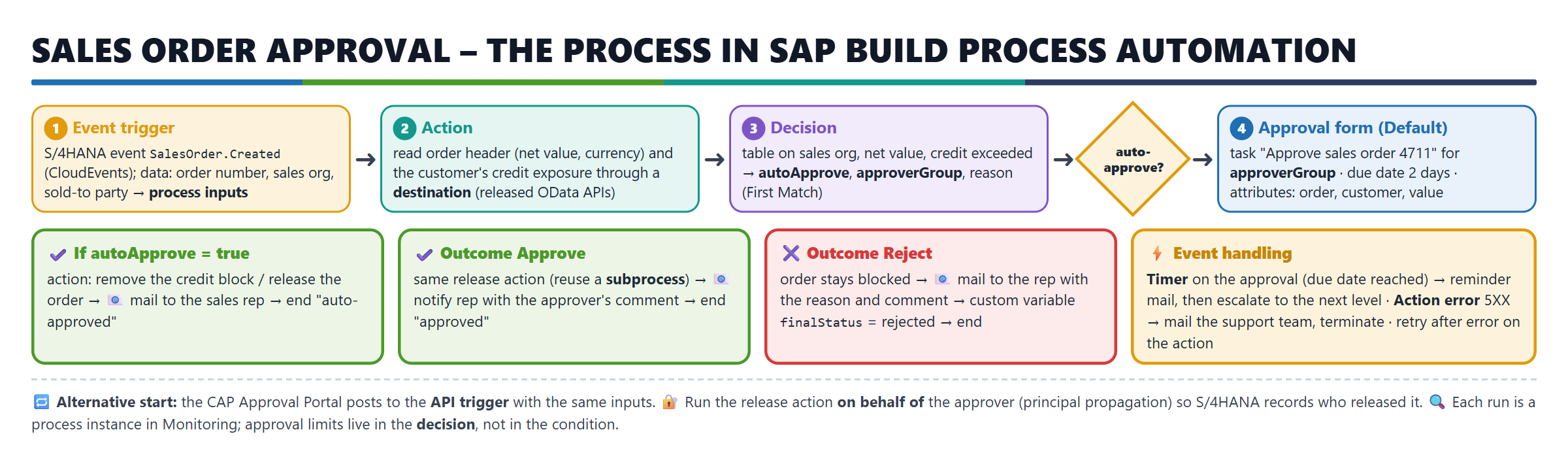
# | Step (artifact) | Configuration | Data in / out |
|---|---|---|---|
1 | Event trigger – Wait for an Event | Event project from the Business Accelerator Hub with the S/4HANA sales order created event (CloudEvents type | In: SalesOrder, SalesOrganization, SoldToParty |
2 | Actions – get sales order, get credit exposure | Action project from the released sales order API (and a credit API or custom CAP service), destination variable, retry after error, 5XX handler | Out: net value, currency, exposure, limit |
3 | Script task (optional) | Computes | Out: custom variables |
4 | Decision – Determine approver | Decision table, First Match (page 04) | In: sales org, net value, credit exceeded · Out: autoApprove, approverGroup, reason |
5 | Condition – auto-approve? | If | – |
6 | Approval form | Subject "Approve sales order 4711", recipients = | Out: decision, comment, processor |
7 | Subprocess – Release order | Action that removes the delivery / credit block, run on behalf of the approver; mail to the rep | In: order, approver |
8 | Mail – rejection | Reason and approver comment to the sales rep; | – |
- Alternative start: a CAP "Approval Portal" performs its own checks and starts the same process via the API trigger; both triggers fill the same process inputs, so the rest of the model is unchanged.
- Clean core: S/4HANA only raises a standard event and offers released APIs; all approval logic lives side by side on SAP BTP. No modification, no custom workflow in the ERP.
- Business key and duplicates: use the order number in the process subject and as an attribute; make sure only one trigger path is active per order (event or API), or check for a running instance with that attribute before starting a second one.
8.1 Common mistakes
- Approval limits as fixed numbers in conditions – put them in a decision so the business can change them without redesigning the process.
- Passing the whole order into the context – pass keys and the fields the forms need; read the rest through actions (100 KB action-result limit).
- Assigning tasks to individual user IDs – use groups maintained in SAP Cloud Identity Services (page 04).
- No error handling on actions – one S/4HANA outage leaves hundreds of erroneous instances; add retry and an error handler.
- Overlapping condition branches – evaluation order is not guaranteed; keep branch conditions mutually exclusive.
Part 9 – Architect view: classic workflow or SAP Build Process Automation
Use classic SAP Business Workflow / flexible workflow when … | Use SAP Build Process Automation when … |
|---|---|
The process lives entirely inside one S/4HANA system (on-premise or private cloud) | The process spans several systems (S/4HANA, SuccessFactors, Ariba, non-SAP) |
SAP delivers it: standard workflow templates or flexible workflow (Manage Workflows app) already cover it | Business experts should model and change the flow themselves (no-code) |
Deep access to BOR / class-based objects and ABAP logic inside the transaction is needed | You need start forms, RPA bots, document extraction or a cross-system inbox |
The approval must block the document inside its own transaction (status handling in the ERP) | Clean core: keep custom process logic out of the ERP and connect via released APIs and events |
- Hybrid is normal: S/4HANA flexible workflow for standard document approvals, SAP Build Process Automation for side-by-side extensions; both feed SAP Task Center and visibility scenarios (SAP Business Workflow can be added to a visibility scenario; page 07).
- Design rules: start with a process map (SAP Signavio or BPMN import), keep steps small and reusable (subprocesses, decisions), keep the context lean, use groups as recipients, model errors and timers, separate design, test and production environments, and define who may change decisions in production.
- Platform limits to remember: one SAP Build Process Automation service instance per subaccount; it cannot be used together with SAP Intelligent RPA in the same subaccount; Identity Authentication (SAP Cloud Identity Services) is mandatory as identity provider; process execution is asynchronous – no guaranteed latency between steps.
Part 10 – Legacy: SAP Workflow Management
Legacy – know it for interviews. SAP Workflow Management was the earlier BTP service (workflow, business rules, process visibility, process flexibility / live process packages, My Inbox). SAP has deprecated it – functional parity exists in SAP Build Process Automation. Existing contracts (CPEA or subscription) are honoured for their duration; afterwards no new instances can be provisioned.
Workflow Management capability | What it offered | In SAP Build Process Automation |
|---|---|---|
Workflow (BPMN editor in SAP Business Application Studio) | Code-based workflow modules in MTA projects | Process editor (no-code); BAS workflows can still be deployed and called (Call a Workflow) |
Business Rules | Rule projects, rule services, deployment to S/4HANA or SAP HANA | Decisions; imported rule projects are redeployed as rule services |
Process Visibility | Visibility scenarios, live dashboards | Visibility scenarios in a business process project |
Process flexibility (live process packages, variants) | Business configuration of pre-built processes | Store content, live process projects, process variants |
Inbox | My Inbox, SAP Task Center | My Inbox, SAP Task Center |
Integration with SAP Intelligent RPA | Separate bot product | Automations (built in) |
10.1 Transition
- Workflows are not converted to the process editor. Rebuild them as processes (usually more efficient), or adapt the BAS workflow MTA and deploy it to SAP Build Process Automation.
- Business rules: export the rule project from the Workflow Management subaccount, import it, redeploy the rule services (all versions you need), re-check role assignments and re-create direct deployment targets (S/4HANA, SAP HANA) in Manage Rule Projects; redirect API callers (xs-app.json). Rules repository APIs are not exposed, so the rule builder UI control no longer works.
- Visibility scenarios: export, import into a business process project, adapt. Completed / aborted instances older than 24 months or beyond one million are archived periodically.
- Live process packages: adapt the workflows in Manage Packages, export in SAP Build Process Automation format (.mtar) and import it in the lobby.
- Running Workflow Management and SAP Build Process Automation in one subaccount works but bypasses the project lifecycle (instances and keys of the old capabilities can change content directly) and may cause workflow definition ID clashes – use namespaces.
10.2 Workflow Management modelling – expressions and task types
Expression syntax of the BAS workflow editor (still relevant for BAS workflows called from a process):
Where | Syntax | Example |
|---|---|---|
Task properties (subject, recipients, conditions, mail text) | ${context.<path>} | Approve return ${context.request.id} |
Script task (JavaScript) |
| $.context.approval = {...} |
Instance information | ${info.<property>} | ${info.startedBy} |
Result of a user task | ${usertasks.<taskId>.last.processor} | who approved |
Standard instance information: workflowInstanceId (UUID), workflowDefinitionId, startedBy (user ID) and businessKey (e.g. ONBOARDING-247).
BAS task type | Purpose | SAP Build Process Automation |
|---|---|---|
User task | A person acts; creates an inbox task | Form / approval step |
Service task | Calls a REST / OData service through a destination | Action |
Script task | JavaScript on the context | Script task (custom variables only) or decision |
Mail task | Designs and sends an e-mail | Mail step / notification |
Referenced subflow | Calls another workflow | Subprocess / Call a Workflow |
Exclusive / parallel gateway, timer / message events | Branching and waiting | Condition, branch, wait for duration, wait for an API call, timer events |
10.3 BAS project structure and deployment
- Setup was automated by a cockpit booster: entitlements and quota, subscriptions (Workflow Management, BAS), service instances per capability (e.g.
wm_workflow), role collections and default destinations (bpmworkflowruntime,bpmrulesruntime,bpmprocessvisibility,BUSINESS_RULES). - In BAS: create a multitarget application project, add a Workflow Module, model in the graphical editor, Build MTA Project and deploy the
.mtar(see BTP Development). Instances were started from the Monitor Workflows apps or the workflow REST API (definition ID + context JSON).
Folder / file | Content |
|---|---|
workflows/ | Workflow definitions ( |
forms/ | Simple task and start forms (label–field pairs) |
scripts/ | JavaScript files for script tasks |
sample-data/ | JSON sample context for testing |
webcontent/ | SAPUI5 task UIs |
mta.yaml | Development descriptor; the workflow module is content for the workflow service instance ( |
Part 11 – Interview questions
Q1. What is SAP Build Process Automation and which products did it replace?
The SAP Build component for no-code / low-code process automation on SAP BTP, released in February 2022. It consolidated SAP Workflow Management and SAP Intelligent RPA: processes with forms and approvals, decisions, actions, RPA automations, document extraction and process visibility in one project-based tool. SAP Workflow Management is deprecated.
Q2. Map the classic workflow terms to SAP Build Process Automation.
Workflow definition → process; instance → process instance; container → process context (inputs, step outputs, custom variables); agent → recipients (users / groups); work item → task in My Inbox or SAP Task Center; triggering event → event trigger; BRF+ rule → decision; background method → action.
Q3. Name the trigger types of a process and when you use each.
Form trigger for people starting a request (link or Work Zone tile), API trigger for applications (OAuth client credentials, api-key for technical users, 64 kB payload), event trigger for business events via Event Hub, Advanced Event Mesh or Event Mesh, scheduled trigger for periodic runs, and queue or UiPath connector triggers with the UiPath add-on. Wait for an API Call resumes a running instance.
Q4. How does an S/4HANA business event start a process?
Create an event project from the event specification on the SAP Business Accelerator Hub (or an AsyncAPI file), publish it, add Wait for an Event as trigger, release and deploy. S/4HANA publishes the CloudEvents message to the broker, which forwards it to SAP Build Process Automation; the event data becomes the process inputs. Because events carry only keys, the first step is usually an action that reads the document.
Q5. Condition versus branch – what is the difference?
A condition routes the instance into exactly one path (up to 10 IF branches plus Default; evaluation order not guaranteed, so conditions must be exclusive). A branch runs up to 10 paths in parallel and continues when all are complete. For a dynamic number of parallel paths use a subprocess with Run in parallel, optionally with an end condition.
Q6. What are custom variables and why do you need them?
Global process variables that any step's outputs or a script task can write. They make later steps independent of which branch ran, keep values during a send-back / rework loop and let several steps edit one field. Script tasks can write only custom variables ($.context.custom).
Q7. What are the rules for script tasks?
JavaScript ECMAScript 5.1, max 10,000 characters, context read only except $.context.custom and $.roles, no eval / Function / require / console.log, deep-copy objects before changing them, resource limits put the instance into Erroneous. Test with Run Test and sample values; move heavy logic into an action.
Q8. How do you make a process resilient?
Retry after error and error handlers on actions (specific codes, 4XX, 5XX, undefined), timer events on approvals for reminders and escalation, escalation events from subprocesses caught by the parent, End / Skip to Next Step / Terminate Process per handler, groups instead of single users, small context, and monitoring with retry for erroneous instances.
Q9. Scenario: orders above the credit limit must be approved by a manager. Design the process.
Event trigger on the S/4HANA sales order created event (or API trigger from a CAP portal), actions read the order and credit exposure, a decision table returns auto-approve and approver group, a condition auto-approves or creates an approval task for the group with a due date and timer escalation, a reusable subprocess releases the order on behalf of the approver, a mail informs the rep on rejection. Order number in subject and attributes, one trigger path per order.
Q10. Classic SAP Business Workflow or SAP Build Process Automation for a new S/4HANA approval?
Classic or flexible workflow when the process is inside one S/4HANA system, SAP delivers it or it needs deep BOR / ABAP access in the transaction. SAP Build Process Automation when it spans systems, needs forms, bots or business-maintained rules, or must keep the core clean with events and released APIs.
Q11. What happens to an existing SAP Workflow Management landscape?
The service is deprecated; contracts run until they end. Workflows are not converted – rebuild as processes or deploy the adapted BAS workflow MTA and call it; rule projects are exported, imported and their rule services redeployed (repository APIs and the rule builder control are gone); visibility scenarios are exported and imported into a business process project; packages are exported as .mtar.
Q12. What are subprocesses, process variants and guided processes used for?
Subprocesses modularise and reuse logic (same or dependent project; parallel per list item with an end condition). Process variants let business configuration experts create pre-configured variants of a template with start conditions and step outcomes. Guided processes are stage-and-widget wizards for SAP Build Work Zone, advanced edition.
🏠 Start Here · ◀ 02 · SAP Build Apps · 04 · Forms & Decisions ▶ · Sections: CORE ABAP | OOPS ABAP | ABAP on HANA | Clean Core | RAP | ABAP Points | SAP Fiori | SAPUI5 | Mobile Development (MDK) | BTP Foundations | BTP Development | CAP | SAP Build | ABAP on BTP | Integration Suite | SAP Business AI | SAP BASIS | Security | SAP SDLC
Functional: FICO ABAP | TRM ABAP | VIM | SAP BIS | SD ABAP | MM ABAP | PP ABAP | QM ABAP | PM ABAP | PS ABAP | EWM | TM ABAP | GTM ABAP | EHS ABAP | HR ABAP | BW | SAP Datasphere | SAP Business Data Cloud | SAP MDG | SAP Analytics Cloud | SAP Ariba | SAP CX | SAP IBP