A process that only collects approvals is half a solution – the approved order must change something in S/4HANA. Actions are the no-code way for SAP Build Process Automation (and Joule Studio) to call REST and OData APIs, BAPIs and RFCs, integration flows and other services: an action project wraps selected operations of one API as reusable, versioned actions, and a BTP destination supplies URL, authentication and connectivity at run time. This page covers the integration options for S/4HANA, action projects and the action editor, destinations and the Cloud Connector, using actions in the Sales Order Approval process (page 03), RFC and Integration Suite scenarios, events, and the other direction – external systems calling SAP Build Process Automation through API triggers and public APIs. Bots for systems without APIs: page 05; trigger configuration in the process editor: page 03; monitoring and transport: page 07; BTP destinations and the Cloud Connector in general: BTP Development; iFlows and API Management in depth: Integration Suite.
Part 1 – Integration options for a process at a glance
SAP's integration guide for S/4HANA and SAP Build Process Automation distinguishes remote calls (APIs, RFC, Integration Suite) from UI automation through the Desktop Agent and recommends remote calls wherever a connector exists. In the lobby the three connector types are Actions (APIs), Events (asynchronous business events) and the Automation SDK (bots, page 05).
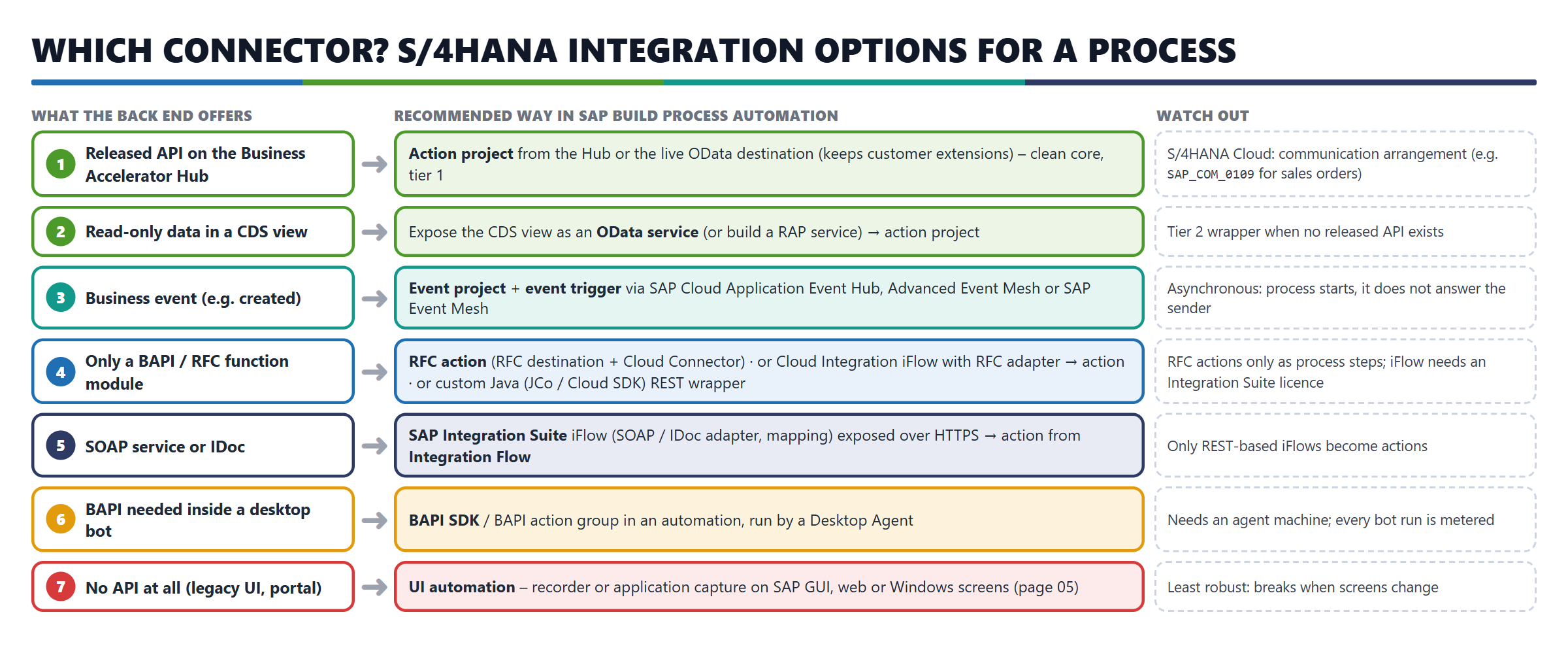
- Clean core: use released APIs from the SAP Business Accelerator Hub first (tier 1); where none exists, wrap classic APIs in a released custom interface (tier 2) or expose a CDS view as an OData service; keep custom process logic in SAP Build Process Automation instead of the ERP (ABAP on HANA › Clean Core).
- Native alternative for S/4HANA Cloud: the extensibility wizard in an S/4HANA Cloud app links a business event of that app to a process in SAP Build Process Automation without building the connection by hand.
- Classic SAP Business Workflow inside the ERP vs side-by-side processes: CORE ABAP › 12 Workflow and page 03.
Part 2 – Action projects: sources and set-up
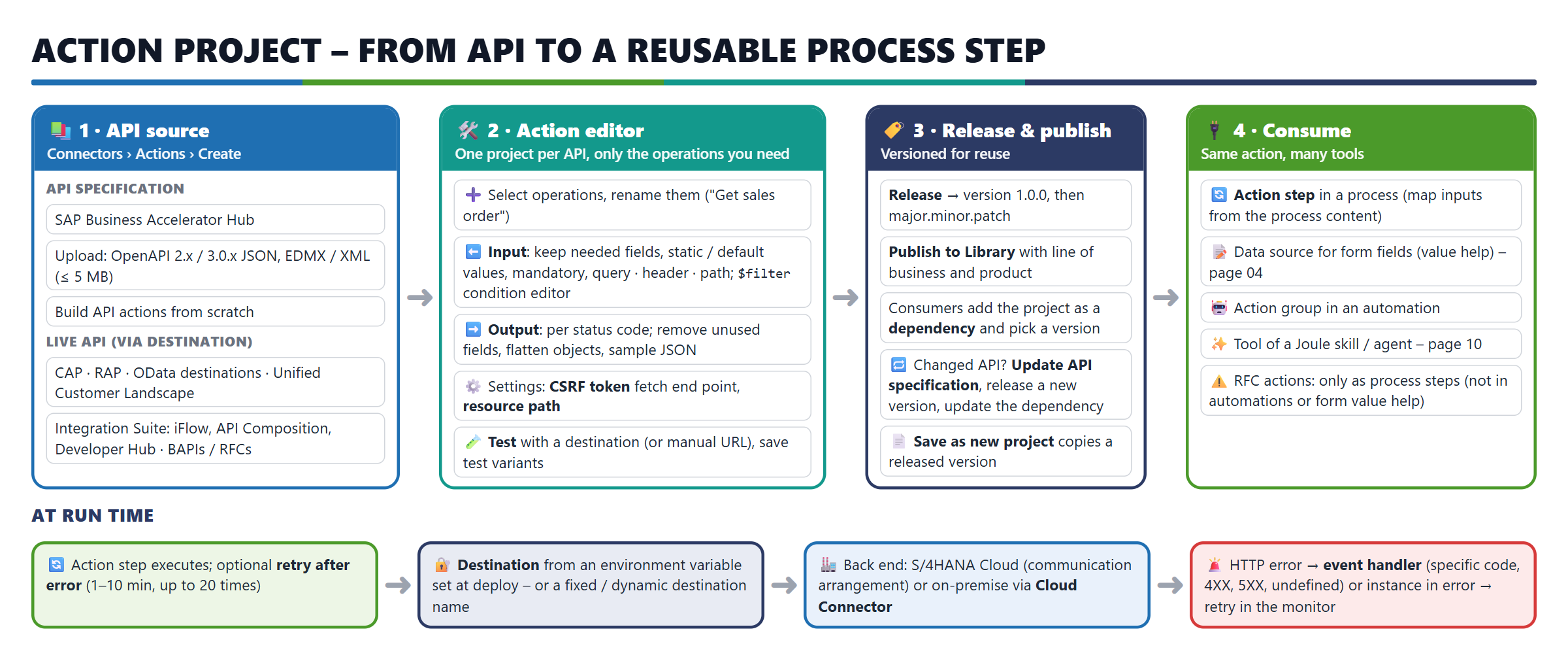
Piece | What it is | Where you set it up |
|---|---|---|
Action project | Wraps selected operations of one API as released, reusable actions | Lobby › Connectors › Actions › Create |
API source | An API specification (Hub, upload, from scratch) or a live API read through a destination | Choose an API Source dialog |
Destination | URL, authentication, proxy type (Internet / OnPremise via Cloud Connector), additional properties that make it visible to SAP Build | BTP cockpit, then added in Control Tower › Destinations |
Action step | Uses a published action in a process; inputs mapped from the process content, outputs become process content | Process editor |
Destination variable | Placeholder in the project, filled with a real destination at deployment – DEV, QA and PROD use different back ends | Action step › deployment dialog |
2.1 API sources
Source | When to use | Notes |
|---|---|---|
SAP Business Accelerator Hub | Standard SAP APIs (S/4HANA Cloud, SuccessFactors, Ariba …) | Pick product and package; SAP's standard definitions – no customer extensions |
Upload API Specification | You have a spec file, possibly adapted | OpenAPI 2.x or 3.0.x JSON, EDMX / XML; up to 5 MB; OpenAPI 3.1.0 not supported |
Build API Actions from Scratch | No spec exists (simple REST service) | Define endpoints, parameters and responses yourself; sample JSON helps |
OData Destinations (live API) | Any OData service reachable through a destination | Reads |
SAP Cloud Application Programming Model · ABAP RESTful Application Programming Model | Your own CAP or RAP services | OData services only (a REST-only CAP service has no |
Unified Customer Landscape | SAP systems registered in the global account (S/4HANA Cloud, SuccessFactors, Commerce Cloud …) | System in a formation of type Integration with SAP Build; not in the CN40 data center |
Integration Suite › Integration Flow · API Composition · Developer Hub | iFlows, a composed data graph, or APIs managed in API Management's Developer Hub | Needs design-time and run-time destinations (Part 6) |
BAPIs and/or RFCs | Function modules of an ABAP system | RFC destination + Cloud Connector; allow |
Action projects can also come ready-made from the Store (content packages with actions and processes); they then live in your library like your own projects.
Part 3 – The action editor: inputs, outputs, CSRF, testing, release
The action editor shows a simplified view of the specification: an Overview tab (description, members, tags, line of business, product) and an Actions tab with one entry per operation.
3.1 Steps
- Lobby › Connectors › Actions › Create → choose the source, e.g. SAP Business Accelerator Hub › Sales Order (A2X)
API_SALES_ORDER_SRV(or upload its OpenAPI file) → project name → Create. - In Add Actions, filter and select only the operations you need (e.g.
GET /A_SalesOrder('{SalesOrder}'),PATCH /A_SalesOrder('{SalesOrder}')) and give them business names ("Get sales order"). - Input: remove fields nobody maps, mark mandatory ones, set static or default values (also used for testing). Output: keep only fields the process needs, per HTTP status code.
- Settings: CSRF token for modifying OData calls, resource path if one destination serves several services.
- Test with a destination, Release (first version 1.0.0, then major.minor.patch), Publish to Library (line of business, product) – now any process designer can pick the action.
3.2 Input and output parameters
Attribute | Meaning |
|---|---|
Parameter | Location of the input: |
Static / Value | Constant value sent with every call, or a default used for testing |
Type · API format · max length | Data type, date / time format sent to the API, length check |
Tags | OData system query options such as |
Handle special characters | Doubles single quotes in URI keys so OData accepts the value |
Custom parameters | Extra fields beyond the spec; |
$filter | Condition editor or text expression, e.g. |
Flatten object · Fields from sample JSON | Lift nested fields one level up for citizen developers; generate body fields from a sample payload |
3.3 CSRF token and resource path
- SAP OData services require an x-csrf-token for POST, PATCH, PUT and DELETE. Enable CSRF in the project settings with a Token Fetch End-Point (relative to the destination URL, e.g.
/when the destination points at the service root); a token set on one action overrides the project setting. - Alternative: a custom header parameter
x-csrf-token=fetchon a GET action and pass the returned token to the modifying action – then switch the project-level CSRF setting off. - Resource path: destination
https://host:port+ resource path/sap/opu/odata/sap/API_SALES_ORDER_SRV+ endpoint/A_SalesOrder– one destination serves several API projects (path starts with/, no trailing/, project level only).
3.4 Testing
- Test tab › Host Destination (needs
sap.applicationdevelopment.actions.enabledandsap.processautomation.enabled= true) or Manual (URL with no or basic authentication). On-premise systems can be tested only through a destination with the Cloud Connector. sap-clientandsap-languagein the destination override values maintained in the action. The test response is limited to 1 MB – use$topor filters.- Save test variants to re-run tests with the same payload.
3.5 Restrictions to know
Restriction | Consequence |
|---|---|
OData V2 and V4; content types JSON (incl. SCIM+JSON) and URL-encoded only | No |
Payload returned to the process context max. 100 KB | Remove unneeded output fields, page through large results |
Published action projects used in processes max. 2,000,000 bytes (SAP Note 3526561) | Keep projects small – one API, only needed operations |
| Convert in the process or decision; OData V4 calls send |
No data type | Clean up custom specs before upload |
RFC actions only as process steps | Not usable in automations or form value helps |
- Tip: one action project per API, with only the operations you need; reuse it across processes as a dependency. Changed API? Update API Specification in the editor, release a new version and update the dependency in the consuming projects.
Part 4 – Destinations and connectivity
A destination is created in the same subaccount as the SAP Build Process Automation subscription. Two additional properties decide where it appears: sap.applicationdevelopment.actions.enabled makes it selectable in the action editor (design time), sap.processautomation.enabled makes it selectable for process runtime and deployment. Live-API sources also need sap.build.usage.
|
- Then Control Tower › Destinations › Add: select the destination and associate it with all or specific environments. Mistake: a destination created in the cockpit but not added in the Control Tower – the action project cannot test it and the deployment dialog does not offer it.
- Known limitations: destinations of type
OAuth2RefreshTokenbreak the destination list; destinations created before the subscription must be recreated; cockpit users can change destinations without having access to SAP Build Process Automation – protect the subaccount.
4.1 Authentication: technical user or the approver?
Pattern | Destination authentication | Effect in S/4HANA |
|---|---|---|
Technical user | BasicAuthentication (communication user), OAuth2ClientCredentials, NoAuthentication | Simple; every change is logged under the technical user |
User propagation | PrincipalPropagation (on-premise, Cloud Connector with X.509), OAuth2SAMLBearerAssertion, SAMLAssertion, OAuth2JWTBearer, OAuth2UserTokenExchange | The call runs as a real process participant – change log and authorizations of that user |
- For user-dependent types the action step needs Run step on behalf of: pick the step whose user is used – the process starter or the processor of an earlier step, e.g. the sales manager who approved. Avoid users of steps inside a condition branch; a technical user there makes the step fail.
- Decide consciously: technical user (simple, but the change log shows the technical user) or principal propagation of the approver (needs trust set-up with SAP Cloud Identity Services and, on-premise, the Cloud Connector with X.509 principal propagation – Cloud Connector 2.11.03 or higher).
4.2 S/4HANA Cloud and S/4HANA on-premise
Step | S/4HANA Cloud Public Edition | S/4HANA on-premise / Private Edition |
|---|---|---|
1. Expose the API | Communication user, communication system, communication arrangement for the scenario named on the Hub (e.g. | Activate the OData service (SAP Gateway), authorizations for the user |
2. Network | Internet – no Cloud Connector | Cloud Connector connected to the same subaccount: system mapping (ABAP system, HTTPS, virtual host and port), resource paths of the APIs |
3. Destination | Proxy type Internet, URL of the API host | Proxy type OnPremise, virtual host URL; location ID if several Cloud Connectors |
4. SAP Build | Add to Control Tower, associate environments | Same |
Part 5 – Actions in a process: the Sales Order Approval example
The Sales Order Approval process (page 03) uses two actions from the action project Sales Order: Get sales order after the trigger, so the approval form shows customer, net value and items; and Update sales order after approval, a PATCH on A_SalesOrder that changes the header (for example removes a delivery block) – check in $metadata which header fields your release lets you update.
5.1 Adding the action step
- Process editor › + › Action → pick from the actions of dependent projects, Browse All Actions in the library or Browse RFC Actions; the action project becomes a project dependency.
- Map inputs:
SalesOrder← trigger inputsalesorder; outputs (SoldToParty,TotalNetAmount,TransactionCurrency…) become process content for the form, the decision and later conditions. - Destination – three options:
- Destination environment variable – a placeholder filled at deployment; fixed afterwards. The usual choice for DEV / QA / PROD.
- Destination name – a fixed name, resolved at run time without a deployment value.
- Destination name from a process variable – the name is resolved dynamically per instance, so one process routes to different back ends (e.g. per company code) without extra deployments.
- User-dependent authentication: set Run step on behalf of = the approval step, so the update runs as the sales manager.
5.2 Error handling for actions
Feature | What it does |
|---|---|
Retry after error | The step retries automatically: interval 1–10 minutes, 1–20 retries; only the last error is handled |
Handle Event on the action (event handler) | Catches specific HTTP codes (e.g. 400, 401), any 4XX, any 5XX or undefined errors – evaluated in that order; then skip to the next step (default) or terminate the process, plus follow-up steps on the event path (subprocess, e-mail, raise event) |
Instance in error + retry in the monitor | Without a handler the instance stops in error; fix the cause and retry the step – the context is kept (page 07) |
Typical support case: an action fails because the destination's user is locked – the instance goes to erroneous; fix the destination and retry the step, the process continues with the same context. For 400 errors the action runtime shows the API's response body, which usually names the wrong field.
5.3 Run-time limits
- Action tasks in the workflow runtime: connection timeout 1 minute, socket timeout 3 minutes, total execution time 4 minutes (as of November 2026) – long-running back-end work belongs in an asynchronous pattern (start the job, wait for an API call or event).
- Pass keys and needed fields, not whole documents, into the process context (100 KB per action response).
Part 6 – RFC, Integration Suite and other consumers of actions
6.1 BAPIs and RFCs
Option | How | Trade-off |
|---|---|---|
RFC action | Action project › Live API › BAPIs, RFCs; RFC destination in the cockpit; Cloud Connector with | No extra licence, no agent; process steps only |
Cloud Integration iFlow | HTTPS sender → RFC receiver adapter; iFlow imported as an action (Integration Flow source) | Encapsulates complex BAPI structures and commit logic; needs an Integration Suite licence; allow |
Custom Java service | SAP JCo or SAP Cloud SDK on BTP exposes the RFC as REST; action from scratch | Own development and maintenance per BAPI |
Web service wrapper | SE80 › Create › Enterprise Service from the BAPI, publish in SOAMANAGER, call via Integration Suite or a REST layer | ABAP work in every system; not for S/4HANA Cloud |
BAPI SDK in a bot | Automation with BAPI activities on a Desktop Agent (page 05) | Needs an agent; each run metered |
6.2 SAP Integration Suite as the integration layer
- Use Integration Suite when the back end speaks SOAP or IDoc, when mapping and validation are heavy, for API Management policies or event-based connectivity. Only REST-based iFlows become actions.
- Set-up for Integration Flow actions: a Process Integration Runtime instance with plan
api(roleAuthGroup_ReadOnly) for the design-time destination (sap.build.usage = integration_flow_dt) and an instance with planintegration-flow(roleESBMessaging.send) for the run-time destination (integration_flow_rt), both OAuth2ClientCredentials. Define inputs from a sample JSON, test, then Generate Output from the response. - API Composition (destination with
sap.build.usage = GRAPH, OAuth2JWTBearer) exposes a composed data graph; Developer Hub (apihub_enterprise) offers APIs your organisation manages in API Management (formerly API Business Hub Enterprise).
6.3 Who else consumes actions
Consumer | How the action is used |
|---|---|
Process (action step) | Part 5 |
Forms | Data source for dynamic value help of form fields – page 04 |
Automations | Action project as dependency → action groups in the bot (page 05); not for RFC actions |
Joule Studio | Skills call actions as steps and agents use them as tools – page 10 and SAP Business AI › 03 |
Live process content | Store packages that use actions and need their destinations configured |
Part 7 – Events: event projects and event channels
Events let S/4HANA and other systems start processes asynchronously ("sales order created"). In the lobby, Connectors › Events holds event projects; a process uses a released and published event in an event trigger (Wait for an Event – configuration on page 03).
Event source for the project | Notes |
|---|---|
SAP Business Accelerator Hub | Standard event specifications of SAP applications |
Upload Event Specification | AsyncAPI 2.0.0 file; events follow CloudEvents 1.0 – a converter turns a CloudEvents payload into an AsyncAPI schema |
Unified Customer Landscape | Events of SAP systems registered in the global account and included in a formation |
Event channel | Set-up in short |
|---|---|
SAP Cloud Application Event Hub (default eventing service of SAP BTP) | Formation of type Eventing Between SAP Cloud Systems with SAP Build Process Automation as consumer and / or producer; integration dependency listing the event types; no own queues or topics to manage |
SAP Integration Suite, advanced event mesh | Cluster with client-certificate authentication; a REST Delivery Point whose queue binding calls SAP Build Process Automation with headers |
SAP Event Mesh | Queue with subscriptions; webhook subscription to the |
- Design rule: an event starts the process – it does not get an answer. Keep a business key (sales order number) in the process so a duplicate event or an additional API start can be detected (page 03).
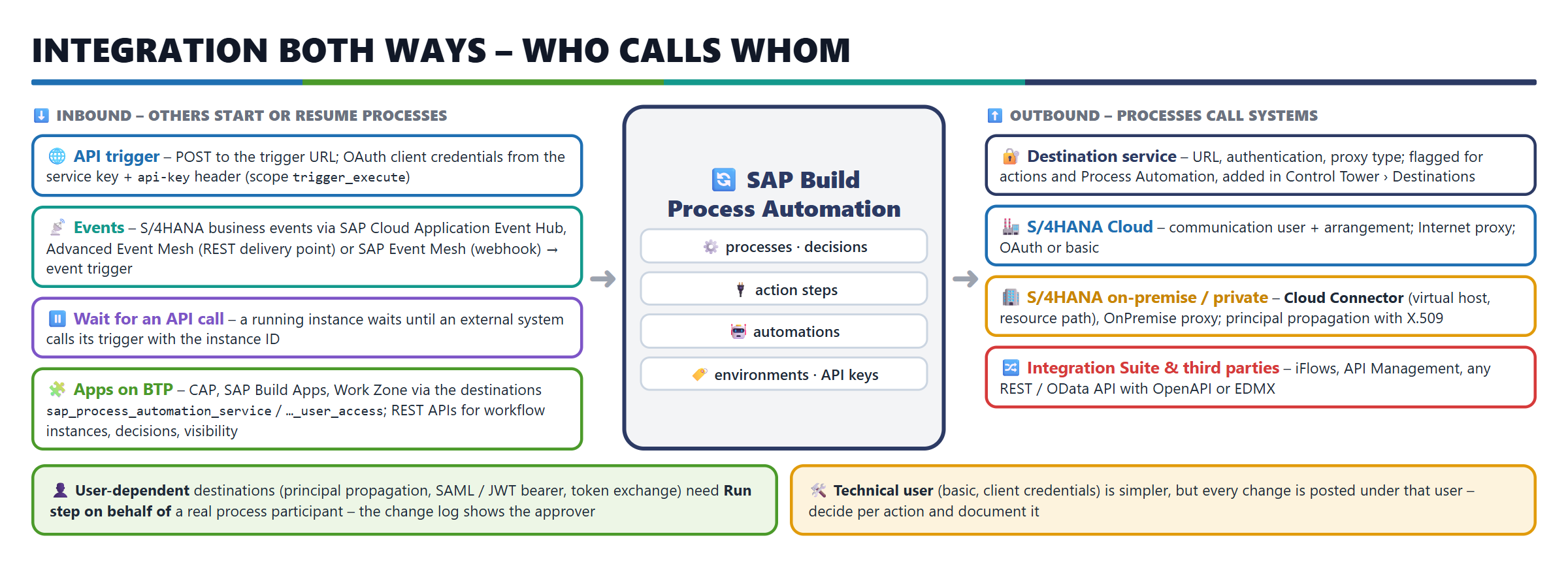
Part 8 – Calling SAP Build Process Automation from outside
8.1 Service instance, service key and destinations
- Create one service instance of SAP Build Process Automation (plan
standard) per subaccount and a service key:uaa.clientid,uaa.clientsecret,uaa.url(token URL base) andendpoints.api(API host). - The booster creates two destinations:
sap_process_automation_service(OAuth2ClientCredentials, for technical scenarios) andsap_process_automation_service_user_access(OAuth2JWTBearer with properties such assap.cloud.service = com.sap.spa.processautomation,HTML5.DynamicDestination,AppgyverEnabled) for Work Zone, HTML5 apps and SAP Build Apps with principal propagation.
8.2 API triggers and API keys
- An API trigger (on a process, a decision or an automation) opens an endpoint in the environment; copy the trigger URL and payload example from Control Tower › Environments › Triggers › View. API trigger payloads are limited to 64 KB.
- Technical callers authenticate with OAuth client credentials and an API key of the target environment with the right scopes (e.g.
trigger_execute,trigger_read,workflow_instance_read_context) – sent as headerapi-key, as destination propertyURL.headers.api-key, or stored once in the service instance configuration (environmentId,apiKey).
|
- Wait for an API Call pauses a running instance until a third-party system calls the step's trigger (
~/public/unified/v1/triggers/api/…) with the instance ID; the classic messages endpoint~/public/workflow/rest/v1/messagesis not supported for processes designed in SAP Build Process Automation.
8.3 Public REST and OData APIs
API family | Typical use |
|---|---|
Workflow / process instances ( | Start instances, list them, read context and execution logs, admin operations |
User task instances (REST) and OData task APIs (Task Consumption Model) | Custom inboxes, complete tasks from your own UI |
Decisions (rules runtime, | Invoke a deployed decision (in shared environments through an API trigger on the decision) |
Visibility | Push events of external processes, read scenario instances |
Automation triggers and jobs | Start bots, list API triggers and jobs |
- Authentication: OAuth2 authorization code or SAML bearer for user-centric calls (the application router handles tokens and needs CSRF protection), client credentials for technical calls. Rate limit: 200 requests per second per tenant and capability in paid tenants (as of November 2026). The API reference is on the SAP Business Accelerator Hub.
From a CAP application, call the API through a destination and pass the API key that the destination holds as an additional property (pattern from the SAP help):
|
Part 9 – Troubleshooting, limits and the architect view
Error | Cause | Fix |
|---|---|---|
"No destinations are available" in the action editor | Missing | Fix properties; same subaccount |
Destination not offered at deployment | Not added in Control Tower or not associated with the environment; | Add and associate |
CSRF token fetch failed (401 / 403) | Wrong credentials or | Correct the destination; enable CSRF on project or action |
Failed to validate response against output schema | Spec and real response differ | Adjust the output in the editor to the actual response |
Response size exceeded configured limit | More than 1 MB returned |
|
401 in production only | PROD destination credentials, principal propagation or Cloud Connector set-up | Test the destination in the cockpit, fix it, retry the step |
9.1 Architect view
- One action project per API, published versions as dependencies; destinations per environment through variables – no URLs or secrets in processes.
- Sync vs async: actions are synchronous calls with a few minutes' limit; long work and cross-system signals use events, API triggers or Wait for an API Call.
- Identity: decide per action between technical user and propagated user, document it, align with the S/4HANA authorization concept and audit requirements.
- Integration layer: SAP Build Process Automation orchestrates; Integration Suite transforms and connects (SOAP, IDoc, mapping, API Management); bots only fill the remaining gaps (page 05).
- Governance: destinations belong to the subaccount administrators; review which subaccount users can change them; monitor quotas for API calls (standard and advanced users include an amount of API calls – API-heavy scenarios may need the API calls entitlement, page 01).
Part 10 – Interview questions
Q1. What is an action project and why use it instead of calling APIs in a script?
It wraps selected operations of an API (from the SAP Business Accelerator Hub, an uploaded spec or a live API) as reusable, released and versioned actions. Process designers pick them from the library; authentication comes from a destination chosen at deployment, so no code or secrets live in the process, and the same action serves processes, forms, bots and Joule skills.
Q2. How does a destination become usable in SAP Build Process Automation?
Create it in the subscribed subaccount with sap.applicationdevelopment.actions.enabled (design time) and sap.processautomation.enabled (run time), plus sap.build.usage for live-API sources; add it in Control Tower › Destinations and associate environments; then select it for the destination variable at deployment.
Q3. Hub specification or live OData destination – what is the difference?
The Hub delivers SAP's standard definition without customer extensions; a live OData destination reads $metadata from your system, so extension fields and custom services are included. Uploading a spec lets you adapt it but must be repeated when the API changes.
Q4. Why and how do you configure CSRF in an action project?
SAP OData services reject modifying calls without an x-csrf-token. Enable CSRF in the project settings with a token fetch end point relative to the destination (or per action); the runtime fetches the token and sends it with POST, PATCH or DELETE. Alternatively use a custom x-csrf-token header with value fetch.
Q5. Technical user or principal propagation for an action that posts in S/4HANA?
A technical user is simple, but S/4HANA logs every change under it. Principal propagation (or SAML / JWT bearer flows) runs the call as the approver – needs trust set-up, the Cloud Connector with X.509 for on-premise, and Run step on behalf of in the action step. Choose per action based on audit needs.
Q6. How do you handle an action that fails at run time?
Retry after error (1–10 minutes, up to 20 retries) for transient errors; an event handler on the action for specific codes, 4XX, 5XX or undefined errors that either skips to the next step or terminates, with follow-up steps such as an e-mail or subprocess; otherwise the instance goes into error and is retried from the monitor with its context.
Q7. How do you call a BAPI from a process?
With an RFC action (RFC destination, Cloud Connector, function modules allowed), with a Cloud Integration iFlow using the RFC adapter exposed as an action, or with a custom REST wrapper (JCo / Cloud SDK). The BAPI SDK in a bot works too but needs a Desktop Agent and is metered per run.
Q8. How can an S/4HANA event start a process?
Create an event project (Hub, AsyncAPI upload or Unified Customer Landscape), release and publish it, and add an event trigger to the process. The event reaches SAP Build Process Automation through SAP Cloud Application Event Hub (formation + integration dependency), Advanced Event Mesh (REST delivery point) or SAP Event Mesh (webhook subscription).
Q9. An external application must start the approval process. What does it need?
An API trigger on the process, deployed to an environment; the caller gets an OAuth token with the client credentials of the service key and sends an API key of that environment (scope trigger_execute) in the api-key header, posting the payload to the trigger URL. From BTP apps use a destination with the API key as an additional property.
Q10. One process must update different S/4HANA systems depending on the company code. How?
Configure the action's destination by name from a process variable: a decision maps company code to destination name, and the action resolves the destination per instance – no separate deployments. All destinations must exist, be flagged and be added in the Control Tower.
Q11. Scenario: the release action fails in production with 401 errors. How do you analyse it?
The monitor shows the instance as erroneous with the action error; check the destination used in PROD (credentials, sap-client, principal propagation, Cloud Connector mapping and trust), test it in the cockpit, fix it and retry the step – the context is kept, so the process continues where it stopped.
Q12. What are the main limits of actions an architect must design around?
Synchronous calls with minute-level timeouts, 100 KB of response data into the process context, no OData $batch or multipart, OpenAPI 3.1 not supported, Int64 and Decimal as strings, RFC actions only in processes. Long or bulk work goes to Integration Suite, events or asynchronous patterns.
🏠 Start Here · ◀ 05 · Automations & RPA · 07 · Visibility & Lifecycle ▶ · Sections: CORE ABAP | OOPS ABAP | ABAP on HANA | Clean Core | RAP | ABAP Points | SAP Fiori | SAPUI5 | Mobile Development (MDK) | BTP Foundations | BTP Development | CAP | SAP Build | ABAP on BTP | Integration Suite | SAP Business AI | SAP BASIS | Security | SAP SDLC
Functional: FICO ABAP | TRM ABAP | VIM | SAP BIS | SD ABAP | MM ABAP | PP ABAP | QM ABAP | PM ABAP | PS ABAP | EWM | TM ABAP | GTM ABAP | EHS ABAP | HR ABAP | BW | SAP Datasphere | SAP Business Data Cloud | SAP MDG | SAP Analytics Cloud | SAP Ariba | SAP CX | SAP IBP