Users should not collect URLs for every S/4HANA app, BTP app and inbox. SAP Build Work Zone builds sites on SAP BTP: role-based entry points that show apps, tasks and content from many cloud and on-premise systems with one log-on – as a cloud Fiori launchpad (standard edition) or a full digital workplace (advanced edition). This page explains the editions and licensing, the architecture from content channels to the runtime site, content federation from SAP S/4HANA, how BTP apps (Fiori elements, SAP Build Apps, SAP Build Process Automation) get into a site, site design, tasks, notifications, Joule and mobile, the advanced-edition workspaces, transport and troubleshooting. Running example: the Sales Order Approval site – S/4HANA sales apps, the Approval Portal Fiori app, My Inbox or SAP Task Center and the visibility dashboard of page 07 in one place. Facts are as of November 2026; launchpad basics: SAP Fiori section; BTP services: BTP Development.
Part 1 – Editions, related entry points and licensing
Names to know: SAP Cloud Platform Launchpad / SAP Launchpad service → SAP Build Work Zone, standard edition; SAP Work Zone → SAP Build Work Zone, advanced edition (renamed with the SAP Build launch in late 2022). SAP Mobile Start → Joule Work mobile app (release 3.0, May 2026). The older SAP Cloud Portal service is no longer offered in the Service Marketplace – only existing subscriptions run on it.
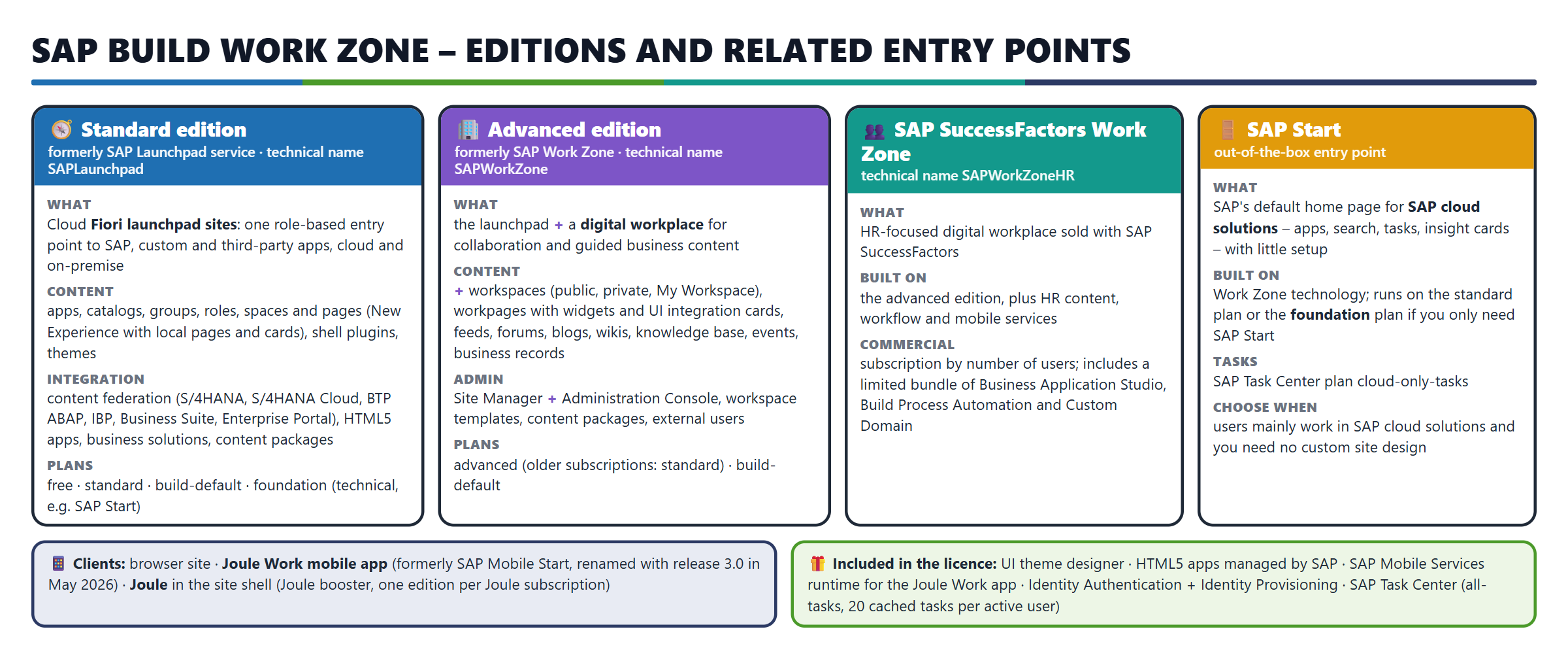
Standard edition | Advanced edition | |
|---|---|---|
Purpose | Central Fiori launchpad site in the cloud | Launchpad + digital workplace |
Content | Apps, catalogs, groups, roles, spaces and pages, cards (New Experience), shell plugins, themes | Everything in standard + workspaces, workpages, widgets, UI integration cards, feeds, forums, blogs, wikis, knowledge base, events, business records |
Business content | Content federation from S/4HANA, S/4HANA Cloud, BTP ABAP, IBP, Business Suite, Enterprise Portal; HTML5 apps; business solutions; content packages | The same + content packages and workspace templates (guided experiences) |
Administration | Site Manager | Site Manager + Administration Console (company settings, users, compliance, reports) |
Users | Employees who start apps and process tasks | Employees who also collaborate and need guided, role-based content; external users |
Admin role collection | Launchpad_Admin | Workzone_Admin |
- SAP SuccessFactors Work Zone – HR-focused workplace sold with SAP SuccessFactors, built on the advanced edition.
- SAP Start – SAP's out-of-the-box entry point for SAP cloud solutions (home page, search, tasks, insight cards), built on Work Zone technology; it can run on the standard plan or on the foundation plan when a customer only needs SAP Start.
- Joule Work – the AI workspace announced at SAP Sapphire 2026 (users state a goal, Joule agents execute) is a separate, complementary experience, not a replacement of Work Zone; SAP announced general availability for H2 2026 – check the current status. The Joule Work mobile app already serves the Work Zone content.
1.1 Service plans and metering
Technical name | Plan | Use |
|---|---|---|
SAPLaunchpad (standard edition) |
| Free tier: unlimited time, 2 subaccounts, 20 named users + 2 admins per month per subaccount, no API integration (no Cloud TMS, Identity Provisioning, OData APIs) |
SAPLaunchpad |
| Productive sites |
SAPLaunchpad |
| Technical plan created automatically for scenarios such as SAP Start |
SAPLaunchpad / SAPWorkZone |
| SAP Build commercial model – do not subscribe to standard / advanced in parallel; one-way switch, not possible from foundation |
SAPWorkZone (advanced edition) |
| Productive advanced sites (older subscriptions: plan standard) |
build-workzone-standard / build-workzone-advanced |
| Service instance + key for API integration (Cloud TMS, Identity Services) |
SAPWorkZoneHR |
| SAP SuccessFactors Work Zone |
- Metrics: Active Users (authenticated internal individuals per calendar month, counted once per global account by UUID) or Connections (sessions of external users, who must be assigned to
Launchpad_External_Userin standard /Workzone_External_Userin advanced) – never both for one user. - Commercial models: subscription (fixed price per licence) or consumption-based (cloud credits); the advanced edition is consumption-based, SuccessFactors Work Zone subscription-based.
- Included in both editions: UI theme designer, HTML5 applications managed by SAP, SAP Mobile Services runtime for the Joule Work app (no offline, MDK or SDK development – those need a Mobile Services licence), Identity Authentication and Identity Provisioning, and SAP Task Center plan
all-taskswith 20 cached tasks per active user. - SAP Build Process Automation user entitlements include access to the standard edition, so a Process Automation customer can run its approval site without a separate Work Zone licence (page 07).
Part 2 – Architecture: from content to site
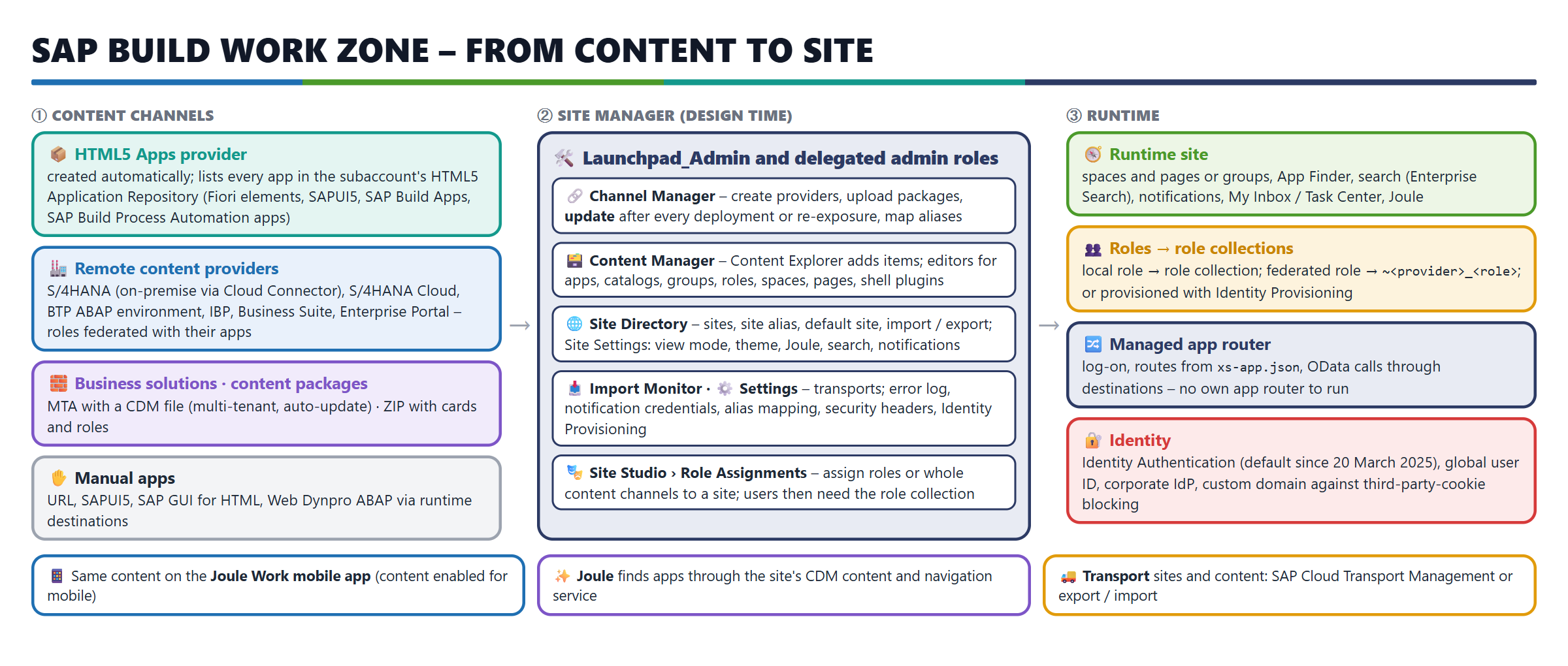
2.1 Site Manager
Screen | Use |
|---|---|
Site Directory | Create, delete, import / export sites; site alias; default site; open the runtime site; Site Studio for Site Settings and Role Assignments |
Content Manager | Business content of the subaccount: apps, catalogs, groups, roles, spaces, pages, shell plugins; Content Explorer adds items from channels; editors for local items (federated items are read-only) |
Channel Manager | Content providers (remote, HTML5 Apps, business solutions) and content packages; create, update, alias mapping, reports |
Import Monitor | Progress of content imports and transports |
Settings | Subaccount level: Error Log (app router errors of the last 24 hours), Notifications (authentication identifier, credentials), Alias Mapping, Security Headers, Neo Site Conversion, Identity Provisioning |
2.2 Content items and assignments
Assignment | Where | Result |
|---|---|---|
Apps → role | Role editor, Apps tab | Role-based access to the apps |
Apps → group | Group editor | Visible on the home page in the Groups view mode |
Apps → catalog (optional) | Catalog editor | Findable in the App Finder |
Spaces → role, pages → space, apps / cards → page | Role, space and page editors | Layout in the Spaces and Pages view modes |
Roles or whole content channels → site | Site Studio › Role Assignments | Content available in that site |
Role collections → users / groups | BTP cockpit, or Identity Provisioning | Users see the content |
2.3 Roles and role collections
Default role collection | Purpose |
|---|---|
Launchpad_Admin | All administration (Super_Admin, plus Theme_Admin, Editor, Viewer for themes) |
Work_Zone_STD_Content_Manager_Admin | Create and edit content; read-only Site Directory, settings, channels |
Work_Zone_STD_Transport_Admin | Export, import and transport with Cloud TMS |
Work_Zone_STD_Channel_Update_Admin | Update content providers, channel reports |
Launchpad_Admin_Read_Only | Read-only admin screens (support) |
Launchpad_Advanced_Theming | Publish themes and custom CSS in the UI theme designer |
Launchpad_External_User | Authenticated users outside the organization (metered as connections) |
- A local role created in the Content Manager creates a role collection of the same name; a federated role creates
~<provider ID>_<role ID>– unless Identity Provisioning provisions the assignments from the identity provider. - Limits: 150 role collections per user via the cockpit (1,000 via Identity Provisioning), 5,000 admin-created role collections per subaccount, 6,000 apps per local role, 3,000 per local group or catalog, 10,000 related roles per role, 200,000 content items per site.
2.4 Identity, domains and runtime
- Identity Authentication is the default for subscriptions created after 20 March 2025; older XSUAA-based subscriptions should switch, because Joule, Task Center and custom domains need it. A global user ID connects the user across Work Zone, Task Center and back ends.
- Apps that open in place run in an iFrame. Browsers block third-party cookies, so the site, the IdP and the embedded apps should share a common super domain (e.g.
*.ondemand.com) or a custom domain (SAP Custom Domain service); the default site opens when no site ID is in the URL. - The managed application router serves all HTML5 apps: log-on, routes from the app's
xs-app.json, OData calls through destinations – you do not run your own app router (unlike a standalone CF app). - Destination names for Work Zone must be lowercase and must not contain an underscore.
Part 3 – Content federation from SAP S/4HANA
Content federation means the back end stays the master of launchpad content: business roles with their catalogs, groups, spaces and pages are exposed by S/4HANA and consumed by Work Zone at role level. Roles are maintained once (PFCG, Fiori launchpad designer / content manager) and shown in the cloud site next to BTP apps and other systems.
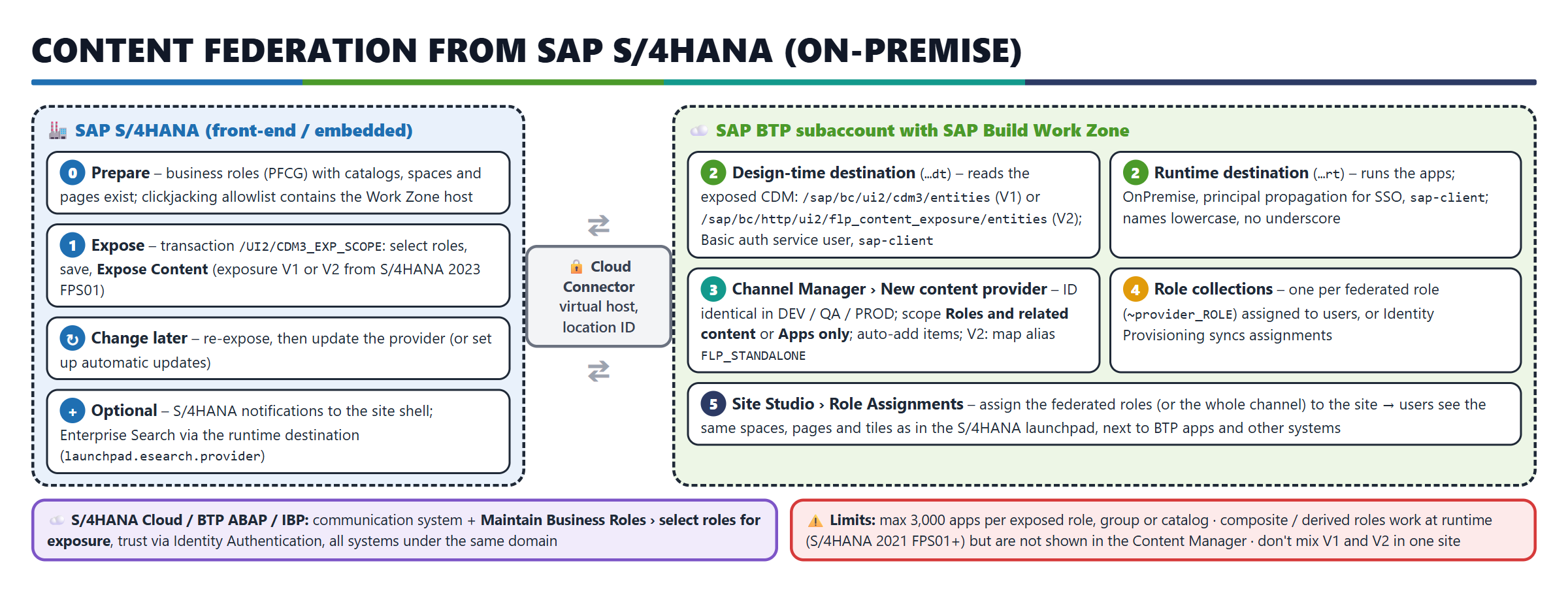
3.1 On-premise flow (S/4HANA, Business Suite)
- 0 Prepare – business roles exist; the Work Zone host is in the S/4HANA clickjacking allowlist (plus a CSS allowlist for custom themes); Cloud Connector exposes the front-end server (virtual host).
- 1 Expose – transaction
/UI2/CDM3_EXP_SCOPE(Launchpad Content Exposure): select the roles, save, Expose Content. From S/4HANA 2023 FPS01 you choose exposure version 1 or 2. - 2 Destinations – a design-time destination and one or more runtime destinations in the BTP cockpit.
- 3 Content provider – Channel Manager › New › Content Provider: title, ID, destinations, content scope, auto-add, Identity Provisioning option; then check the Content Explorer.
- 4 Users – assign the generated role collections (or let Identity Provisioning do it).
- 5 Site – Site Studio › Role Assignments: add the roles or the whole channel.
Destination | Key properties |
|---|---|
Design-time (suffix | HTTP, OnPremise, URL = Cloud Connector virtual host + |
Runtime (suffix | HTTP, OnPremise, URL = virtual host; PrincipalPropagation for SSO; |
Provider setting | Options |
|---|---|
Content scope | Roles and related content – provider controls apps, catalogs, groups, spaces and pages (read-only) · Apps only – admin builds local roles, spaces and pages and may mix apps of several providers |
Content addition | Automatically add all content items to the subaccount (default) or pick roles in the Content Explorer |
Authorizations | Role collections created per role, or Identity Provisioning syncs assignments |
Alias mapping | Map back-end system aliases to runtime destinations; for V2 map |
Provider ID | Must be identical in DEV, QA and PROD – transports refer to it |
- V1 vs V2: V2 opens all applications in a new window; do not mix both in one site, and an existing provider cannot be switched – create a new provider for V2 (SAP Note 3345119).
- Composite and derived PFCG roles work at runtime from S/4HANA 2021 FPS01 but are not shown in the Content Manager; a single exposed role, group or catalog may have at most 3,000 apps.
- After role changes, re-expose in S/4HANA and update the provider in the Channel Manager – or set up automatic updates for ABAP-based providers.
- Smart Business tiles are supported; Enterprise Search needs the runtime destination property
launchpad.esearch.provider = abap_odata, an alias mappingsid(<SID>.<client>)and the Enterprise Search setting in the site.
3.2 Cloud providers (S/4HANA Cloud, BTP ABAP environment, IBP)
- In the provider system: a communication system for Work Zone, and the Maintain Business Roles app to select roles for exposure.
- On BTP: trust between corporate IdP, Identity Authentication and the subaccount; design-time and runtime destinations; content provider in the Channel Manager. All systems must run under the same domain.
3.3 Manual integration of apps
Systems without content exposure – for example SAP ECC – are integrated manually: a runtime destination (direct access with proxy Internet, or tunneled access through the Cloud Connector), then app items of type URL, SAPUI5, SAP GUI for HTML, Web Dynpro ABAP or WebClient UI in the Content Manager, assigned to local roles, groups or pages. More effort, and every change is maintained twice – prefer federation wherever the back end supports it.
Part 4 – BTP apps, business solutions and the Approval Portal
4.1 HTML5 Apps content provider
When you subscribe, the HTML5 Apps provider is created automatically. It lists every app deployed to the HTML5 Application Repository of the same subaccount – Fiori elements and SAPUI5 apps from MTAs, SAP Build Apps web apps, SAP Build Code apps and the delivered apps of SAP Build Process Automation (My Inbox, Process Workspace, Visibility Scenario Dashboard …). An app needs two entries in its manifest.json:
|
sap.cloud.servicenames the business service (unique per subaccount, appears in the runtime URL);semanticObject+actionform the navigation intent; title, icon anddataSourcesdefine the tile.sap.app/idmust be unique in the subaccount.- OData calls go through a route in
xs-app.jsonto a destination – the managed app router resolves it:
|
4.2 Approval Portal: from BAS to the site
- Build the Fiori elements app with SAP Fiori tools (back end: CAP service from SAP Build Code, page 09).
- Add Deploy Configuration (Cloud Foundry) and Add Fiori Launchpad Configuration (semantic object, action, title) in the app; build and deploy the MTA.
- Channel Manager › HTML5 Apps › Update; Content Explorer › add the app to My Content.
- Assign the app to a role (and a group, catalog or page); assign the role to the site; give users the role collection.
- Add My Inbox (or the Task Center tile) and the Visibility Scenario Dashboard from the HTML5 Apps channel to the same role – the sales manager now finds S/4HANA apps, the portal, tasks and KPIs in one site.
- Mistake: the tile opens a blank page – the destination named in
xs-app.jsonis missing or lacksHTML5.DynamicDestination = true, the user lacks the role collection, or the provider was not updated after the last deployment.
4.3 Business solutions, local entry points and content packages
Type | What it is | When |
|---|---|---|
HTML5 app (legacy flow) | App in the subaccount's HTML5 repository; admin assigns it manually | Single subaccount, simple apps |
HTML5 business solution | MTA bound to one | Products and partner solutions; no admin design-time work |
Local-entry-point solution | Standalone site of a business solution with its own app router; no Work Zone subscription for the consumer; replaces the legacy launchpad modules | SaaS apps with a fixed layout |
Content package | ZIP (built in BAS) with cards and roles, uploaded in the Channel Manager; read-only | Cards and prepared content |
Shell plugin | HTML5 app with | Extend the shell (banner, tracking, custom buttons) |
- The Common Data Model (CDM) is the JSON format every content provider uses; because federated content is in CDM, it is also available to SAP Start, the Joule Work app and Joule.
- Content from other subaccounts: either a business solution, or the documented flow for integrating HTML5 applications from multiple subaccounts.
Part 5 – Site design, runtime and SAP Build Work Zone vs SAP Fiori launchpad
5.1 View modes and site settings
View mode | Behaviour |
|---|---|
Groups | Classic home page with groups of tiles (not recommended for new sites) |
Spaces and Pages | Only spaces and pages federated from content providers, read-only |
Spaces and Pages – New Experience | Local spaces and pages (Page editor, grid layout with sections and columns, tiles and cards) side by side with federated ones; visible in the Joule Work app; reusable across sites |
- Site Settings also control: name, alias, new shell bar and logo, theme (UI theme designer via the Theme Manager, user theme selection), languages and translation, notifications, Enterprise Search, Joule, personalization, session timeout for external connections (20 minutes, up to 30).
- Runtime features for users: search, App Finder (catalogs), My Space, notifications, recent and frequent apps, personalization, settings with default values in app fields.
- Cards: list, table, timeline, analytical, object and component cards (UI integration cards); in the standard edition they come from content packages, in the advanced edition also as visualization of local apps.
5.2 Choosing the central entry point
Option | Fits when | Watch out |
|---|---|---|
Embedded Fiori launchpad in S/4HANA | Users work in one S/4HANA system | No other systems, no BTP apps without extra setup |
Central launchpad on a hub front-end server | Existing on-premise hub with several ABAP back ends | On-premise operations; no cloud content |
SAP Build Work Zone, standard edition | Hybrid landscape: S/4HANA (any edition), BTP apps, SAP cloud solutions, tasks, mobile | Needs IAS, Cloud Connector, destinations, role design |
SAP Build Work Zone, advanced edition | Plus collaboration, workspaces, guided experiences, external users | Consumption pricing, more admin and governance |
SAP Start | Mainly SAP cloud solutions, quick start | Limited site design |
Work Zone does not replace the Fiori launchpad inside S/4HANA – federation reuses its roles. Many customers keep the embedded launchpad for power users and give everybody else one Work Zone site that combines several systems (launchpad concepts and roles: SAP Fiori section).
Part 6 – Tasks, notifications, Joule and mobile
6.1 Tasks: My Inbox and SAP Task Center
- My Inbox of SAP Build Process Automation comes through the HTML5 Apps channel; Work Zone and Process Automation must be in the same subaccount (details: page 07).
- SAP Task Center: complete its initial setup, then create a Task Center tile (and optionally a Task Center Administration tile) in the site; plan
all-tasksis included with 20 cached tasks per active user. It federates tasks from Process Automation, S/4HANA, SuccessFactors, Ariba and more. - Advanced edition: workspace tasks and migrated notifications can be exposed to Task Center (not shown in the Joule Work app).
6.2 Notifications
Source | Setup |
|---|---|
SAP S/4HANA | S/4HANA 1909 (SAP_GWFND 754 SP06) or higher; Settings › Notifications: authentication identifier (e-mail or user ID) and Generate credentials (host, OAuth client ID and secret, token endpoint) for the notification channel configuration in S/4HANA |
SAP cloud solutions and services | Enable notifications per solution; SAP Build Process Automation uses the destination |
Custom CF apps | Developers publish through a destination created from the generated credentials |
SMTP mail destination |
- Administrators need a role collection with
Business_Notifications_Admin; users switch notifications on in the site settings.
6.3 Joule
- Prerequisites: Identity Authentication with an OpenID Connect trust (SAML trust is not supported), the Joule prerequisites, and the Joule booster run for exactly one Work Zone edition per Joule subscription (both editions → separate Joule subscriptions in different subaccounts).
- Then switch on Joule in Site Settings; the Joule icon appears in the site header. Joule uses the site's CDM content and navigation service to find and open business apps – good content design makes Joule better. Joule in depth: SAP Business AI › 03.
6.4 Joule Work mobile app
- Native iOS and Android app (formerly SAP Mobile Start): business apps, tasks, notifications, insight cards and Joule from the user's sites; online only.
- Shows content that is assigned to the user, enabled for mobile and not excluded or replaced for mobile; local spaces and pages of the New Experience are visible.
- Runtime included via SAP Mobile Services in the Work Zone licence; the separate advanced-edition mobile app is in maintenance mode – SAP recommends the Joule Work app.
Part 7 – Advanced edition: workspaces and the digital workplace
Element | What it is |
|---|---|
Workspace | Collaboration area for a team, project or topic: public (anyone can view and join), private (invited members), My Workspace (personal, if enabled); creator is workspace admin |
Workspace template | Predefined structure (e.g. an Overview workpage) to create workspaces quickly; delivered in content packages, for example onboarding |
Workpage | Grid page of a workspace or the site menu: sections with up to six columns, widgets, apps and cards; edit, save as draft, publish; access per workpage |
Widgets and cards | Text, images, feeds, forums, links, apps, UI integration cards that call APIs through destinations |
Collaboration | Feeds, forums, blogs, wiki pages, knowledge base, events, polls, surveys, video, tasks |
Business records | Business objects (e.g. a customer) that users follow and discuss |
Administration Console | Company settings, feature enablement, compliance and profanity monitors, users and external users, OAuth clients, SCIM provisioning, reports |
Integrations | Microsoft 365 / SharePoint, search appliance, document grounding of workspaces as AI sources, SAP Build Process Automation for guided experiences |
- Choose the advanced edition when the requirement is "one place to work together" – onboarding hubs, department portals, supplier or partner collaboration with external users – not only "one place to start apps".
- As of Q1 2026 SAP brought the new menu experience and spaces and pages to the advanced edition, so launchpad content looks the same in both editions.
Part 8 – Transport, troubleshooting and architect decisions
8.1 Transport
- SAP Cloud Transport Management: subscribe in the source, configure source and target nodes and a route, a destination from the source to Cloud TMS and from Cloud TMS to the target; then transport selected content or a site with its content. Track the result in the Import Monitor.
- Manual: export and import ZIP files of sites or content.
- Rules: content provider IDs must be identical in all landscapes; the free plan has no Cloud TMS API; from standard to advanced edition only selected content can be transported (spaces and pages are filtered out); a site cannot be transported to the advanced edition.
8.2 Troubleshooting
Symptom | Check |
|---|---|
Tile opens a blank page | Destination in |
Federated S/4HANA app does not start | Runtime destination and Cloud Connector, principal propagation, clickjacking allowlist, alias mapping ( |
Roles missing in the Content Explorer | Roles exposed and provider updated, design-time destination user authorized, 3,000-app limit, composite roles not displayed |
User sees no content | Role assigned to the site, role collection assigned (or provisioned by IPS), correct IdP |
Log-on loops or empty iFrames | Third-party cookies – common super domain or custom domain, Identity Authentication |
Errors in the shell | Settings › Error Log (app router errors of the last 24 hours) |
8.3 Architect decisions
Decision | Recommendation |
|---|---|
Edition | Standard for launchpad and tasks; advanced only for real collaboration needs |
Content | Federate S/4HANA roles (Roles and related content) instead of rebuilding them; use Apps only when one page must mix several providers |
Authorizations | Identity Provisioning from the corporate IdP instead of manual role collection assignment at scale |
Tasks | SAP Task Center for a multi-system inbox; My Inbox for Process Automation-only pilots |
Domain | Custom domain plus Identity Authentication from day one |
Landscape | One Work Zone subaccount per stage, Cloud TMS transports, identical provider IDs |
Mobile and AI | Design content once in CDM – the same roles feed the Joule Work app and Joule |
Part 9 – Interview questions
Q1. What is the difference between the standard and the advanced edition of SAP Build Work Zone?
Standard (formerly SAP Launchpad service) is a cloud Fiori launchpad: sites with apps, catalogs, groups, roles, spaces and pages, content federation, tasks and notifications. Advanced (formerly SAP Work Zone) adds the digital workplace: workspaces, workpages with widgets and cards, feeds, forums, knowledge base, external users, workspace templates and the Administration Console.
Q2. What are the screens of the Site Manager?
Site Directory (sites, alias, default site, Site Studio with settings and role assignments), Content Manager (content items, Content Explorer), Channel Manager (content providers and packages), Import Monitor and Settings (error log, notifications, alias mapping, security headers, Identity Provisioning).
Q3. What is content federation and how do you set it up for S/4HANA on-premise?
The back end exposes its business roles with apps, catalogs, groups, spaces and pages, and Work Zone consumes them at role level. Expose roles with /UI2/CDM3_EXP_SCOPE, create a design-time destination (CDM entities endpoint, basic auth) and a runtime destination (principal propagation) through the Cloud Connector, define the content provider in the Channel Manager, assign role collections and assign the roles to the site.
Q4. Roles and related content or Apps only – which content scope do you choose?
Roles and related content when the back end should stay the master of layout and assignments – least effort, read-only in Work Zone. Apps only when the admin needs local roles, spaces and pages that mix apps from several providers.
Q5. How does a Fiori app built in Business Application Studio get into a site?
Its manifest needs sap.cloud.service and a crossNavigation inbound; deploy the MTA so the app lands in the HTML5 Application Repository of the subaccount; update the HTML5 Apps provider, add the app in the Content Explorer, assign it to a role and a group or page, assign the role to the site and the role collection to users.
Q6. What is the Common Data Model?
The JSON format in which every content provider describes apps, roles, tiles or cards, groups, spaces and pages and navigation. Because all content arrives in CDM, it can be federated uniformly and reused by SAP Start, the Joule Work app and Joule.
Q7. How are users authorized for federated content?
Each federated role becomes a role collection named ~providerID_roleID that is assigned to users in the BTP cockpit, or Identity Provisioning provisions the assignments from the identity provider. In addition the role must be assigned to the site.
Q8. How do SAP Task Center and My Inbox fit into Work Zone?
My Inbox is an HTML5 app of SAP Build Process Automation for its own tasks. SAP Task Center is a separate service with a tile in the site that federates tasks from many SAP and third-party providers; the all-tasks plan is included in Work Zone with 20 cached tasks per active user and it needs Identity Authentication with global user IDs.
Q9. What is needed to use Joule in a Work Zone site?
Identity Authentication with OpenID Connect trust, the Joule prerequisites and the Joule booster for one Work Zone edition, then the Joule setting in Site Settings. Joule navigates to apps through the site's CDM content.
Q10. Scenario: a federated S/4HANA tile opens but the app fails with an authorization error. What do you check?
The runtime destination (principal propagation, sap-client, virtual host), Cloud Connector trust and mapping, the user's PFCG roles in S/4HANA, alias mapping in the provider, and the clickjacking allowlist; the Settings › Error Log and the browser network trace show which call fails.
Q11. Work Zone or the embedded Fiori launchpad – how do you decide?
Embedded launchpad when users work in a single S/4HANA system. Work Zone when they need one entry point across S/4HANA, BTP apps, SAP cloud solutions and tasks, on desktop and mobile. Work Zone reuses the S/4HANA roles through federation instead of replacing the launchpad.
Q12. Scenario: design the entry point for the Sales Order Approval solution.
Work Zone standard site in the PROD subaccount with Identity Authentication and a custom domain; S/4HANA sales roles federated with Roles and related content; the Approval Portal from the HTML5 Apps provider; SAP Task Center tile for approvals and the visibility dashboard tile for sales managers in a local role; role collections provisioned by IPS; content transported with Cloud TMS; the same content reaches the Joule Work app and Joule.
🏠 Start Here · ◀ 07 · Visibility & Lifecycle · 09 · SAP Build Code ▶ · Sections: CORE ABAP | OOPS ABAP | ABAP on HANA | Clean Core | RAP | ABAP Points | SAP Fiori | SAPUI5 | Mobile Development (MDK) | BTP Foundations | BTP Development | CAP | SAP Build | ABAP on BTP | Integration Suite | SAP Business AI | SAP BASIS | Security | SAP SDLC
Functional: FICO ABAP | TRM ABAP | VIM | SAP BIS | SD ABAP | MM ABAP | PP ABAP | QM ABAP | PM ABAP | PS ABAP | EWM | TM ABAP | GTM ABAP | EHS ABAP | HR ABAP | BW | SAP Datasphere | SAP Business Data Cloud | SAP MDG | SAP Analytics Cloud | SAP Ariba | SAP CX | SAP IBP