The developer's view of SAP Business AI: Joule for developers in ADT, VS Code and SAP Business Application Studio, agentic ABAP tools (ADT MCP server, custom code migration agents), the ABAP AI SDK inside a RAP business object, intelligent scenarios in ISLM, the generative AI hub and the SAP Cloud SDK for AI from the developer side, interoperability (MCP, A2A), how all of this fits clean core, and what to practise for interviews. Basics – SAP AI Core, the orchestration pipeline, RAG with the HANA vector engine and the first ABAP AI SDK example – are in BTP Development › 04 Data & AI; ADT, ABAP Cloud and communication arrangements in ABAP on BTP › 01 ABAP on BTP.
Part 1 – Two kinds of AI for developers
Keep two things apart – interviewers like to test it: AI that helps you write code (design time, output is code you review) and AI that your application uses (run time, output is business data a user confirms). Both run on SAP AI Core and the generative AI hub.
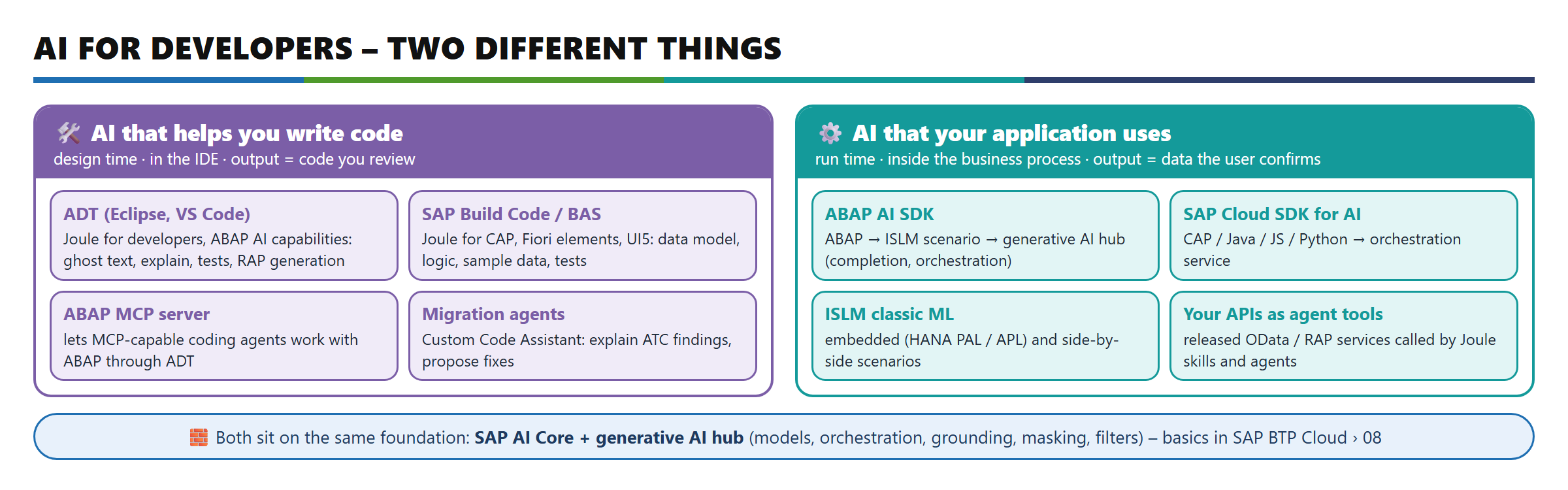
Question | Design time | Run time |
|---|---|---|
Who uses the AI? | The developer | The end user, through your app or Joule |
Products | Joule for developers (ABAP AI capabilities, SAP Build Code), ADT MCP server, Custom Code Migration AI Assistant | ABAP AI SDK, SAP Cloud SDK for AI, ISLM, Joule Studio agents calling your APIs |
Licensing idea | Premium AI feature per developer usage (AI units) | Your SAP AI Core consumption |
Your responsibility | Review, ATC, unit tests before release | Validation, authorizations, human review |
Part 2 – Joule for developers, ABAP AI capabilities in ADT
Generative AI built into the ABAP Development Tools, tuned for ABAP Cloud and powered by SAP's own ABAP-trained model. The overview list is on ABAP on BTP › 01, Part 9; here is how you use each capability.
Capability | How you use it | Notes |
|---|---|---|
Joule chat | Window → Show View → Other → Joule; ask in natural language | ABAP / RAP / CDS questions in the context of your code |
Predictive code completion | Ghost text while you type; toggle in the ADT toolbar | Classes, interfaces and programs |
Explain | Context menu Joule → Explain, or | Objects, selected lines, Outline view; CDS view entities, classes, interfaces, function modules |
ABAP Unit test generation | From Joule on a class | Generated tests are a starting point – add edge cases |
CDS test generation | Test classes for CDS entities (CDS Test Double Framework) | Same review rule |
OData UI service from scratch | Joule chat creates the RAP service objects from a description | Table, CDS, behavior, service definition and binding |
RAP business logic prediction | Proposes determinations and validations in the behavior implementation class | Check EML and messages carefully |
Consume | Generates an OData request and ABAP code using the OData client proxy | For calling remote OData services |
Extensibility assistant | Answers field extensibility questions, helps with custom fields and value helps | Key-user extensibility context |
Custom code migration help | Explains ATC custom code migration findings and proposes changes (in ADT and the Custom Code Migration app) | Preview before applying |
2.1 Where it is available
Product | Status (November 2026) |
|---|---|
SAP Business AI Platform, ABAP environment | Available |
SAP S/4HANA Cloud Public Edition | Available (developer extensibility) |
SAP S/4HANA Cloud Private Edition | Available from release 2025; SAP is extending ABAP AI to all releases from 2021, and since Q2 2026 a side-by-side service makes the AI tools usable regardless of release |
SAP S/4HANA on-premise | Not covered by SAP's Joule for developers offering (the ABAP AI SDK itself is available on-premise – Part 5) |
- IDE: ADT for Eclipse is the full-featured IDE. ADT for VS Code shipped its first release in Q2 2026, initially for the ABAP Cloud scope including SAP Fiori app development, with integration of GitHub Copilot and Amazon Q; classic ABAP and more object types are planned during 2026. SAP's product page lists Joule's ABAP AI capabilities for both IDEs.
- Licensing: a premium AI feature on top of the base product. The free promotional period ended on 30 September 2026; since 1 October 2026 the ABAP AI capabilities are billed by consumption in AI units (SAP moved from users-per-month to usage-based billing). ADT itself stays free.
- Rule: AI output is a proposal. Run ATC and ABAP Unit, read every generated line, and never paste customer data or credentials into a prompt.
Part 3 – Joule in SAP Build Code: CAP and Fiori
SAP Build Code is the pro-code part of SAP Build: SAP Business Application Studio (BAS) with CAP, SAPUI5, SAP Fiori elements and SAP Mobile Services, plus Joule as the AI assistant (BTP Development › 01, Part 7).
Joule generates | Example prompt | Comment |
|---|---|---|
CAP data model and service | "A loyalty app: customers, purchases, redemptions" | CDS entities, associations, OData service |
Sample data | "Create 20 realistic customers" | CSV files for local testing |
Application logic | "Add bonus points of 10 % of the purchase value" | Node.js or Java event handlers |
Unit tests | "Write tests for the bonus logic, positive and negative cases" | Review before you accept |
Fiori elements app | "List report for purchases, filter by customer" | Annotations and app from the service |
- Joule in BAS also offers slash commands for these tasks (for example for CAP data generation, logic and unit tests); command names change between releases – use the command list in your BAS.
- ABAP developers meet this when a side-by-side extension is built in CAP instead of the ABAP environment – same RAP-like ideas (CDS models, OData, Fiori elements), different runtime.
Part 4 – Agentic ABAP: ADT MCP server and migration agents
The next step after chat and code completion: agents that perform multi-step development tasks through the tools.
- ADT MCP server: an MCP (Model Context Protocol) server in ADT exposes ABAP development functions to MCP-capable AI coding agents. SAP states that the ADT MCP server for Eclipse is available as of Q2 2026, and that the servers for Eclipse and VS Code are generally available for connecting third-party solutions. It is also the base of SAP's own migration agents.
- Custom Code Migration AI Assistant / migration agents: SAP delivered the first Custom Code Migration AI Assistant and the first agent for the custom code migration strategy in Q2 2026; a second agent for clean core transformation was announced for Q3 2026, and SAP plans agent families for all phases of a migration project.
- Agentic Joule in ADT: SAP's direction is that the existing ABAP AI capabilities become skills that an autonomous orchestrator combines; SAP is adding multi-agent orchestration and more agents through 2026.
- What stays the same: every change still goes through a transport request, ATC and code review. An agent working through ADT has the developer's authorizations – not more.
Part 5 – ABAP AI SDK: APIs, availability and a RAP action
The ABAP AI SDK powered by ISLM is the ABAP client for the generative AI hub. Set-up (SAP AI Core, communication arrangement, intelligent scenario, deployment) and a first console example: BTP Development › 04 Data & AI on BTP, Part 9. This part shows the full API set and a real use inside RAP.
API | Entry point | Use |
|---|---|---|
Completion API | cl_aic_islm_compl_api_factory=>get( )->create_instance( islm_scenario = … ) | Send system role + user messages, read the completion |
Orchestration API | cl_aic_islm_orch_api_factory=>get( )->create_instance( islm_scenario = … ) | Use the orchestration service; masking, filters, translation and grounding are defined in the scenario's execution flow template (JSON), not in ABAP |
Prompt template API (cl_aic_islm_prompt_tpl_factory) | Prompt templates stored in the intelligent scenario | Versioned prompts, maintained outside the code |
Tracing | ABAP Cross Trace | See the requests and responses during development |
5.1 Availability
- SAP Business AI Platform, ABAP environment and S/4HANA Cloud Public Edition – available.
- S/4HANA Cloud Private Edition and on-premise – in standard delivery from release 2025; lower releases via transport-based correction instructions (SAP Note 3513374; SAP's set-up tutorial starts at S/4HANA 2023).
- Always needs the customer's own SAP AI Core instance (generative AI hub).
5.2 Example – a RAP action that summarises a complaint
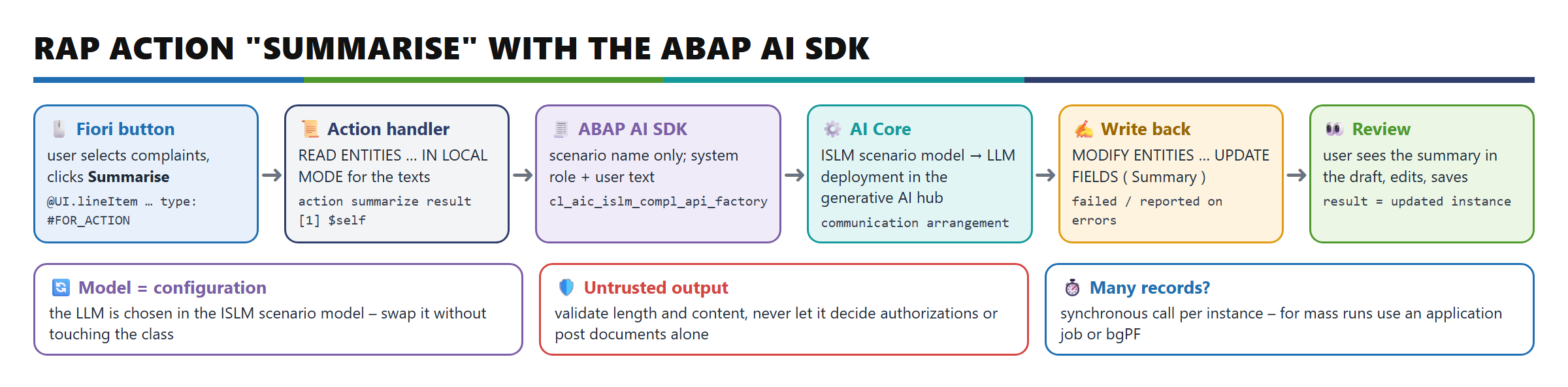
A complaint BO ZR_Complaint has a long text field ComplaintText and a field Summary (type string, read-only for the user). A button Summarise calls the LLM for the selected complaints and writes the result into Summary; the user reviews it in the draft and saves.
|
|
- The class names only the scenario
ZCOMPLAINT_SUMMARY; which LLM answers is set in the ISLM scenario model (Part 6). - Add the action to the UI with
@UI.lineItem: [{ type: #FOR_ACTION, dataAction: 'summarize', label: 'Summarise' }]in the metadata extension. - The LLM is called in the interaction phase (action handler) – never in the save sequence. Each call takes seconds: for hundreds of records use an application job or the background processing framework (bgPF) instead of a synchronous button.
- Treat the answer as untrusted input: limit its length, never let it change status, amounts or authorizations by itself, and let the user confirm. For personal data in the text, use the orchestration API with data masking.
Part 6 – Intelligent scenarios in ISLM
ISLM (Intelligent Scenario Lifecycle Management) is the S/4HANA / ABAP framework that manages every AI use case as an intelligent scenario – a transportable object that binds the business application to its machine learning or LLM provider.
Type | Where the model runs | Typical use |
|---|---|---|
Embedded | In the same stack – SAP HANA machine learning libraries (PAL, APL) | Classic ML on S/4 data: forecasts, classification (e.g. delivery delay prediction) |
Side-by-side | A separate stack – SAP AI Core on BTP | Custom ML models and generative AI (scenario type Generative AI) |
- 1. Create – app Intelligent Scenarios (F4469): create the scenario, add a model (for generative AI: provider + LLM), optional prompt templates or an execution flow template, publish it into a package (transportable).
- 2. Train – app Intelligent Scenario Management (F4470): embedded scenarios train on HANA; for generative AI the model is pre-trained, so the synchronisation creates a default training.
- 3. Deploy – creates the deployment (for side-by-side, the LLM deployment in SAP AI Core); status goes to Deployed.
- 4. Activate – activate the deployment (e.g. "For All"); only now can ABAP call the scenario.
- 5. Monitor and switch – change the model or deactivate the scenario centrally, without a code change.
Both apps exist in S/4HANA Cloud Public Edition and in Private Edition / on-premise releases; which scenario types and models a customer may create depends on the edition and release.
Part 7 – The generative AI hub from the developer side
The orchestration pipeline, model access and RAG basics are on BTP Development › 04, Parts 5 – 6. What a developer decides:
Decision | Options | Guidance |
|---|---|---|
Direct model call or orchestration | Completion of one deployed model vs the orchestration service | Prefer orchestration: masking, filters, grounding and model switching come for free |
Where the prompt lives | In code, in the prompt registry / ISLM prompt templates, in an execution flow template | Outside the code – versioned and changeable without transport of code |
Grounding | Orchestration grounding module (document grounding service with pipelines from an object store or document repository) vs own vector search in HANA Cloud | Managed grounding for documents; own SQL vector search when you must filter by business data |
Model choice | GPT, Claude, Gemini, Mistral, open models … | Choose by evaluation (quality, latency, cost, data residency); keep it configurable |
Resource group | Default or own groups in SAP AI Core | An orchestration deployment exists in the default group after onboarding; new groups need their own |
- From ABAP: the orchestration API reads the execution flow template uploaded to the ISLM scenario – the JSON defines the modules (prompt templating with the model, filtering, masking, translation, grounding). SAP's tutorials show orchestration and grounding consumption from ABAP step by step.
Part 8 – AI in CAP and other BTP apps: SAP Cloud SDK for AI
The SAP Cloud SDK for AI is SAP's official SDK for the generative AI hub and its orchestration service, available for JavaScript / TypeScript, Java and Python. The older CAP LLM plugin has a limited scope; SAP recommends the SDK for new projects.
|
- Credentials: on Cloud Foundry or Kyma the SDK finds the bound
aicoreservice instance automatically; locally setAICORE_SERVICE_KEYor usecds bindfor hybrid testing; alternatively a BTP destination. - By default the client uses the orchestration deployment of the
defaultresource group; pass another resource group or deployment ID if needed. - Same rules as in ABAP: model name from configuration in real projects, output validated, user confirms.
Part 9 – Interoperability: MCP and A2A
Protocol | What it connects | Confirmed SAP use (Nov 2026) |
|---|---|---|
MCP (Model Context Protocol) | An AI agent ↔ tools and data of a system | ADT MCP server in ADT (Eclipse, VS Code); MCP servers as tools of Joule Studio agents; the new Joule Studio generates MCP servers from SAP OData / REST APIs; coding agents connect to Joule Studio via MCP |
A2A (Agent-to-Agent) | An agent ↔ another agent | Bring-your-own agents in your BTP subaccount connect to Joule via A2A; a governed agent gateway lets third-party agents call Joule agents |
For an architect the point is governance: every external agent enters through a defined, authenticated entry point and acts with a user's or a defined technical identity – not through direct database access.
Part 10 – AI and clean core
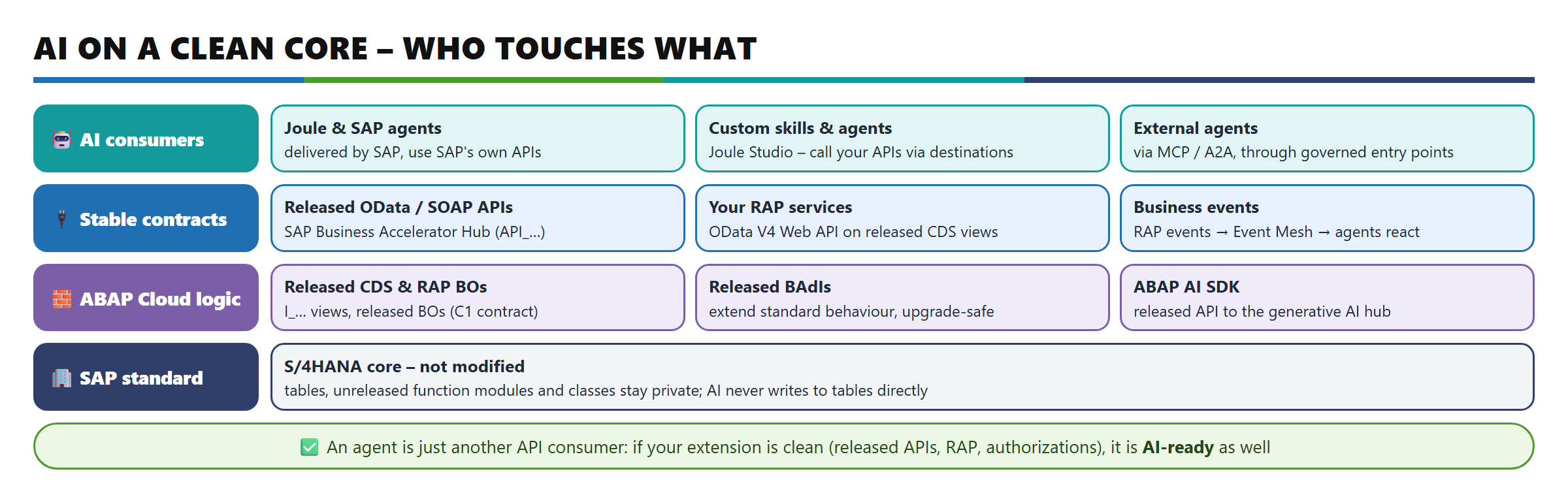
- AI is just another consumer of released APIs. A Joule skill, an agent or an MCP client calls the same released OData APIs and RAP services as any other integration – if your extensions follow clean core, they are AI-ready.
- ABAP Cloud for AI logic: the ABAP AI SDK is used from ABAP Cloud code (on-stack or in the SAP Business AI Platform, ABAP environment) – no modifications, no unreleased objects.
- Narrow APIs for agents: build small RAP Web APIs on released CDS views that return exactly what an agent needs; authorizations in CDS access control and the behavior definition.
- Events: RAP business events let agents react instead of polling.
- Agent extensions instead of copies: extend SAP-delivered agents (new Joule Studio) the way you extend SAP apps – on top, upgrade-safe.
- Full clean-core rules and levels: Clean Core › 01 Clean Core.
Part 11 – What an ABAP developer should practise
Practice | How | What you can say afterwards |
|---|---|---|
Joule in ADT | SAP Business AI Platform, ABAP environment trial or customer system with ABAP AI: explain a class, generate a RAP service, generate unit tests | "I use it for explanation and test scaffolding and review everything" |
ABAP AI SDK | SAP tutorial group for ISLM: scenario, deployment, console class; then the RAP action of Part 5 | "I built an LLM call from RAP and know why the code names a scenario" |
Orchestration from ABAP | Tutorial with an execution flow template (masking, filters) | "Personal data is masked before the LLM sees it" |
RAP Web API for agents | OData V4 Web API on released CDS views + communication scenario | "I deliver the back end for Joule skills" |
Joule Studio skill | SAP CodeJam / tutorials: skill with an action project and a destination | "I know how skills reach S/4HANA" |
Clean core story | Map one classic exit to a released BAdI or side-by-side app | "AI-ready because clean" |
- Know the vocabulary: ISLM, intelligent scenario, generative AI hub, orchestration, grounding, data masking, AI units, MCP, A2A, skill vs agent, principal propagation.
- Be honest about limits: non-determinism, cost per call, review duty, availability per edition.
Part 12 – Interview questions
Q1. Joule for developers vs ABAP AI SDK – what is the difference?
Joule for developers helps the developer write code in ADT or BAS (design time). The ABAP AI SDK lets an application call an LLM at run time through ISLM and the generative AI hub.
Q2. Which Joule capabilities do you use in ADT?
Joule chat, predictive code completion, explain, ABAP Unit and CDS test generation, OData UI service generation, RAP business logic prediction, consumption code for OData services and help with custom code migration findings – always reviewed and checked with ATC.
Q3. Where are the ABAP AI capabilities available?
SAP Business AI Platform, ABAP environment, S/4HANA Cloud Public Edition and Private Edition (SAP is extending it to all releases from 2021), in ADT for Eclipse and ADT for VS Code; licensed in AI units.
Q4. How do you call an LLM inside a RAP action?
In the action handler: read the texts with READ ENTITIES IN LOCAL MODE, call the ABAP AI SDK completion API with an ISLM scenario, write the result back with MODIFY ENTITIES, report errors in failed / reported and return the updated instances; the user reviews before saving.
Q5. Why should an LLM call not happen in the save sequence?
The save sequence must be fast and must not fail on external calls; an LLM call takes seconds and can fail. Call it in the interaction phase or in background processing and save only the reviewed result.
Q6. What is ISLM and what are embedded and side-by-side scenarios?
The S/4HANA framework that manages AI use cases as transportable intelligent scenarios. Embedded scenarios train and run in HANA (PAL / APL); side-by-side scenarios use SAP AI Core, including generative AI.
Q7. What are the steps to make an intelligent scenario usable?
Create and publish it in Intelligent Scenarios (with model and templates), train / synchronise, deploy and activate it in Intelligent Scenario Management, then call it from ABAP by its name.
Q8. Completion API or orchestration API?
The orchestration API when you need data masking, content filters, translation or grounding – defined in the scenario's execution flow template. The completion API for a simple, direct prompt.
Q9. How do CAP apps use generative AI?
With the SAP Cloud SDK for AI (JavaScript, Java, Python): an orchestration client that finds the bound SAP AI Core instance and calls the orchestration service; the CAP LLM plugin is the older, narrower option.
Q10. What is the ADT MCP server?
An MCP server in ADT that lets MCP-capable AI coding agents work with the ABAP system through the development tools – generally available for Eclipse and VS Code in 2026 and the base of SAP's custom code migration agents.
Q11. How does AI fit clean core?
Agents and AI features are API consumers: they use released APIs and RAP services, AI logic runs in ABAP Cloud with the released ABAP AI SDK, and SAP agents are extended, not copied. A clean extension is automatically AI-ready.
Q12. What risks do you manage when an app uses an LLM?
Hallucinations (grounding, validation), personal data (masking), prompt injection (filters, no blind actions), cost and latency (narrow prompts, background processing), and accountability (human review, logging).
🏠 Start Here · ◀ 03 · Joule Studio · 05 · C_JSD Certification ▶ · Sections: CORE ABAP | OOPS ABAP | ABAP on HANA | Clean Core | RAP | ABAP Points | SAP Fiori | SAPUI5 | Mobile Development (MDK) | BTP Foundations | BTP Development | CAP | SAP Build | ABAP on BTP | Integration Suite | SAP Business AI | SAP BASIS | Security | SAP SDLC
Functional: FICO ABAP | TRM ABAP | VIM | SAP BIS | SD ABAP | MM ABAP | PP ABAP | QM ABAP | PM ABAP | PS ABAP | EWM | TM ABAP | GTM ABAP | EHS ABAP | HR ABAP | BW | SAP Datasphere | SAP Business Data Cloud | SAP MDG | SAP Analytics Cloud | SAP Ariba | SAP CX | SAP IBP