Everything you need for SAP Certified – Joule Studio Developer (C_JSD): the exam facts and the free campaign, the skill areas mapped to these notes, how you build a custom agent and extend an SAP-delivered agent in the new Joule Studio, the Knowledge Graph and intent-based development topics, a practice plan with SAP's hands-on tutorials, and how to present your agents in the AI roleplay. The product background is on pages 01 – 04: SAP Business AI and the Knowledge Graph on page 01, Joule and SAP-delivered agents on page 02, both Joule Studio editions on page 03, Joule for developers on page 04.
State in November 2026. Joule Studio is still rolling out in phases, and SAP's tutorials run on a pre-release version – labels in your practice system can differ slightly. Announcements are marked 📣.
Part 1 – The certification at a glance
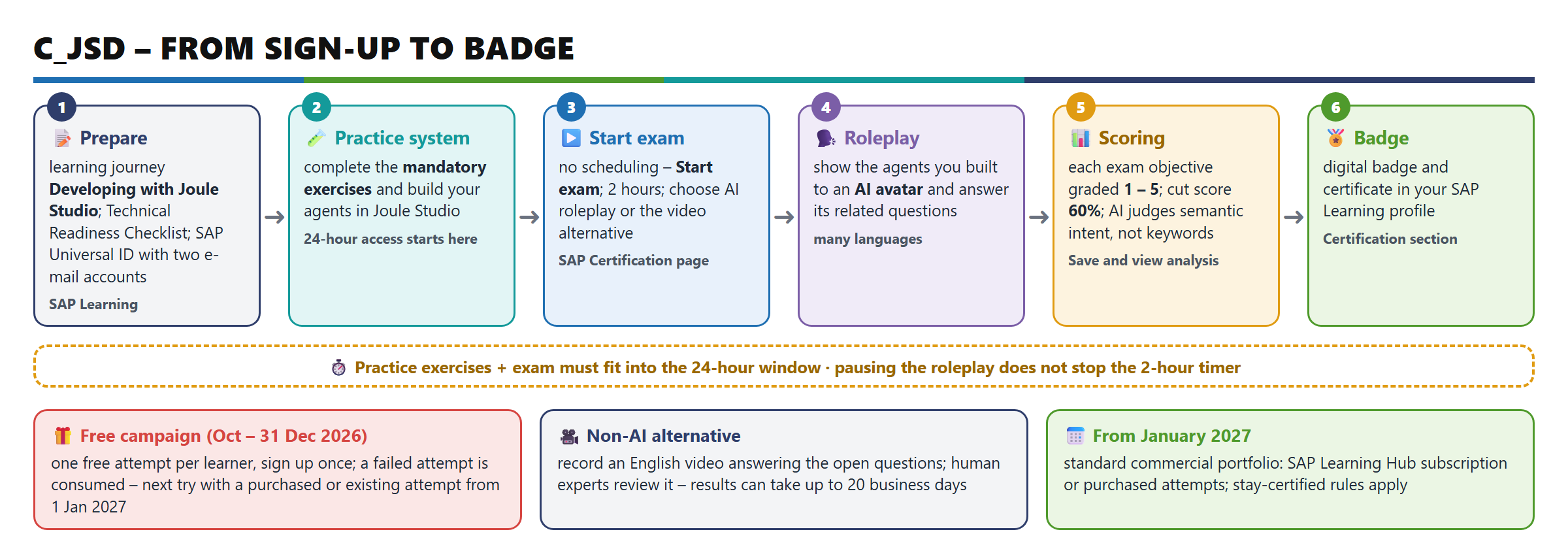
Item | Fact |
|---|---|
Title and code | SAP Certified – Joule Studio Developer, C_JSD |
Assessment | One activity: a scenario-based assessment (performance-based, no multiple choice) |
Duration and cut score | 2 hours, 60% |
Exam steps (SAP) | 1. Check your system set-up with the Technical Readiness Checklist. 2. Access Joule Studio, complete the tasks (practice exercises) and create your agents – you use them in the exam. 3. Start the exam: an AI roleplay with an AI avatar that asks you to show your agents and answer related questions |
Languages | AI roleplay: English, Spanish, Italian, French, Japanese and further languages (chosen in the roleplay's Language menu); non-AI alternative (recorded video): English only |
Skill areas listed | Developer · SAP Business Technology Platform · AI Assisted Development · Knowledge Graph Integration and Interaction · Artificial Intelligence (no weights published) |
Recommended preparation | Learning journey Developing with Joule Studio (prerequisite listed: Understanding AI): explain Joule Studio and its place in the SAP Business AI Platform; build agents, agent extensions and n8n workflows. SAP advises doing all practice exercises and reading the exam guidance in full |
What it validates | That you can build custom agents and extend LoB agents with Joule Studio – the fundamental and core knowledge of the Joule Studio Developer profile, working as a mentored member of a project team |
Scoring | Each exam objective is graded from 1 (Insufficient) to 5 (Excellent) against criteria set by subject matter experts; the AI evaluates semantic intent, not keywords. Save and view analysis shows the detailed score before you submit |
After passing | Digital badge and certificate in the Certification section of your SAP Learning profile |
- Which Joule Studio? The exam is about the new Joule Studio that you open from Joule Work – agents, agent extensions and n8n workflows built with intent-based development. The classic edition in SAP Build (skill builder, agent builder – page 03, Parts 2 – 8) is not the subject of the learning journey; use page 03 Part 9 and this page.
- Who it is for: developers who build agents for SAP landscapes – ABAP, CAP and SAP Build developers and technical consultants. An ABAP developer brings the back-end side (released APIs, RAP services, authorizations) that agents depend on.
1.1 Free campaign rules (October – 31 December 2026)
Rule | Detail |
|---|---|
Who | Any learner with a valid SAP Universal ID – no restriction on company type, role or geography; no SAP Learning Hub subscription needed. The Universal ID must have two different e-mail accounts |
Sign-up | Once, on the campaign page, logged in with the Universal ID, accepting the terms (no confirmation e-mail – the sign-up page confirms it) |
Attempts | One free attempt for this certification only. A failed attempt is consumed (it does not count against commercial attempt limits); a retry needs a purchased or existing attempt from 1 January 2027. Unused attempts expire when the campaign ends |
Practice system | 24 hours of access; the exercises are mandatory before you can start the exam, and the exam must be finished inside the same 24-hour window. No own BTP subaccount or Joule Studio subscription needed |
Scheduling | None – select Start exam on the certification page after the exercises |
Non-AI alternative | Record a video answering the exam's open questions (screen and audio, .mp4 under 1,000 MB – export at 720p if larger); human experts review it, results can take up to 20 business days |
Support | Case in the SAP Learning Help Center, service category Scenario Based Assessment |
1.2 From January 2027
- C_JSD moves into the standard commercial SAP Certification portfolio: you need a purchased or existing certification attempt (for example through an SAP Learning Hub subscription).
- Certifications earned during the campaign stay valid in the same way as any other SAP Certification; the standard stay-certified rules apply.
- General rule for scenario-based exams (not the free campaign): up to four attempts in 12 months, at least 24 hours apart.
Part 2 – Skill areas mapped to these notes
SAP lists five skill areas without weights. The table translates each into what the examiner can ask you to show or explain, and where you study it.
Skill area | What you must be able to do | Where it is taught |
|---|---|---|
Developer | Create an agent and an agent extension end to end; read the generated PRD, specification and code; test in the Try and Testing tabs; deploy | This page Parts 3 – 4; SAP Business AI › 03 Joule Studio, Part 9; BTP Development › 01 Developing on BTP, Part 7 (SAP Build); Joule Studio, classic edition inside SAP Build: SAP Build › 10 |
SAP Business Technology Platform | Explain where the agent runs (SAP-managed Joule Studio runtime, SAP Business AI Platform), how it reaches back ends and how identity and destinations work | SAP Business AI › 01, Part 4; BTP Development › 04 Data & AI; 09 BTP Security Deep Dive (OAuth, IAS, destinations, Cloud Connector); 10 BTP Developer Hands-On (CAP, MTA) |
AI Assisted Development | Drive intent-based development: write an intent statement, answer clarifying questions, review and change generated artefacts, know the low-code and pro-code paths | This page Part 6; SAP Business AI › 04 Joule for Developers (Joule in ADT and SAP Build Code) |
Knowledge Graph Integration and Interaction | Explain how SAP Knowledge Graph, SAP Domain Models and enterprise data give the agent business context and help discover the right APIs | This page Part 5; SAP Business AI › 01, Part 4.3; BTP Development › 04 (HANA Cloud) |
Artificial Intelligence | LLM agents vs deterministic logic, grounding, tools via MCP, agent-to-agent via A2A, human in the loop, responsible AI | SAP Business AI › 01, Part 6; 02, Parts 3, 4 and 7; 04, Part 9; BTP Development › 04, Parts 5 – 6 |
Part 3 – Building a custom agent in Joule Studio step by step
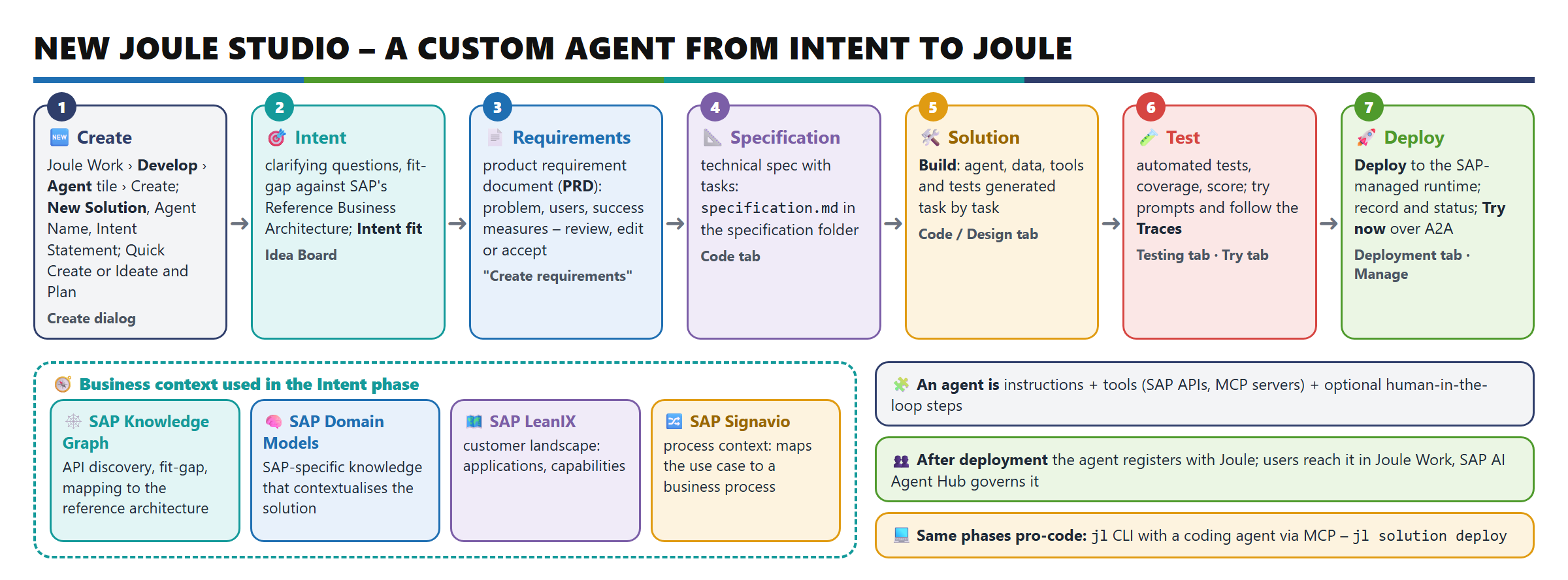
The labels below come from SAP's Joule Studio tutorials (HR onboarding, SCM equipment, CX sales, FI collection). The flow is always the same six phases of intent-based development; what changes is how much Joule Studio does on its own.
Step | What you do | UI terms (from SAP tutorials) |
|---|---|---|
1 Create | Start a new agent solution and describe it | Joule Work › Develop › Agent tile › Create; keep New Solution; Agent Name; Intent Statement; Quick Create check box |
2 Intent | Answer clarifying questions with the real back end in mind; check the fit | Fit-gap against SAP's Reference Business Architecture; Intent fit; intent document on the Idea Board |
3 Requirements | Review the product requirement document; accept or edit it | PRD; edit in the view or in the Code tab, or accept it; in Guided type "Create requirements" |
4 Specification | Check the technical specification and its task list | "Create specification"; |
5 Solution | Let Joule Studio implement the tasks; review the code | Build (top right) or "Build solution for this project"; progress per task; agent, data, tools and tests created |
6 Try | Chat with the agent and follow each request | Try tab; ask "How can I test this agent"; capability panel on the right; Traces panel at the bottom |
7 Testing | Read the automated test results | Testing tab: total, passed, failed, code coverage, overall score, validation per artefact |
8 Deploy | Deploy to SAP BTP and try the deployed agent | Deploy → Deploy; Deployment tab with record and status; then Manage › Try talks to the deployed agent |
- Quick Create vs Guided: Quick Create skips the clarifying questions and runs every phase automatically (Joule adds "Fast Track" to the prompt). Guided (Quick Create deselected) asks questions and pauses for your confirmation after each phase – better when you want to explain your decisions in the exam.
- Tab and phase names vary slightly between tutorial versions (e.g. Requirement or Requirements; View, Code, Try, Design, Solution). Use what your practice system shows.
3.1 What an agent consists of
Element | In the new Joule Studio |
|---|---|
Instructions | Additional context injected into the agent's system prompt to steer its behaviour; editable (in the extension tutorial: Design tab › Instructions and Context) |
Tools – SAP APIs | OData or REST APIs of the back end; Joule Studio finds candidates during the Intent phase (Part 5) |
Tools – MCP servers | Generated from SAP OData or REST APIs and attachable to any agent as a tool source; each server lists its tools and descriptions |
Workflows | n8n workflows: the SAP Agent node calls an agent of another solution, the SAP Task Center node sends an approval to a person. 📣 n8n in Joule Studio is for early adopters, broader availability to follow |
Human in the loop | Optional approval steps – SAP lists them with instructions and tools as the parts of an agent |
Business context | SAP Knowledge Graph, SAP Domain Models and enterprise data used while the agent is designed and grounded (Part 5) |
Tests | Generated unit tests and AI evaluations, run automatically after the build |
- Joule skills with their trigger-action canvas belong to the classic edition (page 03, Part 3). In the new Joule Studio tutorials the tools are APIs, MCP servers and workflows.
3.2 After deployment
- Deployed agents run on the SAP-managed Joule Studio runtime (sandboxed; page 03 Part 9) and register with Joule. SAP's reference architecture names Joule Work as the main interface through which end users work with Joule Studio agents, and SAP AI Agent Hub manages and governs deployed agents.
- The Manage area of Joule Studio shows each solution's overview (solution details, deployment status), Deploy, version management and monitoring.
- Pro-code equivalent: the Joule Studio CLI
jl(e.g.jl solution deploy) – Part 6.
Part 4 – Extending SAP-delivered LoB agents
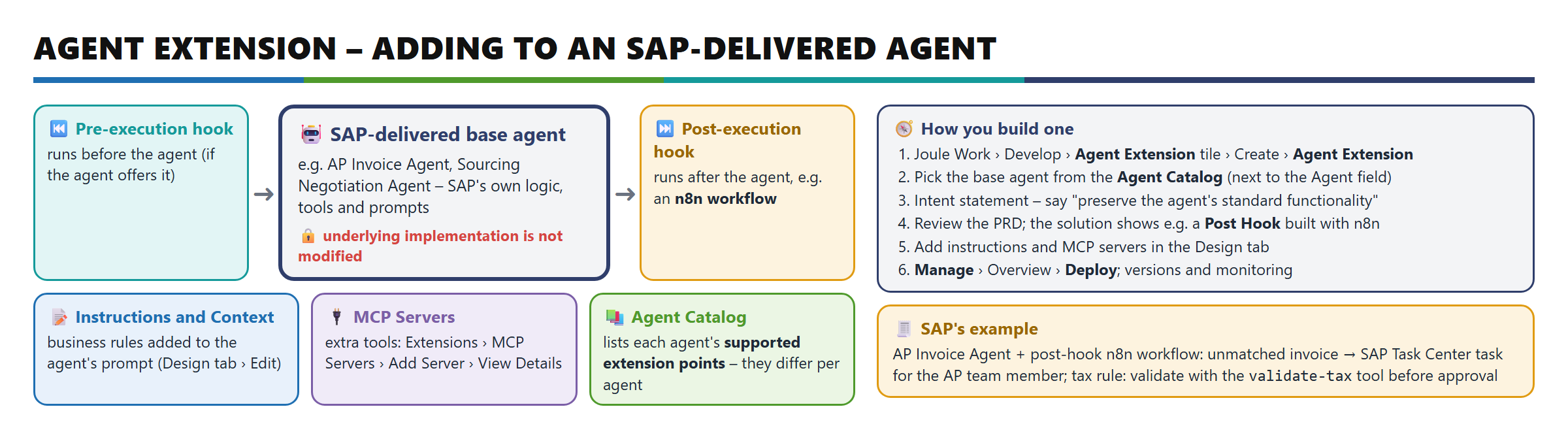
An agent extension adds business-specific capabilities to an SAP-delivered agent without changing the agent's underlying implementation. You describe the behaviour in natural language and Joule Studio generates the extension – the same intent-based flow as in Part 3.
Extension point | What it does | Where you set it |
|---|---|---|
Instructions and Context | Domain rules and behavioural guidance injected into the agent's prompt | Design tab › Instructions and Context › Edit |
MCP servers | Additional tools for the agent | Design tab › Extensions › MCP Servers › Add Server › View Details › Add MCP Server |
Pre- or post-execution hooks | Logic before or after the agent runs – e.g. a post-hook n8n workflow that acts on the agent's result | Generated from the intent; shown in the Solution tab as Post Hook |
- Which points are available depends on the agent: the Agent Catalog lists each SAP-delivered agent's supported extension points.
- Limits: the base agent's implementation is not modified, and you work only through the extension points the agent offers – the extension should preserve its standard capabilities. If you need different core logic, build a custom agent and let it work with SAP's agent. Never copy an SAP agent – page 04 Part 10 (clean core).
- Generated artefacts (SAP Learning example):
solution.yamldefines the solution and references its assets; an agent extension asset for the base agent; a post-hook workflow (e.g.executive-summary-post-hook). - Deployment: switch from Develop to Manage, check the solution details and deployment status on the Overview page, select Deploy, then validate; Manage also offers version management and monitoring.
4.1 SAP's examples
Base agent | Extension intent | What was generated or added |
|---|---|---|
Sourcing Negotiation Agent (SAP Learning) | Add an executive summary of the supplier bid analysis – compliance and audit, competitive positioning, risks – and "preserve the agent's standard functionality" | Agent extension asset + post-hook workflow that adds the summary to the agent's output |
AP Invoice Agent (developers.sap.com, extension "AP Notification") | For any invoice that cannot be matched, create an SAP Task Center task and notify the responsible AP team member | Post Hook built with n8n; plus an instruction: validate tax with the |
4.2 Custom agent or extension?
Situation | Choose |
|---|---|
SAP's agent does the job but misses a company rule, a notification or an extra check | Agent extension |
SAP's agent must also use one more system or data source it offers an MCP extension point for | Agent extension with an MCP server |
No SAP agent covers the process, or the core logic must be different | Custom agent (Part 3) |
Part 5 – Knowledge Graph integration and interaction
Joule Studio rests on three ideas SAP calls Build with Context, Build Your Way and Build with Confidence. "Context" means: the SAP Knowledge Graph, SAP Domain Models and enterprise data ground the agents so they reason over connected business data. What the Knowledge Graph is in general (entities, processes, relationships on top of CDS metadata) is on page 01 Part 4.3.
Source of context | What it provides | Where you meet it in Joule Studio |
|---|---|---|
SAP Knowledge Graph | API discovery, fit-gap analysis, mapping to SAP's Reference Business Architecture | Intent phase; result in the intent document and Intent fit |
SAP Domain Models | SAP-specific knowledge that contextualises the generated solution; also used when Joule Studio generates the code | Intent phase and code generation |
SAP LeanIX | The customer's enterprise landscape: applications, business capabilities and organisation structure | Intent phase (fit-gap) |
SAP Signavio | Process context for the business intent (the SCM tutorial maps its use case to the business process "Acquire to Decommission") | Intent phase |
Enterprise data | Business data from SAP systems and SAP Business Data Cloud data products | Tools (APIs, MCP servers) at run time |
5.1 How agents reach business services
- Design time: during the Intent phase the Knowledge Graph helps Joule Studio find which SAP APIs and standard capabilities already exist – the fit-gap tells you what SAP covers and what you build.
- Run time: the agent calls services through its tools – SAP APIs and MCP servers generated from SAP OData or REST APIs. SAP's reference architecture states that SAP uses MCP internally to give Joule Agents semantically enriched access to SAP business capabilities and Knowledge Graph content; pro-code agents built outside Joule Studio integrate with Joule through A2A.
- Authorizations stay in the back end: an agent only gets what the called API and the user's or technical identity allow (page 02 Part 6).
5.2 How you ground an agent in business context
- Write the intent in SAP business terms – user role, business object, process, back end (e.g. "open items and payment history from SAP S/4HANA") – so the graph and domain models can match it.
- Answer clarifying questions with real data sources, landscape and KPIs; check Intent fit and the gaps before you accept the PRD.
- Prefer released SAP APIs and well-described MCP tools; in the instructions require the agent to use only values returned by tools.
- Show the grounding in the demo: the intent document, the solution architecture in the PRD, and the Traces with the tool calls behind an answer.
5.3 Announcements and related technology
- 📣 TechEd 2026: the SAP Knowledge Graph will incorporate data from additional SAP and non-SAP sources unique to each customer, explorable in natural language, with answers grounded in the customer's own information (no date in SAP's release).
- Your own graphs: the SAP HANA Cloud knowledge graph engine stores RDF triples (import formats such as Turtle and JSON-LD) and runs SPARQL via the procedure
SYS.SPARQL_EXECUTE;SPARQL_TABLEembeds SPARQL SELECT results in SQL. HANA Cloud basics: BTP Development › 04. - ABAP angle: clean, released CDS views and APIs are what the graph and the agents can understand and call – the same rule as on page 01 Part 4.3 and page 03 Part 8.1.
Part 6 – AI-assisted, intent-based development
Intent-based development (IBD): you describe the business outcome in natural language; Joule Studio turns it into requirements, a specification, code and tests, with traceability from idea to implementation. You stay responsible for every artefact.
Phase | Generated artefact | Your review duty |
|---|---|---|
Intent | Intent document: users, functions, architecture, gaps in the SAP standard; Intent fit | Is this the right problem? Is the standard really not enough? |
Requirements | PRD: problem, target users and success measures, traceable to the intent | Scope, users, data, success criteria, out-of-scope items |
Specification | Technical blueprint: business objects, system contracts, interfaces, attributes; task list | Right APIs? Write actions with approval? Data minimised? |
Solution | Code (reviewable in Git, openable in VS Code), agent, tools, data | Read the instructions and tool wiring; no hard-coded secrets or test data in production paths |
Testing | Unit tests and AI evaluations, test report | Failed tests, coverage, missing edge cases |
Deployment | Deployment to the SAP-managed runtime | Owner, approval, monitoring |
6.1 Low-code and pro-code
- Low-code flow: the browser-based builder – no local set-up, no coding agent needed. This is what the tutorials and the practice system use.
- Pro-code flow: the Joule Studio CLI
jl(project initialisation, landscape connections,jl solution deploy) with a coding agent such as Claude Code or OpenCode connected via MCP; IBD skills come as an npm package. Developers refine generated solutions in VS Code or Cursor and can use LangChain, Pydantic AI or LlamaIndex.
6.2 Apps and workflows
- Applications: full-stack apps with a CAP back end and a React front end (CAP basics: the CAP section and BTP Development › 06 Hands-On).
- n8n workflows: created with a solution type N8N Workflow; you can add nodes by intent ("add an SAP Task Center node … to send approvals to the manager") or manually with + (e.g. the SAP Agent node), then Execute to test.
6.3 Governance of generated artefacts
- Version control through Git (solutions pushed to GitHub for review), observability of performance, cost and usage, tracing, metrics and logs.
- Governance at design time and run time: risk-based approval before production, a named owner for each agent, monitoring and evaluation, measuring business value – across agents, LLMs and MCP servers; SAP AI Agent Hub as the central place to discover, manage and govern deployed agents.
- Joule for developers in ADT and SAP Build Code (generating ABAP, RAP and CAP code) is a different tool – page 04 Parts 2 – 3.
Part 7 – Practice plan: tutorials, 7 days, practice-system tips
SAP's developers.sap.com tutorials were written for the Agent Lab (a pre-release Joule Studio with logon data provided at SAP events). If you have no Agent Lab access, read them step by step anyway: they are the closest public description of what you do in the practice system.
Tutorial | Goal | Key steps | What to show |
|---|---|---|---|
HR onboarding assistant ( | HR Virtual Assistant: answers employee HR questions, analyses workforce data, predicts attrition risks (simulated HCM data) | Both paths (Quick Create, Guided); Build; Try with Traces; Testing tab; optional Deploy → Manage › Try | Intent document, test results, a traced answer |
SCM equipment assistant ( | Equipment Troubleshooting Agent for maintenance technicians | Quick Create; Intent fit; process mapping (Acquire to Decommission); | How context mapped the use case to a process |
CX sales agent ( | AI Sales Assistant: 2 – 3 ranked discount strategies with rationale, win probability and margin impact | Intent with S/4HANA SD in mind; PRD Solution Architecture; Testing; test the solution | Why the agent ranks and how margin data is used |
n8n workflow ( | IT Incident Triage + Auto Routing Agent with severity P1 – P4 | N8N Workflow type; add SAP Task Center node by intent; add SAP Agent node with +; Execute | Human approval step and agent-to-agent call |
Extra: agent extension ( | Extend the AP Invoice agent | Agent Extension tile; post-hook n8n; instructions; Add MCP Server | The extension points you used |
7.1 A 7-day plan
Day | Focus |
|---|---|
1 | SAP Business AI pages 01 – 02 (Joule, agents, Knowledge Graph); start the learning journey |
2 | Page 03 Part 9 and this page Parts 3 and 6; learning journey: building agents |
3 | Agent extensions and n8n (this page Part 4, learning journey); read the extension and n8n tutorials |
4 | Read the HR, SCM and CX tutorials; write your own intent statements for two agents |
5 | Part 5 Knowledge Graph; prepare your demo story and answers (Part 8); technical readiness check |
6 | Open the practice system (the 24 hours start): mandatory exercises, build and test your agents, one extension; rehearse the demo aloud |
7 | Inside the same 24 hours: final check of the agents, then start the exam |
7.2 Practice-system tips
- Do not open the practice system early – the 24-hour window starts with access and must hold the exercises and the exam. Keep a buffer for slow generation (complex scenarios take longer).
- Save your evidence for yourself: copy each intent statement, note the agent names, and take screenshots of the intent document, PRD, Testing tab and a good trace – you must be able to find them fast while the avatar watches.
- Use Guided for at least one agent so you can explain the questions Joule asked and your answers.
- Run each agent with a happy-path prompt and one edge case before the exam; fix instructions if needed.
7.3 Common mistakes
- Accepting every generated artefact without reading it – then you cannot explain the design.
- Vague intent statements ("an HR bot") instead of user, task, data and back end.
- Mixing up the classic edition (skills, action projects, Control Tower) with the new Joule Studio.
- Calling an extension a copy – the base agent stays SAP's and unchanged.
- Forgetting write-action approvals, data access and testing when explaining the agent.
- Leaving the exam to the last day of the campaign or the last hour of the 24-hour window.
Part 8 – Presenting your agents in the scenario-based roleplay
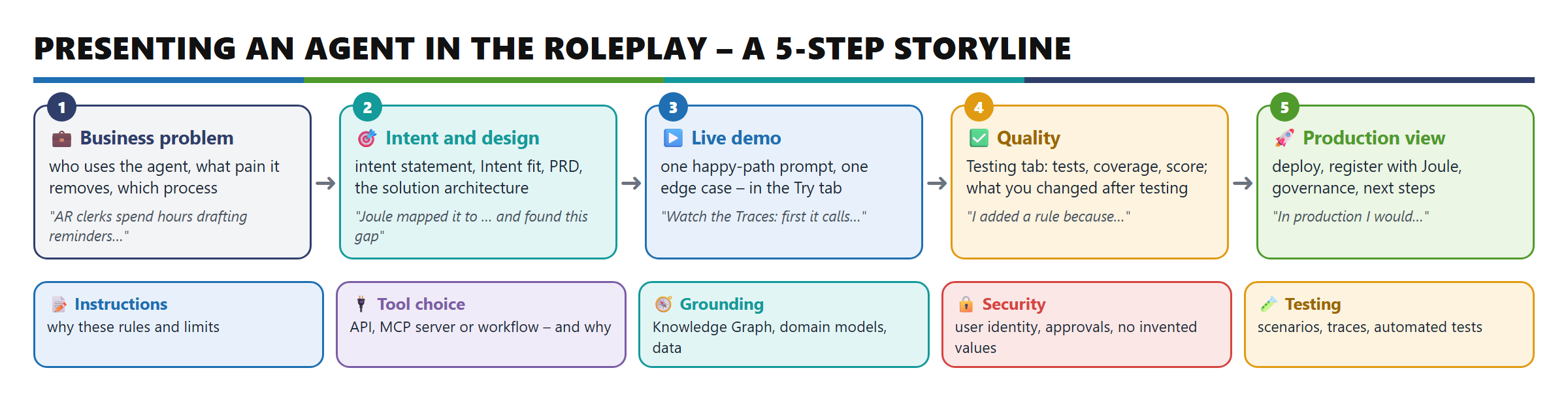
The AI avatar asks you to show the agents you built and to answer related questions about them. Treat it like a short design review with a business stakeholder: problem, design, demo, quality, production.
8.1 Explaining your design decisions
Decision | What to say |
|---|---|
Instructions | Which rules you added and why (scope, approval before actions, "use only tool values", what to do when data is missing) |
Tool choice | Why this API or MCP server, why a workflow for approvals or routing, why some steps stay deterministic |
Grounding | How Knowledge Graph and domain models shaped the intent and fit-gap; where the agent's facts come from at run time |
Security | Back-end authorizations, human approval for write actions, no sensitive data in prompts, SAP-managed sandboxed runtime |
Testing | Automated tests and evaluations, your own prompts, traces checked, changes after a failure |
8.2 Likely examiner questions with model answers
Question | Model answer |
|---|---|
"Walk me through your agent." | User and problem in one sentence, then the intent, the PRD scope, the tools, a live prompt with the trace, and the test result. |
"Why did Joule Studio suggest this design?" | The Intent phase mapped my intent to SAP's Reference Business Architecture with Knowledge Graph, LeanIX and Domain Models; the fit-gap showed what the standard covers, so the agent only builds the gap. |
"What happens if the data is missing?" | My instructions tell the agent to ask for it or to say it cannot answer – never to invent values; I tested that case. |
"How do you stop the agent from doing something wrong?" | Write actions need human approval (e.g. an SAP Task Center step), the APIs enforce authorizations, and the traces show every tool call. |
"Why an extension and not a new agent?" | SAP's agent already does the core job; the extension adds my rule through its extension points without changing SAP's implementation. |
"How would you take this to production?" | Review the generated code, run tests and evaluations, get the risk-based production approval, deploy from Manage, give the agent an owner, monitor usage and cost, govern it in SAP AI Agent Hub. |
8.3 Technical readiness checklist
- Technical Readiness Checklist done; supported browser (Chrome, Edge, Firefox or Safari); cookies accepted.
- Microphone enabled (built-in is enough); camera optional; quiet room; stable connection.
- Company network: the roleplay needs
*.yoodli.aiandstorage.googleapis.com– ask IT before the exam day. - Joule Studio open with your agents; your notes and screenshots at hand; language chosen in the Language menu (bottom left of the video preview).
- Pausing the roleplay and taking breaks do not stop the exam timer.
Part 9 – Interview questions
Q1. What does the Joule Studio Developer certification validate, and how is it assessed?
The ability to build custom agents and extend LoB agents with Joule Studio. It is a 2-hour scenario-based assessment with a 60% cut score: you build agents in a practice system, then present them to an AI avatar and answer questions (or record an English video reviewed by people).
Q2. Explain the phases of intent-based development in Joule Studio.
Intent (intent document, fit-gap, Intent fit), Requirements (PRD), Specification (technical spec with tasks), Solution (generated code, tools, data), Testing (unit tests and AI evaluations) and Deployment to the SAP-managed runtime.
Q3. What is the difference between Quick Create and Guided?
Quick Create skips the clarifying questions and runs all phases automatically. Guided asks questions and waits for your confirmation after each phase, so you control and can explain the result.
Q4. What does an agent consist of?
Instructions, tools – SAP APIs, MCP servers, workflows – and optional human-in-the-loop steps, plus the business context used to design it and the generated tests.
Q5. What is an agent extension and what can it change?
An addition to an SAP-delivered agent that leaves its implementation unchanged. Depending on the agent (Agent Catalog), it adds instructions, MCP servers and pre- or post-execution hooks such as an n8n workflow.
Q6. How is an extension deployed?
In the Manage area: open the extension's overview, select Deploy, check the status and validate; Manage also handles versions and monitoring.
Q7. What role do SAP Knowledge Graph and SAP Domain Models play?
They provide business context: the Knowledge Graph supports API discovery, fit-gap analysis and mapping to SAP's Reference Business Architecture; domain models add SAP-specific knowledge so the generated solution fits SAP processes and data.
Q8. How do you test an agent in Joule Studio?
Automated tests and evaluations run after the build (Testing tab: passed, failed, coverage, score). Then you chat with the agent in the Try tab and follow each request in the Traces, including edge cases.
Q9. How do you keep an agent safe?
Authorizations enforced by the back-end APIs, human approval for write actions, instructions against invented values, minimal data, the sandboxed SAP-managed runtime, an owner and monitoring in SAP AI Agent Hub.
Q10. Where does n8n fit?
n8n workflows orchestrate steps visually inside Joule Studio – for example a SAP Task Center node for approvals or an SAP Agent node that calls another solution's agent – and serve as hooks in agent extensions.
Q11. What happens after you deploy a custom agent?
It runs on the SAP-managed Joule Studio runtime and registers with Joule; end users work with it through Joule Work and SAP AI Agent Hub manages and governs it. The Deployment tab shows its status; Manage › Try reaches it.
Q12. Low-code or pro-code – when would you use which?
Low-code in the browser for most agents and for the exam. Pro-code with the jl CLI, a coding agent via MCP and frameworks like LangChain when the team needs Git-based engineering, custom logic or its own toolchain – the same IBD phases apply.
🏠 Start Here · ◀ 04 · Developer AI · 06 · AI Core Hands-On ▶ · Sections: CORE ABAP | OOPS ABAP | ABAP on HANA | Clean Core | RAP | ABAP Points | SAP Fiori | SAPUI5 | Mobile Development (MDK) | BTP Foundations | BTP Development | CAP | SAP Build | ABAP on BTP | Integration Suite | SAP Business AI | SAP BASIS | Security | SAP SDLC
Functional: FICO ABAP | TRM ABAP | VIM | SAP BIS | SD ABAP | MM ABAP | PP ABAP | QM ABAP | PM ABAP | PS ABAP | EWM | TM ABAP | GTM ABAP | EHS ABAP | HR ABAP | BW | SAP Datasphere | SAP Business Data Cloud | SAP MDG | SAP Analytics Cloud | SAP Ariba | SAP CX | SAP IBP