The hands-on, pro-code view of SAP AI Core and SAP AI Launchpad: service plans, service key, resource groups and the AI Core object model, then step by step from an empty subaccount to a running LLM deployment that you call with curl and Python. The concepts (what AI Core, the generative AI hub and orchestration are) are in BTP Development › 04; strategy and licensing in page 01; the ABAP side (ABAP AI SDK, ISLM) in page 04. The Python SDK and orchestration in code follow on page 07, RAG and knowledge graphs on HANA Cloud on page 08, building and deploying complete AI apps and agents on page 09.
Status of facts: November 2026 (SAP Help Portal, SAP Developers tutorials). Model names, plans and UI labels change often – the model list is in SAP Note 3437766 and in the Model Library of AI Launchpad.
Part 1 – Framing: generative AI, agents, agentic AI – platform vs embedded
Interviewers often open with vocabulary. Keep these terms apart (SAP's strategy view of them is on page 01):
Term | What it does | SAP example |
|---|---|---|
Generative AI | An LLM produces text, code or images from a prompt – one request, one answer | Summarise a complaint through the generative AI hub |
AI agent | An LLM in a loop with tools: it plans, calls APIs, reads the results and decides the next step until a goal is reached | A Joule agent; a LangChain agent calling an S/4HANA OData API (page 09) |
Agentic AI | Several agents that cooperate with some autonomy, under governance (approvals, audit, limits) | Joule Assistants coordinating Joule Agents (page 02) |
AI platform (build) | Embedded AI (use) | |
|---|---|---|
What | Services to build your own AI: SAP AI Core, generative AI hub, AI Launchpad, Joule Studio | AI features already inside SAP applications |
Who builds | You (Python, CAP, ABAP, Java) | SAP – the customer activates it |
Paid with | Consumption on BTP (capacity units) | Included (Base AI) or AI units (Premium AI) – page 01 |
This page | Yes | No – see page 01 Part 7 |
Part 2 – AI Core architecture: plans, tenant, service key, resource groups, object model
2.1 Service plans
Plan | Use | Generative AI hub | Pricing idea |
|---|---|---|---|
standard | Production workloads without generative AI (own models) | Not included | Per resource + baseline charge |
extended | Production workloads with generative AI | Included | Per resource + model / token usage |
- You can upgrade standard → extended without losing data; you cannot downgrade.
- The current service plan documentation lists only these two plans. For learning, SAP points to a 30-day free trial of the generative AI hub instead of the older free tier plan – check the SAP Discovery Center for your region.
- SAP AI Launchpad has one plan, standard: a fixed monthly price per subaccount, including the generative AI hub UI.
2.2 Tenant, service instance and service key
- Your AI Core service instance in a BTP subaccount gives you an AI Core tenant – the space in which your resource groups, configurations and deployments live. Plan one instance per subaccount and separate work with resource groups (check the current docs before creating several instances in one subaccount).
- The service key holds what a client needs:
clientid,clientsecret,url(the XSUAA authentication URL – the token endpoint isurl+/oauth/token) andserviceurls.AI_API_URL(the AI API base URL). With an X.509 key you getcertificate,keyandcerturlinstead of the secret. - The service key is a secret: never in Git, prompts or logs. You are responsible for rotating it.
2.3 Resource groups
- A resource group isolates workloads inside one tenant – e.g. per team, stage or customer. Configurations, deployments, executions and artifacts belong to exactly one resource group.
- Onboarding creates the resource group
default; with the extended plan it already contains a running orchestration deployment. - Scenarios, executables and Docker registry secrets are shared across resource groups.
- Every AI API call names its group in the HTTP header
AI-Resource-Group. Limit: 50 resource groups per tenant; IDs 3–253 characters, letters, digits,.and-.
2.4 The object model
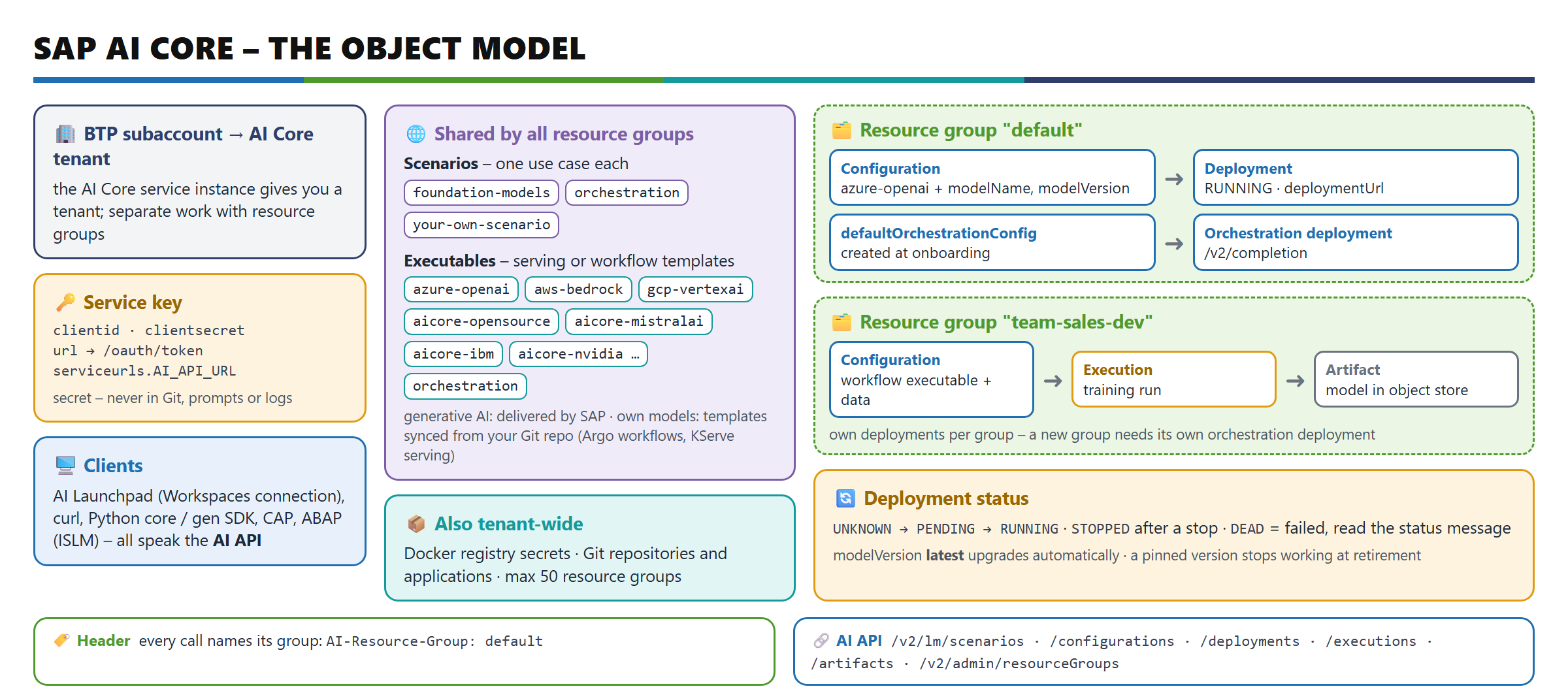
Object | Meaning | Generative AI example |
|---|---|---|
Scenario | One AI use case; groups executables | Global scenarios |
Executable | A template: workflow template (training, runs on Argo Workflows) or serving template (inference server, KServe) | azure-openai, aws-bedrock, gcp-vertexai, aicore-mistralai, aicore-sap, aicore-nvidia, aicore-cohere, perplexity-ai, orchestration (earlier lists: aicore-opensource, aicore-ibm) |
Configuration | Executable + parameter bindings + input artifacts | Executable |
Deployment | A running serving executable with a | The LLM endpoint you call |
Execution | One run of a workflow executable (e.g. training) | Not needed for LLMs; used for own models |
Artifact | Registered dataset or model in an object store | Not needed for LLMs |
For your own models (classic ML) you add the GitOps part: register a Git repository with workflow / serving templates, create an application that syncs it, register a Docker registry secret and an object store secret. For generative AI all of this is pre-delivered: you only create configurations and deployments.
2.5 The AI API
AI Core implements the open AI API – the same API AI Launchpad uses, so any runtime that implements it can be connected to Launchpad. The paths you use most:
Path (after | Purpose |
|---|---|
GET /v2/lm/scenarios | Which scenarios exist (is |
GET /v2/lm/scenarios/foundation-models/models | Model discovery: executable, model name, versions, context length, cost, deprecation and retirement dates |
POST /v2/lm/configurations | Create a configuration |
| Create a deployment, read status and |
PATCH /v2/lm/deployments/{id} | Switch to another configuration or stop the deployment |
POST /v2/admin/resourceGroups | Create a resource group (admin API, no resource group header) |
GET /v2/admin/quota/model | Rate limits per model (Part 7) |
| Training runs and artifacts (own models) |
Part 3 – Setting up AI Core, AI Launchpad and the generative AI hub
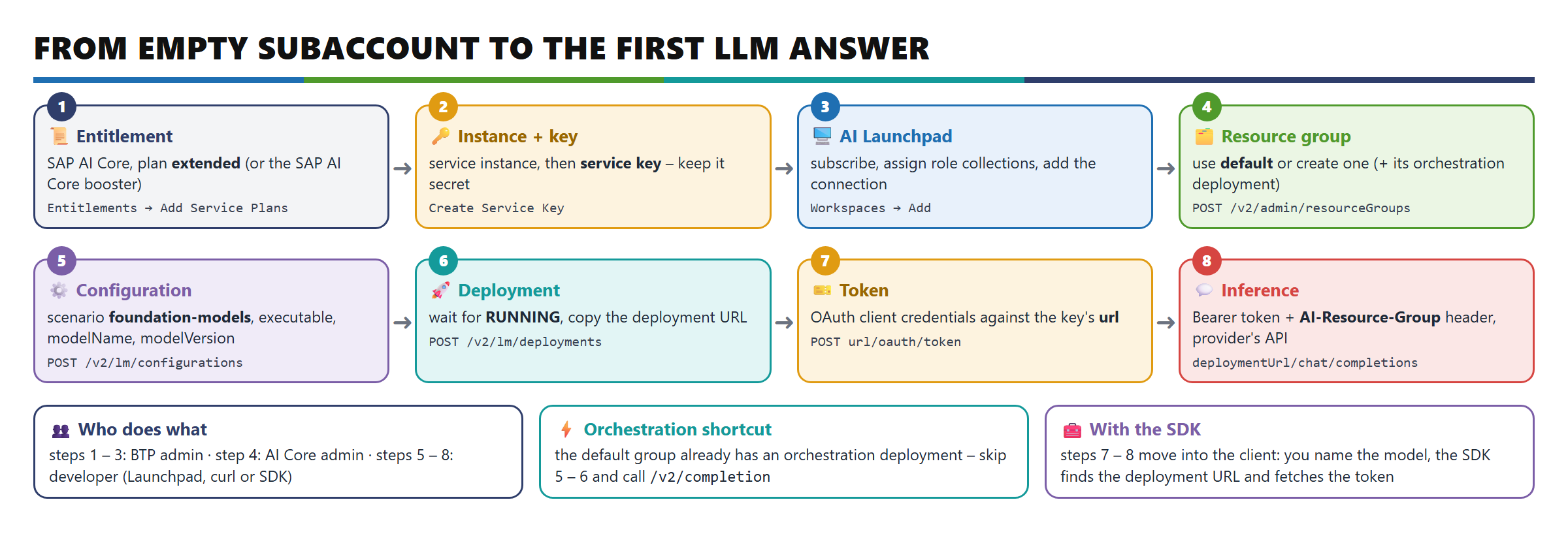
3.1 SAP AI Core instance and service key (BTP cockpit)
- 1. Entitlement: subaccount → Entitlements → Configure Entitlements → Add Service Plans → SAP AI Core, plan extended → save.
- 2. Instance – either manually (Service Marketplace → SAP AI Core → Create) or with the SAP AI Core booster: Boosters → SAP AI Core → Start → choose the extended plan and your subaccount → Finish. The booster provisions the instance for you (SAP's tutorial adds the entitlement first).
- 3. Service key: Instances and Subscriptions → your AI Core instance → Create Service Key → name → Create; download it to a safe place (password manager or secret store).
3.2 SAP AI Launchpad
- 4. Subscribe: Service Marketplace → SAP AI Launchpad → Create (plan standard); status Subscribed in Instances and Subscriptions.
- 5. Roles: Security → Users → Assign Role Collection. Default collections include
ailaunchpad_connections_editor,ailaunchpad_mloperations_editor,ailaunchpad_aicore_admin_editorandailaunchpad_allow_all_resourcegroups, plusailaunchpad_genai_experimenter,ailaunchpad_genai_managerandailaunchpad_genai_administrator; for the generative AI hub apps you need one of the rolesgenai_manager,prompt_manager,genai_experimenter,prompt_experimenter.- Collections ending in
_without_genaideliberately hide the generative AI hub – a classic reason why the menu is missing. - Users with only an *experimenter* role can run prompts but not save templates.
- Collections ending in
- 6. Connect: open Launchpad → Workspaces → Add → *Create AI API Connection*: name (lowercase, digits,
-,.), upload the service key file (or enterAI_API_URL,url,clientid,clientsecret). - 7. Select the connection and a resource group in Workspaces – now the Generative AI Hub entry appears in the side navigation.
3.3 Resource group
- 8. Launchpad: SAP AI Core Administration → Resource Groups → Create (role
aicore_admin_resourcegroup_editor). Or with the AI API:
|
3.4 Enabling the generative AI hub
- With the extended plan the generative AI hub is on: the scenarios
foundation-modelsandorchestrationappear under ML Operations → Scenarios. Iffoundation-modelsis missing, check the service plan. - The
defaultresource group has an orchestration deployment (configuration namedefaultOrchestrationConfig). A new resource group needs its own:
|
- Tip: use one resource group for all generative AI work of an app – deployments are per resource group, so a second group means repeating the deployments.
Part 4 – Deploying a foundation model
You need a model deployment for direct calls (native provider APIs, LangChain proxy clients – page 07). For calls through orchestration the orchestration deployment is enough – no deployment per model.
4.1 In AI Launchpad
- 1. ML Operations → Configurations → Create: name, scenario
foundation-models, a version (your own reference, e.g.0.0.1), the executable of the provider. - 2. Input parameters:
modelNameandmodelVersion(latestor a fixed version) → Review → Create. - 3. Create Deployment from the configuration → wait until the status is RUNNING → copy the deployment URL.
- Shortcut: Generative AI Hub → Model Library → model card → Deploy.
4.2 Executables of the foundation-models scenario
Executable ID | Provider / hosting | Typical models (examples) |
|---|---|---|
azure-openai | Azure OpenAI Service (private instance) | GPT family, OpenAI embedding models |
aws-bedrock | AWS Bedrock | Anthropic Claude, Amazon Nova |
gcp-vertexai | Google Vertex AI | Gemini |
aicore-opensource | Earlier executable, hosted by SAP AI Core, OpenAI-compatible API – not in SAP's current model list | Open models |
aicore-mistralai | Hosted by SAP AI Core | Mistral models |
aicore-ibm | Hosted by SAP AI Core | IBM models (earlier executable – not in SAP's current model list) |
| Further providers (see each model's page) | NVIDIA, Cohere, Perplexity models |
- Exact
modelNamevalues (e.g. Bedrock models are writtenprovider--model, likeanthropic--claude-…) and versions: SAP Note 3437766 or the model discovery endpoint.
4.3 With the AI API (curl)
|
4.4 The same with the Python core SDK
sap-ai-sdk-core (import ai_core_sdk, version 3.5 in October 2026) wraps the AI API; it reads the same AICORE_* variables as the generative SDK (page 07, Part 2).
|
- Clean up: stop and delete deployments you no longer need (
PATCHwithtargetStatusSTOPPED, thenDELETE) – they count against the tenant's deployment quota, and deployments of own models reserve compute that is billed by resource plan.
Part 5 – Calling a deployment directly (curl and Python)
Two things are always needed: an OAuth token (client credentials grant against the XSUAA URL of the service key) and the header AI-Resource-Group. The path after the deployment URL is the provider's own API.
Executable | Path after | Body format |
|---|---|---|
azure-openai |
| OpenAI chat completions |
aws-bedrock |
| AWS Bedrock Converse / InvokeModel |
aicore-… executables (SAP-hosted) | OpenAI-compatible API (paths per model in the docs) | OpenAI chat completions |
orchestration |
| SAP harmonised orchestration request (page 07) |
5.1 curl
|
- On Windows PowerShell call
curl.exe(not thecurlalias) or useInvoke-RestMethod.
5.2 Python with requests
|
- Cache the token until shortly before
expires_in– fetching a new one for every request adds a round trip to each call. - In real projects use the SDK instead of raw HTTP: it finds the deployment URL by model name, renews tokens and retries on HTTP 429 (page 07). Careful: the SDK's variable
AICORE_AUTH_URLis the full token URL including/oauth/token.
5.3 Keeping secrets out of code
Where the app runs | Where the credentials come from |
|---|---|
Your laptop | Environment variables or |
Cloud Foundry / Kyma | Bind the AI Core instance to the app – credentials arrive in |
Several apps / other subaccounts | A BTP destination of type OAuth2ClientCredentials that points to |
Part 6 – The generative AI hub in AI Launchpad
Select the connection and resource group in Workspaces, then expand Generative AI Hub in the side navigation.
App | What you do there | Needs |
|---|---|---|
Model Library | Catalog (all models, filters, model cards with input types, cost and deprecation), Leaderboard (benchmark scores), Chart; from a model card: Deploy, Use in Chat / Prompt, see your rate limit and Increase Quota | Any generative AI hub role |
Chat | Chat with a model; model settings (model, parameters, streaming), chat context (template, context history, system message, examples); image and PDF input for some models (5 MB limit) | Running orchestration deployment |
Prompt Editor | Messages with roles, variables ( | Orchestration deployment; *manager* role to save |
Prompt Management (templates / prompt registry) | Versioned prompt templates, reusable from code and orchestration (page 07, Part 5) | Save rights |
Orchestration | Build and test an orchestration workflow (templating, filtering, masking, grounding, translation) and save it as an orchestration config | Orchestration deployment |
Evaluations | Compare prompt templates and models (as orchestration configs) on your own dataset with predefined or custom metrics | Evaluation set-up |
Grounding Management | Data repositories and pipelines for document grounding – page 08 | Grounding set-up |
- Saved prompts → templates: the older *prompt* objects of the prompt editor are retired on 29 November 2026; download them and recreate them as templates (templates also work with orchestration).
- Templates are stored per region, count against a tenant storage limit (see Administration) and must not contain personal data.
- Model comparison in practice: the Model Library leaderboard for a shortlist, then the same template against two or three models in the prompt editor, then a proper Evaluation before you decide.
- ML Operations (Scenarios, Configurations, Deployments, Executions) is the classic app for both own models and LLM deployments; SAP AI Core Administration manages resource groups, secrets and Git repositories.
Part 7 – Monitoring, cost, quotas and the model lifecycle
7.1 Monitoring
- Deployment status: ML Operations → Deployments (or
GET /v2/lm/deployments):PENDING→RUNNING;DEADmeans it failed – read the status message;STOPPEDafter a stop. - Own model deployments: logs via the AI API / core SDK (
deployment.query_logs(...)). - Inference observability (opt-in): stores metadata (model, version, input / output tokens, latency) and optionally request, response and feedback in your S3 object store; only requests that ask for it in their headers are recorded. Stored payloads are not masked – mind personal data.
- Application side: log the orchestration
request_id, token usage and latency per call; trace chains and agents with LangSmith (page 07, Part 6).
7.2 Cost
- Generative AI is metered in tokens → converted per model into GenAI tokens → billed as BTP capacity units (CU). Output tokens usually cost more than input tokens. The conversion rates per model are in SAP Note 3437766.
- Orchestration modules have their own metrics: grounding storage (GB/day) and retrieval (text blocks), content filtering (text blocks), data masking (API calls); inference observability storage is billed too.
- AI units are a different currency – for Premium AI features in SAP applications (page 01, Part 5). Your own apps on the generative AI hub consume CUs.
- Estimate with the SAP AI Core Cost Calculator; watch real consumption in the BTP cockpit usage views.
SAP's sizing example (fictitious rates) | Value |
|---|---|
One RAG request | 3,500 input + 300 output tokens |
GenAI tokens per request | 3.5 × 0.00112 + 0.3 × 0.00320 = 0.00488 |
CU per request (× 1.90385) | 0.00929 |
25,000 requests per month (LLM only) | ≈ 232 CU – grounding, filtering and masking add ≈ 186 CU |
7.3 Quotas and rate limits
- Requests per minute per model, per tenant; all resource groups share the tenant limit unless a resource group gets its own; all versions of a model share one limit. Exceeding it returns HTTP 429 (also possible when the hyperscaler is saturated) – honour
Retry-After, back off exponentially with jitter.
|
- Increase:
POST /v2/admin/quota/requests(tenant or"scope": "resource_group"), or in Launchpad Administration → Quota Management → Create (rolesgenai_administrator/prompt_administrator); requests go through approval. - Other limits: deployments and replicas per tenant (ticket on component
CA-ML-AIC), 50 resource groups, five tenant-wide generic secrets.
7.4 Model lifecycle
- Every model version has a deprecation / retirement date (model discovery endpoint, Model Library, SAP Note 3437766).
- Auto upgrade:
modelVersion=latest– the deployment moves to new versions automatically. - Manual upgrade: pin a version; before its retirement create a configuration with the new version and
PATCHthe deployment to it – the deployment URL stays the same. A pinned deployment stops working on the retirement date. - Production advice: pin versions, test the successor with an Evaluation, then switch.
Part 8 – Interview questions
Q1. Which SAP AI Core plan do you need for the generative AI hub?
The extended plan. standard is for own models without generative AI; you can upgrade standard → extended but not downgrade. AI Launchpad has a single standard plan.
Q2. What is in an AI Core service key and how do you get a token?
clientid, clientsecret, the XSUAA url and serviceurls.AI_API_URL (or certificate fields for X.509). POST grant_type=client_credentials to url/oauth/token and send the token as Bearer header.
Q3. What is a resource group and why use several?
An isolation unit inside one tenant; configurations, deployments, executions and artifacts belong to one group, named in the AI-Resource-Group header. Separate teams, stages or customers, and give heavy workloads their own rate limit.
Q4. Explain scenario, executable, configuration, deployment and execution.
Scenario = use case; executable = workflow (training) or serving (inference) template; configuration = executable + parameters + artifacts; deployment = a running serving executable with a URL; execution = one run of a workflow.
Q5. How do you deploy an LLM in SAP AI Core?
Create a configuration in scenario foundation-models with the provider executable (e.g. azure-openai) and parameter bindings modelName / modelVersion, create a deployment from it, wait for RUNNING and use the deploymentUrl – in Launchpad, with the AI API or the SDK.
Q6. Do you need a deployment per model when you use orchestration?
No. Orchestration has its own deployment (pre-created in default) and reaches all models of the generative AI hub by name. Per-model deployments are only needed for direct calls.
Q7. Which executables exist in the foundation-models scenario?
azure-openai, aws-bedrock, gcp-vertexai, aicore-mistralai, aicore-sap (sap-abap-1, SAP-RPT-1; earlier lists: aicore-opensource, aicore-ibm), and newer ones such as aicore-nvidia, aicore-cohere and perplexity-ai; orchestration uses scenario and executable orchestration. Model names and versions: SAP Note 3437766 or /v2/lm/scenarios/foundation-models/models.
Q8. Which headers does an inference call need?
Authorization: Bearer <token> and AI-Resource-Group: <group of the deployment>, plus Content-Type: application/json; Azure OpenAI paths also need the api-version query parameter.
Q9. How do you keep AI Core credentials out of the code?
Environment variables or the SDK config file locally, service binding (VCAP_SERVICES) on Cloud Foundry or Kyma, or a BTP destination; never in Git, prompts or logs, and rotate the key.
Q10. The Generative AI Hub menu is missing in AI Launchpad – what do you check?
The AI Core plan (extended?), that a connection and resource group are selected in Workspaces, and the user's role collections – a generative AI role is needed and _without_genai collections hide it.
Q11. How is generative AI usage billed?
Tokens per model are converted to GenAI tokens and billed as BTP capacity units; orchestration modules (grounding, filtering, masking) and inference observability have their own metrics. AI units are for Premium AI in SAP applications, not for your own AI Core usage.
Q12. You get HTTP 429 from the generative AI hub – what does it mean and what do you do?
The per-model requests-per-minute limit (tenant or resource group) is exceeded or the provider is saturated. Retry with exponential backoff and jitter honouring Retry-After, spread load, cache, add a fallback model, isolate workloads in resource groups and request a quota increase.
Q13. modelVersion latest or a fixed version?
latest upgrades automatically but can change behaviour; a fixed version is predictable but stops working on its retirement date. In production pin it, evaluate the successor and PATCH the deployment.
Q14. What do Model Library, Prompt Editor and Evaluations give a developer?
Model Library: catalog, benchmark leaderboard, cost and deprecation per model. Prompt Editor: design and test prompts with variables, tools and JSON response formats, save them as versioned templates. Evaluations: compare prompt / model combinations on your own data with metrics.
🏠 Start Here · ◀ 05 · C_JSD Certification · 07 · SDK & Orchestration ▶ · Sections: CORE ABAP | OOPS ABAP | ABAP on HANA | Clean Core | RAP | ABAP Points | SAP Fiori | SAPUI5 | Mobile Development (MDK) | BTP Foundations | BTP Development | CAP | SAP Build | ABAP on BTP | Integration Suite | SAP Business AI | SAP BASIS | Security | SAP SDLC
Functional: FICO ABAP | TRM ABAP | VIM | SAP BIS | SD ABAP | MM ABAP | PP ABAP | QM ABAP | PM ABAP | PS ABAP | EWM | TM ABAP | GTM ABAP | EHS ABAP | HR ABAP | BW | SAP Datasphere | SAP Business Data Cloud | SAP MDG | SAP Analytics Cloud | SAP Ariba | SAP CX | SAP IBP