How a developer uses the generative AI hub from Python code: which SDK to install, how it finds your SAP AI Core credentials, calling models through native and LangChain clients, the orchestration service with templating, content filtering, data masking, grounding and translation, the prompt registry, LangChain agents with LangSmith tracing, and how to handle errors, rate limits and cost. Prerequisites – an AI Core instance with the extended plan, a service key, resource groups and deployments – are on page 06. RAG with the HANA Cloud vector engine and knowledge graphs: page 08. Streamlit apps, Cloud Foundry deployment, S/4HANA OData tools and LangGraph agents end to end: page 09.
Status of facts: November 2026 – sap-ai-sdk-gen 7.4.1 (September 2026), sap-ai-sdk-core 3.5.0 (October 2026), LangChain 1.x. The SDK moves fast: check the release notes before you copy code.
Part 1 – The SDK landscape: which SDK when
SAP Cloud SDK for AI is SAP's official SDK family for SAP AI Core, the generative AI hub and orchestration – for Python, JavaScript / TypeScript and Java.
Package | Import / artifact | What it is for |
|---|---|---|
| gen_ai_hub | Model access through native provider SDKs (OpenAI, Amazon, Google) and LangChain, orchestration ( |
|
| AI Core administration and lifecycle: configurations, deployments, resource groups, secrets, Git repositories (page 06, Part 4) |
| ai_api_client_sdk | Low-level AI API client used by the two above |
| gen_ai_hub | Deprecated – last release 4.12.4 (May 2025); the same SDK was renamed to |
|
| Node.js and CAP apps (CAP example on page 04, Part 8) |
SAP Cloud SDK for AI (Java) |
| Java 17+, optional Spring AI and CAP Java integration |
CAP LLM plugin |
| Older open-source community plugin, provided as-is – SAP recommends the SDK for new projects |
ABAP AI SDK |
| ABAP with ISLM – page 04 |
You build … | Use |
|---|---|
A Python app, notebook, Streamlit UI or LangChain / LangGraph agent | sap-ai-sdk-gen |
Scripts that create deployments or resource groups (CI/CD, set-up) | sap-ai-sdk-core |
A CAP Node.js service |
|
A Java / Spring Boot or CAP Java service | SAP Cloud SDK for AI for Java |
Logic in S/4HANA or the SAP Business AI Platform, ABAP environment | ABAP AI SDK |
An existing multi-provider app built on LiteLLM | LiteLLM's SAP provider (route |
Part 2 – Setup: install, credentials, resource group
2.1 Install
|
- Requires Python 3.9 or later (classifiers list 3.10 – 3.14); pin the version in
requirements.txt– minor releases add and deprecate classes.
2.2 Credentials – three sources, in this order
Order | Source | When |
|---|---|---|
1 | Environment variables | Local development, containers, CI |
2 | Config file | Developer laptop with several tenants |
3 |
| App on Cloud Foundry / Kyma (page 09) |
|
AICORE_AUTH_URL= the service keyurlplus/oauth/token;AICORE_BASE_URL=AI_API_URLplus/v2– the two most common set-up errors.- X.509 instead of a secret:
AICORE_CERT_FILE_PATHandAICORE_KEY_FILE_PATH(or the…_STRvariants). - The config file lives in your home folder, outside the project – nothing to commit. If you use a project
.env, put it in.gitignore. - Resource group:
AICORE_RESOURCE_GROUPselects where the SDK looks for deployments; the orchestration client also needs an orchestration deployment in that group (page 06, Part 3.4).
Part 3 – Calling models: native clients, LangChain, streaming, embeddings
The proxy clients look like the providers' own SDKs, but the SDK replaces the endpoint and token: you name the model, the SDK finds the matching deployment in your resource group. Each model you call this way needs its own deployment in scenario foundation-models (page 06, Part 4).
3.1 OpenAI-style chat (native client)
|
3.2 Amazon Bedrock and Google Gemini (native clients)
|
- The model names above are SAP's documentation examples; the list changes every quarter – take the current names from the Model Library or SAP Note 3437766.
3.3 LangChain clients
|
init_llmpicks the right LangChain class from the model name (OpenAI, Bedrock foramazon--/anthropic--, Google forgemini). You can also use the classes directly:gen_ai_hub.proxy.langchain.openai.ChatOpenAI(proxy_model_name=...),...amazon.ChatBedrock,...google_genai.ChatGoogleGenerativeAI.- Answers cut off after a few lines?
init_llmdefaults tomax_tokens=256– raise it.
3.4 Streaming
|
- Streaming improves perceived latency in chat UIs (e.g. Streamlit's
st.write_stream– page 09); not every model supports it – the model discovery data has astreamingSupportedflag.
3.5 Embeddings
|
- Use one embedding model for documents and questions; vector storage and similarity search in HANA Cloud are on page 08.
Part 4 – The orchestration service in Python
4.1 Why orchestration
- One endpoint, any model: the harmonised API takes OpenAI-style messages and parameters and maps them to the provider (e.g. one
max_completion_tokensfor every model); switching the model is a config change. - No per-model deployment: one orchestration deployment per resource group reaches all models.
- Guardrails as configuration: templating, content filtering, data masking, grounding and translation are modules in the same request – not code you write and test yourself.
- Fallbacks: a list of module configurations is tried in order until one succeeds.
- Use the v2 API: endpoint
/v2/completion, Python packagegen_ai_hub.orchestration_v2. The v1 packagegen_ai_hub.orchestrationis marked deprecated in the SDK documentation.
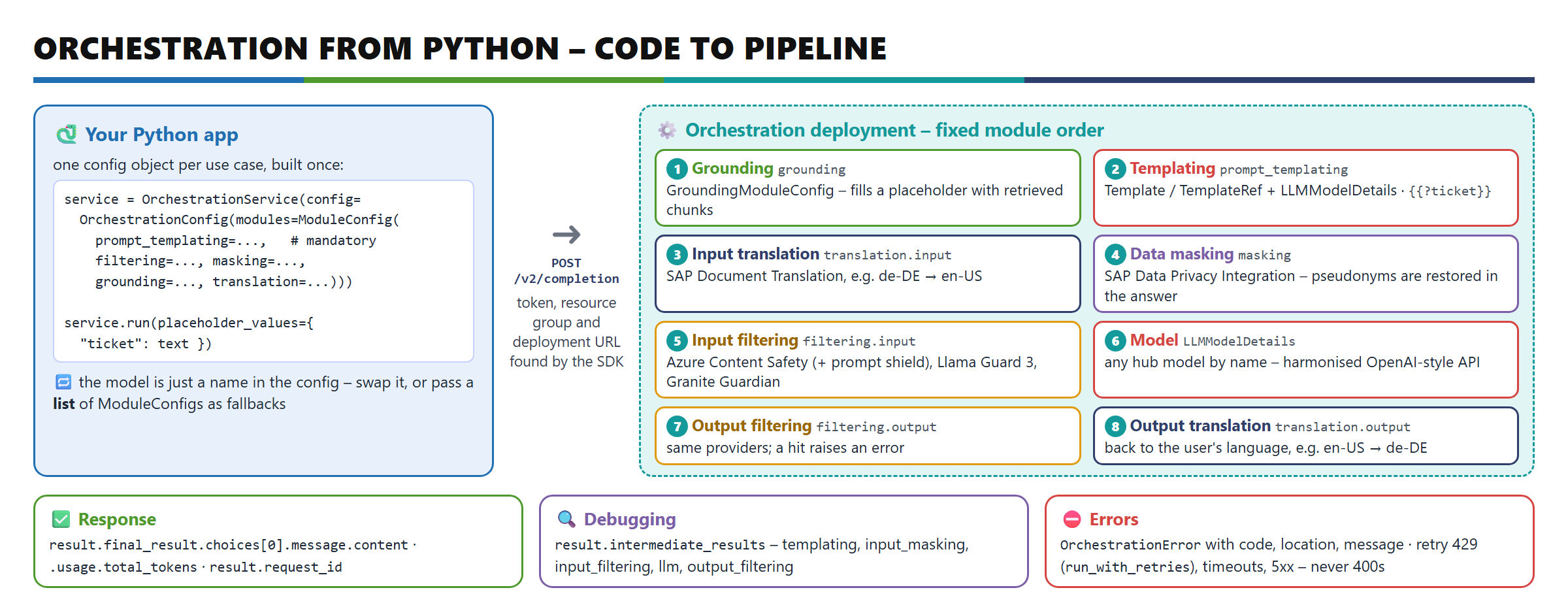
4.2 The modules and their Python classes
Module (JSON key) | Python class | Provider / options |
|---|---|---|
Templating + model (mandatory) | PromptTemplatingModuleConfig(prompt=Template(...), model=LLMModelDetails(...)) | Placeholders |
Content filtering | FilteringModuleConfig(input=InputFiltering(...), output=OutputFiltering(...)) | Azure Content Safety (hate, sexual, violence, self-harm; thresholds 0 / 2 / 4 / 6; input |
Data masking | MaskingModuleConfig(providers=[MaskingProviderConfig(...)]) | SAP Data Privacy Integration: anonymization or pseudonymization of entities such as person, email, phone, address, IBAN; custom regex; allowlist |
Grounding | GroundingModuleConfig(config=DocumentGroundingConfig(...)) | Document Grounding service: vector data repositories or help.sap.com – page 08 |
Translation | TranslationModuleConfig(input=..., output=...) | SAP Document Translation, e.g. de-DE → en-US before the LLM and back |
4.3 Full example – support ticket assistant
A German customer e-mail is translated, personal data is pseudonymised, the input is filtered, the LLM answers in a fixed structure, the output is filtered and translated back.
|
result.intermediate_resultsshows what each module did (templating,input_masking,input_filtering,llm,output_filtering…) – the first place to look when an answer is odd.- Detected entities are masked before the prompt reaches the model (detection is automatic and not guaranteed to catch everything); with pseudonymization the placeholders in the answer are replaced back, with anonymization they stay masked.
- A filter hit is an error, not an empty answer: catch
OrchestrationErrorand show the user a neutral message.
4.4 Grounding (short) and other options
|
- Setting up the document repositories and pipelines, and the alternative of your own vector search in HANA Cloud: page 08.
- Streaming:
OrchestrationConfig(modules=..., stream=GlobalStreamOptions(enabled=True))andfor part in service.stream(...):part.final_result.choices[0].delta.content. - Async:
await service.arun(...)andservice.astream(...)for web back ends. - Fallback models:
OrchestrationConfig(modules=[ModuleConfig(...primary...), ModuleConfig(...fallback...)])– the service tries them in order. - Stored configs: instead of building the config in code, reference an orchestration config saved in the prompt registry / AI Launchpad:
service.run(config_ref=...).
Part 5 – Prompt templates and the prompt registry from code
The prompt registry stores versioned prompt templates (and orchestration configs) in AI Core, so prompts can change without a code release. Templates saved in AI Launchpad's prompt editor land in the same registry.
|
|
Way to manage templates | How | Good for |
|---|---|---|
Imperative | API / SDK calls ( | Experiments, design time |
Declarative | Files | Productive apps, CI/CD, review via pull request |
- Version templates like code (
1.0.0→1.1.0) and reference an exact version in production; aTemplateRefByIDpoints to one specific stored template. - Reference scope:
scope="tenant"(default) or"resource_group".
Part 6 – LangChain on the generative AI hub: a chain, a tool-calling agent, LangSmith
The proxy LangChain models from Part 3 are normal LangChain chat models, so every LangChain feature works with SAP-hosted models. LangChain basics (runnables, prompts, tools, memory) are in your AI notebook; here only the SAP-specific wiring.
6.1 A small chain
|
6.2 A tool-calling agent
|
create_agent(LangChain 1.x) builds a LangGraph agent loop: model → tool calls → tool results → model, until it answers. Real tools that call S/4HANA OData APIs, multi-step LangGraph graphs and deployment to Cloud Foundry: page 09.- Tool calling needs a model that supports it (check the model card) – GPT, Claude and Gemini models do.
- The tool runs in your process with your credentials: validate arguments, keep tools read-only unless a human confirms, and never pass secrets through the prompt.
6.3 LangSmith tracing of SAP-hosted model calls
LangSmith records every chain / agent step (prompt, model call, tool call, tokens, latency). Because the SAP proxy models are LangChain models, tracing needs only environment variables:
|
- Data protection: traces contain the full prompts and answers. Sending them to LangSmith's cloud is a data transfer outside SAP BTP – clear it with data protection, never trace production data with personal data unless approved (self-hosted LangSmith is an option), and keep using orchestration masking.
- Short-lived processes (jobs, serverless): make sure traces are flushed before exit (in Python call
wait_for_all_tracers()fromlangchain_core.tracers.langchain). - LangSmith traces the LangChain side; the AI Core side has inference observability (page 06, Part 7) and the orchestration
request_idto correlate both.
Part 7 – Errors, rate limits, retries and cost
Symptom | Likely cause | Fix |
|---|---|---|
401 / token error at start-up | Wrong | Compare with the service key; rotate a leaked key |
404 or "no deployment found" | No deployment for that model in this resource group, wrong | Deploy the model (page 06) or use orchestration; check |
"No Orchestration deployment found!" | New resource group without an orchestration deployment | Create one (page 06, Part 3.4) |
400 from orchestration | Invalid config, e.g. unknown model name, placeholder without value | Read |
| Content filter blocked input or output | Expected behaviour – show a neutral message, log the request ID |
429 Too Many Requests | Requests-per-minute limit of the model (tenant or resource group) or provider capacity | Backoff with jitter, honour |
Answer cut off |
| Raise the limit; check |
Deployment stops working | Pinned model version reached its retirement date | Upgrade the configuration (page 06, Part 7.4) |
7.1 Retries
|
- Orchestration also retries the model call itself:
LLMModelDetails(..., max_retries=2, timeout=600)(defaults; Vertex AI models ignore them). - Do not retry 400 errors or filter hits – only 429, timeouts and 5xx. Set a client
timeoutso a hung call does not block a web worker:OrchestrationService(config=config, timeout=60).
7.2 Cost tips
- Every call costs input + output tokens (converted to capacity units – page 06, Part 7.2). Log
usage.total_tokensper call and per user from day one. - Choose the smallest model that passes your evaluation; use large models only where needed (route by task).
- Keep prompts short: send the 3–5 best chunks, not whole documents; trim chat history; set
max_completion_tokens. - Cache answers for repeated questions and embeddings for unchanged documents.
- Each orchestration module (grounding, filtering, masking) has its own metric – switch on what the use case needs, not everything.
- Batch jobs: the SDK has a batch service (
gen_ai_hub.batch_service) for large offline workloads – check availability and pricing for your models in the current docs.
Part 8 – Interview questions
Q1. Which Python package do you install for the generative AI hub today?
sap-ai-sdk-gen (SAP Cloud SDK for AI, generative part; import gen_ai_hub). generative-ai-hub-sdk is the deprecated old name – same import path. sap-ai-sdk-core is for AI Core administration.
Q2. How does the SDK find your credentials?
First AICORE_* environment variables, then ~/.aicore/config.json (or AICORE_HOME, AICORE_PROFILE, AICORE_CONFIG), then VCAP_SERVICES of a bound instance on Cloud Foundry or Kyma.
Q3. Native proxy client, LangChain client or orchestration – when which?
Native clients when you need provider-specific features; LangChain clients inside chains and agents; orchestration when you want one model-agnostic endpoint with masking, filtering, grounding and translation – the default for business apps.
Q4. Why do direct model calls need a deployment per model but orchestration does not?
Direct calls go to the model's own deployment URL in scenario foundation-models. Orchestration is one deployment that routes to any hub model named in the request.
Q5. Name the orchestration modules and which are mandatory.
Templating with the model configuration is mandatory; grounding, content filtering (input / output), data masking and translation (input / output) are optional.
Q6. How do you write a placeholder in an orchestration template?
{{?name}}; values come from placeholder_values at run time, defaults from the template's defaults, and the grounding module can fill one placeholder with retrieved context.
Q7. Which content filters are available?
Azure Content Safety (hate, sexual, violence, self-harm with thresholds, plus prompt shield on input and protected-material detection on output), Llama Guard 3 8B with categories such as privacy, hate or specialized advice, and IBM Granite Guardian (e.g. jailbreak, social bias) – configured separately for input and output.
Q8. Anonymization or pseudonymization – what is the difference?
Both are done by SAP Data Privacy Integration before the LLM call. Anonymization replaces entities irreversibly; pseudonymization uses reversible placeholders that are put back into the answer.
Q9. What is the prompt registry and how do you use it from code?
A versioned store for prompt templates and orchestration configs in AI Core. Create templates with PromptTemplateClient or declaratively from Git, and reference them in orchestration with a TemplateRef by ID or scenario / name / version.
Q10. How do you build a LangChain agent on SAP-hosted models?
Create the model with init_llm from gen_ai_hub.proxy.langchain, define tools with @tool, and pass both to create_agent; the SDK handles authentication and deployment lookup.
Q11. How do you trace SAP-hosted model calls with LangSmith?
Set LANGSMITH_TRACING=true, LANGSMITH_API_KEY and LANGSMITH_PROJECT (plus LANGSMITH_ENDPOINT for EU). Because the proxy models are LangChain models, all steps are traced – mind that prompts leave BTP.
Q12. How do you handle HTTP 429 in Python?
Use the SDK's retry (run_with_retries, model-level max_retries), exponential backoff with jitter honouring Retry-After, fallback models in the orchestration config, separate resource groups for heavy workloads and a quota increase request.
Q13. A content filter blocks a request – what happens and what should the app do?
The orchestration call raises an OrchestrationError with code, location and message instead of returning an answer. The app shows a neutral message, logs the request ID and does not retry.
Q14. How do you keep LLM cost under control in a Python app?
Log token usage per call, choose the smallest model that passes evaluation, short prompts and limited output tokens, cache, enable only the needed orchestration modules, and watch capacity unit consumption in BTP.
🏠 Start Here · ◀ 06 · AI Core Hands-On · 08 · RAG & Knowledge Graphs ▶ · Sections: CORE ABAP | OOPS ABAP | ABAP on HANA | Clean Core | RAP | ABAP Points | SAP Fiori | SAPUI5 | Mobile Development (MDK) | BTP Foundations | BTP Development | CAP | SAP Build | ABAP on BTP | Integration Suite | SAP Business AI | SAP BASIS | Security | SAP SDLC
Functional: FICO ABAP | TRM ABAP | VIM | SAP BIS | SD ABAP | MM ABAP | PP ABAP | QM ABAP | PM ABAP | PS ABAP | EWM | TM ABAP | GTM ABAP | EHS ABAP | HR ABAP | BW | SAP MDG | SAP Analytics Cloud | SAP Ariba | SAP CX | SAP IBP