Data products are the building blocks of SAP Business Data Cloud (BDC). A data product is a curated, versioned and governed business data set – for example Sales Order or Cost Center – plus the metadata that explains it, exposed outside the application that produced it. For SAP applications, SAP itself builds and loads these SAP-managed data products through the foundation services; customers find them in the catalog, request access, and install them in SAP Datasphere or share them zero-copy with SAP Databricks, SAP Snowflake, SAP HANA Cloud or partner platforms. Customers can also publish their own customer-managed data products. This page explains what a data product is, its metadata and protocols (ORD, CSN, Delta Sharing), how the foundation services produce it, how source systems are connected, how data products are activated, governed, consumed and created. BDC changes fast – facts that may change are marked "as of <month year>". Components and architecture: page 01; intelligent content: page 03; SAP Databricks and partners: page 04; BW data products: page 05; versioning, release states and licences: page 06.
Part 1 – What a data product is
SAP Help: "A data product is a self-contained set of data exposed for consumption outside the producing application or service via APIs." The SAP Architecture Center (RA0013, "Data Products in SAP Business Data Cloud") adds that it is described by high-quality metadata, discoverable in a catalog, optimised for intensive reads and managed with a product mindset and clear ownership – ideas taken from data mesh.
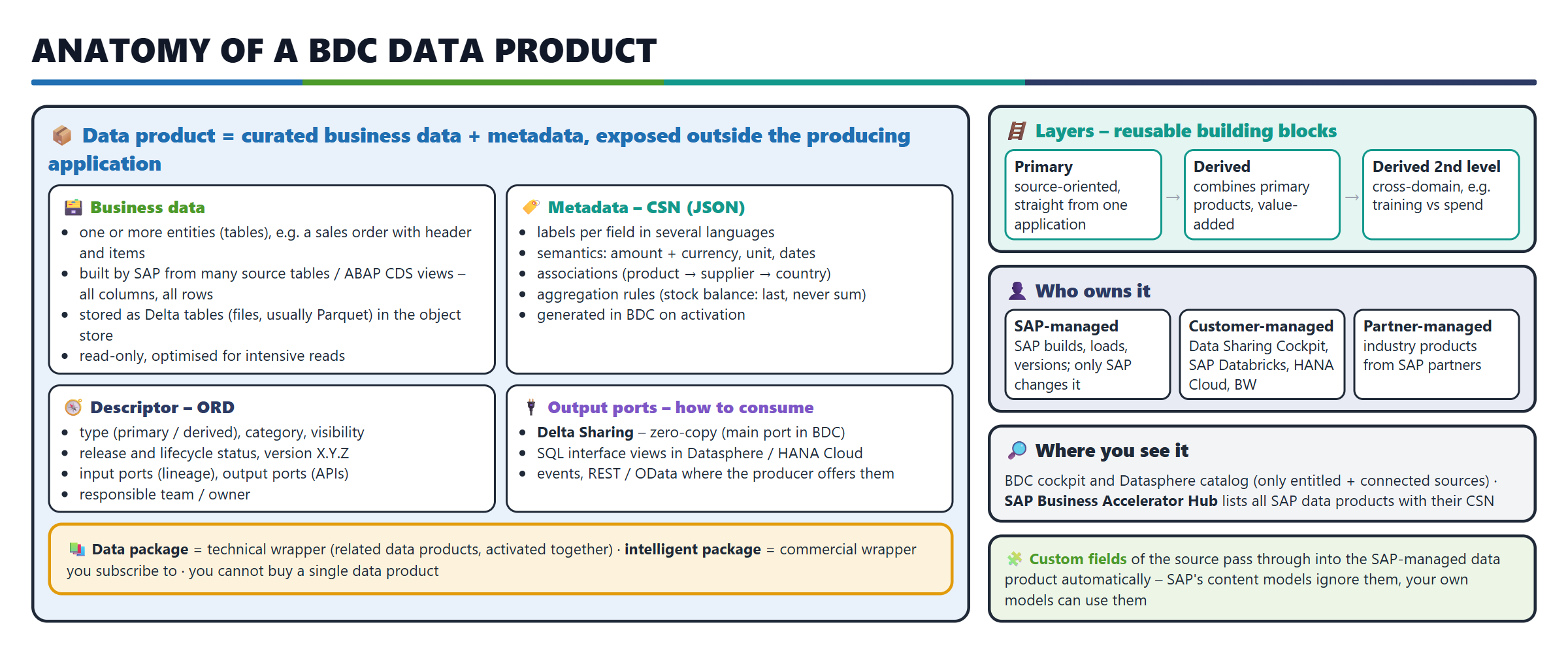
Characteristic | Meaning |
|---|---|
Complete business data | Transaction or master data from one or more source tables or views, forming a meaningful set with all columns – e.g. Sales Order with customer, material, dates, quantities |
Well described | Metadata gives the meaning of every field and how it relates to other data |
Easily consumable | Shared securely with data platforms and BI tools without a physical copy |
Discoverable | Self-describing and listed in the catalog |
Read-only, versioned, governed | Consumers read; the owner changes it in versions (X.Y.Z) with release states and access rules (page 06 Part 5) |
1.1 Attributes of a data product (RA0013)
Attribute | Description |
|---|---|
Type | Primary or derived |
Category | Kind of data set, e.g. business object or analytical |
Visibility | Exposure: public, internal or private |
Input ports | Integration dependencies describing the inputs – used for lineage |
Output ports | APIs or events through which the data is accessed |
Integration dependencies | Relationships with external resources |
Responsible | Organisation or team that owns the lifecycle |
- Supported API types (RA0013): SQL (including SQL interface views), Delta Sharing, events, REST and OData. In BDC the main port is Delta Sharing.
- Example – the S/4HANA data product Sales Order is built by SAP from many tables and ABAP CDS views; the material ID comes with descriptions in several languages, material type, supplier, country of origin and the valuation currency through the metadata.
Part 2 – Types, owners and packages
Type | Definition | Example |
|---|---|---|
Primary | Exposed directly from one application; source-oriented; not based on other data products | Journal Entries, Sales Orders, Learning History |
Derived | Combines and transforms one or more data products (or APIs) into a value-added, consumer-oriented set | Workforce Capability from learning and skills data |
Derived, 2nd level | Built on derived products, often across domains | Impact of training on spend behaviour |
Owner | Who builds and changes it | Where it lives |
|---|---|---|
SAP-managed | SAP – only SAP creates, updates and manages the lifecycle | Foundation services object store |
Customer-managed | The customer – Datasphere Data Sharing Cockpit, SAP Databricks, SAP HANA Cloud, BW Data Product Generator (Part 9) | Datasphere object store / the producing engine |
Partner-managed | SAP partners, typically industry-specific | Published through the catalog |
2.1 Data packages and intelligent packages
- Data package = the technical wrapper: related data products of one business area (e.g. sales order, customer) that you activate together. Data packages delivered through BDC are SAP-managed.
- Intelligent package = the commercial wrapper (e.g. SAP Cloud ERP Intelligence, People Intelligence). You subscribe to the intelligent package to get its data products even if you do not use its dashboards; you cannot subscribe to a single data package or data product.
- A data product appears in the cockpit only if the account has the commercial entitlement to the SAP business solution and the add-on entitlement to the intelligent package, and an instance of that solution is in a BDC formation.
- Package list, metrics and prerequisites: page 03 Part 2 and page 06 Part 1.3.
Part 3 – Metadata and open protocols: ORD, CSN, Delta Sharing
Standard | Purpose | In BDC |
|---|---|---|
ORD – Open Resource Discovery | SAP-developed open protocol to describe and discover APIs, events and data products; attributes such as visibility, release status and integration dependencies | Every source provides a data product definition through its ORD provider API; the BDC catalog acts as the aggregator |
CSN – Core Schema Notation | JSON format for entity and service models in the SAP ecosystem (also used by CAP) | Describes the metadata of each data product; the CSN file is generated in BDC when the data product is activated |
Delta Sharing | Open protocol for sharing data stored in data lake tables without copying | Zero-copy access for SAP Databricks, SAP Snowflake, HANA Cloud, BDC Connect and any Delta Sharing client (page 04) |
Delta table format | Open table format on Parquet files with ACID transactions | Storage format of data products in the object store; Apache Iceberg supported since October 2026 |
3.1 What the metadata carries
- Labels per field in several languages – technical name R_001_10a becomes Gross Revenue / Revenu Brut.
- Language field – which field decides the display language (e.g. country of the invoicing company code).
- Associations – product → supplier → country.
- Semantics – revenue is an amount with two decimals in currency EUR.
- Aggregation rules – a closing stock balance must never be summed over time; use Last.
- For S/4HANA the metadata comes from the ABAP CDS definitions; other sources use their own mechanisms – but the result is always CSN. This is what lets Joule and AI agents interpret the data correctly.
3.2 How Delta Sharing works
- The provider manages data lake tables and access permissions behind a sharing server.
- The recipient uses any Delta Sharing client (connectors exist e.g. for Apache Spark and Python), authenticates and asks for a table.
- The server checks the permission, logs the request and returns short-lived URLs; the client downloads the files directly from cloud storage – fast, scalable, no extra copy to govern.
Part 4 – Foundation services and the object store
The foundation services are the SAP-managed "backbone" of BDC. They are mandatory, part of BDC core, invisible to the customer and continuously monitored by SAP. Responsibilities (SAP Learning): extracting data from SAP applications, transforming and unifying it, generating data products, setting up initial and delta loads, managing storage in the object store, sharing data products with consumers, and their governance and security.
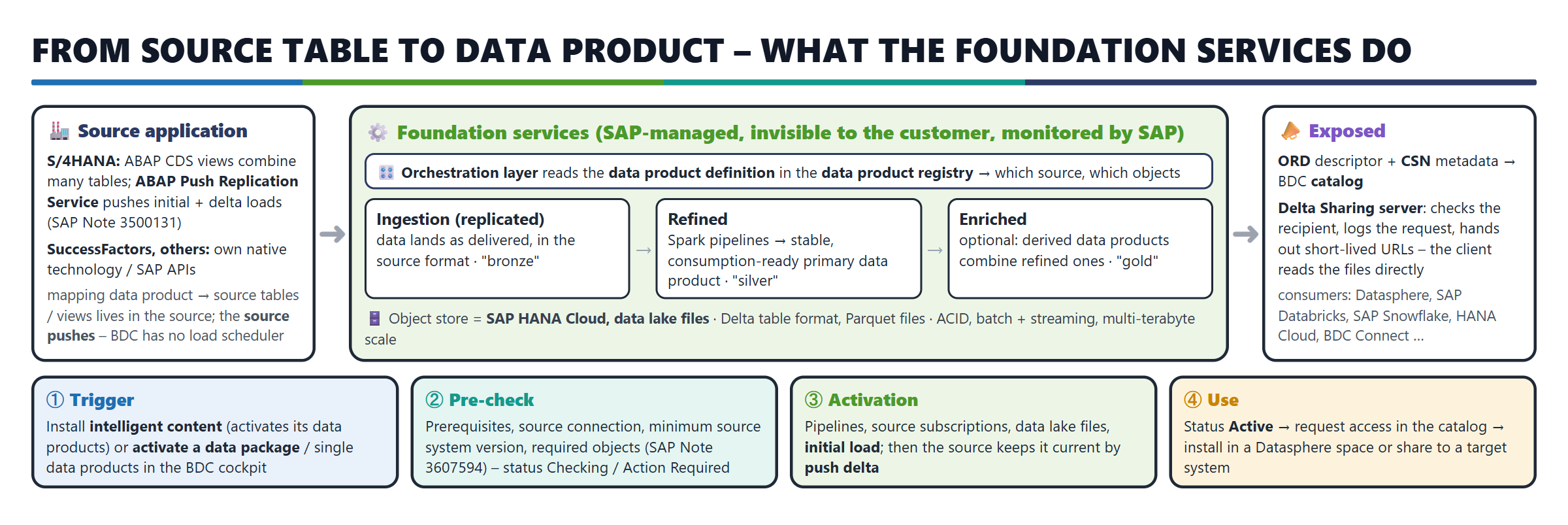
4.1 The flow
- 1. Trigger – an administrator installs intelligent content (which activates its data products) or activates a data package / single data products in the BDC cockpit.
- 2. Orchestration – the orchestration layer looks up the data product definition in the data product registry to find the source system and objects.
- 3. Ingestion – the source maps each data product to its tables / views and pushes the data into the ingestion (replicated) layer, still in the source format.
- 4. Refinement – Spark pipelines transform it into stable, consumption-ready data products (refined layer); derived products pass an additional enriched layer.
- 5. Exposure – the product is published via ORD to the catalog and shared via Delta Sharing.
- RA0013 describes the same layering as a medallion architecture: bronze, silver and (optionally) gold.
4.2 The object store
- Technically SAP HANA Cloud, data lake (data lake files) – data in files, usually Parquet, managed in the Delta table format: ACID transactions, scalable metadata, batch and streaming, multi-terabyte volumes at low cost.
- The foundation services object store holds SAP-managed data products only. Customer- and partner-managed products use the SAP Datasphere object store, also based on HANA Cloud, data lake.
- There is no load scheduler on the BDC side: after the initial load the source application keeps the data product current with its own push delta.
Part 5 – Connecting the source systems
Source (as of November 2026) | Integration | Notes |
|---|---|---|
SAP S/4HANA Cloud Private Edition | Releases 2021, 2022, 2023 and 2025. Install the ABAP Push Replication Service (APRS) via SAP Note 3500131 (ABAP Data Integration for BDC), set up inbound communication (technical user, role, PSE / certificate signing request), add the system to the formation, set up outbound communication (client certificate, RFC destination, register the outbound connection), configure the SAP Cloud Connector (minimum version 2.18) | SAP recommends the guided Cloud Integration Automation Service (CIAS) workflow; integration overview in SAP Note 3539174; several clients of one system can join the same formation |
SAP S/4HANA Cloud Public Edition | Fully automated by SAP once the tenant is added to a BDC formation | 3-system landscape: test tenant and production tenant each in their own formation with own Datasphere / SAC; or only production when standard content is used |
SAP SuccessFactors | Fully automated, one-directional sync to BDC | Only one SuccessFactors tenant per formation; different tenants for different formations |
Other SAP applications | Added as SAP ships their data products | Check SAP Note 3607594 and the What's New |
SAP BW (BW PCE) | Data Product Generator | page 05 |
Non-SAP sources | Not via foundation services – Datasphere connections, files or partner platforms, then customer-managed data products | Part 9 |
- APRS runs in the ABAP system: it optimises data movement into BDC and provides APIs to control and monitor the transfer. If function module
DHAFR_FOS_VERSION_GETdoes not exist, the system is not yet enabled. - Collection note: SAP Note 3607594 (Activation and Consumption of SAP Data Products for BDC – Prerequisites) lists the prerequisites per release and source – check it before every activation and update.
- Minimum system version: each data package and data product states the minimum source release. If the source in the formation is older, the product shows "Not Compatible with Source System Version" and cannot be activated.
- Custom fields: extension fields of the source tables are passed through automatically into the SAP-managed data product. SAP's own models ignore them – use them in your own Datasphere models. Some early S/4HANA data products typed custom fields as String(128); an update converts them to native types and may break consumers (SAP Note 3832388).
Part 6 – Activating, updating and deactivating data products
6.1 Activation (BD / BDC Administrator)
- 1. BDC cockpit → Intelligent Content and Data Packages → tab Available → choose the data package and the version; read its documentation.
- 2. Manage Package → Activate Package (all) or select single products → Manage → Activate. Dependencies are added automatically: derived products of the selection and the primary products they use.
- 3. Select the source system – a short connection check runs.
- 4. Start Pre-Check – status Checking; missing objects give Action Required with links to SAP Notes (Managing Validation Check Results).
- 5. Activation runs: prerequisites, connection to source tables and views, pipelines, source subscriptions, data lake files and the initial load. Follow it in the Monitoring app.
- 6. Status Active → tell catalog administrators and Datasphere modelers that they can request access (Part 7).
6.2 Rules of activation
- You cannot choose tables, fields or filters – SAP defines the complete set so that every use case works on the same trusted data. Reduce data later in your own views.
- Activation does not ask for a formation: the product lives in the foundation services and can be installed in the Datasphere tenants of several formations (e.g. DEV and TEST).
- Installing intelligent content activates its data products automatically if they are not active yet.
- Several major versions of the same data package or product can be active side by side; each operates independently.
6.3 Statuses of a data package
Status | Meaning |
|---|---|
Available | Made available by SAP for your entitlements and sources |
Activating | Data products are being activated in the catalog |
Active | All data products of the package are active |
Partially Active | Some products active, others waiting for activation |
Activation Failed | Source release too low, activation pending, or connectivity / data / configuration issues – retry or open an SAP support case |
Entitlement Invalid | Entitlement expired or terminated – renew it or deactivate |
Deactivation in Progress | Products are being deactivated |
- Operation statuses on single products include Checking, Action Required and Update Failed (with a correlation ID for SAP Support).
6.4 Updates
- Minor (0.X.0) and patch (0.0.X) versions show Update Available; update per package or per product. Major versions are new objects installed side by side (versioning and release states: page 06 Part 5).
- SuccessFactors supports only the latest minor / patch version: until you update, the product stays Active but receives no new data, Datasphere replication flows fail and SAC stories show old data. Other sources keep delivering on the old minor version until you update.
- An update can take up to several days for large volumes. Afterwards new delta shares are created: Datasphere administrators stop and restart the replication flows, and references to the old delta shares are updated.
6.5 Deactivation
- Done by the BD Administrator when a product is no longer needed or the entitlement ended. Prerequisite: uninstall the intelligent content that uses it and the installations in all Datasphere spaces and other target services.
- Effects: removed from the catalog (status Inactive); deactivated in every data package and intelligent content that contains it (content becomes Not Operational); Datasphere replication flows stop and related objects are cleared; the last product of an ingestion space deletes that space; installations in other consumer systems keep running but no new access requests are possible.
- Alternative: pause the replication flow in Datasphere – data stays, changes are loaded when you resume.
Part 7 – Catalog, discovery and access governance
7.1 Discovery
- BDC catalog (Catalog & Marketplace in the cockpit and in Datasphere) – searchable by source system, industry, activation status; shows columns, data package, statuses (lifecycle, release, functional), data protection tags and APIs.
- It shows only products of sources in your formation that you are entitled to. Everything else: SAP Business Accelerator Hub (api.sap.com/dataproducts) lists all SAP data products with description and CSN; publishing schedules may differ briefly from the cockpit.
- Several formations can share a central catalog ("catalog of catalogs"); the catalog can be exposed to enterprise catalogs such as Collibra.
- View Impact and Lineage (cockpit) – lineage on the left shows the sources of an object, impact on the right shows its consumers; containers are systems (S/4HANA, ECC, SuccessFactors, Datasphere, SAC, partner platforms), inner containers are spaces, SAC folders, BW InfoAreas or data products; dashed lines link BW DTPs to their transformations.
7.2 Access workflow
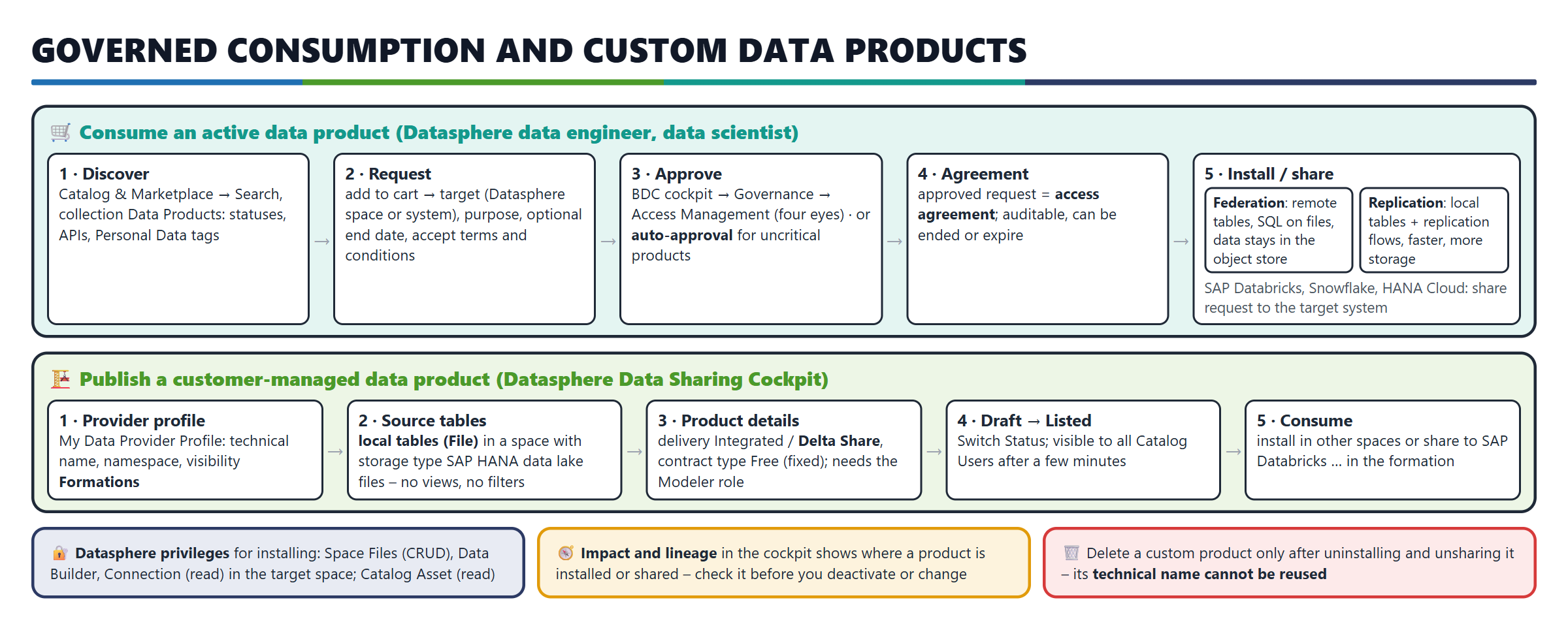
- 1. Terms – BDC cockpit → Governance → Domains → Default Terms and Conditions (individual products can deviate). A domain is the organisation that owns data products; as of the current release only the default domain exists.
- 2. Request – the data engineer adds products to the cart in Catalog & Marketplace, proceeds and names the target (Datasphere space or target system), purpose, optional access end date and accepts the terms. Prerequisite: release and lifecycle status Active, functional status of all APIs Current.
- 3. Approve – BDC administrator / data steward: Governance → Access Management → Requests → Approve or Reject with comment. Administrators follow the same workflow (four-eyes principle).
- 4. Auto-approval – Governance → Data Product Management → Edit Auto-Approval for selected uncritical products.
- 5. Agreement – an approved request becomes an access agreement (Agreements tab); it can be ended by the user or a data steward, or expires at its end date. All decisions are auditable.
Part 8 – Consuming data products
Consumer | How the data product gets there | Notes |
|---|---|---|
SAP Datasphere (own space) | Install from the approved agreement (Catalog & Marketplace → Data Product Access → Agreements → Install Data Product), federation or replication | You do not "share" to Datasphere – you install into a space |
SAP Datasphere (intelligent content) | Installed by the content into SAP-managed ingestion spaces | page 03 |
SAP Databricks · SAP Snowflake | Share request from the catalog to the target system; appears as a Delta share | page 04 |
SAP HANA Cloud, SAP HANA database | Formation with the BTP subaccount running HANA Cloud Central; the database administrator installs the product there | Calculation views, CDS, CAP on data products without replication |
Data composer · SAP Customer Data Platform | Installed / one-directional sync in the formation | CDP integration automated by SAP |
External platforms | SAP BDC Connect – own Databricks, Snowflake, BigQuery | page 04 |
SAP Analytics Cloud | Through Datasphere models (analytic models, live connection) | SAP Analytics Cloud section |
8.1 Federation or replication in Datasphere
Aspect | Federation | Replication |
|---|---|---|
Generated objects | Remote tables (use them in views) | Local tables + replication flows |
Data | Always up to date – SQL on files reads the object store | Snapshot of the last load |
Location | Object store only | Object store + disk / in-memory in Datasphere |
Use when | Save storage, real-time need, low volumes or latency acceptable | Reporting performance, high volumes, snapshot requirement |
- Data products from supported external systems can only be installed with federation. To switch the method, reinstall the product.
- Installed artifacts appear in the Data Builder of the target space; build relational and dimensional models, combine several data products, drop fields, add measures and join non-SAP data. Define data access controls in your space (row-level security).
- Privileges for the data engineer: global Data Warehouse General (read) and Catalog Asset (read); scoped in the target space: Spaces (read), Space Files (CRUD – install and end agreements), Data Warehouse Data Builder (CRUD), Data Warehouse Connection (read). The approver needs a BDC administrator role.
- Lifecycle: patches and minor updates normally arrive automatically; if not, use Update Data Product (API) and Check for Schema Changes on the Data Product Access page.
Part 9 – Customer-managed data products
Customers publish their own data products to share curated data – non-SAP data, enriched SAP data, ML results – with the same governance as SAP's. Main tool: the Data Sharing Cockpit in SAP Datasphere, originally built for the data marketplace and extended for BDC. Prerequisite: the Datasphere tenant is part of a BDC formation.
9.1 Steps in the Data Sharing Cockpit
- 1. Data provider profile (My Data Provider Profile) – the "business card" of the provider: technical name, contact, visibility Formations (required for BDC – then products can be shared with any formation system that supports Delta Sharing) and a namespace (prefix generated from the landscape name).
- 2. Create Data Product (My Data Products, Modeler role) – business and technical name, product details. Data Shipment is fixed to Integrated Delivery, Delivery Mode to Delta Share, Contract Type to Free.
- 3. Source artifacts – only local tables (File) of a space with storage type SAP HANA data lake files; views are not allowed, no column or row filters, only supported data types.
- 4. Lifecycle – the product starts as Draft; Switch Status → Listed makes it visible to all Catalog Users after a few minutes.
- 5. Consume – install in Datasphere spaces (from the Datasphere catalog) or share to SAP Databricks and other formation systems (from the BDC catalog).
- Delete only after uninstalling it from all spaces and ending all shares; the delta share tables are deleted and the technical name cannot be reused.
9.2 Other producers of custom data products
Producer | How | More |
|---|---|---|
SAP Databricks | Derived data product shared back to BDC with the SAP BDC Connect SDK | page 04 |
SAP BW PCE | Data Product Generator → local table (File) in Datasphere → custom data product | page 05 |
SAP HANA Cloud | Result sets published as custom data products | page 01 |
SAP Reltio | Unified golden profiles published as governed data products | page 01 |
Non-RISE SAP ERP | Onboarded with Datasphere object store and integration capacity – own data products only | page 01 |
- Planned (SAP Learning, as of November 2026): a Data Product Creation Agent that generates custom data products from natural language.
- Commercially, building own data products is covered by the Customer-Managed Data Products intelligent package (page 06 Part 1.3).
Part 10 – Architect view and pitfalls
Decision | Guidance |
|---|---|
SAP data: data product or own extraction? | Use SAP-managed data products wherever an intelligent package covers the source – harmonised, versioned, compatible with SAP content; build own flows only for gaps |
Federation or replication | Default federation; replicate for heavy reporting or high volumes – remember replication costs memory / disk |
Where to enrich | Semantic models in Datasphere; heavy ML and data engineering in SAP Databricks / SAP Snowflake; publish results as derived custom data products |
Governance | Default terms and conditions, auto-approval only for uncritical products, data stewards per product, end dates for temporary access |
Versions | Plan the switch to a new major version within the deprecation window; test side by side (page 06) |
Custom fields | They arrive automatically – model them in own views, never edit SAP content |
10.1 Pitfalls
- Expecting a data product to appear without the intelligent package entitlement or with the source missing from the formation – check entitlements and the formation first.
- Ignoring SAP Note 3607594 and the minimum source release – activation fails with Action Required or Not Compatible.
- Forgetting to update SuccessFactors data products – they silently stop receiving data.
- Deactivating a product that intelligent content or other spaces still use – content becomes Not Operational; check impact and lineage first, or pause the replication flow instead.
- Building custom data products on views – only local tables (File) in a data lake files space are allowed.
- Using personal data without review – products tagged Personal Data / Sensitive Personal Data need strict approval and data access controls (page 06 Part 4.5).
Part 11 – Interview questions
Q1. What is a data product in BDC?
A self-contained, curated business data set exposed outside the producing application via APIs, described by metadata (CSN) and an ORD descriptor, discoverable in the catalog, read-only, versioned and governed. In BDC it is stored as Delta tables in the object store and shared mainly with Delta Sharing.
Q2. Primary vs derived data products?
A primary data product comes directly from one application and is not based on other data products (e.g. Journal Entries). A derived data product combines and transforms one or more data products into a value-added, consumer-oriented set; derived products can build on derived products again.
Q3. What are the foundation services?
SAP-managed services in BDC core that extract and unify data from SAP applications, generate data products, set up initial and delta loads, store them in the object store on SAP HANA Cloud, data lake files, and share and govern them. Customers have no access; SAP monitors them. They handle SAP-managed products only.
Q4. Explain ORD and CSN.
ORD (Open Resource Discovery) is SAP's open protocol for describing and discovering APIs, events and data products; each source publishes data product definitions and the BDC catalog aggregates them. CSN (Core Schema Notation) is the JSON metadata format that describes the entities, fields, semantics and associations of a data product; it is generated in BDC on activation.
Q5. How does S/4HANA Cloud Private Edition deliver data to BDC?
SAP-defined ABAP CDS views combine the source tables; the ABAP Push Replication Service (installed via SAP Note 3500131) pushes initial and delta loads to the foundation services through the SAP Cloud Connector. Set-up: technical user and certificate, add the system to the formation, RFC destination and outbound registration – ideally with the CIAS guided workflow.
Q6. Can you choose fields or filters when you activate an SAP data product?
No. SAP defines the tables, fields and full data set so every use case works on the same complete data. You reduce or enrich the data in your own Datasphere views on top of the installed product.
Q7. Why do some data products not appear in the cockpit?
The cockpit shows only products whose source system is in a formation and for which the account has both the commercial entitlement to the SAP solution and the add-on entitlement to the intelligent package. Use the SAP Business Accelerator Hub to see all SAP data products.
Q8. How does a data engineer get a data product into a Datasphere space?
After activation, they add it to the cart in Catalog & Marketplace and send an access request with target space, purpose, optional end date and terms; an administrator approves it in Governance → Access Management (or auto-approval applies); the access agreement then allows Install Data Product with federation or replication.
Q9. Federation or replication – what is the difference?
Federation creates remote tables that read the files in the object store with SQL on files – always current, no extra storage. Replication creates local tables and replication flows – better reporting performance, but a snapshot and more storage. Reinstall to switch; external products support only federation.
Q10. How do you create a customer-managed data product?
In the Datasphere Data Sharing Cockpit: create a data provider profile with visibility Formations and a namespace, create the data product from local tables (File) of a data lake files space, delivery Delta Share, then switch it from Draft to Listed so Catalog Users can install or share it. SAP Databricks, BW PCE and HANA Cloud can also publish custom products.
Q11. What happens when you deactivate a data product?
It is removed from the catalog and deactivated in all packages and intelligent content that use it, which become Not Operational; Datasphere replication flows stop and objects are cleared. Uninstall dependent content and installations first, check impact and lineage, or simply pause the replication flow if you may need it again.
Q12. As an architect, how do you handle custom fields and version changes?
Custom fields of the source pass through automatically into SAP-managed data products but SAP's content ignores them, so they are used in own models built on top. Minor and patch versions are compatible updates (SuccessFactors must always be on the latest); a major version is installed side by side and consumers are switched within the deprecation period.
🏠 Start Here · ◀ 01 · Overview & Architecture · 03 · Intelligent Content & AI ▶ · Sections: CORE ABAP | OOPS ABAP | ABAP on HANA | Clean Core | RAP | ABAP Points | SAP Fiori | SAPUI5 | Mobile Development (MDK) | BTP Foundations | BTP Development | CAP | SAP Build | ABAP on BTP | Integration Suite | SAP Business AI | SAP BASIS | Security | SAP SDLC
Functional: FICO ABAP | TRM ABAP | VIM | SAP BIS | SD ABAP | MM ABAP | PP ABAP | QM ABAP | PM ABAP | PS ABAP | EWM | TM ABAP | GTM ABAP | EHS ABAP | HR ABAP | BW | SAP Datasphere | SAP Business Data Cloud | SAP MDG | SAP Analytics Cloud | SAP Ariba | SAP CX | SAP IBP