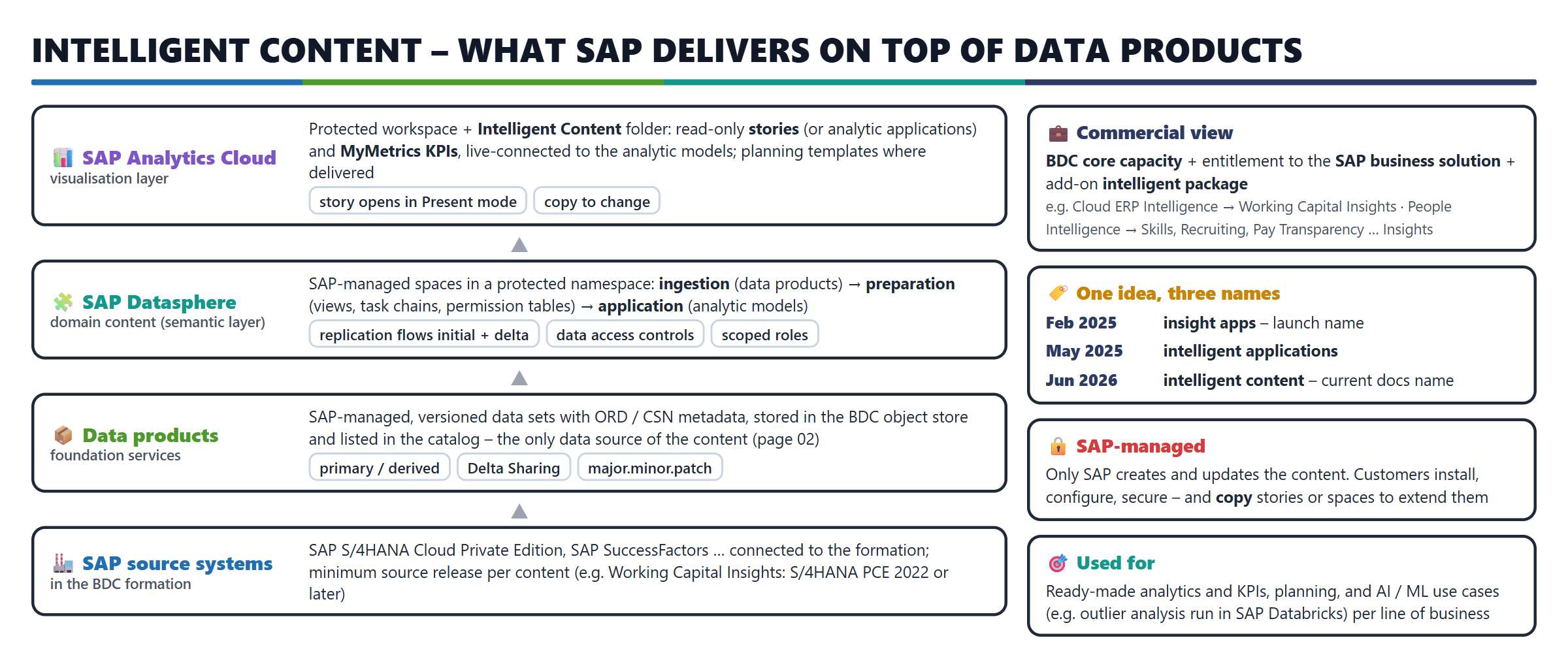
SAP Business Data Cloud (BDC) is not only a place to store and share data products – SAP also ships ready-made business content on top of them. At the launch in February 2025 these packages were called insight apps; SAP renamed them intelligent applications in May 2025 and intelligent content in June 2026 (the term used in the help documentation today). An intelligent content item bundles SAP-managed data products, SAP Datasphere models and SAP Analytics Cloud (SAC) stories and KPIs for one business question, for example working capital or workforce composition, and is installed with a few clicks from the BDC cockpit. On the same data foundation SAP adds AI: machine learning inside the content, Joule for natural-language questions in SAC and Datasphere, the SAP Knowledge Graph for business context and a growing set of Joule agents. This page explains the content model, the packages, what an installation creates, the lifecycle, security, extension, and the Joule and AI layer. Data products themselves: page 02; SAP Databricks and partners: page 04; licences: page 06. Facts that change quickly are marked "as of <month year>".
Part 1 – From insight apps to intelligent content
The BDC idea is "data products first": SAP applications publish curated, versioned data sets (page 02). Most customers do not want to start from raw data products, though – they want answers. Intelligent content is SAP's packaged answer: a complete, SAP-managed analytical solution for one use case that runs on those data products without a custom data model or report.
Term | Meaning |
|---|---|
Intelligent content | Current name (since June 2026). Pre-built BDC application delivered as SAC stories (or analytic applications) and MyMetrics KPIs, supported by Datasphere objects (replication flows, views, analytic models) and built on data products; supports analytics, planning and AI / ML use cases |
Intelligent application | Name from May 2025 to June 2026 – still common in blogs, SAP Learning and SAP Architecture Center pages |
Insight app | Launch name (February 2025): "fully managed, with predefined metrics, AI models and planning capabilities" |
Intelligent package | Commercial offering per line of business that contains several intelligent content items and their data products, e.g. SAP Cloud ERP Intelligence, People Intelligence |
Domain content | Architecture term for the Datasphere and SAC part (semantic models, dashboards, planning templates, KPIs) between the data products and the user |
Data package | SAP-managed group of related data products that can be activated without any content, for your own modelling (page 02) |
1.1 The three layers SAP describes
- Data products – curated data set + business metadata + access port (API, Delta Sharing), published in the catalog.
- Domain content – data products combined into Datasphere semantic (analytic) models that feed SAC stories and planning models.
- Applications – SAP's longer-term direction: apps that turn the content into recommended actions linked to the transactional systems and, later, AI agents acting inside them. Today the delivered content is mainly the first two layers plus embedded ML in selected items.
- SAP-managed means only SAP creates and updates the content and manages its lifecycle; the customer installs, configures, secures and copies it (Part 6).
1.2 Where it sits in BDC
Intelligent content needs the BDC cockpit, an SAP Datasphere tenant and an SAP Analytics Cloud tenant in a BDC formation ("Integration with SAP Business Data Cloud") together with the entitled source system; SAP Databricks is optional and only needed for content with ML notebooks. Components and formations: page 01 and page 02.
Part 2 – Intelligent packages and the content catalog
Content is entitled per intelligent package. To install an item, the global account needs three things: BDC core capacity, the commercial entitlement to the SAP business solution that provides the data (for example SAP S/4HANA Cloud Private Edition) and the add-on entitlement to the package that contains the content (page 06).
Package (as of Nov 2026) | Source | Status and examples |
|---|---|---|
SAP Cloud ERP Intelligence (Cloud ERP Intelligence Private; former name Core Enterprise Analytics) | SAP S/4HANA Cloud Private Edition 2021 and later | Released 2025 – e.g. Working Capital Insights (liquidity and cash, receivables, payables, inventory; needs S/4HANA PCE 2022 or later) |
People Intelligence | SAP SuccessFactors | Released 2025 – Workforce Composition, Workforce Compensation, Skills, Learning, Goals, Performance, Succession, Career Development and Planning, Recruiting, Time Management, Onboarding, Compensation Planning, Rewards and Recognition, Benefits, Pay Transparency and Employee Availability Insights |
Finance Intelligence | SAP Finance Base / Premium or GROW with SAP S/4HANA Cloud Public Edition (SDG) | Liquidity analysis and cash-flow forecasting incl. external credit data; restricted preview from October 2025, controlled availability from January 2026 |
Spend, Supply Chain, Revenue Intelligence | S/4HANA, SAP Business Network, CX data | Restricted public preview announced October 2025 – check the current status before quoting a GA date |
Travel & Expense, Retail, Consumer Products Intelligence | Various | Listed as planned packages in the SAP Architecture Center |
- Find content: the BDC cockpit (Intelligent Content and Data Packages › Available) shows everything your account is entitled to; the SAP Business Accelerator Hub lists all data products available via BDC. Publishing schedules differ, so the two can briefly disagree.
- Non-RISE ERP: customers can onboard non-RISE SAP ERP systems to build their own data products with Datasphere object store and integration capacity – but this gives no SAP-managed intelligent content or data products.
- Partner content: SAP partners (e.g. large consultancies) announced their own finance and supply chain applications on BDC – these are partner offerings, separate from the SAP-managed packages.
Part 3 – What an installation creates
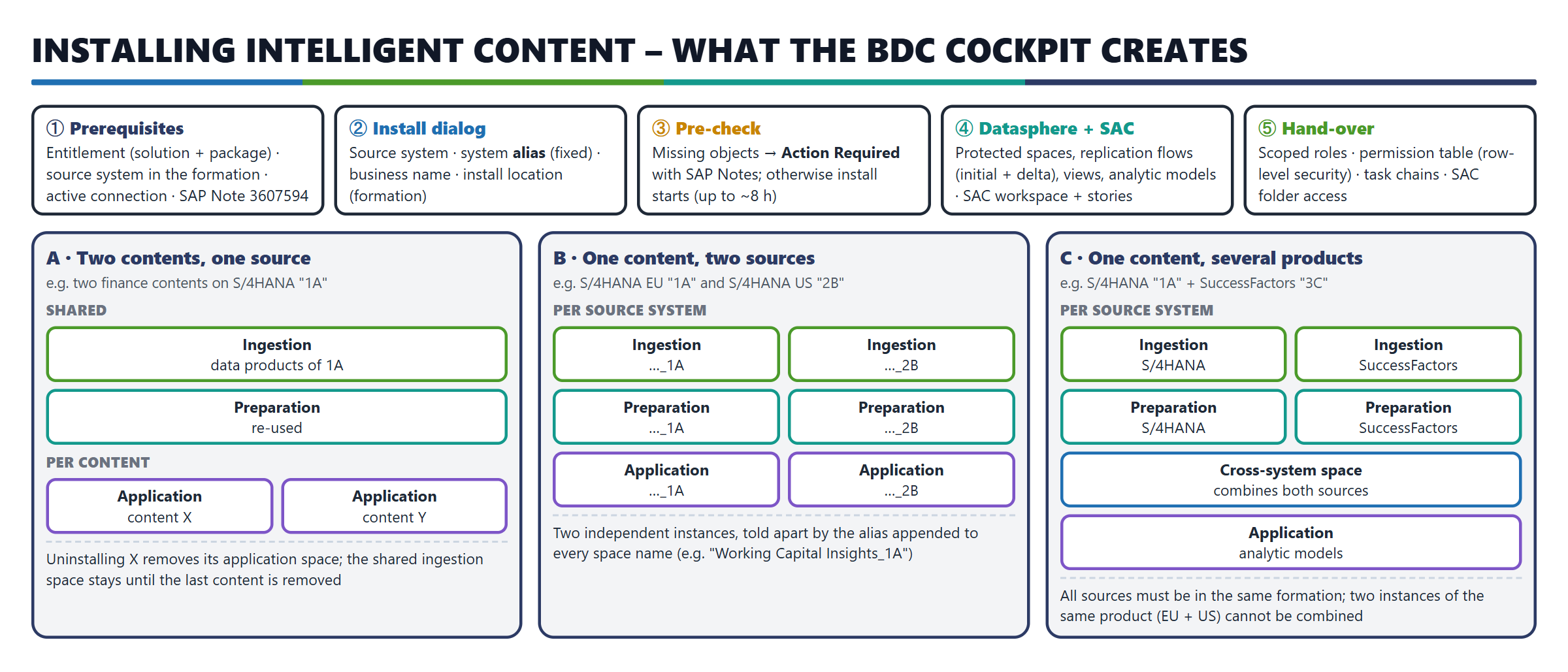
Installing content is an orchestrated deployment across three tenants. The cockpit activates the data products, imports SAP business content from the Content Network into Datasphere and SAC, and wires everything together.
Tenant | Objects created | Notes |
|---|---|---|
BDC object store / catalog | Data products of the content activated for the chosen source system | Shown in the catalog; usable by modellers only after the data products themselves are activated |
SAP Datasphere | Protected, SAP-managed spaces: ingestion (data products), preparation (views, local tables such as configuration and permission tables, task chains), application (analytic models), plus a cross-system space when several products are combined; connections, replication flows started with load type Initial and Delta | Objects sit in a protected namespace (technical names like |
SAP Analytics Cloud | Protected workspace, stories in the dedicated Intelligent Content folder of Files, linked to the analytic models through an SAP-managed live connection | Stories open in Present mode and are read-only |
Roles | Scoped roles for the generated spaces (modeler access to preparation, consumer access to application) | Users must still be assigned (Part 5) |
3.1 Multiple instances, multiple sources, multiple versions
- Alias: every installation gets a fixed system alias appended to all its space names (e.g. "Working Capital Insights_1A"); an optional business name (≤ 200 characters, changeable) helps users.
- Same content, several sources – e.g. one S/4HANA per region, or DEV / TEST / PROD sources feeding one Datasphere tenant: one independent instance per source system.
- Different content, same source – the ingestion (and preparation) spaces are re-used; each content gets its own application space. The shared ingestion space stays until the last content on that source is uninstalled.
- Cross-product content (since July 2026) – combines data products of different products, e.g. S/4HANA and SuccessFactors, in the same formation; not two instances of the same product (EU + US).
- Major versions side by side (since September 2026) – a breaking change gives a new major version (X.0.0) that can be installed next to the old one to test and migrate; minor (0.X.0) and patch (0.0.X) versions are updates in place.
Part 4 – Lifecycle: install, monitor, update, uninstall
4.1 Installation steps
- 1. Check prerequisites – entitlements, the source system is in the formation with an active connection, minimum source release met (warning sign in the Minimum System Version column blocks the install), SAP Note 3607594 (collection note for activating data products) and the content's own collective note.
- 2. BDC cockpit › Intelligent Content and Data Packages › Available › choose content and version › Install › source system, alias, business name, install location (the formation with the target Datasphere and SAC tenants) › Start Pre-Check.
- 3. Pre-check – validates that all required objects exist; status Pre-Check in Progress, then either automatic installation or Action Required with a list of missing objects and SAP Notes.
- 4. Installation – status Installation in Process → Installed; can take up to about 8 hours. Install several contents into the same tenants one after the other, not in parallel: imports run sequentially anyway and parallel runs risk timeouts.
- 5. Hand-over to other admins – Datasphere: assign modelers to the preparation space, monitor replication, fill the permission table, run the delivered task chains, assign business users to the consumer scoped role; SAC: grant access to SAC and to the content folder.
4.2 Statuses you must recognise
Status | Meaning / action |
|---|---|
Available · Pending · Installation in Process · Installed | Normal path; status is aggregated over all data products and content objects |
Action Required · Pre-check Failed | Missing objects (follow the SAP Notes) or a technical error (Repair › Run Pre-Check Again) |
Installation Failed / Uninstallation Failed | Repair from the content page (retry, clean-up of artifacts) or open a case with the correlation ID |
Not Operational | A data product used by the content was deactivated – re-activate it for the same source system, then stop and restart its replication flow in Datasphere |
Update Available · Deprecated · Decommissioned | Newer version exists; content will be retired on a date (install the successor); content retired, shown for history |
Entitlement Invalid | Entitlement expired or cancelled – since February 2026 nothing is uninstalled automatically; only a cockpit user can uninstall |
4.3 Monitoring, updates and removal
- Monitoring app in BDC (since April 2026): pipeline health per data product, data flow monitor, historical runs; records dropped in a pipeline run can be downloaded and fixed in the source.
- Update (only from status Installed): Installed tab › Update › review version history and release notes › Update. Validation check first; large data volumes can make an update take days, while the old version keeps serving data until the switch.
- Uninstall (BDC administrator): deletes the content's Datasphere and SAC objects and data products that no other content or data package uses (status Skipped for shared objects), ends access agreements to other consumers and removes empty SAP-managed spaces. Delete your own dependent objects and copied stories first. After a renewed entitlement the content can be re-installed.
Part 5 – Security, roles and row-level security
Security is decentralised: each tenant keeps its own users and roles, connected by single sign-on through SAP Cloud Identity Services. A freshly installed content shows no data until row-level security is filled in.
Where | What to set up | Example |
|---|---|---|
BDC cockpit | Administrator role to install, update and uninstall content (documented as BD / BDC Administrator) | Platform team only |
Datasphere – scoped roles | Modelers on the preparation space; business analysts on the Consumer scoped role of the application space (required for row-level security) | DW Modeler, consumer role |
Datasphere – data access controls | Fill the delivered permission table (operator-and-values data access control) per user and criterion | Working Capital: |
Datasphere – People Intelligence | Data access control | A criterion left empty → the user sees no data at all |
SAC | Access to SAC and Read / Copy on the Intelligent Content folder or file | Shared by a system administrator |
- Rule to remember: every criterion of the permission table must be maintained for every user – one missing criterion hides all data. Datasphere data access controls in depth: SAP Datasphere › 04.
- Identity caution: once a Joule formation is created with the BDC tenant, you cannot roll back to default or custom authentication or change the bundled SAP Cloud Identity Services tenant – decide the IdP design first (page 06).
Part 6 – Extending intelligent content and a worked example
You never change SAP-managed objects. You copy what you need and own the copy – with the price that SAP updates no longer reach it.
Need | How | Consequence |
|---|---|---|
Different layout or extra charts | Copy the story (Files › Copy To) to a private, public or workspace folder and change the copy | Copy gets no SAP updates or fixes |
Custom fields of the source system | Since September 2026 BDC detects custom fields and entities in SAP sources and adds them to the data products in the next replication cycle (for incremental data products on S/4HANA PCE from 2025 SP02) | Delivered views and stories still ignore them until you extend a copy |
Changed views or analytic models | DW Administrator copies both preparation and application spaces with the Copy Spaces wizard (preparation as source space); objects leave the protected namespace ( | Fully independent copy; repeat for every SAP update; repoint copied stories to the new models |
New KPIs or own app | Build own Datasphere models and SAC stories on the activated data products, or derived data products in SAP Databricks (page 04) | Customer-managed content |
- Never copy only one of the two spaces – objects in a copied space depending on the original preparation space are not supported. The ingestion space is not copied; the copied preparation space is granted access to the same data products.
6.1 Worked example – Working Capital Insights
- Business question: how much cash is tied up in receivables, payables and inventory, and how liquid is the company? Story pages: Overview, Liquidity & Cash, Accounts Receivable, Accounts Payable, Inventory – each with a KPI header row and charts.
- Source prerequisites: S/4HANA Cloud Private Edition 2022 or later (cash management KPIs on 2022 need an SAP Note or 2023), ABAP push replication of released CDS views set up, and a financial statement version (or G/L hierarchy) with semantic tags for the KPI measures.
- Configuration in Datasphere: run task chain
sap.s4h.TC_InitWCIConfiguration– fillssap.s4h.IL_TimeBucketConfiguration(seven due-date buckets for AP and AR by default) andsap.s4h.IL_FinancialDataModelConfiguration(hierarchy, currency role such as30EUR); adjust them, then runsap.s4h.TC_NWCPersist, which persists intermediate results for the Overview, Liquidity and Inventory pages (re-run after changing the hierarchy). - Security: fill
sap.s4h.DAC_CustomerPermissions, assign consumer scoped role and SAC folder access – then business users open the story from the Intelligent Content folder.
Part 7 – AI inside intelligent content
"AI-powered" in intelligent content covers three different things – keep them apart in interviews.
Kind of AI | How it works | Example |
|---|---|---|
SAC augmented analytics | Smart Insights, forecasts in time-series charts, predictive planning and Smart Predict on the delivered models | Forecast of cash position in a copied story |
ML notebooks in SAP Databricks | Content ships a Databricks notebook; the customer runs it on an ML compute in the SAP Databricks tenant of the same formation; results flow back as data | Pay Transparency – Outlier Analysis: a model learns expected pay from job-related factors (grade, tenure, manager status …) and excludes gender and protected characteristics; the story compares predicted vs actual pay and splits the gap into explained and unexplained parts |
AI-enriched data products | Models served in SAP AI Core enrich data products in batch; SAP AI Core integration with BDC was announced in May 2026 to embed batch inference in data products | Payment delay forecasts as a data product (page 04, Part 8) |
Joule and agents | Natural-language questions, story generation, agents grounded in data products and the Knowledge Graph | Part 8 |
- The Outlier Analysis help states it supports EU Pay Transparency Directive reporting but is not legal advice – a typical governance point for AI in HR.
Part 8 – Joule on BDC: SAC, Datasphere, Knowledge Graph and agents
Joule is SAP's generative AI assistant: one central instance on SAP BTP, embedded in many SAP cloud products. On BDC it appears in SAC, in Datasphere and in the BDC cockpit, and it is increasingly grounded in BDC data products. Joule set-up, skills and Joule Studio in depth: SAP Business AI › 02 and 03.
8.1 Joule in SAP Analytics Cloud
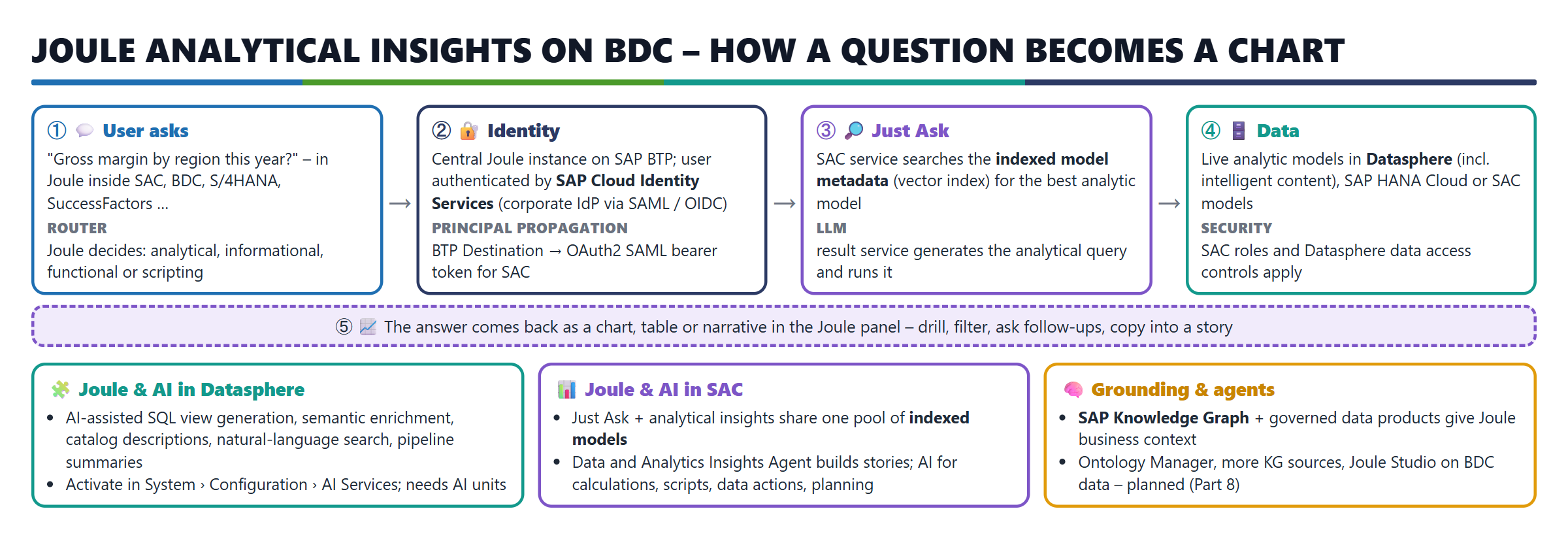
- Four interaction types – analytical (questions on data), informational (answers from SAP help), functional (act on story elements) and scripting (generate story scripts).
- Analytical insights and Just Ask use the same pool of indexed models: a model administrator indexes models (synonyms, sample questions, visibility); Just Ask finds the best model by semantic search over the indexed metadata, an LLM generates the query, SAC runs it live against Datasphere, HANA Cloud or SAC models.
- From anywhere: analytical insights can be enabled for Joule in other SAP products (e.g. S/4HANA, SuccessFactors), so a user asks a question there and gets a chart from BDC data. Joule calls Just Ask with principal propagation (OAuth 2.0 SAML bearer assertion via a BTP destination), so SAC roles and Datasphere data access controls still apply.
- More AI features: Data and Analytics Insights Agent (creates stories from models and insight instructions), AI-assisted calculations, story code generation, data actions, prompt insights on planning data, chart summaries – capability list in SAP Analytics Cloud › 02 and 06.
8.2 Joule and AI in SAP Datasphere
Feature (System › Configuration › AI Services) | What it does |
|---|---|
AI-enhanced SQL view generation | Generates SQL code for views from a description |
AI-enhanced semantic enrichment | Proposes semantic information for entities and columns before consumption |
AI-enhanced metadata enrichment (catalog) | Generates asset summaries, descriptions and tag relationships |
AI-enhanced metadata discovery | Natural-language search over the repository / catalog |
Data pipeline analyzer summary | Business summary or errors-and-impacts summary of a view / model pipeline |
Joule | Conversational discovery, explanations and navigation; activated separately |
- Prerequisites: a landscape that supports SAP Business AI and a purchased AI units licence; the privilege Data Warehouse AI Consumer for the AI features and Data Warehouse Joule Consumption (role DW Joule Consumer) for Joule, after the Joule onboarding and Datasphere integration steps.
8.3 SAP Knowledge Graph and the knowledge core
SAP's BDC architecture (SAP Architecture Center, last updated October 2026) describes four layers: lake storage, intelligent compute (SAP HANA Cloud, SAP Databricks, SAP Snowflake), the knowledge core (business semantics, knowledge graph, canonical models, governed data products, active metadata) and agents and intelligent applications on top, with governance across all layers.
- SAP Knowledge Graph – announced at SAP TechEd 2024, described by SAP as the semantic bridge between Joule agents and BDC: it maps business objects, processes and relationships so Joule can resolve a question to the right entities and data instead of guessing.
- Do not confuse it with the SAP HANA Cloud knowledge graph engine (RDF triple store, SPARQL) – a database capability you use yourself for graph RAG (SAP Business AI › 08).
8.4 Joule agents and roadmap (as of November 2026)
Item | Status |
|---|---|
Joule agents for BDC: data product search and creation in natural language, automated planning and analytical modelling, natural-language insights grounded in data products and the Knowledge Graph, SAC story generation | Announced at SAP Sapphire, May 2026 |
SAP AI Core integration – AI models grounded in BDC data, batch inference embedded in data products | Announced May 2026 |
SAP BDC Ontology Manager – AI-assisted authoring of domain ontologies over SAP and customer-managed data products for agents | Beta planned November 2026 (SAP TechEd, October 2026) |
SAP Knowledge Graph enhancements – SAP-managed and customer-managed data products and customer-specific sources in Joule's context | Planned Q1 2027 |
Joule Studio integration with BDC – create and use data products in Joule Studio; runtime data access for custom agents | Planned Q1 2027 |
Agent gateway – third-party agents call Joule agents via Agent2Agent (A2A) and Model Context Protocol (MCP) | Announced October 2026 |
Joule – Databricks Genie bidirectional integration | Planned, no date (page 04) |
- Roadmap items carry SAP's usual forward-looking disclaimer – check SAP Roadmap Explorer and the BDC What's New before you present them as available.
Part 9 – Architect view and pitfalls
Decision | Recommendation |
|---|---|
Standard content or own model? | Start with intelligent content where a package fits (fast, SAP maintains it); build own models on activated data packages for company-specific KPIs; copy content only when you must change it |
One Datasphere tenant for several sources / stages? | Possible with aliases (one instance per source), but keep naming, space governance and capacity in mind; a separate non-production BDC landscape is cleaner for testing updates |
Extending content | Plan for the copy-and-repeat effort on every update; prefer additive own models over deep changes to copied SAP models |
Row-level security | Design the permission-table maintenance (who, how, automated load) before go-live – without it users see nothing |
Joule | Index only curated analytic models with good business names and synonyms; answers inherit model quality and security |
Release dependency | SAC follows a quarterly release; content needing a newer SAC version shows Not Compatible until that SAC release is out (SAP Note 2728183 schedule) |
- Pitfalls: parallel installs into the same tenants; forgetting the permission table; editing a copied story but not repointing it to the copied model; deactivating a data package used by content (content becomes Not Operational); starting without the source prerequisites (semantic tags, CDS replication notes).
Part 10 – Interview questions
Q1. What are insight apps, intelligent applications and intelligent content?
The same concept under three names: insight apps at the BDC launch in February 2025, intelligent applications from May 2025, intelligent content since June 2026. It is SAP-managed, pre-built BDC content – SAC stories and KPIs on Datasphere models built on SAP-managed data products – installed from the BDC cockpit.
Q2. What does an intelligent content item contain?
Data products for the use case, Datasphere content (replication flows, local tables, views, analytic models, task chains, data access controls) in protected spaces, and SAC stories or analytic applications with KPIs in a protected workspace, linked by a live connection; optionally ML notebooks for SAP Databricks.
Q3. Which entitlements are needed to install content?
BDC core capacity, the entitlement to the SAP business solution that provides the data (e.g. S/4HANA Cloud Private Edition) and the add-on intelligent package, e.g. SAP Cloud ERP Intelligence or People Intelligence. The source system must also be in the BDC formation.
Q4. Which Datasphere spaces does an installation create?
An ingestion space for the data products, a preparation space for views and configuration, an application space for the analytic models, and a cross-system space when the content combines several products. Spaces get the system alias; ingestion and preparation are re-used by other content on the same source.
Q5. A user opens the Working Capital story and sees no data. What do you check?
Row-level security first: is the user in the consumer scoped role and maintained for every criterion in sap.s4h.DAC_CustomerPermissions? Then replication status, whether the configuration task chains ran, and whether the data products are active (status Not Operational).
Q6. How do you extend content with a custom field?
The data products can pick up custom fields (automatic detection since 2026); to show them, a DW Administrator copies the preparation and application spaces together, the data products are reinstalled with custom fields, views and models in the copies are repointed and changed, a copied story is pointed at the new models. Copies get no SAP updates.
Q7. How are updates and breaking changes handled?
Semantic versioning: minor and patch versions are applied in place via Update (old version serves data until the switch); a breaking change is a new major version that can be installed side by side to test and migrate before uninstalling the old one.
Q8. How does Joule answer a data question from S/4HANA using BDC data?
Analytical insights are enabled for Joule; Joule authenticates the user via SAP Cloud Identity Services and calls SAC Just Ask with a SAML-bearer OAuth token through a BTP destination. Just Ask finds the best indexed model, an LLM generates the query, SAC runs it live against Datasphere, and the chart returns to Joule – with the user's own authorisations.
Q9. What is the SAP Knowledge Graph and why does it matter for agents?
A graph of SAP business objects, processes and relationships that gives Joule and agents business context – the semantic bridge to BDC data products. Agents grounded in it and in governed data products make consistent, explainable decisions; SAP is extending it to customer data products (planned 2027).
Q10. Which AI features does Datasphere offer and what do they require?
AI-assisted SQL view generation, semantic enrichment, catalog descriptions and tags, natural-language search, pipeline analyzer summaries and Joule. They need a supported landscape, an AI units licence, activation under System › Configuration › AI Services and the AI Consumer / Joule Consumption privileges.
Q11. Where is machine learning actually used in intelligent content?
In SAC augmented analytics and predictive planning, in notebooks shipped for SAP Databricks (e.g. Pay Transparency outlier analysis, which excludes protected characteristics from the model) and in AI-enriched data products served by SAP AI Core.
Q12. As an architect, when would you not use intelligent content as delivered?
When the KPIs or hierarchies differ strongly from SAP's definitions, when sources are not covered (e.g. non-RISE ERP gets no SAP-managed content), or when the extension effort per update is higher than owning a custom model on data packages. Then activate data packages and build customer-managed models, possibly reusing the delivered content as a template.
🏠 Start Here · ◀ 02 · Data Products · 04 · Databricks & Partners ▶ · Sections: CORE ABAP | OOPS ABAP | ABAP on HANA | Clean Core | RAP | ABAP Points | SAP Fiori | SAPUI5 | Mobile Development (MDK) | BTP Foundations | BTP Development | CAP | SAP Build | ABAP on BTP | Integration Suite | SAP Business AI | SAP BASIS | Security | SAP SDLC
Functional: FICO ABAP | TRM ABAP | VIM | SAP BIS | SD ABAP | MM ABAP | PP ABAP | QM ABAP | PM ABAP | PS ABAP | EWM | TM ABAP | GTM ABAP | EHS ABAP | HR ABAP | BW | SAP Datasphere | SAP Business Data Cloud | SAP MDG | SAP Analytics Cloud | SAP Ariba | SAP CX | SAP IBP