SAP Business Data Cloud (BDC) was launched on 13 February 2025 together with SAP Databricks – the message was "SAP business data with business context, opened to the best data and AI platforms without copying it". The mechanism is zero-copy sharing of data products with the open Delta Sharing protocol, in both directions. Three ways exist today: SAP Databricks, a Databricks edition sold and run by SAP inside BDC; SAP Snowflake, the same idea for Snowflake; and SAP BDC Connect, a connector that links BDC to a customer's own Databricks, Snowflake or Google BigQuery platform (Microsoft Fabric and Amazon Athena announced). This page explains Delta Sharing, SAP Databricks end to end (provisioning, security, consuming SAP data products, publishing derived data products with the BDC Connect SDK), BDC Connect and the other partners, ML and data science patterns with SAP AI Core, and the architect decisions. Data products and the catalog: page 02; intelligent content and Joule: page 03; licences: page 06. The partner landscape changes every quarter – facts are marked "as of <month year>".
Part 1 – Open ecosystem, zero-copy and Delta Sharing
Classic integration of SAP data into a lakehouse meant extraction: ODP / SLT / replication tools copy tables, lose the business semantics on the way and create a second truth that must be reconciled. BDC turns this around: SAP curates the data once as a data product (with ORD and CSN metadata) in the BDC object store, and partners read it where it is.
Concept | Meaning in BDC |
|---|---|
Delta Sharing | Open protocol for sharing Delta Lake tables: a provider exposes shares (tables / schemas) through a sharing server; an authorised recipient reads them with any Delta Sharing client (Spark, pandas, Databricks, Snowflake, BigQuery …) without a copy |
Zero-copy | The consumer queries the provider's files directly; no ETL pipeline, no duplicate storage to reconcile (a consumer may still cache or materialise data if its use case requires) |
Bidirectional | Partners can publish their own tables back to BDC as data products, which then appear in the BDC catalog for Datasphere, SAC and others |
ORD / CSN | Open Resource Discovery describes the data product (title, descriptions, labels, status); CSN Interop describes the schema (entities, types, keys, associations) |
Recipient | The Delta Sharing recipient that represents BDC when a partner shares data back |
1.1 Timeline (as of November 2026)
Date | Milestone |
|---|---|
13 Feb 2025 | SAP Business Data Cloud announced with SAP Databricks (staged rollout on AWS, Azure, Google Cloud) |
30 Apr 2025 | SAP Databricks released in BDC |
Oct 2025 | SAP BDC Connect released on AWS, Google Cloud and Azure; BDC Connect for Databricks generally available; Google in public preview |
4 Nov 2025 | SAP Snowflake and SAP BDC Connect for Snowflake announced (SAP TechEd) |
18 Nov 2025 | SAP BDC Connect for Microsoft Fabric announced – planned GA Q3 2026 |
Apr 2026 | Semantic metadata of SAP data products visible in the SAP Databricks Unity Catalog |
May 2026 | SAP Snowflake released as solution extension; SAP HANA Cloud a core BDC component; BDC Connect for Amazon Athena announced (planned H2 2026) |
20 Jul 2026 | SAP BDC Connect for Google BigQuery available |
Oct 2026 | SAP TechEd: Genie, Lakeflow, Unity Gateway and Lakebase coming to SAP Databricks; SAP Application Data Foundation; Dremio-based lakehouse with Apache Iceberg planned Q1 2027 |
Nov 2026 | Private Link for BDC Connect to Snowflake (AWS) |
Part 2 – SAP Databricks: what it is
SAP documentation calls SAP Databricks "a special edition of Databricks available as an application in SAP Business Data Cloud"; the SAP Architecture Center calls it a fully embedded OEM component. It is sold by SAP as part of BDC, paid with BDC capacity units, supported by SAP, and pre-integrated: Delta Sharing to the BDC catalog is configured out of the box.
Aspect | SAP Databricks |
|---|---|
Compute | Serverless only – compute and storage fully managed; no customer cloud account or cluster sizing |
Storage | Unity-governed managed storage on SAP HANA Cloud, data lake storage embedded in the product; SAP-managed, not customer-configurable |
Governance | Unity Catalog for data, models, notebooks; privileges on securable objects |
Tools | Python and SQL notebooks, SQL editor and serverless SQL warehouses, Apache Spark, Delta Lake, managed MLflow |
AI / ML (docs.databricks.com/sap) | AutoML forecasting, Model Serving incl. Foundation Model APIs, AI Functions in SQL, AI Playground, AI Search (vector search), agent evaluation and custom agents, foundation model fine-tuning (selected regions), data profiling; feature set differs by cloud |
Clouds | AWS, Azure and Google Cloud regions; some BDC data centers (e.g. certain EU Access regions) offer no SAP Databricks – check Data Center Availability |
Integration | Data products shared from the BDC catalog into Unity Catalog; derived data products published back with the BDC Connect SDK |
2.1 SAP Databricks vs your own (enterprise) Databricks
Topic | SAP Databricks | Enterprise Databricks + BDC Connect |
|---|---|---|
Contract and support | SAP – one bill (capacity units), SAP first-line support | Databricks contract; BDC Connect billed by SAP |
Infrastructure | SAP-managed, serverless | Customer's cloud account; classic and serverless compute |
Feature scope | Focused subset; partner analyses (early 2026) list e.g. marketplace, auto loader, full jobs framework and some low-code AI / BI features as not included | Full Databricks platform |
SAP data access | Pre-configured; data products shared with one click from the catalog | Provision BDC Connect once; data products shared explicitly from the catalog |
Typical customer | No lakehouse yet, wants ML on SAP data quickly | Databricks already the strategic data platform |
- Feature lists of SAP Databricks change with the Databricks releases (TechEd October 2026: Genie, Lakeflow, Unity Gateway, Lakebase announced for SAP Databricks) – always check docs.databricks.com/sap.
Part 3 – Provisioning, users and security
3.1 Provisioning in SAP for Me
- 1. SAP for Me › Portfolio & Products › My Product Packages › Business Data Cloud › Applications › tile SAP Databricks › Start Provisioning.
- 2. General information – name, resource group (path) in the location of the BDC cockpit, business type Production.
- 3. Quota – capacity units you plan for SAP Databricks. The quota is not enforced; billing is always actual usage (metric Capacity Units – SAP Databricks, CY477).
- 4. Set up systems – SAP Cloud Identity Services tenant; SAP Databricks is integrated as a bundled OIDC application.
- 5. Parameters – region (recommended: same as the BDC cockpit), owner e-mail and name, account name. Region, data center, owner, host name and resource group cannot be changed later.
- 6. Formation – the wizard creates a formation of type Integration with SAP Databricks (SAP Databricks + IAS); in a separate step add SAP Databricks to the Business Data Cloud formation with the other BDC systems.
- 7. Activate – the owner follows the activation link, verifies a one-time code, accepts the terms ("Provisioning Complete"), logs in and shares the workspace URL with other users.
3.2 Users, roles and privileges
- Authentication via SAP Cloud Identity Services; users provisioned with Identity Provisioning (SCIM), which SAP recommends as the single source of truth. Groups synchronise in both directions; roles are assigned through group membership.
- Data authorisation through Unity Catalog privileges. To work with data products a user needs
USE PROVIDER; the admin grants on the metastoreCREATE CATALOG,CREATE SHARE,SET SHARE PERMISSION,USE PROVIDER,USE RECIPIENT,USE SHARE. Typical roles: Data Product Admin (mount and create catalogs) and Data Product Publisher (share back).
3.3 Network, encryption, backup
Topic | What SAP Databricks provides |
|---|---|
Network | IP access lists (check SAP's gateway IP ranges before enforcing them, or the BDC link breaks), network connectivity configuration to reach own sources, serverless egress controls |
Encryption | mTLS between BDC and SAP Databricks; derived data products in Unity-governed HANA Cloud data lake storage; compute storage protected by an SAP-managed customer-specific key |
Backup | Overwritten or deleted data kept as snapshot for 14 days (restore via SAP support); no backup of compute storage – a deleted workspace loses its notebooks, so keep code in Git |
Part 4 – Consuming SAP data products in SAP Databricks
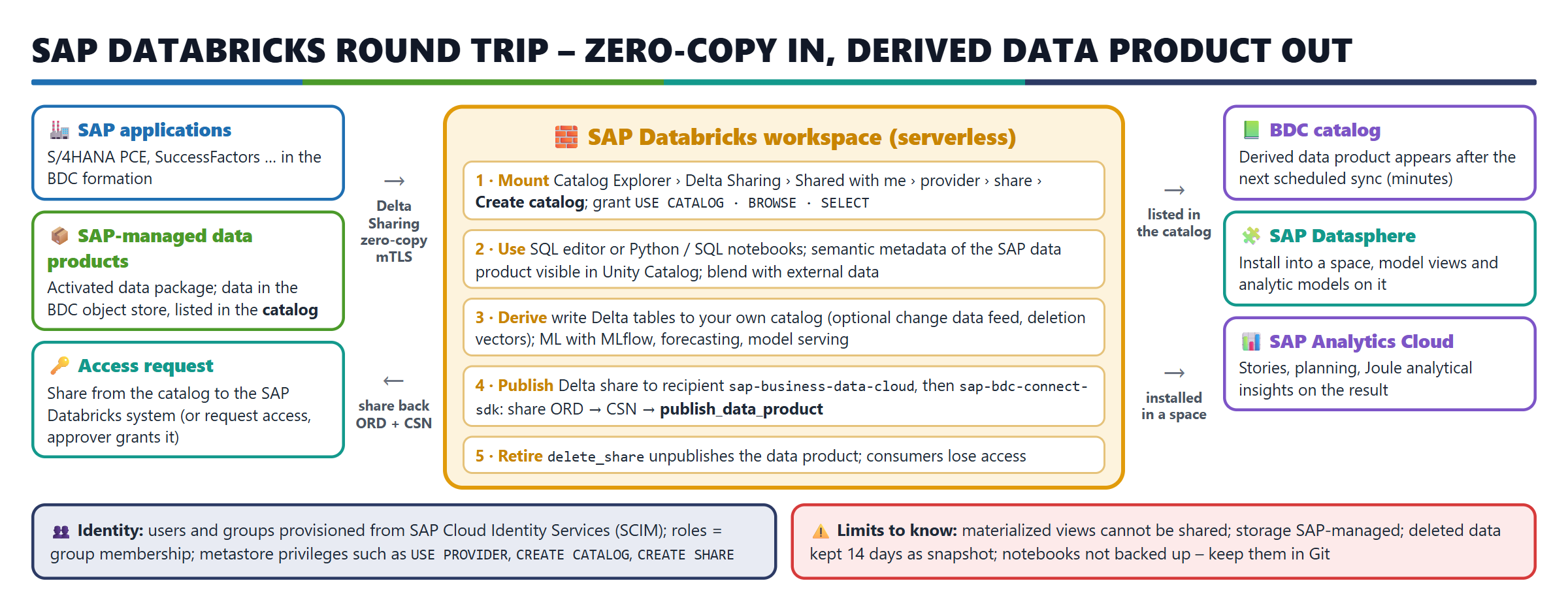
- Preparation by the admin: SAP Databricks is in the BDC formation, one or more data packages are activated (page 02), users have access.
- Get access: share the data product from the catalog to the SAP Databricks system, or request access in the catalog and wait for approval.
- Mount: Catalog Explorer › gear › Delta Sharing › Shared with me › provider of the source system (see the Comment column) › Shares › Create catalog. The catalog appears under Shared. Requires Data Product Admin with
USE PROVIDERandCREATE CATALOG. - Authorise readers: grant USE CATALOG, USE SCHEMA, SELECT on the shared catalog.
- Use: query as a normal Unity Catalog catalog in the SQL editor (serverless SQL warehouse) or notebooks (serverless compute); the SAP semantic metadata of the data product is visible in Unity Catalog.
|
|
- The table and column names follow the SAP help example; the budget table is your own illustration. Shared tables are read-only – results go into your own catalog (Part 5).
Part 5 – Publishing derived data products back to BDC
A derived data product combines or enriches existing data products. Publishing it makes it a first-class citizen of the BDC catalog – discoverable and installable in Datasphere like an SAP data product, with lineage back to SAP Databricks.
5.1 Steps
- 1. Catalog for writing – Catalog Explorer › + › Add a catalog, type Standard, untick "use default storage"; grant writers
USE CATALOG,USE SCHEMA,SELECT,CREATE SCHEMA,CREATE TABLE. - 2. Write Delta tables – optionally with change data feed (off by default) and deletion vectors; enabling deletion vectors can invalidate running Spark Streaming queries.
- 3. Delta share – Catalog › gear › Delta Sharing › Share data: share name, schemas or tables, recipient
sap-business-data-cloud. Tables, schemas and views can be shared; materialized views cannot. NeedsCREATE SHARE,USE RECIPIENTandSELECT(Data Product Publisher). - 4. Publish with the SDK – in a workspace notebook (serverless environment version 3) install
sap-bdc-connect-sdk, describe the share with ORD, generate and upload the CSN, then publish. - 5. Consume – after the next scheduled sync (minutes) the data product appears in the catalog's Data Product collection; Datasphere modelers request access and install it into a space.
|
|
ORD field | Rule |
|---|---|
| Mandatory; description must not contain the short description |
visibility | Default public; alternatives internal, private |
releaseStatus | Default active; alternatives beta, deprecated |
Optional | labels, industry, lineOfBusiness, tags, deprecationDate, sunsetDate, successors, links, correlationIds … |
Alias | Used as the ORD ID instead of the share name, so DEV / QA / PROD tenants publish the same data product identity; must differ from all share names and cannot be changed or removed |
- Supported data types for publishing: SAP Note 3830443 (CSN type mapping for SAP Databricks). The recipient name is under Delta Sharing › Shared by me › Recipients.
Part 6 – SAP BDC Connect for existing partner platforms
SAP BDC Connect is the BDC service for customers who already run a data platform. It enables zero-copy, bidirectional data product sharing between BDC and a supported external system, which keeps its own licence and operations. If SAP Databricks or SAP Snowflake is provisioned, a default connector is already included and no separate BDC Connect is needed.
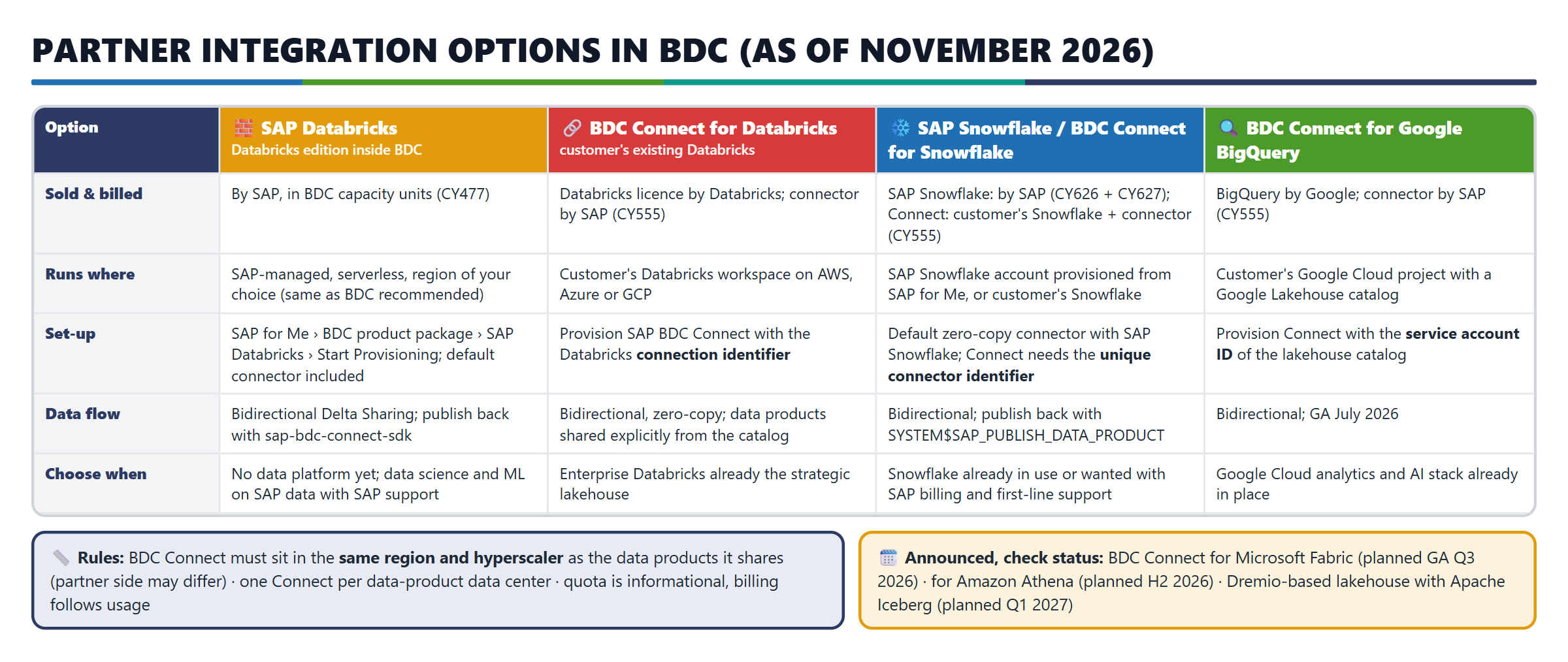
Partner (as of Nov 2026) | Partner hyperscaler | Identifier for provisioning | Consume SAP data as |
|---|---|---|---|
Databricks | AWS, Azure, GCP | Connection identifier (Data Ingestion › SAP Business Data Cloud) | Catalog created from the share |
Snowflake | AWS, Azure, GCP | Unique connector identifier (Snowsight › Ingestion › Zero-Copy); extra terms to accept | Catalog-linked database |
Google BigQuery | GCP | Service account ID of the Google Lakehouse catalog | Lakehouse Delta Sharing catalog |
6.1 Provisioning and rules
- Prerequisite: source systems for SAP-managed data products are in the BDC formation; customer data products created in Datasphere need no source system (embedded object store).
- Provision: SAP for Me › BDC product package › tile SAP BDC Connect › quota (informational) › external system instance identifier › region › network configuration (Allow Public Access or Private Link – default; Enforce Private Link only where the partner supports it, today Snowflake on AWS) › finish; complete the connection in the partner tool with the activation URL; add the instance to the formation.
- Region rule: BDC Connect and the system sharing the data product must be in the same region and hyperscaler as the data product; the partner platform may be elsewhere (SAP Note 3699756). Data products in several data centers need one BDC Connect per location.
- Sharing: data products are shared explicitly to the external system from the BDC catalog – SAP-managed products from the foundation services and custom products from the Datasphere object store.
- Share back: Databricks as in Part 5; Snowflake via a share associated with the zero-copy connector (connector CONNECTED, SHARE_BACK enabled,
SYSTEM$SAP_PUBLISH_DATA_PRODUCT, CSN names must match the schema and table names of the GRANT statements); BigQuery via "Publish Data Products to SAP BDC". CSN type mappings: SAP Notes 3830443 (Databricks), 3799841 (Snowflake), 3839319 (Google). - Metering: Capacity Units – SAP Business Data Cloud Connect (CY555); estimate with the BDC Capacity Unit Estimator in SAP for Me.
Part 7 – SAP Snowflake, Google BigQuery and other partners
Partner | What it is | Status (as of Nov 2026) |
|---|---|---|
SAP Snowflake | Snowflake AI Data Cloud as an SAP-certified solution extension of BDC: sold, billed (Compute Credits CY626 + Optimized Storage CY627) and first-line supported by SAP; zero-copy bidirectional sharing; Snowflake Cortex AI next to Joule; metadata linked with the BDC knowledge graph | Released May 2026; AWS first, Azure and Google Cloud data centers added June–August 2026 |
SAP BDC Connect for Snowflake | Connector to a customer's existing Snowflake account | Bidirectional since May 2026; Private Link (AWS) November 2026 |
SAP BDC Connect for Google BigQuery | BigQuery analytics and AI directly on SAP data products | GA July 2026; BDC Connect on Azure can serve BigQuery since October 2026 |
SAP BDC Connect for Microsoft Fabric | SAP data products in OneLake for Fabric data engineering, warehousing and Power BI; Fabric data shared back | Announced November 2025, planned GA Q3 2026; not yet listed among supported systems in the BDC Connect help – confirm before use |
SAP BDC Connect for Amazon Athena | Query SAP data products from Athena | Announced May 2026, GA planned H2 2026 |
SAP HANA Cloud | Not a partner but a consumer: data products shared via Delta Sharing to HANA Cloud for CDS / calculation views and CAP apps | Core BDC component since May 2026 |
Dremio-based lakehouse | Native Apache Iceberg / Apache Polaris support and federated SQL engine in BDC | Planned Q1 2027 |
- Other consumers of activated data products in a formation: SAP Datasphere, SAP Datasphere data composer, SAP Customer Data Platform and any service connected through BDC Connect.
Part 8 – ML and data science on business data
Use case | How in SAP Databricks |
|---|---|
Forecasting | AutoML forecasting picks algorithm and hyperparameters for time series, e.g. demand or cash |
Fine-tuning an LLM | Foundation model fine-tuning on your SAP and non-SAP data (supported regions only) |
Exploratory analysis and feature engineering | Multi-language notebooks on shared data products plus external data (IoT, web, market data) |
BI on large volumes | SQL editor and serverless SQL warehouses; e.g. BW data products shared to the lakehouse (page 05) |
Data engineering | Spark pipelines that blend curated SAP data with semi-structured and unstructured data, written back as derived data products |
8.1 SAP reference pattern: develop in Databricks, serve in SAP AI Core
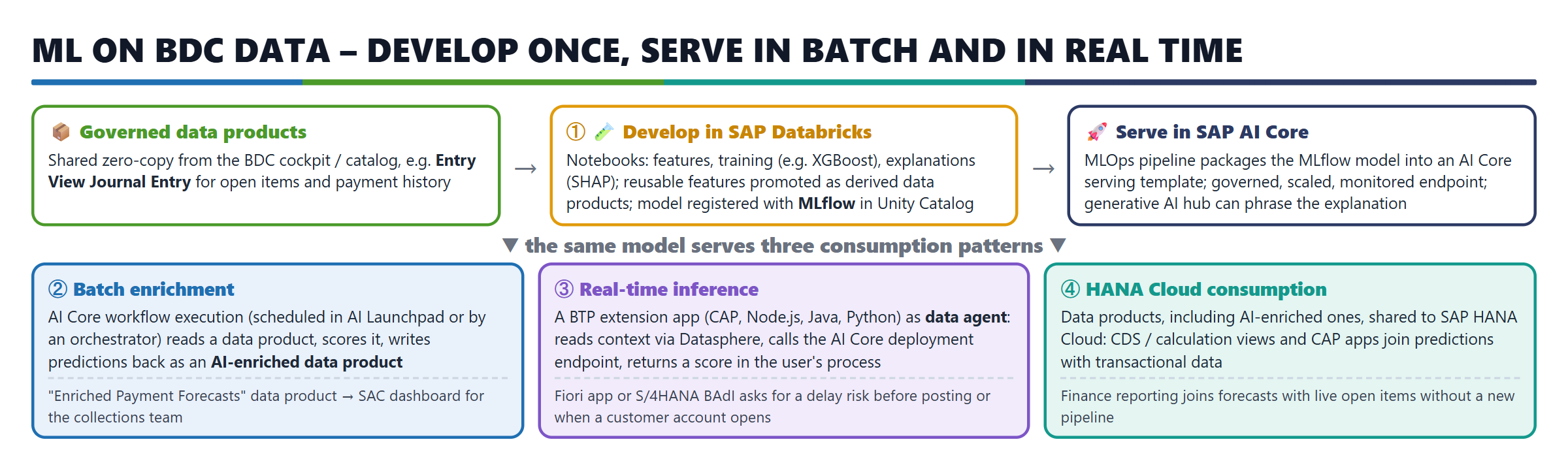
- Pattern 1 – development: data scientist trains on governed data products in SAP Databricks, promotes reusable features as derived data products, registers the model with MLflow in Unity Catalog; an MLOps pipeline packages it into an SAP AI Core serving template (SAP recommends AI Core for production serving because the same governed model serves batch and real time).
- Pattern 2 – batch: AI Core workflow executions (scheduled in AI Launchpad or by Databricks Workflows / Airflow) score a data product and write an AI-enriched data product; change data feed allows incremental scoring.
- Pattern 3 – real time: a BTP extension app acting as data agent (CAP, Node.js, Java, Python) reads context via Datasphere, calls the AI Core deployment endpoint and optionally the generative AI hub for an explanation – called from a Fiori app or an S/4HANA BAdI.
- Pattern 4 – HANA Cloud: AI-enriched data products shared to SAP HANA Cloud for joins with transactional data.
- Worked example (SAP Architecture Center): payment-delay prediction on the Entry View Journal Entry data product – XGBoost for the prediction, SHAP for feature importance, generative AI hub for a readable explanation; batch output "Enriched Payment Forecasts" feeds an SAC dashboard, the same API serves a collections Fiori app.
- AI Core, AI Launchpad and the generative AI hub hands-on: SAP Business AI › 06 and 07.
8.2 Roadmap with Databricks (as of November 2026)
- SAP TechEd (October 2026): Lakeflow (data engineering), Agent Bricks (agents), Unity Gateway and Lakebase (Postgres-style operational database) coming to SAP Databricks; Genie as natural-language analytics with a planned bidirectional Joule – Genie integration; SAP Application Data Foundation to make SAP application data available to the BDC engine of choice. Treat dates as planned until they appear in What's New.
Part 9 – Architect view and decisions
Question | Guidance |
|---|---|
SAP Databricks or BDC Connect? | Existing Databricks estate with data from many systems → BDC Connect and keep it; no lakehouse or a mainly SAP-centric ML need → SAP Databricks (one contract, no infra) |
Datasphere or a partner platform for modelling? | Business semantics, SAC consumption, planning and intelligent content → Datasphere; heavy data science, unstructured data, Spark engineering → SAP Databricks / partner; both read the same data products |
Where does the result live? | Publish results that others need as derived data products (ORD + CSN, owner, version) rather than ad-hoc tables; keep one owner per data product |
Region and data residency | BDC Connect in the data product's region and hyperscaler; some data centers offer no SAP Databricks or BDC Connect; EU Access is not available for every BDC solution |
Security | One IAS design for BDC, SAP Databricks and partners; Unity Catalog privileges and BDC catalog access requests are separate layers – both must be governed; whitelist SAP gateway IPs before IP ACLs |
Cost | Capacity units for SAP Databricks / SAP Snowflake / BDC Connect are billed on usage, quotas only inform; the partner platform's own compute is extra for BDC Connect |
- Pitfalls: materialized views cannot be shared back; Snowflake shares imported into Datasphere must use remote tables (replication flow to local tables is not supported); notebooks lost with a deleted workspace; announced partners (Fabric, Athena) not yet in the supported list.
Part 10 – Interview questions
Q1. What is SAP Databricks and how does it differ from Databricks?
A special edition of Databricks inside BDC, sold, billed in capacity units and supported by SAP. It is serverless with SAP-managed storage, pre-integrated with the BDC catalog through Delta Sharing, and offers a focused feature subset; a customer's own enterprise Databricks keeps the full platform and connects through BDC Connect.
Q2. What does zero-copy mean and which protocol is used?
The consumer reads the data product where it is stored instead of extracting a copy. BDC uses the open Delta Sharing protocol: the provider exposes shares, an authorised recipient reads the Delta tables directly; mTLS protects the transfer to SAP Databricks.
Q3. How does a data scientist get an S/4HANA data product into SAP Databricks?
An admin activates the data package and the data product is shared from the catalog to SAP Databricks (or access is requested and approved). In Catalog Explorer › Delta Sharing › Shared with me the user picks the provider and share and creates a catalog, then grants USE CATALOG, USE SCHEMA and SELECT; the data is queried like any Unity Catalog table.
Q4. How do you publish a result from SAP Databricks back to BDC?
Write a Delta table into an own catalog, create a Delta share to the recipient sap-business-data-cloud, then with sap-bdc-connect-sdk create the share with ORD metadata, upload the CSN generated by csn_generator and call publish_data_product. It appears in the BDC catalog and can be installed in Datasphere.
Q5. What are ORD and CSN used for?
ORD (Open Resource Discovery) describes the data product for discovery – title, descriptions, visibility, release status, labels. CSN Interop describes the schema – entities, columns, types, keys. Both are required to publish a data product.
Q6. What is SAP BDC Connect and which partners are supported?
The BDC service for zero-copy, bidirectional data product sharing with a customer's existing platform. As of November 2026 it supports Databricks, Snowflake and Google BigQuery; Microsoft Fabric and Amazon Athena are announced. With SAP Databricks or SAP Snowflake a default connector is included.
Q7. What region constraint applies to BDC Connect?
BDC Connect and the sharing system must be in the same region and on the same hyperscaler as the data product; the partner platform can be elsewhere. Data products in several data centers need a BDC Connect instance per location.
Q8. How are users and permissions managed in SAP Databricks?
Users come from SAP Cloud Identity Services via SCIM provisioning; groups sync both ways and roles are assigned through groups. Data access uses Unity Catalog privileges such as USE PROVIDER, CREATE CATALOG, CREATE SHARE and SELECT.
Q9. What is SAP Snowflake?
Snowflake offered as an SAP-certified solution extension of BDC, released in May 2026: provisioned from SAP for Me, billed by SAP, first-line supported by SAP, with zero-copy bidirectional sharing of data products and a default zero-copy connector. Existing Snowflake customers can use BDC Connect for Snowflake instead.
Q10. How would you operationalise an ML model trained in SAP Databricks?
Register it with MLflow, package and deploy it to SAP AI Core, then use the same model for batch enrichment (writing an AI-enriched data product), real-time calls from a BTP data agent used by Fiori or a BAdI, and share the enriched product to HANA Cloud or Datasphere for reporting.
Q11. What are the backup and recovery characteristics of SAP Databricks?
Overwritten or deleted data is kept in snapshots for 14 days and restored through SAP support; compute storage is not backed up, so notebooks are lost with a deleted workspace – keep them in connected Git repositories.
Q12. A customer has a large Databricks lakehouse and buys BDC. What architecture do you propose?
Keep the enterprise Databricks as the data science platform and provision BDC Connect for Databricks in the region of the data products; share SAP-managed data products zero-copy instead of extracting them; publish curated results back as derived data products for Datasphere and SAC; govern access in the BDC catalog and Unity Catalog with one identity design; use Datasphere for semantic models, planning and intelligent content.
🏠 Start Here · ◀ 03 · Intelligent Content & AI · 05 · BW in BDC ▶ · Sections: CORE ABAP | OOPS ABAP | ABAP on HANA | Clean Core | RAP | ABAP Points | SAP Fiori | SAPUI5 | Mobile Development (MDK) | BTP Foundations | BTP Development | CAP | SAP Build | ABAP on BTP | Integration Suite | SAP Business AI | SAP BASIS | Security | SAP SDLC
Functional: FICO ABAP | TRM ABAP | VIM | SAP BIS | SD ABAP | MM ABAP | PP ABAP | QM ABAP | PM ABAP | PS ABAP | EWM | TM ABAP | GTM ABAP | EHS ABAP | HR ABAP | BW | SAP Datasphere | SAP Business Data Cloud | SAP MDG | SAP Analytics Cloud | SAP Ariba | SAP CX | SAP IBP