This page follows the main SAP CX processes end to end and shows which system does what in each step: lead-to-cash with SAP Sales Cloud, SAP CPQ and S/4HANA, the service process with SAP Service Cloud, S/4HANA Service and SAP Field Service Management, and the commerce order flow from the storefront to an S/4HANA sales order. It then explains the key business objects, territory management, pricing ownership and master data ownership – the topics an architect settles first. The product overview is on page 01; the integration technology (packages, APIs, IDocs, monitoring) on page 03. Object names below follow Sales and Service Cloud Version 2; Version 1 names are given where they differ.
Part 1 – Process landscape and business objects at a glance
Every CX process starts with a customer interaction in the front office and ends with execution in S/4HANA. The table is the map for the rest of the page.
Process | Front office (SAP CX) | Back office (S/4HANA) |
|---|---|---|
Lead-to-cash (B2B sales) | Lead → opportunity → sales quote (Sales Cloud or CPQ) → sales order capture | Sales order, ATP, credit, delivery, billing, payment; status back to CX |
Customer service | Case from email, phone, chat, portal → agent desktop → service order; technician in SAP Field Service Management | S/4HANA Service order, parts, confirmation, service billing |
Online commerce (B2C / B2B) | Storefront → cart → checkout → Commerce Cloud order | Sales order, delivery, billing, payment clearing; status and invoices back to the shop |
Marketing to cash | Consent and profile (Customer Data Cloud / Platform) → segment → campaign (Engagement Cloud) → lead or shop visit | Sales data and orders feed back into segments |
1.1 Key business objects
Object | Purpose | Lives in | S/4HANA counterpart |
|---|---|---|---|
Account | Company customer or prospect (B2B) | Sales / Service Cloud | Business partner, customer role (BUT000, KNA1) |
Individual customer | Private person as customer (B2C) | Sales / Service Cloud | Business partner of category person |
Contact | Person working for an account | Sales / Service Cloud | BP contact-person relationship (BUT050) |
Lead | Unqualified interest in a product | Sales Cloud | – (none) |
Opportunity | Qualified deal with value, phase, probability, close date | Sales Cloud | – (none) |
Sales quote | Priced offer to the customer | Sales Cloud or SAP CPQ | Sales quotation (VBAK / VBAP) |
Sales order | Customer order | Captured in CX, executed in S/4HANA | Sales order (VBAK / VBAP) |
Activity / visit | Appointment, phone call, task, email, customer visit with survey | Sales / Service Cloud | – (none) |
Case (V1: ticket) | Customer request, question or complaint | Service Cloud | – (none) |
Service order | Service work to be executed and billed | Created in Service Cloud, executed in S/4HANA | S/4HANA Service order (CRMS4D_SERV_H / _I) |
Registered product | Customer's installed product / equipment | Service Cloud | Equipment, serial number, technical object |
Product | What is sold | Replicated to CX and Commerce | Material (MARA, MVKE) |
Cart / order (commerce) | Shopping cart and placed web order | Commerce Cloud | Sales order |
Part 2 – Customer master: accounts, individual customers, contacts
The customer model of Sales and Service Cloud is close to the S/4HANA business partner, which makes replication straightforward.
- Account – a company. Has addresses, sales area data (sales organisation, distribution channel, division), an account team (owner and team members with roles), relationships (parent / child account hierarchy, ship-to, bill-to, payer) and a lifecycle status (prospect, active, blocked).
- Individual customer – a consumer for B2C sales and service (e.g. utilities, retail, consumer electronics service). Has personal data, consents and marketing permissions; often also known in SAP Customer Data Cloud and SAP Commerce Cloud.
- Contact – a person related to one or more accounts, with function, department, decision role and communication data. A contact without an account does not exist in B2B.
- Prospect vs customer: reps create prospects freely in CX. A common rule is to replicate an account to S/4HANA only when it becomes a customer (first order or explicit release), so the S/4HANA customer master is not filled with prospects. S/4HANA returns its business partner number, stored in CX as the external ID.
- Duplicate check and data quality: both CX and S/4HANA have duplicate checks; the project decides where accounts are created and which fields each side may change (Part 9).
- Data protection: personal data (contacts, individual customers) needs consent tracking, information reports, blocking and deletion – supported by the GDPR functions of Sales and Service Cloud and by SAP Customer Data Cloud for consumers.
Part 3 – Lead-to-cash with SAP Sales Cloud, SAP CPQ and S/4HANA
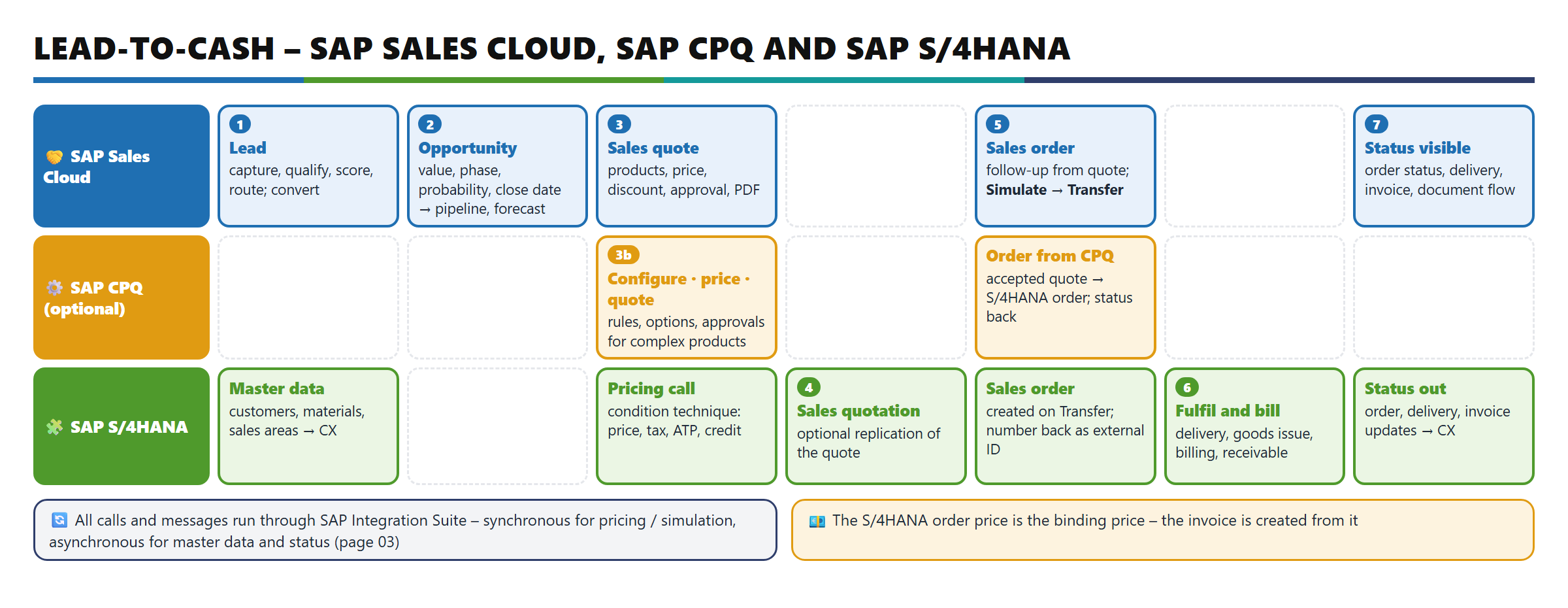
Lead-to-cash is the B2B sales process from the first interest to the payment. SAP Sales Cloud runs the sales cycle, SAP CPQ (optional) the configuration and quote for complex products, and S/4HANA the order execution. Numbered flow:
# | Step | System | What happens |
|---|---|---|---|
1 | Lead | Sales Cloud (from Engagement Cloud, web forms, events, reps) | Capture interest; qualify (hot / warm / cold), score (AI lead scoring), route to an owner; convert to account, contact and opportunity |
2 | Opportunity | Sales Cloud | Expected value, sales cycle and phase, probability, close date, competitors, products, sales team; feeds pipeline and forecast |
3 | Sales quote | Sales Cloud or SAP CPQ | Products and quantities, price from S/4HANA or internal price lists, discounts, approval if margin or discount rules are breached, quote output (PDF) to the customer |
4 | Quote in S/4HANA (optional) | S/4HANA | Quote replicated as a sales quotation when the back office needs it (e.g. for ATP reservation or follow-up in SD) |
5 | Sales order | Sales Cloud → S/4HANA | Follow-up order from the accepted quote; simulate (price, ATP, credit) and transfer – S/4HANA creates the sales order and returns its number |
6 | Fulfilment and billing | S/4HANA | Delivery, picking, goods issue, billing document, revenue and receivable in finance (SD ABAP › 02 Order-to-Cash Process & Sales Documents) |
7 | Status back | S/4HANA → Sales Cloud | Order status, delivery and invoice information and the document flow are visible to the rep in the account and order |
3.1 Sales order modes in Sales Cloud Version 2
Mode | Meaning |
|---|---|
Internal | The order lives only in Sales Cloud (e.g. orders passed to a distributor, or no ERP) |
Internal and External | Order created in Sales Cloud and synchronised with S/4HANA – the only mode with Simulate and Transfer |
External | Orders are created in S/4HANA and replicated to Sales Cloud for information |
- Simulate calls S/4HANA synchronously and returns net prices, discounts, header values, credit and rejection status, product substitution, bill-of-material explosion, ATP results and free goods – before anything is saved in S/4HANA.
- Transfer creates the sales order in S/4HANA and starts the configured follow-up processes (delivery, billing); the S/4HANA order number is written to the order's external ID in Sales Cloud.
- Orders can also be replicated in both directions, so orders entered in S/4HANA (EDI, inside sales) appear in the account's history in Sales Cloud.
3.2 Where SAP CPQ fits
- Use SAP CPQ when products are configurable (variants, options, rules), prices depend on many factors or approvals are complex – e.g. machinery, telecom bundles, subscriptions. Sales Cloud's own sales quote is enough for standard products.
- Flow: the rep starts the quote from the opportunity, configures and prices it in CPQ, gets it approved and generates the document; the accepted quote creates the sales order in S/4HANA, and the order status is replicated back to CPQ.
- Configuration model: for products that are also configured in S/4HANA (variant configuration), the architect must decide where the configuration rules are maintained and how the configuration reaches the S/4HANA order – a frequent design discussion (page 05).
3.3 Supporting sales capabilities
Capability | What it does |
|---|---|
Activities and visits | Appointments, calls, tasks, emails, visits with surveys and checklists; visit planning and route optimisation in the field sales add-on |
Pipeline and forecasting | Pipeline by phase and probability, forecast categories, forecast submission and adjustment by managers |
Sales campaigns, call lists | Targeted outreach to a list of accounts or contacts, with call scripts (surveys) |
Relationship intelligence, customer insights | Who knows whom, buying-centre mapping, 360° view of orders, cases and activities |
AI features | Lead and deal scoring, opportunity summaries, email drafting (some need SAP AI Units) |
Groupware and Teams | Email, calendar and contact sync with Microsoft 365, collaboration in Microsoft Teams |
Part 4 – Pricing ownership: internal pricing, external pricing, CPQ
Who owns the price is one of the first architecture decisions. In almost every S/4HANA landscape the answer is: S/4HANA owns pricing (condition technique, condition records, pricing procedure – SD ABAP › 03 Pricing, Output, Credit & Other SD Functions), and the front office asks S/4HANA for the price.
Option | How it works | When to use |
|---|---|---|
External pricing (S/4HANA) | Sales Cloud calls S/4HANA in real time for quotes and orders: price, discounts, tax, ATP and credit check, using S/4HANA's full pricing logic | Default with S/4HANA – one price truth, no duplicate condition maintenance |
Internal pricing (Sales Cloud) | Price lists and discount lists maintained in Sales Cloud | No ERP, simple list prices, or prices only for indicative quotes |
SAP CPQ pricing | Pricing rules and tables in CPQ, often enriched with list prices replicated from S/4HANA; S/4HANA re-prices when the order is created | Complex configurable products, margin-based approvals |
Commerce Cloud pricing | Price rows imported from S/4HANA, or a synchronous price call to S/4HANA at checkout (common in B2B with customer-specific prices) | B2C list prices: import; B2B contract prices: real-time call (Part 6) |
- Rule of thumb: whatever the front office shows, the S/4HANA order price is the binding one – the invoice is created from it. If CX prices are only indicative, the business must accept differences or simulate before confirming.
- Trade-off: a synchronous price call gives correct prices but makes the CX process depend on S/4HANA availability and latency; replicated prices are fast but can be stale and need the same conditions in two places.
Part 5 – Service process: case to service order to billing
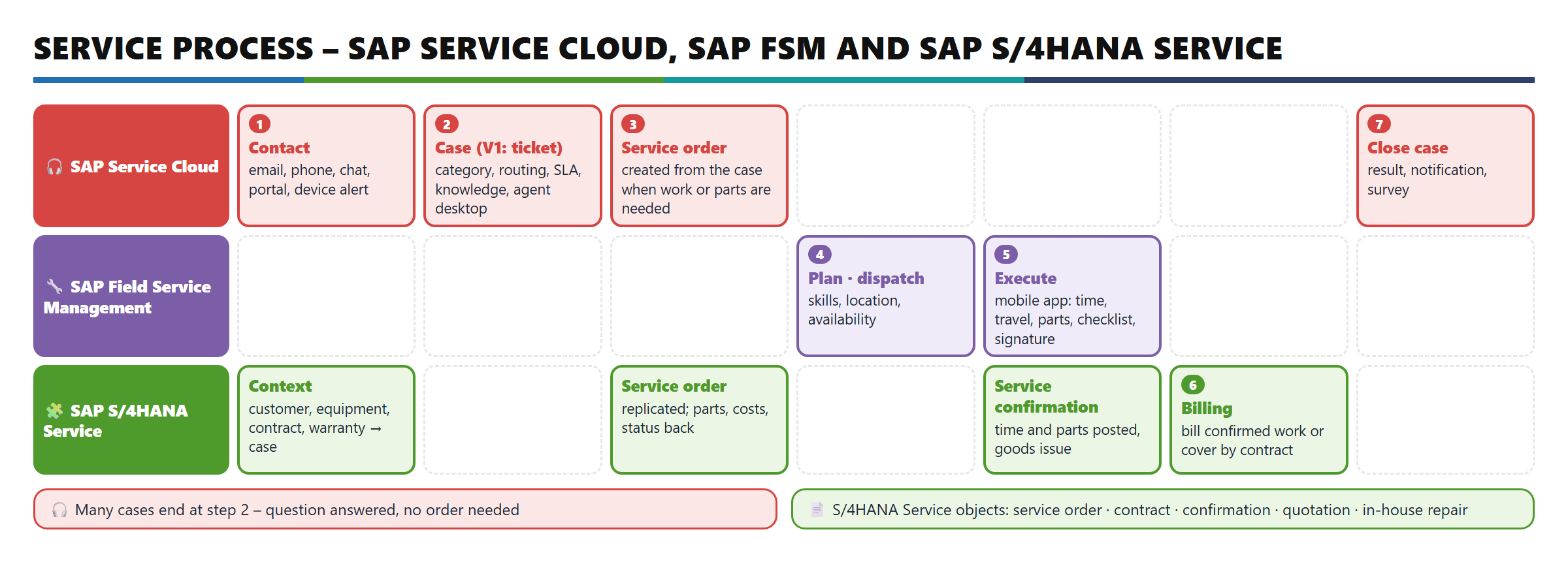
Customer service combines three products. SAP Service Cloud handles the interaction (Version 2 calls it a case, Version 1 a ticket), S/4HANA Service the commercial and logistical execution, and SAP Field Service Management (FSM) the technician's work in the field.
# | Step | System | What happens |
|---|---|---|---|
1 | Contact | Service Cloud | Email, phone (CTI), chat, social, self-service portal or a device alert create or update a case |
2 | Case handling | Service Cloud | Categorisation, routing to a queue or agent, service level (response and resolution times), knowledge articles, customer and registered product context in the agent desktop; many cases end here (question answered) |
3 | Service order | Service Cloud → S/4HANA Service | If work or parts are needed, a service order is created from the case and replicated to S/4HANA; statuses come back through the integration |
4 | Planning and dispatch | SAP FSM | Service call / activity in FSM, scheduling by skills, location and availability, technician's mobile app |
5 | Execution and confirmation | FSM → S/4HANA Service | Time, travel, expenses and parts recorded by the technician become a service confirmation in S/4HANA (goods issue for parts, costs) |
6 | Billing | S/4HANA | Billing of the confirmed service (or covered by a service contract / warranty), revenue and costs on the service order |
7 | Close | Service Cloud | Case resolved with the result, customer notified, survey |
- Contracts and entitlements: service contracts are usually managed in S/4HANA Service; the agent needs to see whether the customer is entitled (contract, warranty, service level) – replicated or read in real time.
- Registered products / installed base: the customer's equipment with serial numbers; maintained or replicated from S/4HANA (equipment), shown on the case for warranty and history.
- Without S/4HANA Service: smaller scenarios run case handling in Service Cloud and create sales orders or S/4HANA maintenance / service orders directly; the target process decides which S/4HANA object is created.
Part 6 – Commerce order flow and the commerce data model
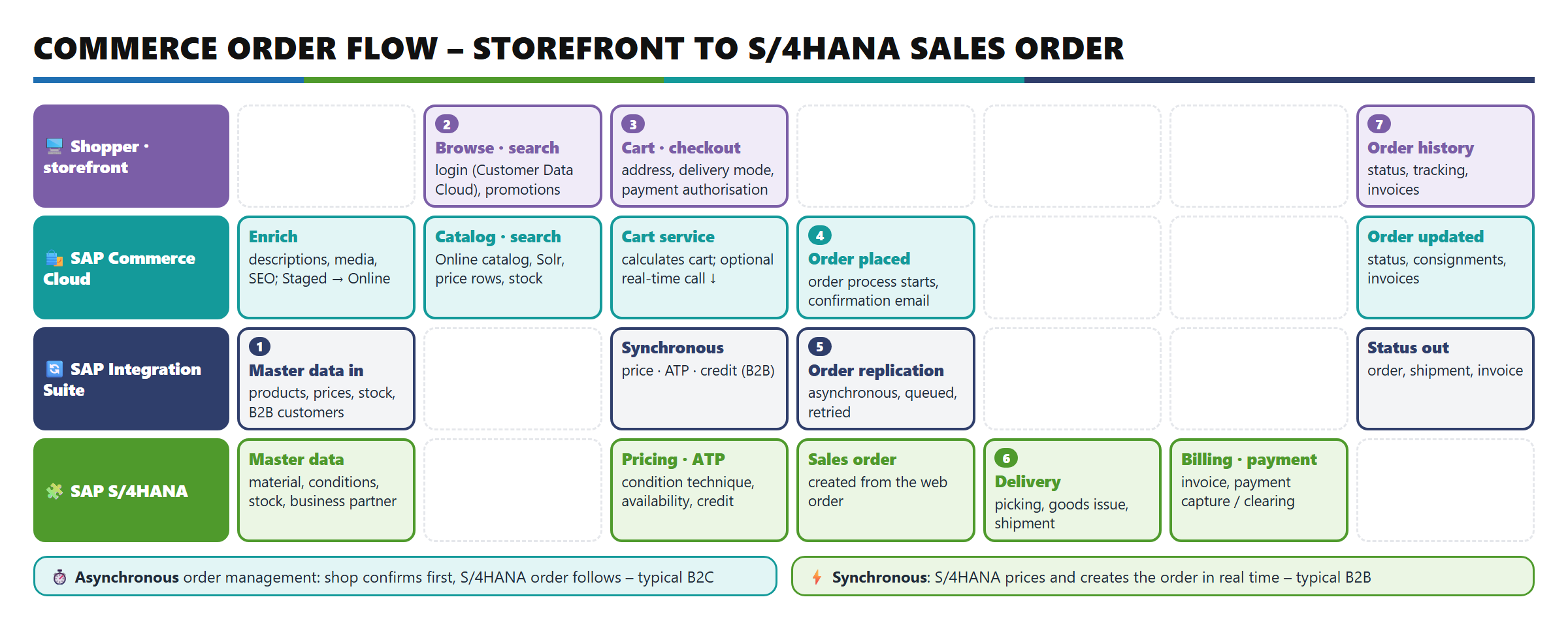
In commerce the customer places the order himself. SAP Commerce Cloud owns the shopping experience (catalog content, search, cart, checkout, customer account); S/4HANA remains the system of record for products, prices, stock, orders, deliveries and invoices.
# | Step | System | What happens |
|---|---|---|---|
1 | Master data in | S/4HANA → Commerce Cloud | Products (materials), classification, prices, stock levels and B2B customers replicated through SAP Integration Suite; Commerce enriches products with descriptions, media and SEO content |
2 | Browse and search | Storefront → Commerce Cloud | Catalog navigation, Solr search, personalisation and promotions; customer logs in (often via SAP Customer Data Cloud) |
3 | Cart and checkout | Commerce Cloud (+ S/4HANA) | Cart, delivery address and mode, payment authorisation with a payment provider; optional real-time price, ATP and credit check against S/4HANA |
4 | Order placed | Commerce Cloud | Order created in Commerce; order process (business process engine) starts; confirmation email |
5 | Order replication | Commerce Cloud → S/4HANA | Order sent asynchronously through SAP Integration Suite; S/4HANA creates the sales order |
6 | Fulfilment | S/4HANA (or an order management system) | Delivery, goods issue, shipment; billing and payment capture / clearing |
7 | Status back | S/4HANA → Commerce Cloud | Order status, shipment tracking and invoices shown in the customer's order history |
6.1 Synchronous vs asynchronous order management
Pattern | How it works | Typical use |
|---|---|---|
Asynchronous order management | The order is captured and confirmed in Commerce Cloud and then replicated to S/4HANA; prices may come from imported price rows or a pricing call | B2C; high volumes; shop must work even if S/4HANA is down |
Synchronous order management | Commerce calls S/4HANA in real time for pricing, availability and order creation; the S/4HANA order is the leading document | B2B with customer-specific prices, credit limits and real-time ATP |
Order management system | Commerce's own order management (sourcing to warehouses, splits into consignments, returns) or SAP Order Management services orchestrate fulfilment across locations | Omnichannel retail: ship-from-store, click-and-collect, several fulfilment systems |
- Middleware: SAP Integration Suite with the prebuilt Commerce ↔ S/4HANA packages and the Commerce Integration API module; the older Data Hub is legacy and no longer the strategic path (page 03).
6.2 Commerce data model (key concepts)
Concept | Meaning |
|---|---|
Base site / base store | A web shop (site) and its commercial settings (store): currencies, languages, delivery modes, payment, warehouses |
Product catalog | Products, categories, classification attributes and media |
Catalog version (Staged / Online) | Content is maintained in the Staged version and published to the Online version by catalog synchronisation – the shop reads only Online |
Content catalog | Pages, components and slots edited in SmartEdit |
Price row, stock level | Prices (per currency, unit, customer group) and stock per warehouse – imported from S/4HANA or fetched in real time |
Customer, B2B unit | Consumer account (B2C) or company structure with B2B units, buyers, approvers and budgets (B2B) |
Cart, order, consignment | Cart becomes an order at checkout; consignments split the order for fulfilment; returns create return requests |
Type system | Every item type (product, order, customer …) is defined in items.xml; custom fields and types are added by extensions (page 04) |
Part 7 – Territory management, organisation and access
Territory management divides the market into territories – by region, postal code, country, industry, account size or a named account list – and assigns owners and teams. It is used in Sales and Service Cloud for account assignment, data access, forecasting and visit planning.
Concept | What it controls |
|---|---|
Territory hierarchy | Territories roll up to regions and countries; managers see their subordinate territories |
Assignment rules | Rules that assign accounts (and their leads, opportunities, visits) to territories automatically; a realignment run re-assigns after rule or market changes |
Territory team | Owner and team members with roles; determines who works on the accounts |
Access restriction | Users see only accounts and documents of their territories (or their organisational units) – a key part of the authorisation concept |
Targets and forecast | Target plans and forecasts per territory and for subordinate territories |
- Organisation model: CX organisational units (sales, service units) are mapped to the S/4HANA sales area (sales organisation, distribution channel, division) so that quotes and orders carry the right sales area into S/4HANA. The S/4HANA org structure is the leading one.
- Employees and users: employees come from the HR system (e.g. SAP SuccessFactors) or are maintained in CX; users log on through SAP Cloud Identity Services; roles and territories decide what they can do and see.
Part 8 – Customer data, consent and marketing
For consumer-facing companies three products build the customer data foundation. Their objects are different from the sales objects and have their own owners.
Product | Key objects | Role in the processes |
|---|---|---|
SAP Customer Data Cloud | Identity (account with login), consent statements and versions, preferences, profile | Registration and login for shop, apps and portals; consent proof for GDPR; passes identity to Commerce Cloud and Service Cloud |
SAP Customer Data Platform | Unified customer profile, activities (events), segments, activations | Merges shop, service, marketing and S/4HANA order data; builds segments and sends them to marketing and commerce |
SAP Engagement Cloud | Contacts, segments, automation programs, campaigns, loyalty | Omnichannel campaigns (email, mobile, web, messaging); generates leads for Sales Cloud and traffic to the shop; CDP data available for audiences |
- Consent first: a marketing message may only be sent if a valid consent exists; the consent is captured once (Customer Data Cloud) and must be respected by every downstream system.
- Closed loop: campaign → lead (Sales Cloud) or order (Commerce Cloud) → S/4HANA order → data back into the CDP profile → next segment. Measuring this loop is a common CX project goal.
Part 9 – Master data ownership and the data model
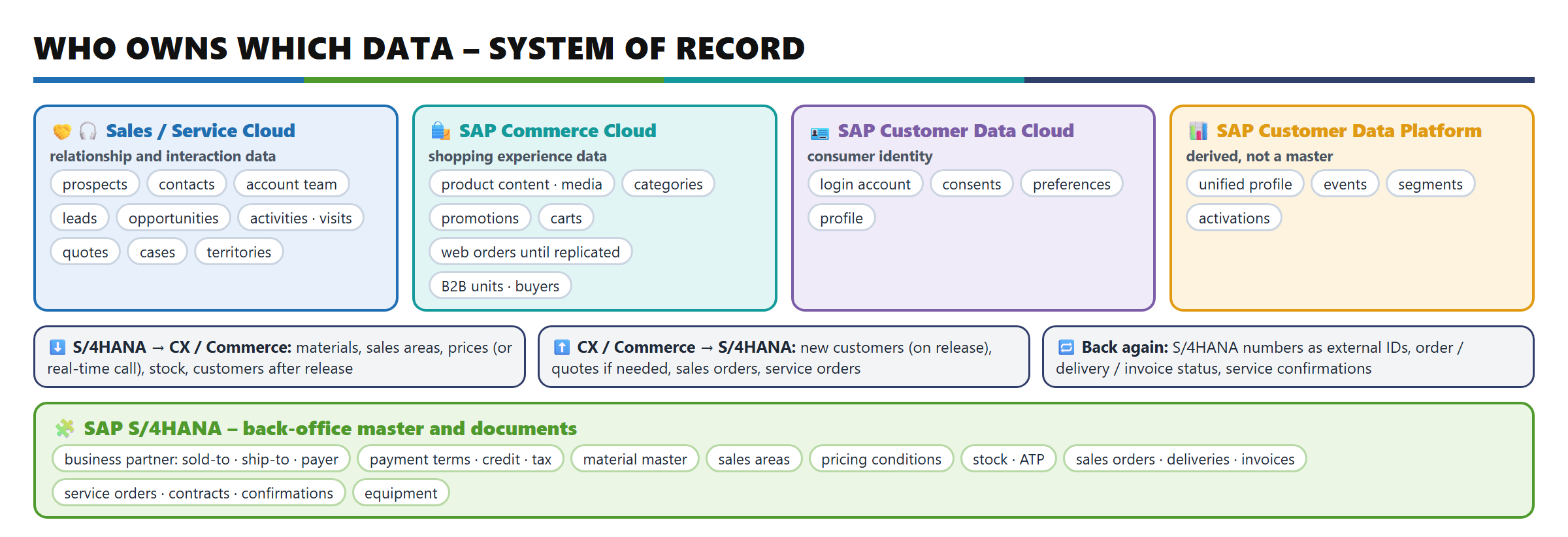
Before any integration is built, the architect writes down the system of record for every object and the direction of replication. A clear ownership matrix prevents endless conflicts and duplicate maintenance.
Object | System of record | Replication |
|---|---|---|
Customer (sold-to, ship-to, bill-to) | S/4HANA (after release); CX for prospects | S/4HANA → CX business partner replication; released CX accounts → S/4HANA, S/4HANA number back to CX (page 03 Part 3) |
Contact persons | Sales / Service Cloud (usually) | CX → S/4HANA if needed for order output or service |
Material / product | S/4HANA | S/4HANA → CX and Commerce (one way); Commerce adds rich content |
Org structure (sales area) | S/4HANA | S/4HANA → CX (mapping) |
Prices and discounts | S/4HANA | Real-time call or replication to CX / Commerce |
Leads, opportunities, activities | Sales Cloud | Not replicated to S/4HANA |
Quotes | Sales Cloud / CPQ | Optionally replicated as S/4HANA sales quotations |
Sales orders | S/4HANA (after transfer) | CX / Commerce → S/4HANA; status back |
Cases | Service Cloud | Not replicated; service orders created from them are |
Service orders, contracts, confirmations | S/4HANA Service | Service order from Service Cloud; status, confirmations back |
Consumer identity and consent | SAP Customer Data Cloud | To Commerce, Service Cloud, Engagement Cloud, CDP |
- Field-level ownership: even for a shared object such as the account, decide field by field who may change what – e.g. CX owns the account team and marketing attributes, S/4HANA owns the payment terms, credit limit and tax data.
- Keys and mapping: each system has its own IDs; the integration stores ID mappings (CX ID ↔ S/4HANA BP number). Value mappings (country, sales area, units, codes) are maintained in the integration or in CX code lists (page 03).
- Initial load vs delta: an initial load fills CX from S/4HANA at go-live; afterwards changes flow as deltas (events, change pointers, IDocs or APIs). The migration of legacy CRM data is a separate work stream (page 05).
Part 10 – Interview questions
Q1. Walk me through lead-to-cash with SAP Sales Cloud and S/4HANA.
Lead captured and qualified in Sales Cloud → converted to an opportunity with phases and probability → sales quote in Sales Cloud or SAP CPQ priced by S/4HANA → approval → sales order simulated and transferred to S/4HANA → delivery, goods issue, billing and payment in S/4HANA → status, delivery and invoice information back to Sales Cloud.
Q2. What do Simulate and Transfer do in a Sales Cloud V2 sales order?
Simulate calls S/4HANA synchronously and returns prices, discounts, ATP, credit status, product substitution, BOM explosion and free goods without saving. Transfer creates the sales order in S/4HANA, triggers fulfilment and billing there and writes the S/4HANA order number back as external ID. Both need the order mode "Internal and External".
Q3. Who owns pricing in a CX + S/4HANA landscape?
Usually S/4HANA: the condition technique is the single price truth and CX calls it in real time (external pricing) or imports prices. Sales Cloud internal price lists or CPQ pricing are used for special cases; the S/4HANA order price is always the binding one because the invoice is built from it.
Q4. When would you add SAP CPQ to SAP Sales Cloud?
For configurable products, complex price rules and approvals, or professional quote documents – e.g. machinery, bundles, subscriptions. For standard products the native sales quote is enough. With S/4HANA variant configuration you must decide where the configuration rules live.
Q5. Describe the service process across Service Cloud, FSM and S/4HANA Service.
A case is created from email, phone, chat or portal and routed in Service Cloud with service levels and knowledge. If work or parts are needed, a service order is created from the case and replicated to S/4HANA Service. FSM plans and dispatches the technician; time and parts become a service confirmation in S/4HANA, which bills it. The case is closed with the result.
Q6. What is the difference between a case and a ticket?
The same concept – a customer request in Service Cloud. Version 1 (C4C) calls it a ticket; Version 2 calls it a case, configured with the case designer, routing and service levels.
Q7. How does an order from SAP Commerce Cloud reach S/4HANA?
The shopper checks out in the storefront (optionally with real-time price, ATP and credit checks against S/4HANA). The Commerce order is replicated asynchronously through SAP Integration Suite and S/4HANA creates the sales order, delivers and bills; status, shipment and invoices flow back to the shop. Synchronous order management, where S/4HANA creates the order in real time, is used for demanding B2B scenarios.
Q8. What are Staged and Online catalog versions?
Each Commerce catalog has a Staged version where merchandisers maintain products and content and an Online version that the storefront reads. Catalog synchronisation publishes Staged to Online, so changes can be prepared and checked before going live.
Q9. What is territory management used for?
To divide the market into territories by rules (region, postal code, industry, named accounts), assign accounts and teams automatically, restrict data access to the territory, and plan targets, forecasts and visits per territory. A realignment run re-assigns accounts after changes.
Q10. Who should own the customer master?
S/4HANA for real customers (sold-to, ship-to, payer) with financial data such as payment terms, credit and tax; CX for prospects, contacts and relationship data. Accounts are replicated to S/4HANA when they become customers, and field-level ownership rules decide who may change what.
Q11. Which objects are not replicated to S/4HANA, and why?
Leads, opportunities, activities, visits and cases – S/4HANA has no counterpart and does not need them for execution. Only documents with back-office consequences (quotes if needed, sales orders, service orders, customers) are replicated.
Q12. How do Customer Data Cloud, Customer Data Platform and Engagement Cloud work together?
Customer Data Cloud handles registration, login and consent; the Customer Data Platform merges data from the shop, service, marketing and S/4HANA into unified profiles and segments; Engagement Cloud uses those segments for consented omnichannel campaigns, which create leads or shop orders – closing the loop back into the profile.
🏠 Start Here · ◀ 01 · Overview & Architecture · 03 · Integration ▶ · Sections: CORE ABAP | OOPS ABAP | ABAP on HANA | Clean Core | RAP | ABAP Points | SAP Fiori | SAPUI5 | Mobile Development (MDK) | BTP Foundations | BTP Development | CAP | SAP Build | ABAP on BTP | Integration Suite | SAP Business AI | SAP BASIS | Security | SAP SDLC
Functional: FICO ABAP | TRM ABAP | VIM | SAP BIS | SD ABAP | MM ABAP | PP ABAP | QM ABAP | PM ABAP | PS ABAP | EWM | TM ABAP | EHS ABAP | HR ABAP | BW | SAP MDG | SAP Analytics Cloud | SAP Ariba | SAP CX | SAP IBP