SAP CX products run the front office, S/4HANA the back office – so almost every CX project is also an integration project. This page explains the standard integration technology (SAP Integration Suite with SAP's prepackaged integration content), the scenarios between Sales and Service Cloud Version 2 and S/4HANA, what is configured and enhanced on the S/4HANA side (DRF, web services, IDocs, APIs, BAdIs), the Commerce Cloud integration, events, customer-data flows, identity and monitoring. The business processes behind the messages are on page 02 (lead-to-cash, service, commerce order flow, data ownership); extending the integration is on page 04; the architecture decisions on page 05.
Part 1 – The integration landscape at a glance
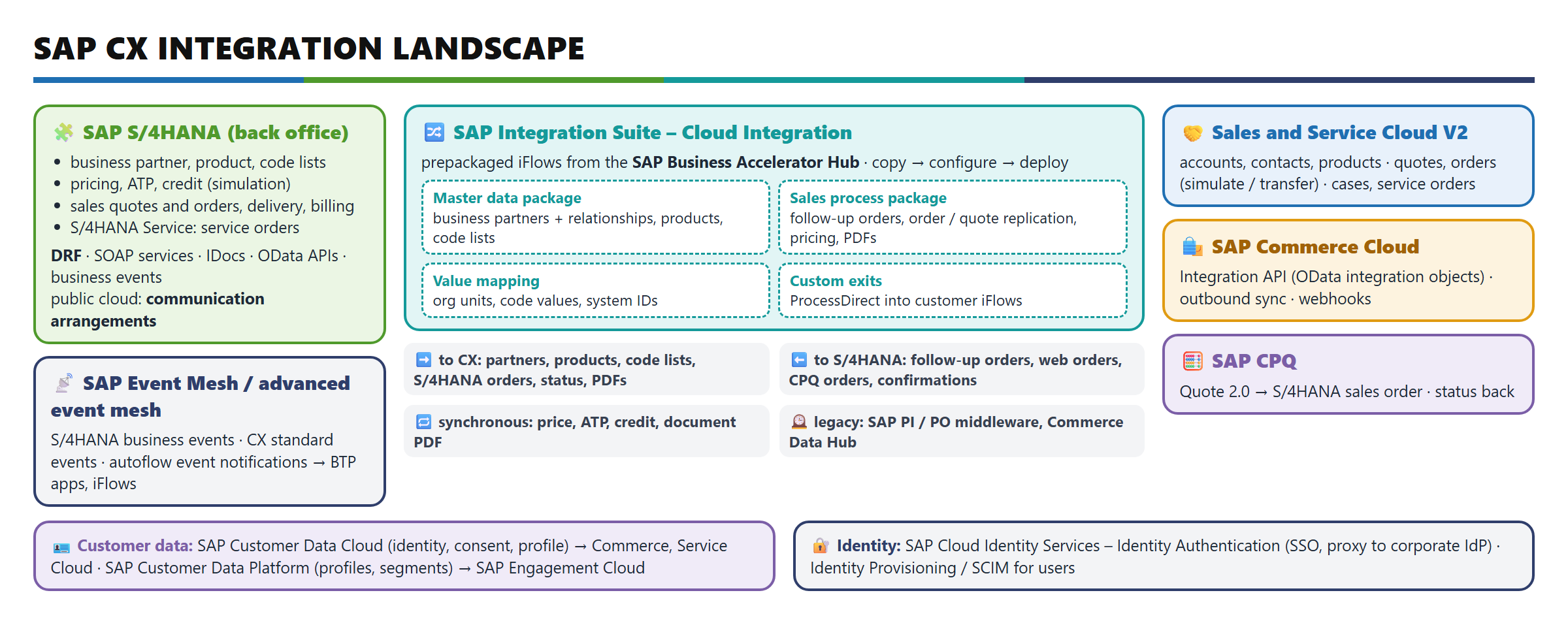
Every CX product talks to S/4HANA through SAP Integration Suite (Cloud Integration) with prepackaged integration flows (iFlows). Master data flows from S/4HANA into CX, transactions created in CX flow into S/4HANA, and status, documents and follow-up information flow back. Prices, availability and credit are usually read synchronously at the moment a quote or order is priced.
Integration pair | What flows | Typical style |
|---|---|---|
S/4HANA ↔ Sales and Service Cloud V2 | Business partners (accounts, contacts, relationships), products, code lists → CX; follow-up sales orders from quotes → S/4HANA; sales orders and quotes, quote PDFs, document flow → CX; real-time pricing, ATP and credit check; service orders | Asynchronous SOAP / IDoc for master data and documents; synchronous calls for pricing and PDFs |
S/4HANA ↔ Commerce Cloud | Products, classification, prices, stock, B2B customers → Commerce; web orders → S/4HANA; order status and notifications → Commerce | IDocs from S/4HANA, Commerce Integration API (OData) inbound and outbound; synchronous calls for B2B prices and ATP |
SAP CPQ ↔ S/4HANA | Business partners and products → CPQ; accepted quote → S/4HANA sales order; order status → CPQ | Prepackaged iFlows, e.g. "Replicate Quote 2.0 from SAP CPQ to SAP S/4HANA Sales Order" (Quote 2.0 engine only) |
Customer data products ↔ CX | Consumer identity, consent and profile → Commerce, Service Cloud, Engagement Cloud; events and orders → Customer Data Platform | Product connectors, REST APIs, SDKs (Part 8) |
Identity | Employee login and user provisioning across CX, S/4HANA and SAP BTP | SAP Cloud Identity Services (Part 9) |
- Direction rule: S/4HANA is the system of record for released customers, products, prices and orders; CX owns leads, opportunities, activities and cases (ownership matrix: page 02 Part 9).
- Synchronous vs asynchronous: use a synchronous call only when the user waits for the answer (price, ATP, credit, PDF). Everything else is asynchronous, so CX keeps working when S/4HANA is down (trade-offs: page 02 Part 4).
Part 2 – SAP Integration Suite and the prepackaged integration content
SAP delivers the CX ↔ S/4HANA integration as integration packages for Cloud Integration. The packages are listed on the SAP Business Accelerator Hub (api.sap.com) and in the Discover area of the Cloud Integration tenant. The integration team copies a package into its tenant, fills the externalized parameters (hosts, credentials, IDs), maintains value mappings and deploys the iFlows (CPI basics: Integration Suite › 02 SAP Cloud Integration).
Package (Version 2 content) | Scope |
|---|---|
SAP Sales Cloud and SAP Service Cloud Version 2 Integration for Master Data with SAP S/4HANA | Business partners with relationships (accounts, contacts), confirmation back to S/4HANA, products, code lists. Version 2 only – not compatible with Version 1 |
SAP Sales Cloud Version 2 Integration for Sales Processes with SAP S/4HANA | Sales quotes and follow-up orders, replication of S/4HANA sales orders and quotes, external pricing (simulation), follow-up document PDFs |
Variants "… with SAP S/4HANA Cloud Public Edition" | Separate packages for the public cloud edition – pick the package that matches the S/4HANA edition |
Service Cloud Version 2 packages | Service scenarios with S/4HANA Cloud and on-premise (e.g. service orders); listed on the Business Accelerator Hub under the Version 2 packages |
- Middleware is part of the standard: messages between Sales and Service Cloud V2 and S/4HANA always pass Cloud Integration. The communication system in Version 2 therefore combines the logical system ID of S/4HANA with the host name of the Cloud Integration runtime.
- S/4HANA Cloud Public Edition: SAP offers to set up and operate the integration with Sales and Service Cloud V2 for a standard business scope (SAP-managed SAP Integration Suite, for qualifying public-edition subscriptions). Customer-run setups apply to private cloud and on-premise.
- Value mapping: organisational units, code values (countries, titles, sales areas) and system IDs differ between systems – they are mapped in Cloud Integration value mappings or in CX code-list mapping. IDoc and web-service messages can carry different system IDs, which may need a value mapping of their own.
- Custom exits instead of copies: many standard iFlows offer a switchable custom exit (a ProcessDirect call into a customer iFlow). Use it for customer fields and logic so the standard iFlow can still be updated by SAP (page 04 Part 8).
- Always check the hub: SAP publishes the latest supported scenarios and package versions on the Business Accelerator Hub; scope grows with every release.
Part 3 – Sales and Service Cloud Version 2 ↔ S/4HANA: the scenarios
Scenario | Direction | Technology | Notes |
|---|---|---|---|
Business partner (organisation, person, contact relationships) | S/4HANA → CX, confirmation back | DRF outbound implementation 986_3 (BP and relationships via services), SOAP BusinessPartnerSUITEBulkReplicateRequest through Cloud Integration | Contacts come along with the relationships; address usages must be filtered to those CX supports |
Product | S/4HANA → CX | DRF business object 194, outbound implementation 194_3 (product replication via services), SOAP ProductMDMBulkReplicateRequest | In ECC products were MATMAS IDocs; S/4HANA uses the SOAP service |
Code lists | S/4HANA → CX | iFlows in the master data package | Keeps value help in CX equal to S/4HANA customizing |
External pricing / simulate | CX → S/4HANA → CX (synchronous) | Pricing iFlow calls S/4HANA's sales order simulation | Price, discounts, tax, ATP and credit check for quotes and orders |
Follow-up sales order from quote | CX → S/4HANA | iFlow "Create Follow-Up Sales Order in SAP S/4HANA from Sales Quote" | Transfer creates the S/4HANA order; its number goes back to the external ID in CX |
Sales orders and quotes from S/4HANA | S/4HANA → CX | iFlow "Replicate Sales Order and Sales Quote from SAP S/4HANA" with an IDoc sender | Orders entered in S/4HANA (EDI, inside sales) appear in the account history |
Follow-up document PDF | CX → S/4HANA → CX (synchronous) | iFlow "Retrieve Follow-up Sales Document PDF from S/4HANA" | Real-time preview of S/4HANA documents from the document flow |
Service order | Service Cloud ↔ S/4HANA | Service Cloud V2 packages; standard action "S/4 Service Order Creation" opens the S/4HANA Cloud app through a mashup | Service order events (created, released, completed) appear on the agent desktop timeline |
- Order modes: Simulate and Transfer exist only in the "Internal and External" order mode (page 02 Part 3.1). After transfer the S/4HANA order is the binding document – changes are made in S/4HANA and replicated back.
- Accounts created in CX: the leading direction is S/4HANA → CX. Accounts can also be replicated from Version 2 to S/4HANA, where the CVI settings must allow a customer for the business partner grouping used. When a prospect becomes an S/4HANA business partner (release step, approval, first order) is a design decision – page 05 Part 6.
- Gaps happen: not every message has a standard iFlow in every package version (SAP knowledge base articles list missing flows, e.g. order confirmations). Check the package's artefact list before promising a scenario.
- Other integrations of Version 2: SAP CPQ, SAP Field Service Management, SAP Customer Data Cloud, Microsoft 365 / Teams and telephony are separate integrations with their own setup.
Part 4 – The S/4HANA side: DRF, web services, IDocs, APIs and BAdIs
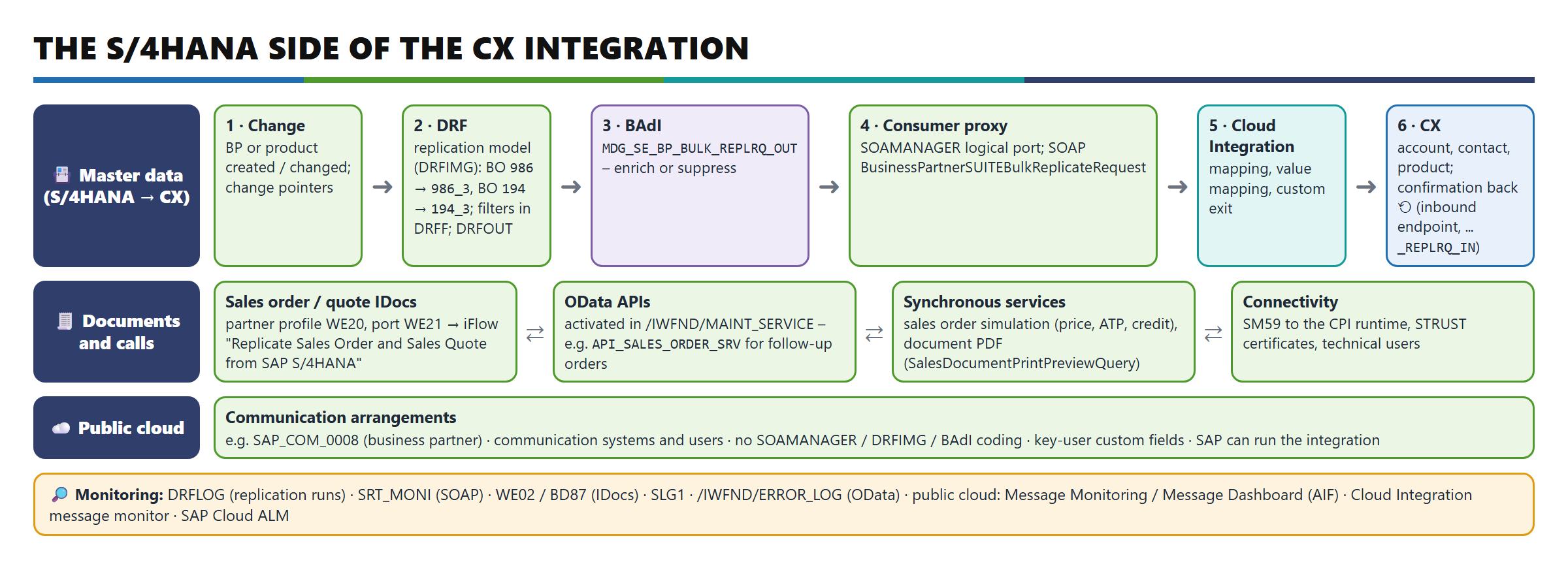
This is where an ABAP developer works in a CX project. On-premise and private cloud S/4HANA are configured with classic transactions; S/4HANA Cloud Public Edition uses communication arrangements instead.
4.1 Data Replication Framework (DRF)
Step | Transaction | What you set |
|---|---|---|
Define business system | DRFIMG | The CX tenant as target business system (logical system) |
Define replication model | DRFIMG | Business object (986 = business partner incl. relationships, 194 = product), outbound implementation (986_3, 194_3), target system, outbound parameters such as PACK_SIZE_BULK (business partners per message) |
Filters | DRFF | Which partners or products are replicated – e.g. by BP role, sales area, product type; the business partner address usage segment filter is required for CX |
Initial load and manual replication | DRFOUT | Replication model + outbound implementation; initial or manual mode with filter criteria |
Delta replication | Change pointers / automatic mode | Changes in S/4HANA trigger replication automatically |
Logs | DRFLOG | Replication runs and their messages |
4.2 Web services, IDocs and APIs
Object | Transaction / app | Role |
|---|---|---|
Consumer proxies (outbound SOAP) | SOAMANAGER | Logical ports for the BP and product services pointing to Cloud Integration |
Service endpoints (inbound SOAP) | SOAMANAGER | e.g. the business partner confirmation inbound service; synchronous services called by CX |
RFC / HTTP destinations, certificates | SM59, STRUST | Connection to the Cloud Integration runtime, trust for client certificates |
IDoc partner profile and port | WE20, WE21, BD54 | Sales order and quote IDocs sent to Cloud Integration for replication to CX |
OData services | /IWFND/MAINT_SERVICE | APIs called by iFlows, e.g. API_SALES_ORDER_SRV for order creation in the public-edition package |
Communication arrangements (public cloud) | Fiori app Communication Arrangements | e.g. SAP_COM_0008 for business partner replication with a CX target system; users and systems in Communication Systems / Users |
4.3 Where ABAP developers enhance the S/4HANA side
Requirement | Where |
|---|---|
Fill or change data in the outbound business partner message, or suppress partners that no DRF filter can express | BAdI MDG_SE_BP_BULK_REPLRQ_OUT (outbound processing of BusinessPartnerSUITEBulkReplicateRequest) |
Process extra data in an inbound business partner message | BAdI MDG_SE_BP_BULK_REPLRQ_IN |
Send a customer field of the business partner or product | Enhance the service data type (proxy enhancement), fill it in the BAdI, map it in the iFlow's custom exit; in CX create the matching extension field (page 04 Part 8) |
Customer field on the S/4HANA sales order filled from CX | Custom field (Custom Fields app, enabled for the API) + mapping in the iFlow custom exit (example: page 04 Part 10) |
Different filter logic per target | DRF filter objects in DRFF; BAdI only if the filter cannot express it |
Order or quote IDoc enrichment | Standard IDoc user exits / BAdIs of the outbound IDoc (CORE ABAP › 07 Interfaces, 10 Enhancements) |
- Clean core: prefer released APIs, DRF filters and iFlow mappings over modifications; keep BAdI logic small and documented (Clean Core › 01 Clean Core).
- Key mapping: S/4HANA business partner numbers and CX IDs differ; the replication stores the mapping, and messages for partners without a mapping are treated as new – a common cause of duplicates after failed loads.
Part 5 – Version 1 (SAP Cloud for Customer) integration
Many existing customers still run Version 1 (classic C4C). Its integration is conceptually the same but uses its own packages and settings – Version 1 and Version 2 content cannot be mixed.
Topic | Version 1 (classic C4C) | Version 2 |
|---|---|---|
Middleware | SAP Integration Suite (earlier SAP PI / PO also common) | SAP Integration Suite |
Settings in CX | Communication systems and communication arrangements in the C4C tenant | Communication systems with the own system ID; outbound communication setup per scenario |
Master data from ECC | IDocs (e.g. DEBMAS for customers, MATMAS for materials) | – |
Master data from S/4HANA | SOAP services via DRF (same BP and product services as Part 4) | SOAP services via DRF |
APIs | OData (c4codataapi) and SOAP | REST API per business object (page 04 Part 5) |
S/4HANA Cloud | Communication arrangement SAP_COM_0008 with a C4C-enabled target system | SAP-managed or customer-run with the public-edition packages |
- Migration consequence: moving from Version 1 to Version 2 means re-doing the integration with the Version 2 packages and re-testing every scenario (page 05 Part 4).
Part 6 – Commerce Cloud ↔ S/4HANA
6.1 Integration technology in Commerce Cloud
Component | What it does |
|---|---|
Integration API module | Exposes integration objects (modelled sets of Commerce item types) as OData services under |
Outbound sync | Detects new and changed items (delta detection) and sends them on a schedule to a destination, e.g. Cloud Integration; channels configured in the Backoffice Integration UI Tool |
Webhooks | Event-based notification to a URL each time an item of an integration object is created, updated (saved) or deleted (Basic or OAuth credentials) |
Outbound service | Sends data from a Commerce process or custom code to an outbound destination |
Integration packages | SAP Commerce Cloud ↔ SAP S/4HANA (on-premise / Cloud) content on the Business Accelerator Hub: route iFlows for incoming S/4HANA IDocs, material and classification replication, order replication to S/4HANA, order notifications back |
6.2 Data flows
Data | Direction | Typical technology |
|---|---|---|
Products (materials), classification | S/4HANA → Commerce | IDocs via Cloud Integration → Integration API (inbound) |
Prices, stock, B2B customers and units | S/4HANA → Commerce (or real-time read) | Replication iFlows where the package provides them; synchronous calls for B2B prices and ATP |
Web orders, cancellations | Commerce → S/4HANA | Outbound from Commerce through Cloud Integration; S/4HANA creates the sales order |
Order status, shipment, invoice | S/4HANA → Commerce | Notification iFlows → Integration API |
- Asynchronous vs synchronous order management: the patterns and when to use them are on page 02 Part 6.1. Both can coexist (e.g. synchronous pricing with asynchronous order replication).
- Legacy – SAP Commerce Data Hub: the older staging layer between Commerce and SAP back ends. Still found in older projects; the strategic path is the Integration API module with SAP Integration Suite.
- Customer master in commerce: B2C consumers usually stay in Commerce (or SAP Customer Data Cloud) and their orders often use a generic reference sold-to in S/4HANA; B2B customers and units come from S/4HANA – an architecture decision (page 05).
Part 7 – Events: S/4HANA business events and CX events
Events decouple systems: the source publishes "something happened", subscribers react, nobody polls. In CX landscapes events typically go through SAP Event Mesh or SAP Integration Suite, advanced event mesh and are consumed by Cloud Integration or by side-by-side apps on SAP BTP.
Source | How events are produced | Typical consumer |
|---|---|---|
S/4HANA | Standard business events (catalogue on the Business Accelerator Hub). On-premise / private: event enablement with a channel to the event broker; public cloud: communication scenario SAP_COM_0092 with channel and outbound topic bindings | BTP app or iFlow that reads the changed object through its API and updates CX |
Sales and Service Cloud V2 | Standard events raised after an entity is saved; autoflow action "Send Event Notifications" for rule-based events (e.g. opportunity won) | BTP extension, Cloud Integration, external systems |
Commerce Cloud | Webhooks on integration objects; internal platform events | Cloud Integration, BTP apps |
- Notification vs data events: most S/4HANA business events carry only the key and the change type (e.g. sales order ID, changed); the consumer reads the details through the API. Plan the API authorisation for the consumer.
- Events complement, not replace, the packages: master data and order replication still run through the prepackaged iFlows; events are used for extensions, notifications and near-real-time reactions.
Part 8 – Customer data, consent and marketing flows
These flows matter mainly for B2C and are configured with the products' own connectors rather than with S/4HANA customizing. Roles of the products: page 02 Part 8.
Flow | From → to | How |
|---|---|---|
Consumer registration, login, profile, consent | SAP Customer Data Cloud → Commerce Cloud (and composable storefront) | Customer Data Cloud extensions for Commerce and the storefront integration library; screen-sets in the shop |
Identity, consent and profile for service | SAP Customer Data Cloud → Sales / Service Cloud | Standard integration of the CX products |
Behaviour, orders, service history | Commerce, Customer Data Cloud, Service Cloud, S/4HANA → SAP Customer Data Platform | CDP source connectors; S/4HANA data via connectors or Integration Suite |
Segments and audiences | Customer Data Platform → SAP Engagement Cloud, Commerce Cloud | CDP activations; SAP describes the CDP as embedded in SAP Engagement Cloud (2026) |
Leads from campaigns | Engagement Cloud → Sales Cloud | Standard connector / Integration Suite |
- Consent travels with the data: every receiving system must respect the consent captured in Customer Data Cloud; design the consent attributes before building the flows.
- S/4HANA rarely needs consumer master data: pass only what billing, delivery and tax require.
Part 9 – Identity, users and technical security
Topic | How it works |
|---|---|
Employee login | SAP Cloud Identity Services – Identity Authentication (IAS) as identity provider, usually proxying the corporate IdP (SAML 2.0 / OpenID Connect). Sales and Service Cloud V2 tenants come IAS-integrated with single sign-on pre-configured (IAS basics: BTP Foundations › 03) |
User provisioning | Identity Provisioning (IPS) – bundled with the cloud products, no longer sold standalone – reads users from IAS or the HR system; Sales and Service Cloud V2 offers a SCIM API for user sync |
Business users in CX | Employee record + business role (and territories) decide what a user may see and do; IAS groups can map to business roles |
Technical users | Communication users / systems in CX and S/4HANA, credentials in Cloud Integration security material; Basic authentication or client certificates (preferred) – certificates in STRUST and the CX communication system |
Commerce Cloud | Integration API secured per integration object (Basic or OAuth); Backoffice users can log on via SAML SSO; consumers via SAP Customer Data Cloud or Commerce's own accounts |
Data protection | Replicate only needed personal data; align blocking and deletion of business partners (S/4HANA end-of-purpose check) with CX deletion rules |
Part 10 – Monitoring and troubleshooting
Where | Tool | What you see |
|---|---|---|
S/4HANA on-premise / private | SRT_MONI, WE02 / BD87, DRFLOG, SLG1, /IWFND/ERROR_LOG | SOAP messages and their processing status, IDocs, replication runs, application logs, OData errors |
S/4HANA Cloud Public Edition | Message Monitoring / Message Dashboard apps (AIF-based) | Inbound and outbound messages of communication arrangements, errors with reprocessing |
Cloud Integration | Monitor › Message Processing | Message processing log per iFlow run, payloads with trace, mapping and value-mapping errors |
Sales and Service Cloud V2 | Message monitoring | Asynchronous integration messages; synchronous REST calls are not stored there – the caller receives the response |
Commerce Cloud | Backoffice Integration UI Tool › monitoring | Inbound and outbound integration requests (outbound monitoring switched on by a property) |
End to end | SAP Cloud ALM integration and exception monitoring | Alerts across S/4HANA, Cloud Integration and cloud products |
Symptom | Typical cause |
|---|---|
HTTP 401 in Cloud Integration or S/4HANA | Wrong password or certificate on one leg (S/4HANA → CPI or CPI → CX) |
System error in SRT_MONI right after go-live | Communication configuration inactive when the message arrived; reprocess after correction |
Business partner rejected in CX | Unsupported address usage, missing code-value mapping, employee partner function without mapping |
"No SD partner can be determined" warnings | Key mapping or partner determination for ship-to / bill-to missing |
Simulation error in a quote | Pricing iFlow misconfigured or wrong iFlow, date conversion, OData syntax in the receiver call |
Duplicates after reload | Key mapping lost, partner treated as new |
Part 11 – Interview questions
Q1. How is SAP Sales Cloud Version 2 integrated with S/4HANA?
Through SAP Integration Suite (Cloud Integration) with SAP's prepackaged packages from the Business Accelerator Hub: a master data package (business partners, relationships, products, code lists) and a sales process package (follow-up orders from quotes, order and quote replication, external pricing, PDFs). Middleware is always in between; for S/4HANA Cloud Public Edition SAP can set up and run the integration.
Q2. How does a business partner get from S/4HANA to Sales Cloud?
DRF: replication model in DRFIMG with business object 986 and outbound implementation 986_3, filters in DRFF (including the address usage segment filter), initial load with DRFOUT and deltas by change pointers. S/4HANA sends BusinessPartnerSUITEBulkReplicateRequest via SOAMANAGER consumer proxy to Cloud Integration, which maps and posts it to Sales Cloud; a confirmation can come back.
Q3. Which BAdIs do you use to enhance business partner replication?
MDG_SE_BP_BULK_REPLRQ_OUT for the outbound message (fill extra fields, suppress partners no DRF filter can express) and MDG_SE_BP_BULK_REPLRQ_IN for the inbound side. Custom fields also need a proxy data type enhancement and a mapping in the iFlow.
Q4. How are prices shown in a Sales Cloud quote when S/4HANA owns pricing?
External pricing: when the rep prices or simulates, Sales Cloud calls S/4HANA synchronously through Cloud Integration; S/4HANA's sales order simulation returns prices, discounts, tax, ATP and credit results without saving anything. No condition records are replicated.
Q5. What happens when the rep transfers an order?
The iFlow "Create Follow-Up Sales Order in SAP S/4HANA from Sales Quote" creates the sales order in S/4HANA, the order number returns as external ID, and S/4HANA runs delivery and billing. From then on the S/4HANA order is binding; status and documents are replicated back.
Q6. What is different on the S/4HANA side for the public cloud edition?
No SOAMANAGER, DRFIMG or BAdI work: communication arrangements (e.g. SAP_COM_0008 for business partners), communication systems and users, released APIs and key-user custom fields. Monitoring is in the Message Monitoring / Message Dashboard apps. SAP can operate the integration itself.
Q7. How is SAP Commerce Cloud integrated with S/4HANA?
Through SAP Integration Suite packages and Commerce's Integration API module: S/4HANA sends material and classification IDocs that route iFlows post into Commerce via OData integration objects; web orders go out of Commerce to S/4HANA as sales orders; order notifications come back. Prices and stock are replicated or read synchronously, depending on the order management pattern.
Q8. What is the SAP Commerce Data Hub?
The older integration staging layer between Commerce and SAP back ends. It is legacy: new projects use the Integration API module (integration objects, outbound sync, webhooks) with SAP Integration Suite.
Q9. Where do events fit in a CX integration?
For decoupled, near-real-time reactions: S/4HANA business events (event enablement on-premise, SAP_COM_0092 in the public cloud) and Sales and Service Cloud standard events or autoflow event notifications go through SAP Event Mesh or advanced event mesh to BTP apps or iFlows. They complement the packaged replication, they do not replace it.
Q10. How do users log on and how are they provisioned?
Employees log on through SAP Cloud Identity Services – Identity Authentication, which proxies the corporate IdP; Version 2 tenants come with SSO pre-configured. Identity Provisioning or the SCIM API syncs users; business roles in CX decide authorisations. Consumers use SAP Customer Data Cloud.
Q11. A business partner did not arrive in Sales Cloud – how do you analyse it?
DRFLOG and DRFOUT in S/4HANA (was it replicated, filtered?), SRT_MONI for the outbound SOAP message, Cloud Integration message monitor for mapping or authentication errors, then message monitoring in Sales Cloud for the inbound error (address usage, code values, employee mapping). Fix and reprocess.
Q12. As an architect, which questions do you ask before designing the CX integration?
Which S/4HANA edition and which CX version? Who owns customers, products and prices? Which scenarios do the current packages cover, and which need custom exits? Synchronous or asynchronous for each flow? Event broker needed? Who runs Cloud Integration and monitoring? How are test and production paired end to end?
🏠 Start Here · ◀ 02 · Capabilities & Data · 04 · Extensibility ▶ · Sections: CORE ABAP | OOPS ABAP | ABAP on HANA | Clean Core | RAP | ABAP Points | SAP Fiori | SAPUI5 | Mobile Development (MDK) | BTP Foundations | BTP Development | CAP | SAP Build | ABAP on BTP | Integration Suite | SAP Business AI | SAP BASIS | Security | SAP SDLC
Functional: FICO ABAP | TRM ABAP | VIM | SAP BIS | SD ABAP | MM ABAP | PP ABAP | QM ABAP | PM ABAP | PS ABAP | EWM | TM ABAP | GTM ABAP | EHS ABAP | HR ABAP | BW | SAP Datasphere | SAP Business Data Cloud | SAP MDG | SAP Analytics Cloud | SAP Ariba | SAP CX | SAP IBP