The SAP CX products are extended in very different ways: Sales and Service Cloud are multi-tenant SaaS with in-app low-code tools and side-by-side extensions on SAP BTP (no custom code inside the tenant in Version 2), SAP Commerce Cloud is a Java platform the customer develops on, and the integration to S/4HANA is extended in Cloud Integration iFlows and S/4HANA BAdIs. This page explains each option from configuration to code, the public APIs and events, the legacy Version 1 SDK, Commerce development, typical custom developments and one complete example. Integration scenarios: page 03; decisions about where to extend: page 05.
Part 1 – Configure, adapt, extend: the extension ladder in SAP CX
Take the lowest rung that solves the requirement. Every rung up costs more to build, test and keep working through the products' frequent releases.
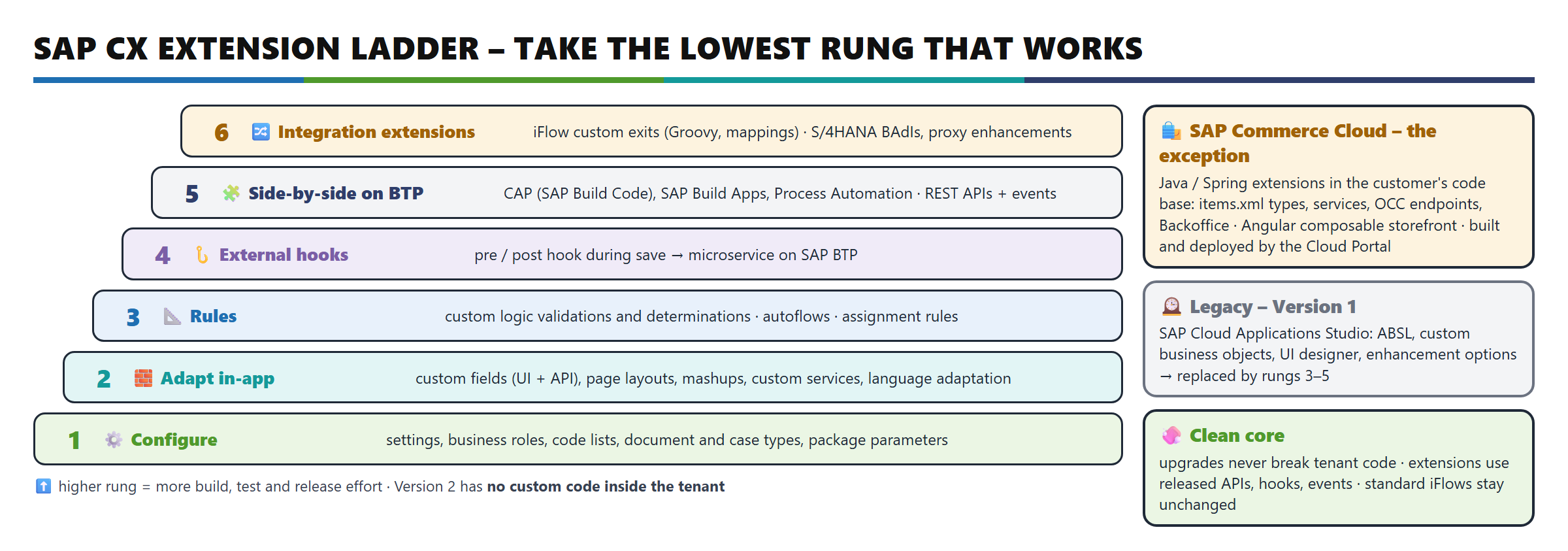
Rung | Sales and Service Cloud V2 | Commerce Cloud | Integration / S/4HANA |
|---|---|---|---|
1 Configure | Settings, business roles, code lists, document types, case types | Backoffice configuration, base store, catalogs, promotions | Package parameters, value mappings |
2 Adapt (no code) | Custom fields, page layouts, mashups, custom services, language adaptation | SmartEdit pages and components | Mappings for existing extension fields |
3 Rules (low code) | Custom logic (validations, determinations), autoflows, assignment rules | Promotion and rule engine | DRF filters |
4 Code outside the core | External hooks and side-by-side apps on SAP BTP (CAP, SAP Build) | Composable storefront (Angular) code | iFlow custom exits (Groovy, mappings) |
5 Code inside the product | Not possible in Version 2 (Version 1: Cloud Applications Studio) | Java extensions (type system, services, OCC) | S/4HANA BAdIs, proxy enhancements |
- Clean core applies to CX too: Version 2 has no in-tenant code by design, so upgrades never break custom code; logic that needs code lives on SAP BTP and talks to the tenant through APIs, hooks and events (Clean Core › 01 Clean Core).
- Commerce is different: custom Java extensions run inside the platform – flexible, but every monthly update release must be built and regression-tested with the customer code (page 01 Part 7).
Part 2 – In-app extensibility in Sales and Service Cloud Version 2
Administrators find the tools under Settings › Extensibility. They need no development system – changes are made in the test tenant and moved to production with a Change Project (page 05 Part 2).
Tool | What it does |
|---|---|
Extensibility Administration – custom fields | Add fields to standard entities (account, opportunity, case …). Custom fields behave like standard fields: part of the entity's data model, available in the UI and in the APIs; attributes such as creatable, updatable, required, and query properties filterable, searchable, sortable |
Page Layouts | Arrange fields and sections per business role or type |
Assignment Rules | Rules that assign owners, teams or territories |
Mashup Authoring | Embed external web content or apps (e.g. an S/4HANA Fiori app, a BTP app, a map) in CX screens, with parameters from the current record |
Custom Services | Define own business entities (custom objects) for data that has no standard entity; SAP limits the number of custom services per tenant, so use them sparingly |
Custom Logic Administration | Validations, determinations and external hooks (Part 3) |
Language Adaptation, Work Center Sequence | Translate custom texts; order of work centres |
Interaction types, case designer | Service-specific configuration of interactions and case structures |
- Extension fields and integration: a custom field travels in the entity's API payload in an
extensionsobject (not an array). To reach S/4HANA it must also be mapped in the iFlow and exist in S/4HANA (Part 10).
Part 3 – Custom logic, external hooks and autoflows
3.1 Custom logic: validations and determinations
A simple editor builds validation rules (block the save with a message, e.g. "close date must not be in the past") and determination rules (set a field value, e.g. derive priority from category). They run in the tenant during save – no BTP needed.
3.2 External hooks
External hooks are webhook-style extension points: during save, the tenant calls an external service – typically a microservice on SAP BTP – which validates the data or returns changed values. They are the Version 2 replacement for in-tenant code.
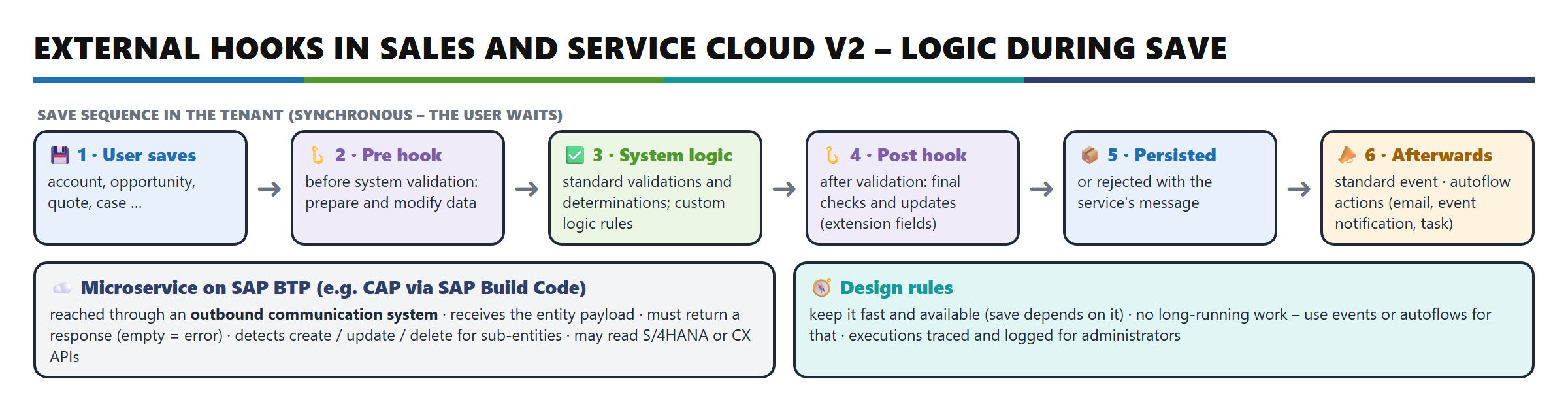
Aspect | Detail |
|---|---|
Pre hook | Before the standard logic: prepare and modify data (all fields changeable) |
Post hook | After the standard logic, before save: final checks and updates (only extension fields); a post-hook determination writes into an extension field |
Connection | Outbound communication system pointing to the service (e.g. a CAP app on SAP BTP); authentication configured there |
Contract | Synchronous request / response with the entity payload; the service must return a response (an empty response is rejected); for aggregate entities the service must detect whether a sub-entity is created, updated or deleted |
Operations | Executions are traced and logged for administrators; keep the service fast – the user waits for it |
3.3 Autoflows
Autoflows are rule-based automations without code: when a condition on an entity is met (e.g. opportunity status = won), an action runs – Send Email, Send Event Notifications (to integrated systems), Info Notification (in-app) or Create Task.
- Autoflow vs external hook: autoflows react after the save (asynchronous); hooks act during the save and can stop or change it.
Part 4 – Side-by-side extensions on SAP BTP
Anything that needs real code, own data or own UIs is built on SAP BTP and connected to the CX tenant through REST APIs, external hooks, mashups and events. Platform details: BTP Development › 01 Developing on BTP – CAP, Kyma, MTA & SAP Build, 05 ABAP on BTP.
Tool | Typical CX use |
|---|---|
SAP Build Code / CAP (Node.js or Java) | Microservices behind external hooks (custom logic), own entities with business logic, APIs that combine CX and S/4HANA data – SAP Learning has a course on a custom-logic microservice for Version 2 |
SAP Build Apps (low-code) | Simple apps that read and write CX data through the Version 2 REST APIs, e.g. a field app or a partner form |
SAP Build Process Automation | Approval workflows and automations across CX and S/4HANA, often triggered by events |
SAP Integration Suite | Cloud Integration iFlows, API Management, Event Mesh / advanced event mesh |
SAP Business AI Platform, ABAP environment | When the team prefers ABAP for a side-by-side service (RAP-based APIs called by CX) – RAP section |
- Embedding the result: the BTP app appears in CX as a mashup or is called by an external hook; users keep working in the CX UI.
- Identity: use SAP Cloud Identity Services for both the tenant and the BTP app so the user logs on once (page 03 Part 9).
Part 5 – Public APIs and events
Product | API style | Notes |
|---|---|---|
Sales and Service Cloud V2 | REST API per business object, e.g. | Documented on the SAP Business Accelerator Hub; Basic or certificate authentication for API users; calls are synchronous and not kept in message monitoring; SCIM API for users |
Sales and Service Cloud V1 | OData v2 ( | Custom OData services could be defined in the tenant |
SAP Commerce Cloud | OCC REST APIs ( | OCC is extended with custom controllers and DTOs (Part 7) |
SAP Customer Data Cloud | REST APIs and web / mobile SDKs | Identity, consent and profile operations |
SAP CPQ | REST / SOAP APIs | Quotes, products, pricing |
- Events: Version 2 raises standard events after an entity is saved (sent to SAP Event Mesh) and autoflow event notifications; Commerce offers webhooks on integration objects (page 03 Part 7).
- Calling CX from ABAP: an S/4HANA program or RAP service can call the Version 2 REST API with
CL_WEB_HTTP_CLIENT_MANAGERthrough an HTTP destination (technique: CORE ABAP › 07 Interfaces); in most landscapes Cloud Integration sits in between.
Part 6 – Legacy: Version 1 extensibility with SAP Cloud Applications Studio
Legacy for new projects – still running at Version 1 customers. Version 1 (classic C4C) had two levels: key-user adaptation in the browser (extension fields, page layouts, workflow rules, mashups) and the SAP Cloud Applications Studio (formerly PDI, the SDK) for code inside the tenant.
Studio feature | What it was used for |
|---|---|
ABSL (ABAP-like scripting language) | Event logic on business objects (before save, after modify, actions), validations |
Business object extensions and custom BOs | New fields and new objects with their own persistence |
UI designer | Floorplans and changes to standard screens |
Enhancement options (BAdIs) | Hooks offered by SAP in standard processes |
Web services, OData, mashups | Expose custom objects, call external services |
Solutions and deployment | Developed in a development tenant, deployed to test and production |
- Successor: in Version 2 none of this code runs – custom BOs become custom services or BTP apps, ABSL logic becomes custom logic, external hooks or BTP services. SAP's migration assessment gives recommendations for custom code, integrations and mashups (page 05 Part 4).
Part 7 – SAP Commerce Cloud development
Commerce Cloud projects are Java software projects: the customer's developers build extensions on the Commerce platform (Java, Spring) and the storefront in Angular; the Cloud Portal builds the code from the customer's Git repository and deploys it to the environments.
Building block | What a developer does |
|---|---|
Extensions | Modules of the platform; custom ones are generated from templates and declared in |
Type system | New item types and attributes in |
Service layer | Services, facades, converters and populators (data → DTO) following the platform's layering; interceptors on save / remove; events; cron jobs |
Business processes | Order and fulfilment processes defined as process XML with actions |
ImpEx | Script format to import and export data (catalogs, prices, configuration, test data) |
Backoffice | Configuration of editors, list views and wizards for business users |
OCC extensions | Custom REST endpoints (controllers, WsDTOs) for the storefront or apps |
Composable storefront | Angular libraries (formerly project Spartacus) consuming OCC; custom components and CMS mappings; the JSP accelerator storefronts are deprecated since 2205 |
Cloud Portal and manifest.json |
|
- Integration code: prefer the Integration API module (integration objects, outbound sync, webhooks) and SAP Integration Suite over hand-written integration in extensions (page 03 Part 6).
- Upgrade discipline: keep custom code out of SAP's extensions, use the documented extension points, and automate regression tests – monthly update releases make this essential.
Part 8 – Extending the integration: iFlows and the S/4HANA side
Layer | Extension technique | Example |
|---|---|---|
CX tenant | Extension field on the entity; it is included in the outbound payload's extensions | Field "responsible seller" on the sales quote |
Cloud Integration | Switch on the standard iFlow's custom exit (externalized parameter) and implement a customer iFlow on the same ProcessDirect address; Groovy scripts and message mappings inside it | Read the extension field, map it to the S/4HANA API field |
Cloud Integration | Value mappings for customer-specific codes | Map a CX code list to an S/4HANA customizing value |
S/4HANA (outbound) | DRF filters; BAdI MDG_SE_BP_BULK_REPLRQ_OUT; proxy enhancement for new fields in the BP or product message | Send a customer classification of the business partner |
S/4HANA (inbound) | Custom field enabled for the API (key-user Custom Fields app, | Store the CX field on the sales order header |
- Never edit the standard iFlow: a modified copy no longer receives SAP's updates. Exits, externalized parameters and value mappings survive package updates.
- Test both directions: a new field on an object replicated both ways needs mappings in both iFlows, otherwise the next replication overwrites it.
Part 9 – Typical custom developments
Type | Requirement | Typical solution |
|---|---|---|
Extension | Industry-specific fields on account and opportunity | Custom fields, page layouts; mapping to S/4HANA only if the back office needs them |
Extension | CX field must reach the S/4HANA sales order | Extension field + iFlow custom exit + S/4HANA custom field (Part 10) |
Extension | Customer classification from S/4HANA shown in CX | Proxy enhancement + BAdI MDG_SE_BP_BULK_REPLRQ_OUT + iFlow mapping + CX custom field |
Pricing | Customer-specific price from a source other than standard pricing (e.g. a contract database) | Keep S/4HANA pricing as the source and add the logic there (pricing routines, condition records) so simulation returns it; avoid a second pricing engine in CX |
Validation | Block quote submission without an approved credit check | Custom logic validation, or external hook calling a BTP service that reads S/4HANA credit data |
Workflow | Approval of large discounts with S/4HANA data | Autoflow event → SAP Build Process Automation or CAP service |
UI | Show S/4HANA open items or deliveries on the account | Mashup of a Fiori app or a BTP app calling S/4HANA APIs |
Commerce | Custom checkout step, B2B approval rule, extra product attribute | Commerce extension (type system, service, OCC endpoint) + composable storefront component |
Commerce | Real-time stock from S/4HANA at checkout | Synchronous call through Integration Suite or an S/4HANA API, with caching and a fallback |
Migration | Load legacy CRM accounts and opportunities | CX data import templates or migration tools; S/4HANA-owned data through the standard integration (page 05 Part 4) |
Part 10 – Example: a Sales Cloud field on the S/4HANA sales order
Requirement: the sales quote in Sales Cloud V2 has a custom field RespSellerName (responsible seller). When the rep creates the follow-up sales order, the value must be stored on the S/4HANA sales order. This follows SAP's own tutorial for the package "SAP Sales Cloud Version 2 Integration for Sales Processes with SAP S/4HANA Cloud Public Edition".
# | Where | Step |
|---|---|---|
1 | Sales Cloud V2 | Extensibility Administration: custom field RespSellerName on the sales quote (and the sales order), added to the page layout |
2 | S/4HANA | Custom field on the sales document header (Custom Fields app, business context SD_SALESDOC), enabled for API_SALES_ORDER_SRV – technical name YY1_RespSellerName_SDH |
3 | Cloud Integration | In the standard iFlow "Create Follow-Up Sales Order in SAP S/4HANA from Sales Quote" set the externalized parameter Custom Exit = true |
4 | Cloud Integration | Create a customer iFlow (e.g. DirectProcessAdapter) in the package whose ProcessDirect sender uses the same address as the exit call in the standard iFlow (e.g. |
5 | Cloud Integration | Allow the header sourcePayload (the original CX JSON) in the runtime configuration; a Groovy script reads the extension fields from it into exchange properties |
6 | Cloud Integration | Message mapping: the extended API_SALES_ORDER_SRV schema (with YY1_RespSellerName_SDH) uploaded as reference; the target field gets the property value |
7 | Test | Create quote → follow-up order; check the iFlow trace and the field in the S/4HANA order |
Groovy script in the customer iFlow (step 5). In the sales quote payload the extension fields sit in messageRequests[0].body.extensions:
|
- Mapping: in the message mapping, the standard
getPropertyfunction readsEXT_RespSellerNameand fillsYY1_RespSellerName_SDHof the sales order header element. - On-premise / private cloud: the same pattern applies with the non-public package; the S/4HANA field is created with the Custom Fields app or as an append plus API extension, depending on the API the iFlow calls.
Part 11 – Interview questions
Q1. How is SAP Sales Cloud Version 2 extended?
In-app with custom fields, page layouts, mashups, custom services, custom logic (validations and determinations) and autoflows; with external hooks that call a BTP microservice during save; and side-by-side on SAP BTP (CAP, SAP Build) using the REST APIs and events. There is no custom code inside the Version 2 tenant.
Q2. What is an external hook?
A webhook-style extension point: during save, the tenant calls an external service via an outbound communication system. A pre hook runs before the standard logic (prepare and modify data), a post hook after it and before save (final checks, updates of extension fields). The service must answer synchronously and quickly.
Q3. What is the difference between an autoflow and an external hook?
An autoflow is a no-code rule that runs an action after the save – email, event notification, in-app notification or task. An external hook runs during the save and can reject or change the data.
Q4. What was the SAP Cloud Applications Studio?
The SDK of Version 1 (classic C4C): ABSL scripting, custom business objects, UI designer and enhancement options, developed in a development tenant and deployed as a solution. It is legacy for new projects; in Version 2 the logic moves to custom logic, hooks or BTP.
Q5. What APIs does Version 2 offer?
A REST API per business object (e.g. /sap/c4c/api/v1/account-service/accounts) documented on the SAP Business Accelerator Hub, with query options such as $filter, Basic or certificate authentication, plus standard events and a SCIM API for users. Version 1 used OData v2 and SOAP.
Q6. How do you add a CX field to the S/4HANA sales order?
Extension field in Sales Cloud, custom field enabled for the sales order API in S/4HANA, then the custom exit of the follow-up order iFlow: a customer iFlow on the ProcessDirect exit address reads the extension from the sourcePayload header and maps it to the YY1_ field. The standard iFlow stays unchanged.
Q7. Why not simply change the standard iFlow?
A changed copy no longer receives SAP's package updates, so every new release must be merged by hand. Custom exits, externalized parameters and value mappings keep the standard updatable.
Q8. How do you enhance business partner replication on the S/4HANA side?
DRF filters first; for data or logic a filter cannot express, BAdI MDG_SE_BP_BULK_REPLRQ_OUT on the outbound message (and MDG_SE_BP_BULK_REPLRQ_IN inbound); new fields need a proxy data type enhancement and an iFlow mapping, and a custom field in CX.
Q9. How is SAP Commerce Cloud developed?
As a Java / Spring project: custom extensions with items.xml types, services, facades and populators, interceptors, business processes, ImpEx data, Backoffice configuration and OCC endpoints, plus the Angular composable storefront. The Cloud Portal builds the Git repository (manifest.json) and deploys to the environments.
Q10. What is the composable storefront?
SAP's Angular-based headless storefront (formerly project Spartacus) that talks to Commerce Cloud only through the OCC REST APIs. It replaces the JSP accelerator storefronts, which are deprecated since release 2205.
Q11. A customer wants customer-specific prices in Sales Cloud quotes from a special source – what do you recommend?
Keep S/4HANA as the single pricing engine: implement the logic in S/4HANA pricing (condition records, routines) so external pricing returns it in the simulation. A second pricing engine in CX or on BTP creates differences between quote and order.
Q12. Which side-by-side tools on SAP BTP do you use with CX?
CAP (SAP Build Code) for microservices and hook implementations, SAP Build Apps for low-code UIs on the REST APIs, SAP Build Process Automation for approvals, Integration Suite for iFlows and events, and the ABAP environment when the team wants RAP-based services.
🏠 Start Here · ◀ 03 · Integration · 05 · Architect View ▶ · Sections: CORE ABAP | OOPS ABAP | ABAP on HANA | Clean Core | RAP | ABAP Points | SAP Fiori | SAPUI5 | Mobile Development (MDK) | BTP Foundations | BTP Development | CAP | SAP Build | ABAP on BTP | Integration Suite | SAP Business AI | SAP BASIS | Security | SAP SDLC
Functional: FICO ABAP | TRM ABAP | VIM | SAP BIS | SD ABAP | MM ABAP | PP ABAP | QM ABAP | PM ABAP | PS ABAP | EWM | TM ABAP | GTM ABAP | EHS ABAP | HR ABAP | BW | SAP Datasphere | SAP Business Data Cloud | SAP MDG | SAP Analytics Cloud | SAP Ariba | SAP CX | SAP IBP