SAP Fiori elements builds complete Fiori apps from an OData service, its annotations and a small manifest.json – no hand-written views or controllers for the standard parts. This page explains what it is, the floorplans, how the UI is generated, the annotations you need, how to create and extend an app, and where it fits with RAP, CAP and clean core – on the Sales Order Approval apps: *Manage Sales Orders* for reps (ZC_SalesOrder with items, service ZUI_SalesOrder_O4) and *Approve Sales Orders* for managers (ZC_SalesOrderApv, Approve / Reject). The complete metadata extensions of both apps are on RAP › 03 · Projection, UI, Access Control & Service; CDS annotation syntax is on ABAP on HANA › 05 · CDS Views. The SAP Fiori tools and the flexible programming model → SAP Fiori › 04 · SAP Fiori Tools & Flexible Programming Model; adapting SAP standard apps → SAP Fiori › 05 · Adaptation & Extensibility of SAP Fiori Apps.
Part 1 – What Fiori elements is and why
Fiori elements is a UI5 framework that contains SAP's most-used floorplan templates (list report, object page, overview page, analytical list page …). At runtime a template reads the service metadata and annotations and renders the screens. Its two goals:
- Speed up development – far less front-end code for a Fiori app.
- UX consistency – every app follows the current SAP Fiori design guidelines automatically.
SAP recommends Fiori elements as the default for new transactional and analytical apps, and builds a large part of its own S/4HANA apps with it. Standard floorplans and views are generated from backend annotations, and most customer requirements can be met by extending or configuring them instead of coding a UI.
Advantages
Advantage | What it means |
|---|---|
Developer productivity | You work on the backend and business logic; annotations generate the front end. The UI part is mostly configuration (manifest.json) and a few extra annotations. |
Upgrade safety | The app uses only the standard framework, no custom UI code, so it survives SAP upgrades. |
UX consistency | Same look and feel as SAP standard apps – no gap between custom and standard apps, users need no retraining per app. |
Enterprise readiness | Translation, authorisation checks, accessibility, responsive design for desktop, tablet and phone come built in. |
Innovation for free | New template features arrive with framework upgrades and are inherited by your app as long as you use standard templates – for example SAP's AI features (such as summarise or easy-fill functions) on object pages, depending on release and backend. |
Why floorplans in particular: consistency (one UX across the company and SAP), low code (mostly annotations), scalability (once the OData/CDS service exists, new apps are quick), maintenance and cost (less custom code, fewer upgrade risks) and clean core compliance. The same app type runs on S/4HANA on-premise, S/4HANA Cloud and SAP BTP.
Fiori elements or freestyle SAPUI5?
Approach | Choose it when | Effort |
|---|---|---|
Fiori elements | Standard CRUD on business objects, lists with filters, detail pages, analytics, approvals | Lowest – annotations + configuration |
Fiori elements + flexible programming model | A standard app with a few special parts: a custom column, section, action or a whole custom page built from building blocks (SAP Fiori › 04 · SAP Fiori Tools & Flexible Programming Model) | Low to medium – small UI5 fragments and controller extensions |
Freestyle SAPUI5 | A highly individual UX that no floorplan covers (visual planning boards, drag-and-drop editors, unusual layouts) | Highest – own views, controllers, routing (SAPUI5 › 03 and 04) |
Part 2 – Two technology stacks: OData V2 and OData V4
There are two separate Fiori elements implementations. The OData version of your service decides which one you use. New development uses V4 with a RAP or CAP backend.
Fiori elements for OData V2 | Fiori elements for OData V4 | |
|---|---|---|
Libraries |
|
|
Typical backend | SEGW services, RAP with a V2 service binding; legacy | RAP with a V4 service binding, CAP |
Floorplans | List report, object page, worklist, analytical list page, overview page | List report (also as worklist), object page, analytical list page, form entry object page, custom pages; overview page support is limited |
Extensibility | Extension API ( | Flexible programming model: building blocks, manifest extensions, controller extensions |
Status | Maintained; for existing V2 services | Strategic; new features land here first |
Part 3 – Floorplans and when to use them
A floorplan is a predefined page template from SAP: it fixes the layout, navigation and interaction pattern. You fill it with your data through annotations, so the whole UI comes from metadata. Floorplans are responsive and bring filtering, sorting, grouping, variant management, export to spreadsheet and navigation out of the box.
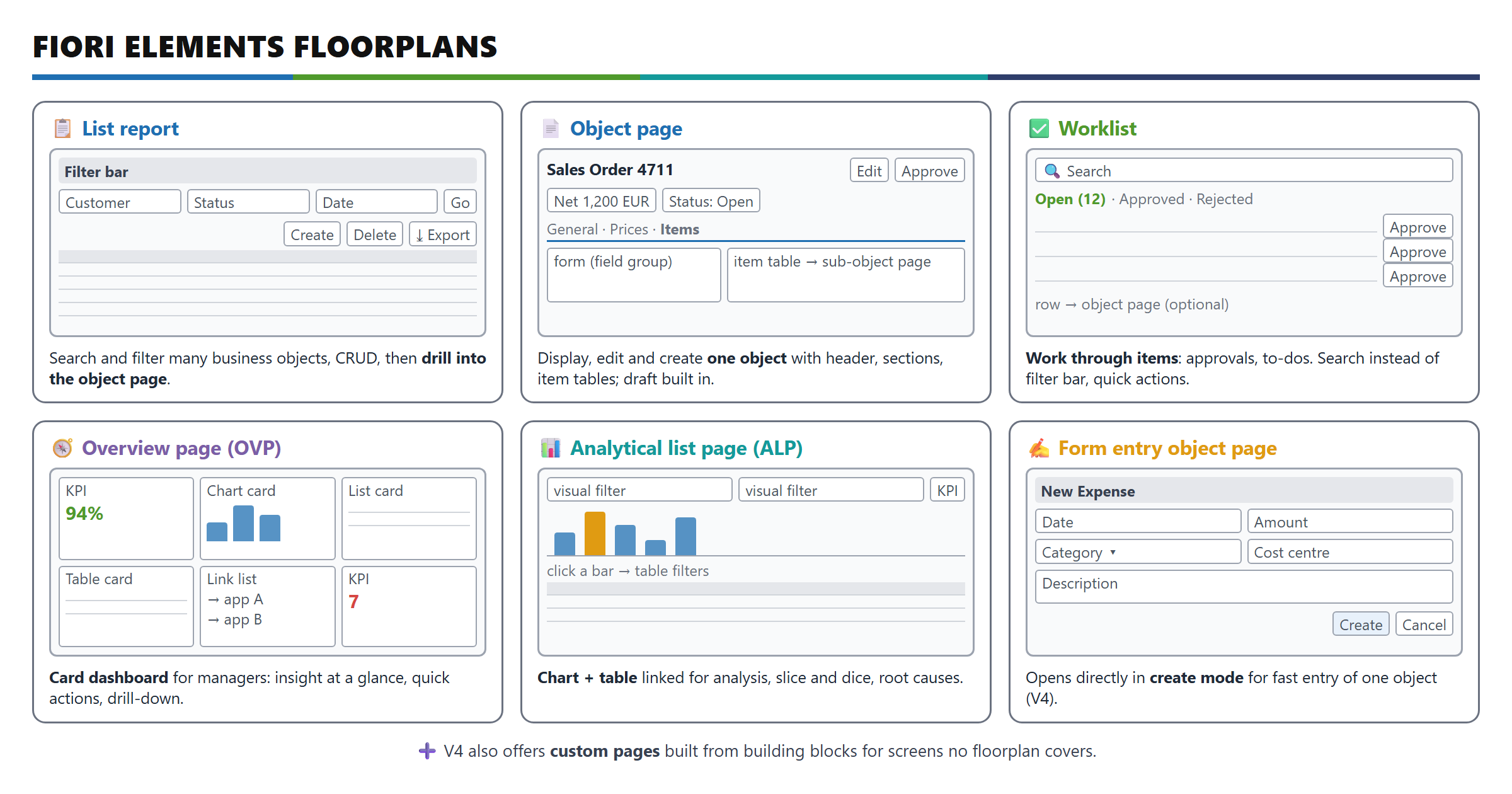
List report + object page
- List report: filter bar plus table of business objects (sales orders, products) – search, filter, sort, group, export, create and delete. Selecting a row opens the object page.
- Object page: header (title, key facts, actions) and sections with forms and item tables. Supports display, edit and create (with draft). Item tables can navigate to sub-object pages (order item → schedule line).
- Best for full CRUD on business objects. Optional flexible column layout shows list, object and sub-object side by side.
Worklist
- A list of items a user must work through – approvals, to-dos, service requests. It is a slimmed list report: search field instead of a filter bar, optional tabs for item states, quick actions in the table.
- Rows can still open an object page for details. In V2 it is the list report with the
isWorklistsetting; in V4 a list report with the filter bar hidden.
Overview page (OVP)
- Dashboard of cards (list, table, chart, KPI, link list) on one screen, each card from its own annotations. For managers, planners and team leads who need instant insight, quick actions and drill-down into detail apps.
Analytical list page (ALP)
- Chart and table on one page, linked: click a chart bar and the table filters. Visual filters and KPI tags in the header. For exploring data and finding root causes – performance metrics, inventory analysis, sales trends, slice and dice. Needs an analytical (aggregating) service.
Form entry object page
- An object page that opens directly in create mode for quick data entry of one object (V4). Also used as a standalone object page for one entity – profile pages or a single record to create, change or delete.
Custom page (V4)
- Your own XML view inside a Fiori elements app, built from building blocks (Part 7) – for screens no floorplan covers, while keeping routing, draft and messages from the framework.
When to use which floorplan
Floorplan | Main use | When to choose |
|---|---|---|
List report + object page | List, filter and work with entities | Business object CRUD with list-to-detail navigation |
Worklist | Action-based lists | Task-oriented apps with few clicks per item |
Overview page (OVP) | Dashboard, KPIs, quick insights | Managers who need an overview of many areas and instant actions |
Analytical list page (ALP) | Analytics + list, drill-down | Deep data analysis and visualisation |
Object page / form entry object page | Single object detail or fast entry | Profile or detail pages, focused create/update/delete |
Custom page | Anything else inside an FE app | A special screen next to standard pages |
Design rules for every floorplan (layouts, when to use a dialog, button placement) are in the SAP Fiori design guidelines – see SAP Fiori › 01 · SAP Fiori Design & Architecture.
The floorplans of the running example
App | Floorplan | Why |
|---|---|---|
Manage Sales Orders (reps) | List report + object page with an Items table and an item sub-object page | Full CRUD with draft: find orders, create header and items, edit, copy |
Approve Sales Orders (managers) | List report used as a worklist: few columns, default filter on open orders, Approve / Reject in the table toolbar and the object page header | A queue of decisions; the manager edits nothing |
Sales KPIs (optional) | Overview page or analytical list page on an analytical service | Totals per customer or status with drill-down – needs an aggregating service |
Part 4 – How it works: the five ingredients
A Fiori elements app has no views or controllers of its own. The template in the browser reads three things – the service metadata with annotations, the manifest.json and optional extensions – and builds the screens at runtime.
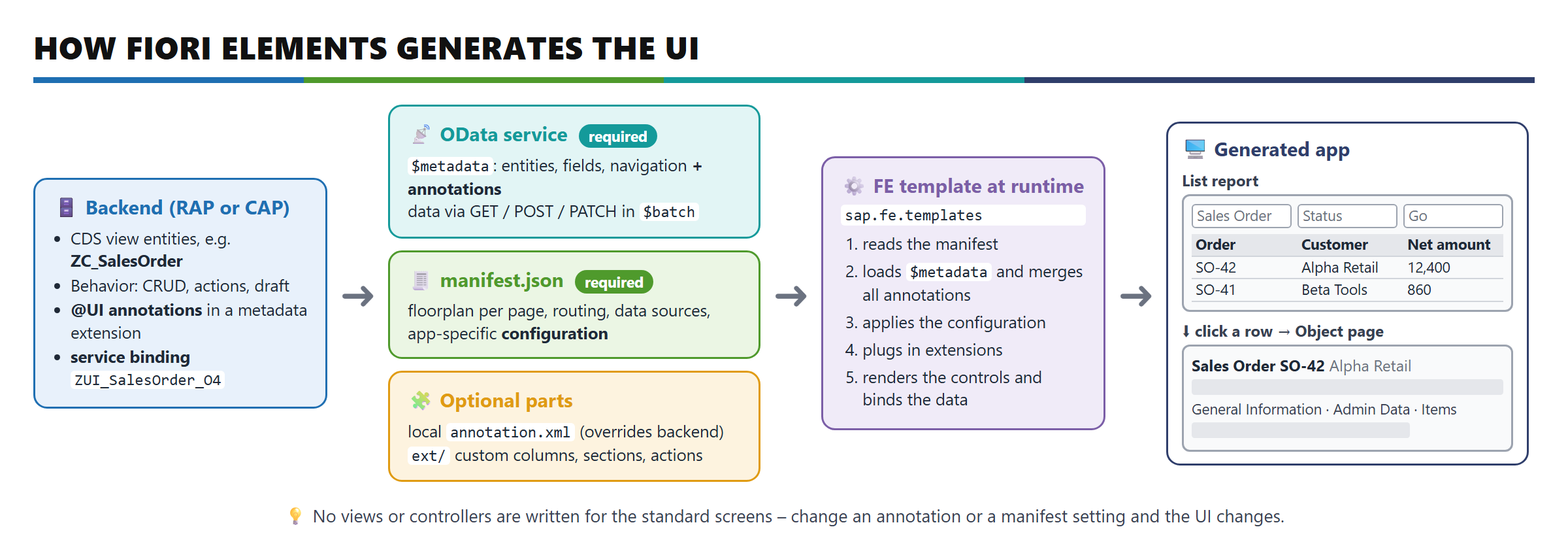
Ingredient | Role | Where it lives |
|---|---|---|
1. Floorplan | The layout blueprint (list report, object page, ALP …) | Chosen in the generator; |
2. OData service | The data backbone: data and metadata | Backend (RAP, CAP, SEGW) |
3. Annotations | Metadata that drives UI behaviour: columns, labels, filters, sections, value helps | Backend CDS / service, or a local annotation file |
4. Configuration | App-specific fine-tuning without code |
|
5. Code extensions | Custom logic only where really needed |
|
SAP documentation uses "building blocks" for the reusable sap.fe.macros controls (Part 7), so this page calls the five parts "ingredients".
4.1 Floorplan
- Pre-built, responsive templates with filtering, sorting, grouping, navigation, export and table views.
- No repetitive front-end code – you choose a template and configure it through metadata.
4.2 OData service
OData is a REST-based protocol that defines how front-end apps talk to the backend. It gives a standard way to expose entities, relationships (navigation properties), CRUD operations and actions (business logic triggers). Requests use HTTP: GET (read), POST (create, actions), PATCH in V4 or MERGE/PUT in V2 (update), DELETE. Fiori elements bundles requests in $batch calls.
- Role in Fiori elements: it delivers the business data and the metadata (
$metadata) that describes its structure. The framework interprets the metadata to generate the UI automatically. - How developers provide it:
- ABAP RAP – exposes CDS view entities as OData V4 (or V2) services through a service binding; supports draft, actions, validations.
- CAP – Node.js or Java on SAP BTP; generates OData V4 from CDS models with little code.
- Classic SAP Gateway (SEGW) – still valid for OData V2 services in non-RAP scenarios (CORE ABAP › 08 OData).
OData model details (V2 vs V4 model, binding, $batch groups) → SAPUI5 › 04 · Data, Binding & Navigation.
4.3 Annotations
- Define how the UI should present and treat the data: column labels, field properties, charts, value helps, sections. They change presentation and interaction, never the data itself.
- Written in the backend (CDS
@UIannotations, ideally in metadata extensions) or in a local annotation file in the app project. Details in Part 5.
4.4 Configuration
Configuration is optional, app-specific settings that fine-tune UI behaviour. It is applied on top of the annotations, without changing the backend, to adjust appearance and behaviour for one use case: table type, navigation target, initial load, variant management, field visibility, hiding a standard action.
Annotation | Configuration | |
|---|---|---|
Meaning | Semantic meaning of the data – reused by every app on the service | App-level preference – only this app |
Stored in | Service metadata or local annotation file | UI descriptor |
Example |
| Show that list as a grid table with multi-select |
Where it is maintained: directly in webapp/manifest.json, with the SAP Fiori tools Application Modeler (Page Map and Page Editor), or with Guided Development in SAP Business Application Studio or VS Code. Example of a V4 list report target:
|
4.5 Code extensions
- For the few requirements that floorplan, annotations and configuration cannot meet – a confirmation popup before saving, a custom navigation, a special column.
- Keep them small and upgrade-safe, and use only the extension options SAP provides (Part 7).
Part 5 – Annotations
Annotations are terms from SAP's and OASIS's vocabularies, attached to entity types, properties or actions in the service metadata. In XML they look like UI.LineItem; in ABAP CDS like @UI.lineItem.
5.1 Vocabularies
Vocabulary | Purpose | Common terms |
|---|---|---|
UI | Layout and presentation |
|
Common | Semantics shared by all UIs |
|
Capabilities | What the service allows |
|
Communication | Contact data |
|
Core, Measures | Basics and units |
|
5.2 UI annotations and what they render
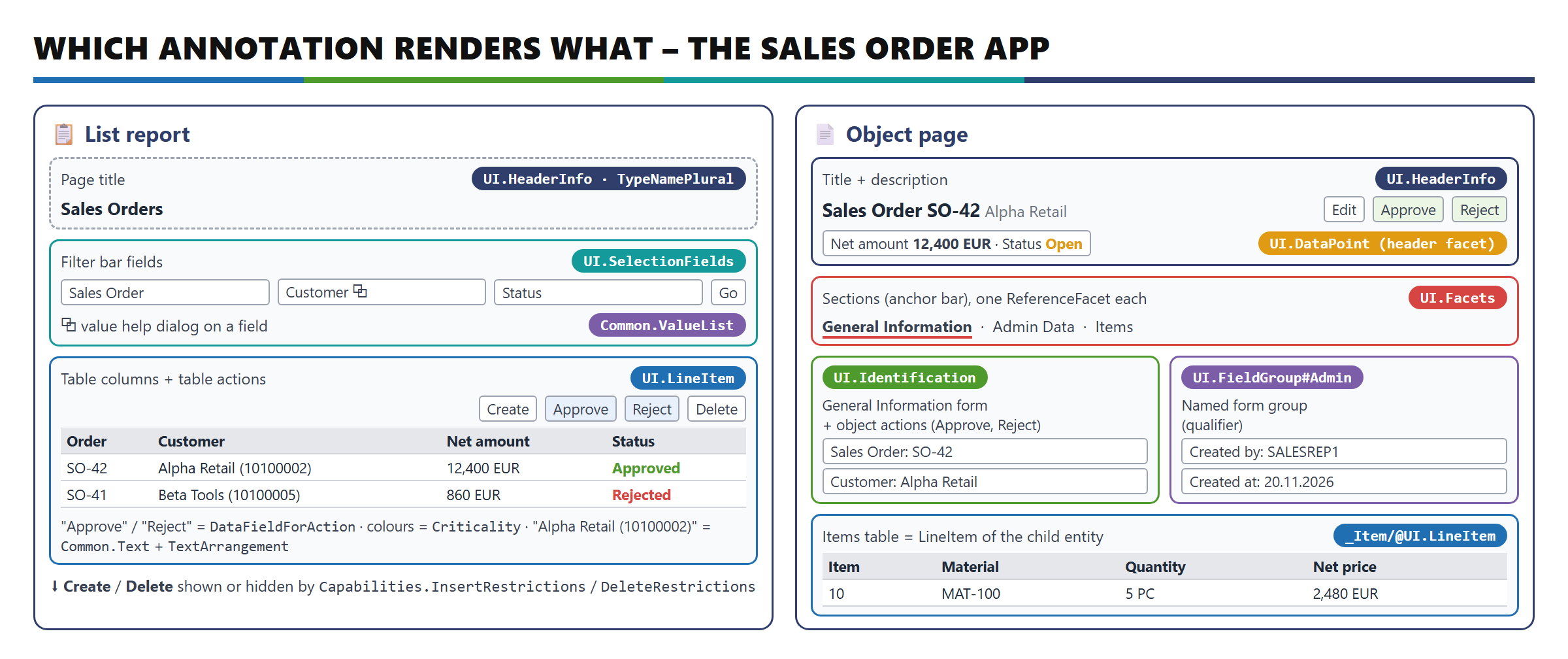
Annotation (XML / CDS) | Renders | Floorplan |
|---|---|---|
| Filter fields in the filter bar | List report, ALP |
| Table columns; with | List report, item tables |
| Object type name (singular/plural), title and description of the object page | Object page |
| Sections and subsections of the object page; each | Object page |
| A named group of fields (with qualifier) shown as a form | Object page |
| The main fields of the object ("General Information") and object-level action buttons | Object page |
| A KPI or rating/progress value, e.g. in the header | Object page, OVP |
| Charts and default sort/group/visualisation | ALP, OVP |
5.3 Backend annotations: CDS metadata extensions
In RAP the UI annotations belong in a metadata extension (annotate entity) of the projection view, not in the view itself – the data model stays clean and the UI layer can be changed or layered separately. The projection view needs @Metadata.allowExtensions: true. The complete metadata extensions of ZC_SalesOrder, ZC_SalesOrderItem and the approver projection ZC_SalesOrderApv are on RAP › 03 · Projection, UI, Access Control & Service (Parts 2 and 4); full CDS annotation syntax → ABAP on HANA › 05 · CDS Views. The excerpt shows how one CDS element feeds several screen areas of the sales order app:
|
CDS (metadata extension) | In | Fiori elements shows |
|---|---|---|
|
| Approve / Reject in the table toolbar |
|
| Approve / Reject in the object page header |
criticality: 'StatusCriticality' |
| Green / orange / red status |
|
| Items table section |
- Value helps, text arrangements and labels usually go in the projection view itself (
@Consumption.valueHelpDefinition,@ObjectModel.text.element,@EndUserText.label) because they are semantics, not layout. - SEGW (V2) services carry annotations in the model provider class or an annotation model; CAP uses
annotate … with @(UI.LineItem: [...])in.cdsfiles of the app or service.
5.4 Local annotation file
Annotations can also live in the app project: webapp/annotations/annotation.xml. Use it for app-specific UI tweaks or when you cannot change the backend (e.g. a released SAP service). The Fiori tools annotation language server gives code completion; the Page Editor writes the file for you.
|
The annotation file is not part of manifest.json – the manifest only references it as a data source of type ODataAnnotation, listed in the main service's annotations array:
|
5.5 Precedence
- The framework merges the backend metadata first, then each annotation file in the order of the
annotationsarray. Later sources win, so a local annotation overrides the backend one for the same target and term (and qualifier). - Rule of thumb: semantics reused by many apps → backend (metadata extension); app-only layout → local file or manifest configuration.
Part 6 – Creating and previewing an app
6.1 Quick preview from RAP (no project needed)
In ADT, open the service binding, publish it, select the entity set and click Preview. The system starts a Fiori elements list report + object page on the service – the fastest way to test annotations while you write them. Service definition and binding → RAP › 03 · Projection, UI, Access Control & Service.
6.2 Generating a real app
Tools: SAP Business Application Studio (dev space "SAP Fiori") or VS Code with the SAP Fiori tools Extension Pack (all tools in depth → SAP Fiori › 04 · SAP Fiori Tools & Flexible Programming Model). Steps for the reps' app:
- Open the SAP Fiori generator (Command Palette → "Fiori: Open Application Generator") and pick a template, e.g. List Report Page (V4).
- Data source: connect to an ABAP system (destination in BAS, saved system in VS Code), enter a service URL, use a local CAP project, or upload a metadata file for offline work.
- Service
ZUI_SALESORDER_O4; choose the main entitySalesOrderand the navigation entity_Itemfor the items table. The approver app is generated the same way fromZUI_SALESORDERAPV_O4. - Project attributes: module name, namespace, title; optionally add deployment and launchpad configuration.
- Run it:
npm start(or the run configuration) – the app runs locally with a proxy to the backend;npm run start-mockuses mock data generated from the metadata. - Shape it with the Page Map, Page Editor, Guided Development and Service Modeler (SAP Fiori › 04 · SAP Fiori Tools & Flexible Programming Model). With a RAP backend, most layout changes still belong in the metadata extension.
- Deploy with
npm run deployto the ABAP repository or BTP, then add the app to the launchpad → SAP Fiori › 02 · SAP Fiori Launchpad & Security.
Legacy: SAP Web IDE had the same templates; it is no longer supported – use BAS or VS Code.
Part 7 – Actions, messages and side effects: Approve and Reject
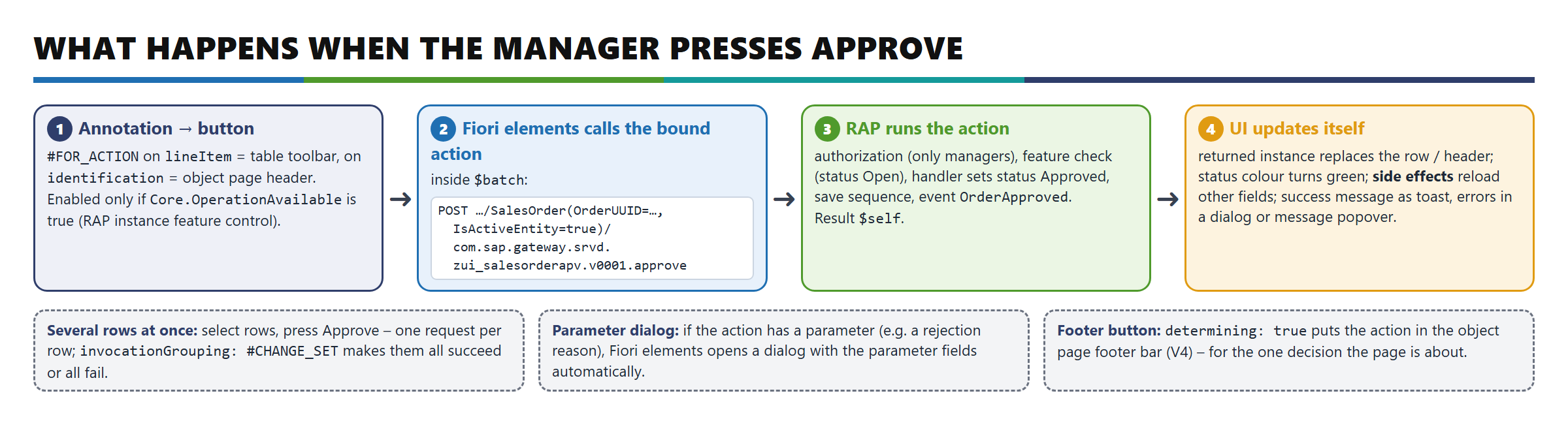
The manager's whole job in the approver app is one decision per order. Fiori elements turns the RAP actions approve and reject into buttons, calls them, shows the messages and refreshes the screen – without a line of UI code. Knowing this chain is how you debug a button that is missing, grey or does nothing.
7.1 Where the button comes from
Question | Answer | Home of the detail |
|---|---|---|
Is there a button at all? | The action exists in the base BDEF, is exposed with | RAP › 04 · Behavior Definition & Behavior Pool; RAP › 03 · Projection, UI, Access Control & Service |
Is it enabled for this order? | RAP instance feature control ( | RAP › 06 · Feature Control, Authorization & Numbering |
May this user execute it? | Authorization in the base BO – checked on the server even if someone calls the action without the UI | RAP › 06 |
Which screen area? |
| This page |
7.2 Calling the action and refreshing the UI
- Fiori elements sends a bound action request inside
$batch:POST …/SalesOrder(OrderUUID=…,IsActiveEntity=true)/com.sap.gateway.srvd.zui_salesorderapv.v0001.approve. result [1] $selfreturns the changed order, so the row or header shows the new status and colour at once. Other fields that depend on it are reloaded through side effects (use side effects;in the projection BDEF → RAP › 07 · Locking, Draft & Side Effects).- Several orders at once: with multi-selection in the table, Fiori elements calls the action for each selected row.
invocationGrouping: #CHANGE_SETin the#FOR_ACTIONentry puts the calls in one change set (all or nothing);#ISOLATEDlets each succeed or fail on its own. - Action with a parameter (e.g. a rejection reason as an abstract entity): Fiori elements opens a dialog with the parameter fields automatically; labels and value helps come from the parameter's annotations.
7.3 Messages
- RAP messages (
reported,failed) arrive in the response; Fiori elements shows a single success message as a toast, errors in a dialog, and state messages of a draft in the message popover of the object page, linked to the field they belong to. - So the message texts are written once in the behavior pool (RAP › 05 · Business Logic & Messages) and need no UI code.
7.4 Common mistakes
- Button missing:
#FOR_ACTIONwritten butuse actionmissing in the projection BDEF – or the opposite. - Button always grey: the action needs a selected row (table toolbar) or the feature control returns disabled for every order – check the status values and the instance features handler.
- Hiding Approve in the reps' app only by leaving out the annotation – the action is still callable. Use a separate projection and authorization (→ RAP › 03 · Projection, UI, Access Control & Service, Part 4).
- Status column not refreshed after the action: missing
result $selfor side effects.
Part 8 – Extensibility
Go up the ladder only as far as you need: every step adds code you own. Steps 1–2 need no code at all.
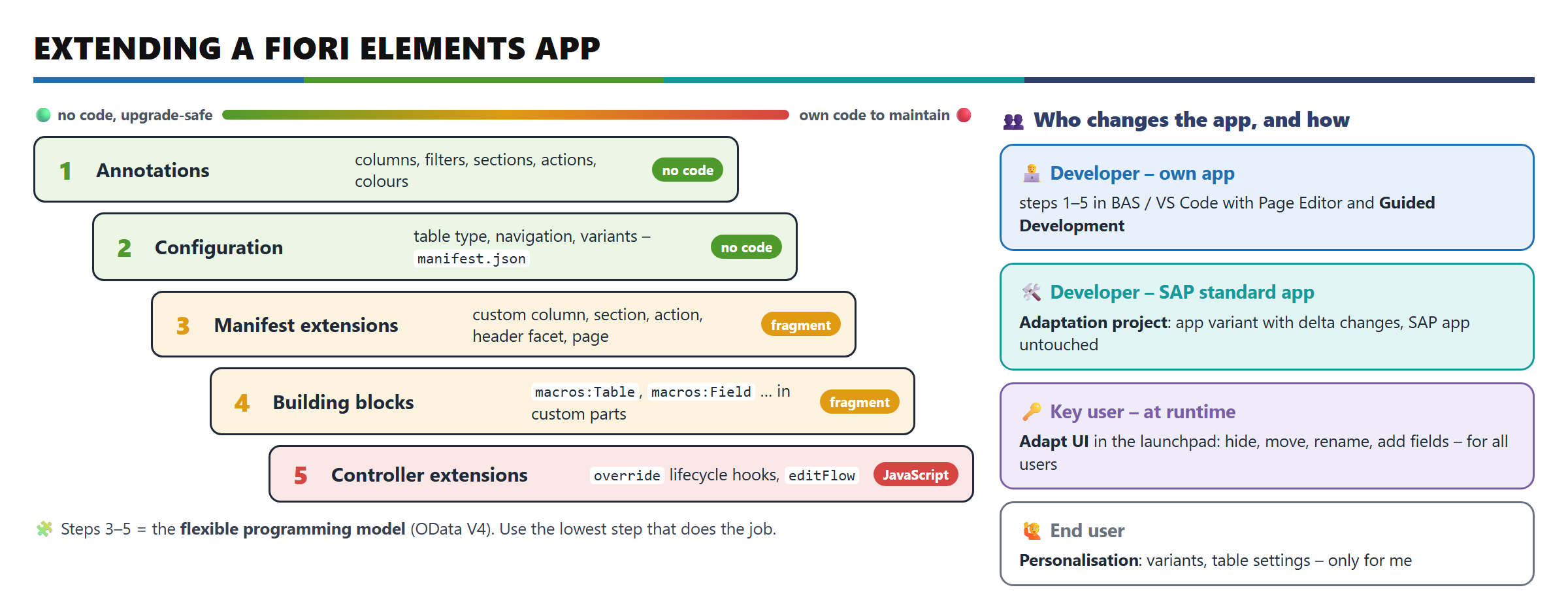
Step | What you can do | How |
|---|---|---|
1. Annotations | Columns, filters, sections, actions, criticality colours, value helps | Metadata extension or local annotation file |
2. Configuration | Table type, navigation, variant management, hide standard actions, initial load | manifest.json via Page Editor |
3. Manifest extensions | Custom column, section, action, header facet, filter field, custom page – your XML fragment or handler placed into the standard page | Guided Development / Page Editor, code in |
4. Building blocks | Reuse FE controls ( | XML fragment with |
5. Controller extensions | Hook into the page lifecycle: |
|
Steps 3–5 together are the flexible programming model of Fiori elements for OData V4: you mix generated pages with your own parts without leaving the framework. Code for custom columns, actions, building blocks, custom pages and controller extensions → SAP Fiori › 04 · SAP Fiori Tools & Flexible Programming Model.
- Example in the running scenario: a custom column *Credit check* in the approver list, or a confirmation dialog before Reject through a controller extension – everything else stays generated.
Legacy (V2): extensions use the V2 Extension API (this.extensionAPI) and view extensions at named extension points declared in sap.ui.viewExtensions.
8.1 Extending SAP standard apps and runtime adaptation
Who | Tool | What happens |
|---|---|---|
Developer at the customer | Adaptation project on an SAP standard app | An app variant: changes stored as deltas, the SAP app stays unmodified and upgrade-safe |
Key user | Key user adaptation – "Adapt UI" in the launchpad user menu | Hide, move, rename, add available fields at runtime, no code, for all users |
End user | Personalisation – variants, table settings | Changes only for this user |
Procedures, roles and limits → SAP Fiori › 05 · Adaptation & Extensibility of SAP Fiori Apps.
Part 9 – Backend options and draft
Backend | Status | Notes |
|---|---|---|
RAP (ABAP RESTful Application Programming Model) | Current – S/4HANA, SAP Business AI Platform, ABAP environment | CDS + behavior definition + service binding (OData V4 or V2); the recommended way in ABAP; RAP section |
CAP (Cloud Application Programming Model) | Current – SAP BTP | Node.js or Java; OData V4 generated from CDS models; annotations in |
SEGW (SAP Gateway Service Builder) | Classic, OData V2 only | Still valid for V2 services outside RAP; CORE ABAP › 08 OData |
| Legacy | Quick V2 service from a DDIC-based CDS view; not available in ABAP Cloud – use a RAP service definition + binding |
BOPF-based programming model | Legacy | CDS + BOPF + |
Draft
- Draft saves unfinished edits on the server continuously, so a user can leave and continue later and nobody else changes the object meanwhile.
- Fiori elements handles draft completely: Edit, Save, Discard buttons, "unsaved changes" indicators, the draft filter in the list report. You only enable it in the backend:
with draftin the RAP behavior definition,@odata.draft.enabledon the entity in CAP. Draft in depth → RAP › 07 · Locking, Draft & Side Effects; CAP → CAP › 06 · Fiori Elements & Draft in CAP.
Part 10 – Fiori elements and clean core
- No custom UI framework code – the app uses only SAP's templates, so UI5 upgrades do not break it and new SAP features flow in automatically.
- Backend in ABAP Cloud – RAP on released APIs and CDS view entities keeps the backend side clean (Clean Core › 01 Clean Core).
- Extend, don't modify – adaptation projects and key user adaptation change SAP standard apps as separate layers, never by copying or modifying SAP's code.
- Low maintenance – uniform UX means a lower learning curve, and fewer custom parts mean cheaper testing at each upgrade.
- Keep code extensions minimal and use only documented extension options and public APIs of
sap.fe.
Part 11 – Interview questions
Q1. What is SAP Fiori elements and why use it?
A UI5 framework of floorplan templates that generate Fiori apps from an OData service, its annotations and manifest settings. Benefits: developer productivity, upgrade safety, consistent SAP UX, built-in enterprise features (translation, authorisation, responsiveness) and new SAP features inherited automatically.
Q2. Fiori elements or freestyle UI5 – how do you decide?
Fiori elements for standard CRUD, lists, detail pages and analytics. Add the flexible programming model for a few special parts. Freestyle only when the UX is so individual that no floorplan fits.
Q3. Which floorplans exist and when do you use each?
List report + object page (CRUD on business objects), worklist (processing tasks), overview page (card dashboard for managers), analytical list page (chart + table analysis), form entry object page (fast create of one object), custom page (V4, anything else).
Q4. List report vs worklist?
Both show a table and can navigate to an object page. The list report has a full filter bar for searching large data sets; the worklist has only a search field and optional tabs and is optimised for working through a limited set of items.
Q5. How does Fiori elements generate the UI?
At runtime the template (e.g. sap.fe.templates.ListReport) reads the $metadata with its annotations, merges local annotation files and applies the manifest configuration, then renders the controls. No views or controllers are written for the standard parts.
Q6. Which UI annotations build a list report and an object page?
UI.SelectionFields (filter bar), UI.LineItem (table columns, table actions), UI.HeaderInfo (object title), UI.Facets (sections), UI.FieldGroup (form groups), UI.Identification (main fields and object actions), UI.DataPoint (header KPIs). Value helps come from Common.ValueList.
Q7. Annotation vs configuration?
An annotation gives semantic meaning to the data and is reused by every app on the service. Configuration is an app-only preference in manifest.json (table type, navigation, variant management) applied on top.
Q8. Where can annotations be defined, and which one wins?
In the backend (CDS @UI annotations, best in a metadata extension with @Metadata.allowExtensions: true; SEGW annotation model; CAP .cds files) or in a local annotation.xml referenced in manifest.json as an ODataAnnotation data source. Later sources override earlier ones, so local beats backend.
Q9. Fiori elements V2 vs V4?
V2 (sap.suite.ui.generic.template, smart controls) serves OData V2 services from SEGW or older CDS/BOPF. V4 (sap.fe.*) serves RAP and CAP OData V4 services, adds the flexible programming model, building blocks, form entry object page and custom pages, and is the strategic stack.
Q10. How do you create and test an app on a RAP service?
Quick test: service binding ZUI_SalesOrder_O4 → Preview in ADT. Real app: SAP Fiori generator in BAS or VS Code → List Report Page template → connect to the system and service → main entity SalesOrder, navigation entity _Item → run with npm start, refine with Page Editor and Guided Development, deploy with npm run deploy.
Q11. How do you extend a Fiori elements app?
In order of preference: annotations, manifest configuration, manifest extensions (custom column, section, action, page), building blocks in custom parts, controller extensions. For SAP standard apps use an adaptation project; key users change layouts at runtime with Adapt UI; end users personalise with variants.
Q12. How does Fiori elements support clean core?
No custom UI framework code to break at upgrades, extensions only through documented options and separate layers (adaptation projects, key user adaptation), and a RAP backend on released APIs in ABAP Cloud.
Q13. How does an Approve button get into a Fiori elements app?
The action approve is defined in the base BDEF, exposed with use action approve; in the projection BDEF and annotated with #FOR_ACTION in @UI.lineItem (table toolbar) and @UI.identification (object page header). Fiori elements calls it as a bound OData action in $batch, shows the returned instance (result $self) and the RAP messages, and reloads dependent fields through side effects.
Q14. Scenario: managers say Approve is always grey. What do you check?
First whether a row is selected – a bound action in the table toolbar needs a selection. Then the instance feature control: Fiori elements enables the button from Core.OperationAvailable, which RAP fills from the features : instance handler, so check the status values the handler expects. If the button is enabled but fails, it is the authorization check in the base BO or a validation message.
Q15. Scenario: reps must not approve. Is hiding the button enough?
No. Leaving out the annotation only hides the button; the action can still be called through OData. The reps' app uses its own projection without use action approve, and the authorization check in the base BO allows approve only for managers, so the rule holds for every caller.
🏠 Start Here · ◀ 02 · Launchpad & Security · 04 · Fiori Tools & FPM ▶ · Sections: CORE ABAP | OOPS ABAP | ABAP on HANA | Clean Core | RAP | ABAP Points | SAP Fiori | SAPUI5 | Mobile Development (MDK) | BTP Foundations | BTP Development | CAP | SAP Build | ABAP on BTP | Integration Suite | SAP Business AI | SAP BASIS | Security | SAP SDLC
Functional: FICO ABAP | TRM ABAP | VIM | SAP BIS | SD ABAP | MM ABAP | PP ABAP | QM ABAP | PM ABAP | PS ABAP | EWM | TM ABAP | GTM ABAP | EHS ABAP | HR ABAP | BW | SAP Datasphere | SAP Business Data Cloud | SAP MDG | SAP Analytics Cloud | SAP Ariba | SAP CX | SAP IBP