This page follows the governed data through MDG's processes: the change request lifecycle of central governance, the rule-based workflow that routes it, the validations, derivations and duplicate check that protect quality, the consolidation and mass processing processes for many records, and data quality management. It ends with the key MDGIMG settings and the apps per step. Data models, CR types and statuses: page 02; replication after activation: page 04; BAdIs and custom workflow logic: page 05.
Part 1 – Change request lifecycle
In central governance every create or change runs as a change request: create → validate → approve → activate, then replicate. Until activation the data stays in the staging area.
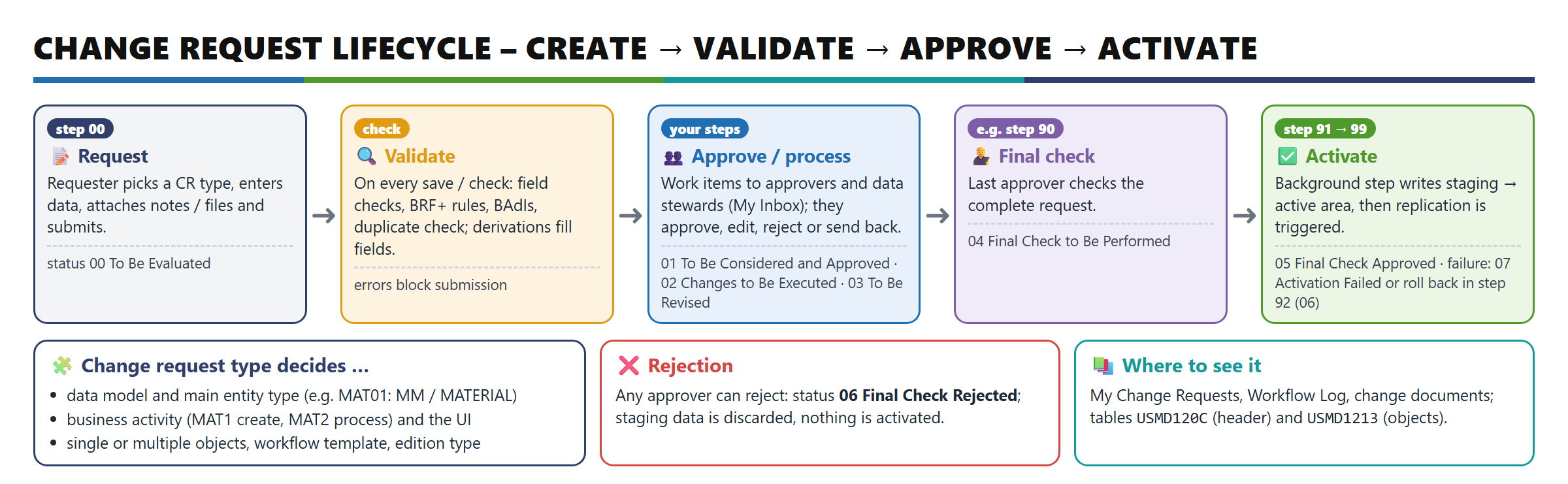
# | Step | Who / what | Result |
|---|---|---|---|
1 | Create – choose CR type, enter data, notes, attachments, submit | Requester (business user or data steward) | CR in status 00; objects locked; data in staging |
2 | Validate – on check / save / submit | System: field checks, backend checks, BRF+ rules, BAdIs, duplicate check; derivations fill fields | Errors must be fixed before the CR moves on |
3 | Approve / process – one or more steps, serial or parallel | Approvers and data stewards via the inbox; actions approve, reject, send for revision, finalize | Status 01 / 02 / 03 as the CR moves |
4 | Final check | Last approver | Status 04 |
5 | Activate – background step | System: staging → active area; on error roll back | Status 05; on failure 07 Activation Failed, or roll back in step 92 (status 06) |
6 | Replicate | DRF sends the active object to the client systems (page 04) | Replication status per target |
- Rejection at any approval step ends the CR with status 06 Final Check Rejected; the staging data is discarded.
- Send for revision returns the CR to the requester (status 03 To Be Revised) – nothing is lost.
- Snapshot check: at activation MDG compares the active data with the snapshot taken when the CR started; if someone changed the object in the meantime, normal activation (process pattern 05) stops, "bypass snapshot" activation (pattern 06) activates anyway.
Part 2 – Workflow: rule-based workflow with BRF+
The CR type points to a workflow template. MDG offers two styles; the rule-based workflow is the standard choice because the route is data, not code.
Style | How it works | Change effort |
|---|---|---|
Static / standard workflow templates | SAP Business Workflow templates with fixed steps per domain or CR type; agents from organisational rules | Every new step means a workflow change in SWDD |
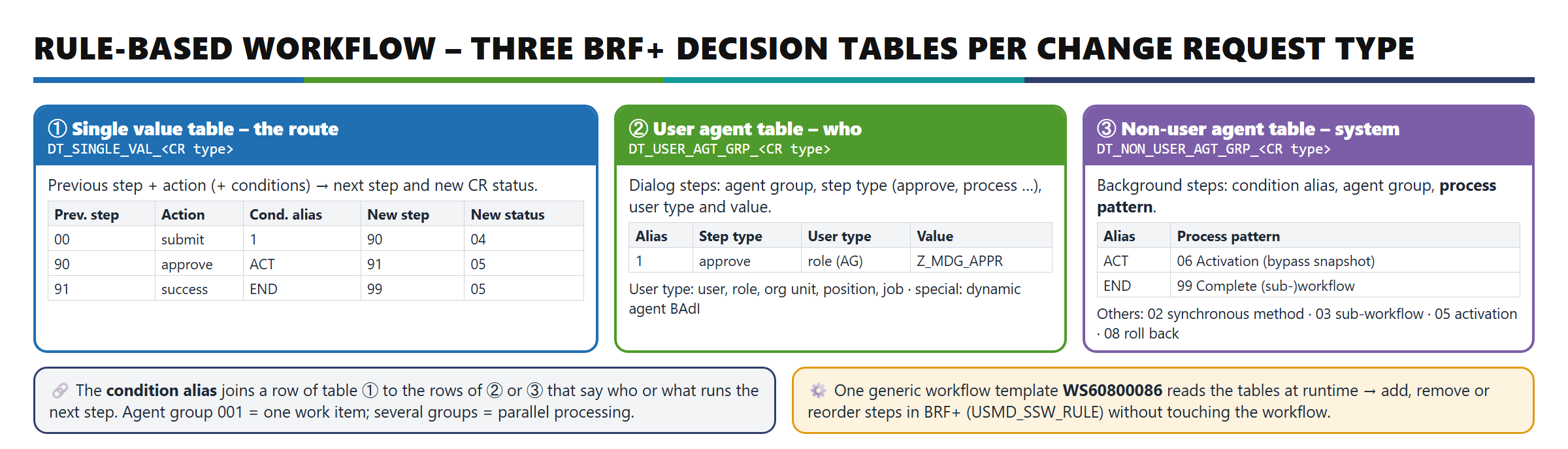
Rule-based workflow | One generic template WS60800086 reads three BRF+ decision tables per CR type at runtime | Add, remove or reorder steps in BRF+ (USMD_SSW_RULE) – no workflow change |
Custom extensions | Sub-workflows (process pattern 03), synchronous methods (pattern 02), dynamic agent determination – implemented with BAdIs (page 05) | Developer |
Cloud-ready mode | Process templates in Customizing, optional workflows per step with SAP Build Process Automation on BTP | Configuration + BTP |
2.1 The three decision tables
Decision table | Columns | Purpose |
|---|---|---|
DT_SINGLE_VAL_<CR type> – single value | CR previous step, CR previous action, condition alias, new CR step, new CR status (plus optional conditions) | The route: one row per arrow of the process diagram |
DT_USER_AGT_GRP_<CR type> – user agent | Condition alias, agent group, step type, user type, user value | Who works on a dialog step (user, role, org unit, position, job) |
DT_NON_USER_AGT_GRP_<CR type> – non-user agent | Condition alias, agent group, process pattern | What the system does in a background step |
- The condition alias connects a single-value row to the user-agent or non-user-agent rows of the next step.
- Agent group 001 = one work item; several agent groups for one step = parallel work items; the next step can wait for all of them (merge).
- Instead of fixed agents a row can name a service for the BAdI Dynamic Selection of Agent in Rule-Based Workflow (page 05).
2.2 Process patterns (background steps)
Pattern | Meaning |
|---|---|
01 UI Dialog | Selected automatically for user-agent steps |
02 Call Synchronous Method | Calls a system method implemented with a BAdI |
03 Call Sub-Workflow | Starts a (custom) sub-workflow |
05 Activation | Activates; fails if the active data changed since the CR started (snapshot) |
06 Activation (Bypass Snapshot) | Activates even if the active data changed in the meantime |
08 Roll Back Change Request | Discards the inactive (staging) data – after rejection or a failed activation – and sets status 06 Final Check Rejected |
99 Complete (Sub-)Workflow | Ends the process |
Typical SAP example process: 00 request → approval / processing steps → 90 final check → 91 activation → 99 complete; if activation fails → 92 roll back.
Part 3 – Validations, derivations and field properties
Mechanism | What it does | Configured in |
|---|---|---|
Backend checks | In reuse mode MDG runs the application's own checks (e.g. material type and plant must exist) – same logic as MM01 / BP | Delivered; switch per entity type |
BRF+ validation rules | Check rules without code: messages when a condition is violated | USMD_RULE / MDGIMG › Data Quality and Search › Validations and Enrichments |
BRF+ derivation rules | Fill or change fields from other fields (e.g. propose a value from the material type) | USMD_RULE |
DQM rules | Data quality rules defined in the Fiori apps can be used as checks and derivation scenarios in central governance and mass processing | DQM apps (Part 7) |
BAdIs | Complex checks and derivations across entity types, external lookups | ABAP – page 05 |
Field properties | Per CR step: fields hidden, read-only or mandatory | Process Modeling › change request step properties; BAdI for dynamic properties (page 05) |
Enrichment | Calls external or internal services to enrich data (e.g. address validation) | Validations and Enrichments node |
- Validations run when the user checks or saves and again before activation – the data that reaches the active area is always validated.
- Rule of thumb: BRF+ for rules business can read; BAdI when the logic needs ABAP (page 05).
Part 4 – Search and duplicate check
Before a new object is created MDG searches for similar records and shows potential duplicates; the same search serves the MDG search UI.
Search provider | Use |
|---|---|
SAP HANA search | Fuzzy (similarity) search with scores; recommended on HANA; supports lower and upper thresholds |
Enterprise Search / SAP HANA enterprise search | Search connector based search, broader results |
Database search | Simple search on database fields |
Remote key search | Find an object by its key in a client system (key mapping) |
- Configuration: MDGIMG › General Settings › Data Quality and Search › Search and Duplicate Check › Define Search Applications (match profile and its fields) and Configure Duplicate Check for Entity Types (assign search mode, match profile and thresholds to data model and main entity type). Delivered match profile for MM: MATCH_MM_MATERIAL.
- Thresholds (HANA search only): below the lower threshold a record is not a duplicate; between lower and upper it is a possible duplicate shown to the user; above the upper threshold it is a strong duplicate.
- Matching in consolidation (Part 5) uses the same HANA fuzzy capabilities with its own match configuration.
Part 5 – Consolidation
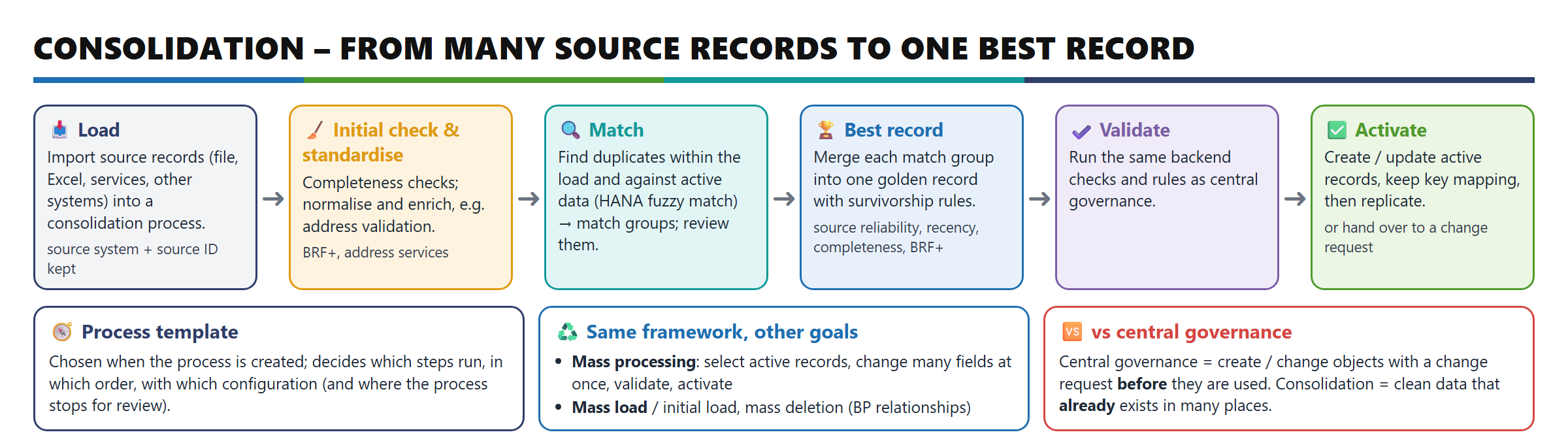
Consolidation cleans data that already exists in several systems or files: it identifies duplicates and builds one best record (golden record) per real-world object, keeping the link to every source record (key mapping).
Step | What happens |
|---|---|
Load | Source records come in from files (incl. Excel), services or other systems; source system and source ID are kept |
Initial check | Completeness and format checks |
Standardise | Normalise and enrich, e.g. address validation (BRF+, address services; for BP also SAP Data Services) |
Match | Find duplicates within the load and against active data (HANA fuzzy matching) → match groups; match review confirms or splits them |
Best record calculation | Survivorship rules decide which value wins: source system reliability, recency, completeness or BRF+ |
Validate | Same backend checks and rules as central governance |
Activate | Create or update active records and key mapping, then replicate – or hand the best record over to a change request |
- The process template, chosen when a consolidation process is created, specifies which steps run, in which order and with which configuration; templates for BP relationships add relationship steps.
- Two flavours: source consolidation (incoming records) and consolidation of active records (find duplicates already in the system).
- Consolidation and mass processing are configured in MDGIMG › Consolidation and Mass Processing and run in Fiori apps for BP and material / product (in cloud-ready mode only in the new apps).
Part 6 – Mass processing
Mass processing changes many active records in one governed process – thousands or millions of records – instead of one change request per object.
Option | How | Typical use |
|---|---|---|
Mass processing (S/4HANA) | Fiori app MDG, Mass Processing (classic mode; cloud-ready mode has its own new app): select records, change fields or extend data, validate, activate – steps from a process template | New sales area or plant for many customers / products, field updates |
Mass load / mass deletion | Same framework with other process goals (e.g. mass deletion of BP relationships) | Initial loads, clean-up |
Classic mass change | Web Dynpro USMD_MASS_CHANGE or multi-object change requests | Older releases, flex-mode objects |
File upload | Load changed data from a file into a change request or consolidation | Steward corrections prepared in Excel |
- Mass processes are normally for data stewards, not for every business user.
- Mass processing uses the same validations and DQM rules, so bulk changes cannot bypass governance.
Part 7 – Data quality management and analytics
Data quality management (DQM) is built into MDG on S/4HANA (since 1809 for product data, since 1909 also for business partner and custom objects): define rules once, use them to check new data (central governance, mass processing) and to measure existing data.
Function | What it does | Apps |
|---|---|---|
Rule definition | Data quality rules with conditions and checks, versioned and approved | Master Data Quality Rules (per domain) |
Evaluation | Run rules against active data; results per rule: records that comply or violate | Evaluate Master Data Quality |
Scores | Quality scores per rule and category; average category score as overview | Configure Master Data Quality Scores |
Rule mining | Machine learning proposes rules from existing data: define, start, find and accept, implement (product, BP incl. customer / supplier, custom objects) | Manage Rule Mining |
Remediation | Start a mass process or change request for the violating records | From the evaluation results |
- DQM for product and BP data does not need SAP Information Steward; DQM apps work in classic and cloud-ready mode.
7.1 MDG analytics
- Process analytics (S/4HANA): overview page with change request cards (total, open, overdue) and the analytical list pages Change Request Analysis (central governance) and Change Process Analysis (consolidation and mass processing). Setup starts in MDGIMG by generating the CDS views for process analytics.
- Change analytics: drill down change requests by master data attributes, e.g. compliance reports on bank detail changes.
- SLA: service-level times on CR types and steps feed the overdue figures.
Part 8 – Key MDGIMG configuration
MDGIMG area | Activity | What it controls |
|---|---|---|
Data Modeling | Edit Data Model, activate | Entity types, attributes, relationships, reuse area (page 02) |
UI Modeling | UI configurations and their assignment | Which UI a CR type / business activity uses (page 05) |
Process Modeling › Business Activities | Create business activities, link logical actions | Create / change / delete activities and their UI mode |
Process Modeling › Change Requests | Create edition type, create change request type, define steps, step properties, priorities, reasons | The CR type (page 02 Part 5) |
Process Modeling › Workflow | Rule-based workflow (USMD_SSW_RULE), other workflow settings | Route and agents (Part 2) |
Data Quality and Search | Validations and enrichments, search applications, duplicate check | Parts 3 and 4 |
Value Mapping / Key Mapping / Data Replication | Mapping, replication models | page 04 |
Analytics | Generate CDS views for process analytics | Part 7 |
Consolidation and Mass Processing | Process templates, standardisation, matching, best record, mass processing | Parts 5 and 6 |
- Delivered settings come as BC sets (SCPR20); copy SAP CR types into your own (Z…) before changing them, so upgrades do not overwrite them.
Part 9 – Apps per process step
Step | Classic UI (Web Dynpro) | Fiori / S/4HANA |
|---|---|---|
Create / change an object | USMD_CREQUEST_CREATE, domain OVP (MDG_BS_MAT_OVP, BS_OVP_BP) | Domain apps; cloud-ready: Manage Business Partners – Governance (F7204) |
Search | USMD_SEARCH | Search in the domain apps |
Approve / process | IBO_WDA_INBOX, USMD_CREQUEST_PROCESS | My Inbox |
Follow my requests | USMD_EDITION_CREQUEST (change requests of an edition) | My change requests views in the apps |
Workflow log | USMD_CREQUEST_PROTOCOL2 | Process tracking in the apps |
Consolidate | – | Consolidation apps (create / manage consolidation processes) |
Mass change | USMD_MASS_CHANGE | MDG, Mass Processing |
Data quality | – | Master Data Quality Rules, Evaluate Master Data Quality, Manage Rule Mining |
Analyse | – | Change Request Analysis, Change Process Analysis |
Part 10 – Interview questions
Q1. Walk me through the change request lifecycle.
The requester creates a CR of a CR type and submits it (step 00, status 00). Validations, derivations and the duplicate check run. The workflow routes it through approval and processing steps, then a final check (status 04). A background step activates the data from staging into the active area (status 05) and DRF replicates it. Rejection ends with status 06; activation errors roll back.
Q2. What is the rule-based workflow?
A generic workflow template (WS60800086) whose route and agents come from three BRF+ decision tables per CR type, maintained in USMD_SSW_RULE. Steps can be added, removed or reordered without changing the workflow definition.
Q3. Name the three decision tables and their purpose.
Single value table DT_SINGLE_VAL_<CR type>: previous step and action → next step and status. User agent table DT_USER_AGT_GRP_<CR type>: who processes a dialog step. Non-user agent table DT_NON_USER_AGT_GRP_<CR type>: the process pattern of a background step. The condition alias links them.
Q4. What is a process pattern?
The type of a background step in the rule-based workflow: 02 synchronous method, 03 sub-workflow, 05 activation, 06 activation bypassing the snapshot, 08 roll back, 99 complete. 01 UI dialog is used for user steps.
Q5. How do you set up parallel approval?
Give one step several agent groups in the user agent table – each group gets its own work item – and configure in the single value table how the results are merged before the next step.
Q6. How are validations and derivations implemented?
Backend checks of the application in reuse mode, BRF+ validation and derivation rules (USMD_RULE), DQM rules, and BAdIs for complex logic across entity types. They run on check, save and before activation.
Q7. How does the duplicate check work?
A search application with a match profile is assigned to the data model and entity type. With SAP HANA search, similarity scores are compared with a lower and an upper threshold; matches are shown to the requester before the object is created.
Q8. Explain consolidation.
Records from several sources are loaded, checked, standardised, matched into match groups, merged into a best record with survivorship rules, validated and activated (or passed to a change request); key mapping keeps the link to the source IDs. A process template defines the steps.
Q9. When do you use mass processing instead of change requests?
For the same change on many existing records – e.g. extending thousands of customers to a new sales area. Mass processing selects, changes, validates and activates them in one process run by data stewards.
Q10. What does data quality management in MDG offer?
Data quality rules defined once and used both as checks in governance processes and to evaluate existing data with scores; rule mining proposes rules from the data; violating records can be corrected through mass processing.
Q11. Which MDG analytics do you know?
Process analytics with an overview page and the Change Request Analysis and Change Process Analysis apps (based on generated CDS views), change analytics by attributes, SLA monitoring and data quality scores.
Q12. What is the snapshot check at activation?
MDG compares the active data with the state at CR start. If the object was changed outside the CR, activation pattern 05 stops so nothing is overwritten unnoticed; pattern 06 bypasses the check.
🏠 Start Here · ◀ 02 · Data Model & UI · 04 · Replication ▶ · Sections: CORE ABAP | OOPS ABAP | ABAP on HANA | Clean Core | RAP | ABAP Points | SAP Fiori | SAPUI5 | Mobile Development (MDK) | BTP Foundations | BTP Development | CAP | SAP Build | ABAP on BTP | Integration Suite | SAP Business AI | SAP BASIS | Security | SAP SDLC
Functional: FICO ABAP | TRM ABAP | VIM | SAP BIS | SD ABAP | MM ABAP | PP ABAP | QM ABAP | PM ABAP | PS ABAP | EWM | TM ABAP | GTM ABAP | EHS ABAP | HR ABAP | BW | SAP Datasphere | SAP Business Data Cloud | SAP MDG | SAP Analytics Cloud | SAP Ariba | SAP CX | SAP IBP