Governed data is only useful when it reaches the systems that run the business. After a change request is activated, the Data Replication Framework (DRF) sends the active object to every connected system – S/4HANA, ECC, CRM, non-SAP and cloud applications – over SOA web services, ALE IDocs, RFC / files or SAP Master Data Integration. Key mapping and value mapping translate IDs and codes between the systems, and data can also flow into MDG. This page covers the replication architecture, its configuration, the technologies, mapping, targets, inbound integration and monitoring. The general interface techniques (IDoc, SOAP, ALE) are taught in CORE ABAP › 07 Interfaces and Integration Suite › 02 SAP CPI; enhancing a replication message is on page 05.
Part 1 – Replication in the MDG architecture
Replication is the distribution layer of MDG (page 01 Part 4). It always sends active data – never staging data of open change requests – and it is the same framework whether the source is an MDG hub, a co-deployed MDG or a plain S/4HANA system without MDG (DRF is part of the S/4HANA foundation, e.g. for business partner replication to SAP CRM or SAP cloud solutions).
Question | Answer |
|---|---|
What is replicated? | The active object after activation: from application tables in reuse mode (BUT000, MARA …) or from the generated /1MD/ tables in flex mode (0G, custom objects) |
When? | Automatically after activation (replication mode changes), as an initial load (mode initialization) or on demand with DRFOUT (mode manual) |
To whom? | Every target system defined in an active replication model for that object, after filters have been applied |
How? | Through an outbound implementation for one channel: SOA service, IDoc, RFC or a custom implementation |
With which IDs and codes? | Key mapping links the MDG ID with the target's ID; value mapping translates code values (Part 4) |
1.1 Co-deployed vs hub – what changes for replication
Co-deployed MDG | MDG hub | |
|---|---|---|
Own system | No replication into its own S/4HANA – activation writes the operational tables directly (reuse mode) | Active data lives in the hub; nothing reaches an ERP without replication |
Other systems | DRF to CRM, other ERPs, non-SAP, cloud – same as a hub | DRF to every operational S/4HANA / ECC, CRM, SRM, non-SAP, cloud |
Customizing | Identical by definition | Check-table values must exist in the targets – value mapping or aligned customizing |
Keys | One number range for the own system | Key mapping or harmonized IDs per target |
- Errors in a target system never roll back the activated change request – the data is valid in MDG and the replication is repeated after the target problem is fixed (Part 7).
Part 2 – Data Replication Framework (DRF)
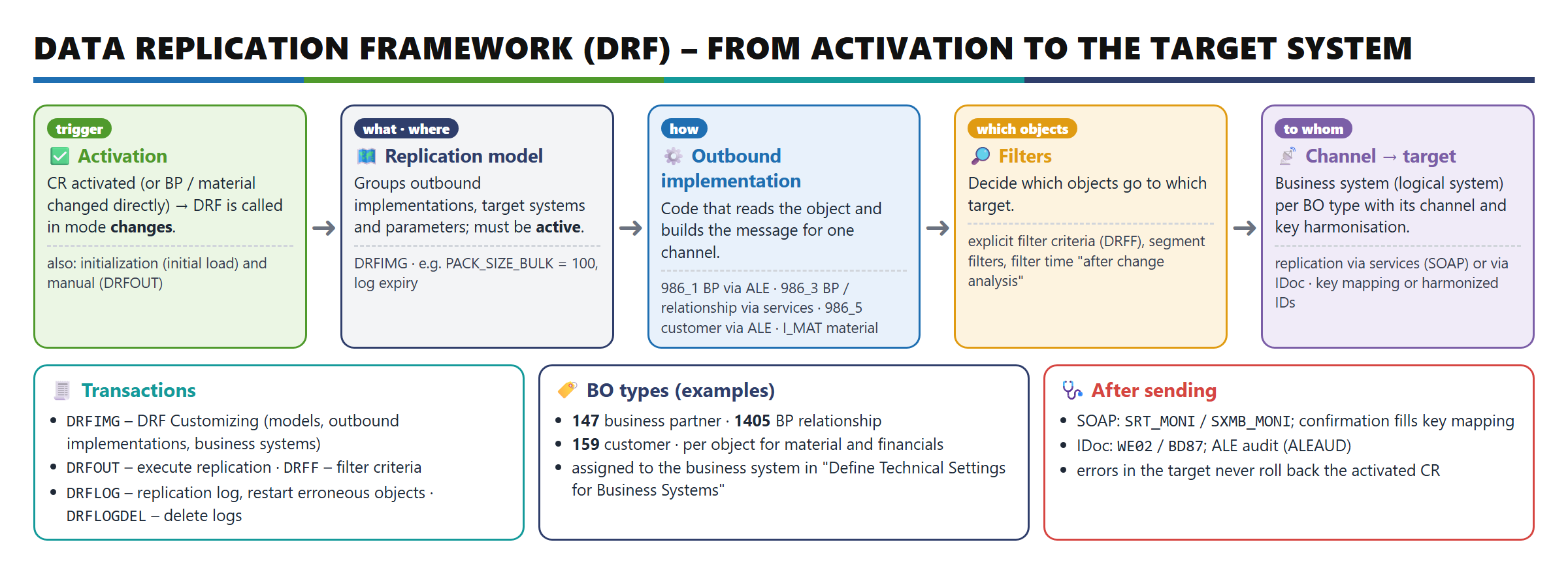
2.1 DRF building blocks
Object | Meaning | Examples |
|---|---|---|
Business object type (BO type) | Numeric ID of the object kind that DRF and key mapping understand | 147 business partner, 1405 BP relationship, 159 customer |
Outbound implementation | ABAP implementation that selects the object, applies filters and builds the message for one channel | 986_1 MDG BP via ALE, 986_3 BP / relationship via services, 986_5 MDG customer via ALE, I_MAT material |
Replication model | What goes where: outbound implementations, target systems, outbound parameters, log expiry; must be activated | Z_BP_TO_S4: 986_3 → business system S4PCLNT100 |
Business system | The target as DRF sees it, mapped to a logical system; per BO type: communication channel and key harmonisation | Channel: replication via services / via IDoc; key mapping or harmonized IDs |
Outbound parameter | Technical setting of an outbound implementation in a model | PACK_SIZE_BULK = 100 (objects per message) |
Filter | Restricts which objects or parts go to a target | Explicit filter criteria (DRFF), segment filters, filter time "filter after change analysis" |
Replication mode | Why DRF runs | Initialization (initial load), changes (delta after activation), manual (selected objects) |
2.2 Configuration steps
# | Step | Where |
|---|---|---|
1 | Define the target systems (RFC destinations, logical systems; receiving systems in the System Landscape Directory) | SM59, SALE / BD54, SLD |
2 | Define the business system, map it to the logical system, assign BO types with communication channel and key harmonisation | DRFIMG › Define Technical Settings for Business Systems |
3 | Check the outbound implementation of the object and channel | DRFIMG › Define Outbound Implementations |
4 | Create the replication model: assign outbound implementation (with channel and filter time), target system, outbound parameters; activate | DRFIMG › Define Replication Models |
5 | Channel-specific setup: SOA – logical ports and endpoints; IDoc – distribution model and partner profiles (Part 3) | SOAMANAGER; BD64, BD82, WE20 |
6 | Optional: filter criteria per model and target | DRFF |
7 | Initial load with DRFOUT (mode initialization), then deltas run automatically | DRFOUT |
2.3 DRF transactions
Transaction | Purpose |
|---|---|
DRFIMG | DRF Customizing: business systems, outbound implementations, replication models (also under MDGIMG › General Settings › Data Replication) |
DRFOUT | Execute data replication for a model / outbound implementation in a chosen mode; without an outbound implementation it runs all of the model |
DRFF | Define filter criteria per replication model |
DRFLOG | Evaluate replication logs by model, outbound implementation, mode, date, user; restart for erroneous objects or for all objects of a run; jump to the XML / SXMB_MONI for services |
DRFLOGDEL | Delete replication logs (by model, mode, expiry date) |
- One replication model per object family and channel keeps logs and restarts manageable (e.g. do not mix G/L accounts, cost centers and profit centers in one model).
- A custom target or format gets its own outbound implementation class (interface
IF_DRF_OUTBOUND) – page 05 Part 7.
Part 3 – Replication technologies: SOA, ALE IDoc, RFC / file, MDI
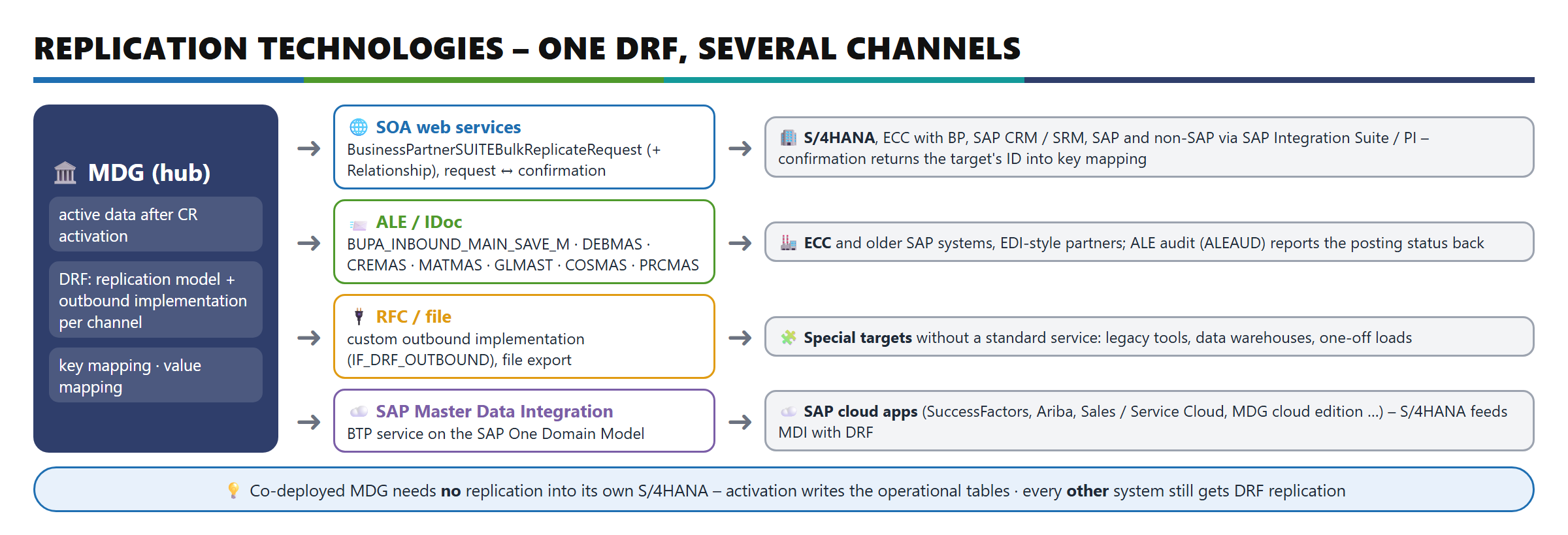
Technology | Messages | Strengths | Typical target |
|---|---|---|---|
SOA web services (SOAP, asynchronous) | BusinessPartnerSUITEBulkReplicateRequest and BusinessPartnerRelationshipSUITEBulkReplicateRequest with confirmation services; material / product: bulk replication services such as ProductMDMBulkReplicateRequest | Full BP with all roles, bulk messages, confirmation returns the target ID into key mapping | S/4HANA, ECC with BP, CRM, SRM, middleware |
ALE / IDoc | BP: BUPA_INBOUND_MAIN_SAVE_M, BUPA_INBOUND_REL_SAVE_M; customer DEBMAS (+ ADRMAS / ADR2MAS / ADR3MAS); vendor CREMAS; MATMAS; finance GLMAST, COSMAS, PRCMAS, COELEM | Proven, serialisation, ALE audit, easy extension segments | ECC, older SAP systems, EDI-style partners |
RFC / file | Custom outbound implementation, file export | Anything without a standard service | Legacy tools, data warehouses |
SAP Master Data Integration (MDI) | SAP One Domain Model objects (business partner, product, organisational data …) | One hub for SAP's cloud applications | SuccessFactors, Ariba, Sales / Service Cloud, MDG cloud edition |
- DEBMAS / CREMAS carry only the customer / vendor view; for receivers that hold the full business partner (S/4HANA, ECC with BP) use the BP services or the BP IDoc.
- SOA services must be activated with business function CA_BP_SOA (BP) and configured in SOAMANAGER on both sides; the hub receives the confirmation services, the client the request services. Through SAP Integration Suite or PI the same services reach non-SAP systems.
3.1 ALE setup for IDoc replication (BP / customer example)
# | Step | Transaction |
|---|---|---|
1 | RFC destinations in both directions; logical systems for every target | SM59, SALE |
2 | Distribution model: message types BUPA_INBOUND_MAIN_SAVE_M / _REL_SAVE_M (or DEBMAS + address messages), source and target; distribute the model | BD64 |
3 | Partner profiles (outbound in the hub, inbound in the target; DEBMAS inbound process code DEBM) | BD82, WE20 |
4 | Serialisation in the target so that address and BP IDocs post in the right order; background report RBDSER04 | SALE, WE20 |
5 | ALE audit: target sends ALEAUD (hub process code AUD2), report RBDSTATE scheduled in the target – the hub sees whether the IDoc was posted | BD64, WE20, SALE |
6 | DRF: business system with channel replication via IDoc, replication model with 986_1 / 986_5 (or I_MAT) | DRFIMG |
Part 4 – Key mapping and value mapping
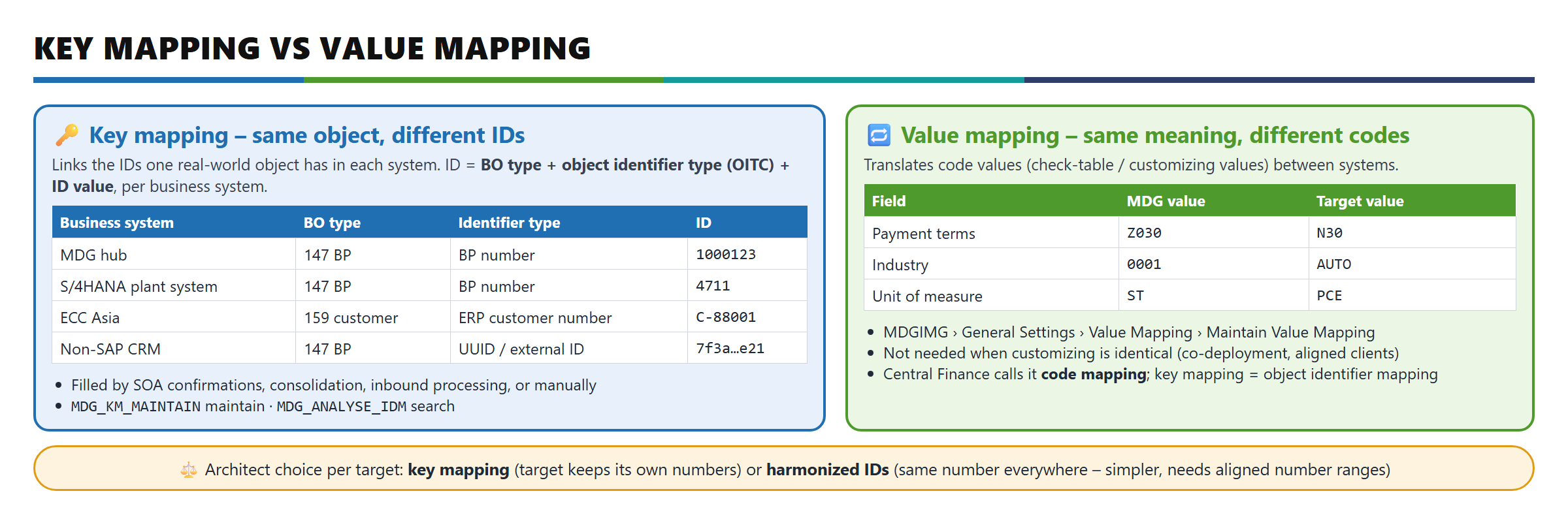
4.1 Key mapping
Key mapping stores which IDs belong to the same real-world object in different systems. An identifier consists of the BO type, the object identifier type (object identifier type code, OITC – e.g. BP number, BP UUID, ERP customer number) and the ID value, per business system.
- Filled automatically by SOA confirmations (the target returns its ID), by consolidation (source records keep their source IDs) and by inbound processing; maintained manually or by file upload.
- MDG_KM_MAINTAIN – maintain key mapping (Web Dynpro UI); MDG_ANALYSE_IDM – display / analyse key mapping. Central Finance uses the same key mapping (called object identifier mapping there).
- Per business system and BO type you choose key mapping (target keeps its own numbers) or harmonized IDs (same number everywhere, no mapping – needs aligned number ranges; with IDocs it relies on ALE inbound).
- Read and write key mapping in custom code with the MDG key mapping APIs, never directly in the tables.
4.2 Value mapping
Value mapping translates code values whose meaning is the same but whose key differs between systems (payment terms, industry keys, units, regions). It is maintained in MDGIMG › General Settings › Value Mapping › Maintain Value Mapping and can be exported / imported as a file. Central Finance calls it code mapping.
Key mapping | Value mapping | |
|---|---|---|
Maps | Object IDs (instances) | Code values (customizing / check-table entries) |
Grows with | Every new object | Customizing changes |
Filled by | Confirmations, consolidation, inbound, manual | Customizing / file upload |
Not needed when | Harmonized IDs | Identical customizing (co-deployment, aligned clients) |
Part 5 – Replication targets: S/4HANA, ECC, non-SAP, cloud
Target | Recommended way | Watch out for |
|---|---|---|
SAP S/4HANA (operational, from a hub) | BP SOA services (986_3) or BP IDoc; material via services or MATMAS; finance via IDocs / services | CVI in the target creates customer / supplier; BP groupings and number ranges must fit (Part 4, page 06) |
SAP ECC | BP services where ECC uses the BP; otherwise DEBMAS / CREMAS / MATMAS / GLMAST … | Customizing alignment or value mapping; serialisation and ALE audit |
SAP CRM / SRM | BP services or BP IDoc | Relationships (BO type 1405) need their own messages |
Non-SAP | SOA services through SAP Integration Suite (CPI) or PI, IDoc to an EDI converter, or a custom outbound implementation | Mapping in the middleware; confirmations for key mapping |
SAP cloud applications | SAP Master Data Integration on BTP – S/4HANA feeds MDI through DRF replication models | Only One Domain Model objects and attributes are exchanged |
Co-deployed own system | No replication | – |
5.1 SAP Master Data Integration (MDI)
- A BTP service that distributes master data between SAP applications on the SAP One Domain Model – a shared, aligned data model for business partner, product, organisational and workforce data. Applications send their data to MDI once and consume what others publish (initial load and deltas).
- MDI is distribution, not governance: it has no change requests, workflow or quality rules. Governance stays in MDG (on S/4HANA or cloud edition); MDI moves the governed result.
- On-premise S/4HANA and MDG on S/4HANA keep DRF; DRF replication models push BP and product data to MDI. SAP Master Data Governance, cloud edition integrates with SAP applications through MDI (page 06).
Part 6 – Inbound integration
Data reaches MDG from outside in several ways. The rule of thumb: inbound data that must be governed lands in a change request or a consolidation process, never directly in the active area.
Channel | How | Typical use |
|---|---|---|
SOA inbound into MDG | BusinessPartnerSUITEBulkReplicateRequest_In on the hub; BAdI MDG_SE_BP_BULK_REPLRQ_IN (enhancement spot MDG_SE_SPOT_BPBUPA, method INBOUND_PROCESSING) creates a change request and key mapping instead of posting directly | Supplier portal, CRM or non-SAP system proposes a new partner |
Consolidation import | Load source records (file incl. Excel, services, other systems) into a consolidation process: standardise, match, best record (page 03 Part 5) | Initial load, merging acquisitions, cleansing before migration |
File upload | Upload into a change request, mass processing or the Data Import Framework (flex-mode and financial objects) | Steward corrections, small loads |
APIs in ABAP | Governance API creates and processes change requests in programs (page 05 Part 8) | Custom interfaces, batch jobs |
Client side (MDG as sender) | Targets receive with the request services or IDoc inbound (e.g. DEBMAS process code DEBM) | Every operational system |
- Mass loads should use consolidation or mass processing (page 03), not thousands of single change requests.
- For the S/4HANA system itself (not MDG) the initial data migration uses the SAP S/4HANA Migration Cockpit; MDG consolidation can cleanse the data before it.
Part 7 – Monitoring and error handling
Tool | Shows | Used for |
|---|---|---|
DRFLOG | Replication logs per model / outbound implementation / run | First stop: what was sent, which objects failed; restart erroneous objects |
SRT_MONI | Web service messages in the ABAP SOAP runtime | SOAP messages that failed in the sender or receiver; payload |
SXMB_MONI | Integration Engine messages (PI / proxy runtime) | Messages via PI or XI adapter |
SOAMANAGER | Logical ports, endpoints, service configuration | Connectivity and security problems |
WE02 / WE05, BD87 | IDoc list with status; reprocess IDocs | IDoc errors (e.g. status 51 in the target) |
ALE audit (ALEAUD, BD87 in the hub) | Posting status reported back from the target | End-to-end IDoc monitoring from the hub |
SAP Application Interface Framework (AIF) | Business-level monitoring of IDocs and services (e.g. /AIF/ERR) | Error handling by key users with alerts and restart |
SAP Integration Suite monitor | Message processing in CPI | Non-SAP and cloud targets |
7.1 Typical errors
Symptom | Likely cause | Fix |
|---|---|---|
Nothing in DRFLOG after activation | Replication model not active, BO type not assigned to the business system, filter excludes the object | Check DRFIMG settings and DRFF |
IDoc status 51 in the target | Missing customizing value (account group, payment terms), number range, CVI mapping | Align customizing or add value mapping; reprocess with BD87 |
SOAP message error, no confirmation | Endpoint or logical port wrong, receiver error | SRT_MONI in both systems; SOAMANAGER |
Duplicate partner in the target | Key mapping missing (no confirmation received) | Maintain key mapping (MDG_KM_MAINTAIN), repeat replication |
Old values overwrite new ones | IDocs posted out of order | Serialisation (RBDSER04), single queue |
Part 8 – Interview questions
Q1. What is the Data Replication Framework?
The SAP framework that distributes master data from a source system to target systems. A replication model defines which outbound implementations send to which business systems, with filters and parameters; DRF runs automatically after MDG activation, as an initial load or manually (DRFOUT), and logs every run (DRFLOG).
Q2. Explain replication model, outbound implementation and business system.
The outbound implementation is the code that builds the message for one object and channel (e.g. 986_3 BP via services). The business system represents the target, mapped to a logical system, with channel and key harmonisation per BO type. The replication model connects outbound implementations to target systems and must be activated.
Q3. Which replication modes exist?
Initialization (initial load of all relevant objects), changes (delta after activation or change) and manual (selected objects, e.g. with DRFOUT).
Q4. SOA or IDoc – which would you choose?
SOA web services for S/4HANA and BP-based receivers: the full BP with roles and relationships, bulk messages and confirmations that fill key mapping. IDocs for ECC and older systems where they are established, using serialisation and ALE audit. DEBMAS / CREMAS only carry the customer / vendor view.
Q5. What is the difference between key mapping and value mapping?
Key mapping links the IDs of the same object in different systems (BO type + object identifier type + ID). Value mapping translates code values such as payment terms or units. Key mapping grows with the data, value mapping with customizing.
Q6. When do you not need key mapping?
When the business system uses harmonized IDs – the same number in MDG and the target. That needs aligned number ranges and external numbering in the target.
Q7. Does a co-deployed MDG replicate?
Not into its own system: activation writes the operational tables directly. It still replicates to every other system (CRM, other ERPs, non-SAP, cloud) with DRF.
Q8. How do you set up IDoc replication of business partners?
RFC destinations and logical systems, distribution model with BUPA_INBOUND_MAIN_SAVE_M and BUPA_INBOUND_REL_SAVE_M (BD64), partner profiles (BD82 / WE20), serialisation in the target, ALE audit, then DRF: business system with BO types 147 / 1405 and channel IDoc, replication model with outbound implementation 986_1, activate.
Q9. What is SAP Master Data Integration and how does it relate to MDG?
A BTP service that distributes master data between SAP applications on the SAP One Domain Model. It distributes but does not govern; MDG governs the data and S/4HANA feeds MDI with DRF. MDG cloud edition integrates with SAP applications through MDI.
Q10. How can an external system create a business partner in MDG under governance?
Send it to the hub with the BP replication request service and implement the inbound BAdI MDG_SE_BP_BULK_REPLRQ_IN so that a change request (and key mapping) is created instead of a direct update; for many records use a consolidation process.
Q11. A replicated customer does not arrive in the target. How do you analyse it?
DRFLOG in MDG (was it sent, filtered, failed?), then the channel: SRT_MONI / SXMB_MONI for SOAP, WE02 / BD87 and ALE audit for IDocs, AIF if used. Typical causes: inactive model, filter, missing customizing or value mapping in the target, CVI number range. Fix and restart from DRFLOG.
Q12. Does a replication error roll back the change request?
No. Activation and replication are decoupled: the data is valid in MDG, replication is repeated after the target problem is fixed (DRFLOG restart, IDoc reprocessing).
🏠 Start Here · ◀ 03 · Processes & Config · 05 · Development ▶ · Sections: CORE ABAP | OOPS ABAP | ABAP on HANA | Clean Core | RAP | ABAP Points | SAP Fiori | SAPUI5 | Mobile Development (MDK) | BTP Foundations | BTP Development | CAP | SAP Build | ABAP on BTP | Integration Suite | SAP Business AI | SAP BASIS | Security | SAP SDLC
Functional: FICO ABAP | TRM ABAP | VIM | SAP BIS | SD ABAP | MM ABAP | PP ABAP | QM ABAP | PM ABAP | PS ABAP | EWM | TM ABAP | GTM ABAP | EHS ABAP | HR ABAP | BW | SAP Datasphere | SAP Business Data Cloud | SAP MDG | SAP Analytics Cloud | SAP Ariba | SAP CX | SAP IBP